
Aurora vs RDS: What’s the Difference?

Picking between Aurora and RDS for PostgreSQL tripped me up for a while. Let me save you some headache by breaking down what actually matters.
What Changed Recently (2024-2026)
Aurora moved fast over the past two years, and the gap widened in some areas:
- Aurora Serverless v2 reached general availability in 2022 but saw massive adoption growth through 2024-2025 as AWS improved its scaling speed (now scales in under 10 seconds in most cases) and added features like Aurora Global Database cross-region replication. The pricing model stayed at roughly $0.12/hour per ACU.
- Aurora Limitless Database (preview 2024, GA expected 2026) is horizontal sharding built into Aurora, targeting petabyte-scale databases with millions of write TPS. If you’re building something that outgrows even Aurora’s largest instances, this is worth watching.
- RDS Proxy is now included with Aurora (not an add-on) and became GA for MySQL 8.0, PostgreSQL 13+, and SQL Server. It significantly reduces connection overhead during scaling events and failover — something that used to bite production apps hard.
- RDS Blue/Green Deployments reached GA for all RDS engines (MySQL, PostgreSQL, MariaDB, Oracle, SQL Server) in 2024, enabling zero-downtime major version upgrades. This was a long-standing gap compared to Aurora’s smoother upgrade path.
- Aurora DSQL (preview 2024) is a new distributed SQL service from AWS, positioned as a serverless distributed SQL alternative to Aurora PostgreSQL for multi-region active-active workloads. Still in preview — don’t bet production on it yet.
- RDS on VMware was deprecated in 2024. If you’re still on that, migrate.
- Amazon RDS Optimized Writes (MySQL 8.0.30+) and Optimized Reads improved RDS MySQL performance by 2x for write-heavy and analytic workloads. This closed some of the raw performance gap.
- Babelfish for Aurora PostgreSQL matured — it lets you run SQL Server applications on Aurora with minimal code changes. Worth considering if you’re migrating legacy SQL Server apps to Aurora.
Performance
Aurora generally smokes RDS PostgreSQL on performance, especially for OLTP stuff. The distributed architecture and SSD storage make a real difference. You get faster read/write speeds and better query performance out of the box.
RDS PostgreSQL handles large data volumes and complex queries fine. But for heavy read/write workloads, it struggles more than Aurora does.
Distributed Database Architecture
Aurora spreads your data across multiple nodes. RDS PostgreSQL keeps everything on a shared-storage model with a single node. For apps with light workloads, RDS gets the job done. Push it harder and you’ll notice the gap.
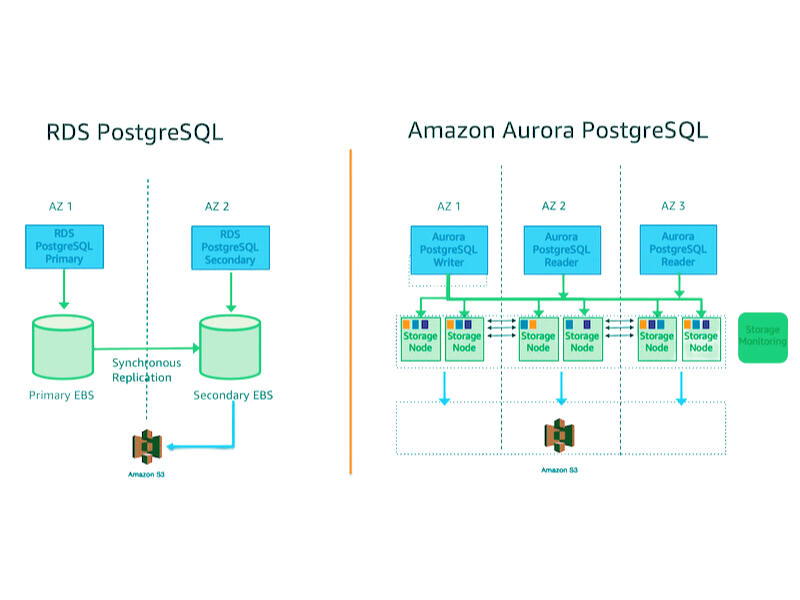
Amazon RDS for PostgreSQL and Amazon Aurora PostgreSQL is managed database services offering a high-performance, scalable, and reliable way to store and manage your data. However, there are some critical differences between the two services.
Read/Write Speeds and SSD
RDS PostgreSQL uses provisioned IOPS. You pick your IOPS when you create the instance. Need more later? You’re modifying the instance and potentially dealing with downtime.
Aurora does things differently. The storage system scales automatically based on your workload. No manual IOPS tuning. It just adjusts. This means better performance for unpredictable or spiky workloads without you babysitting it.
Query Performance
Aurora uses a cost-based query optimizer that knows about your actual hardware specs: CPU cores, memory. That lets it build more efficient query plans.
RDS PostgreSQL uses the standard PostgreSQL optimizer. It’s good, but doesn’t squeeze out the same performance on the same hardware.
Both support replication and failover, but Aurora’s distributed storage makes this smoother.
Scalability
Both scale up when you need them to. The how differs quite a bit.
Aurora auto-scales compute and storage based on workload. More connections, more transactions per second, bigger queries — it handles it without you lifting a finger.
RDS PostgreSQL gives you vertical scaling (bigger instance) and horizontal scaling (read replicas). Read replicas are copies of your primary database that spread the load around.
Automated Scaling and Self-Healing
Aurora detects hardware or software issues and responds automatically. That means fewer surprise outages and better availability overall.
RDS doesn’t have this automated self-healing. You’re more on the hook for catching issues.
Read Replicas
Aurora lets you create up to 15 read replicas. RDS PostgreSQL maxes out at 5. If you need serious read scaling, Aurora wins here.
Security
Both Aurora and RDS encrypt data at rest using AWS KMS and data in transit via SSL/TLS. Security groups control who can reach your database.
Aurora has a more secure architecture though. The distributed design isolates instances from each other better than RDS’s shared storage layer.
Aurora also gives you Database Activity Streams for real-time audit logs. Nice to have when you’re tracking down security issues.
Backup
Here’s where things get interesting.
Aurora replicates data across multiple Availability Zones automatically. Backups happen without impacting your database performance, and restore times are fast since the data’s already distributed.
RDS PostgreSQL takes traditional snapshots. These live in S3. Backups can slow things down during the process, and restores take longer since you’re rebuilding from S3.
Aurora lets you keep up to 15 backups for up to 35 days. RDS PostgreSQL goes up to 1000 automated backups plus manual snapshots.
Backup Cost
Aurora includes backups in the service price. RDS PostgreSQL charges for backup storage based on how much data you’re storing.
Instance Types
Aurora offers Aurora and Aurora Serverless families. RDS PostgreSQL gives you more variety: General Purpose, Memory Optimized, Burstable, and a couple others.
Aurora instances tend to have a higher compute-to-memory ratio. Better for write-heavy stuff. RDS PostgreSQL instances pack more memory per vCPU, which suits read-heavy workloads.
Aurora Serverless auto-scales on its own. RDS PostgreSQL scaling requires manual intervention and downtime.
Aurora also wins on network throughput — it pushes more data than RDS PostgreSQL instances can.
One thing to keep in mind: Aurora instances cost more. You’re paying for that performance and scalability.
Storage
Aurora scales storage automatically and can go up to 256 TiB in current versions (you need Aurora PostgreSQL 17.5, 16.9, 15.13, or higher to hit that limit — earlier versions cap at 128 TiB). RDS PostgreSQL scales but needs manual work and might require downtime.
For write-intensive workloads, Aurora’s distributed storage delivers faster I/O. RDS PostgreSQL storage costs less per GB, but you’re trading performance for price.
Free Tier
Aurora Free Tier gives you 2 vCPUs, 4 GB RAM, and 10 GB storage. RDS PostgreSQL Free Tier gets you 1 vCPU, 1 GB RAM, and 20 GB storage. Both include 750 hours monthly for a year.
The free tiers work fine for learning and experimenting. Don’t try to run production on them.
Serverless Options
Aurora Serverless is exactly what it sounds like: you don’t provision anything, the database just scales with your traffic. You pay for what you use. Good for unpredictable workloads.
RDS PostgreSQL doesn’t offer a serverless option. If you want serverless with PostgreSQL compatibility, Aurora Serverless is your only AWS option.
Feature Comparison at a Glance
Here’s how the two stack up on the details that matter in production:
| Feature | Aurora PostgreSQL/MySQL | RDS PostgreSQL/MySQL |
|---|---|---|
| Storage | 6-way replication across 3 AZs | Single AZ, 3 copies via snapshots |
| Auto-scaling | Up to 15 replicas, auto-seeding | Read replicas (up to 5), manual |
| Serverless v2 | Yes (0.5 to 128 ACU, ~$0.12/hr per ACU) | No |
| Global Database | Yes (cross-region, <1 min RTO) | No |
| RDS Proxy | Included | Included (all engines) |
| Backtrack | Yes (MySQL-compatible Aurora only, 72 hr max) | No |
| Limitless Database | Preview (GA expected 2026) | No |
| Blue/Green Deployments | No | Yes (GA 2024, all engines) |
| Point-in-time recovery | With no downtime | With no downtime |
| Storage cost | ~$0.10/GB/mo | ~$0.115/GB/mo (gp3) |
| Compute cost | Higher than RDS | Lower |
| Failover time | ~30 seconds (Aurora Replicas) | 60-120 seconds (Multi-AZ) |
Creating Aurora and RDS via CLI
If you’re hands-on with the AWS CLI, here’s how both look in practice:
# Create an Aurora Cluster
aws rds create-db-cluster \
  --db-cluster-identifier my-aurora-cluster \
  --engine aurora-postgresql \
  --engine-version 15.4 \
  --master-username admin \
  --master-user-password 'MySecurePassword!' \
  --db-subnet-group-name my-db-subnet-group \
  --vpc-security-group-ids sg-0123456789abcdef0 \
  --backup-retention-period 7 \
  --preferred-backup-window "03:00-04:00" \
  --preferred-maintenance-window "mon:04:00-mon:05:00"

# Add an Aurora Replica
aws rds create-db-instance \
  --db-instance-identifier my-aurora-replica \
  --db-cluster-identifier my-aurora-cluster \
  --db-instance-class db.r7g.large \
  --engine aurora-postgresql

# Compare: Create a standard RDS Instance
aws rds create-db-instance \
  --db-instance-identifier my-rds-instance \
  --db-instance-class db.r7g.large \
  --engine postgres \
  --engine-version 15.4 \
  --master-username admin \
  --master-user-password 'MySecurePassword!' \
  --allocated-storage 100 \
  --storage-type gp3 \
  --db-subnet-group-name my-db-subnet-group \
  --backup-retention-period 7
# Aurora Serverless v2 via Terraform
resource "aws_rds_cluster" "serverless_v2" {
  cluster_identifier  = "aurora-serverless-v2"
  engine             = "aurora-postgresql"
  engine_version     = "15.4"
  serverlessv2_scale_settings {
    min_capacity = 0.5   # 0.5 ACU — minimum even when "idle"
    max_capacity = 128   # Scales up to 128 ACU on demand
  }
}

resource "aws_rds_cluster_instance" "serverless_instance" {
  cluster_identifier = aws_rds_cluster.serverless_v2.id
  instance_class     = "db.serverless"
  engine             = aws_rds_cluster.serverless_v2.engine
  engine_version     = aws_rds_cluster.serverless_v2.engine_version
}
Key Aurora Capabilities Worth Knowing
Aurora Global Database
If your app serves users across regions, Aurora Global Database replicates your cluster to secondary regions with typically under 1 second of lag. If your primary region goes down, you can promote a secondary region in under a minute. RDS has no equivalent.
RDS Proxy
RDS Proxy sits between your application and your database and pools connections. Without it, every new database connection opens a new session — expensive on CPU and memory. With it, connections are reused from a pool, and failover (when the primary swaps to a replica) is transparent to your app. It’s included with both Aurora and RDS now, so there’s no reason not to use it for production workloads.
Babelfish for Aurora PostgreSQL
If you’re migrating SQL Server apps, Babelfish lets those apps connect to Aurora PostgreSQL using SQL Server’s TDS protocol. You don’t have to rewrite all your queries. It’s not perfect — some SQL Server-specific features still behave differently — but it’s the fastest path off SQL Server onto Aurora.
Common Gotchas and Pitfalls
Here’s what trips people up that the documentation glosses over:
Aurora storage costs are deceptive. You pay for all allocated storage, not just used storage. A 1 TB database pays for 1 TB even if it uses only 100 GB. RDS gp3 starts at 20 GB and scales per GB used. If you’re storing mostly empty space (sparse indexes, archived data), Aurora’s storage bill will surprise you.
Aurora Serverless v2 has a floor. Even at “zero” activity, you pay for 0.5 ACU — roughly $0.12/hour, which comes to around $86/month. If you turn off an Aurora Serverless cluster completely, it actually detaches the compute and you only pay for storage (~$0.10/GB/mo). But the moment it scales back up, you’re back to that 0.5 ACU minimum.
Aurora MySQL vs PostgreSQL behave differently under the hood. Aurora MySQL uses a Percona-based storage engine that differs from community MySQL. Stored procedures, certain locking behaviors, and InnoDB-specific tuning can behave differently. Don’t assume your MySQL knowledge transfers 1:1.
RDS PostgreSQL extensions are limited on Aurora. Not all PostgreSQL extensions work on Aurora PostgreSQL. pg_cron has limited support, postgis requires an Aurora-specific version, and some extensions you might rely on aren’t available at all. Check the Aurora PostgreSQL extension list before committing.
Aurora PostgreSQL version lag. Aurora typically trails community PostgreSQL by 1-2 minor versions. You won’t get every PostgreSQL feature the moment it ships. Check engine version compatibility before planning upgrades.
Backtrack only works on Aurora MySQL-compatible. If you’re on Aurora PostgreSQL, you don’t get the backtrack feature. And even on Aurora MySQL, the maximum backtrack window is 72 hours. It’s not a substitute for proper backups.
RDS Blue/Green Deployments are RDS-only. Aurora doesn’t have Blue/Green Deployments — it uses a different upgrade mechanism. If you’re on Aurora and need a zero-downtime major version upgrade, you promote a read replica running the new version, which takes longer and is more manual.
Summary
Here’s what it comes down to:
- Performance: Aurora’s faster, especially for writes, because of its distributed architecture.
- Scalability: Aurora scales faster and without downtime. RDS needs more hands-on time.
- Storage capacity: Aurora handles bigger databases (up to 256 TiB now). RDS works for smaller to medium workloads.
- Cost: RDS PostgreSQL is cheaper. Aurora costs more but gives you more back in performance and less management overhead.
- Complexity: Aurora’s architecture is more sophisticated. If you prefer simpler operations, RDS might feel more comfortable.
- High availability: Aurora’s failover and replica promotion happen faster.
- Community: RDS PostgreSQL benefits from the massive PostgreSQL open-source community. Aurora has a smaller but growing community plus AWS support.
- Serverless: Only Aurora offers this. If you need it, the choice is made.
- Global workloads: Aurora Global Database has no RDS equivalent.
- Major version upgrades: RDS Blue/Green Deployments (2024 GA) closed a gap — both now offer safer upgrade paths, though Aurora’s still requires more manual process.
FAQ
Q: What’s the difference between Aurora and RDS PostgreSQL?
Aurora is AWS’s cloud-native database optimized for performance and scalability. RDS PostgreSQL is AWS’s managed PostgreSQL service. Aurora’s faster but pricier and more complex. RDS PostgreSQL is simpler and cheaper.
Q: How does Aurora Serverless v2 work?
Aurora Serverless v2 automatically provisions and scales compute (measured in Aurora Capacity Units, or ACUs) based on demand. One ACU is roughly 2 GB of memory and proportional compute. You set min and max ACU bounds (0.5 to 128), and Aurora handles the rest. You’re billed per ACU-hour (~$0.12/hr per ACU at standard pricing).
Q: What should I consider when choosing?
Performance needs, how fast you’ll grow, storage requirements, your budget, your team’s experience with distributed systems, whether you need serverless, and whether you need cross-region replication.
Q: What are Aurora’s main advantages over RDS?
Performance, automatic scaling, faster failover, larger storage capacity, the serverless pricing model if that fits your workload, and Aurora Global Database for cross-region setups.
Q: How does high availability compare?
Aurora’s automated failover kicks in faster (~30 seconds vs. 60-120 seconds for RDS Multi-AZ). Aurora Replicas are also readable during failover — RDS Multi-AZ standby is not.
Q: What’s the max storage for Aurora?
Aurora PostgreSQL clusters now support up to 256 TiB of storage if you’re on version 17.5, 16.9, 15.13, or higher. Earlier versions max out at 128 TiB.
Q: How does Aurora scale?
Aurora uses adaptive scaling. It detects when you need more resources and adds them automatically. Scale-down happens the same way when usage drops. Aurora Serverless v2 scales in under 10 seconds in most cases.
Q: What encryption does Aurora support?
Server-side encryption with AWS KMS keys, plus client-side encryption via SSL/TLS for connections. You can also use CloudHSM if you need more control over your keys.
Q: How do I monitor Aurora performance?
CloudWatch gives you real-time metrics like latency and throughput. Performance Insights is built in. Trusted Advisor provides optimization recommendations on cost and capacity.
Q: What HA features does Aurora offer?
Automated failover to a standby, plus replica promotion you can trigger manually. Both keep your app running during outages. Aurora Global Database also lets you promote a secondary region as the new primary.
Q: Is RDS Proxy worth using?
Yes, for anything production. It pools connections, reduces database load from connection overhead, handles failover transparently, and enforces IAM authentication. It’s included in the price now — no excuse not to use it.
For more on AWS databases, the AWS STS guide covers cross-account database access with IAM roles, and cloud migration covers moving existing databases to managed services like Aurora. The FinOps guide has cost optimization patterns for RDS and Aurora at scale.
Explore more like this

Aurora Serverless v2 + Bedrock: AI Database Queries in 2026
I connected Bedrock to our Aurora cluster last month. The first thing I asked it was “show me all customers who churned in Q1 but came back in Q2” —...
Lambda Container Images: Build on GitLab CI, Deploy to ECR
Container images solved my biggest Lambda frustration: the 250MB zip limit.

AWS WAF Rules Deep Dive: Rate-Based, Geo, and Custom Rules
WAF is one of those services where the default managed rules get you 80% of the way there. The last 20% is where it gets interesting.

Comments