
EventBridge + Step Functions: Event-Driven Architecture Patterns

Introduction
This is Part 2 of our EventBridge series. If you haven’t read Part 1 yet, check out Approaches for Real-time Updates of AWS Secrets Manager Secrets in Applications for foundational concepts.
EventBridge is a powerful event bus. Step Functions orchestrates workflows. Together, they solve a specific problem that haunts every engineer who’s built serverless systems at scale: how do I build complex, stateful workflows triggered by events without collapsing under Lambda function nesting and complexity?
I’ve shipped production systems using just Lambda chaining. It works for simple workflows. But the moment you need retries, error handling, state tracking, or anything approaching real business logic, the cognitive overhead becomes crushing. You’re writing try-catch blocks nested four levels deep, managing timeouts at every step, and debugging failures across a dozen Lambda logs.
Step Functions changes this. It’s a state machine engine. You define workflow logic declaratively in JSON, and Step Functions handles execution, retries, catches, parallel execution, and everything in between. EventBridge feeds events into Step Functions. The workflow runs, manages complexity, and publishes results back as events if needed.
This post covers the pattern, shows real code, and explains what I’ve learned the hard way.
Why EventBridge + Step Functions, Not Just Lambda
Lambda is great for single, focused operations. Receive an event, do work, done.
Step Functions is for orchestration. When your workflow has:
- Multiple steps that must run in sequence
- Conditional branching (process order differently based on amount or type)
- Retries with exponential backoff
- Failure paths and compensating transactions (refund if shipping fails)
- Long-running operations that might take hours
- Human approval gates
- Parallel operations that converge later
…then chaining Lambda functions becomes a liability.
Lambda chaining looks simple until it isn’t. Lambda A calls Lambda B calls Lambda C — each one needs its own timeout logic, retry code, and undo path. Lambda A has to know that if Lambda B times out, it should retry. And if Lambda C fails after Lambda B succeeded, Lambda A needs to roll back. That distributed transaction logic ends up scattered across a dozen functions. When something breaks at 3 AM, you’re correlating five CloudWatch log streams in different tabs trying to figure out which step died and why.
Step Functions takes that and makes it a config file. The state machine says “try X, then Y, if Y fails go to Z”. Retries live in the step config. Error catches are explicit. Parallel branches are a first-class feature. The state machine engine tracks every transition, so you have a full execution history even when something fails at 3 AM.
EventBridge’s role here is routing: it matches the incoming event against your rules and starts a Step Functions execution. That’s all it does. The workflow takes it from there.
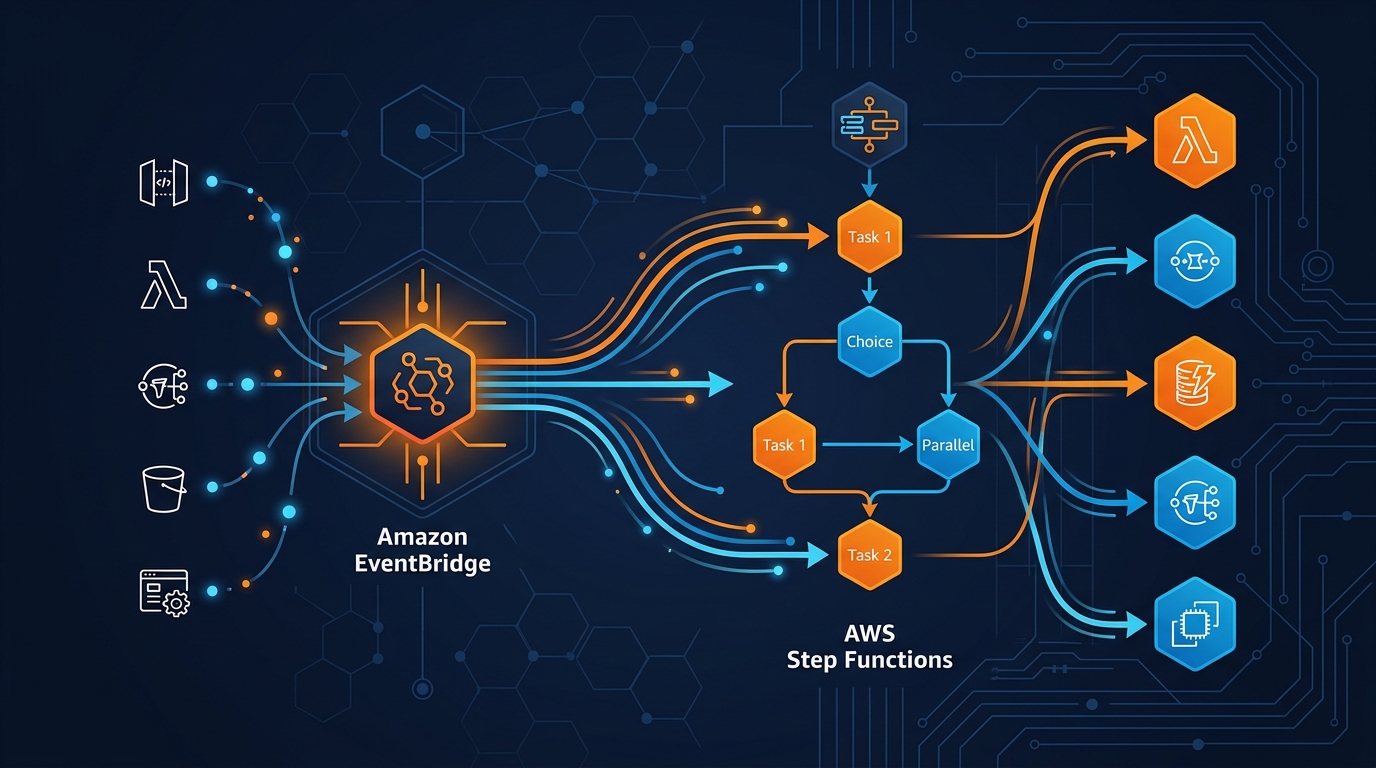
The Pattern: EventBridge → Step Functions → Multiple Lambdas
Here’s the shape of production event-driven systems I’ve built:
Event Source (e.g., S3, application API)
    ↓
EventBridge Rule (matches event pattern)
    ↓
Step Functions State Machine (StartExecution)
    ↓
State 1: Validate (Lambda)
    ↓ (success) ↓ (failure)
    ↓            Error handling state
State 2: Charge (Lambda)
    ↓
State 3: Parallel:
  - Fulfill (Lambda)
  - Notify (Lambda)
    ↓
State 4: Complete
EventBridge’s job is routing. It matches incoming events against rules and decides what happens next. For this pattern, “what happens next” is a Step Functions state machine starts executing.
The Step Functions state machine orchestrates the actual work. Each task state typically invokes a Lambda function. But a state could also invoke another service—you could call SQS, SNS, SageMaker, Glue, anything that Step Functions supports.
This decoupling is powerful. The event producer doesn’t know about the workflow. The workflow doesn’t need to know about retries or error handling at each Lambda—the state machine owns that. Each Lambda is a small, focused function: charge this card, or fulfill this order, nothing more.
Real Example: Order Processing Pipeline
Take a typical e-commerce flow. An order comes in, fires an event, and needs to hit four steps:
- Validate the order (check inventory, validate customer)
- Charge the customer’s card
- In parallel: fulfill the order and send a confirmation email
- Notify the warehouse
Here’s the event that arrives (simplified):
{
  "source": "order.service",
  "detail-type": "Order Placed",
  "detail": {
    "orderId": "12345",
    "customerId": "cust-999",
    "items": [...],
    "totalAmount": 129.99,
    "cardToken": "tok_visa_xxx"
  }
}
Create the EventBridge Rule
First, define the rule that catches order placement events:
aws events put-rule \
  --name order-processing-rule \
  --event-bus-name default \
  --event-pattern '{
    "source": ["order.service"],
    "detail-type": ["Order Placed"]
  }' \
  --state ENABLED \
  --description "Route order events to Step Functions"
Now add the Step Functions state machine as the target:
aws events put-targets \
  --rule order-processing-rule \
  --targets \
    Id=1,Arn=arn:aws:states:us-east-1:ACCOUNT_ID:stateMachine:order-processor,RoleArn=arn:aws:iam::ACCOUNT_ID:role/eventbridge-to-stepfunctions-role
The RoleArn is crucial. EventBridge needs an IAM role with permission to start state machine executions. Here’s the trust policy:
{
  "Version": "2012-10-17",
  "Statement": [
    {
      "Effect": "Allow",
      "Principal": {
        "Service": "events.amazonaws.com"
      },
      "Action": "sts:AssumeRole"
    }
  ]
}
And the inline policy:
{
  "Version": "2012-10-17",
  "Statement": [
    {
      "Effect": "Allow",
      "Action": [
        "states:StartExecution"
      ],
      "Resource": "arn:aws:states:us-east-1:ACCOUNT_ID:stateMachine:order-processor"
    }
  ]
}
Create the Step Functions State Machine
The state machine is where the work actually happens. You write it in Amazon States Language — JSON that describes your workflow step by step. Below is a full working state machine for this order pipeline:
{
  "Comment": "Order processing workflow with error handling and compensating transactions",
  "StartAt": "ValidateOrder",
  "States": {
    "ValidateOrder": {
      "Type": "Task",
      "Resource": "arn:aws:lambda:us-east-1:ACCOUNT_ID:function:validate-order",
      "Retry": [
        {
          "ErrorEquals": ["States.TaskFailed"],
          "IntervalSeconds": 2,
          "MaxAttempts": 3,
          "BackoffRate": 2.0
        }
      ],
      "Catch": [
        {
          "ErrorEquals": ["ValidationError"],
          "Next": "OrderValidationFailed"
        },
        {
          "ErrorEquals": ["States.ALL"],
          "Next": "UnexpectedError"
        }
      ],
      "Next": "ChargeCard"
    },
    "ChargeCard": {
      "Type": "Task",
      "Resource": "arn:aws:lambda:us-east-1:ACCOUNT_ID:function:charge-payment",
      "Retry": [
        {
          "ErrorEquals": ["ThrottlingException"],
          "IntervalSeconds": 1,
          "MaxAttempts": 5,
          "BackoffRate": 2.0
        },
        {
          "ErrorEquals": ["States.TaskFailed"],
          "IntervalSeconds": 2,
          "MaxAttempts": 2,
          "BackoffRate": 1.5
        }
      ],
      "Catch": [
        {
          "ErrorEquals": ["InsufficientFundsError"],
          "Next": "RefundAndFail"
        },
        {
          "ErrorEquals": ["PaymentProcessorDown"],
          "Next": "QueueForRetry"
        },
        {
          "ErrorEquals": ["States.ALL"],
          "Next": "UnexpectedError"
        }
      ],
      "Next": "FulfillmentAndNotification"
    },
    "FulfillmentAndNotification": {
      "Type": "Parallel",
      "Branches": [
        {
          "StartAt": "FulfillOrder",
          "States": {
            "FulfillOrder": {
              "Type": "Task",
              "Resource": "arn:aws:lambda:us-east-1:ACCOUNT_ID:function:fulfill-order",
              "Retry": [
                {
                  "ErrorEquals": ["States.TaskFailed"],
                  "IntervalSeconds": 3,
                  "MaxAttempts": 2,
                  "BackoffRate": 2.0
                }
              ],
              "Catch": [
                {
                  "ErrorEquals": ["States.ALL"],
                  "ResultPath": "$.fulfillmentError",
                  "Next": "LogFulfillmentFailure"
                }
              ],
              "End": true
            },
            "LogFulfillmentFailure": {
              "Type": "Pass",
              "Result": "Fulfillment failed but order was charged",
              "End": true
            }
          }
        },
        {
          "StartAt": "SendConfirmationEmail",
          "States": {
            "SendConfirmationEmail": {
              "Type": "Task",
              "Resource": "arn:aws:states:us-east-1:ACCOUNT_ID:stateMachine:send-email",
              "Retry": [
                {
                  "ErrorEquals": ["States.TaskFailed"],
                  "IntervalSeconds": 2,
                  "MaxAttempts": 3,
                  "BackoffRate": 2.0
                }
              ],
              "Catch": [
                {
                  "ErrorEquals": ["States.ALL"],
                  "ResultPath": "$.emailError",
                  "Next": "LogEmailFailure"
                }
              ],
              "End": true
            },
            "LogEmailFailure": {
              "Type": "Pass",
              "Result": "Email send failed but order was processed",
              "End": true
            }
          }
        }
      ],
      "Next": "MarkOrderComplete"
    },
    "MarkOrderComplete": {
      "Type": "Task",
      "Resource": "arn:aws:lambda:us-east-1:ACCOUNT_ID:function:mark-order-complete",
      "End": true
    },
    "OrderValidationFailed": {
      "Type": "Task",
      "Resource": "arn:aws:sns:us-east-1:ACCOUNT_ID:topic/order-validation-failures",
      "Parameters": {
        "TopicArn": "arn:aws:sns:us-east-1:ACCOUNT_ID:topic/order-validation-failures",
        "Message.$": "$"
      },
      "Next": "ValidationFailedEnd"
    },
    "ValidationFailedEnd": {
      "Type": "Fail",
      "Error": "ValidationFailed",
      "Cause": "Order failed validation checks"
    },
    "RefundAndFail": {
      "Type": "Task",
      "Resource": "arn:aws:lambda:us-east-1:ACCOUNT_ID:function:refund-payment",
      "Catch": [
        {
          "ErrorEquals": ["States.ALL"],
          "Next": "RefundFailedManualIntervention"
        }
      ],
      "Next": "PaymentFailedEnd"
    },
    "PaymentFailedEnd": {
      "Type": "Fail",
      "Error": "PaymentFailed",
      "Cause": "Payment processing failed and was refunded"
    },
    "RefundFailedManualIntervention": {
      "Type": "Task",
      "Resource": "arn:aws:sns:us-east-1:ACCOUNT_ID:topic/manual-intervention",
      "Parameters": {
        "TopicArn": "arn:aws:sns:us-east-1:ACCOUNT_ID:topic/manual-intervention",
        "Message": "CRITICAL: Refund failed. Manual intervention required."
      },
      "Next": "CriticalFailure"
    },
    "QueueForRetry": {
      "Type": "Task",
      "Resource": "arn:aws:sqs:us-east-1:ACCOUNT_ID:order-processing-dlq",
      "Next": "RetryQueuedEnd"
    },
    "RetryQueuedEnd": {
      "Type": "Fail",
      "Error": "TemporaryFailure",
      "Cause": "Payment processor unavailable. Order queued for retry."
    },
    "UnexpectedError": {
      "Type": "Task",
      "Resource": "arn:aws:sns:us-east-1:ACCOUNT_ID:topic/unexpected-errors",
      "Parameters": {
        "TopicArn": "arn:aws:sns:us-east-1:ACCOUNT_ID:topic/unexpected-errors",
        "Message.$": "$"
      },
      "Next": "UnexpectedErrorEnd"
    },
    "UnexpectedErrorEnd": {
      "Type": "Fail",
      "Error": "UnexpectedError",
      "Cause": "An unexpected error occurred during order processing"
    },
    "CriticalFailure": {
      "Type": "Fail",
      "Error": "CriticalFailure",
      "Cause": "Critical infrastructure failure requiring manual intervention"
    }
  }
}
Notice what this state machine does:
- Validate runs first. If it throws a
ValidationError, we catch it and notify via SNS. If any other error occurs, we catch it and handle it separately. - Charge has retry logic for throttling (quick backoff, more attempts) and a different retry strategy for general failures (slower backoff, fewer attempts). This is crucial—transient failures need aggressive retries, while systemic failures shouldn’t hammer the system.
- Parallel execution for fulfillment and email. If fulfillment fails, we log it but don’t fail the entire order—the customer was charged. If email fails, same thing.
- Compensating transactions: if payment fails due to insufficient funds, we refund. If the refund itself fails, we escalate to SNS for manual intervention.
Deploy this state machine:
aws stepfunctions create-state-machine \
  --name order-processor \
  --definition file://order-processor.json \
  --role-arn arn:aws:iam::ACCOUNT_ID:role/stepfunctions-execution-role
The execution role needs permission to invoke Lambda functions and publish to SNS:
{
  "Version": "2012-10-17",
  "Statement": [
    {
      "Effect": "Allow",
      "Action": "lambda:InvokeFunction",
      "Resource": "arn:aws:lambda:us-east-1:ACCOUNT_ID:function:*"
    },
    {
      "Effect": "Allow",
      "Action": [
        "sns:Publish",
        "sqs:SendMessage"
      ],
      "Resource": "*"
    }
  ]
}
Error Handling Patterns
This is where Step Functions earns its place in your architecture. Error handling is declarative and composable.
Retry Strategy
The Retry block lives inside any Task state. You specify the error types you want to catch, the attempt limit, and the backoff curve:
"Retry": [
  {
    "ErrorEquals": ["ThrottlingException"],
    "IntervalSeconds": 1,
    "MaxAttempts": 5,
    "BackoffRate": 2.0
  },
  {
    "ErrorEquals": ["States.TaskFailed"],
    "IntervalSeconds": 2,
    "MaxAttempts": 2,
    "BackoffRate": 1.5
  }
]
This says: if you hit a ThrottlingException, wait 1 second, then 2 seconds, then 4 seconds, etc. (exponential backoff), up to 5 attempts. Other TaskFailed errors get fewer retries with different timing.
This is the right way to handle transient failures. You’re not guessing in your application code—the orchestrator manages it.
Catch Blocks
If retries exhaust, or if the error doesn’t match any retry clause, Catch blocks take over:
"Catch": [
  {
    "ErrorEquals": ["ValidationError"],
    "Next": "ValidationFailed"
  },
  {
    "ErrorEquals": ["States.ALL"],
    "Next": "UnexpectedError"
  }
]
The ErrorEquals array can be specific error names or States.ALL for anything. When caught, you transition to a different state—often a failure state that logs the error and stops.
The key insight: Catch is for expected failures that your workflow knows how to handle. Don’t catch States.ALL unless you’re just logging and failing. Catch specific errors and handle them specifically.
Compensating Transactions
This is the pattern for undo operations. If step X succeeds but step Y fails, you need step X to reverse itself.
In the order example: charge succeeds, but fulfillment fails. You refund. The state machine tracks this:
"ChargeCard": {
  ...
  "Catch": [
    {
      "ErrorEquals": ["InsufficientFundsError"],
      "Next": "RefundAndFail"
    }
  ]
},
"RefundAndFail": {
  "Type": "Task",
  "Resource": "arn:aws:lambda:...:refund-payment",
  "Next": "PaymentFailedEnd"
}
It’s explicit. You’re not hiding undo logic in callbacks.
Observability: X-Ray Tracing
EventBridge → Step Functions → Lambda is a distributed system. You need observability.
AWS X-Ray is built in. Enable it on the state machine:
aws stepfunctions create-state-machine \
  --name order-processor \
  --definition file://order-processor.json \
  --role-arn arn:aws:iam::ACCOUNT_ID:role/stepfunctions-execution-role \
  --tracing-config Enabled=true
Now every execution is traced. X-Ray shows you:
- The execution path (which states ran, in what order)
- Duration of each state
- Errors and where they occurred
- Lambda invocation details
- Service map showing dependencies
In CloudWatch, you can see the execution history:
aws stepfunctions describe-execution \
  --execution-arn arn:aws:states:us-east-1:ACCOUNT_ID:execution:order-processor:order-12345
This returns the full execution history, including every state transition, input/output, and timing.
For observability at scale: X-Ray tracing on the state machine is free for most use cases and worth enabling immediately. Push custom metrics from your Lambda functions via the CloudWatch SDK. Set up alarms on state machine failures so you’re not finding out about broken workflows from customer support. And publish completion events back to EventBridge — both success and failure — so downstream systems can react.
The last point is powerful. Your state machine can emit events when done:
"MarkOrderComplete": {
  "Type": "Task",
  "Resource": "arn:aws:states:us-east-1:ACCOUNT_ID:stateMachine:publish-event",
  "Parameters": {
    "eventBusName": "default",
    "source": "order.processor",
    "detailType": "Order Processed",
    "detail.$": "$"
  },
  "End": true
}
Now downstream systems (analytics, fulfillment, accounting) can react to order completion events. Your architecture stays loosely coupled.
Cost and Performance
Step Functions pricing has two components: state transitions and execution duration.
- State transitions: $0.000025 per transition (1,000 transitions = $0.025). This is negligible.
- Execution duration: Variable pricing, but roughly $0.30 per million-hour of execution. For an order processing workflow that takes 5 seconds, you’re looking at ~$0.00000042 per execution.
The real cost is Lambda. Each Lambda invocation costs. If you’re running 10 Lambda functions per order with no Step Functions, that’s 10 Lambda invocations. With Step Functions, it’s still 10 Lambda invocations—Step Functions doesn’t add cost, it organizes them.
Where Step Functions saves cost: fewer Lambda invocations overall. Without Step Functions, you’d need a “orchestrator Lambda” that chains calls and manages retries. That orchestrator Lambda now becomes your state machine, which is cheaper and more reliable.
Performance: Step Functions adds latency. Each state transition takes ~10-50ms depending on input size and service load. For a 5-state workflow, expect 50-250ms of overhead from Step Functions. This is acceptable for most use cases (orders, notifications, batch processing). For sub-millisecond requirements, it’s not a fit.
From real production workloads: an order processing workflow with 5 steps runs 2-3 seconds end-to-end, with nearly all that time in Lambda — not Step Functions overhead. A notification pipeline with 3 steps clocks in at 500-800ms, mostly cold starts. A batch validation job with 20 steps takes 30-40 seconds, but that’s almost entirely external API calls.
Common Mistakes
Mistake 1: Using EventBridge for Everything
EventBridge is an event bus, not a workflow engine. Don’t use it for complex logic.
Wrong: EventBridge rule that invokes Lambda 1, and that Lambda invokes Lambda 2, and that Lambda invokes Lambda 3. You’ve just built a distributed system with no visibility.
Right: EventBridge routes to Step Functions. Step Functions orchestrates the Lambda chain with full visibility, retries, and error handling.
Mistake 2: Making Lambdas Non-Idempotent
Step Functions will retry. If your Lambda charges a card twice because it didn’t handle retries, you’ve got a problem.
Every Lambda invoked by Step Functions must be idempotent. Use request IDs:
def charge_payment(event, context):
    idempotency_key = event.get('orderId')

    # Check if we already processed this
    charge = get_charge_by_key(idempotency_key)
    if charge:
        return {'chargeId': charge['id'], 'status': 'already_processed'}

    # Process new charge
    charge = stripe.Charge.create(...)
    save_charge(idempotency_key, charge)
    return {'chargeId': charge['id'], 'status': 'new'}
Now if the Lambda is invoked twice, the second invocation returns the cached result. No double-charge.
Mistake 3: Wrong Retry Strategy
Not all failures are equal. Throttling should retry aggressively. Validation errors should not retry at all (they’ll keep failing).
Wrong:
"Retry": [
  {
    "ErrorEquals": ["States.ALL"],
    "MaxAttempts": 10
  }
]
This retries everything, including validation errors. Your workflow will retry for minutes waiting for an invalid input to somehow become valid.
Right:
"Retry": [
  {
    "ErrorEquals": ["ThrottlingException", "ServiceUnavailableException"],
    "IntervalSeconds": 1,
    "MaxAttempts": 5,
    "BackoffRate": 2.0
  }
]
Only retry transient failures. Let other errors fall through to Catch.
Mistake 4: Ignoring Dead-Letter Queues
When a step fails after retries, where does that failure go? Nowhere by default.
Add DLQ handling. When a workflow fails, send it to SQS for later analysis:
"Catch": [
  {
    "ErrorEquals": ["States.ALL"],
    "Next": "SendToDeadLetterQueue"
  }
]
Later, you can analyze failed orders and reprocess them:
aws sqs receive-message \
  --queue-url https://sqs.us-east-1.amazonaws.com/ACCOUNT_ID/order-processing-dlq \
  --max-number-of-messages 10
Mistake 5: Not Setting Task Timeouts
If a Lambda hangs (infinite loop, deadlock with external service), Step Functions will wait forever by default.
Always set a timeout:
"ChargeCard": {
  "Type": "Task",
  "Resource": "arn:aws:lambda:...:charge-payment",
  "TimeoutSeconds": 30,
  "Next": "FulfillmentAndNotification"
}
Now if charge-payment doesn’t return in 30 seconds, Step Functions moves to error handling.
Related Reading
If your EventBridge events come from external APIs, the entry point security matters as much as the workflow logic. AWS API Gateway with Nginx and WAF and the 2026 zero-trust update cover authentication, rate limiting, and WAF filtering — things you want in place before events reach EventBridge.
For Part 1 of this series on event-driven updates, see Approaches for Real-time Updates of AWS Secrets Manager Secrets in Applications.
Conclusion
EventBridge + Step Functions is the right pattern when you need to orchestrate complex, multi-step workflows triggered by events. EventBridge routes events. Step Functions executes the workflow declaratively with built-in retry, error handling, and visibility.
I’ve used this pattern in production for order processing, data pipelines, approval workflows, and notification systems. Declarative workflows beat callback chains for readability. Retries, catches, and timeouts live in one place instead of scattered across every Lambda. X-Ray gives you the full execution trace without any custom instrumentation. Step Functions overhead is cheap relative to what it replaces. And the pattern holds up from a few hundred executions a day to millions.
The mistakes I’ve made and seen others make usually fall into two categories: either using Step Functions for simple things it’s not needed for (adding complexity), or trying to use EventBridge + Lambda chains for complex things it’s not designed for (debugging hell).
If your workflow has more than 2-3 steps, conditional logic, or needs error handling, use Step Functions. If it’s a single event trigger a single action, Lambda is fine. The middle ground is where this pattern shines.
Error handling approach comparison
| Approach | Visibility | Complexity | Testability | Cost |
|---|---|---|---|---|
| Lambda chaining | Poor — distributed logs | High — nested try/catch | Hard | Orchestrator Lambda |
| EventBridge + Step Functions | Excellent — X-Ray trace | Low — declarative JSON | Easy | $0.000025/transition |
| EventBridge + SQS chains | Good — SQS visibility | Medium — polling logic | Medium | Queue storage |
| Simple EventBridge + Lambda | Good — direct invocation | Low — single function | Easy | Lambda invocation only |
Step Functions state types
| State | Purpose | Example |
|---|---|---|
| Task | Invoke Lambda, SQS, SNS, or other service | Process order validation |
| Pass | Transform or pass data without invoking a service | Log failure, pipe message through |
| Choice | Conditional branching on input | Order > $100 → require approval |
| Parallel | Execute multiple branches simultaneously | Fulfill + send email at the same time |
| Map | Iterate over array, same steps for each element | Process multiple line items |
| Wait | Pause execution for a set duration | Wait 24h before retrying payment |
| Fail | Terminate with error | Validation failure — stop workflow |
| Succeed | Terminate successfully | Order fully processed |
Explore more like this
Scrum + Team Topologies: Why Your DevOps Team Structure Might Be Slowing You Down
I spent three years at a company that spent $4 million on “DevOps transformation.” New tools, new cloud infrastructure, training budgets, the works. The velocity of the platform stayed flat....

AWS VPC Design Patterns in 2026: From Single Account to Multi-Account Landing Zone
The VPC decisions you make on day one will follow you for years. I’ve lived through the consequences—redesigning a network that was built without proper CIDR planning, watching a simple...
Platform Engineering with Backstage on AWS: A Practical Guide for 2026
I watched a backend engineer spend two hours yesterday trying to figure out which CloudFormation template to use for their new service. They had three options in a Confluence page....

Comments