
IAM Identity Center Session Tags: Practical ABAC with Entra ID and AWS

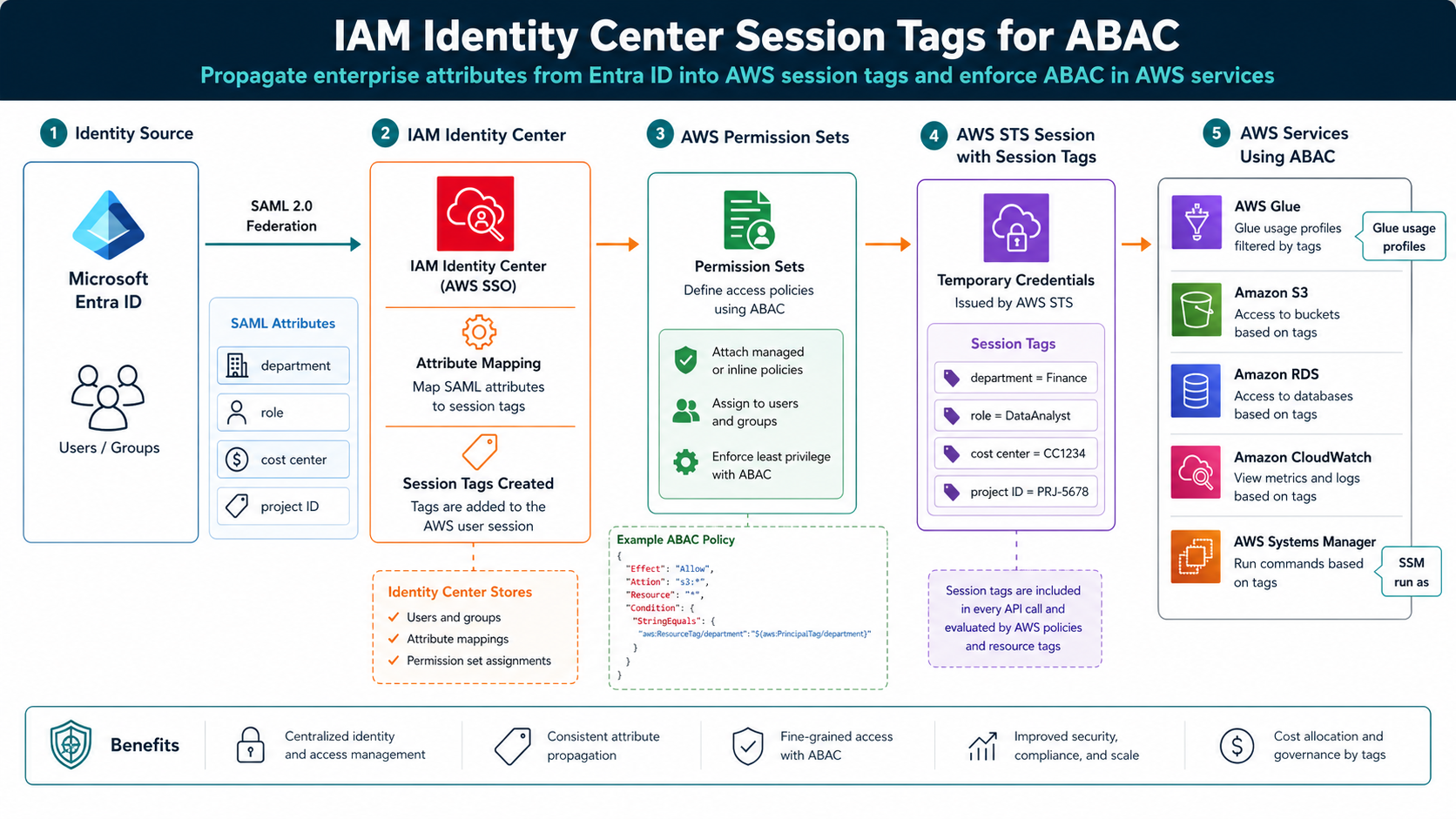
AWS published a practical IAM Identity Center session-tags walkthrough on April 28, 2026, and the pattern is worth copying: take attributes from Microsoft Entra ID, pass them through IAM Identity Center, and use them as session tags for ABAC decisions in AWS.
The reason this matters is role sprawl. Without attributes, teams create one role per project, department, environment, or exception. With session tags, the same permission set can behave differently based on trusted identity context like department, cost center, role, or project ID.
What Changed
IAM Identity Center already centralizes workforce access. Session tags make that access more contextual. AWS’s example shows Entra ID attributes flowing through SAML into IAM Identity Center, then appearing under PrincipalTags in the AssumeRoleWithSAML CloudTrail event.
That CloudTrail check is not a footnote. It is how you prove the identity system is sending the attribute you think it is sending. If department=finance does not appear in the role-assumption event, an IAM policy using aws:PrincipalTag/department will not save you.
This pattern fits the same mental model as AWS STS temporary credentials: trust the federation boundary, keep credentials short-lived, and make the session carry enough context for the authorization decision.
The Numbers That Matter
| Fact | Number or date | Source |
|---|---|---|
| AWS post date | April 28, 2026 | AWS Security Blog |
| Identity provider example | Microsoft Entra ID | AWS Security Blog |
| Validation event | AssumeRoleWithSAML in CloudTrail |
AWS Security Blog |
| Example attributes | department, role, cost center, project ID | AWS Security Blog |
| Extended use cases | AWS Glue usage profiles and Systems Manager Run As | AWS Security Blog |
Those facts are the reason this post should be published now, not next quarter. The dates are fresh, the limits are concrete, and the operational impact is clear enough for an engineer to act on today.
How It Works in Practice
Start with one low-risk attribute. department or project_id is better than five attributes on day one. Configure the attribute in Entra ID, map it into IAM Identity Center, then verify CloudTrail before writing broad ABAC policies.
Next, write policies that compare principal tags to resource tags. Keep ownership of those resource tags strict. ABAC fails when anyone can set the tag that grants access. Use IAM policy, SCPs, tag policies, and change control to protect authorization-critical tag keys.
AWS also points to AWS Glue usage profiles and Systems Manager Session Manager Run As as extended use cases. That is a good signal: session tags are not only for S3 bucket examples. They can drive data, operations, and console-access boundaries.
{
  "Effect": "Allow",
  "Action": ["s3:GetObject", "s3:PutObject"],
  "Resource": "arn:aws:s3:::company-project-data/*",
  "Condition": {
    "StringEquals": {
      "aws:ResourceTag/project-id": "${aws:PrincipalTag/project-id}"
    }
  }
}
After a test sign-in, look for AssumeRoleWithSAML in CloudTrail and confirm the expected session tags under requestParameters.PrincipalTags.
Gotchas I Would Check First
- ABAC is only as trustworthy as the system that controls the attributes.
- Multi-valued attributes and inconsistent naming can make policies unreadable fast.
- CloudTrail validation is mandatory. Do not debug ABAC from the IAM policy alone.
Decision Guide
| Use session-tag ABAC when | Stick with explicit roles when |
|---|---|
| Access follows project, department, or cost center | Access is a rare exception with strong manual approval |
| Attributes are managed centrally in Entra ID | Attribute quality is poor or politically owned |
| Resource tags are governed | Anyone can change authorization tags |
For related background, keep these existing BitsLovers posts close: IAM roles and policies, AWS STS temporary credentials, AWS Organizations and Control Tower, EKS Pod Identity session policies, secure AI agent access on AWS.
Sources
Session tags are not magic, but they are a clean way to make enterprise identity useful inside AWS authorization decisions.
Explore more like this

Cloud IoT Security: Zero Trust, Identity, and Signed Updates
On September 11, 2026, the Cyber Resilience Act’s incident-reporting rules start applying in the European Union. That is 22 days after this article’s publication date. A manufacturer that learns of...

Kill the Docker Hub Token: OIDC Trust for GitHub Actions
On July 31, 2026, Docker shipped OIDC connections for GitHub Actions to any organization on a Docker Team, Docker Business, or Docker Hardened Images subscription, plus organizations in the Docker-Sponsored...

Bedrock Web Search: Grounding an Agent Without Building a Scraper
On August 4, 2026, AWS made Web Search on Amazon Bedrock generally available, and the entire integration surface is one JSON object: {"type": "web_search"}. That is the whole change from...

Comments