
Amazon S3 Tables and Apache Iceberg: When S3 Becomes a Managed Lakehouse Layer

Amazon S3 Tables is not just another way to put Parquet files in a bucket. It is AWS turning a long-running data lake pattern into a managed S3 resource: table buckets that store Apache Iceberg tables, expose table metadata through catalog integrations, and run maintenance work that many teams used to schedule, tune, and debug themselves.
That changes the architecture conversation. The old question was “Can we store analytics data cheaply in S3?” The answer has been yes for years. The better question in 2026 is sharper: when does raw object storage stop being enough, and when does a team need table semantics, snapshots, maintenance policy, and query-engine discovery as part of the storage layer itself?
For adjacent AWS design context, keep these BitsLovers guides nearby: Terraform state locking with S3 and DynamoDB, AWS VPC design patterns, OpenTelemetry with CloudWatch, AWS Lambda layers and custom runtimes, and AWS WAF rules deep dive. This article is about data platforms, but the real theme is the same as the infrastructure articles: put operational boundaries where the system naturally fails.
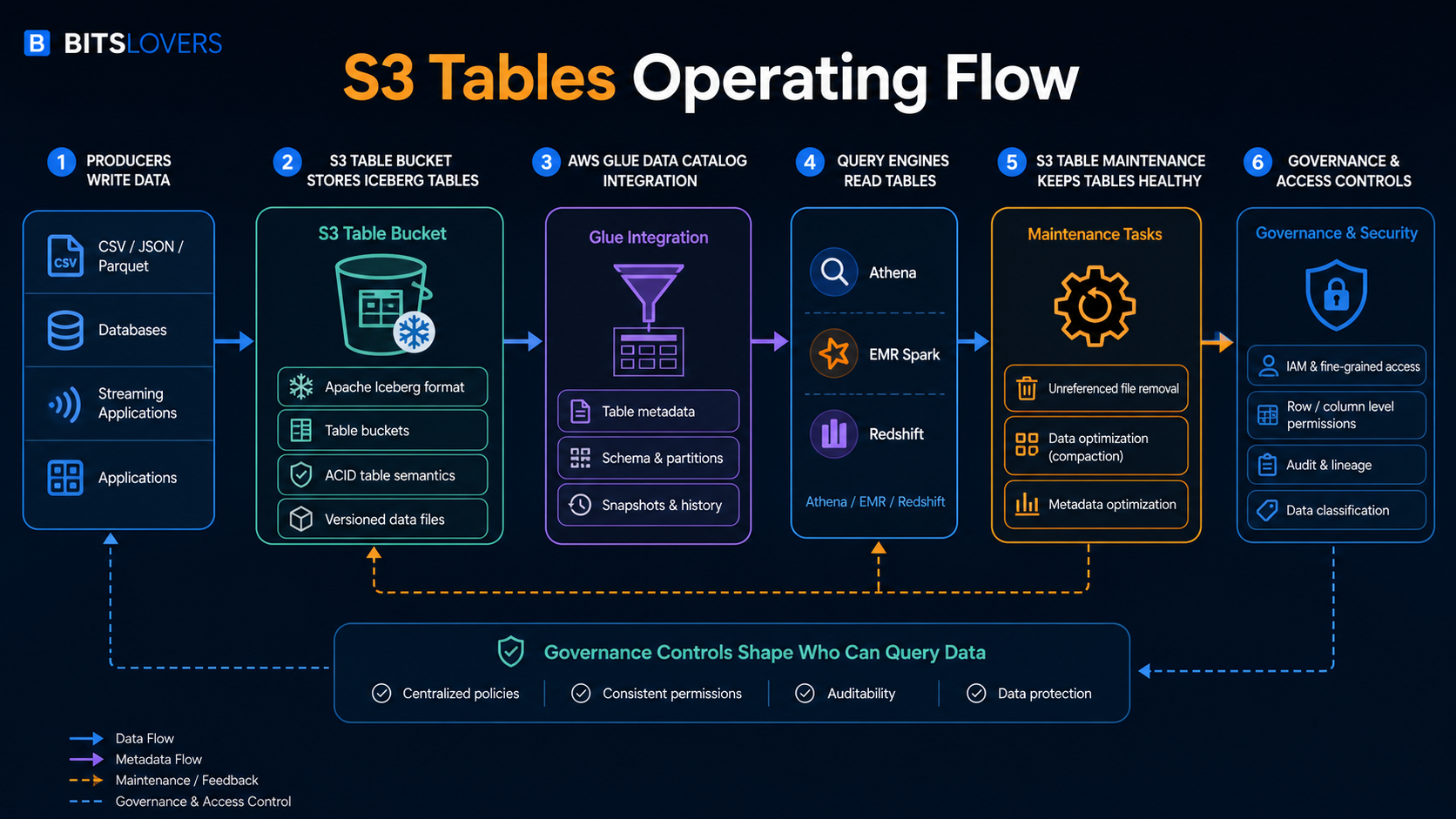
The workflow above is the useful mental model. Producers still write data. Query engines still read tables. The important difference is that S3 is no longer acting only as a passive object namespace. With S3 Tables, AWS gives the table bucket its own resource model, Apache Iceberg table format, catalog integration, and managed maintenance behavior.
What S3 Tables Actually Is
AWS describes Amazon S3 Tables as S3 storage optimized for tabular analytics data in Apache Iceberg format. The AWS launch announcement framed the service around daily purchase transactions, sensor data, ad impressions, and similar structured datasets that teams want to query with engines such as Athena, EMR, Spark, and Redshift.
The key piece is the table bucket. AWS now has general purpose buckets, directory buckets, and table buckets. A table bucket is not just a naming convention on a normal S3 bucket. The S3 table bucket documentation describes table buckets as an S3 bucket type for creating and storing tables as S3 resources. Those tables store tabular data and metadata as objects, but the resource model is built for analytics workloads.
Inside a table bucket, AWS stores tables in Apache Iceberg format. The S3 table documentation says all tables in a table bucket use Apache Iceberg, and that Amazon S3 manages table maintenance through automatic file compaction and snapshot management. That is the architectural line that matters. S3 is no longer just holding files that some external system interprets. S3 understands that these objects belong to managed tables.
That does not mean S3 Tables replaces every data warehouse, every lakehouse engine, or every catalog strategy. It means AWS is moving more of the table-storage operating burden into S3. If your team already uses S3 as the durability layer for analytics data, S3 Tables asks whether the bucket itself should become table-aware.
The Old Data Lake Failure Mode
The basic S3 data lake pattern is easy to start. You write Parquet files to a prefix, create Glue tables, query with Athena, and call it a lake. That works until it does not.
The first failure is metadata drift. Files arrive late. Partitions do not match the catalog. A job writes data with a slightly different schema. A cleanup script deletes files that another query expected to read. A compaction job rewrites data but does not update the table view cleanly. Everyone still says “the data is in S3,” but nobody agrees which files represent the table at a point in time.
The second failure is small-file debt. Streaming jobs, frequent batch writes, CDC pipelines, and ad hoc export jobs often produce many small objects. Query engines can read them, but performance and cost get ugly. The team adds compaction. Then it adds monitoring for compaction. Then it adds retries. Then it adds cleanup. Eventually a supposedly cheap data lake has a maintenance platform hiding behind it.
The third failure is governance ambiguity. S3 permissions, Glue permissions, Lake Formation, IAM roles, engine-specific access controls, and application conventions can all affect who sees data. If the table is only an informal agreement between an S3 prefix and a catalog entry, governance becomes a stack of assumptions.
Apache Iceberg exists because these problems are real. S3 Tables matters because AWS is moving some of the Iceberg operating model closer to S3 itself.
Why Apache Iceberg Is The Center Of The Design
Apache Iceberg is an open table format. In practical terms, it gives large analytic datasets table behavior without requiring the data to live inside a traditional database. The table has metadata, snapshots, schema evolution, partition evolution, and a view of which data files are part of the current table state.
That is a bigger deal than it sounds. Raw object storage has objects. A table has intent.
When a query reads a raw S3 prefix, the engine needs to infer what files belong to the dataset. When a query reads an Iceberg table, it reads through table metadata. That metadata can describe snapshots, manifests, schema, partitioning, and the current set of files that make up the table. This is how Iceberg supports table-level behavior on top of object storage.
The paradox is that open table formats make data lakes more flexible and more operationally demanding at the same time. You gain a table abstraction without locking every workload into one compute engine. But you also inherit metadata maintenance, snapshot expiration, file compaction, catalog integration, engine compatibility, and permission design. S3 Tables is AWS taking a position on that paradox: keep the open table format, but manage more of the storage-side table work.
AWS said in the S3 Tables launch post that Iceberg has become a popular way to manage Parquet files, with AWS customers querying across billions of files and petabyte or exabyte-scale datasets. The scale claim matters less as marketing than as a design signal. Once a table reaches that kind of object count, the operational overhead is not a side issue. It becomes the product.
What Table Buckets Change
A table bucket gives tables a managed S3 home. According to the AWS documentation, table buckets store tabular data and metadata as objects for analytics workloads, perform maintenance automatically, and integrate with AWS analytics services through the AWS Glue Data Catalog. AWS also notes that teams can use open-source engines through the Amazon S3 Tables Catalog for Apache Iceberg.
That creates a useful division of responsibility:
| Layer | Traditional S3 lake pattern | S3 Tables pattern |
|---|---|---|
| Storage | Objects in prefixes | Tables in table buckets |
| Table format | Team chooses and operates it | Apache Iceberg is the table format |
| Metadata | Glue or external catalog plus conventions | S3 table resources with catalog integration |
| Maintenance | Jobs, scripts, engine-specific procedures | Managed table maintenance in S3 |
| Query access | Engine reads files/catalog entries | Engines discover and query table data through integrations |
| Governance | IAM, catalog, engine, and data-lake controls | Same concerns, but table resources become clearer boundaries |
The important phrase is “clearer boundaries.” S3 Tables does not erase governance work. It does not design your domains, data products, retention policy, PII controls, or cost allocation model. It gives you a stronger storage primitive for tables so those decisions can attach to something more precise than a bucket prefix convention.
Glue Integration Is The Practical Adoption Point
S3 Tables becomes much more useful when query engines can discover the tables without every team wiring custom catalog behavior. The AWS S3 table documentation says you can integrate S3 table buckets with AWS Glue Data Catalog so AWS analytics services such as Amazon Athena and Amazon Redshift can automatically discover and access table data.
That is where most teams should start their evaluation. Do not start with “Can we create a table bucket?” Start with these questions:
| Question | Why it matters |
|---|---|
| Which query engines need to read the same table? | S3 Tables is more valuable when multiple engines share the table reliably. |
| Is Glue already the catalog boundary? | Adoption is easier if the team already trusts Glue and related permissions. |
| Do analysts use Athena, Redshift, EMR Spark, or compatible engines? | The value depends on the actual read path, not the storage feature alone. |
| Who owns schema evolution? | Iceberg can support schema evolution, but ownership is still a team process. |
| Where do governance decisions live? | Catalog integration helps discovery; it does not automatically solve policy design. |
If the team has one Spark job writing data and one Spark job reading it, S3 Tables may still help, but the value is narrower. If the table is shared across Athena, Redshift, Spark, and BI or AI analytics paths, the managed catalog and maintenance story becomes much more compelling.
Managed Maintenance Is The Real Product
The most underrated part of S3 Tables is maintenance. AWS says table buckets perform maintenance automatically to help reduce storage costs, and the launch post lists compaction, snapshot management, and unreferenced file removal as maintenance operations. The documentation for maintenance for table buckets calls out unreferenced file removal as enabled by default for all table buckets.
That default has concrete numbers. AWS documents unreferencedDays as 3 days by default and nonCurrentDays as 10 days by default. The behavior is two-step: objects not referenced by any table snapshot and older than unreferencedDays are marked noncurrent, then noncurrent objects are deleted after nonCurrentDays.
Those numbers are small but important. They force a real retention conversation. If a team has ingestion bugs, delayed validation, cross-region copy delays, legal hold requirements, or replay workflows that assume old files remain available longer than expected, maintenance policy is no longer a background detail.
This is where S3 Tables can either save a team or surprise it. Managed maintenance is valuable because fewer engineers need to babysit compaction and cleanup. Managed maintenance is risky when nobody reads the defaults and the data platform relies on undocumented recovery windows.
The Cost Model Has More Than Storage In It
Teams often talk about S3 as if the cost model is just gigabytes per month. S3 Tables is different. The S3 pricing page includes S3 Tables storage, requests, object monitoring, and compaction charges.
AWS provides a pricing example for a 1 TB S3 table with an average object size of 100 MB. In that example, object monitoring is calculated as 10,486 objects at $0.025 per 1,000 objects, resulting in $0.26. AWS also gives a compaction example where 30,000 new 5 MB data files are processed. The example shows $0.06 for objects processed and $0.73 for 146.48 GB processed, producing a total S3 Tables example cost of $28.54 when storage, requests, object monitoring, and compaction are included.
Do not memorize those numbers as a universal bill. They are example numbers from AWS pricing, and regional pricing can change. Use them for the lesson: object shape matters. A table with fewer larger files behaves differently from a table constantly producing tiny files. A workload with heavy compaction needs a different cost review than a workload that writes cleanly sized files from the beginning.
That leads to a practical rule: if the S3 Tables pitch for a workload is “cheaper analytics,” calculate the object and compaction profile before believing the sentence. If the pitch is “less operational maintenance and more reliable table semantics,” the cost may still be worth it even when the line items increase.
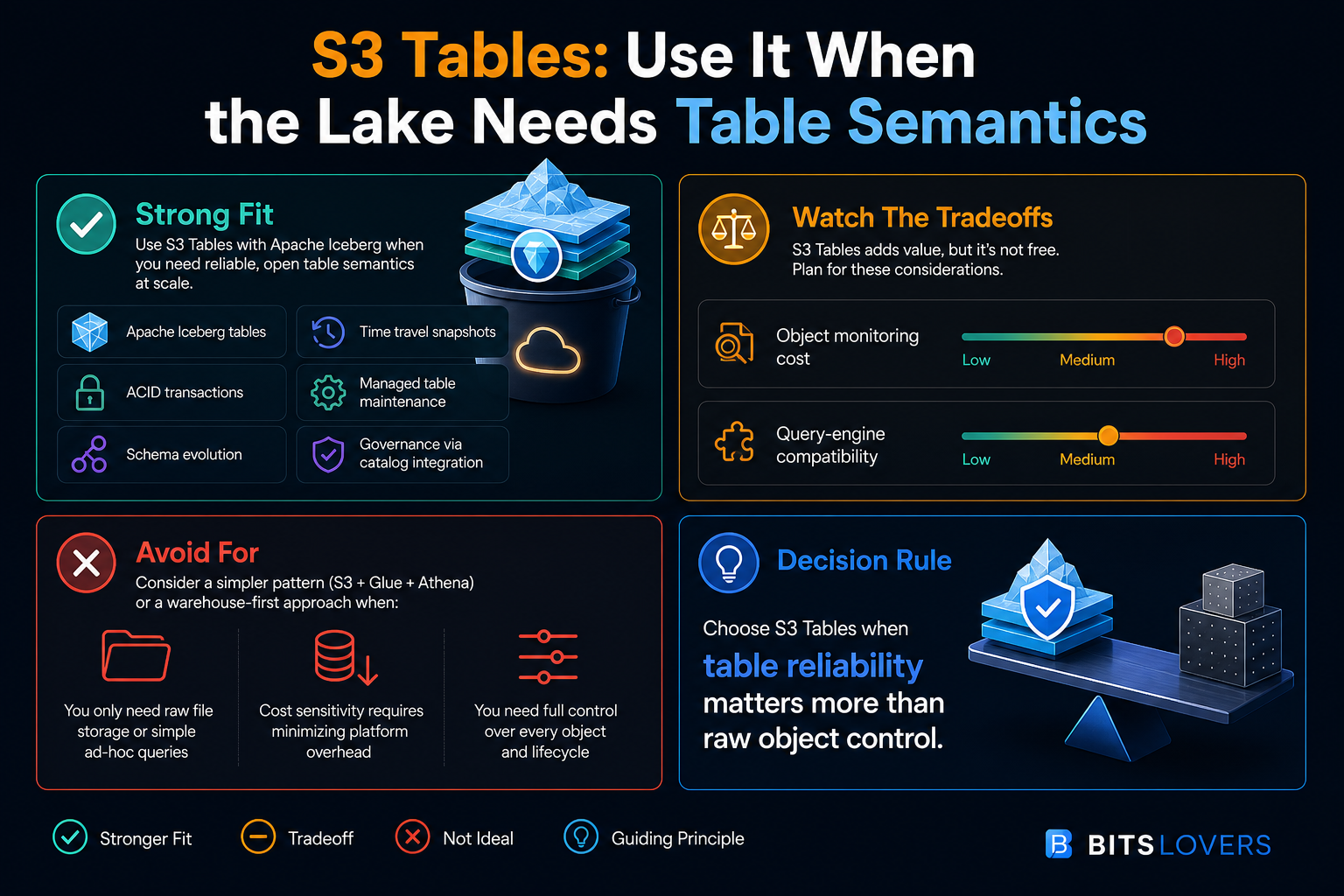
The infographic is the decision shortcut. S3 Tables is attractive when the lake needs table semantics. It is less attractive when the workload is just cheap object storage with occasional ad hoc reads.
Strong Fit: Multi-Engine Analytics On Shared Tables
S3 Tables is a strong fit when multiple compute engines need to trust the same datasets. Think Athena for ad hoc SQL, EMR Spark for transformation, Redshift for warehouse-adjacent analytics, and a governed catalog path for business intelligence or AI analytics tools.
The old pattern can work here, but it often depends on strict team discipline. Everyone must write compatible files, register metadata correctly, respect partition conventions, run compaction, expire snapshots, and avoid breaking readers. That is possible. It is also fragile across many teams.
S3 Tables makes sense when the shared table is important enough that object-prefix conventions feel too weak. The table becomes the boundary. You still need engineering discipline, but the system gives you a better primitive to attach maintenance, catalog integration, and permissions.
A practical example is event data that multiple teams use for product analytics, fraud detection, cost allocation, and ML features. The table is not a scratch export. It is a shared asset. If the table breaks, several downstream systems break. That is the kind of dataset where managed table semantics are worth evaluating.
Strong Fit: Frequently Changing Tables
Apache Iceberg shines when tables change. Inserts, deletes, schema evolution, partition evolution, snapshots, and time-travel style access are exactly the class of features teams reach for when plain files become awkward.
S3 Tables can be attractive for CDC pipelines, high-volume event tables, slowly corrected facts, and data products that need predictable table reads while writes continue. The point is not that S3 Tables magically handles every write pattern. The point is that the architecture acknowledges that the dataset is a table, not just a folder full of Parquet files.
This is especially relevant when cleanup and optimization have become a permanent chore. If the team already has scheduled jobs to rewrite files, expire snapshots, delete orphaned objects, and repair catalog state, S3 Tables should be on the evaluation list. You are already paying the complexity tax. The question is whether AWS should manage more of it.
Strong Fit: Governance Needs A Table Boundary
Security teams do not want to reason about accidental data exposure through informal naming conventions. Platform teams do not want to debug whether the correct prefix, catalog entry, engine role, and downstream permission all match. Data teams do not want every table access review to become archaeology.
Table resources help because they give the organization a clearer unit of control. AWS documentation notes that table buckets and tables have ARNs and resource policies. That means access conversations can attach to table-bucket and table resources, not just broad object paths.
This does not eliminate IAM design. It does not replace least privilege. It does not make data classification automatic. But it gives a cleaner shape to the problem. A platform team can say, “This is the table, this is the catalog integration, this is the query path, and this is the policy boundary.” That is better than “the data is somewhere under this prefix, and the convention is documented in a wiki.”
Weak Fit: Raw File Landing Zones
Not every S3 dataset deserves table semantics. A raw landing bucket that stores source files exactly as received may be better as ordinary S3. Logs, exports, backups, images, legal archives, ingestion quarantine zones, and file-exchange buckets often benefit from simple object storage.
The same is true for early exploration. If a team is still learning the shape of the data, table design may be premature. A normal S3 bucket plus a lightweight discovery process might be enough until the access pattern stabilizes.
The mistake is treating S3 Tables as the default because it is newer. The default should still be the simplest storage model that satisfies the workload. Use S3 Tables when the dataset is a table with operational value, not when the object prefix merely contains structured files.
Weak Fit: Full Warehouse Semantics
S3 Tables is not a data warehouse. It does not replace workload management, mature SQL optimization, materialized views, BI semantic layers, warehouse governance models, or the organizational patterns built around a warehouse-first platform.
If a team already has clean Redshift or Snowflake models, strong governance, predictable performance, and a BI layer that business users depend on, S3 Tables should be evaluated as a storage and interoperability option, not as a reason to tear out the warehouse.
The better architecture may be both. S3 Tables can hold open-format lakehouse tables, while a warehouse serves curated, performance-sensitive, analyst-facing models. The tradeoff is duplication and governance complexity. The benefit is using each system where it is strongest.
Weak Fit: Teams That Need Full Object-Level Control
Managed maintenance is a feature only if the maintenance policy matches the business process. If a team needs exact control over every object lifecycle transition, long manual recovery windows, custom object naming, external replication behavior, or unusual legal retention semantics, S3 Tables requires careful review.
The defaults matter here. Unreferenced file removal has default timing. Compaction rewrites files. Snapshot management can expire old states. These are useful behaviors for analytics tables. They can be dangerous if another system treats the underlying objects as a stable API.
That is the rule: do not let downstream systems depend on table internals. If consumers need object-level contracts, keep that layer separate. S3 Tables should serve table consumers, not random object consumers that happen to know where files live.
The Paradox: Open Format, Managed Service
S3 Tables is interesting because it blends two ideas that usually pull in opposite directions.
Apache Iceberg is attractive because it is open. It lets teams avoid locking table data into one compute engine. Multiple engines can read and write through a shared table abstraction when the integration is correct. That openness is the whole point.
S3 Tables is attractive because it is managed. AWS handles table-bucket behavior, catalog integration paths, and maintenance operations that teams otherwise own. That management is the whole point.
The paradox is that the more value you get from AWS management, the more you need to understand the AWS-specific boundaries. Table buckets, S3 Tables APIs, Glue integration, IAM permissions, regional availability, pricing line items, and maintenance configuration are not generic Iceberg concepts. They are AWS product decisions.
That does not make S3 Tables bad. It makes the architecture honest. You are choosing open table format plus AWS-managed storage operations. That is a reasonable choice, but it should be written down as a choice.
A Practical Evaluation Plan
Do not evaluate S3 Tables with a toy table that nobody cares about. Also do not start with your most business-critical dataset. Pick a table with enough volume and operational pain to reveal the value, but with a rollback path that does not threaten production reporting.
Use this review sequence:
| Step | What to verify | Failure signal |
|---|---|---|
| 1. Pick one candidate table | The table has real consumers and real maintenance pain | Nobody can name who owns the table |
| 2. Map query engines | Athena, Redshift, Spark, BI, or AI tools need a shared read path | Only one job reads the data |
| 3. Review write pattern | File size, write frequency, schema changes, late data | Constant tiny files with no owner for ingestion quality |
| 4. Validate catalog path | Glue integration and permissions match the team model | Manual catalog repair is still required |
| 5. Read maintenance defaults | Snapshot and unreferenced-file policy match recovery needs | Recovery process assumes files live longer |
| 6. Estimate cost | Storage, requests, monitoring, compaction | The cost model ignores object count |
| 7. Run operational game day | Broken write, bad schema, delayed file, permission failure | Nobody knows where evidence lives |
That last step is where many evaluations become real. A data platform is not validated by a successful happy-path query. It is validated when a write goes wrong, a table has to be corrected, a user loses access, a downstream dashboard breaks, and the team can still explain the system.
Questions To Ask Before Production
Before putting an important table on S3 Tables, answer these questions in writing:
- Who owns the table schema?
- Who approves schema evolution?
- Which engines are allowed to write?
- Which engines are read-only?
- What is the recovery window if bad data is written?
- How long must snapshots or historical states remain available?
- Do any downstream systems depend on physical object paths?
- What is the expected object size distribution?
- How often will compaction run, and who watches the cost?
- Which catalog is the source of truth?
- How are IAM, Glue, and analytics-engine permissions reviewed together?
- What happens if a region, engine integration, or catalog path is unavailable?
The uncomfortable questions are the useful ones. If the team cannot answer who owns schema changes or whether a consumer depends on physical files, the storage layer is not the first problem. The operating model is.
S3 Tables Versus A Traditional S3 Data Lake
Here is the shortest practical comparison:
| Scenario | Traditional S3 lake | S3 Tables |
|---|---|---|
| Raw landing zone | Better fit | Usually unnecessary |
| Occasional Athena queries | Often enough | Maybe overbuilt |
| Shared analytics table | Works with discipline | Stronger fit |
| Multi-engine access | Possible, more coordination | Better aligned |
| Frequent updates/deletes | Harder | Stronger fit |
| Small-file cleanup | Team-managed | Managed table maintenance |
| Governance by prefix | Common but fragile | Table resource boundary helps |
| Maximum object-level control | Better fit | Review carefully |
| Open table format strategy | Team-managed Iceberg | Managed Iceberg table storage |
The decision is not “old lake bad, S3 Tables good.” The decision is whether the table is important enough that table semantics should become part of the storage primitive.
Architecture I Would Start With
For a first production pattern, I would keep the architecture intentionally narrow:
- One table bucket for one domain, not one shared bucket for the whole company.
- One owning platform or data team accountable for schema, maintenance configuration, and access review.
- Glue integration as the primary AWS catalog path.
- Athena as the first read engine, because it makes validation easy.
- Spark or EMR added only after the table contract is stable.
- Redshift integration reviewed separately for performance, governance, and cost.
- No downstream system allowed to depend on the physical table object layout.
- Cost monitoring based on storage, requests, object monitoring, and compaction.
This is deliberately conservative. Shared data infrastructure fails when every team treats it as a convenient dump. S3 Tables should be introduced as a table platform boundary, not as a prettier bucket.
What To Monitor
Once a team adopts S3 Tables, monitoring should not stop at query success. Watch the health of the operating model:
| Signal | Why it matters |
|---|---|
| Object count growth | Drives monitoring and maintenance cost, and often reveals tiny-file problems |
| Average file size | Small files hurt query efficiency and increase maintenance pressure |
| Compaction activity | Shows whether the service is constantly cleaning up ingestion behavior |
| Snapshot age and retention | Confirms recovery windows match policy |
| Failed or delayed writes | Protects readers from silent table freshness problems |
| Catalog discovery failures | Breaks Athena, Redshift, EMR, and downstream tools |
| Permission denials | Shows whether IAM/catalog/engine policy is aligned |
| Query latency and scanned data | Validates whether table design improves reader experience |
If you only monitor storage size, you are missing the point. Table health is about metadata, object shape, maintenance, permissions, and reader behavior.
The Bottom Line
Amazon S3 Tables is most useful when a dataset has outgrown the “files in a prefix” mental model. If the data behaves like a real table, has multiple consumers, changes over time, needs reliable metadata, and already forces the team to manage compaction or cleanup, S3 Tables deserves serious evaluation.
It is not the right answer for every S3 workload. Raw files, simple ad hoc datasets, archives, object-level integrations, and warehouse-first analytics can all be better served by simpler patterns. The new service does not remove architecture judgment. It makes the judgment more explicit.
My decision rule is simple: choose S3 Tables when table reliability matters more than raw object control. If the team needs snapshots, schema evolution, shared query discovery, and managed maintenance, S3 Tables moves the lakehouse boundary in a useful direction. If the team only needs cheap durable objects, a normal S3 bucket is still one of the best tools AWS has ever shipped.
Sources
Explore more like this

Cloud IoT Security: Zero Trust, Identity, and Signed Updates
On September 11, 2026, the Cyber Resilience Act’s incident-reporting rules start applying in the European Union. That is 22 days after this article’s publication date. A manufacturer that learns of...

Bedrock Web Search: Grounding an Agent Without Building a Scraper
On August 4, 2026, AWS made Web Search on Amazon Bedrock generally available, and the entire integration surface is one JSON object: {"type": "web_search"}. That is the whole change from...

ECR Now Allows 200 GB Image Layers. Your Model Weights Still Do Not Belong There
On August 3, 2026, AWS raised the maximum Amazon ECR image layer size to 200 GB for images pushed with docker push. The announcement names the driver in the second...

Comments