
API Gateway + Cognito JWT Authorizers in 2026

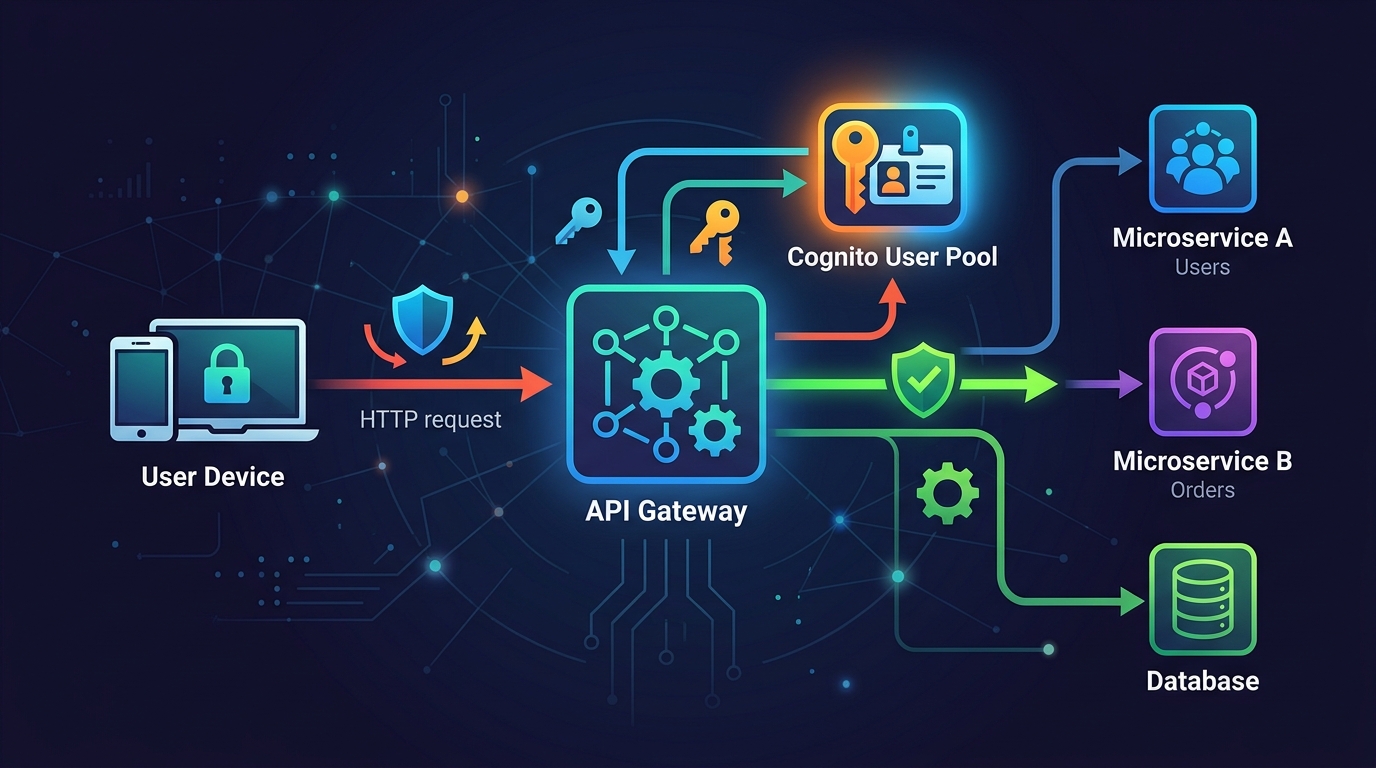
JWT authorizers replaced about 80% of the Lambda authorizers I used to write. Not because they’re always the right tool — they’re not — but because most of the time the authorization logic I was putting in a Lambda boiled down to “is this token valid, and does it have the right scope?” That’s exactly what a JWT authorizer does natively, faster, and for free.
The shift matters for two reasons: latency and cost. A Lambda authorizer adds 50-150ms of cold-start overhead plus invocation costs on every request that doesn’t hit the cache. A JWT authorizer runs inside API Gateway itself — no Lambda invocation, no cold starts, validation in single-digit milliseconds. At scale, this isn’t a small difference.
This post covers the full setup: Cognito User Pool configured specifically for API auth (which is different from app auth), HTTP API vs REST API authorizer differences, scopes and groups-based access control, and a complete Terraform module you can drop into an existing stack.
Why JWT Authorizers Over Lambda Authorizers
Lambda authorizers are the right answer when your authorization logic is genuinely complex: you need to call an external IdP, hit a database to check fine-grained permissions, or validate a custom token format that isn’t standard JWT. For everything else, you’re paying a tax to run code that API Gateway can handle natively.
Here’s the actual difference in a request flow:
Lambda authorizer path:
Client → API Gateway → Lambda (authorizer) → API Gateway → Backend
         ~10ms          ~50-150ms              ~5ms          ~50ms
JWT authorizer path:
Client → API Gateway (validates JWT) → Backend
         ~12ms (including validation)    ~50ms
The Lambda authorizer path has a shared cache (default TTL: 300 seconds). When the cache is warm, it’s fast. But every new token, every cache miss, and every cold start adds up. If you’re running a busy API with short-lived tokens (say, 1-hour expiry), you’re generating a lot of cache misses.
JWT authorizers validate the token signature against Cognito’s JWKS endpoint, check expiry, and validate the audience claim — all inside the gateway process. No Lambda needed.
Cost comparison at 10 million requests/month:
Lambda authorizer (10% cache miss rate = 1M invocations):
  Lambda: 1M × $0.0000002 = $0.20 + compute ~$0.80
  Total: ~$1.00/month

JWT authorizer:
  $0.00 — it's included in API Gateway pricing
That’s not a dramatic number, but it scales. At 1 billion requests/month, the Lambda authorizer approach costs real money. More importantly, the latency savings are felt by every user on every request.
Cognito User Pool Setup for API Auth
Here’s something I got wrong early on: I was using the same Cognito User Pool for both app authentication (the web console login) and API authorization. That works, but it creates problems — app tokens include claims meant for the UI that bloat API tokens, and you end up with scope configurations that make no sense for machine-to-machine access.
For APIs, configure a dedicated app client or a separate resource server:
Resource server = your API, identified by a URI
Scopes = specific permissions within that API
App client = the caller (your frontend, mobile app, or another service)
The resource server setup is what maps Cognito to your actual API boundaries. Without it, you’re using generic token claims, and scope-based authorization at the gateway level becomes messy.
Create a resource server for your API:
aws cognito-idp create-resource-server \
  --user-pool-id us-east-1_ABC123 \
  --identifier "https://api.example.com" \
  --name "Example API" \
  --scopes \
    ScopeName=read,ScopeDescription="Read access" \
    ScopeName=write,ScopeDescription="Write access" \
    ScopeName=admin,ScopeDescription="Admin access"
Then create an app client that requests these scopes:
aws cognito-idp create-user-pool-client \
  --user-pool-id us-east-1_ABC123 \
  --client-name "api-client" \
  --generate-secret \
  --allowed-o-auth-flows "client_credentials" \
  --allowed-o-auth-scopes \
    "https://api.example.com/read" \
    "https://api.example.com/write" \
  --allowed-o-auth-flows-user-pool-client
This is a machine-to-machine client using the OAuth2 client credentials flow. No user login, no redirect URI, just service-to-service auth. The token it gets back includes the scopes it was granted, and API Gateway validates those scopes on every request.
For user-facing APIs (web app, mobile app), you use the authorization code flow instead. Same User Pool, different app client configuration — PKCE enabled, no client secret, redirect URIs configured.
HTTP API vs REST API: The Authorizer Difference
This is where people get confused, and it matters because the two API types implement JWT authorizers differently.
HTTP API (newer, ~60% cheaper):
- JWT authorizer is a first-class built-in feature
- Configured directly on routes
- Validates issuer, audience, and token expiry
- Does NOT natively validate scopes — you have to check scopes in your backend code or add a Lambda for that specific check
REST API (older, more features):
- Uses Cognito User Pool authorizer (a different thing, despite being JWT-based)
- Validates token AND can enforce OAuth scopes natively on each method
- Supports resource policies and usage plans alongside authorization
- More expensive per request
For most new APIs in 2026, HTTP API is the right choice unless you need REST API-specific features like request/response transformations, private endpoints, or built-in caching. The price difference is significant: HTTP API is $1.00/million requests vs REST API’s $3.50/million.
If you need scope enforcement at the gateway layer (not in your backend), use REST API’s Cognito authorizer. If you’re okay checking scopes in your backend code, use HTTP API’s JWT authorizer and save the money.
Configuring the JWT Authorizer on HTTP API
Here’s the manual setup before we get to Terraform:
# Create the JWT authorizer
aws apigatewayv2 create-authorizer \
  --api-id abc123def \
  --name "cognito-jwt-authorizer" \
  --authorizer-type JWT \
  --identity-source '$request.header.Authorization' \
  --jwt-configuration \
    Issuer="https://cognito-idp.us-east-1.amazonaws.com/us-east-1_ABC123",\
    Audience="your-app-client-id"
The Issuer URL must exactly match the iss claim in the token. Cognito tokens include the region and pool ID — get this wrong and every token fails validation with an opaque 401. The Audience must match the aud claim, which for client credentials tokens is the app client ID, and for user tokens might be the resource server identifier depending on how you’ve configured things.
Attach it to a route:
aws apigatewayv2 update-route \
  --api-id abc123def \
  --route-id route123 \
  --authorization-type JWT \
  --authorizer-id authorizer456
Test it immediately:
# Get a token
TOKEN=$(aws cognito-idp initiate-auth \
  --auth-flow USER_PASSWORD_AUTH \
  --auth-parameters USERNAME=testuser,PASSWORD=TestPass123! \
  --client-id your-app-client-id \
  --query 'AuthenticationResult.IdToken' \
  --output text)

# Call the API
curl -H "Authorization: Bearer $TOKEN" \
  https://abc123def.execute-api.us-east-1.amazonaws.com/items
If you get a 401, check the token’s iss and aud claims first:
# Decode JWT without verification (for debugging only)
echo $TOKEN | cut -d'.' -f2 | base64 --decode 2>/dev/null | jq .
Scope-Based Access Control
Scopes let you express “what this token is allowed to do” without round-tripping to a database. The token itself carries the authorization information.
For REST API, API Gateway enforces scopes natively:
aws apigateway update-method \
  --rest-api-id abc123def \
  --resource-id resource456 \
  --http-method POST \
  --patch-operations \
    op=replace,path=/authorizationScopes,value='["https://api.example.com/write"]'
A token with only read scope hitting a POST endpoint gets a 403. The gateway handles this before your code runs.
For HTTP API, you enforce scopes in your backend. Here’s how that looks in a Lambda handler:
def handler(event, context):
    # JWT authorizer puts claims in requestContext
    claims = event['requestContext']['authorizer']['jwt']['claims']
    scopes = claims.get('scope', '').split(' ')

    if 'https://api.example.com/write' not in scopes:
        return {
            'statusCode': 403,
            'body': json.dumps({'error': 'Insufficient scope'})
        }

    # Proceed with actual logic
    ...
This isn’t as clean as gateway-level enforcement, but it works. The token is already validated by the time your Lambda runs — you’re just checking a claim that API Gateway passed through.
Groups-Based Access Control
Cognito groups give you role-based access control without custom claims infrastructure. A user in the admin group gets a token with cognito:groups: ["admin"]. Your code checks that claim.
Add a user to a group:
aws cognito-idp admin-add-user-to-group \
  --user-pool-id us-east-1_ABC123 \
  --username [email protected] \
  --group-name admin
The token automatically includes the group membership. Check it in your Lambda:
def handler(event, context):
    claims = event['requestContext']['authorizer']['jwt']['claims']
    groups = claims.get('cognito:groups', [])

    if isinstance(groups, str):
        # Cognito sometimes returns a string for single-group membership
        groups = [groups]

    if 'admin' not in groups:
        return {
            'statusCode': 403,
            'body': json.dumps({'error': 'Admin access required'})
        }
    ...
That string vs list issue is real — I’ve been bitten by it. When a user belongs to exactly one group, the claim is a string. When they belong to multiple groups, it’s a list. Always normalize it.
For REST API, you can use groups in authorizer conditions. But for most setups, checking groups in application code is simpler and more explicit about what’s happening.
Token Caching and TTL
JWT authorizers cache validation results by default. For HTTP API, the cache TTL is configured on the authorizer:
aws apigatewayv2 update-authorizer \
  --api-id abc123def \
  --authorizer-id auth123 \
  --authorizer-result-ttl-in-seconds 300
300 seconds (5 minutes) is the default. The cache key is the token itself (specifically, its hash). This means:
- Same token, same client → cached for up to 5 minutes
- Token revoked mid-session → still valid for up to 5 minutes (important: JWT authorizers do NOT check Cognito’s token revocation list by default)
If you need real-time revocation, you either need a Lambda authorizer that calls Cognito’s token verification endpoint, or you need to design around it — short token TTL (15 minutes) with proper refresh token flows.
For most APIs, 5-minute cache TTL with short-lived access tokens (1 hour) is a reasonable tradeoff. The revocation window is 5 minutes in the worst case, and you’re getting the performance benefits of native validation.
Set your Cognito token expiry to match your security requirements:
aws cognito-idp update-user-pool-client \
  --user-pool-id us-east-1_ABC123 \
  --client-id your-client-id \
  --access-token-validity 60 \       # minutes
  --id-token-validity 60 \
  --refresh-token-validity 30 \      # days
  --token-validity-units AccessToken=minutes,IdToken=minutes,RefreshToken=days
Terraform: Complete Setup
Here’s the full setup — Cognito User Pool, resource server, app client, HTTP API, and JWT authorizer — in Terraform you can actually use:
# cognito.tf

resource "aws_cognito_user_pool" "api" {
  name = "${var.project}-api-pool"

  password_policy {
    minimum_length    = 12
    require_uppercase = true
    require_lowercase = true
    require_numbers   = true
    require_symbols   = true
  }

  account_recovery_setting {
    recovery_mechanism {
      name     = "verified_email"
      priority = 1
    }
  }

  auto_verified_attributes = ["email"]

  tags = var.tags
}

resource "aws_cognito_resource_server" "api" {
  user_pool_id = aws_cognito_user_pool.api.id
  identifier   = "https://api.${var.domain}"
  name         = "${var.project}-api"

  scope {
    scope_name        = "read"
    scope_description = "Read access to API resources"
  }

  scope {
    scope_name        = "write"
    scope_description = "Write access to API resources"
  }

  scope {
    scope_name        = "admin"
    scope_description = "Admin access to all API resources"
  }
}

resource "aws_cognito_user_pool_client" "web" {
  name         = "${var.project}-web-client"
  user_pool_id = aws_cognito_user_pool.api.id

  generate_secret = false  # Public client (browser/mobile)

  allowed_oauth_flows                  = ["code"]
  allowed_oauth_flows_user_pool_client = true
  allowed_oauth_scopes = [
    "openid",
    "email",
    "profile",
    "${aws_cognito_resource_server.api.identifier}/read",
    "${aws_cognito_resource_server.api.identifier}/write",
  ]

  callback_urls = ["https://${var.domain}/callback"]
  logout_urls   = ["https://${var.domain}/logout"]

  supported_identity_providers = ["COGNITO"]

  token_validity_units {
    access_token  = "minutes"
    id_token      = "minutes"
    refresh_token = "days"
  }

  access_token_validity  = 60
  id_token_validity      = 60
  refresh_token_validity = 30

  prevent_user_existence_errors = "ENABLED"
}

resource "aws_cognito_user_pool_client" "machine" {
  name         = "${var.project}-m2m-client"
  user_pool_id = aws_cognito_user_pool.api.id

  generate_secret = true  # Confidential client (server-to-server)

  allowed_oauth_flows                  = ["client_credentials"]
  allowed_oauth_flows_user_pool_client = true
  allowed_oauth_scopes = [
    "${aws_cognito_resource_server.api.identifier}/read",
    "${aws_cognito_resource_server.api.identifier}/write",
  ]

  token_validity_units {
    access_token  = "minutes"
    refresh_token = "days"
  }

  access_token_validity = 60
}

resource "aws_cognito_user_pool_domain" "api" {
  domain       = "${var.project}-auth"
  user_pool_id = aws_cognito_user_pool.api.id
}

resource "aws_cognito_user_group" "admin" {
  user_pool_id = aws_cognito_user_pool.api.id
  name         = "admin"
  description  = "Admin users with elevated API access"
  precedence   = 1
}

resource "aws_cognito_user_group" "user" {
  user_pool_id = aws_cognito_user_pool.api.id
  name         = "user"
  description  = "Standard users"
  precedence   = 10
}
# api_gateway.tf

resource "aws_apigatewayv2_api" "api" {
  name          = "${var.project}-api"
  protocol_type = "HTTP"

  cors_configuration {
    allow_origins = ["https://${var.domain}"]
    allow_methods = ["GET", "POST", "PUT", "DELETE", "OPTIONS"]
    allow_headers = ["Content-Type", "Authorization"]
    max_age       = 300
  }
}

resource "aws_apigatewayv2_authorizer" "cognito" {
  api_id           = aws_apigatewayv2_api.api.id
  authorizer_type  = "JWT"
  identity_sources = ["$request.header.Authorization"]
  name             = "cognito-jwt"

  jwt_configuration {
    issuer   = "https://cognito-idp.${var.region}.amazonaws.com/${aws_cognito_user_pool.api.id}"
    audience = [aws_cognito_user_pool_client.web.id]
  }
}

resource "aws_apigatewayv2_stage" "default" {
  api_id      = aws_apigatewayv2_api.api.id
  name        = "$default"
  auto_deploy = true

  access_log_settings {
    destination_arn = aws_cloudwatch_log_group.api_access.arn
    format = jsonencode({
      requestId      = "$context.requestId"
      ip             = "$context.identity.sourceIp"
      requestTime    = "$context.requestTime"
      httpMethod     = "$context.httpMethod"
      routeKey       = "$context.routeKey"
      status         = "$context.status"
      responseLength = "$context.responseLength"
      errorMessage   = "$context.error.message"
      authorizerError = "$context.authorizer.error"
    })
  }
}

resource "aws_apigatewayv2_route" "get_items" {
  api_id             = aws_apigatewayv2_api.api.id
  route_key          = "GET /items"
  authorization_type = "JWT"
  authorizer_id      = aws_apigatewayv2_authorizer.cognito.id
  target             = "integrations/${aws_apigatewayv2_integration.lambda.id}"
}

resource "aws_apigatewayv2_route" "post_items" {
  api_id             = aws_apigatewayv2_api.api.id
  route_key          = "POST /items"
  authorization_type = "JWT"
  authorizer_id      = aws_apigatewayv2_authorizer.cognito.id
  target             = "integrations/${aws_apigatewayv2_integration.lambda.id}"
}

resource "aws_cloudwatch_log_group" "api_access" {
  name              = "/aws/apigateway/${var.project}"
  retention_in_days = 30
}
# outputs.tf

output "cognito_issuer" {
  value = "https://cognito-idp.${var.region}.amazonaws.com/${aws_cognito_user_pool.api.id}"
}

output "cognito_jwks_uri" {
  value = "https://cognito-idp.${var.region}.amazonaws.com/${aws_cognito_user_pool.api.id}/.well-known/jwks.json"
}

output "web_client_id" {
  value = aws_cognito_user_pool_client.web.id
}

output "auth_domain" {
  value = "${aws_cognito_user_pool_domain.api.domain}.auth.${var.region}.amazoncognito.com"
}

output "api_endpoint" {
  value = aws_apigatewayv2_api.api.api_endpoint
}
Testing with curl and Postman
Get a token via client credentials (machine-to-machine):
# Base64 encode client_id:client_secret
CREDENTIALS=$(echo -n "client_id:client_secret" | base64)

TOKEN=$(curl -s -X POST \
  "https://your-project-auth.auth.us-east-1.amazoncognito.com/oauth2/token" \
  -H "Authorization: Basic $CREDENTIALS" \
  -H "Content-Type: application/x-www-form-urlencoded" \
  -d "grant_type=client_credentials&scope=https://api.example.com/read" \
  | jq -r '.access_token')

echo $TOKEN
Call the API:
curl -s \
  -H "Authorization: Bearer $TOKEN" \
  https://abc123def.execute-api.us-east-1.amazonaws.com/items | jq .
Test an invalid token:
curl -v \
  -H "Authorization: Bearer invalid.token.here" \
  https://abc123def.execute-api.us-east-1.amazonaws.com/items
# Expect: HTTP/2 401
# {"message":"Unauthorized"}
Test a missing token:
curl -v https://abc123def.execute-api.us-east-1.amazonaws.com/items
# Expect: HTTP/2 401
Test an expired token: Set your Cognito token validity to 1 minute, get a token, wait 70 seconds, call the API. You’ll get a 401 with the context.authorizer.error log entry showing Token is expired.
In Postman, use the OAuth 2.0 authorization type, set the grant type to Client Credentials, and fill in your Cognito domain token URL, client ID, and client secret. Postman handles the token exchange and automatically sets the Authorization header.
Custom Claims and Token Enrichment
Cognito’s pre-token-generation Lambda trigger lets you add custom claims to every token before it leaves Cognito. This is where you enrich tokens with data that would otherwise require a database hit on every API call.
def handler(event, context):
    user_sub = event['request']['userAttributes']['sub']
    email = event['request']['userAttributes']['email']

    # Look up user's organization and feature flags
    user_data = get_user_data(user_sub)  # your DB call

    # Add custom claims
    event['response']['claimsOverrideDetails'] = {
        'claimsToAddOrOverride': {
            'org_id': user_data['organization_id'],
            'org_tier': user_data['tier'],           # "free", "pro", "enterprise"
            'feature_flags': ','.join(user_data['features']),
        },
        'claimsToSuppress': ['phone_number_verified'],  # remove claims you don't need
    }

    return event
Wire this up in Terraform:
resource "aws_cognito_user_pool" "api" {
  # ... other config ...

  lambda_config {
    pre_token_generation = aws_lambda_function.pre_token.arn
  }
}

resource "aws_lambda_permission" "cognito_invoke" {
  statement_id  = "AllowCognitoInvoke"
  action        = "lambda:InvokeFunction"
  function_name = aws_lambda_function.pre_token.function_name
  principal     = "cognito-idp.amazonaws.com"
  source_arn    = aws_cognito_user_pool.api.arn
}
Your API then reads the custom claim from the token — no database call needed per request. The token is the source of truth for the duration of its validity.
Be careful not to bloat tokens. JWT tokens are sent with every request. At a certain point, adding everything to the token starts hurting performance in a different direction. Keep claims to data that’s stable for the token’s lifetime and genuinely needed on most requests.
When to Use a Lambda Authorizer Instead
JWT authorizers cover most cases. Use a Lambda authorizer when:
1. Your IdP isn’t Cognito. If you’re federating with Okta, Auth0, Azure AD, or an on-prem LDAP, and you need to validate tokens that don’t follow Cognito’s JWT format exactly, a Lambda authorizer gives you full control.
2. You need real-time permission checks. If your permission model changes frequently and you can’t tolerate the token TTL lag (even 5 minutes), you need a Lambda that calls your authorization service on every request.
3. You have non-JWT credentials. API keys, mTLS certificates, HMAC signatures — none of these work with a JWT authorizer.
4. You need complex scope logic. “User can access resource X if they created it OR if they’re an admin” — that’s not expressible in static scope claims. You need code.
5. Cross-account or cross-service validation. If you’re validating tokens issued by a service in another AWS account and the issuer URL doesn’t match cleanly, Lambda gives you the escape hatch.
The decision isn’t JWT authorizer vs Lambda authorizer; it’s “can the gateway handle this validation statically, or do I need code?” When the answer is static — valid JWT, right audience, right scope — use the native authorizer and keep the complexity out of your infrastructure.
Common Mistakes
CORS with auth is its own problem. The preflight OPTIONS request doesn’t carry an Authorization header. If your JWT authorizer is applied to all routes including OPTIONS, preflight requests fail and your browser app breaks completely. Either configure CORS at the API Gateway level (which handles OPTIONS automatically before authorization runs) or explicitly set OPTIONS routes to NONE authorization:
resource "aws_apigatewayv2_route" "options" {
  api_id             = aws_apigatewayv2_api.api.id
  route_key          = "OPTIONS /{proxy+}"
  authorization_type = "NONE"
  target             = "integrations/${aws_apigatewayv2_integration.lambda.id}"
}
Audience mismatch. Cognito issues tokens with different audience claims depending on the flow. For authorization code flow, the aud claim is the app client ID. For client credentials, it’s the resource server identifier. If you configure your JWT authorizer with the web client ID but test with a machine client token, validation fails. Check the actual token claims with jq before assuming the authorizer is broken.
Token expiration vs cache TTL. When a token expires, the next request after expiry hits the gateway and gets a 401. That’s expected. What trips people up is this: if the cache TTL (300s) is longer than the remaining token lifetime, a cached “valid” result might still return 200 for a token that Cognito now considers expired. Keep your cache TTL shorter than your token TTL, or disable caching for high-security endpoints.
Using the ID token instead of the access token. The ID token is for your application — it contains user profile information. The access token is for API authorization — it contains scopes. JWT authorizers work with access tokens. Using the ID token can work, but the audience and issuer claims are structured differently, and you’ll run into scope issues because ID tokens don’t carry resource server scopes.
Forgetting to update the audience when you rotate app clients. If you create a new Cognito app client (common during a migration), you need to update the JWT authorizer’s audience list. The old client ID stops working, and you’ll see a 401 with audience mismatch in the authorizer error logs.
JWT authorizers aren’t glamorous. There’s no complex logic, no interesting architecture to draw. They’re a configuration change that eliminates a Lambda invocation from your hot path. That’s the whole point. The security stack I covered in API Gateway + WAF Zero Trust gets you to the point where only valid requests reach your API. JWT authorizers are what ensure “valid” includes “authenticated and authorized” — built into the gateway, not bolted on.
For rate limiting your authenticated endpoints to prevent abuse even from valid tokens, see Nginx Rate Limiting — the combination of gateway-level auth and edge-level rate limiting is where you want to end up. If you need to rotate the client secrets used in your machine-to-machine flows, Secrets Manager Rotation covers the Lambda rotation pattern that keeps credentials fresh without downtime. And if token signing keys and encryption keys are a concern for your compliance posture, AWS KMS vs CloudHSM covers where Cognito’s key management fits in the broader picture.
Related Posts: API Gateway WAF Zero Trust · Nginx Rate Limiting · KMS vs CloudHSM · Secrets Manager Rotation
Explore more like this

Aurora Serverless v2 + Bedrock: AI Database Queries in 2026
I connected Bedrock to our Aurora cluster last month. The first thing I asked it was “show me all customers who churned in Q1 but came back in Q2” —...

Lambda Container Images: Build on GitLab CI, Deploy to ECR
Container images solved my biggest Lambda frustration: the 250MB zip limit.

AWS WAF Rules Deep Dive: Rate-Based, Geo, and Custom Rules
WAF is one of those services where the default managed rules get you 80% of the way there. The last 20% is where it gets interesting.

Comments