
AWS KMS vs CloudHSM

Let’s talk about CloudHSM and how it compares to KMS. In my previous post, I covered AWS KMS in detail, including command-line examples.
Sometimes you run into situations where encryption keys or digital signatures need private keys that live inside certified hardware. That is where an HSM comes in.
What is AWS CloudHSM?
Hardware Security Modules (HSMs) give you a tamper-resistant environment for generating, storing, and using cryptographic keys.
CloudHSM is AWS’s dedicated HSM offering. It is similar to KMS in purpose, but the architecture and control model are very different.
I see two common reasons teams pick CloudHSM over KMS:
- Your compliance requirements mandate that you alone control the keys, with no cloud provider access.
- Your application already uses a standard cryptographic API and you need drop-in hardware backing.
CloudHSM is a single-tenant, dedicated hardware solution. It is FIPS 140-2 Level 3 validated, and AWS has also achieved FIPS 140-3 Level 3 validation on newer HSM types (hsm2m.medium). You can choose between FIPS and non-FIPS cluster modes depending on your workload.
A quick note on what FIPS levels mean. Level 2 requires evidence of tampering. Level 3 goes further: the physical mechanisms must detect tampering and automatically zero out plaintext cryptographic material when someone opens the module enclosure. KMS is Level 2 compliant. CloudHSM goes a step higher.
What is the difference between KMS and CloudHSM?
The big difference is key ownership. With CloudHSM, you control your keys. AWS cannot see or export them.
CloudHSM gives you a single-tenant multi-AZ cluster that is yours alone. KMS is multi-tenant. It does use HSMs under the hood, but those HSMs are shared across customer accounts.
Because CloudHSM runs inside your VPC, AWS manages the hardware and firmware but has no access to your keys. The HSM instances connect to your subnets through ENIs (Elastic Network Interfaces), so your applications talk to the cluster just like any other VPC resource.
One thing to keep in mind: if you lose your keys on CloudHSM, they are gone. There is no backup from AWS. This is the trade-off for exclusive control.
CloudHSM API
CloudHSM does not use AWS APIs for cryptographic operations. Instead, it supports industry-standard interfaces:
- PKCS#11 – the C-based interface, widely supported
- Java Cryptography Extension (JCE) – for Java applications
- Microsoft CNG / KSP – for Windows workloads
- OpenSSL Provider – added in Client SDK 5
If your software already targets one of these, CloudHSM plugs in without rewriting your crypto layer.
Client SDK 5 is the current version. It added mTLS support for secure client-to-HSM communication, certificate storage on the HSM, and the OpenSSL Provider interface. These were not available in earlier SDK versions.
How is CloudHSM Deployed
You create a cluster in your VPC (or a dedicated VPC for isolation). CloudHSM provisions ENIs in the subnets you choose. Your applications connect through those ENIs to reach the HSM instances inside the cluster.
CloudHSM is not highly available by default. You have to provision HSMs across availability zones yourself.
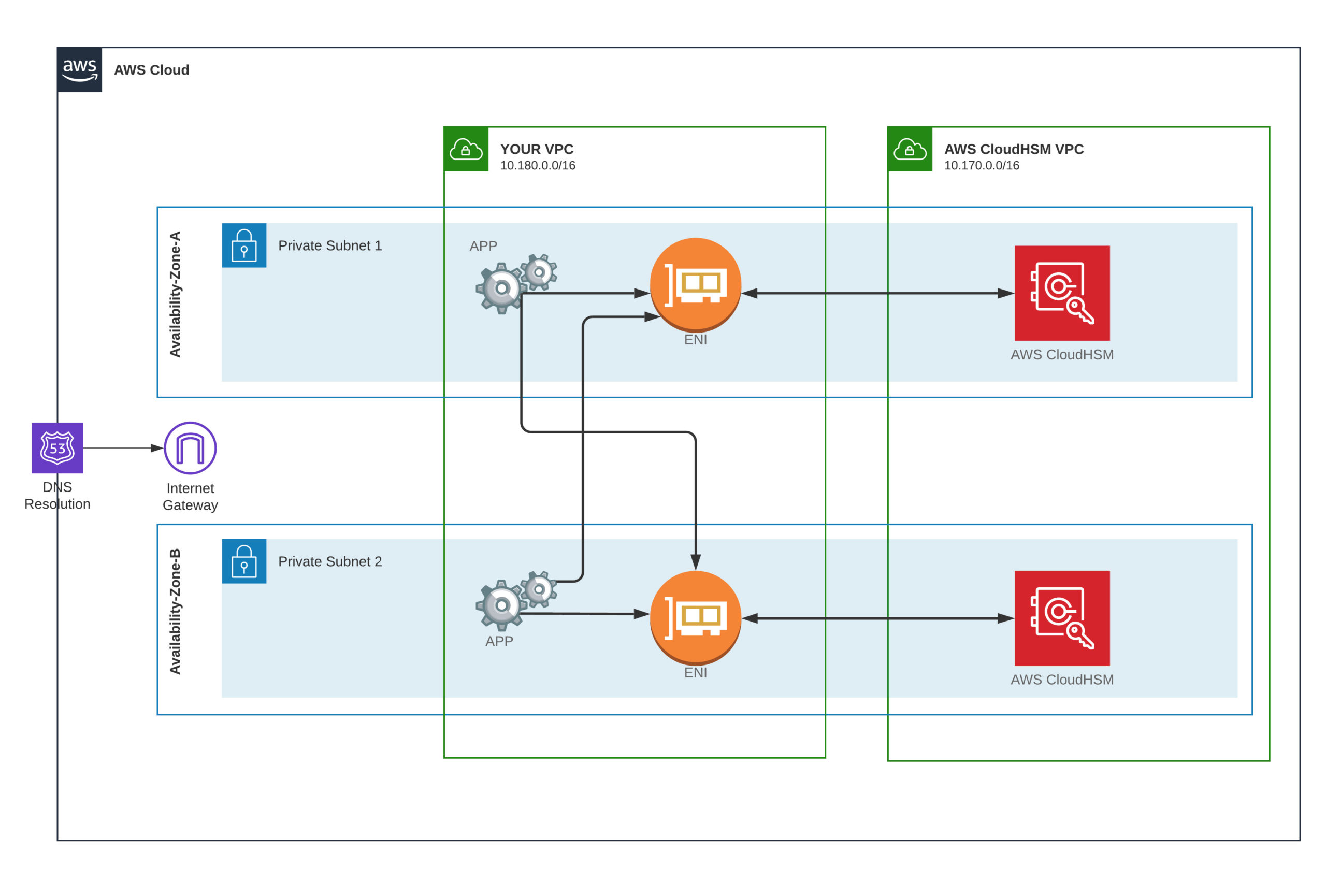 The CloudHSM on multi-AZ cluster for high availability
If one HSM fails or an AZ goes down, the other instances keep serving traffic. The recommended setup is one HSM per subnet across at least two AZs, as shown in the diagram above.
When you create the cluster, you pick the HSM type. The current generation is hsm2m.medium. If you are still running hsm1.medium, AWS provides a migration path to the newer hardware.
When to choose which
Pick KMS if you want a fully managed key store, do not need exclusive hardware, and are fine with FIPS 140-2 Level 2. Most workloads fit here.
Pick CloudHSM if your compliance requirements demand FIPS 140-3 Level 3, if you need sole custody of keys, or if your application requires PKCS#11, JCE, or CNG integration that only a real HSM can provide.
AWS also offers Payment Cryptography if your use case is specifically payment-related (PIN translation, EMV key management). That is worth a look before committing to CloudHSM for payment workloads.
Conclusion
In our AWS KMS vs CloudHSM comparison, we saw that both services handle key management, but they target different needs. KMS is simpler and covers most cases. CloudHSM is the answer when regulations or architecture require dedicated hardware under your exclusive control.
KMS encrypts secrets at rest — for rotating those secrets automatically, see Secrets Manager Auto-Rotation with Lambda.
If you have any questions, feel free to reach out.
Explore more like this

Kill the Docker Hub Token: OIDC Trust for GitHub Actions
On July 31, 2026, Docker shipped OIDC connections for GitHub Actions to any organization on a Docker Team, Docker Business, or Docker Hardened Images subscription, plus organizations in the Docker-Sponsored...

Bedrock Web Search: Grounding an Agent Without Building a Scraper
On August 4, 2026, AWS made Web Search on Amazon Bedrock generally available, and the entire integration surface is one JSON object: {"type": "web_search"}. That is the whole change from...

ECR Now Allows 200 GB Image Layers. Your Model Weights Still Do Not Belong There
On August 3, 2026, AWS raised the maximum Amazon ECR image layer size to 200 GB for images pushed with docker push. The announcement names the driver in the second...

Comments