
Argo Workflows for Kubernetes CI/CD: Complete EKS Guide 2026

I spent two years babysitting a Jenkins cluster that ran 1,200 pipelines across three EKS environments. Every month, something broke. A plugin update broke the Git plugin. The build agent pool ran out of disk space at 2am. A shared library change broke sixteen production pipelines simultaneously. We had a full-time engineer whose job was essentially keeping Jenkins alive.
When we finally migrated to Argo Workflows, the operational overhead dropped to nearly zero. No plugins. No separate build agents. No Groovy DSL that only two people on the team understood. Everything ran as containers on the same Kubernetes cluster where our applications lived.
This post covers what I learned building a Kubernetes-native CI/CD system with Argo Workflows on EKS, including DAG-based pipelines, artifact management, and how to replace Jenkins or GitLab runners entirely.
Why Argo Workflows for CI/CD
Argo Workflows is a Kubernetes-native workflow engine. Each step in your pipeline runs as its own pod. Dependencies, parallelism, artifact passing, and retry logic are all defined in YAML. There is no separate server to manage, no agent pool to maintain, and no plugin ecosystem to fight with.
If you are already running EKS, you already have the infrastructure. Argo Workflows uses the cluster’s compute, networking, and IAM. Your CI/CD pipelines become just another Kubernetes workload.
The key advantages over traditional CI servers:
No separate infrastructure. Jenkins needs a master node, agent nodes, persistent storage for workspaces, and a plugin update strategy. GitLab CI needs runner instances registered and managed. Argo Workflows needs a namespace and a controller. Your pipeline steps run as pods, scheduled by the same Kubernetes scheduler that runs your applications.
Native container execution. Every step is a container image. You want to build with Go 1.23? Use the golang:1.23 image. Need Terraform 1.9? Use the HashiCorp image. No more installing tools on build agents and hoping versions do not conflict.
DAG-based dependency management. Instead of linear stages, you define a directed acyclic graph. Steps that can run in parallel do. Steps with dependencies wait. This is how you cut pipeline times in half without rewriting your build logic.
Artifact management built in. Argo Workflows passes artifacts between steps using S3. Build outputs, test reports, Docker images, deployment manifests – all stored in S3 and passed automatically. No shared workspace, no NFS volume, no “workspace corruption” errors.
Argo Workflows vs Jenkins vs GitLab CI
Before going deeper, here is a practical comparison based on running all three in production.
| Feature | Argo Workflows | Jenkins | GitLab CI |
|---|---|---|---|
| Execution model | Kubernetes pods | Master + agents | Runners (docker, shell, k8s) |
| Pipeline definition | YAML (CRD) | Groovy (Jenkinsfile) | YAML (.gitlab-ci.yml) |
| Dependency model | DAG (native) | Linear stages + parallel blocks | Stages (semi-sequential) |
| Artifact storage | S3 / any S3-compatible | Plugin-based (S3, Artifactory) | Built-in (local, S3, GCS) |
| Plugin ecosystem | None needed (containers) | 1,800+ plugins, frequent breakage | Native features, no plugins |
| Scaling model | Kubernetes pod scheduling | Agent pool management | Runner autoscaling |
| Secret management | Kubernetes Secrets / IRSA | Credentials plugin | CI/CD variables (masked) |
| UI / Visualization | Argo Server UI | Blue Ocean / Classic | Built-in pipeline graph |
| Learning curve | Moderate (YAML + K8s concepts) | High (Groovy + plugin quirks) | Low-Moderate |
| Operational overhead | Very low | High (patching, plugins) | Low |
| EKS integration | Native (IRSA, pod IAM) | Requires plugin configuration | Requires runner registration |
| Reusable templates | WorkflowTemplate CRD | Shared libraries (Groovy) | include: and CI/CD components |
| Cost at scale | Cluster compute only | Master + agents + storage | Runner compute + GitLab licensing |
The Jenkins operational overhead is the real differentiator. When your Jenkins master needs a restart during a critical deploy window, you feel the pain of a separate CI infrastructure. With Argo Workflows on EKS, your CI/CD is just another set of pods.
If you are already using GitLab for source control and considering a full GitOps setup, check out the GitLab CI with Terraform IaC pipeline pattern for infrastructure provisioning.
Argo Workflows vs AWS Step Functions
A question that comes up often: why not use Step Functions for CI/CD on AWS? Both orchestrate tasks. Both handle retries and dependencies. Here is the breakdown.
| Feature | Argo Workflows | AWS Step Functions |
|---|---|---|
| Execution environment | Kubernetes pods | Lambda, ECS, Fargate, Glue, etc. |
| Pipeline definition | YAML CRD | JSON / ASL (Amazon States Language) |
| Artifact passing | Native (S3-backed) | Manual (write to S3, pass ARN) |
| Container support | Native (every step is a container) | ECS/Fargate integration required |
| Parallel execution | Automatic (DAG-based) | Map state (parallel branches) |
| Kubernetes-native | Yes | No |
| EKS pod IAM (IRSA) | Direct integration | Requires Lambda/ECS intermediary |
| Long-running workflows | Hours to days | Up to 1 year (Express: 5 min) |
| Cost model | Cluster compute (already paying) | Per-state-transition + compute |
| Observability | Argo UI + Kubernetes metrics | CloudWatch + X-Ray |
| CI/CD specific features | Container building, image pushing | Generic orchestration |
| Local testing | argo submit --watch locally |
Requires AWS account |
The short answer: Step Functions is excellent for general-purpose orchestration on AWS. If your workflow involves Lambda functions, DynamoDB, SQS, and other AWS services, Step Functions is the right tool. But for CI/CD pipelines that build containers, run tests inside containers, and push images to ECR, Argo Workflows on EKS is more natural. Every build step already runs in the environment where it will deploy.
Key Concepts Reference
Before writing workflows, here is a quick reference for the Argo Workflows vocabulary.
| Concept | What It Does | Example |
|---|---|---|
| Workflow | A single execution of a pipeline | kind: Workflow |
| WorkflowTemplate | A reusable, parameterized workflow definition | kind: WorkflowTemplate |
| CronWorkflow | A workflow triggered on a schedule | kind: CronWorkflow |
| Container template | A step that runs a container image | container: { image: golang:1.23 } |
| Script template | Runs a script inside a container | script: { source: \| ... } |
| Resource template | Creates/manages Kubernetes resources | resource: { action: apply } |
| Suspend template | Pauses workflow for manual approval | suspend: {} |
| DAG template | Defines tasks with dependency graph | dag: { tasks: [...] } |
| Steps template | Defines sequential/parallel steps | steps: [[...], [...]] |
| Artifact | File or directory passed between steps | outputs.artifacts / inputs.artifacts |
| Parameter | String value passed between steps | outputs.parameters / inputs.parameters |
| Entry point | The first template to execute | entrypoint: main |
| Generate name | Prefix for auto-generated workflow names | generateName: ci-pipeline- |
Keep this table handy. The YAML gets verbose, and knowing which template type to use for each step saves a lot of trial and error.
Setting Up Argo Workflows on EKS
Prerequisites
You need an EKS cluster running Kubernetes 1.28 or later. If you are starting from scratch, follow the EKS getting started guide to get a cluster with managed node groups.
You also need:
kubectlconfigured to talk to your cluster- Helm 3 installed
- An S3 bucket for artifact storage
- An IAM role for the Argo Workflows controller with S3 access (use IRSA)
Install the Controller
helm repo add argo https://argoproj.github.io/argo-helm
helm repo update

helm install argo-workflows argo/argo-workflows \
  --namespace argo \
  --create-namespace \
  --set controller.workflowNamespaces="{argo,default}" \
  --set server.authModes="server"
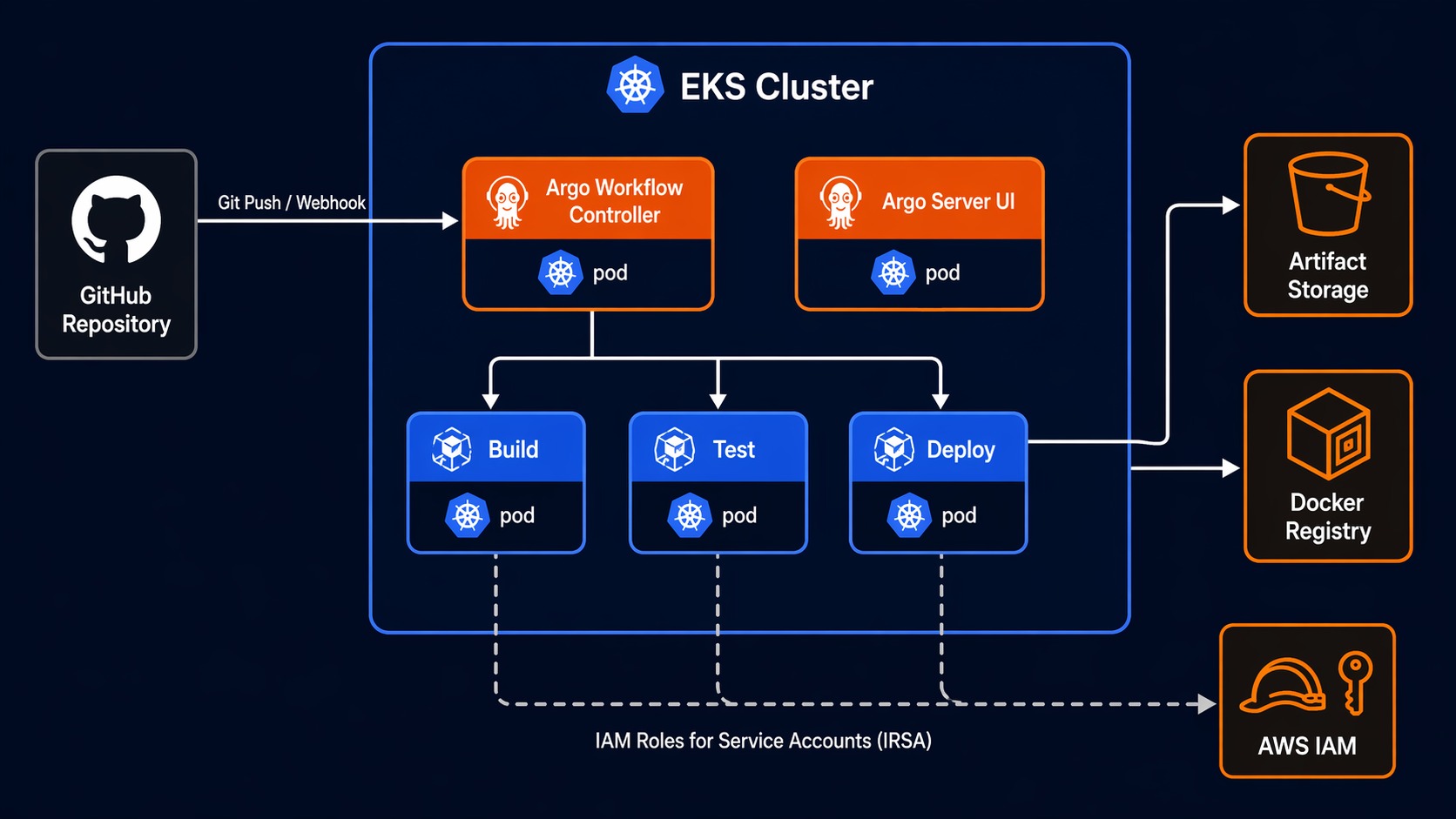
This installs the workflow controller and the Argo Server UI. The UI is optional but extremely helpful for visualizing pipeline execution and debugging failed steps.
Configure S3 Artifact Storage
Create a ConfigMap that tells Argo Workflows where to store artifacts. On EKS, you should use IRSA (IAM Roles for Service Accounts) so the controller gets S3 credentials from the pod identity rather than static access keys.
apiVersion: v1
kind: ConfigMap
metadata:
  name: workflow-controller-configmap
  namespace: argo
data:
  artifactRepository: |
    s3:
      bucket: my-argo-artifacts
      endpoint: s3.amazonaws.com
      region: us-east-1
      roleARN: arn:aws:iam::123456789012:role/argo-workflows-s3
      keyFormat: "//"
The roleARN points to an IAM role that the controller’s service account assumes via IRSA. Create the role with a policy that allows s3:GetObject, s3:PutObject, and s3:DeleteObject on the artifacts bucket.
Apply it:
kubectl apply -f workflow-controller-configmap.yaml

# Restart the controller to pick up the new config
kubectl rollout restart deployment argo-workflows-controller -n argo
Verify the Installation
# Check the controller is running
kubectl get pods -n argo

# Submit a test workflow
kubectl create -f - <<EOF
apiVersion: argoproj.io/v1alpha1
kind: Workflow
metadata:
  generateName: hello-world-
spec:
  entrypoint: main
  templates:
  - name: main
    container:
      image: busybox
      command: [echo]
      args: ["Argo Workflows is running on EKS"]
EOF
If you see the workflow complete successfully, the setup is working.
Building a CI/CD Pipeline: DAG Template
Here is a complete CI/CD pipeline for a Go microservice. This pipeline builds the application, runs unit tests, runs integration tests, builds a Docker image, pushes it to ECR, and deploys to the staging environment – all as a DAG where independent steps run in parallel.
apiVersion: argoproj.io/v1alpha1
kind: Workflow
metadata:
  generateName: microservice-ci-cd-
  labels:
    app: my-service
    pipeline: ci-cd
spec:
  serviceAccountName: workflow-runner
  entrypoint: ci-cd-pipeline
  arguments:
    parameters:
    - name: git-repo
      value: "https://github.com/myorg/my-service.git"
    - name: git-revision
      value: "main"
    - name: image-tag
      value: "latest"
    - name: ecr-repo
      value: "123456789012.dkr.ecr.us-east-1.amazonaws.com/my-service"

  templates:
  # Main DAG - the pipeline entry point
  - name: ci-cd-pipeline
    dag:
      tasks:
      - name: clone-repo
        template: git-clone

      - name: unit-tests
        template: run-tests
        dependencies: [clone-repo]
        arguments:
          parameters:
          - name: test-type
            value: unit
          artifacts:
          - name: source-code
            from: ""

      - name: integration-tests
        template: run-tests
        dependencies: [clone-repo]
        arguments:
          parameters:
          - name: test-type
            value: integration
          artifacts:
          - name: source-code
            from: ""

      - name: lint
        template: run-lint
        dependencies: [clone-repo]
        arguments:
          artifacts:
          - name: source-code
            from: ""

      - name: build-image
        template: docker-build-push
        dependencies: [unit-tests, integration-tests, lint]
        arguments:
          artifacts:
          - name: source-code
            from: ""

      - name: deploy-staging
        template: deploy
        dependencies: [build-image]
        arguments:
          parameters:
          - name: environment
            value: staging
          - name: image-tag
            value: ""

  # Step templates
  - name: git-clone
    container:
      image: alpine/git:latest
      command: [sh, -c]
      args: [
        "git clone  /src &&
         cd /src &&
         git checkout "
      ]
    outputs:
      artifacts:
      - name: source-code
        path: /src

  - name: run-tests
    inputs:
      parameters:
      - name: test-type
      artifacts:
      - name: source-code
        path: /src
    container:
      image: golang:1.23
      command: [sh, -c]
      args: [
        "cd /src && go test -v -tags= ./... 2>&1 | tee /tmp/test-results.txt"
      ]
    outputs:
      artifacts:
      - name: test-results
        path: /tmp/test-results.txt

  - name: run-lint
    inputs:
      artifacts:
      - name: source-code
        path: /src
    container:
      image: golangci/golangci-lint:latest
      command: [sh, -c]
      args: ["cd /src && golangci-lint run --timeout 5m ./..."]

  - name: docker-build-push
    inputs:
      artifacts:
      - name: source-code
        path: /src
    outputs:
      parameters:
      - name: image-tag
        valueFrom:
          path: /tmp/image-tag.txt
    container:
      image: amazon/aws-cli:latest
      env:
      - name: ECR_REPO
        value: ""
      command: [sh, -c]
      args: [
        "cd /src &&
         aws ecr get-login-password --region us-east-1 | docker login --username AWS --password-stdin $(echo $ECR_REPO | cut -d'/' -f1) &&
         docker build -t $ECR_REPO: . &&
         docker push $ECR_REPO: &&
         echo '$ECR_REPO:' > /tmp/image-tag.txt"
      ]
      volumeMounts:
      - name: docker-sock
        mountPath: /var/run/docker.sock
    volumes:
    - name: docker-sock
      hostPath:
        path: /var/run/docker.sock

  - name: deploy
    inputs:
      parameters:
      - name: environment
      - name: image-tag
    resource:
      action: apply
      manifest: |
        apiVersion: apps/v1
        kind: Deployment
        metadata:
          name: my-service
          namespace:
        spec:
          template:
            spec:
              containers:
              - name: my-service
                image:
Let me break down the key parts of this pipeline:
DAG structure. The ci-cd-pipeline template defines a DAG with six tasks. clone-repo runs first. Then unit-tests, integration-tests, and lint run in parallel because they all depend only on clone-repo. build-image waits for all three to complete. deploy-staging waits for the image build. This is where the time savings come from – three test/lint steps that take 2 minutes each run in 2 minutes total, not 6 minutes sequentially.
Artifact passing. The cloned source code is an artifact. Each downstream task receives it as an input artifact. Argo Workflows handles the S3 upload/download automatically – you never configure paths or buckets per step. The controller stores artifacts in the S3 bucket you configured earlier.
Resource template for deployment. The deploy step uses a resource template, which applies a Kubernetes manifest directly. This is how you update deployments without switching to a separate tool. For production environments, you would combine this with ArgoCD for GitOps continuous delivery so the deploy step commits the new image tag to Git and ArgoCD syncs the change.
The Steps Template Alternative
The DAG template is not your only option. Argo Workflows also supports a steps template, which looks more like traditional CI/CD stages:
apiVersion: argoproj.io/v1alpha1
kind: Workflow
metadata:
  generateName: steps-example-
spec:
  entrypoint: main
  templates:
  - name: main
    steps:
    # Stage 1: Build
    - - name: build
        template: build-app

    # Stage 2: Test (parallel)
    - - name: unit-test
        template: run-unit-tests
      - name: integration-test
        template: run-integration-tests
      - name: security-scan
        template: run-security-scan

    # Stage 3: Deploy
    - - name: deploy
        template: deploy-app
        arguments:
          parameters:
          - name: image-tag
            value: ""

  - name: build-app
    container:
      image: golang:1.23
      command: [sh, -c]
      args: ["go build -o /tmp/app . && echo $(date +%s) > /tmp/image-tag.txt"]
    outputs:
      parameters:
      - name: image-tag
        valueFrom:
          path: /tmp/image-tag.txt

  - name: run-unit-tests
    container:
      image: golang:1.23
      command: [sh, -c]
      args: ["go test ./..."]

  - name: run-integration-tests
    container:
      image: golang:1.23
      command: [sh, -c]
      args: ["go test -tags=integration ./..."]

  - name: run-security-scan
    container:
      image: aquasec/trivy:latest
      command: [sh, -c]
      args: ["trivy fs --severity HIGH,CRITICAL /src"]

  - name: deploy-app
    inputs:
      parameters:
      - name: image-tag
    container:
      image: bitnami/kubectl:latest
      command: [sh, -c]
      args: ["kubectl set image deployment/my-service my-service=ecr-repo:"]
The steps template uses nested lists. Each inner list runs in parallel. Each outer list is a sequential stage. This is more intuitive if you are coming from Jenkins or GitLab CI.
When to use steps vs DAG:
- Use steps for straightforward stage-based pipelines where you think in terms of “build, then test, then deploy.”
- Use DAG for complex pipelines where multiple branches fan out and converge, or where you need fine-grained control over which tasks depend on which.
I use DAG for most production pipelines because the dependency graph is explicit. With steps, you have to read the nesting carefully to understand what runs when. With DAG, every task lists its dependencies directly.
CI/CD Pipeline Diagram
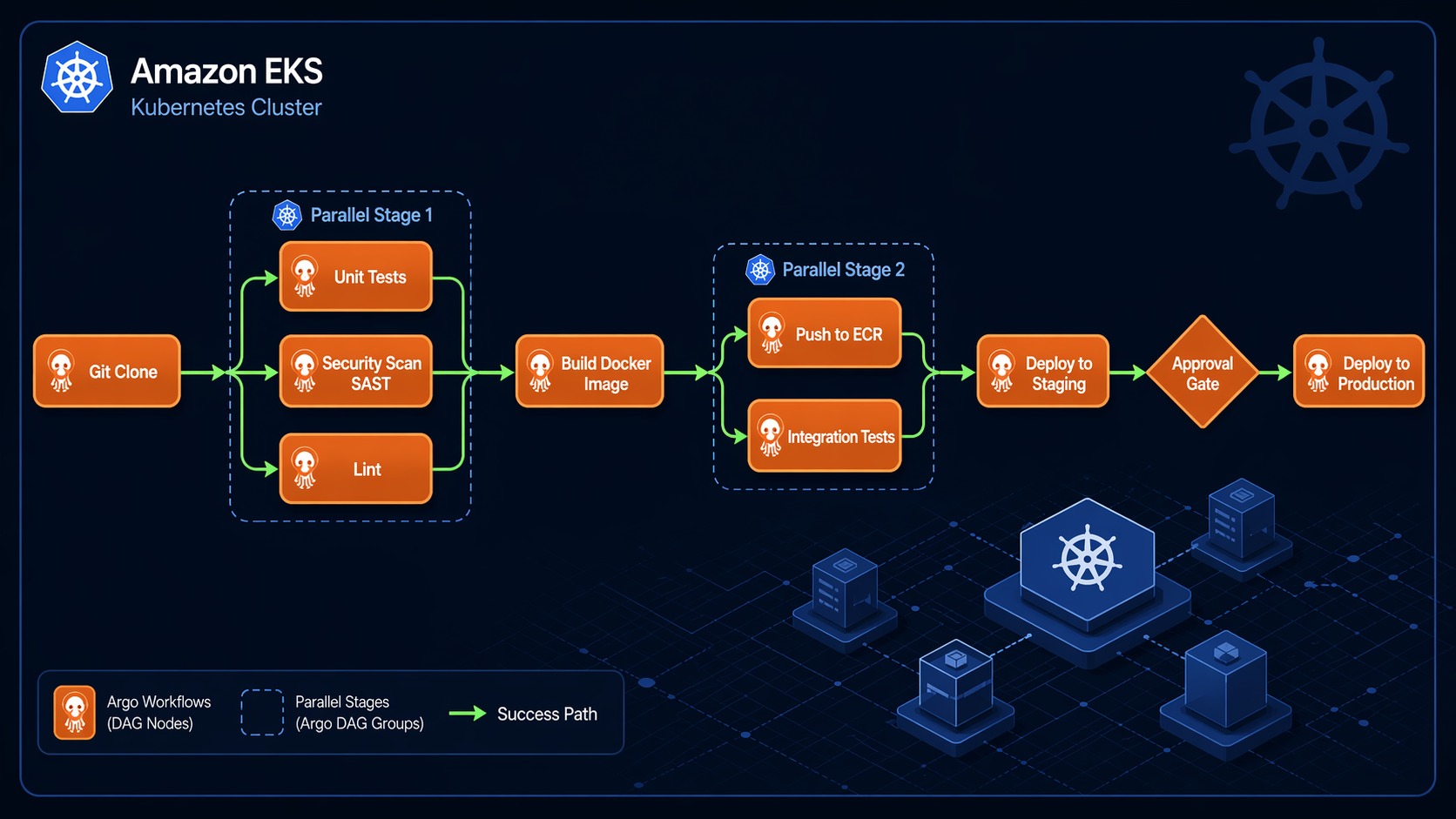
Here is what the full CI/CD pipeline looks like in Argo Workflows. This diagram shows the DAG execution flow from git clone through production deployment:
┌──────────────┐
│  git clone   │  Clone repo, checkout branch
└──────┬───────┘
       │
       ▼
┌──────┴──────────────────────────────────┐
│         Fan-out (parallel execution)     │
│                                          │
│  ┌──────────────┐  ┌───────────────────┐ │
│  │  unit tests  │  │ integration tests │ │
│  └──────┬───────┘  └────────┬──────────┘ │
│         │                   │            │
│  ┌──────┴───────┐          │            │
│  │  lint check  │          │            │
│  └──────┬───────┘          │            │
│         │                   │            │
└─────────┼───────────────────┼────────────┘
          │                   │
          ▼                   ▼
   ┌──────────────────────────────┐
   │       build Docker image     │  Waits for all 3 tasks
   │       push to ECR            │
   └──────────────┬───────────────┘
                  │
                  ▼
   ┌──────────────────────────────┐
   │      deploy to staging       │  Update K8s Deployment
   └──────────────┬───────────────┘
                  │
                  ▼
   ┌──────────────────────────────┐
   │      smoke tests (staging)   │  Verify deployment health
   └──────────────┬───────────────┘
                  │
                  ▼
   ┌──────────────────────────────┐
   │      manual approval gate    │  Suspend template
   └──────────────┬───────────────┘
                  │
                  ▼
   ┌──────────────────────────────┐
   │    deploy to production      │  Update K8s Deployment
   └──────────────────────────────┘
The fan-out in the middle is the key performance win. Unit tests, integration tests, and lint checks all run simultaneously. If unit tests take 3 minutes, integration tests take 5 minutes, and lint takes 1 minute, the total wait is 5 minutes instead of 9.
The manual approval gate uses a suspend template:
- name: approval-gate
  suspend:
    duration: "0"
When the workflow reaches this step, it pauses. You can resume it from the Argo Server UI, the CLI (argo resume <workflow-name>), or via an API call. This is how you gate production deployments without building a custom approval system.
Triggering Workflows from Git Events
A CI/CD pipeline is only useful if it runs automatically when code changes. Argo Workflows does not include a built-in git webhook receiver, but there are three common approaches:
Option 1: Argo Events
Argo Events is a sibling project that handles event-driven triggers. You define a Sensor that watches for GitHub webhooks and triggers a Workflow:
apiVersion: argoproj.io/v1alpha1
kind: Sensor
metadata:
  name: github-trigger
spec:
  dependencies:
  - name: github-push
    eventSourceName: github
    eventName: push
  triggers:
  - template:
      name: trigger-workflow
      k8s:
        operation: create
        source:
          resource:
            apiVersion: argoproj.io/v1alpha1
            kind: Workflow
            metadata:
              generateName: microservice-ci-cd-
            spec:
              entrypoint: ci-cd-pipeline
              arguments:
                parameters:
                - name: git-revision
                  value: ""
        parameters:
        - src:
            dependencyName: github-push
          dest: spec.arguments.parameters.0.value
This is the most Kubernetes-native approach. Argo Events runs inside your cluster, receives the webhook, extracts the git revision, and submits the workflow.
Option 2: GitHub Actions Trigger
If you use GitHub, a simple alternative is to trigger the workflow from a GitHub Action:
# .github/workflows/trigger-argo.yaml
name: Trigger Argo Workflow
on:
  push:
    branches: [main]
jobs:
  trigger:
    runs-on: ubuntu-latest
    steps:
    - uses: aws-actions/configure-aws-credentials@v4
      with:
        role-to-assume: arn:aws:iam::123456789012:role/github-argo-trigger
        aws-region: us-east-1
    - run: |
        aws eks update-kubeconfig --name my-cluster --region us-east-1
        kubectl create -f - <<EOF
        apiVersion: argoproj.io/v1alpha1
        kind: Workflow
        metadata:
          generateName: microservice-ci-cd-
        spec:
          entrypoint: ci-cd-pipeline
          arguments:
            parameters:
            - name: git-revision
              value: "$"
        EOF
This is simpler to set up but introduces GitHub Actions as a dependency. The Action does not run any build logic – it just submits the workflow to EKS.
Option 3: Cron with Polling
For teams that want zero external dependencies, a CronWorkflow polls the git repository:
apiVersion: argoproj.io/v1alpha1
kind: CronWorkflow
metadata:
  name: ci-poll-trigger
spec:
  schedule: "*/5 * * * *"
  workflowSpec:
    entrypoint: check-and-build
    templates:
    - name: check-and-build
      script:
        image: alpine/git:latest
        command: [sh, -c]
        source: |
          CURRENT=$(git ls-remote https://github.com/myorg/my-service.git HEAD | awk '{print $1}')
          LAST=$(cat /tmp/last-commit 2>/dev/null || echo "")
          if [ "$CURRENT" != "$LAST" ]; then
            echo "$CURRENT" > /tmp/last-commit
            echo "New commit detected: $CURRENT"
            # Trigger build workflow here
          else
            echo "No new commits"
          fi
This is the least recommended approach due to the 5-minute polling delay, but it works for teams that cannot expose webhooks.
IRSA and Security on EKS
Security matters more in CI/CD than almost any other workload, because your pipeline has access to source code, container registries, and deployment targets.
Service Accounts and IAM Roles
Never give the workflow controller cluster-admin. Instead, create separate service accounts for different pipeline types:
# For build pipelines - needs ECR access
apiVersion: v1
kind: ServiceAccount
metadata:
  name: workflow-runner
  namespace: argo
  annotations:
    eks.amazonaws.com/role-arn: arn:aws:iam::123456789012:role/argo-ci-role
---
# For deploy pipelines - needs broader K8s permissions
apiVersion: v1
kind: ServiceAccount
metadata:
  name: workflow-deployer
  namespace: argo
  annotations:
    eks.amazonaws.com/role-arn: arn:aws:iam::123456789012:role/argo-deploy-role
The IAM roles should follow least-privilege. The CI role needs ECR permissions only:
{
  "Version": "2012-10-17",
  "Statement": [
    {
      "Effect": "Allow",
      "Action": [
        "ecr:GetAuthorizationToken",
        "ecr:BatchCheckLayerAvailability",
        "ecr:GetDownloadUrlForLayer",
        "ecr:BatchGetImage",
        "ecr:PutImage",
        "ecr:InitiateLayerUpload",
        "ecr:UploadLayerPart",
        "ecr:CompleteLayerUpload"
      ],
      "Resource": "*"
    },
    {
      "Effect": "Allow",
      "Action": ["s3:PutObject", "s3:GetObject", "s3:DeleteObject"],
      "Resource": "arn:aws:s3:::my-argo-artifacts/*"
    }
  ]
}
Pod Security and Resource Limits
Always set resource limits on workflow pods. A runaway build can consume an entire node:
spec:
  podSpecPatch: |
    terminationGracePeriodSeconds: 300
    securityContext:
      runAsNonRoot: true
  templates:
  - name: build
    container:
      image: golang:1.23
      resources:
        requests:
          memory: "512Mi"
          cpu: "500m"
        limits:
          memory: "2Gi"
          cpu: "2"
Argo Workflows also supports podGC to clean up completed pods, which prevents clutter:
spec:
  podGC:
    strategy: OnPodCompletion
Reusable Workflow Templates
One of the most powerful features is the WorkflowTemplate CRD. You define reusable pipeline components that other workflows reference. This is how you avoid copy-pasting the same build steps across ten microservices.
apiVersion: argoproj.io/v1alpha1
kind: WorkflowTemplate
metadata:
  name: go-build-template
  namespace: argo
spec:
  entrypoint: build
  arguments:
    parameters:
    - name: repo-url
    - name: revision
      value: main
    - name: ecr-repo
  templates:
  - name: build
    inputs:
      artifacts:
      - name: source
        path: /src
    container:
      image: golang:1.23
      command: [sh, -c]
      args: ["cd /src && go build -o /tmp/app ."]
    outputs:
      artifacts:
      - name: binary
        path: /tmp/app

  - name: test
    inputs:
      artifacts:
      - name: source
        path: /src
    container:
      image: golang:1.23
      command: [sh, -c]
      args: ["cd /src && go test -v ./..."]
Then reference it from any workflow:
apiVersion: argoproj.io/v1alpha1
kind: Workflow
metadata:
  generateName: my-service-ci-
spec:
  workflowTemplateRef:
    name: go-build-template
  arguments:
    parameters:
    - name: repo-url
      value: "https://github.com/myorg/my-service.git"
    - name: ecr-repo
      value: "123456789012.dkr.ecr.us-east-1.amazonaws.com/my-service"
This pattern is how you build an internal CI/CD platform. Define standard templates for Go services, Node.js services, Terraform deployments, and Helm releases. Teams reference the template and provide their repo URL and image name. No duplication, no drift.
Combining with ArgoCD for Full GitOps
Argo Workflows handles the CI part – building, testing, and pushing images. For the CD part, combining it with ArgoCD gives you a complete GitOps pipeline.
The pattern:
- Argo Workflow builds the image and pushes it to ECR
- The workflow commits the new image tag to your GitOps repository
- ArgoCD detects the change and syncs it to the cluster
The deploy step in your workflow becomes a git commit instead of a kubectl apply:
- name: update-manifest
  inputs:
    parameters:
    - name: image-tag
  container:
    image: alpine/git:latest
    command: [sh, -c]
    args: [
      "git clone https://github.com/myorg/gitops-manifests.git /repo &&
       cd /repo &&
       yq e '.spec.template.spec.containers[0].image = \"\"' -i overlays/staging/deployment.yaml &&
       git config user.email '[email protected]' &&
       git config user.name 'Argo CI' &&
       git add . &&
       git commit -m 'Update my-service to ' &&
       git push"
    ]
ArgoCD detects the commit, syncs the change, and your service is deployed. Full audit trail, rollback capability via git revert, and no direct cluster access from the CI pipeline. For a deeper guide on the ArgoCD setup, see the ArgoCD on EKS GitOps guide.
Monitoring and Troubleshooting
Argo Server UI
The Argo Server UI at https://argo-server.argo.svc.cluster.local:2746 shows every workflow, its status, and the DAG visualization. Click on any step to see logs, inputs, outputs, and artifacts. This is where you will spend most of your debugging time.
Prometheus Metrics
The controller exposes Prometheus metrics. Key ones to watch:
argo_workflows_pods_count– total pods created by workflowsargo_workflows_queue_length– pending workflows in the queueargo_workflows_error_count– workflow errors by type
Common Issues
Workflows stuck in Pending. Usually a resource quota issue. Check kubectl describe quota -n argo and verify your node group has capacity. EKS auto-scaling groups may need time to add nodes.
Artifact upload failures. Check the IRSA configuration. Run aws sts get-caller-identity inside a workflow pod to verify the pod is assuming the correct IAM role.
OOMKilled during build. Your Go build or Docker build needs more memory. Increase the resource limits on the container template.
Timeout during ECR login. The aws ecr get-login-password call can fail if the IAM role does not have ECR permissions or if the network policy blocks outbound HTTPS from the workflow namespace.
What This Setup Replaces
Going back to where I started: the Jenkins cluster that needed a full-time babysitter. After migrating to Argo Workflows on EKS, here is what changed:
- Zero CI infrastructure management. No Jenkins master to patch, no agents to scale, no plugins to update.
- Pipeline times dropped 40%. DAG-based parallelism ran independent steps simultaneously. What took 12 minutes on Jenkins (sequential stages) took 7 minutes on Argo Workflows.
- Every step is reproducible. Since each step is a container with a pinned image, builds are deterministic. No “works on my agent” problems.
- Debugging is faster. The Argo UI shows the DAG, per-step logs, and artifacts. No more digging through Jenkins console output.
- No Groovy. YAML has its limitations, but my entire team can read and modify pipeline configs without learning a DSL.
Argo Workflows is not the right choice for every team. If you have simple pipelines and Jenkins is working, the migration may not be worth the effort. But if you are running on EKS, fighting CI infrastructure overhead, or need complex DAG-based pipelines, Argo Workflows gives you a Kubernetes-native system that scales with your cluster and disappears into the infrastructure you already manage.
Sources
Explore more like this

Kill the Docker Hub Token: OIDC Trust for GitHub Actions
On July 31, 2026, Docker shipped OIDC connections for GitHub Actions to any organization on a Docker Team, Docker Business, or Docker Hardened Images subscription, plus organizations in the Docker-Sponsored...

Lambda SQS Provisioned Mode Now Scales to 10,000 Pollers: The Throughput Math That Decides If You Need It
AWS raised the poller ceiling on August 3, 2026. Provisioned Mode for Amazon SQS event source mappings went from a maximum of 2,000 event pollers to 10,000, which puts the...

CloudWatch Managed Prometheus Collectors on EKS: Delete the Scraper, Keep the Metrics
On July 31, 2026, AWS shipped managed Prometheus collectors for Amazon CloudWatch. The pitch is short: you hand CloudWatch a scrape configuration and a VPC connection, and AWS provisions, scales,...

Comments