
Custom Keyboard Shortcut Linux [Example: Generate AWS MFA Tokens]

![Custom Keyboard Shortcut Linux [Example: Generate AWS MFA Tokens]](/wp-content/uploads/sites/5/2022/02/20220201_043310_0000.png)
I’ve been using this trick for a few months now. Every morning I need my AWS MFA code. Open phone, find authenticator app, squint at 6 digits, type them in manually. It gets old. So I wrote a shell script that spits out the current token and drops it in my clipboard. Bound it to a keyboard shortcut. Now I just hit three keys instead of fumbling with my phone.
The pattern isn’t specific to AWS, either. You can attach any shell script to a keyboard shortcut. Automate anything you can script.
What You Need
Three tools handle this whole thing:
oathtool - Generates TOTP codes from a base32 secret. Install it with sudo apt install oathtool.
xclip - Puts text in your X11 clipboard from the command line. sudo apt install xclip.
zbarimg - Scans QR codes. AWS gives you one when you set up an MFA device. This extracts the secret so you don’t need your phone. sudo apt install zbar-tools.
Getting Your MFA Secret
When you register an MFA device in the AWS console, you get a QR code. Download that image to your machine instead of scanning it with your phone.
Run:
zbarimg qrcode.png
You’ll see output like:
QR-Code:otpauth://totp/Amazon%20Web%20Services:username?secret=YOURSECRETHERE&issuer=Amazon%20Web%20Services
scanned 1 barcode symbols from 1 images in 0 seconds
Extract just the secret:
secret=YOURSECRETHERE
Copy that line into a file. You only do this once.
The Script
#!/usr/bin/env bash
DURATION=30
SECRET_KEY=$(cat "$1" | awk -F '=' '{print $2}' | xargs)
TOKEN=$(oathtool -s $DURATION --totp --base32 "$SECRET_KEY")
echo "$TOKEN"
echo "$TOKEN" | xclip -selection clipboard
Make it executable:
chmod +x generate_token.sh
Test it:
./generate_token.sh /path/to/your/secret-file
It prints the token to your terminal and puts a copy in your clipboard. Paste wherever you need it.
Setting Up the Keyboard Shortcut
This varies by desktop environment, but the idea is the same everywhere.
GNOME: Go to Settings > Keyboard > Keyboard Shortcuts > Custom Shortcuts. Click the + button. Give it a name, enter the full path to your script as the command.
Cinnamon: Same idea. Open Keyboard in System Settings, find Custom Shortcuts, add a new entry pointing to your script.
Most major DEs work this way. The screenshot below shows what it looks like in GNOME.
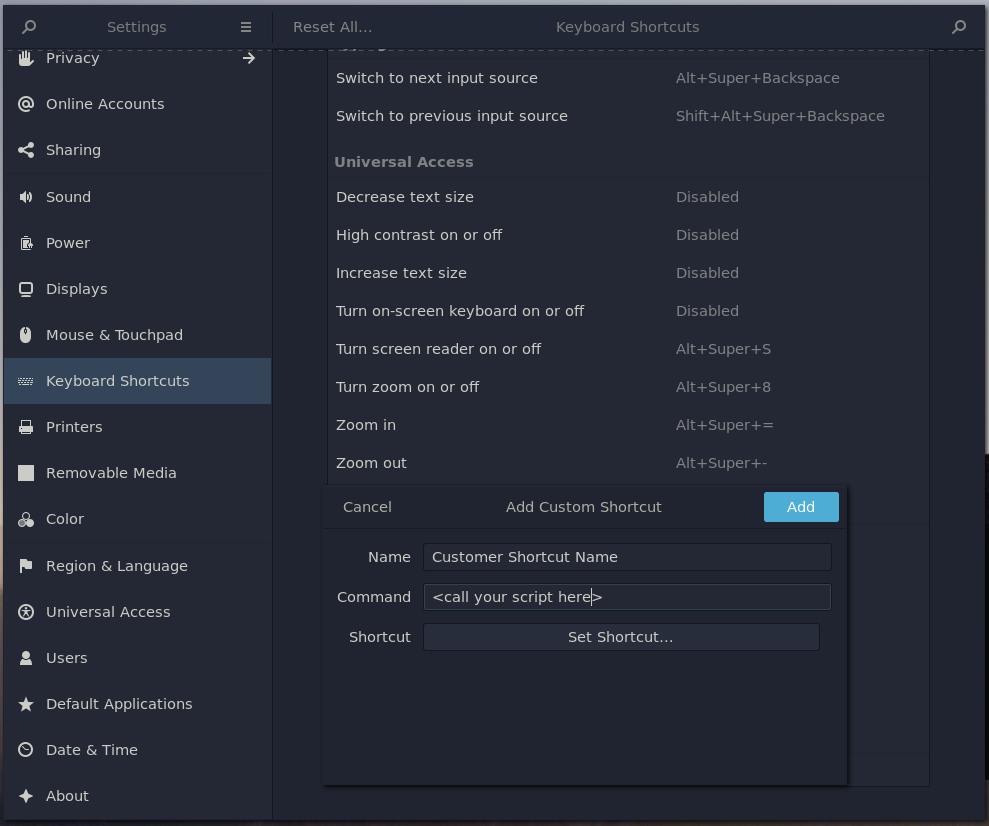
Create a Keyboard Shortcut Linux
Pick a shortcut that doesn’t conflict with anything. I use Super+M.
A Few Notes
Your token is valid for 30 seconds. That’s standard TOTP behavior. Paste it within that window and it works. Miss the window, just run the shortcut again.
The AWS get-session-token command also requires MFA when your IAM policy demands it. Once you have your token, call it like this:
aws sts get-session-token \
    --duration-seconds 900 \
    --serial-number "arn:aws:iam::123456789:mfa/username" \
    --token-code 123456
This returns temporary credentials valid for 15 minutes. Chain it with a shortcut that auto-fills the token code and your morning setup runs itself.
What Else You Can Do
Script + clipboard + shortcut covers a lot of ground. CLI password managers. Pulling a random password from your vault. Kicking off a deploys from a hotkey. Fetching your external IP. Anything you find yourself typing repeatedly.
The limit is whatever you can put in a shell script.
Articles for you
Explore more like this
How to Configure Docker Rotate Log on Amazon Linux 2
DevOps engineers are always looking for innovative ways to improve business operations. One such situation was in a growing e-commerce company that required an efficient log management solution for its...
Reasons to Love Linux
The Linux operating system (OS) is becoming increasingly popular today, as it works on servers, desktop computers, laptops, and various mobile devices and provides a system basis for Android, Tizen,...
Adding SSH Key on Gitlab – Speed up SSH communication
If you work with GitLab, you probably type your username and password every time you push code. It gets old fast. SSH keys fix that: once set up, GitLab authenticates...

Comments