
ECS Canary and Linear Deployments with Network Load Balancers


On February 4, 2026, Amazon ECS added native support for linear and canary deployment strategies for services using Network Load Balancers. That is a small announcement with a large operational consequence. Workloads that need TCP, UDP, low latency, long-lived connections, or static IP addresses can now use managed incremental traffic shifting without leaving the ECS deployment model.
Before this launch, many NLB-backed ECS services were stuck with a blunt choice. Use rolling updates and accept limited traffic-shift control, or build a custom blue/green pattern with extra target groups, listeners, automation, and rollback logic. Application Load Balancer users had more obvious progressive-delivery paths. NLB users often had to do more work.
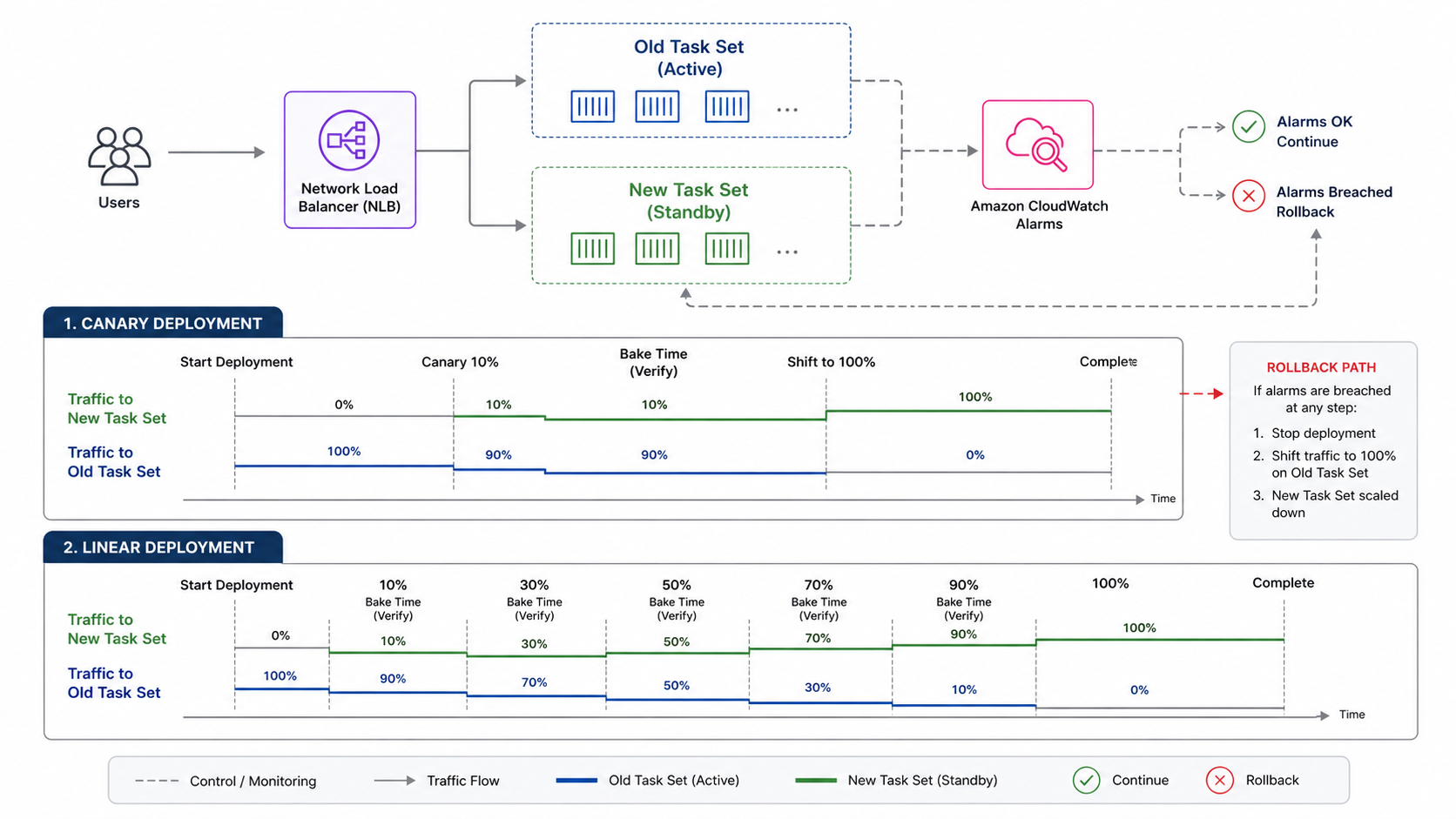
The new support does not make every ECS deployment safe by default. It gives you a better release lever. You still need health checks, CloudWatch alarms, service metrics, connection-draining expectations, rollback criteria, and a deployment shape that matches your protocol.
What AWS Added
AWS says ECS now supports linear and canary deployment strategies for ECS services using Network Load Balancers. The announcement calls out applications that commonly use NLB: TCP and UDP services, low-latency systems, long-lived connections, and workloads that require static IP addresses. It also says deployments can integrate with Amazon CloudWatch alarms to automatically stop or roll back if issues are detected.
The ECS documentation describes four managed strategy families: rolling, blue/green, linear, and canary.
| Strategy | Traffic behavior | Good fit | Main tradeoff |
|---|---|---|---|
| Rolling | Replace tasks gradually | Normal stateless services, cost-sensitive services | Less precise traffic control |
| Blue/green | Create a new environment, then switch traffic | Fast rollback and pre-traffic validation | More duplicate capacity and target group complexity |
| Linear | Shift equal traffic increments over time | Gradual validation and performance monitoring | Slower rollout |
| Canary | Shift a small percentage first, then the rest after a bake period | Feature validation and blast-radius control | Requires strong alarms during bake time |
The difference is not just vocabulary. Linear and canary deployments let you observe the new task set under real production traffic before completing the rollout. That is especially important for NLB workloads, where problems can hide behind long-lived connections, binary protocols, or clients that retry aggressively.
BitsLovers has covered ECS operational patterns in the Amazon ECS managed daemons guide and the ECS Express Mode guide. This post focuses on progressive delivery for the NLB services that usually carry the sharpest operational edges.
Why NLB Workloads Needed This
Network Load Balancers are used when L7 routing is not the point. You choose NLB for L4 behavior: TCP, UDP, TLS pass-through, static IP addresses, very high performance, or long-lived connections. That often means the application protocol owns behavior that an ALB would otherwise expose through HTTP metrics, target response codes, and path-based routing.
That makes deployment safety harder.
| NLB workload type | Why rolling updates can be risky | Canary or linear benefit |
|---|---|---|
| Financial transaction service | Small regression can affect high-value traffic | Limit initial exposure and watch business metrics |
| Real-time messaging | Long-lived connections hide bad behavior | Observe connection churn before full rollout |
| Online gaming backend | Latency and packet behavior matter more than HTTP status | Shift gradually and watch protocol metrics |
| gRPC over TCP/TLS | Client channel behavior can mask target changes | Canary new tasks with connection-level telemetry |
| Static IP partner integration | Partner clients may retry slowly or cache paths | Avoid all-at-once exposure |
The AWS announcement explicitly mentions online gaming backends, financial transaction systems, and real-time messaging services. Those are exactly the systems where “the service is healthy” can be an incomplete signal. A target can pass an NLB health check while still breaking a subset of protocol behavior.
This is why progressive delivery needs application metrics. NLB health checks tell you whether targets are reachable. They do not prove the new version handles a payment reversal, game session rejoin, WebSocket reconnect, or binary message negotiation correctly.
Canary Versus Linear
Use canary when you want to expose a small slice of traffic, wait, and then finish. Use linear when you want to increase exposure in equal increments and observe each step.
| Decision factor | Canary | Linear |
|---|---|---|
| Best for | Unknown feature risk | Performance or capacity validation |
| Traffic shape | Small first step, then large final step | Equal increments over time |
| Operator attention | Intense during bake period | Repeated at each increment |
| Failure visibility | Early if alarms are strong | Easier to spot gradual degradation |
| Rollout time | Usually shorter | Usually longer |
| Capacity pressure | New and old task sets overlap during bake | Overlap lasts through gradual shift |
My default for high-risk behavior changes is canary. Put 5% or 10% of traffic on the new revision, wait long enough to see real behavior, then complete. My default for performance-sensitive changes is linear. Move 10% or 20% at a time and watch latency, connection count, CPU, memory, queue depth, and business metrics at each step.
The wrong choice is using progressive delivery without enough bake time. A canary that waits 30 seconds for a service with 15-minute client sessions is theater. A linear rollout with no alarms is a slower rolling update, not a safety mechanism.
The Metrics That Actually Matter
For NLB deployments, split signals into four groups: load balancer health, ECS service health, application protocol health, and business health.
| Signal group | Metrics or checks | Why it matters |
|---|---|---|
| NLB | Healthy host count, unhealthy host count, target reset count, active flow count | Confirms target reachability and connection behavior |
| ECS | Running task count, deployment state, CPU, memory, task restarts | Confirms scheduler and capacity health |
| Application | p95/p99 latency, protocol error rate, retry rate, connection churn | Confirms the new version handles real protocol traffic |
| Business | payment failures, match disconnects, message delivery failures, job completion rate | Confirms users are not harmed |
CloudWatch alarms should not be decorative. If the deployment can roll back automatically, alarms define the rollback contract.
Good alarms are:
- Fast enough to catch a bad canary before the final shift.
- Specific enough to avoid rolling back for unrelated background noise.
- Sensitive to the new version’s behavior, not only global service health.
- Tested with synthetic failures before you rely on them.
This is where the OpenTelemetry and CloudWatch observability guide becomes relevant. If you cannot break down metrics by task set, version, deployment ID, or target group, a canary can look fine because the stable version still carries most traffic.
Tag or label every metric with version information where the stack allows it. At minimum, log deployment ID and task definition revision in structured logs.
Designing The Alarm Contract
The alarm contract is the most important part of an automated canary. It says what failure means.
Do not start with “rollback on any alarm.” Start with the service promise. A payments service may care about authorization failure rate and p99 latency. A messaging service may care about delivery acknowledgement delay and reconnect rate. A game backend may care about session join failures and packet processing latency. The NLB only sees targets and flows. Your users experience protocol behavior.
I like two alarm tiers:
| Alarm tier | Example | Deployment action |
|---|---|---|
| Hard rollback | New-version error rate above 2% for 3 datapoints | Stop and roll back |
| Human review | p99 latency 25% above baseline for 10 minutes | Pause or require approval |
Hard rollback alarms must be precise. If they fire constantly for unrelated noise, engineers will disable them. Human-review alarms can be more exploratory. They should slow the rollout when the signal is suspicious but not conclusive.
Missing data needs an explicit setting. For a small canary, some metrics may have low traffic. Treating missing data as breaching can roll back a healthy deployment. Treating missing data as not breaching can hide a canary that receives no traffic. Pick intentionally and test it with a dry run.
Target Group And Health Check Design
NLB health checks are simple compared with application health. That simplicity is useful, but it can mislead.
For TCP services, a successful health check may only prove that the port accepts connections. For TLS services, it may prove the listener is reachable. It may not prove the service can process a real message. When the application protocol allows it, expose a dedicated health endpoint or lightweight protocol command that checks dependencies without mutating state.
Health check recommendations:
| Setting | Recommendation | Reason |
|---|---|---|
| Health path or command | Test a real readiness condition | Avoid routing to initialized-but-broken tasks |
| Interval and threshold | Balance speed with noise | Fast rollback needs fast detection, but noisy health hurts availability |
| Deregistration delay | Match connection behavior | Long-lived connections need graceful drain time |
| Grace period | Give new tasks time to warm up | Cold starts and cache warm-up can trigger false failures |
| Per-AZ target health | Watch each zone separately | One unhealthy zone can hide under global averages |
Keep liveness and readiness separate inside the container if you can. Liveness answers “should the orchestrator restart me?” Readiness answers “should the load balancer send me traffic?” During deployment, readiness matters most.
Connection Draining And Long-Lived Clients
NLB workloads often have long-lived connections. That can make traffic shifting less clean than the diagram suggests.
When you move new connection traffic to a new task set, existing client connections may remain on old tasks until they disconnect or the target deregistration process completes. That is usually good. It prevents abrupt drops. It also means the new version may not receive the expected share of traffic immediately if your clients keep connections open for a long time.
Design reviews should answer these questions:
| Question | Why it matters |
|---|---|
| How long do clients keep connections open? | Bake time must exceed a meaningful portion of session behavior |
| Do clients reconnect automatically? | A deployment can trigger reconnect storms |
| What happens to in-flight requests during deregistration? | Some protocols need graceful shutdown logic |
| Can old and new versions coexist? | Long-lived connections create mixed-version windows |
| Are protocol changes backward compatible? | Canary is not a substitute for compatibility |
For connection-heavy services, add a pre-stop behavior inside the container. Stop accepting new work, keep health status honest, finish in-flight work where possible, and exit within the deregistration and ECS stop timeout expectations. Test it. Do not assume SIGTERM handling is correct.
A Minimal ECS Service Shape
The exact API fields can vary by deployment controller and current tooling support, so treat this as a conceptual checklist rather than a copy-paste template.
An ECS service using progressive delivery with NLB needs:
service:
  name: payments-tcp-api
  launchType: FARGATE
  loadBalancer:
    type: network
    listener: payments-nlb-listener
    targetGroups:
      production: payments-blue
      test: payments-green
  deploymentConfiguration:
    strategy: CANARY
    canary:
      percentage: 10
      bakeTimeMinutes: 15
    alarms:
      enable: true
      rollback: true
      names:
        - payments-canary-p99-latency
        - payments-canary-error-rate
        - payments-canary-business-failures
In Terraform, CDK, CloudFormation, or CLI, use the ECS service deployment fields supported by your current provider and AWS SDK. The important design is not the syntax. It is the coupling between traffic strategy and alarm strategy. A canary without meaningful alarms is a manual observation exercise.
If you deploy MCP servers or other stateful-ish container workloads on ECS, the MCP on ECS deployment guide has useful context around service boundaries and operational expectations. Progressive delivery helps, but it does not replace application-level compatibility.
Terraform And CDK Review Points
Because this feature is new, provider support may lag the ECS API in some environments. Before standardizing a module, check your Terraform AWS provider version, CloudFormation resource support, CDK version, and AWS SDK model. The announcement is service capability. Your IaC toolchain still has to expose it.
For an IaC module, I would make these inputs explicit:
| Module input | Example | Why expose it |
|---|---|---|
deployment_strategy |
ROLLING, CANARY, LINEAR |
Strategy should be a conscious choice |
canary_percent |
10 |
Small first exposure controls blast radius |
bake_time_minutes |
15 |
Must match client/session behavior |
linear_percent |
10 |
Controls rollout pace |
alarm_names |
["payments-p99", "payments-errors"] |
Rollback depends on real signals |
rollback_enabled |
true |
Some teams require manual approval |
min_healthy_percent |
100 |
Capacity and availability tradeoff |
max_percent |
200 |
Extra task capacity during deployment |
Do not hide these under a generic “deployment config” object with weak defaults. Defaults become production behavior. For high-risk services, require the caller to choose strategy, bake time, and alarms explicitly.
Also include outputs for the deployment ID, target group ARNs, service ARN, and current task definition revision. Your dashboards and runbooks will need them.
Pre-Production Load Test
Before the first production canary, run a load test that mimics connection behavior, not just request rate.
For HTTP services, request-per-second load tests are often enough to find obvious regressions. For NLB services, the test must understand connection lifetime, reconnect behavior, message size, keepalive settings, TLS negotiation, and client retry policy. A service that handles 10,000 short connections may still fail with 2,000 long-lived clients.
Test matrix:
| Scenario | What it reveals |
|---|---|
| Fresh connections during canary start | Whether new tasks accept traffic cleanly |
| Long-lived sessions before traffic shift | Whether old tasks drain safely |
| Client reconnect storm | Whether rollout causes cascading retries |
| Mixed old/new protocol versions | Whether compatibility is real |
| Downstream dependency slowdown | Whether alarms catch user impact |
| Forced rollback during traffic | Whether rollback preserves active sessions |
The rollback test is the one teams skip. Do not skip it. A rollback path that has never been exercised is a story, not a control.
Rollback Is Not A Time Machine
Automatic rollback is useful. It does not erase every failure.
If a bad version mutates data, sends messages, or changes protocol state, rolling traffic back to the previous task definition may stop new damage but not repair the old damage. This is true for any deployment strategy, but canaries make it more visible because only part of traffic experiences the new behavior first.
Before enabling canary or linear deployments for a stateful workload, define the rollback and repair plan.
| Failure type | Rollback enough? | Additional work |
|---|---|---|
| High latency from code path | Usually yes | Verify old tasks recover saturation |
| Container crash loop | Usually yes | Inspect logs and image differences |
| Bad response format | Maybe | Confirm clients recover and caches expire |
| Duplicate transaction | No | Reconcile and compensate |
| Bad database migration | No | Restore, forward-fix, or data migration rollback |
| Protocol incompatibility | Maybe | Ensure old and new clients can coexist |
This is why progressive delivery should pair with backward-compatible database and protocol changes. Use expand-and-contract migrations. Deploy additive changes first. Keep old fields long enough. Avoid introducing a server version that only works with a client version not yet deployed.
Capacity And Cost
Blue/green, canary, and linear deployments can require extra capacity because old and new task sets overlap. Rolling updates are often cheaper because they replace tasks gradually inside the same desired capacity envelope, depending on minimum and maximum healthy percentages. Progressive traffic shifting gives you better validation, but it is not free.
Capacity questions:
| Question | Why it matters |
|---|---|
| Can the cluster or Fargate quota run both task sets? | Deployment can stall if capacity is unavailable |
| Do target groups have enough healthy targets per AZ? | Traffic shift is only safe when each AZ is healthy |
| Are downstream dependencies sized for duplicate warm-up? | New tasks may create connection pools and caches |
| Does the canary create cold-cache latency? | Early p99 spikes can trigger noisy rollback |
| Is autoscaling tied to service-level or task-set metrics? | Scaling can mask or amplify canary behavior |
For ECS Express Mode and simpler services, progressive delivery may feel heavier than needed. The ECS Express Mode guide is useful for that tradeoff. If the service is low risk, stateless, and easy to roll back, a rolling update may be enough. Save canary and linear deployments for services where the blast radius matters.
This is also relevant for teams leaving App Runner. The App Runner availability change guide explains why many container teams are being pushed toward ECS-native options. If that migration lands on an NLB-backed service rather than a simple public HTTP service, plan progressive delivery from the beginning instead of adding it after the first painful deploy.
Version Compatibility Rules
Progressive delivery creates a mixed-version window. That is the point. Some traffic goes to old tasks and some goes to new tasks. Any shared dependency must tolerate that window.
Use these rules:
- Database changes are additive first. Add columns, indexes, or tables before code requires them.
- Message schemas are backward compatible during rollout. New producers should not break old consumers.
- Protocol changes are negotiated or optional during the mixed window.
- Feature flags can disable risky behavior without redeploying.
- Cache keys include version only when the old and new formats cannot share data.
- Background workers and front-end services are rolled in an order that preserves compatibility.
This may sound like normal deployment hygiene, but canary makes the requirement explicit. If old and new versions cannot coexist, a canary will surface that weakness by design.
Change Types And Recommended Strategy
Not every release deserves the same rollout. Use the deployment strategy as a risk control, not as a ritual.
| Change type | Recommended strategy | Extra check |
|---|---|---|
| Text, config, or small bug fix | Rolling or short canary | Normal service health |
| New protocol behavior | Canary | Client compatibility and reconnect behavior |
| Latency-sensitive optimization | Linear | p95/p99 latency by version |
| Dependency upgrade | Canary | Error rate and downstream timeout alarms |
| Database-read change | Canary or linear | Query latency and connection pool usage |
| Database-write change | Canary plus feature flag | Rollback and data repair plan |
| Security patch | Fast canary or rolling | Confirm vulnerability window and rollback risk |
The table is deliberately opinionated. A release that changes write behavior deserves slower exposure than a release that changes a log line. A security patch may need speed, but speed is not the same as recklessness. You can run a short canary with strong alarms and still reduce blast radius.
Operational Ownership
Progressive delivery crosses team boundaries. The application team owns code behavior. The platform team owns ECS service patterns, target groups, and deployment configuration. The SRE or operations team owns alarms and incident response. If nobody owns the whole deployment contract, the rollout becomes a collection of good intentions.
Write down:
- Who can approve a canary completion.
- Who can override an alarm.
- Who watches the first production rollout.
- Who owns rollback after hours.
- Who repairs data if rollback is not enough.
- Who updates the module defaults after lessons learned.
Those decisions are not bureaucracy. They are what lets a team trust automation when the deployment is half complete and the alarm state turns red.
A Runbook For The First Deployment
Do the first canary during a low-risk window with someone watching the metrics. Automation should exist, but humans should learn the shape of the signals.
- Confirm both target groups are healthy before shifting.
- Confirm alarms are in
OKstate and not missing data. - Deploy with a small canary percentage, such as 5% or 10%.
- Watch p95 and p99 latency, error rate, connection churn, and business metrics.
- Compare new task set metrics against stable task set metrics.
- Wait at least one meaningful client session or transaction window.
- Complete the rollout only if metrics stay inside thresholds.
- After completion, keep watching for delayed failures.
- Record the deployment ID, task definition revision, alarm states, and rollback decision.
- Adjust bake time and thresholds based on what you learned.
For linear deployment, repeat the same review at each increment. Do not approve the next shift just because time elapsed. Approve it because the metrics support it.
When Not To Use This
Canary and linear deployment are not always the right answer.
Do not use them as a substitute for compatibility. If the new version cannot coexist with the old version, traffic shifting may create a mixed-world failure. Fix compatibility first.
Do not use them without metrics. A canary that cannot detect failure is just a partial outage with better branding.
Do not use them for every tiny change if the operational overhead slows the team without reducing real risk. Progressive delivery is most valuable when failure impact is high, detection is possible, and rollback is meaningful.
Use them when:
- The service handles money, messaging, sessions, or real-time user traffic.
- NLB is required because of protocol, latency, static IP, or long-lived connections.
- You have CloudWatch alarms tied to user-impacting metrics.
- Old and new versions can coexist.
- Rollback stops the failure quickly enough to matter.
Stick with rolling updates when:
- The service is low risk and stateless.
- Health checks are enough to catch most failures.
- Duplicate capacity is not available.
- Your team has not built the observability needed for progressive delivery.
Sources
- AWS What’s New: Amazon ECS adds Network Load Balancer support for Linear and Canary deployments
- Amazon ECS Developer Guide: Amazon ECS service deployment controllers and strategies
- Amazon ECS Developer Guide: Amazon ECS deployment failure detection
- Elastic Load Balancing documentation: Network Load Balancers
- Amazon CloudWatch documentation: Using Amazon CloudWatch alarms
NLB-backed services are often the ones where deployment mistakes hurt quickly and visibly. ECS canary and linear strategies give those teams a native traffic-shift mechanism. The value comes from pairing it with real alarms, version-aware telemetry, connection behavior tests, and rollback plans that are honest about data side effects.
Explore more like this

Cloud IoT Security: Zero Trust, Identity, and Signed Updates
On September 11, 2026, the Cyber Resilience Act’s incident-reporting rules start applying in the European Union. That is 22 days after this article’s publication date. A manufacturer that learns of...

Kill the Docker Hub Token: OIDC Trust for GitHub Actions
On July 31, 2026, Docker shipped OIDC connections for GitHub Actions to any organization on a Docker Team, Docker Business, or Docker Hardened Images subscription, plus organizations in the Docker-Sponsored...

Bedrock Web Search: Grounding an Agent Without Building a Scraper
On August 4, 2026, AWS made Web Search on Amazon Bedrock generally available, and the entire integration surface is one JSON object: {"type": "web_search"}. That is the whole change from...

Comments