
GitOps with Flux CD: Going Beyond ArgoCD on EKS in 2026

Our team spent three weeks in a conference room with bad coffee and two GitOps tools fighting for the same EKS cluster. We had ArgoCD running in staging already. It worked fine. But something about the way Flux CD handled multi-cluster setups and image automation kept pulling me back for another look.
This post is the write-up I wish I had during that evaluation. If your team is running EKS and trying to pick between ArgoCD and Flux CD – or wondering whether it is time to reconsider Flux – here is what I found, with real manifests, honest trade-offs, and zero vendor cheerleading.
Why We Even Looked Beyond ArgoCD
Let me be clear: ArgoCD is a solid tool. I have deployed it on multiple clusters and the UI alone has saved me hours of debugging. Our ArgoCD GitOps on EKS setup ran reliably for over a year.
The friction started when we hit multi-cluster. We had three EKS clusters (dev, staging, prod) across two AWS regions, and ArgoCD’s ApplicationSets were doing the job – but the operational overhead was creeping up. Each cluster needed its own ArgoCD instance or a shared instance with carefully scoped projects. The Redis dependency ate memory. The repo server cached aggressively but sometimes stale. And the declarative setup, while powerful, meant a lot of YAML just to express “deploy this Helm chart to these clusters.”
I started reading Flux CD documentation on a Friday evening (yes, I know). By Saturday afternoon I had a working multi-cluster setup that felt… simpler. Not less capable. Simpler.
Flux CD Architecture: How It Actually Works
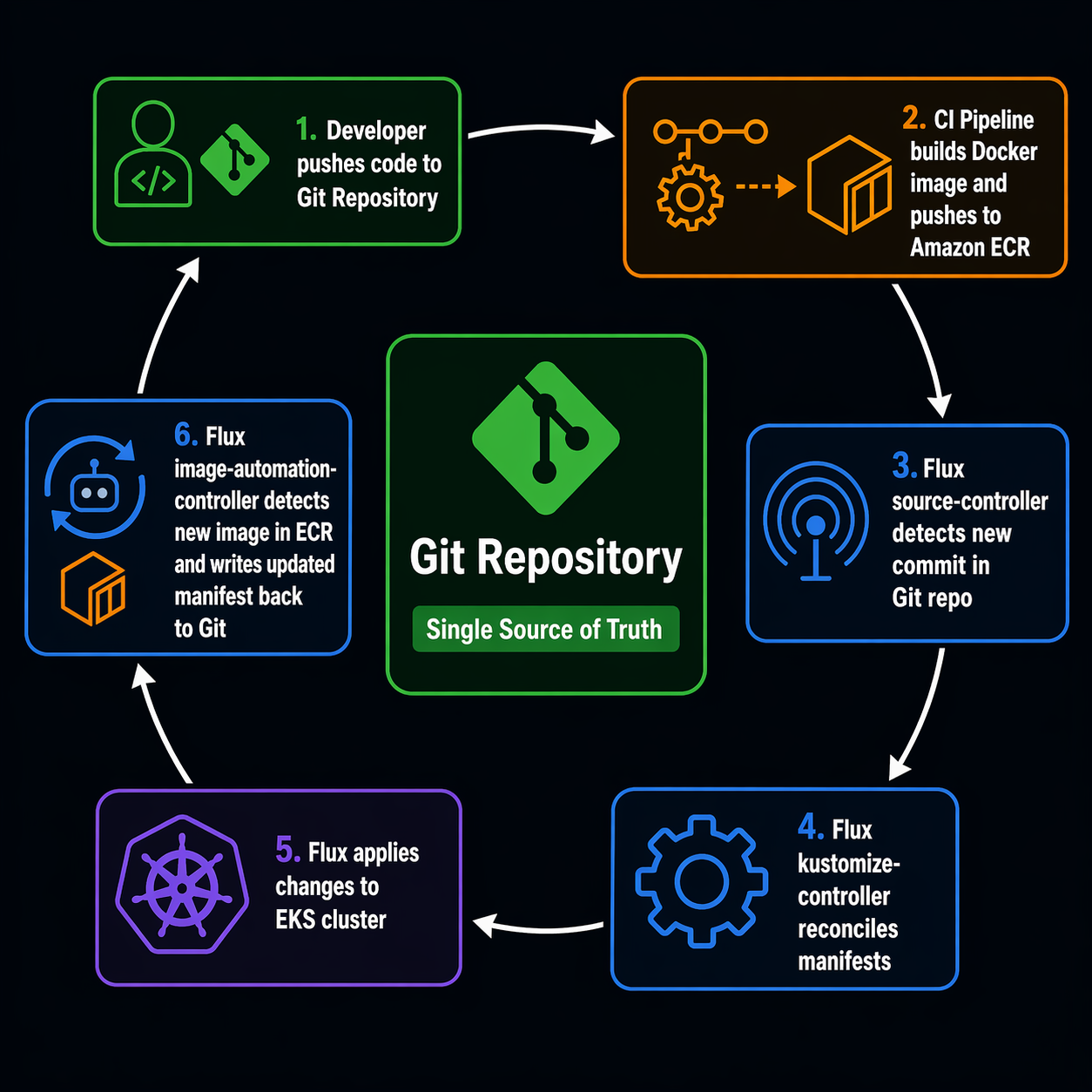
Flux CD takes a different architectural approach from ArgoCD. Instead of a central server with a UI that pulls everything together, Flux is a set of independent Kubernetes controllers that extend the cluster API. Each controller does one thing. They communicate through Kubernetes custom resources.
Here is what the GitOps flow looks like with Flux on EKS:
+------------------------------------------------------------------+
|                        Git Repository                             |
|  clusters/    apps/        infrastructure/      image-policies/   |
+-------+-----------+----------------+--------------------------------+
        |           |                |                    |
        v           v                v                    v
+------------------------------------------------------------------+
|                     EKS Cluster                                   |
|                                                                    |
|  +------------------+    +-------------------+                      |
|  | source-controller|--->| kustomize-controller|                   |
|  | (GitRepository,  |    | (Kustomization)    |                   |
|  |  OCIRepository,  |    +-------------------+                      |
|  |  Bucket)         |              |                                |
|  +------------------+              v                                |
|                              +------------+                         |
|  +------------------+        | Kubernetes |                         |
|  | helm-controller  |------->| Resources  |                         |
|  | (HelmRelease)    |        +------------+                         |
|  +------------------+              ^                                |
|                                     |                                |
|  +-------------------------------------------+                     |
|  | image-reflector-controller                |                     |
|  | (ImageRepository, ImagePolicy)            |                     |
|  +-------------------+-----------------------+                     |
|                      |                                             |
|  +-------------------v-----------------------+                     |
|  | image-automation-controller               |                     |
|  | (ImageUpdateAutomation)                   |                     |
|  | Writes new image tags back to Git ----+   |                     |
|  +---------------------------------------+---+                     |
+------------------------------------------------------------------+
        |
        v
  Git commit with updated image tag
  (triggers next reconciliation loop)
The key insight: Flux does not have a central UI server because every piece of state lives in Kubernetes resources you can inspect with kubectl get. That is a different philosophy from ArgoCD’s dashboard-first approach, and it has real consequences for how you operate day-to-day.
Flux CD Components Reference
Flux ships with four core controllers and two optional ones. Here is what each one does and when you need it:
| Component | CRDs Managed | Purpose | Required? |
|---|---|---|---|
| source-controller | GitRepository, OCIRepository, Bucket, HelmChart |
Fetches artifacts from Git, OCI registries, and S3 buckets. The foundation everything else builds on. | Yes |
| kustomize-controller | Kustomization |
Builds and applies Kustomize overlays from sources. Handles dependency ordering, health checks, and pruning. | Yes |
| helm-controller | HelmRelease |
Reconciles Helm releases from Git or OCI sources. Supports post-renderers and Kustomize-style patches on top of Helm charts. | Default |
| notification-controller | Alert, Provider, Receiver |
Sends alerts to Slack, Discord, Teams, PagerDuty, etc. Also handles webhook receivers for push-based reconciliation. | Default |
| image-reflector-controller | ImageRepository, ImagePolicy |
Scans container registries (ECR, Docker Hub, GHCR) and evaluates policies to pick the latest image tag matching your rules. | Optional |
| image-automation-controller | ImageUpdateAutomation |
Automatically commits updated image tags back to your Git repo based on ImagePolicy decisions. | Optional |
The image automation components are the hidden gem. They are what let you implement a fully automated pipeline: merge a PR with code changes, your CI builds and pushes a new image to ECR, Flux detects the new tag, and Flux writes the updated manifest back to Git. No external CI pipeline needs write access to your config repo. Flux handles the commit itself.
Flux CD vs ArgoCD: The Honest Comparison
Both tools are CNCF graduated projects. Both implement GitOps. Both run great on EKS. The differences are in the details that actually matter when you are on-call at 2 AM.
| Feature | Flux CD | ArgoCD |
|---|---|---|
| Architecture | Distributed controllers (kit-based) | Centralized server + repo server + Redis |
| UI | Optional dashboard, kubectl-first |
Rich built-in web UI with diff views |
| Installation footprint | ~5 pods, ~200MB RAM | ~8 pods, ~500MB+ RAM (Redis included) |
| Multi-cluster | Native via multiple instances or sharding | ApplicationSets + multiple clusters per instance |
| Helm integration | Dedicated helm-controller, HelmRelease CRD | Built-in Helm support via Application CRD |
| Kustomize support | Native kustomize-controller | Built-in Kustomize support |
| Image automation | Built-in (image-reflector + image-automation) | Separate project (argocd-image-updater) |
| RBAC model | Kubernetes-native RBAC + impersonation | Project-based RBAC with SSO/OIDC |
| Secret management | Integrates with SOPS, Sealed Secrets, Vault | Integrates with Vault, SOPS, Sealed Secrets |
| Notification | Built-in notification-controller | Built-in + integrations |
| Sync trigger | Poll-based interval + webhook receivers | Poll-based + webhook + manual sync |
| Rollback | Git revert (the GitOps way) | Built-in rollback button in UI + Git revert |
| Progressive delivery | Via Flagger integration | Via Argo Rollouts integration |
| Learning curve | Moderate (Kubernetes-native concepts) | Moderate (Application CRD + UI) |
| Vendor backing | Weaveworks (original), CNCF community | Akuity (original), CNCF community |
| Git provider | Agnostic (any Git, OCI, S3) | Agnostic (any Git) |
Where Flux Wins
Footprint and resource efficiency. On a production EKS cluster where every MB of memory costs money, Flux’s controller-based architecture uses roughly half the resources of ArgoCD. No Redis. No separate repo server. For teams running multiple clusters, this adds up fast.
Image automation is first-class. Flux’s ImagePolicy and ImageUpdateAutomation are built into the same toolkit. With ArgoCD, you need to install and maintain the separate argocd-image-updater project. It works, but it is another moving part with its own configuration and edge cases.
Git-native workflow. Flux treats Git as the source of truth in a very literal sense. There is no UI where someone can click “sync” and bypass the Git workflow. Every change goes through Git. For teams with strict audit requirements, this is not just a philosophical point – it is a compliance feature.
OCI registry support. Flux can pull manifests from OCI registries, not just Git. If your CI pipeline publishes Helm charts or Kustomize overlays as OCI artifacts to ECR, Flux can consume them directly. ArgoCD added some OCI support but Flux’s integration is more mature.
Where ArgoCD Wins
The UI. I cannot overstate how useful ArgoCD’s web interface is during incidents. You can see exactly what is deployed, what differs from Git, and what failed – all in a visual tree. Flux has a dashboard, but it is basic. Most Flux debugging happens through kubectl and flux CLI.
Application-level RBAC. ArgoCD’s project system with SSO integration gives you fine-grained access control per team per application. Flux relies on Kubernetes RBAC and impersonation, which works but requires more upfront design work. If you have ten teams sharing a cluster, ArgoCD’s project model is easier to reason about.
Initial learning curve. ArgoCD’s UI makes it approachable. Engineers who are not Kubernetes experts can understand what is deployed and why. Flux requires comfort with kubectl and CRDs from day one.
Setting Up Flux CD on EKS
Let me walk through a real EKS bootstrap. I am assuming you already have an EKS cluster and kubectl access configured. If not, start with our EKS getting started guide.
Step 1: Install the Flux CLI
# macOS
brew install fluxcd/tap/flux

# Linux
curl -s https://fluxcd.io/install.sh | sudo bash

# Verify
flux --version
# flux v2.6.x
Step 2: Check Prerequisites
Flux includes a handy pre-check command that validates your cluster is ready:
flux check --pre
This verifies Kubernetes version, RBAC permissions, and that required APIs are available. On EKS 1.30+, you should see all green.
Step 3: Bootstrap Flux on EKS
The bootstrap command installs all Flux components into your cluster and configures it to manage itself from a Git repository. Here is the command for a GitHub-based setup with image automation enabled:
export GITHUB_TOKEN=ghp_your_token_here
export GITHUB_USER=your-org

flux bootstrap github \
  --components-extra=image-reflector-controller,image-automation-controller \
  --owner=$GITHUB_USER \
  --repository=platform-gitops \
  --branch=main \
  --path=clusters/production \
  --read-write-key \
  --personal
For GitLab or generic Git servers, replace github with gitlab or git and adjust the flags accordingly.
What this does under the hood:
- Creates the
flux-systemnamespace - Deploys all Flux controllers as Deployments
- Generates SSH keys (or uses PAT) for Git access
- Creates a
GitRepositoryresource pointing at your repo - Creates a
Kustomizationresource that reconcilesclusters/production/ - Commits the Flux manifests themselves back to your repo
After bootstrap, your repo structure looks like this:
platform-gitops/
  clusters/
    production/
      flux-system/
        gotk-components.yaml    # Flux controller manifests
        gotk-sync.yaml          # GitRepository + Kustomization for self-management
        kustomization.yaml      # References above files
Step 4: Define Your First Application with Kustomize
Now let Flux manage an actual workload. Create a Kustomization resource that points to a directory in your repo:
# clusters/production/apps/my-service.yaml
apiVersion: source.toolkit.fluxcd.io/v1
kind: GitRepository
metadata:
  name: my-service
  namespace: flux-system
spec:
  interval: 5m
  url: https://github.com/your-org/my-service-manifests
  ref:
    branch: main
---
apiVersion: kustomize.toolkit.fluxcd.io/v1
kind: Kustomization
metadata:
  name: my-service
  namespace: flux-system
spec:
  interval: 10m
  targetNamespace: production
  sourceRef:
    kind: GitRepository
    name: my-service
  path: ./overlays/production
  prune: true
  healthChecks:
    - apiVersion: apps/v1
      kind: Deployment
      name: my-service
      namespace: production
  timeout: 3m
Apply it:
kubectl apply -f clusters/production/apps/my-service.yaml
Flux will now pull the manifests from your service repo, build the Kustomize overlay, and apply everything to the production namespace. If someone deletes the Deployment manually, Flux recreates it within the reconciliation interval.
Step 5: Helm Releases with Flux
If you deploy workloads using Helm charts on EKS, Flux’s helm-controller handles that natively:
# clusters/production/infrastructure/nginx-ingress.yaml
apiVersion: source.toolkit.fluxcd.io/v1
kind: HelmRepository
metadata:
  name: ingress-nginx
  namespace: flux-system
spec:
  interval: 1h
  url: https://kubernetes.github.io/ingress-nginx
---
apiVersion: helm.toolkit.fluxcd.io/v2
kind: HelmRelease
metadata:
  name: nginx-ingress
  namespace: flux-system
spec:
  interval: 15m
  chart:
    spec:
      chart: ingress-nginx
      version: "4.x"
      sourceRef:
        kind: HelmRepository
        name: ingress-nginx
      interval: 1h
  targetNamespace: ingress-nginx
  install:
    createNamespace: true
    remediation:
      retries: 3
  upgrade:
    remediation:
      remediateLastFailure: true
  values:
    controller:
      replicaCount: 2
      service:
        type: LoadBalancer
        annotations:
          service.beta.kubernetes.io/aws-load-balancer-type: nlb
      affinity:
        podAntiAffinity:
          preferredDuringSchedulingIgnoredDuringExecution:
            - weight: 100
              podAffinityTerm:
                labelSelector:
                  matchExpressions:
                    - key: app.kubernetes.io/name
                      operator: In
                      values:
                        - ingress-nginx
                topologyKey: kubernetes.io/hostname
The HelmRelease CRD gives you everything helm upgrade --install does, but declaratively and with automatic drift correction.
Image Automation: The Feature That Sold Me
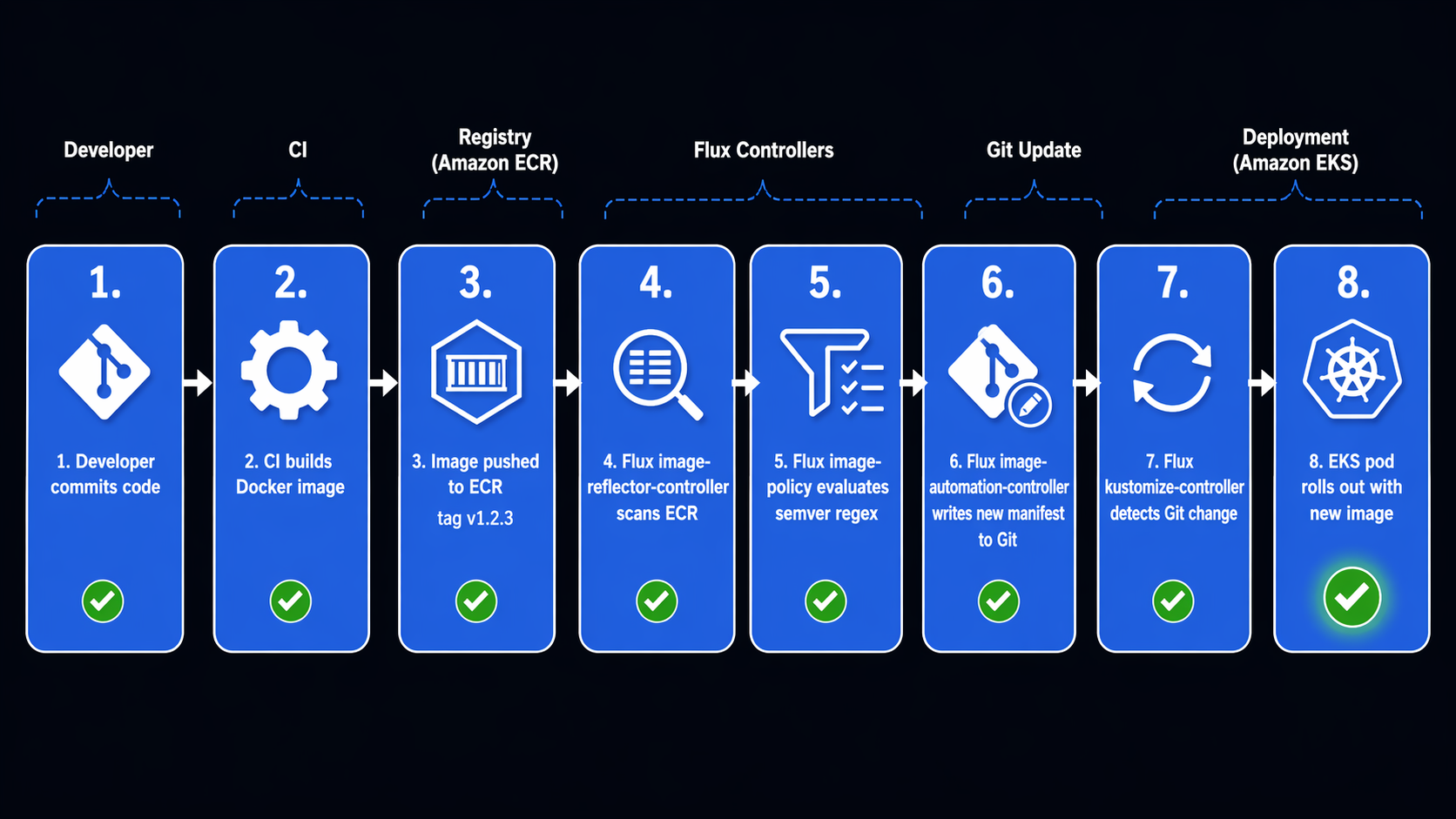
This is the part where Flux genuinely pulled ahead for our use case. Image automation lets Flux watch your ECR registry, pick new image tags based on a policy you define, and commit the updated tag back to Git.
Here is a real setup:
# clusters/production/image-policies/my-app.yaml
apiVersion: image.toolkit.fluxcd.io/v1
kind: ImageRepository
metadata:
  name: my-app
  namespace: flux-system
spec:
  image: 123456789012.dkr.ecr.us-east-1.amazonaws.com/my-app
  interval: 5m
  secretRef:
    name: ecr-credentials
---
apiVersion: image.toolkit.fluxcd.io/v1
kind: ImagePolicy
metadata:
  name: my-app-policy
  namespace: flux-system
spec:
  imageRepositoryRef:
    name: my-app
  policy:
    semver:
      range: ">=1.0.0 <2.0.0"
---
apiVersion: image.toolkit.fluxcd.io/v1
kind: ImageUpdateAutomation
metadata:
  name: my-app-update
  namespace: flux-system
spec:
  interval: 10m
  sourceRef:
    kind: GitRepository
    name: flux-system
  git:
    push:
      branch: main
    commit:
      author:
        email: [email protected]
        name: flux-bot
      messageTemplate: |
        automated: update my-app image tag

         ->
  update:
    path: ./clusters/production
    strategy: Setters
Then in your Deployment manifest, add the image policy marker:
apiVersion: apps/v1
kind: Deployment
metadata:
  name: my-app
  namespace: production
spec:
  template:
    spec:
      containers:
        - name: app
          image: "123456789012.dkr.ecr.us-east-1.amazonaws.com/my-app:1.0.0" # {"$imagepolicy": "flux-system:my-app-policy"}
The # {"$imagepolicy": "..."} comment is not just a comment. Flux’s automation controller parses it, replaces the image tag with whatever the ImagePolicy selected, and commits the change back to Git. The commit then triggers a new reconciliation cycle, and the new image gets deployed.
The flow is fully automatic:
- Your CI pipeline builds a new image and pushes
my-app:1.2.3to ECR - Flux’s
image-reflector-controllerscans ECR every 5 minutes and sees the new tag - The
ImagePolicyevaluates: does1.2.3match>=1.0.0 <2.0.0? Yes. - The
image-automation-controllerupdates the Deployment YAML in Git, replacing1.0.0with1.2.3 - Flux’s
kustomize-controllerdetects the Git change and applies the updated Deployment - Kubernetes rolls out the new pods
No CI pipeline needs write access to your GitOps repo. No external tooling. Flux handles the entire loop.
Multi-Cluster Management with Flux
Managing multiple EKS clusters is where Flux’s architecture shines. Instead of one ArgoCD instance trying to manage many clusters, you run Flux on each cluster independently. Each cluster reconciles its own resources from its own path in the Git repo.
Here is a typical repo layout for multi-cluster:
platform-gitops/
  clusters/
    production/
      flux-system/
      apps/
        my-service.yaml
      infrastructure/
        nginx-ingress.yaml
      image-policies/
        my-app.yaml
    staging/
      flux-system/
      apps/
        my-service.yaml
      infrastructure/
        nginx-ingress.yaml
    dev/
      flux-system/
      apps/
        my-service.yaml
  infrastructure/
    base/
      nginx-ingress-values.yaml
  apps/
    base/
      my-service-deployment.yaml
      my-service-service.yaml
    overlays/
      production/
        kustomization.yaml
        patch-replicas.yaml
      staging/
        kustomization.yaml
        patch-replicas.yaml
Each cluster bootstraps from its own path:
# Production cluster
flux bootstrap github \
  --path=clusters/production \
  --components-extra=image-reflector-controller,image-automation-controller

# Staging cluster
flux bootstrap github \
  --path=clusters/staging
Sharding for Large Clusters
If you have a single cluster with many teams, Flux supports sharding. You can run multiple replicas of the controllers, each handling a subset of resources:
apiVersion: source.toolkit.fluxcd.io/v1
kind: GitRepository
metadata:
  name: team-alpha-apps
  namespace: flux-system
  labels:
    sharding.fluxcd.io/key: shard1
spec:
  interval: 5m
  url: https://github.com/your-org/team-alpha-manifests
  ref:
    branch: main
Resources with the sharding.fluxcd.io/key label get routed to the corresponding controller shard. This gives you horizontal scalability without splitting into separate clusters.
Kustomize + Flux: The Power Combo
Flux and Kustomize work together naturally. You define base manifests in one directory, environment-specific overlays in another, and Flux applies the right overlay to the right cluster.
Here is a practical example. The base kustomization.yaml:
# apps/base/my-service/kustomization.yaml
apiVersion: kustomize.config.k8s.io/v1beta1
kind: Kustomization
resources:
  - deployment.yaml
  - service.yaml
  - hpa.yaml
commonLabels:
  app: my-service
  managed-by: flux
The production overlay:
# apps/overlays/production/kustomization.yaml
apiVersion: kustomize.config.k8s.io/v1beta1
kind: Kustomization
resources:
  - ../../base/my-service
patches:
  - path: patch-replicas.yaml
    target:
      kind: Deployment
  - path: patch-resources.yaml
    target:
      kind: Deployment
# apps/overlays/production/patch-replicas.yaml
apiVersion: apps/v1
kind: Deployment
metadata:
  name: my-service
spec:
  replicas: 3
Then in the Flux Kustomization resource for the production cluster, you point to the overlay:
apiVersion: kustomize.toolkit.fluxcd.io/v1
kind: Kustomization
metadata:
  name: my-service-production
  namespace: flux-system
spec:
  interval: 10m
  path: ./apps/overlays/production
  prune: true
  sourceRef:
    kind: GitRepository
    name: flux-system
  healthChecks:
    - apiVersion: apps/v1
      kind: Deployment
      name: my-service
      namespace: production
Flux builds the Kustomize overlay and applies the result. If the base changes, both production and staging pick it up on their next reconciliation cycle. If an overlay changes, only the affected cluster updates.
For Kubernetes RBAC on EKS, Flux uses impersonation by default. Each Kustomization can specify a serviceAccountName, and Flux will impersonate that account when applying resources. This means platform teams can give individual dev teams Flux-managed namespaces without granting cluster-admin.
Broader GitOps Tool Comparison
Flux and ArgoCD are the two heavyweights, but they are not the only options. Here is how they stack up against other tools in the space:
| Feature | Flux CD | ArgoCD | Jenkins X |
|---|---|---|---|
| GitOps approach | Pull-based reconciliation | Pull-based reconciliation | Push-based with GitOps overlay |
| CNCF status | Graduated | Graduated | Archived (moved to CDF) |
| Architecture | Lightweight controllers | Central server + UI | Pipeline-based + Lighthouse |
| Kubernetes-native | Yes (CRDs only) | Yes (CRDs + UI) | Partial (Jenkins under the hood) |
| Multi-cluster | Independent instances | ApplicationSets | Per-cluster bots |
| Image automation | Built-in | Separate tool | Built-in (pipeline-driven) |
| Helm support | Native controller | Native integration | Via pipelines |
| Progressive delivery | Flagger | Argo Rollouts | Not built-in |
| Secret management | SOPS, Sealed Secrets, Vault | SOPS, Vault, Sealed Secrets | External Secrets |
| Best fit | Platform teams, multi-cluster | App teams, visibility needs | Teams wanting CI/CD + GitOps combined |
| Community | Active, growing | Large, established | Winding down |
Jenkins X deserves a mention because some teams still evaluate it, but the project has been largely inactive since 2024. For new GitOps deployments in 2026, the real decision is between Flux and ArgoCD.
The Decision Framework
After running both tools, here is how I would recommend choosing:
Pick Flux CD if:
- You manage multiple EKS clusters and want independent reconciliation per cluster
- Image automation (auto-updating image tags in Git) is a core workflow for you
- Your team is comfortable with
kubectland prefers CLI-driven workflows - Resource efficiency on the cluster matters (tight node budgets, many workloads)
- You want OCI registry as a first-class source for manifests
- You prefer the Git commit log as your audit trail (no UI bypass)
Pick ArgoCD if:
- You need a rich web UI for non-Kubernetes-experts on your team
- Project-based RBAC with SSO is a hard requirement
- You want the ability to visually diff live state vs desired state during incidents
- Your team is already invested in the Argo ecosystem (Rollouts, Workflows)
- You have a single cluster or a hub-and-spoke model where one ArgoCD manages many clusters
Neither is a wrong answer. Both tools are production-ready, CNCF graduated, and actively maintained. I know teams that switched from ArgoCD to Flux and teams that went the other direction. The right choice depends on your team, your cluster topology, and which trade-offs you prefer living with.
Migration Tips If You Are Coming from ArgoCD
If you are running ArgoCD today and considering Flux, do not try a big-bang migration. Here is the path I have seen work:
- Run both in parallel. Install Flux alongside ArgoCD. Have Flux manage one new service while ArgoCD handles everything else.
- Migrate by namespace. Pick a low-risk namespace, remove it from ArgoCD’s ApplicationSet, and create a Flux Kustomization for it.
- Keep ArgoCD running during transition. Flux will not fight with ArgoCD as long as they do not manage the same resources.
- Move image automation last. Get comfortable with Flux’s reconciliation model before setting up ImagePolicy and ImageUpdateAutomation.
- Remove ArgoCD when ready. Once all workloads are managed by Flux, uninstall ArgoCD components.
Wrapping Up
Flux CD is not “ArgoCD but worse” or “ArgoCD but lighter.” It is a different philosophy for GitOps. Where ArgoCD gives you a rich UI and project-based management, Flux gives you a Kubernetes-native toolkit that stays out of your way and automates the boring parts – especially image updates.
For our EKS multi-cluster setup, Flux’s lower resource footprint, built-in image automation, and independent-per-cluster architecture were the right trade-offs. Your mileage will vary depending on what your team values most.
Both Flux and ArgoCD are excellent tools. The best GitOps tool is the one your team can operate confidently at 2 AM when something breaks.
Sources:
Explore more like this

Kill the Docker Hub Token: OIDC Trust for GitHub Actions
On July 31, 2026, Docker shipped OIDC connections for GitHub Actions to any organization on a Docker Team, Docker Business, or Docker Hardened Images subscription, plus organizations in the Docker-Sponsored...

Lambda SQS Provisioned Mode Now Scales to 10,000 Pollers: The Throughput Math That Decides If You Need It
AWS raised the poller ceiling on August 3, 2026. Provisioned Mode for Amazon SQS event source mappings went from a maximum of 2,000 event pollers to 10,000, which puts the...

CloudWatch Managed Prometheus Collectors on EKS: Delete the Scraper, Keep the Metrics
On July 31, 2026, AWS shipped managed Prometheus collectors for Amazon CloudWatch. The pitch is short: you hand CloudWatch a scrape configuration and a VPC connection, and AWS provisions, scales,...

Comments