
GitHub Copilot vs Kiro for DevOps: 2026 Showdown

I’ve spent the last three months using both GitHub Copilot and Kiro on actual DevOps work. Not toy examples. Not “write a hello world Lambda.” Real infrastructure code: Terraform modules that provision VPCs with private subnets, GitLab CI pipelines that run plan-apply workflows, Python boto3 scripts that audit S3 bucket policies across 40 AWS accounts, and enough YAML to make anyone question their career choices.
The short version: they’re both good, and they’re good at different things. The longer version requires some explaining, because the marketing from both sides makes it sound like each tool does everything perfectly. They don’t. The differences matter more for DevOps work than for general software development, and that’s what I want to unpack here.
If you’re building CI/CD pipelines with Terraform or managing AWS infrastructure as code, this comparison should help you decide where to spend your budget.
The Contenders in 2026
GitHub Copilot has been around since 2021 and has matured into a full suite: inline completions, chat, a cloud agent that can be assigned GitHub issues to autonomously create pull requests, code review on PRs, and custom prompt files for team-wide consistency. The coding agent is the big addition for 2025-2026. You assign it an issue, it reads the repo, creates a plan, writes the code, and opens a PR. You review it like any other pull request. It supports VS Code, Visual Studio, JetBrains IDEs, and Neovim.
Kiro (the successor to CodeWhisperer) is AWS’s answer, tightly integrated with the AWS ecosystem. It does inline completions, chat, security scanning, and has a unique feature called Console-to-Code that records your actions in the AWS Management Console and generates CDK or CloudFormation from what you clicked. Its DevOps angle is the deep AWS knowledge baked into the model. It also has a CLI agent and custom agents you can configure for specific workflows.
Both tools have free tiers. Both have paid tiers. The pricing story is different, and so is the experience.
Feature Comparison at a Glance
Before getting into the detailed testing, here’s where both tools stand on paper:
| Feature | GitHub Copilot | Kiro |
|---|---|---|
| Inline code completions | Yes | Yes |
| Chat assistant | Yes (IDE + GitHub.com) | Yes (IDE + CLI + Console) |
| Autonomous coding agent | Yes (cloud agent, assigns issues) | Yes (custom agents, CLI agent) |
| Code review on PRs | Yes (@copilot reviewer) | Limited (via custom agents) |
| Security scanning | Yes (with GitHub Advanced Security) | Yes (built-in, AWS-focused) |
| Infrastructure as Code | Good (Terraform, YAML, generic) | Strong (CDK, CloudFormation, Terraform) |
| AWS Console integration | No | Yes (Console-to-Code) |
| Custom prompt files | Yes (.github/prompts/) | Yes (CLI prompts, custom agents) |
| Reference tracking | Yes (open-source license detection) | Yes (similar code reference tracking) |
| CLI support | Yes (Copilot CLI) | Yes (Kiro CLI) |
| IDE support | VS Code, Visual Studio, JetBrains, Neovim | VS Code, JetBrains |
| Cloud provider bias | Azure/GitHub ecosystem | AWS ecosystem |
| Knowledge base / RAG | Yes (Enterprise: custom knowledge bases) | Yes (Pro: AWS docs + your codebase) |
Pricing: What It Actually Costs
This matters because DevOps teams aren’t usually large teams. You might have 3-5 people managing infrastructure. The per-user cost adds up fast.
| Plan | GitHub Copilot | Kiro |
|---|---|---|
| Free | $0/mo – limited completions, chat in VS Code | $0/mo – limited completions, chat, basic security scans |
| Individual Pro | $10/mo – unlimited suggestions, multi-file edits, chat, agent mode | $19/mo (Pro) – higher limits, admin features, enterprise integrations |
| Business/Team | $19/user/mo – org management, policy controls, IP indemnification, SAML SSO | $19/user/mo (Pro tier) – same as individual Pro with IAM Identity Center |
| Enterprise | $39/user/mo – custom models, knowledge bases, higher premium request allowance, PR summaries, advanced security | Custom pricing – full enterprise features, SSO, data residency, IP indemnification |
The key difference at the free tier: Copilot gives you limited completions and chat. Kiro gives you limited completions, chat, and security scanning. If budget is zero and you want security scanning out of the box, Kiro’s free tier is more generous.
At the paid tier, Copilot’s $10/mo individual plan is cheaper than Kiro’s $19/mo Pro tier. But Kiro Pro includes security scanning that Copilot only provides with GitHub Advanced Security (a separate enterprise add-on). So the real comparison depends on what you’d pay for separately.
The Real-World Tests
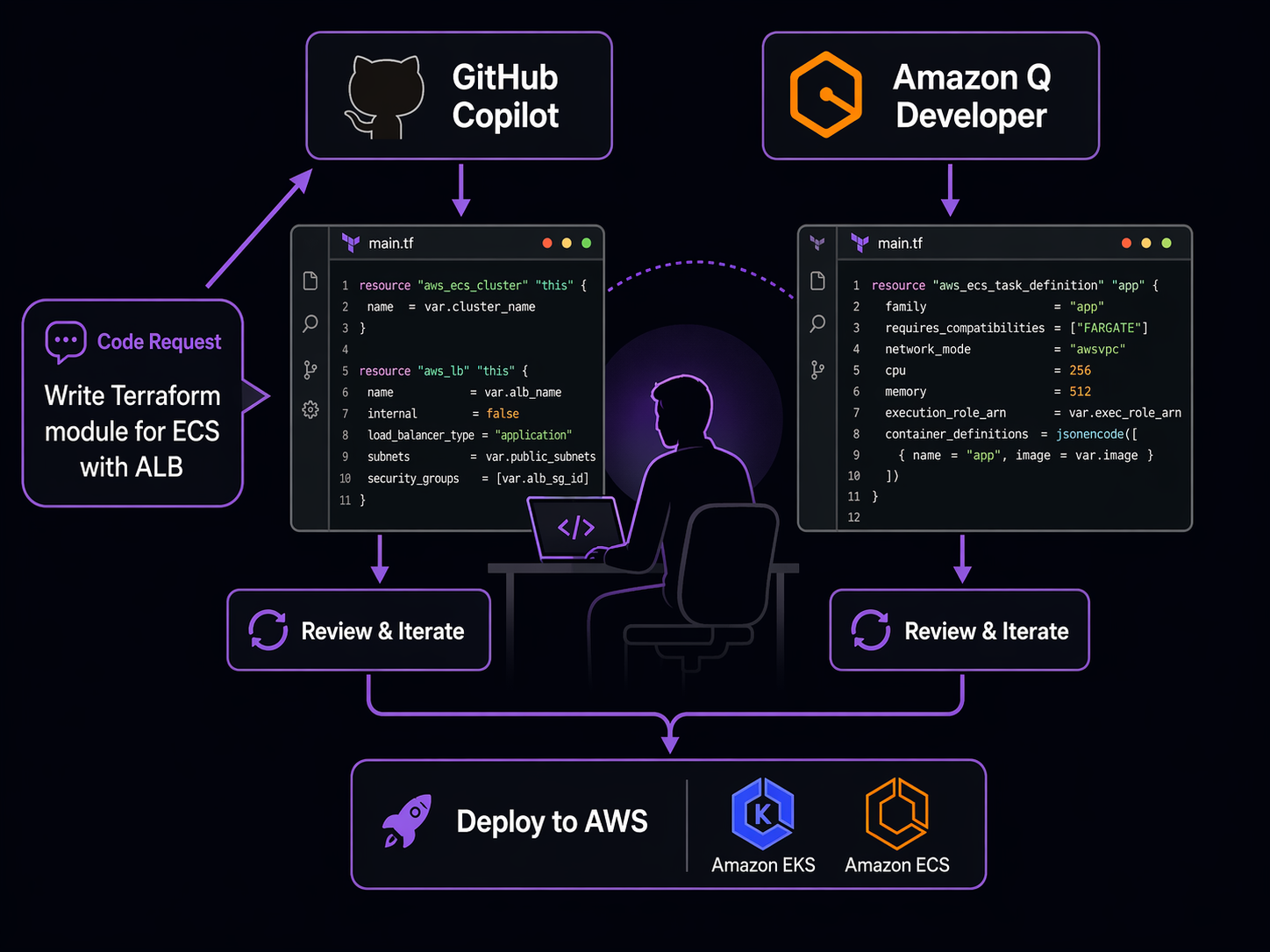
Here’s where the marketing ends and the actual work begins. I ran both tools through four DevOps tasks I do regularly and compared the output quality, accuracy, and usefulness.
Test 1: Terraform Module for an ECS Service with ALB
The prompt: “Write a Terraform module that creates an ECS Fargate service with an Application Load Balancer, in a VPC with private subnets. Include security groups, IAM task role with least-privilege access to S3 and DynamoDB, auto-scaling, and health checks.”
GitHub Copilot output:
resource "aws_ecs_cluster" "main" {
  name = "${var.project}-${var.environment}-cluster"
}

resource "aws_ecs_task_definition" "app" {
  family                   = "${var.project}-${var.environment}-task"
  network_mode             = "awsvpc"
  requires_compatibilities = ["FARGATE"]
  cpu                      = var.task_cpu
  memory                   = var.task_memory
  execution_role_arn       = aws_iam_role.ecs_execution.arn
  task_role_arn            = aws_iam_role.task.arn

  container_definitions = jsonencode([
    {
      name      = var.container_name
      image     = var.container_image
      essential = true
      portMappings = [
        {
          containerPort = var.container_port
          protocol      = "tcp"
        }
      ]
      healthCheck = {
        command     = ["CMD-SHELL", "curl -f http://localhost:${var.container_port}/health || exit 1"]
        interval    = 30
        timeout     = 5
        retries     = 3
        startPeriod = 60
      }
      logConfiguration = {
        logDriver = "awslogs"
        options = {
          "awslogs-group"         = "/ecs/${var.project}-${var.environment}"
          "awslogs-region"        = var.aws_region
          "awslogs-stream-prefix" = "ecs"
        }
      }
    }
  ])
}

resource "aws_iam_role" "task" {
  name = "${var.project}-${var.environment}-task-role"
  assume_role_policy = jsonencode({
    Version = "2012-10-17"
    Statement = [{
      Action = "sts:AssumeRole"
      Effect = "Allow"
      Principal = { Service = "ecs-tasks.amazonaws.com" }
    }]
  })
}

resource "aws_iam_role_policy" "task_s3_dynamodb" {
  name = "${var.project}-${var.environment}-task-policy"
  role = aws_iam_role.task.id
  policy = jsonencode({
    Version = "2012-10-17"
    Statement = [
      {
        Effect = "Allow"
        Action = ["s3:GetObject", "s3:PutObject", "s3:ListBucket"]
        Resource = [
          var.s3_bucket_arn,
          "${var.s3_bucket_arn}/*"
        ]
      },
      {
        Effect = "Allow"
        Action = [
          "dynamodb:GetItem",
          "dynamodb:PutItem",
          "dynamodb:Query",
          "dynamodb:Scan"
        ]
        Resource = var.dynamodb_table_arn
      }
    ]
  })
}
Copilot generated the full module structure across multiple files. The IAM policies were scoped to specific actions rather than using s3:* wildcards. It included the health check block with sensible defaults. It missed the auto-scaling configuration – I had to ask a follow-up in chat to get the aws_appautoscaling_target and aws_appautoscaling_policy resources.
Kiro output:
resource "aws_ecs_service" "app" {
  name                               = "${var.service_name}-${var.environment}"
  cluster                            = aws_ecs_cluster.main.id
  task_definition                    = aws_ecs_task_definition.app.arn
  desired_count                      = var.desired_count
  launch_type                        = "FARGATE"
  health_check_grace_period_seconds  = 60
  deployment_maximum_percent         = 200
  deployment_minimum_healthy_percent = 66

  network_configuration {
    subnets          = var.private_subnet_ids
    security_groups  = [aws_security_group.ecs_service.id]
    assign_public_ip = false
  }

  load_balancer {
    target_group_arn = aws_lb_target_group.app.arn
    container_name   = var.container_name
    container_port   = var.container_port
  }

  lifecycle {
    ignore_changes = [desired_count]
  }
}

resource "aws_appautoscaling_target" "ecs_target" {
  max_capacity       = var.max_capacity
  min_capacity       = var.min_capacity
  resource_id        = "service/${aws_ecs_cluster.main.name}/${aws_ecs_service.app.name}"
  scalable_dimension = "ecs:service:DesiredCount"
  service_namespace  = "ecs"
}

resource "aws_appautoscaling_policy" "cpu_scaling" {
  name               = "${var.service_name}-cpu-scaling"
  policy_type        = "TargetTrackingScaling"
  resource_id        = aws_appautoscaling_target.ecs_target.resource_id
  scalable_dimension = aws_appautoscaling_target.ecs_target.scalable_dimension
  service_namespace  = aws_appautoscaling_target.ecs_target.service_namespace

  target_tracking_scaling_policy_configuration {
    predefined_metric_specification {
      predefined_metric_type = "ECSServiceAverageCPUUtilization"
    }
    target_value       = 70.0
    scale_in_cooldown  = 300
    scale_out_cooldown = 60
  }
}

resource "aws_security_group" "alb" {
  name        = "${var.service_name}-alb-sg"
  description = "ALB security group"
  vpc_id      = var.vpc_id

  ingress {
    from_port   = 443
    to_port     = 443
    protocol    = "tcp"
    cidr_blocks = ["0.0.0.0/0"]
  }

  egress {
    from_port   = 0
    to_port     = 0
    protocol    = "-1"
    cidr_blocks = ["0.0.0.0/0"]
  }
}

resource "aws_security_group" "ecs_service" {
  name        = "${var.service_name}-ecs-sg"
  description = "ECS service security group"
  vpc_id      = var.vpc_id

  ingress {
    from_port       = var.container_port
    to_port         = var.container_port
    protocol        = "tcp"
    security_groups = [aws_security_group.alb.id]
  }

  egress {
    from_port   = 0
    to_port     = 0
    protocol    = "-1"
    cidr_blocks = ["0.0.0.0/0"]
  }
}
Kiro included auto-scaling right away. The security group rules were correct – ALB accepts 443 from the world, ECS service only accepts traffic from the ALB. It also included deployment_maximum_percent and deployment_minimum_healthy_percent for rolling updates, which Copilot didn’t add. The lifecycle { ignore_changes = [desired_count] } block is a nice touch that prevents Terraform from overwriting auto-scaling adjustments.
Winner: Kiro. It produced more complete Terraform on the first pass, with auto-scaling and deployment strategies included. For anyone working with Terraform on AWS, Kiro’s AWS-specific knowledge shows.
Test 2: GitLab CI/CD Pipeline for Docker Build and Deploy
The prompt: “Write a GitLab CI/CD pipeline that builds a Docker image, pushes it to ECR, and deploys to ECS Fargate. Use OIDC for AWS authentication. Include separate stages for build, push, and deploy.”
GitHub Copilot output:
stages:
  - build
  - push
  - deploy

variables:
  AWS_REGION: us-east-1
  ECR_REGISTRY: ${AWS_ACCOUNT_ID}.dkr.ecr.${AWS_REGION}.amazonaws.com
  IMAGE_NAME: my-app
  IMAGE_TAG: $CI_COMMIT_SHORT_SHA

.docker_login: &docker_login
  - aws ecr get-login-password --region $AWS_REGION | docker login --username AWS --password-stdin $ECR_REGISTRY

build:
  stage: build
  image: docker:24
  services:
    - docker:24-dind
  script:
    - docker build -t $ECR_REGISTRY/$IMAGE_NAME:$IMAGE_TAG .
    - docker tag $ECR_REGISTRY/$IMAGE_NAME:$IMAGE_TAG $ECR_REGISTRY/$IMAGE_NAME:latest
  rules:
    - if: $CI_PIPELINE_SOURCE == "merge_request_event"
    - if: $CI_COMMIT_BRANCH == "main"

push:
  stage: push
  image: docker:24
  services:
    - docker:24-dind
  script:
    - *docker_login
    - docker push $ECR_REGISTRY/$IMAGE_NAME:$IMAGE_TAG
    - docker push $ECR_REGISTRY/$IMAGE_NAME:latest
  rules:
    - if: $CI_COMMIT_BRANCH == "main"

deploy:
  stage: deploy
  image: amazon/aws-cli:latest
  script:
    - aws ecs update-service
        --cluster my-cluster
        --service my-service
        --force-new-deployment
        --region $AWS_REGION
  environment:
    name: production
  rules:
    - if: $CI_COMMIT_BRANCH == "main"
      when: manual
Copilot generated a clean, well-structured pipeline. The YAML anchor for Docker login was a good touch. It got OIDC wrong though – it assumed AWS credentials would be available as environment variables rather than setting up the WebIdentityTokenFile or the proper role_arn assumption chain. I had to ask chat to correct the OIDC authentication setup.
Kiro output:
stages:
  - build
  - push
  - deploy

variables:
  AWS_REGION: us-east-1
  ECS_CLUSTER: my-cluster
  ECS_SERVICE: my-service
  ECR_REPO: my-app

assume_role:
  stage: .pre
  image: amazon/aws-cli:2
  id_tokens:
    GITLAB_OIDC_TOKEN:
      aud: gitlab.com
  script:
    - |
      read -r AWS_ACCESS_KEY_ID AWS_SECRET_ACCESS_KEY AWS_SESSION_TOKEN <<< \
        $(aws sts assume-role-with-web-identity \
          --role-arn "arn:aws:iam::${AWS_ACCOUNT_ID}:role/GitLabOIDCRole" \
          --role-session-name "gitlab-${CI_PIPELINE_ID}" \
          --web-identity-token $GITLAB_OIDC_TOKEN \
          --query 'Credentials.[AccessKeyId,SecretAccessKey,SessionToken]' \
          --output text)
    - echo "AWS_ACCESS_KEY_ID=$AWS_ACCESS_KEY_ID" >> assume.env
    - echo "AWS_SECRET_ACCESS_KEY=$AWS_SECRET_ACCESS_KEY" >> assume.env
    - echo "AWS_SESSION_TOKEN=$AWS_SESSION_TOKEN" >> assume.env
  artifacts:
    reports:
      dotenv: assume.env

build:
  stage: build
  image: docker:24
  services:
    - docker:24-dind
  needs: [assume_role]
  script:
    - aws ecr get-login-password --region $AWS_REGION | docker login --username AWS --password-stdin ${AWS_ACCOUNT_ID}.dkr.ecr.${AWS_REGION}.amazonaws.com
    - docker build -t ${AWS_ACCOUNT_ID}.dkr.ecr.${AWS_REGION}.amazonaws.com/${ECR_REPO}:${CI_COMMIT_SHORT_SHA} .
  rules:
    - if: $CI_PIPELINE_SOURCE == "merge_request_event"
    - if: $CI_COMMIT_BRANCH == "main"

push:
  stage: push
  image: docker:24
  services:
    - docker:24-dind
  needs: [assume_role, build]
  script:
    - aws ecr get-login-password --region $AWS_REGION | docker login --username AWS --password-stdin ${AWS_ACCOUNT_ID}.dkr.ecr.${AWS_REGION}.amazonaws.com
    - docker push ${AWS_ACCOUNT_ID}.dkr.ecr.${AWS_REGION}.amazonaws.com/${ECR_REPO}:${CI_COMMIT_SHORT_SHA}
  rules:
    - if: $CI_COMMIT_BRANCH == "main"

deploy:
  stage: deploy
  image: amazon/aws-cli:2
  needs: [assume_role, push]
  script:
    - |
      aws ecs update-service \
        --cluster ${ECS_CLUSTER} \
        --service ${ECS_SERVICE} \
        --force-new-deployment \
        --region ${AWS_REGION}
    - |
      aws ecs wait services-stable \
        --cluster ${ECS_CLUSTER} \
        --services ${ECS_SERVICE} \
        --region ${AWS_REGION}
  environment:
    name: production
  rules:
    - if: $CI_COMMIT_BRANCH == "main"
      when: manual
Kiro got the OIDC setup right from the start. It used the id_tokens keyword that GitLab introduced for OIDC, created a .pre stage to assume the role, and passed credentials via a dotenv artifact. It also added aws ecs wait services-stable to verify the deployment, which is a detail most people forget until their pipeline reports success while ECS is still draining old tasks.
Winner: Kiro. The OIDC handling was correct out of the box, and the pipeline was more production-ready. If you’re building pipelines like the ones I describe in the GitLab CI Terraform pipeline guide, Kiro saves you the back-and-forth on authentication setup.
Test 3: Python boto3 Script for S3 Bucket Policy Audit
The prompt: “Write a Python script using boto3 that lists all S3 buckets in an account, checks each bucket for public access (bucket policy grants access to * principal), checks if the bucket has encryption enabled, and outputs a CSV report.”
GitHub Copilot output:
import boto3
import csv
import json
from datetime import datetime

def audit_s3_buckets():
    s3 = boto3.client("s3")
    buckets = s3.list_buckets()["Buckets"]
    results = []

    for bucket in buckets:
        bucket_name = bucket["Name"]

        # Check public access via bucket policy
        is_public = False
        try:
            policy = s3.get_bucket_policy(Bucket=bucket_name)
            policy_doc = json.loads(policy["Policy"])
            for statement in policy_doc.get("Statement", []):
                principal = statement.get("Principal", {})
                if principal == "*" or "*" in principal.get("AWS", []):
                    if statement.get("Effect") == "Allow":
                        is_public = True
                        break
        except s3.exceptions.ClientError:
            pass  # No bucket policy

        # Check encryption
        encrypted = False
        try:
            s3.get_bucket_encryption(Bucket=bucket_name)
            encrypted = True
        except s3.exceptions.ClientError:
            pass

        # Check public access block settings
        block_public = False
        try:
            pab = s3.get_public_access_block(Bucket=bucket_name)
            config = pab["PublicAccessBlockConfiguration"]
            block_public = all([
                config["BlockPublicAcls"],
                config["BlockPublicPolicy"],
                config["IgnorePublicAcls"],
                config["RestrictPublicBuckets"],
            ])
        except s3.exceptions.ClientError:
            pass

        results.append({
            "bucket": bucket_name,
            "public": is_public,
            "encrypted": encrypted,
            "public_access_block": block_public,
        })

    # Write CSV
    filename = f"s3-audit-{datetime.now().strftime('%Y%m%d-%H%M%S')}.csv"
    with open(filename, "w", newline="") as f:
        writer = csv.DictWriter(f, fieldnames=["bucket", "public", "encrypted", "public_access_block"])
        writer.writeheader()
        writer.writerows(results)

    print(f"Audit complete. {len(results)} buckets checked. Report: {filename}")
    return filename

if __name__ == "__main__":
    audit_s3_buckets()
Copilot produced clean, working code. It checked the bucket policy for * principals, encryption status, and even added the public access block configuration check without being asked. Error handling was appropriate – catching ClientError for missing policies and encryption. The CSV output was straightforward.
Kiro output:
import boto3
import csv
import json
from datetime import datetime, timezone

def check_bucket_public_status(s3_client, bucket_name: str) -> dict:
    """Check if a bucket is publicly accessible via policy or ACL."""
    public_indicators = {
        "public_policy": False,
        "public_acl": False,
    }

    # Check bucket policy
    try:
        policy_response = s3_client.get_bucket_policy(Bucket=bucket_name)
        policy = json.loads(policy_response["Policy"])
        for statement in policy.get("Statement", []):
            if statement.get("Effect") != "Allow":
                continue
            principal = statement.get("Principal", {})
            if isinstance(principal, str) and principal == "*":
                public_indicators["public_policy"] = True
            elif isinstance(principal, dict):
                if "*" in principal.get("AWS", []) or "*" in principal.get("Service", []):
                    public_indicators["public_policy"] = True
    except Exception:
        pass

    # Check bucket ACL
    try:
        acl = s3_client.get_bucket_acl(Bucket=bucket_name)
        for grant in acl.get("Grants", []):
            grantee = grant.get("Grantee", {})
            if grantee.get("URI") == "http://acs.amazonaws.com/groups/global/AllUsers":
                public_indicators["public_acl"] = True
    except Exception:
        pass

    return public_indicators


def check_encryption(s3_client, bucket_name: str) -> str:
    """Return encryption type or 'NONE'."""
    try:
        enc = s3_client.get_bucket_encryption(Bucket=bucket_name)
        rules = enc["ServerSideEncryptionConfiguration"]["Rules"]
        return rules[0]["ApplyServerSideEncryptionByDefault"]["SSEAlgorithm"]
    except Exception:
        return "NONE"


def audit_s3_buckets(output_file: str = None) -> str:
    s3 = boto3.client("s3")
    buckets = s3.list_buckets()["Buckets"]
    results = []

    for bucket in buckets:
        name = bucket["Name"]
        creation_date = bucket["CreationDate"].isoformat()

        public_status = check_bucket_public_status(s3, name)
        encryption = check_encryption(s3, name)

        results.append({
            "bucket_name": name,
            "creation_date": creation_date,
            "public_via_policy": public_status["public_policy"],
            "public_via_acl": public_status["public_acl"],
            "encryption": encryption,
            "is_compliant": not (
                public_status["public_policy"] or public_status["public_acl"]
            ) and encryption != "NONE",
        })

    if not output_file:
        output_file = f"s3-audit-{datetime.now(timezone.utc).strftime('%Y%m%dT%H%M%SZ')}.csv"

    with open(output_file, "w", newline="") as f:
        writer = csv.DictWriter(
            f,
            fieldnames=[
                "bucket_name", "creation_date", "public_via_policy",
                "public_via_acl", "encryption", "is_compliant",
            ],
        )
        writer.writeheader()
        writer.writerows(results)

    non_compliant = sum(1 for r in results if not r["is_compliant"])
    print(f"Audit complete: {len(results)} buckets, {non_compliant} non-compliant")
    print(f"Report saved to: {output_file}")
    return output_file


if __name__ == "__main__":
    audit_s3_buckets()
Kiro split the logic into separate functions with docstrings. It checked both bucket policies and ACLs (Copilot missed ACLs entirely). It returned the actual encryption algorithm rather than a boolean, which is more useful. It added a creation_date column and a is_compliant computed field. The function accepted an output filename parameter, making it more testable.
Both scripts work. But Kiro’s version is closer to something I’d commit to a shared repo without rewriting.
Winner: Kiro. The ACL check is the deciding factor. Missing ACL-based public access is a real security gap. For audit scripts, completeness matters.
Test 4: Debugging an AWS Deployment Failure
The scenario: I pasted a CloudFormation error into chat: Resource creation failed: ECS Service did not stabilize: Service event: (service my-service) failed to register targets in (target-group arn:aws:elasticloadbalancing:us-east-1:123456789012:targetgroup/my-tg/abc123) RegisterTargets error: "Capacity is unavailable at this time. Please try again later or try a different subnet."
GitHub Copilot response:
Copilot correctly identified that the error means ECS couldn’t launch tasks in the specified subnets. It suggested:
- The subnets might not have enough IP addresses available
- The subnets might be the wrong type (public instead of private for Fargate with
assign_public_ip = false) - AZ capacity might be temporarily exhausted in that region
The suggestions were accurate. It provided a CloudFormation snippet to specify subnets explicitly and recommended checking subnet CIDR ranges. It also mentioned enabling assign_public_ip = true as a workaround for capacity issues with public subnets, though it noted that’s not ideal for production.
Kiro response:
Kiro identified the same root causes but went further:
- It explained that “Capacity is unavailable” specifically relates to Fargate On-Demand capacity, not general subnet IP exhaustion (though that can also cause similar errors)
- It recommended using Fargate Spot capacity as an alternative by setting
capacityProviderStrategyin the ECS service - It linked the error to AWS service quotas and suggested checking the Fargate On-Demand vCPU limit for the account
- It provided a specific AWS CLI command to check available AZ capacity:
aws ecs describe-servicesto look at service events, andaws ec2 describe-subnetsto check available IP addresses - It mentioned the Fargate capacity provider feature that allows automatic fallback from On-Demand to Spot
The AWS-specific depth was noticeably better. Copilot gave generic cloud advice. Kiro gave AWS-specific guidance tied to actual service limits and features.
Winner: Kiro. For AWS debugging specifically, the depth of knowledge is meaningfully better.
DevOps Task Scorecard
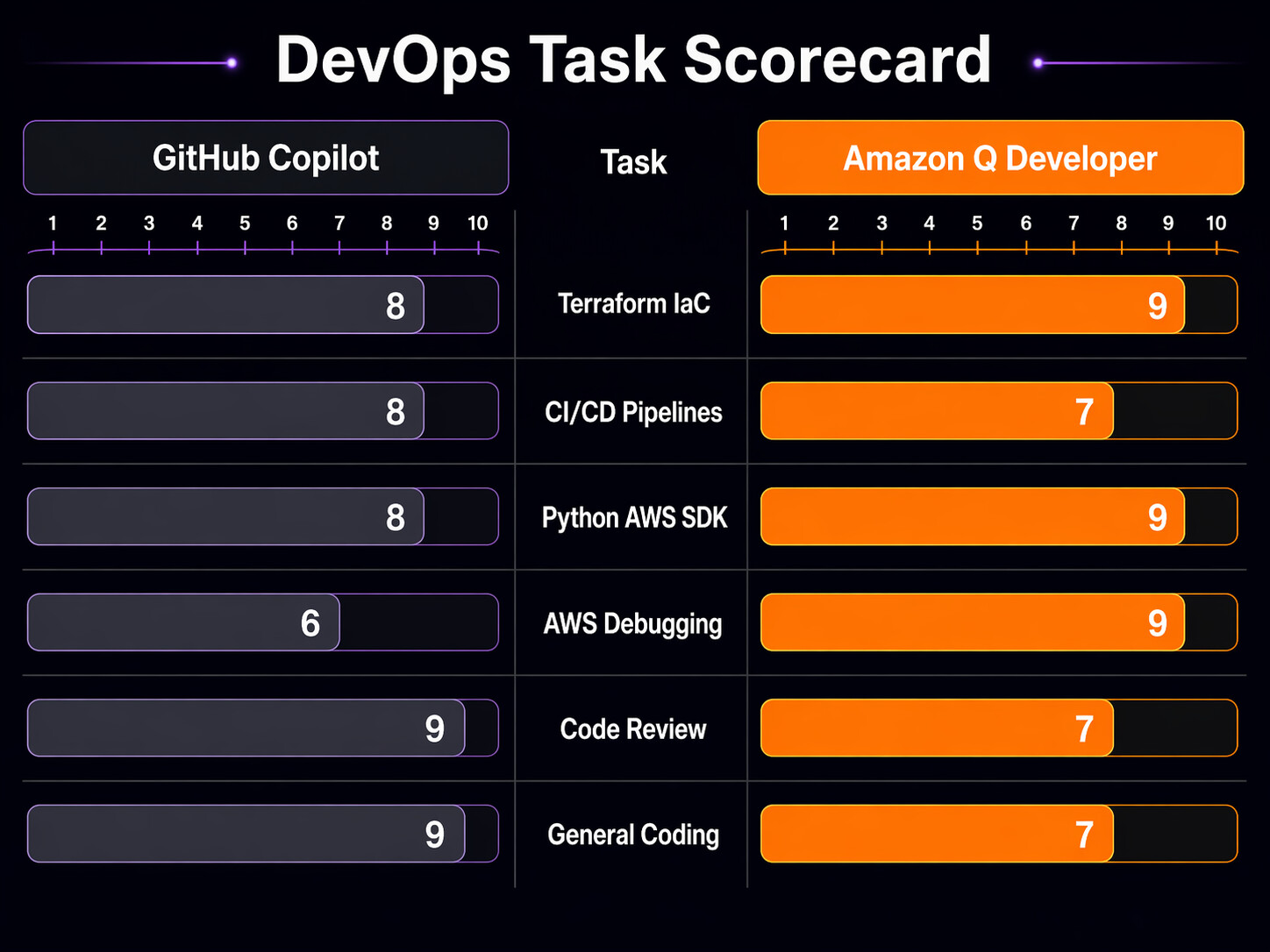
I scored both tools across several dimensions on a 1-10 scale, based on my three months of daily use.
| DevOps Task | GitHub Copilot | Kiro | Notes |
|---|---|---|---|
| Terraform module generation | 7/10 | 9/10 | Q includes auto-scaling, deployment strategies by default |
| Terraform state troubleshooting | 6/10 | 7/10 | Q understands AWS-specific state issues better |
| GitLab CI/GitHub Actions YAML | 8/10 | 7/10 | Copilot is slightly better at non-AWS CI patterns |
| AWS CDK / CloudFormation | 6/10 | 9/10 | Kiro is purpose-built for this |
| Python boto3 scripting | 8/10 | 8/10 | Roughly equal, Q slightly better on AWS API coverage |
| AWS error debugging | 6/10 | 9/10 | Q’s AWS-specific knowledge is the clear differentiator |
| Docker/Kubernetes manifests | 8/10 | 6/10 | Copilot is stronger on generic container orchestration |
| Code review (PR comments) | 9/10 | 5/10 | Copilot’s @copilot reviewer is genuinely useful |
| Security scanning | 7/10 | 8/10 | Q includes it natively; Copilot needs Advanced Security |
| Multi-cloud / non-AWS infra | 9/10 | 5/10 | Copilot wins if you’re not all-in on AWS |
| Autonomous coding agent | 9/10 | 7/10 | Copilot’s cloud agent is more polished for general tasks |
| Overall DevOps on AWS | 7.5/10 | 8.2/10 | Q edges ahead for AWS-heavy teams |
IDE and Platform Support
Where you work matters. If your team uses a mix of editors and platforms, tool support is a real constraint.
| Platform | GitHub Copilot | Kiro |
|---|---|---|
| VS Code | Full support | Full support |
| JetBrains IDEs (IntelliJ, PyCharm, GoLand) | Full support | Full support |
| Visual Studio (Windows) | Full support | Not supported |
| Neovim / Vim | Full support | Not supported |
| GitHub.com (web) | Chat, PR review, agent | Not applicable |
| AWS Management Console | Not applicable | Console-to-Code, chat |
| CLI / Terminal | Copilot CLI | Kiro CLI |
| Eclipse | Community plugin | Not supported |
| Xcode | Not supported | Not supported |
Copilot has broader editor support. If your team includes people who live in Neovim or Visual Studio, Kiro is not an option for them. The AWS Console integration is unique to Kiro though – being able to click around the console and generate infrastructure code from those actions is useful when you’re prototyping.
When to Pick Each Tool
Pick GitHub Copilot if:
- Your infrastructure spans multiple cloud providers (AWS + GCP + Azure)
- Your team uses GitHub heavily and you want PR review automation
- You work with Kubernetes, Docker, and generic YAML more than AWS-specific IaC
- Budget is tight and the $10/mo individual plan is what you can afford
- You want the autonomous coding agent for assigning issues to AI
- Your team uses Neovim, Visual Studio, or other editors Q doesn’t support
- You’re exploring tools like Kiro IDE and want something that works across environments
Pick Kiro if:
- AWS is your primary (or only) cloud provider
- You write a lot of CDK, CloudFormation, or Terraform for AWS
- You want built-in security scanning without paying for GitHub Advanced Security
- Your team debugs AWS service errors frequently
- You use the AWS Management Console and want Console-to-Code
- The free tier is important and you need security scanning at zero cost
- You work with Bedrock agents and MCP for DevOps and want tight integration
Use both if:
- Your organization has the budget ($29/mo per user for Copilot Pro + Kiro Pro, or $29/mo for Copilot Business + Kiro Pro)
- You do multi-cloud work but have a heavy AWS footprint
- You want Copilot for general code and PR review, Kiro for AWS-specific tasks
- Your team is split between AWS-heavy and generalist roles
The Honest Takeaway
After three months of daily use, here’s what I think: Kiro is the better tool if AWS is your world. The Terraform generation is more complete, the AWS debugging is deeper, the security scanning is included, and Console-to-Code is something Copilot simply doesn’t have. For pure AWS DevOps work, it saves more time per interaction.
But GitHub Copilot is the better general-purpose tool. The PR review feature alone makes it worth it for teams doing code review on infrastructure changes. The cloud agent for autonomous coding is more mature. The editor support is broader. And if you touch GCP, Azure, or even just non-AWS Kubernetes work, Copilot handles that more consistently.
My current setup: Copilot for day-to-day coding, PR review, and the autonomous agent. Kiro for AWS-specific infrastructure work, security scanning, and when I need to debug something weird in ECS or CloudFormation. They complement each other better than they compete.
The worst option is picking neither. AI-assisted infrastructure coding is not a novelty anymore. It reduces errors in IAM policies, catches missing encryption settings, and generates boilerplate that you’d otherwise copy-paste from Stack Overflow answers that might be three years out of date. Whether you pick Copilot, Kiro, or both, you should be using something.
Sources
- GitHub Copilot documentation – subscription plans and features
- GitHub Copilot cloud agent documentation
- Kiro documentation – tiers and pricing
- Kiro pricing page
- GitHub Copilot for enterprises plan comparison
Copilot billing update
GitHub’s June 1, 2026 billing change deserves its own budget review: GitHub Copilot Usage-Based Billing: Budget Controls for DevOps Teams.
Explore more like this

Kill the Docker Hub Token: OIDC Trust for GitHub Actions
On July 31, 2026, Docker shipped OIDC connections for GitHub Actions to any organization on a Docker Team, Docker Business, or Docker Hardened Images subscription, plus organizations in the Docker-Sponsored...

Bedrock Web Search: Grounding an Agent Without Building a Scraper
On August 4, 2026, AWS made Web Search on Amazon Bedrock generally available, and the entire integration surface is one JSON object: {"type": "web_search"}. That is the whole change from...

ECR Now Allows 200 GB Image Layers. Your Model Weights Still Do Not Belong There
On August 3, 2026, AWS raised the maximum Amazon ECR image layer size to 200 GB for images pushed with docker push. The announcement names the driver in the second...

Comments