
Istio Service Mesh on EKS: Complete Migration Guide from App Mesh

AWS App Mesh officially reached its end of life on March 31, 2026. So if you’re still running microservices on EKS with App Mesh, you’re overdue for a migration plan. Istio is the obvious replacement: it’s open source, CNCF-graduated, and boasts the largest community of any service mesh in the Kubernetes ecosystem.
We put together this guide to walk you through everything involved in moving from App Mesh to Istio on EKS. That includes the full Helm-based installation, sidecar injection, traffic management with VirtualService and DestinationRule, mTLS via PeerAuthentication, observability with Kiali and Prometheus, multi-cluster setups, performance tuning, and – critically – a phased migration strategy with rollback procedures so you don’t get stuck if something goes sideways.
Table of Contents
- App Mesh EOL: Timeline and Impact
- Why Istio Is the Right Replacement
- Istio Architecture Overview
- Feature Comparison: Istio vs App Mesh
- Prerequisites and EKS Setup
- Installing Istio on EKS with Helm
- Sidecar Injection: Automatic and Manual
- Traffic Management
- Security: mTLS, Authorization, and JWT Validation
- Observability: Kiali, Prometheus, Jaeger, and CloudWatch
- Istio Gateway vs Kubernetes Gateway API
- Migration Strategy from App Mesh
- Performance Impact and Resource Tuning
- Multi-Cluster Service Mesh with Istio on EKS
- Cost Analysis
- Best Practices for Production Istio on EKS
- Conclusion
App Mesh EOL: Timeline and Impact
AWS first announced the deprecation of App Mesh back in September 2024, and the wind-down happened in stages:
| Date | Event |
|---|---|
| September 2024 | AWS announces App Mesh deprecation |
| March 2025 | App Mesh enters maintenance mode (critical fixes only) |
| September 2025 | App Mesh stops accepting new feature requests |
| March 31, 2026 | App Mesh reaches end of life; no further updates or support |
What This Means for Your EKS Clusters
If you’re still running App Mesh with EKS, here’s the reality: your cluster hasn’t stopped working, but you’re now on your own. No vendor support, no security patches, no bug fixes. The App Mesh controller and Envoy sidecars already deployed in your cluster will keep chugging along, but if anything goes wrong, you’re the one who has to fix it.
How much this affects your day-to-day really depends on how deeply you’ve woven App Mesh into your architecture:
- Traffic routing: Virtual nodes, virtual routers, and virtual services stop receiving updates. Any routing bug is now permanent.
- Security: mTLS certificate rotation through App Mesh relies on the controller. If the controller breaks, certificates expire and services lose connectivity.
- Observability: CloudWatch metrics exported by App Mesh continue to flow as long as the sidecars run, but the App Mesh console in AWS is gone.
- Compliance: Running an unsupported service mesh may violate internal compliance policies that require vendor-supported infrastructure components.
If you’re running ECS workloads instead, AWS points teams toward ECS Service Connect as the replacement. We walked through that whole migration in our App Mesh to ECS Service Connect guide. But for EKS workloads, Istio is where you want to be.
Why Istio Is the Right Replacement
There are plenty of service mesh options for Kubernetes, but Istio rises to the top when you’re replacing App Mesh on EKS. Here’s why:
CNCF Graduation and Community Size: Istio graduated from CNCF in 2023. It’s backed by over 1,000 contributors, ships quarterly releases, and has a rich ecosystem of integrations. This isn’t a project that’s going to disappear on you.
Envoy-Based Data Plane: Here’s a nice surprise – both App Mesh and Istio use Envoy as the sidecar proxy. That means your team already knows the proxy behavior, the logging format, and how metrics are exposed. The migration is really about swapping out the control plane, not learning a whole new proxy from scratch.
Feature Parity and Beyond: Istio doesn’t just match App Mesh feature-for-feature – it goes well beyond. Traffic mirroring, fault injection, JWT claim-based routing, multi-cluster federation, and ambient mode (sidecar-less mesh) are all things App Mesh never offered.
AWS Integration: Istio runs natively on EKS without any awkward workarounds. The AWS Load Balancer Controller plays nicely with Istio Gateway, IAM roles for service accounts (IRSA) work out of the box, and you can pipe Istio metrics straight into CloudWatch Container Insights for EKS if you want a unified monitoring view.
Istio Architecture Overview
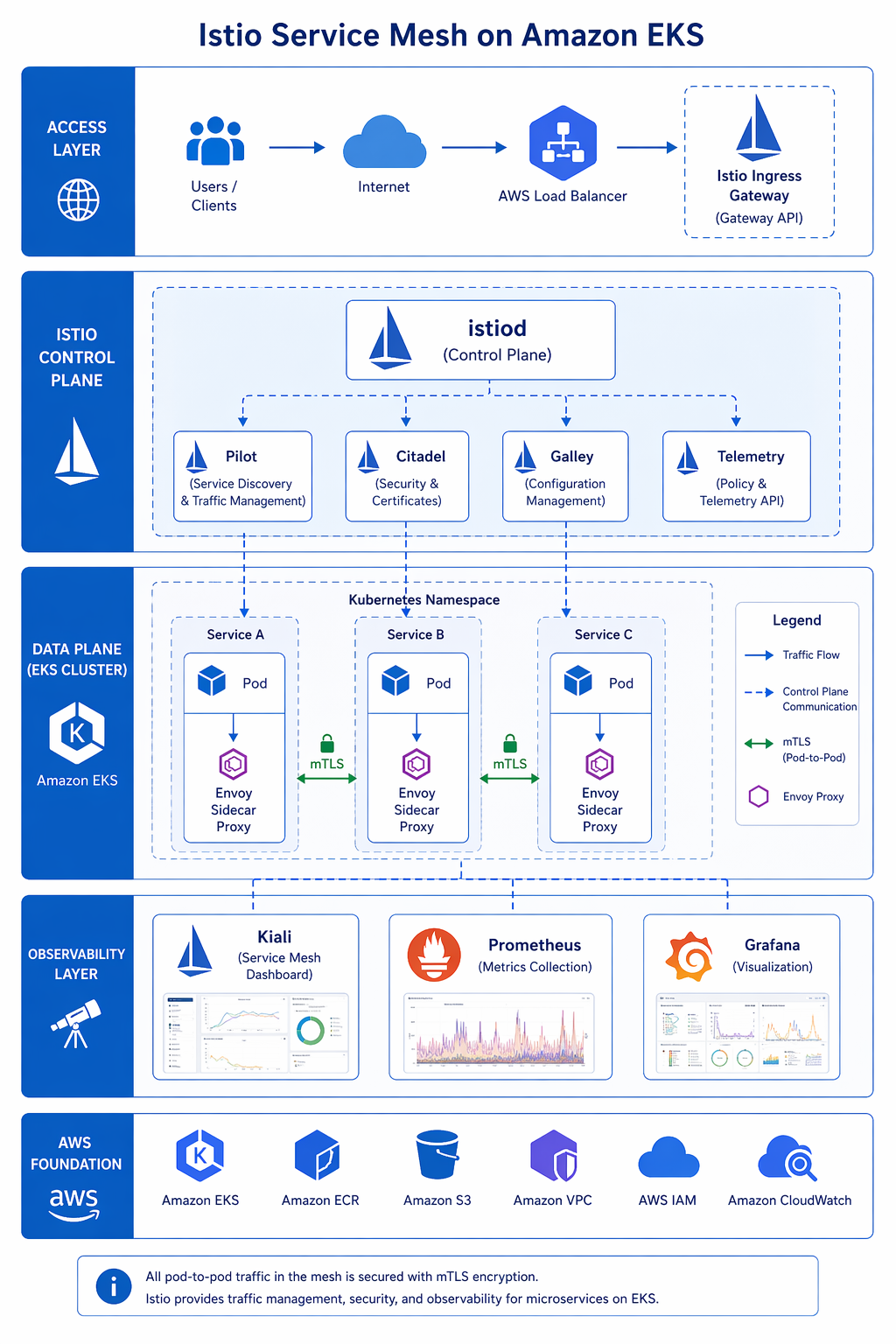
Istio uses a clean split architecture: a centralized control plane pushes configuration out to a distributed data plane of Envoy proxies running alongside your workloads.
Control Plane: istiod
The istiod binary is a bit of a Swiss Army knife – it rolls five previously separate components into a single, streamlined process:
| Component | Responsibility |
|---|---|
| Pilot | Service discovery, traffic management configuration, xDS API server |
| Citadel | Certificate authority, mTLS certificate provisioning and rotation |
| Galley | Configuration validation and ingestion from Kubernetes API |
| CNI | Node-level network configuration for sidecar traffic interception |
| Injector | Mutating webhook for automatic sidecar injection into pods |
In a typical EKS setup, istiod runs as a Deployment with 2 replicas in the istio-system namespace. It keeps an eye on the Kubernetes API for Istio custom resources – things like VirtualService, DestinationRule, and PeerAuthentication – and translates those into Envoy xDS configurations that get pushed down to the sidecars.
Data Plane: Envoy Sidecar Proxy
Every pod enrolled in the mesh gets an Envoy sidecar container automatically injected via a mutating webhook. That sidecar sits in the middle of all inbound and outbound network traffic. The interception itself is handled by iptables rules, set up either by the Istio CNI plugin (the preferred approach) or the older init container method.
The sidecar handles:
- Inbound traffic: Intercepts requests arriving at the pod, performs mTLS handshake, and forwards to the application container on localhost.
- Outbound traffic: Intercepts requests leaving the application container, performs service discovery via xDS, applies traffic policies, and forwards through the mTLS tunnel to the destination sidecar.
- Observability: Exposes metrics in Prometheus format, distributes traces via OpenTelemetry, and writes access logs.
Ambient Mode (Sidecar-Less)
Starting with Istio 1.22 and maturing in more recent releases, ambient mode does away with the sidecar entirely. Instead, a node-level ztunnel proxy takes care of L4 traffic, and an optional waypoint proxy per namespace handles L7 policies. The result? Significantly less resource overhead and simpler operations. We dig into ambient mode in more detail in the performance section later on.
Feature Comparison: Istio vs App Mesh
We’ve put together a comprehensive side-by-side comparison of Istio and App Mesh across every major service mesh capability.
| Feature | Istio | AWS App Mesh | Advantage |
|---|---|---|---|
| Traffic Splitting | Weighted routing via VirtualService (0.01% granularity) | Weighted routing via VirtualRouter (1% granularity) | Istio |
| Canary Deployments | Native via weight shifting in VirtualService | Via VirtualRouter route updates | Istio |
| A/B Testing | Header-based, cookie-based, user-based matching | Not natively supported | Istio |
| Traffic Mirroring | Yes (mirror field in VirtualService) | Not supported | Istio |
| Fault Injection | Delay and abort injection | Not supported | Istio |
| Circuit Breaker | DestinationRule outlierDetection | VirtualNode listener timeout only | Istio |
| Retries and Timeouts | Per-route configuration in VirtualService | Per-route in VirtualRouter | Istio |
| mTLS | Strict or permissive mode, per-service granularity | Enabled/disabled per VirtualNode | Istio |
| Authorization Policies | Rich L4/L7 policy engine (AuthorizationPolicy) | Basic via VirtualNode backends | Istio |
| JWT Validation | Native RequestAuthentication resource | Not supported | Istio |
| Gateway | Istio Gateway + Kubernetes Gateway API | Ingress Gateway only | Istio |
| Multi-Cluster | Primary-remote, multi-primary, external control plane | Single cluster only | Istio |
| Observability | Kiali, Prometheus, Jaeger, Grafana built-in | CloudWatch, X-Ray integration | Depends on stack |
| Control Plane | istiod (open source, self-managed) | App Mesh Controller (AWS-managed) | App Mesh (simpler) |
| Managed Option | Istio on EKS Add-On (AWS managed) | Fully managed by AWS | App Mesh (was) |
| Ambient Mode | Available (sidecar-less) | Not available | Istio |
| Community | 1,000+ contributors, CNCF graduated | AWS-only development | Istio |
| License | Apache 2.0 | Proprietary AWS service | Istio |
Summary of Key Differences
Let’s be fair to App Mesh – it was genuinely easier to adopt if you were already all-in on AWS. The tight integration with CloudWatch and X-Ray meant you didn’t have to piece together a separate observability stack. But it was missing some features that most production microservice architectures really need: traffic mirroring for safe testing, fault injection for chaos engineering, fine-grained authorization policies, JWT validation, and multi-cluster federation.
Istio gives you all of those, though you’ll pay for it with a steeper learning curve and more moving parts to keep an eye on. Still, for teams running production workloads on EKS, the feature gap makes Istio the practical choice.
Prerequisites and EKS Setup
Before installing Istio, ensure your EKS environment meets the requirements.
Cluster Version
Istio 1.24+ requires Kubernetes 1.28 or later. EKS versions 1.29, 1.30, and 1.31 are fully supported.
| Component | Minimum Version | Recommended Version |
|---|---|---|
| EKS Kubernetes | 1.28 | 1.31 |
| kubectl | 1.28 | 1.31 |
| Helm | 3.12 | 3.17 |
| Istio | 1.22 | 1.24 |
CLI Tools
Install the required CLI tools on your workstation:
# Install istioctl
curl -L https://istio.io/downloadIstio | sh -
export PATH="$PWD/istio-1.24.3/bin:$PATH"

# Verify versions
istioctl version --remote=false
helm version
kubectl version --short
aws --version
EKS Cluster Setup
If you need a fresh cluster, create one with the following configuration. Adjust the node group sizes based on your workload.
# Set variables
export CLUSTER_NAME=istio-mesh-cluster
export REGION=us-east-1
export K8S_VERSION=1.31

# Create EKS cluster using eksctl
cat <<EOF > cluster-config.yaml
apiVersion: eksctl.io/v1alpha5
kind: ClusterConfig
metadata:
  name: ${CLUSTER_NAME}
  region: ${REGION}
  version: "${K8S_VERSION}"
managedNodeGroups:
  - name: core-nodes
    instanceType: m6i.xlarge
    desiredCapacity: 3
    minSize: 2
    maxSize: 6
    labels:
      istio-injection: enabled
    iam:
      withAddonPolicies:
        autoScaler: true
        cloudWatch: true
        ebs: true
  - name: gateway-nodes
    instanceType: m6i.2xlarge
    desiredCapacity: 2
    minSize: 1
    maxSize: 4
    labels:
      istio: ingressgateway
    taints:
      - key: dedicated
        value: istio-gateway
        effect: NoSchedule
cloudWatch:
  clusterLogging:
    enableTypes: ["api", "audit", "authenticator"]
EOF

eksctl create cluster -f cluster-config.yaml
For existing clusters, follow our EKS getting started guide 2026 for version upgrades and node group management.
IAM Setup for Istio
Istio itself does not require special IAM permissions, but your workloads might need IRSA. The AWS Load Balancer Controller, which integrates with Istio Gateway, does require IAM:
# Create IAM policy for AWS Load Balancer Controller
aws iam create-policy \
    --policy-name AWSLoadBalancerControllerIAMPolicy \
    --policy-document file://<(curl -s https://raw.githubusercontent.com/kubernetes-sigs/aws-load-balancer-controller/main/docs/install/iam_policy.json)

# Create IAM service account
eksctl create iamserviceaccount \
  --cluster=${CLUSTER_NAME} \
  --namespace=kube-system \
  --name=aws-load-balancer-controller \
  --attach-policy-arn=arn:aws:iam::$(aws sts get-caller-identity --query Account --output text):policy/AWSLoadBalancerControllerIAMPolicy \
  --approve
Installing Istio on EKS with Helm
Helm is the way to go for production Istio installs. It gives you far more control over configuration values than the istioctl install approach, and it integrates cleanly with GitOps workflows.
Step 1: Add the Istio Helm Repository
helm repo add istio https://istio-release.storage.googleapis.com/charts
helm repo update
Step 2: Create the istio-system Namespace
kubectl create namespace istio-system
Step 3: Create a Custom Values File
Create a istio-values.yaml file tailored for EKS production deployments:
# istio-values.yaml - Production configuration for EKS
istiod:
  pilot:
    enabled: true
    resources:
      requests:
        cpu: 500m
        memory: 2Gi
      limits:
        cpu: "2"
        memory: 4Gi
    replicaCount: 3
    topologySpreadConstraints:
      - maxSkew: 1
        topologyKey: topology.kubernetes.io/zone
        whenUnsatisfiable: DoNotSchedule
        labelSelector:
          matchLabels:
            app: istiod
    autoscaleEnabled: true
    autoscaleMin: 2
    autoscaleMax: 5

  # Global configuration
  global:
    # Use IRSA for AWS integration
    podSecurityContext:
      runAsNonRoot: true
      runAsUser: 1337
      fsGroup: 1337

    # Proxy configuration (sidecar)
    proxy:
      resources:
        requests:
          cpu: 100m
          memory: 128Mi
        limits:
          cpu: "1"
          memory: 512Mi
      concurrency: 2
      accessLogFile: /dev/stdout
      accessLogEncoding: JSON
      logLevel: warning

    # Proxy init configuration
    proxy_init:
      resources:
        limits:
          cpu: 200m
          memory: 128Mi
        requests:
          cpu: 10m
          memory: 64Mi

# Install CNI plugin (required for production)
cni:
  enabled: true
  resources:
    requests:
      cpu: 100m
      memory: 128Mi
    limits:
      cpu: 500m
      memory: 512Mi

# Install gateway
gateways:
  istio-ingressgateway:
    enabled: true
    labels:
      app: istio-ingressgateway
      istio: ingressgateway
    resources:
      requests:
        cpu: 200m
        memory: 256Mi
      limits:
        cpu: "2"
        memory: 1Gi
    serviceAnnotations:
      service.beta.kubernetes.io/aws-load-balancer-type: nlb
      service.beta.kubernetes.io/aws-load-balancer-scheme: internet-facing
    type: LoadBalancer
    ports:
      - port: 80
        targetPort: 8080
        name: http2
      - port: 443
        targetPort: 8443
        name: https
      - port: 15021
        targetPort: 15021
        name: status-port
Step 4: Install Istio Base CRDs
helm install istio-base istio/base \
  -n istio-system \
  --wait
Step 5: Install Istio Discovery (istiod)
helm install istiod istio/istiod \
  -n istio-system \
  -f istio-values.yaml \
  --wait
Step 6: Install Istio CNI
helm install istio-cni istio/cni \
  -n istio-system \
  --set profile=production \
  --wait
Step 7: Install the Ingress Gateway
helm install istio-ingressgateway istio/gateway \
  -n istio-system \
  --set name=istio-ingressgateway \
  --wait
Step 8: Verify the Installation
# Check all Istio components are running
kubectl get pods -n istio-system

# Expected output:
# NAME                                    READY   STATUS    RESTARTS   AGE
# istiod-xxxxxxxxx-xxxxx                 1/1     Running   0          2m
# istiod-xxxxxxxxx-xxxxx                 1/1     Running   0          2m
# istio-ingressgateway-xxxxxxxxx-xxxxx   1/1     Running   0          2m
# istio-cni-node-xxxxx                   1/1     Running   0          2m

# Check istiod status
istioctl analyze -n istio-system

# Get the ingress gateway load balancer address
export INGRESS_HOST=$(kubectl -n istio-system get service istio-ingressgateway \
  -o jsonpath='{.status.loadBalancer.ingress[0].hostname}')
echo "Ingress Gateway: $INGRESS_HOST"
Sidecar Injection: Automatic and Manual
Istio gets its Envoy sidecar into pods via a Kubernetes mutating admission webhook. You’ve got two options for controlling this: flip it on at the namespace level, or fine-tune it pod by pod.
Automatic Injection (Namespace-Level)
Label the namespace to enable automatic sidecar injection for all pods deployed into it:
# Enable injection for a namespace
kubectl label namespace default istio-injection=enabled

# Verify the label
kubectl get namespace -L istio-injection
When you deploy a pod into a labeled namespace, Istio injects the Envoy sidecar automatically. The pod will have two containers: your application container and the istio-proxy container.
Per-Pod Injection Control
You can override namespace-level injection using pod annotations:
# Force injection ON for this pod
apiVersion: v1
kind: Pod
metadata:
  name: my-app
  annotations:
    sidecar.istio.io/inject: "true"
spec:
  containers:
    - name: my-app
      image: my-app:latest
      ports:
        - containerPort: 8080
# Force injection OFF for this pod (even in an injection-enabled namespace)
apiVersion: v1
kind: Pod
metadata:
  name: legacy-app
  annotations:
    sidecar.istio.io/inject: "false"
spec:
  containers:
    - name: legacy-app
      image: legacy-app:latest
Manual Injection
For cases where you need precise control, use istioctl kube-inject to inject the sidecar at deploy time:
# Generate the manifest with sidecar injected (dry run)
istioctl kube-inject -f deployment.yaml > deployment-with-sidecar.yaml

# Apply the injected manifest
kubectl apply -f deployment-with-sidecar.yaml
Customizing Sidecar Resources
Tune sidecar resources per-deployment using annotations:
apiVersion: apps/v1
kind: Deployment
metadata:
  name: high-throughput-service
spec:
  replicas: 3
  selector:
    matchLabels:
      app: high-throughput-service
  template:
    metadata:
      labels:
        app: high-throughput-service
      annotations:
        sidecar.istio.io/proxyCPU: "200m"
        sidecar.istio.io/proxyMemory: "256Mi"
        sidecar.istio.io/proxyCPULimit: "2"
        sidecar.istio.io/proxyMemoryLimit: "1Gi"
        sidecar.istio.io/logLevel: "info"
        traffic.sidecar.istio.io/includeOutboundIPRanges: "10.0.0.0/8"
    spec:
      containers:
        - name: app
          image: high-throughput-service:v2.1.0
          ports:
            - containerPort: 8080
Traffic Management
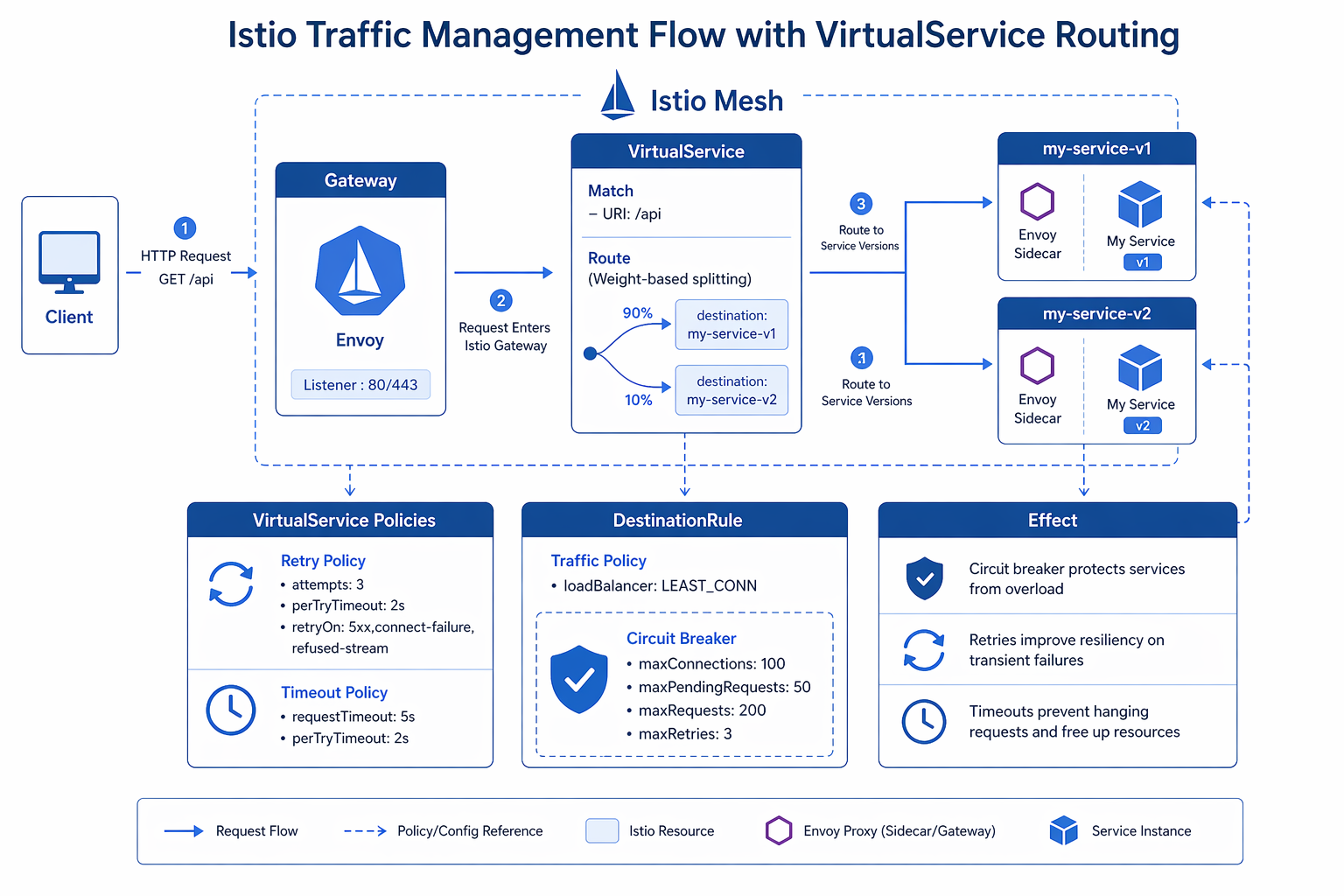
This is where Istio really leaves App Mesh in the dust. Istio gives you granular, fine-grained control over how traffic moves between your services, all through three core resources: VirtualService, DestinationRule, and Gateway.
VirtualService: Routing Rules
A VirtualService defines the routing rules for traffic reaching a host. It supports weight-based routing, header-based matching, retries, timeouts, and fault injection.
apiVersion: networking.istio.io/v1
kind: VirtualService
metadata:
  name: productpage
  namespace: default
spec:
  hosts:
    - productpage
  http:
    - match:
        - headers:
            x-user-type:
              exact: "premium"
      route:
        - destination:
            host: productpage
            subset: v2
          weight: 100
    - route:
        - destination:
            host: productpage
            subset: v1
          weight: 90
        - destination:
            host: productpage
            subset: v2
          weight: 10
This VirtualService routes premium users to v2 exclusively, while other traffic splits 90/10 between v1 and v2.
DestinationRule: Traffic Policies and Subsets
DestinationRule defines subsets (groups of pods identified by labels) and traffic policies like connection pool settings, circuit breakers, and load balancing.
apiVersion: networking.istio.io/v1
kind: DestinationRule
metadata:
  name: productpage
  namespace: default
spec:
  host: productpage
  trafficPolicy:
    connectionPool:
      tcp:
        maxConnections: 100
      http:
        h2UpgradePolicy: DEFAULT
        http1MaxPendingRequests: 1024
        http2MaxRequests: 1024
    outlierDetection:
      consecutive5xxErrors: 5
      interval: 30s
      baseEjectionTime: 30s
      maxEjectionPercent: 50
      minHealthPercent: 25
  subsets:
    - name: v1
      labels:
        version: v1
      trafficPolicy:
        connectionPool:
          http:
            http1MaxPendingRequests: 512
    - name: v2
      labels:
        version: v2
      trafficPolicy:
        connectionPool:
          http:
            http1MaxPendingRequests: 2048
Canary Deployments with Weight Shifting
A canary deployment gradually shifts traffic from the stable version to the new version. Here is a complete example:
# Step 1: Deploy both versions with labels
apiVersion: apps/v1
kind: Deployment
metadata:
  name: reviews-v1
spec:
  replicas: 3
  selector:
    matchLabels:
      app: reviews
      version: v1
  template:
    metadata:
      labels:
        app: reviews
        version: v1
    spec:
      containers:
        - name: reviews
          image: reviews:v1
          ports:
            - containerPort: 9080
---
apiVersion: apps/v1
kind: Deployment
metadata:
  name: reviews-v2
spec:
  replicas: 1
  selector:
    matchLabels:
      app: reviews
      version: v2
  template:
    metadata:
      labels:
        app: reviews
        version: v2
    spec:
      containers:
        - name: reviews
          image: reviews:v2
          ports:
            - containerPort: 9080
# Step 2: Start with 95/5 traffic split
apiVersion: networking.istio.io/v1
kind: VirtualService
metadata:
  name: reviews
spec:
  hosts:
    - reviews
  http:
    - route:
        - destination:
            host: reviews
            subset: v1
          weight: 95
        - destination:
            host: reviews
            subset: v2
          weight: 5
Shift the weights progressively: 95/5, 80/20, 50/50, 25/75, and finally 0/100. Monitor error rates and latency at each step using Kiali or your observability dashboard.
A/B Testing with Header Matching
A/B testing routes specific users to specific versions based on request headers, cookies, or other attributes:
apiVersion: networking.istio.io/v1
kind: VirtualService
metadata:
  name: frontend
spec:
  hosts:
    - frontend
  http:
    - match:
        - headers:
            cookie:
              regex: "^(.*?;)?(ab_variant=blue)(;.*)?$"
      route:
        - destination:
            host: frontend
            subset: blue
    - match:
        - headers:
            cookie:
              regex: "^(.*?;)?(ab_variant=green)(;.*)?$"
      route:
        - destination:
            host: frontend
            subset: green
    - route:
        - destination:
            host: frontend
            subset: stable
Traffic Mirroring
Traffic mirroring sends a copy of live traffic to a canary version without impacting the user. This is invaluable for testing with real production traffic:
apiVersion: networking.istio.io/v1
kind: VirtualService
metadata:
  name: orders
spec:
  hosts:
    - orders
  http:
    - route:
        - destination:
            host: orders
            subset: v1
          weight: 100
      mirror:
        host: orders
        subset: v2
      mirrorPercentage:
        value: 10.0
This routes 100% of traffic to v1 but also sends a 10% mirror of requests to v2. The mirrored requests receive responses that are discarded, so the caller is unaffected.
Circuit Breaker Configuration
Circuit breakers prevent cascading failures by ejecting unhealthy instances from the load balancing pool:
apiVersion: networking.istio.io/v1
kind: DestinationRule
metadata:
  name: payments
spec:
  host: payments
  trafficPolicy:
    outlierDetection:
      consecutive5xxErrors: 3
      consecutiveGatewayErrors: 2
      interval: 15s
      baseEjectionTime: 30s
      maxEjectionPercent: 50
    connectionPool:
      tcp:
        maxConnections: 50
      http:
        http1MaxPendingRequests: 100
        http2MaxRequests: 200
        maxRequestsPerConnection: 4
        maxRetries: 3
The following table summarizes the traffic management capabilities in Istio compared to App Mesh:
| Traffic Management Feature | Istio Resource | App Mesh Equivalent | Istio Advantage |
|---|---|---|---|
| Weight-based routing | VirtualService route.weight | VirtualRouter route.weight | 0.01% granularity vs 1% |
| Header-based routing | VirtualService match.headers | Not available | Exact, regex, prefix matching |
| Cookie-based routing | VirtualService match.headers (cookie) | Not available | Native A/B testing |
| Traffic mirroring | VirtualService mirror | Not available | Safe prod testing |
| Fault injection | VirtualService fault | Not available | Delay and abort injection |
| Circuit breaker | DestinationRule outlierDetection | VirtualNode timeout only | Full outlier detection |
| Connection pooling | DestinationRule connectionPool | Not available | TCP and HTTP pools |
| Retries | VirtualService retries | VirtualRouter retryPolicy | Per-route, per-condition |
| Timeouts | VirtualService timeout | VirtualRouter timeout | Per-route granularity |
Security: mTLS, Authorization, and JWT Validation
Istio takes a layered approach to security, covering identity, mutual TLS, authorization policies, and JWT validation – all without requiring changes to your application code.
Mutual TLS (mTLS)
Istio handles mTLS certificate provisioning and rotation automatically through its built-in CA (Citadel). Out of the box, it runs in permissive mode – meaning it accepts both mTLS and plaintext connections. That’s fine for getting started, but for production you’ll want to flip it to strict mode.
Mesh-Wide Strict mTLS
apiVersion: security.istio.io/v1
kind: PeerAuthentication
metadata:
  name: default
  namespace: istio-system
spec:
  mtls:
    mode: STRICT
This enforces mTLS for all services in the mesh. Any client not presenting a valid certificate is rejected.
Per-Service mTLS
apiVersion: security.istio.io/v1
kind: PeerAuthentication
metadata:
  name: ratings-peer-auth
  namespace: default
spec:
  selector:
    matchLabels:
      app: ratings
  mtls:
    mode: STRICT
  portLevelMtls:
    8080:
      mode: STRICT
    9090:
      mode: DISABLE
This enforces mTLS for the ratings service but allows plaintext on port 9090 (useful for metrics scraping).
Authorization Policies
AuthorizationPolicy replaces the App Mesh virtual node backend restrictions with a powerful L4/L7 policy engine.
Deny All by Default
apiVersion: security.istio.io/v1
kind: AuthorizationPolicy
metadata:
  name: deny-all
  namespace: default
spec:
  {}
An empty spec denies all traffic to services in the namespace.
Allow Specific Service Communication
apiVersion: security.istio.io/v1
kind: AuthorizationPolicy
metadata:
  name: allow-productpage-to-reviews
  namespace: default
spec:
  selector:
    matchLabels:
      app: reviews
  action: ALLOW
  rules:
    - from:
        - source:
            principals:
              - "cluster.local/ns/default/sa/productpage"
      to:
        - operation:
            methods: ["GET", "POST"]
            paths: ["/api/reviews/*"]
Block Specific IP Ranges
apiVersion: security.istio.io/v1
kind: AuthorizationPolicy
metadata:
  name: block-internal-from-external
  namespace: default
spec:
  selector:
    matchLabels:
      app: internal-api
  action: DENY
  rules:
    - from:
        - source:
            ipBlocks:
              - "0.0.0.0/0"
            notIpBlocks:
              - "10.0.0.0/8"
              - "172.16.0.0/12"
JWT Validation
Istio validates JWT tokens at the sidecar level, rejecting invalid tokens before they reach your application:
apiVersion: security.istio.io/v1
kind: RequestAuthentication
metadata:
  name: jwt-auth
  namespace: default
spec:
  selector:
    matchLabels:
      app: api-gateway
  jwtRules:
    - issuer: "https://cognito-idp.us-east-1.amazonaws.com/us-east-1_XXXXXXXXX"
      jwksUri: "https://cognito-idp.us-east-1.amazonaws.com/us-east-1_XXXXXXXXX/.well-known/jwks.json"
      audiences:
        - "api://my-application"
      forwardOriginalToken: true
Combine RequestAuthentication with AuthorizationPolicy to enforce valid tokens:
apiVersion: security.istio.io/v1
kind: AuthorizationPolicy
metadata:
  name: require-jwt
  namespace: default
spec:
  selector:
    matchLabels:
      app: api-gateway
  action: ALLOW
  rules:
    - from:
        - source:
            requestPrincipals:
              - "https://cognito-idp.us-east-1.amazonaws.com/us-east-1_XXXXXXXXX/*"
Security Feature Comparison
| Security Feature | Istio | App Mesh |
|---|---|---|
| mTLS mode | STRICT, PERMISSIVE, DISABLE per service/port | Enabled/disabled per VirtualNode |
| Certificate rotation | Automatic (every 24h by default) | Automatic via App Mesh controller |
| Authorization | L4/L7 policies (IP, service, method, path, header) | Basic backend allow-lists |
| JWT validation | Native (RequestAuthentication) | Not supported |
| External CA | Supported (Vault, AWS Private CA) | AWS Certificate Manager only |
| Identity | SPIFFE-based (cluster.local/ns/…/sa/…) | AWS IAM roles |
Observability: Kiali, Prometheus, Jaeger, and CloudWatch
Istio comes bundled with a full observability stack out of the box. Unlike App Mesh, which leaned on CloudWatch and X-Ray, Istio gives you purpose-built tools designed specifically for understanding what’s happening inside your service mesh.
Kiali Dashboard
Kiali provides a visual overview of your service mesh topology, traffic flow, health status, and configuration validation.
Install Kiali alongside Istio:
helm repo add kiali https://kiali.org/helm-charts
helm repo update

helm install kiali-server kiali/kiali-server \
  -n istio-system \
  --set cr.create=true \
  --set cr.spec.external_services.prometheus.url="http://prometheus.istio-system:9090" \
  --set cr.spec.external_services.tracing.url="http://tracing.istio-system:16685/jaeger"
Access Kiali via port-forward or expose it through an Istio Gateway:
# Port-forward for quick access
kubectl port-forward -n istio-system svc/kiali 20001:20001

# Or expose via Istio Gateway
cat <<EOF | kubectl apply -f -
apiVersion: networking.istio.io/v1
kind: Gateway
metadata:
  name: kiali-gateway
  namespace: istio-system
spec:
  selector:
    istio: ingressgateway
  servers:
    - port:
        number: 443
        name: https-kiali
        protocol: HTTPS
      tls:
        mode: SIMPLE
        credentialName: kiali-tls-secret
      hosts:
        - "kiali.example.com"
---
apiVersion: networking.istio.io/v1
kind: VirtualService
metadata:
  name: kiali-vs
  namespace: istio-system
spec:
  hosts:
    - "kiali.example.com"
  gateways:
    - kiali-gateway
  http:
    - route:
        - destination:
            host: kiali
            port:
              number: 20001
EOF
Prometheus Metrics
Istio sidecars expose metrics in Prometheus format on port 15090. Install Prometheus in the mesh:
# Install Prometheus using the Istio sample manifests
kubectl apply -f https://raw.githubusercontent.com/istio/istio/release-1.24/samples/addons/prometheus.yaml

# Or use the kube-prometheus-stack Helm chart for a full production setup
helm repo add prometheus-community https://prometheus-community.github.io/helm-charts
helm repo update

helm install prometheus prometheus-community/kube-prometheus-stack \
  -n monitoring --create-namespace \
  --set prometheus.prometheusSpec.serviceMonitorSelectorNilUsesHelmValues=false
Key Istio metrics to monitor:
| Metric | Description | Alert Threshold |
|---|---|---|
istio_requests_total |
Total requests by response code, destination, source | Error rate > 1% over 5m |
istio_request_duration_milliseconds |
Request latency histogram | P99 > 500ms over 5m |
istio_request_bytes |
Request body size | Unusual spikes indicate anomalies |
istio_response_bytes |
Response body size | Unusual spikes indicate anomalies |
istio_tcp_connections_opened_total |
TCP connections opened | Connection surge |
istio_tcp_connections_closed_total |
TCP connections closed | Unexpected closures |
Jaeger Distributed Tracing
Install Jaeger for distributed tracing:
kubectl apply -f https://raw.githubusercontent.com/istio/istio/release-1.24/samples/addons/jaeger.yaml
Configure your applications to propagate tracing headers. Istio automatically generates span headers, but your application needs to forward the x-request-id, x-b3-traceid, x-b3-spanid, and x-b3-sampled headers.
Integration with CloudWatch Container Insights
To integrate Istio metrics with AWS CloudWatch, use the CloudWatch Agent with Prometheus metric collection. This provides a unified view alongside your CloudWatch Container Insights for EKS metrics:
# cloudwatch-agent-config.yaml - Prometheus config for Istio metrics
apiVersion: v1
kind: ConfigMap
metadata:
  name: prometheus-config
  namespace: amazon-cloudwatch
data:
  prometheus.yaml: |
    global:
      scrape_interval: 15s
      evaluation_interval: 15s
    scrape_configs:
      - job_name: 'istio-mesh'
        kubernetes_sd_configs:
          - role: endpoints
            namespaces:
              names:
                - istio-system
        relabel_configs:
          - source_labels: [__meta_kubernetes_service_name, __meta_kubernetes_endpoint_port_name]
            action: keep
            regex: istio-telemetry;prometheus
      - job_name: 'envoy-sidecar'
        metrics_path: /stats/prometheus
        kubernetes_sd_configs:
          - role: pod
        relabel_configs:
          - source_labels: [__meta_kubernetes_pod_label_istio]
            action: keep
            regex: .*
          - source_labels: [__meta_kubernetes_pod_container_name]
            action: keep
            regex: istio-proxy
          - source_labels: [__address__]
            regex: '(.*):15090'
            target_label: __address__
            replacement: '${1}:15090'
Observability Tools Comparison
| Tool | Purpose | Istio Stack | App Mesh Stack |
|---|---|---|---|
| Kiali | Service mesh topology and health | Built-in integration | Not available |
| Prometheus | Metrics collection and alerting | Native support | Via CloudWatch |
| Grafana | Metrics dashboards | Built-in dashboards | CloudWatch dashboards |
| Jaeger | Distributed tracing | Native integration | AWS X-Ray |
| CloudWatch | AWS-native metrics and logs | Configurable integration | Native integration |
Istio Gateway vs Kubernetes Gateway API
Istio provides two approaches for ingress traffic management: the Istio Gateway resource and the Kubernetes Gateway API. Understanding both helps you choose the right path.
Istio Gateway
The Istio Gateway resource configures the Envoy ingress gateway:
apiVersion: networking.istio.io/v1
kind: Gateway
metadata:
  name: app-gateway
  namespace: default
spec:
  selector:
    istio: ingressgateway
  servers:
    - port:
        number: 80
        name: http
        protocol: HTTP
      hosts:
        - "app.example.com"
      tls:
        httpsRedirect: true
    - port:
        number: 443
        name: https
        protocol: HTTPS
      tls:
        mode: SIMPLE
        credentialName: app-tls-secret
      hosts:
        - "app.example.com"
Kubernetes Gateway API
The Kubernetes Gateway API is a standard, vendor-neutral API for ingress traffic management. Istio supports it natively. For more background on Gateway API concepts, see our Kubernetes Gateway API migration guide. If you are evaluating the newer stable features, the Gateway API v1.5 deep dive covers ListenerSet, TLSRoute, and ReferenceGrant from the operator side.
apiVersion: gateway.networking.k8s.io/v1
kind: Gateway
metadata:
  name: app-gateway
  namespace: default
  annotations:
    cert-manager.io/issuer: letsencrypt-prod
spec:
  gatewayClassName: istio
  listeners:
    - name: http
      port: 80
      protocol: HTTP
      hostname: "app.example.com"
      allowedRoutes:
        namespaces:
          from: Same
    - name: https
      port: 443
      protocol: HTTPS
      hostname: "app.example.com"
      tls:
        mode: Terminate
        certificateRefs:
          - name: app-tls-secret
      allowedRoutes:
        namespaces:
          from: Same
---
apiVersion: gateway.networking.k8s.io/v1
kind: HTTPRoute
metadata:
  name: app-route
  namespace: default
spec:
  parentRefs:
    - name: app-gateway
  hostnames:
    - "app.example.com"
  rules:
    - matches:
        - path:
            type: PathPrefix
            value: /api
      backendRefs:
        - name: api-service
          port: 8080
          weight: 90
        - name: api-service-canary
          port: 8080
          weight: 10
    - matches:
        - path:
            type: PathPrefix
            value: /
      backendRefs:
        - name: frontend-service
          port: 3000
When to Use Each
| Criteria | Istio Gateway | Kubernetes Gateway API |
|---|---|---|
| Maturity | Production-proven since Istio 1.0 | Stable since v1.0, Istio support is GA |
| Expressiveness | Full Istio feature set | Standardized subset, growing |
| Portability | Istio-specific | Vendor-neutral, portable |
| AWS ALB/NLB Integration | Via annotations | Via GatewayClass configuration |
| Traffic splitting | Via VirtualService | Via HTTPRoute weight |
| mTLS termination | Native | Via TLS config |
If you’re starting fresh and portability matters, go with the Kubernetes Gateway API. But if you need advanced features like traffic mirroring, fault injection, or granular header matching, stick with the Istio Gateway paired with VirtualService.
Migration Strategy from App Mesh
Don’t try to do this all at once. Migrating from App Mesh to Istio calls for a careful, phased approach – trying a big-bang switchover is a recipe for a long, stressful weekend. The strategy below keeps risk manageable and gives you a rollback path at every step.
Migration Phase Overview
| Phase | Duration | Risk | Rollback Complexity |
|---|---|---|---|
| Phase 1: Discovery | 1-2 weeks | None | N/A |
| Phase 2: Parallel Install | 1-2 weeks | Low | Remove Istio resources |
| Phase 3: Workload Migration | 2-4 weeks | Medium | Re-enable App Mesh sidecar |
| Phase 4: Traffic Cutover | 1-2 weeks | Medium-High | Revert VirtualService weights |
| Phase 5: App Mesh Removal | 1 week | Low | Re-install App Mesh controller |
Phase 1: Discovery and Inventory
Audit your current App Mesh configuration:
# List all App Mesh virtual services
aws appmesh list-virtual-services --mesh-name your-mesh-name

# List all virtual nodes
aws appmesh list-virtual-nodes --mesh-name your-mesh-name

# List all virtual routers
aws appmesh list-virtual-routers --mesh-name your-mesh-name

# Export all App Mesh resources
for mesh in $(aws appmesh list-meshes --query 'meshes[*].meshName' --output text); do
  echo "=== Mesh: $mesh ==="
  aws appmesh describe-mesh --mesh-name "$mesh"
  for vs in $(aws appmesh list-virtual-services --mesh-name "$mesh" --query 'virtualServices[*].virtualServiceName' --output text); do
    echo "  VirtualService: $vs"
    aws appmesh describe-virtual-service --mesh-name "$mesh" --virtual-service-name "$vs"
  done
  for vn in $(aws appmesh list-virtual-nodes --mesh-name "$mesh" --query 'virtualNodes[*].virtualNodeName' --output text); do
    echo "  VirtualNode: $vn"
    aws appmesh describe-virtual-node --mesh-name "$mesh" --virtual-node-name "$vn"
  done
done
Document the following for each service:
- Traffic routing rules (weights, retries, timeouts)
- mTLS configuration
- Access log configuration
- CloudWatch metric exports
- Service discovery mappings
Phase 2: Install Istio Alongside App Mesh
Good news: Istio and App Mesh can peacefully coexist in the same cluster. During this phase, both control planes are running, but only the App Mesh sidecars are actively handling traffic:
# Install Istio with injection disabled by default
helm install istiod istio/istiod \
  -n istio-system \
  --set global.proxy.autoInject=disabled \
  --set global.istiod.enableAlphaMtlsDebug=true \
  -f istio-values.yaml \
  --wait

# Do NOT label namespaces for injection yet
# Verify Istio is running
kubectl get pods -n istio-system
Phase 3: Migrate Workloads One at a Time
For each service, create the Istio resources before removing the App Mesh sidecar:
# Step 1: Create Istio DestinationRule for the service
cat <<EOF | kubectl apply -f -
apiVersion: networking.istio.io/v1
kind: DestinationRule
metadata:
  name: catalog-service
  namespace: default
spec:
  host: catalog-service
  trafficPolicy:
    tls:
      mode: ISTIO_MUTUAL
  subsets:
    - name: v1
      labels:
        version: v1
    - name: v2
      labels:
        version: v2
EOF

# Step 2: Create Istio VirtualService matching the App Mesh routing rules
cat <<EOF | kubectl apply -f -
apiVersion: networking.istio.io/v1
kind: VirtualService
metadata:
  name: catalog-service
  namespace: default
spec:
  hosts:
    - catalog-service
  http:
    - route:
        - destination:
            host: catalog-service
            subset: v1
          weight: 100
      retries:
        attempts: 3
        perTryTimeout: 2s
EOF

# Step 3: Remove App Mesh sidecar injection annotation and add Istio injection
# Update the deployment
kubectl patch deployment catalog-service -p '{"spec":{"template":{"metadata":{"annotations":{"appmesh.k8s.aws/sidecarInjectorWebhook":"none","sidecar.istio.io/inject":"true"}}}}}'

# Step 4: Verify the pod now has the Istio sidecar
kubectl get pods -l app=catalog-service -o jsonpath='{.items[*].spec.containers[*].name}'
Phase 4: Traffic Cutover
Once all workloads have Istio sidecars, cutover external traffic from the App Mesh ingress to the Istio Gateway:
# Update DNS to point to the Istio ingress gateway
INGRESS_HOSTNAME=$(kubectl -n istio-system get service istio-ingressgateway \
  -o jsonpath='{.status.loadBalancer.ingress[0].hostname}')

# In Route 53, update the alias record to point to the new NLB
aws route53 change-resource-record-sets \
  --hosted-zone-id Z1234567890 \
  --change-batch '{
    "Changes": [{
      "Action": "UPSERT",
      "ResourceRecordSet": {
        "Name": "app.example.com",
        "Type": "A",
        "AliasTarget": {
          "HostedZoneId": "Z215JYRZR1TBD5",
          "DNSName": "'"$INGRESS_HOSTNAME"'",
          "EvaluateTargetHealth": true
        }
      }
    }]
  }'
Phase 5: Remove App Mesh
After confirming stable operation with Istio for at least one week:
# Remove App Mesh controller
helm uninstall appmesh-controller -n appmesh-system

# Remove App Mesh CRDs
kubectl delete crds virtualservices.appmesh.k8s.aws \
  virtualnodes.appmesh.k8s.aws \
  virtualrouters.appmesh.k8s.aws \
  meshes.appmesh.k8s.aws

# Remove App Mesh namespace
kubectl delete namespace appmesh-system

# Delete App Mesh resources in AWS
aws appmesh delete-mesh --mesh-name your-mesh-name

# Clean up IAM roles used by App Mesh
aws iam delete-role --role-name eks-appmesh-controller
Performance Impact and Resource Tuning
Let’s not pretend a service mesh is free – it adds latency and eats resources. Understanding exactly how much overhead you’re dealing with, and knowing how to tune it, makes the difference between a smooth production deployment and a bunch of confused alerts at 2 AM.
Sidecar Resource Usage
The following table shows typical sidecar resource consumption under different traffic profiles:
| Metric | Low Traffic (<100 RPS) | Medium Traffic (100-1000 RPS) | High Traffic (>1000 RPS) |
|---|---|---|---|
| CPU request | 50m | 100m | 200m |
| CPU limit | 500m | 1 | 2 |
| Memory request | 64Mi | 128Mi | 256Mi |
| Memory limit | 256Mi | 512Mi | 1Gi |
| P50 latency added | <1ms | 1-2ms | 2-3ms |
| P99 latency added | <3ms | 3-5ms | 5-8ms |
Tuning Sidecar Resources
Adjust resources per workload using annotations or the global proxy configuration:
# In your istio-values.yaml
global:
  proxy:
    resources:
      requests:
        cpu: 100m
        memory: 128Mi
      limits:
        cpu: "1"
        memory: 512Mi
    # Reduce CPU usage by limiting worker threads
    concurrency: 2
    # Enable access logging only for debugging
    accessLogFile: /dev/null
    # Reduce memory by limiting stats
    proxyStatsMatcher:
      inclusionRegexps:
        - "istio_*"
      exclusionRegexps:
        - ".*_rq_[0-9].*"
CNI Mode vs Sidecar Mode
Istio offers two data plane modes. The following table compares them:
| Aspect | Sidecar Mode (Traditional) | Ambient Mode (CNI + ztunnel) |
|---|---|---|
| Proxy location | Per-pod container | Per-node daemonset |
| L4 features | Full | Full |
| L7 features | Full | Requires waypoint proxy per namespace |
| CPU overhead per pod | 50-200m | Negligible per pod, ~100m per node |
| Memory overhead per pod | 64-256Mi | Negligible per pod, ~256Mi per node |
| Latency overhead | 1-5ms per hop | 0.5-2ms per hop |
| Pod restart on mesh change | Yes (sidecar injection) | No |
| Maturity | Production GA | Production-ready in Istio 1.24+ |
| App Mesh migration path | Direct replacement | Consider for new deployments |
Reducing Overhead in Sidecar Mode
# Optimize Envoy for production
apiVersion: apps/v1
kind: Deployment
metadata:
  name: optimized-service
spec:
  template:
    metadata:
      annotations:
        # Limit CPU usage
        sidecar.istio.io/proxyCPU: "100m"
        sidecar.istio.io/proxyMemory: "128Mi"
        # Reduce stats generation
        sidecar.istio.io/statsInclusionRegexps: "istio_rq_.*,istio_rqxx"
        # Disable access logging in high-throughput scenarios
        traffic.sidecar.istio.io/accessLogFile: "/dev/null"
    spec:
      containers:
        - name: app
          image: optimized-service:latest
Multi-Cluster Service Mesh with Istio on EKS
Istio supports multi-cluster deployments, a feature App Mesh never offered. This is essential for high-availability architectures spanning multiple AWS regions or accounts.
Multi-Cluster Topologies
| Topology | Description | Use Case |
|---|---|---|
| Single network, multi-cluster | Clusters share a VPC network (VPC peering or Transit Gateway) | Regional HA |
| Multi-network, multi-cluster | Clusters in different VPCs or regions | Cross-region DR |
| External control plane | istiod runs outside the workload cluster | Managed control plane |
| Primary-remote | One cluster hosts the control plane, others are remote | Cost optimization |
Single-Network Multi-Cluster Setup
The following example configures two EKS clusters in the same VPC:
# Set context variables
export CTX_CLUSTER1=arn:aws:eks:us-east-1:123456789012:cluster/cluster1
export CTX_CLUSTER2=arn:aws:eks:us-east-1:123456789012:cluster/cluster2

# Create a shared root CA and intermediate CAs for each cluster
mkdir -p certs
pushd certs

# Generate shared root CA
openssl genrsa -out root-ca-key.pem 4096
openssl req -x509 -new -nodes -key root-ca-key.pem \
  -sha256 -days 3650 -out root-cert.pem \
  -subj "/C=US/ST=Virginia/O=MyOrg/OU=Istio/CN=Root CA"

# Generate intermediate CA for cluster 1
openssl genrsa -out cluster1-ca-key.pem 4096
openssl req -new -key cluster1-ca-key.pem \
  -out cluster1-ca-cert.csr \
  -subj "/C=US/ST=Virginia/O=MyOrg/OU=Istio/CN=Cluster1 Intermediate CA"
openssl x509 -req -in cluster1-ca-cert.csr \
  -CA root-cert.pem -CAkey root-ca-key.pem \
  -CAcreateserial -out cluster1-ca-cert.pem \
  -days 1825 -sha256

# Generate intermediate CA for cluster 2
openssl genrsa -out cluster2-ca-key.pem 4096
openssl req -new -key cluster2-ca-key.pem \
  -out cluster2-ca-cert.csr \
  -subj "/C=US/ST=Virginia/O=MyOrg/OU=Istio/CN=Cluster2 Intermediate CA"
openssl x509 -req -in cluster2-ca-cert.csr \
  -CA root-cert.pem -CAkey root-ca-key.pem \
  -CAcreateserial -out cluster2-ca-cert.pem \
  -days 1825 -sha256

popd

# Create secrets for each cluster
kubectl --context="${CTX_CLUSTER1}" create secret generic cacerts \
  -n istio-system \
  --from-file=ca-cert.pem=certs/cluster1-ca-cert.pem \
  --from-file=ca-key.pem=certs/cluster1-ca-key.pem \
  --from-file=root-cert.pem=certs/root-cert.pem \
  --from-file=cert-chain.pem=certs/cluster1-ca-cert.pem

kubectl --context="${CTX_CLUSTER2}" create secret generic cacerts \
  -n istio-system \
  --from-file=ca-cert.pem=certs/cluster2-ca-cert.pem \
  --from-file=ca-key.pem=certs/cluster2-ca-key.pem \
  --from-file=root-cert.pem=certs/root-cert.pem \
  --from-file=cert-chain.pem=certs/cluster2-ca-cert.pem
Install Istio on both clusters with multi-cluster configuration:
# values-cluster1.yaml
global:
  multiCluster:
    clusterName: cluster1
  network: network1
  meshNetworks:
    network1:
      endpoints:
        - fromRegistry: cluster1
        - fromRegistry: cluster2
      gateways:
        - address: 0.0.0..0
          port: 15443
# Install on cluster 1
helm install istiod istio/istiod \
  -n istio-system \
  --kube-context "${CTX_CLUSTER1}" \
  -f values-cluster1.yaml \
  --wait

# Configure cross-cluster service discovery
istioctl create-remote-secret \
  --context="${CTX_CLUSTER2}" \
  --name=cluster2 | \
  kubectl --context="${CTX_CLUSTER1}" apply -f -

istioctl create-remote-secret \
  --context="${CTX_CLUSTER1}" \
  --name=cluster1 | \
  kubectl --context="${CTX_CLUSTER2}" apply -f -
After setup, services in cluster1 can call services in cluster2 using the standard Kubernetes service DNS name, and Istio routes the traffic across clusters automatically.
Cost Analysis
Running Istio on EKS adds costs beyond the base cluster. The following analysis helps you budget accurately.
Control Plane Costs
| Component | Instance Type | Count | Monthly Cost (us-east-1) |
|---|---|---|---|
| istiod (pilot) | 2 vCPU / 4Gi per pod | 3 replicas | Included in compute |
| Istio CNI | 100m / 128Mi per node | Per node | Included in compute |
| Ingress Gateway | 2 vCPU / 1Gi per pod | 2 replicas | Included in compute |
| EKS Control Plane | N/A | 1 | $73.00 |
| NLB (ingress) | N/A | 1 | ~$16.00 |
Sidecar Resource Overhead Per Pod
| Resource | Per-Pod Overhead | Cluster-Wide (100 pods) | Monthly Cost |
|---|---|---|---|
| CPU request | 100m | 10 vCPU | ~$30.00 |
| Memory request | 128Mi | 12.5 Gi | ~$15.00 |
| CPU limit | 1 | 100 vCPU (burst) | Variable |
Total Cost Estimate (100-pod Cluster)
| Cost Category | Monthly Estimate |
|---|---|
| EKS control plane | $73.00 |
| Additional compute (sidecars + istiod) | $45-90 |
| Network Load Balancer | $16.00 |
| Cross-AZ data transfer (mesh traffic) | $10-50 |
| Observability (Prometheus/EFS) | $20-40 |
| Total incremental cost | $164-269/month |
Compare this with App Mesh, which had no separate control plane charge but added similar sidecar overhead. Istio is roughly cost-neutral when replacing App Mesh, with the added benefit of no vendor lock-in.
Best Practices for Production Istio on EKS
Based on production deployments, the following practices reduce operational risk and improve performance.
Resource Management
-
Always set resource requests and limits on sidecars. Default limits are generous; tune them per workload.
-
Use topology spread constraints for istiod to span availability zones:
topologySpreadConstraints:
  - maxSkew: 1
    topologyKey: topology.kubernetes.io/zone
    whenUnsatisfiable: DoNotSchedule
    labelSelector:
      matchLabels:
        app: istiod
- Enable horizontal pod autoscaling for istiod:
autoscaleEnabled: true
autoscaleMin: 2
autoscaleMax: 5
Security
-
Enforce mesh-wide strict mTLS from day one. Use permissive mode only during migration.
-
Apply deny-all AuthorizationPolicy as the default in every namespace, then add explicit allow rules:
apiVersion: security.istio.io/v1
kind: AuthorizationPolicy
metadata:
  name: deny-all-default
  namespace: production
spec: {}
- Use AWS Private CA or HashiCorp Vault as an external CA for production workloads with compliance requirements.
Reliability
-
Deploy istiod across at least 3 availability zones to survive a zone failure.
-
Pre-pull the Envoy image on all nodes to avoid image pull delays during pod scheduling:
# DaemonSet to pre-pull Istio proxy image
cat <<EOF | kubectl apply -f -
apiVersion: apps/v1
kind: DaemonSet
metadata:
  name: istio-image-prepull
  namespace: istio-system
spec:
  selector:
    matchLabels:
      app: istio-image-prepull
  template:
    metadata:
      labels:
        app: istio-image-prepull
    spec:
      initContainers:
        - name: prepull
          image: proxyv2:1.24.3
          command: ['sh', '-c', 'echo Image pulled']
      containers:
        - name: pause
          image: registry.k8s.io/pause:3.9
EOF
- Use pod disruption budgets for the ingress gateway:
apiVersion: policy/v1
kind: PodDisruptionBudget
metadata:
  name: istio-ingressgateway-pdb
  namespace: istio-system
spec:
  minAvailable: 1
  selector:
    matchLabels:
      app: istio-ingressgateway
Observability
- Enable access logging in production but log to a file, not stdout, and ship logs via Fluent Bit or FireLens:
global:
  proxy:
    accessLogFile: /dev/stdout
    accessLogEncoding: JSON
    accessLogFormat: |
      {"start_time":"%START_TIME%","method":"%REQ(:METHOD)%","path":"%REQ(X-ENVOY-ORIGINAL-PATH?:PATH)%","protocol":"%PROTOCOL%","response_code":"%RESPONSE_CODE%","response_flags":"%RESPONSE_FLAGS%","bytes_received":"%BYTES_RECEIVED%","bytes_sent":"%BYTES_SENT%","duration":"%DURATION%","upstream_service":"%UPSTREAM_HOST%","upstream_cluster":"%UPSTREAM_CLUSTER%","upstream_local":"%UPSTREAM_LOCAL_ADDRESS%","downstream_local":"%DOWNSTREAM_LOCAL_ADDRESS%","downstream_remote":"%DOWNSTREAM_REMOTE_ADDRESS%","requested_server_name":"%REQUESTED_SERVER_NAME%","route_name":"%ROUTE_NAME%"}
-
Set up alerting on Istio control plane health, sidecar injection failures, and certificate rotation errors.
-
Run
istioctl analyzein CI/CD to catch configuration errors before they reach production:
# Add to your CI pipeline
istioctl analyze -A --failurePolicy WARN
Networking
-
Use the Istio CNI plugin instead of init containers. The CNI plugin is more reliable and avoids the privilege escalation required by init containers.
-
Configure AWS Network Load Balancer health checks for the ingress gateway:
serviceAnnotations:
  service.beta.kubernetes.io/aws-load-balancer-type: nlb
  service.beta.kubernetes.io/aws-load-balancer-healthcheck-protocol: http
  service.beta.kubernetes.io/aws-load-balancer-healthcheck-port: "15021"
  service.beta.kubernetes.io/aws-load-balancer-healthcheck-path: /healthz/ready
- Exclude the Kubernetes API server from mesh interception to prevent connectivity issues:
global:
  proxy:
    excludeIPRanges: "10.100.0.1/32"
Replace 10.100.0.1 with your EKS API server IP (check kubectl get endpoints kubernetes).
Conclusion
AWS App Mesh is gone. If you are running microservices on EKS, you need a service mesh, and Istio is the strongest replacement. It covers every App Mesh capability and adds features that modern microservice architectures demand: traffic mirroring, fault injection, fine-grained authorization, JWT validation, multi-cluster federation, and an ambient mode that eliminates sidecar overhead.
The migration does not need to be disruptive. Install Istio alongside App Mesh, migrate workloads one at a time, validate each step with Kiali and Prometheus, and remove App Mesh only after confirming stable operation. The phased approach described in this guide minimizes risk and provides rollback capability at every stage.
The key takeaways from this guide:
- Istio uses the same Envoy proxy as App Mesh, so your team’s proxy knowledge transfers directly.
- Install with Helm for production-grade configuration management and reproducibility.
- Use PeerAuthentication with STRICT mTLS and deny-all AuthorizationPolicy as your security baseline.
- Budget approximately $164-269/month in incremental costs for a 100-pod cluster, roughly cost-neutral with App Mesh.
- Consider ambient mode for new deployments to reduce per-pod overhead, but use sidecar mode for the App Mesh migration path.
- Run multi-cluster Istio for cross-region high availability, a capability App Mesh never provided.
The Istio community is active, releases are quarterly, and the CNCF graduation ensures long-term viability. This is a migration worth making now, before your unsupported App Mesh deployment encounters a problem with no fix available.
Explore more like this

Cloud IoT Security: Zero Trust, Identity, and Signed Updates
On September 11, 2026, the Cyber Resilience Act’s incident-reporting rules start applying in the European Union. That is 22 days after this article’s publication date. A manufacturer that learns of...

Bedrock Web Search: Grounding an Agent Without Building a Scraper
On August 4, 2026, AWS made Web Search on Amazon Bedrock generally available, and the entire integration surface is one JSON object: {"type": "web_search"}. That is the whole change from...

ECR Now Allows 200 GB Image Layers. Your Model Weights Still Do Not Belong There
On August 3, 2026, AWS raised the maximum Amazon ECR image layer size to 200 GB for images pushed with docker push. The announcement names the driver in the second...

Comments