
FSx for OpenZFS Multi-AZ in Shared VPCs: AWS Organizations Storage Pattern

AWS announced on May 13, 2026 that Amazon FSx for OpenZFS supports creating Multi-AZ file systems in shared VPCs. That sounds narrow. In multi-account AWS environments, it changes who can own highly available file storage without owning the whole network.
That is why this post is intentionally practical. It does not try to turn FSx for OpenZFS in shared VPCs into a product brochure. It treats the announcement, release, or vulnerability as an operating decision: what should a cloud team change, what can wait, what has to be measured, and which guardrails keep the fix from becoming a new source of downtime.
If you are connecting this to the existing BitsLovers library, start with AWS VPC design patterns, cloud tagging strategy, Amazon EFS file storage, AWS Client VPN and Transit Gateway, multi-cloud strategy framework, Amazon Keyspaces migration patterns. Those articles cover the adjacent platform patterns; this one focuses on multi-account AWS storage architecture with VPC sharing, FSx for OpenZFS, and organization guardrails.
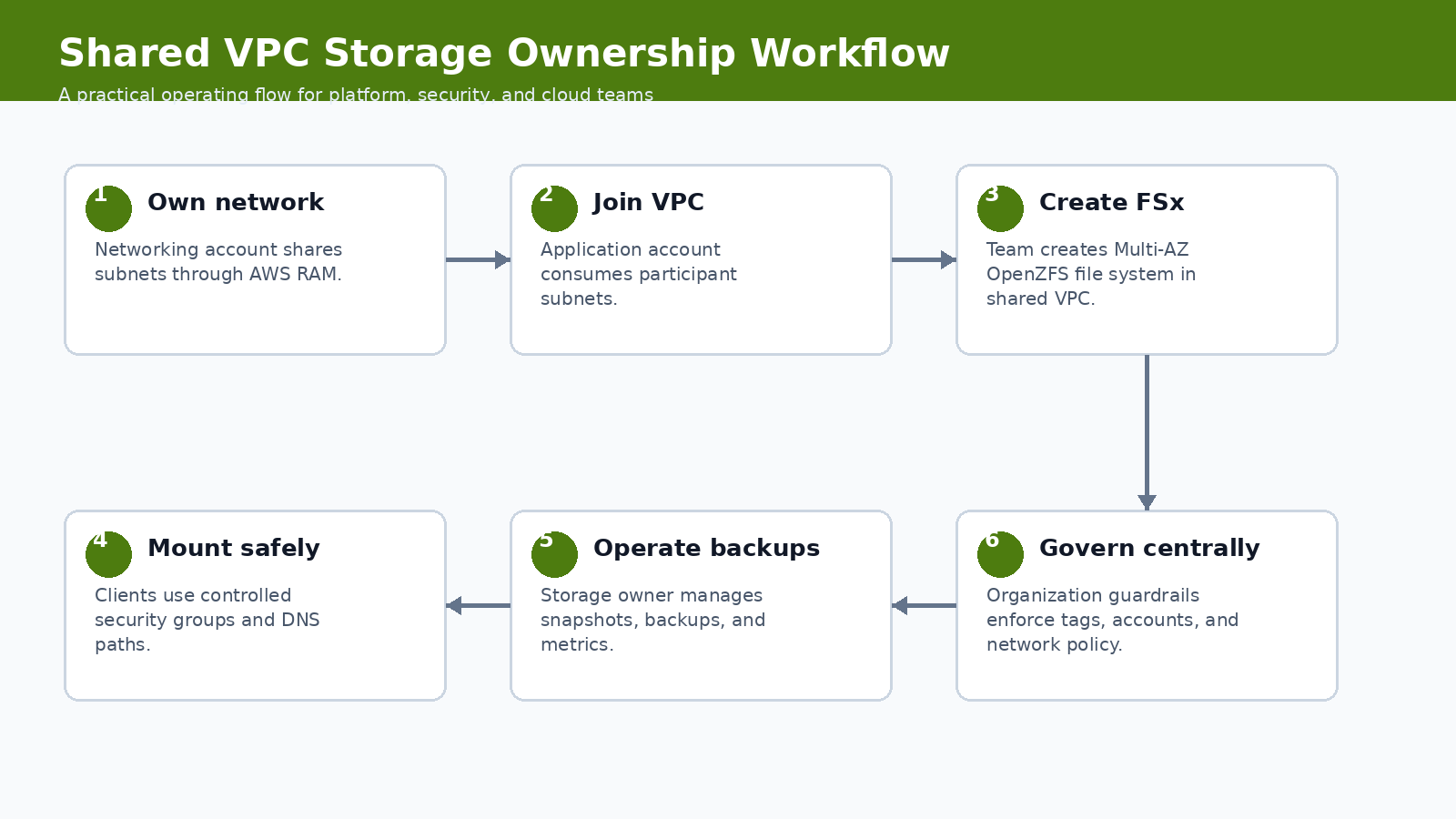
The workflow above is the recommended operating model. It keeps the discussion out of the abstract. You start with the signal, scope the blast radius, implement the smallest useful control, verify the result, and then turn the work into a repeatable runbook. That order matters. A lot of teams jump straight from announcement to tooling. That feels fast, but it usually skips ownership, rollback, and the boring evidence an auditor or incident reviewer will ask for later.
What Changed
VPC sharing lets a central networking account own subnets while participant accounts deploy resources into them. The new FSx for OpenZFS support means participant accounts can create Multi-AZ OpenZFS file systems in that shared network model. That is useful for platform teams that separate network ownership from application ownership.
The date matters here because engineering teams already have plenty of stale guidance in their wikis. Treat this as a May 2026 operating note. If a vendor updates the documentation later, update the runbook and leave a revision note in the post. That is not editorial polish; it is how you keep technical content from becoming another unsafe copy-paste source.
FSx for OpenZFS provides managed OpenZFS file systems. Shared VPCs are shared through AWS Resource Access Manager inside an AWS Organization. With support for Multi-AZ file systems in participant accounts, the storage resource can live with the application team while the network baseline remains centrally governed.
Why Platform Teams Should Care
Central networking is common in mature AWS organizations. The failure mode is that every exception turns into a ticket to the networking team. Storage exceptions are especially painful because they mix subnet selection, security groups, backups, performance, and ownership. This feature can reduce ticket pressure, but only if guardrails are clear.
This is also where cost and reliability get mixed together. A feature that looks like a security improvement can increase build time, data scanned, node churn, or operational review effort. A reliability feature can quietly move risk from the service team to the platform team. A new AI workflow can shorten analysis time and still create a governance problem if the identity model is weak. Good engineering writing should name that tradeoff.
For FSx for OpenZFS in shared VPCs, the practical question is not “is this useful?” It is useful. The better question is where the control should live. If it belongs in a one-off project, document it there. If it belongs in the platform baseline, put it in CI, admission control, IAM, observability, or a shared runbook. Most teams get into trouble when they make that boundary implicit.
Operating Baseline
The baseline is an AWS Organization where VPC sharing already has account boundaries, subnet tagging, security group rules, and ownership conventions. If shared VPCs are informal, adding stateful file systems will make the confusion worse.
| Ownership model | Good fit | Watch out |
|---|---|---|
| Network account owns VPC | Central routing, inspection, and subnet policy | Application team waits for every change |
| App account owns FSx | Storage lifecycle follows workload owner | Guardrails needed for cost and exposure |
| Central storage team owns FSx | Shared enterprise platforms | Can become a bottleneck |
| Each app owns VPC | Small isolated teams | Harder centralized governance |
The table is deliberately opinionated. It gives you a default answer before the exception shows up. Exceptions are fine; hidden exceptions are not. If someone wants to bypass the default, require a reason, an owner, and an expiration date. That one small rule prevents a lot of permanent “temporary” infrastructure.
Implementation Pattern
The pattern starts with shared subnet intent. Tags and account boundaries matter as much as the file system setting.
resource "aws_fsx_openzfs_file_system" "app" {
  storage_capacity    = 1024
  subnet_ids          = var.shared_private_subnet_ids
  deployment_type     = "MULTI_AZ_1"
  throughput_capacity = 512

  tags = {
    Application = "media-pipeline"
    Owner       = "platform-storage"
    Environment = "prod"
  }
}
The snippet is not meant to be pasted blindly. Use it as the shape of the implementation, then adapt names, account boundaries, tags, and approval gates to your environment. The useful part is the sequence: inspect, constrain, verify, and record evidence. If your process cannot produce evidence, it is not mature enough for production.
Controls, Metrics, And Evidence
Storage metrics need both service health and ownership health.
| Control | Evidence | Owner |
|---|---|---|
| Subnet eligibility | Tags and RAM share scope | Network platform |
| Security groups | Inbound NFS path from approved clients only | Application platform |
| Backup policy | Automated backups and restore test | Storage owner |
| Cost allocation | Required tags and budget mapping | FinOps or app owner |
Notice that the table separates a control from the evidence. A control without evidence is a hope. Evidence without an owner is a screenshot in a ticket that nobody trusts three months later. Tie each signal to a system that already has retention, access control, and review habits.
Rollout Plan
Pilot the pattern with one application account before publishing it as a platform standard.
- Confirm the shared VPC subnets are intended for stateful workloads, not only stateless compute.
- Define security group patterns for clients and file systems before the first deployment.
- Create a tagging policy that maps FSx cost to the application owner.
- Test failover and client behavior in a non-production Multi-AZ file system.
- Document the line between network team, application team, and storage owner responsibilities.
This is where teams often overbuild. Start with the smallest production slice that proves the behavior. One non-critical cluster, one runner group, one application namespace, one account, or one data domain is enough. Then widen the blast radius only after you have a rollback path and a metric that proves the change did not make the system worse.
Gotchas
The feature removes one blocker, but it does not remove operating ownership.
- Shared VPC does not mean shared accountability. The file system still needs a named owner.
- Security groups can become the de facto access-control model. Review them like production policy.
- Backups and snapshots need restore tests. A Multi-AZ file system is not a backup.
- Participant accounts can create cost in centrally owned networks. Tagging and budgets must be enforced.
- NFS-style access patterns can surprise application teams used to object storage semantics.
The uncomfortable lesson is simple: new platform features usually fail at the handoff points. The vendor feature works. The identity mapping is incomplete. The backup restores but not the secret. The scanner finds an issue but nobody owns the fix. The autoscaler drains a zone correctly but the application has a bad disruption budget. These are not edge cases. They are where production work lives.
Security, Reliability, And Cost Tradeoffs
The architecture gain is cleaner separation of network and workload ownership. The cost is more governance work. Central networking teams must publish safe subnets and controls. Application teams must own the file system lifecycle instead of assuming the network team will catch every problem.
Use a scorecard before rolling the pattern to every team:
| Question | Good answer | Weak answer |
|---|---|---|
| Is ownership split clear? | Network, storage, and app owners are named | Shared VPC means everyone |
| Can cost be traced? | Tags and budgets map to app owner | FSx spend lands in shared account noise |
| Can access be reviewed? | Security groups and clients are documented | Anyone in the VPC can mount |
The weak answers are not moral failures. They are just not production answers yet. If your current state is weak, write the gap down, choose the next smallest fix, and keep the change contained until the evidence improves.
First 48 Hours In Practice
The first two days decide whether FSx for OpenZFS in shared VPCs becomes a controlled platform improvement or another half-finished note in a chat thread. I would split the work into three windows: the first hour, the first business day, and the first week. The first hour is about scope. Do not change production yet unless the exposure is obvious. Name the owner, capture the source link, list affected systems, and decide whether this is emergency work or scheduled platform work.
By the end of the first business day, the team should have one working example. That could be one patched runner pool, one restored namespace, one repository review, one governed data domain, one EKS node group, or one shared VPC deployment. The exact target depends on the topic. The point is to choose a small production-shaped slice, not a toy. A lab that has no secrets, no real users, no deployment pressure, and no monitoring will hide the problems that matter.
The first-week goal is repeatability. If the change worked once because a senior engineer babysat it, you have a useful experiment, not a platform pattern. Turn the successful path into a runbook with commands, screenshots, expected output, rollback steps, and escalation rules. Then test it with someone who did not write the first version. That review will expose missing assumptions faster than another hour of polishing.
For multi-account AWS storage architecture with VPC sharing, FSx for OpenZFS, and organization guardrails, the review meeting should be short and concrete. Ask what changed, which systems are in scope, which systems are intentionally out of scope, what evidence proves the control works, and what would make the team roll back. If the group cannot answer those five questions, the change is not ready to become a default.
| Owner | Decision to make | Evidence they should demand |
|---|---|---|
| Service owner | Confirms scope and business impact | Accepts or rejects the default action for Network account owns VPC |
| Platform owner | Turns the pattern into a shared control | Publishes the runbook, dashboard, and rollback path for FSx for OpenZFS in shared VPCs |
| Security owner | Reviews risk and exception handling | Checks that Subnet eligibility has usable evidence |
| FinOps or operations owner | Checks cost and toil | Watches whether Security groups creates recurring work |
One practical habit helps a lot: write the rollback criteria before the rollout starts. For FSx for OpenZFS in shared VPCs, a rollback may mean re-enabling an old runner path, restoring a prior IAM policy, pausing an agent workflow, undoing an autoscaling setting, or reverting to a previous storage ownership model. Whatever the answer is, write it down. Operators make better decisions during incidents when the stop condition is already named.
Runbook Artifacts To Keep
A trustworthy runbook is not a wall of prose. It is a small set of artifacts that prove the system can be operated by more than one person. Keep the procedure, the evidence, and the exception list separate. Procedures change often. Evidence grows during exercises and incidents. Exceptions need owners and expiration dates because otherwise they become the real architecture.
| Artifact | What good looks like | Maintenance rule |
|---|---|---|
| Runbook page | One current procedure with commands, owners, and rollback | Update after every exercise or incident |
| Evidence folder | Screenshots, command output, logs, ticket IDs, and query results | Keep according to audit and incident policy |
| Exception register | Every skipped service, account, cluster, repo, or dataset | Owner plus expiration date required |
| Dashboard link | The live view operators use during rollout | Must show the metric in the control table |
The evidence should be boring enough to survive an audit and specific enough to help an engineer at 2 a.m. A command transcript showing tags and ram share scope is useful. A dashboard screenshot with no time range is not. A ticket that says “verified” is weak. A ticket with the exact source, system, output, owner, and next review date is much stronger.
This also keeps trust resources honest. A blog post can point to AWS, Kubernetes, GitLab, or project documentation, but the local runbook has to say how your team interpreted that source. If the official document changes, the local procedure needs a review. If the source disappears, the team needs a replacement. That is why the trusted resources section at the end of this post is not decorative; it is part of the operating model.
Example Review Questions
Use these questions before making FSx for OpenZFS in shared VPCs a default pattern:
- What is the smallest system where we proved this works with production-like constraints?
- Which team owns the control after the initial rollout is finished?
- Which metric tells us the change helped instead of simply adding process?
- What is the first rollback action if shared vpc does not mean shared accountability. the file system still needs a named owner.?
- What exception would we approve, and how long may that exception live?
- Which trusted source would force us to revisit the design if it changed?
Two questions deserve blunt answers. First, does the pattern reduce risk, or does it only move risk to another team? Second, can a new engineer follow the runbook without private context? If the answer to either question is no, keep the rollout narrow.
A Concrete Failure Scenario
Imagine the team accepts the default action for network account owns vpc but ignores app account owns fsx. At first, the rollout looks successful. The dashboard turns green. The announcement is written. Then the first exception arrives. A service owner cannot meet the deadline, a cluster has an unusual constraint, or a repository breaks in a way the shared workflow did not predict. Without an exception register, the team handles that case in a side conversation. Two weeks later nobody remembers whether the exception was temporary.
That is the failure mode this article is trying to avoid. The technology can be good and the rollout can still decay. The fix is not more meetings. The fix is a small operating loop: define the default, record the exception, attach an owner, set an expiration date, and review the evidence. This is simple, but it is not optional for production work.
Security groups can become the de facto access-control model. Review them like production policy. That gotcha should shape the rollout. Put it in the runbook as a check, not as a footnote. If a future operator has to rediscover it during an outage or audit review, the article failed to become operational knowledge.
When To Use This
Use this pattern when your organization already uses shared VPCs and application teams need managed Multi-AZ file storage without owning the network account.
Do not use it when the workload only needs object storage, or your shared VPC model does not yet have clear security and cost guardrails. That boundary is important because the wrong abstraction can make a simple system harder to operate. Sometimes the best platform decision is to leave a feature out of the shared baseline and document a local exception instead.
Trusted Resources
These are the sources I would keep next to the runbook:
- FSx for OpenZFS shared VPC announcement
- Amazon FSx for OpenZFS
- VPC sharing
- AWS Resource Access Manager
- AWS Organizations
- FSx security
I am intentionally marking one uncertainty: regional support, deployment-type behavior, and service quotas should be checked in the current FSx documentation before rollout. Treat the article as an operating guide, not as a replacement for the vendor documentation. The source links above are the authority when a limit, feature state, or mitigation changes.
The Practical Takeaway
FSx for OpenZFS in shared VPCs is a useful ownership shift. Treat it as a platform pattern, not just another storage checkbox.
Explore more like this

Cloud IoT Security: Zero Trust, Identity, and Signed Updates
On September 11, 2026, the Cyber Resilience Act’s incident-reporting rules start applying in the European Union. That is 22 days after this article’s publication date. A manufacturer that learns of...

Bedrock Web Search: Grounding an Agent Without Building a Scraper
On August 4, 2026, AWS made Web Search on Amazon Bedrock generally available, and the entire integration surface is one JSON object: {"type": "web_search"}. That is the whole change from...

ECR Now Allows 200 GB Image Layers. Your Model Weights Still Do Not Belong There
On August 3, 2026, AWS raised the maximum Amazon ECR image layer size to 200 GB for images pushed with docker push. The announcement names the driver in the second...

Comments