
Multi-Cloud Strategy: A Practical Decision Framework for AWS, Azure, and GCP

Three years ago I watched a company spend $2.4 million and eleven months building a “cloud-agnostic” platform that ran equally on AWS, Azure, and GCP. The CTO sold the board on avoiding vendor lock-in. The architecture team built an abstraction layer over Kubernetes that normalized storage, networking, and identity across all three providers.
It worked. Technically. Every service deployed to any cluster on any cloud. But the abstraction added 40% overhead to every deployment. The team spent more time maintaining the abstraction than shipping features. And when they finally calculated the cost, they were paying 30% more than a single-cloud setup because they couldn’t use any provider’s managed services – those broke the abstraction.
I’ve since helped that same company (and others) unwind multi-cloud deployments that never should have been multi-cloud in the first place. I’ve also helped companies where multi-cloud was absolutely the right call and saved them real money and real risk.
The difference? Having a decision framework instead of a philosophy. That’s what this post lays out.
The Honest Truth About Multi-Cloud
Multi-cloud means running production workloads on more than one cloud provider simultaneously. Not having a dev environment on GCP while production runs on AWS. Not backing up to S3 from Azure. Actually running different parts of your system on different providers, or running the same system on multiple providers for redundancy.
According to Flexera’s 2025 State of the Cloud Report, 87% of enterprises report a multi-cloud strategy. But when you look at what that actually means, most of them have one primary provider and one secondary. The “secondary” is usually a single project, an acquisition’s leftover infrastructure, or a test environment. True multi-cloud – where production workloads are intentionally split across providers – is far less common than the 87% suggests.
Here’s the uncomfortable reality: most companies adopt multi-cloud for the wrong reasons. Fear of vendor lock-in. A PowerPoint slide from a consulting engagement. An executive who read an article about avoiding dependency on a single provider. These are emotional decisions dressed up as architectural ones.
Multi-cloud makes sense in specific, measurable situations. The rest of the time, it’s expensive overhead.
When Multi-Cloud Actually Makes Sense
I’ve seen four legitimate reasons to go multi-cloud. If none of these apply to your situation, stop reading and pick one provider.
Reason 1: Regulatory and data residency requirements. Some governments require specific data to stay within their borders, and sometimes the best or only provider in that region isn’t your primary. German healthcare data has different constraints than US financial data. If you operate in regions where one provider has presence and another doesn’t, you need both.
Reason 2: Acquisitions. You bought a company that runs on Azure. Your infrastructure is on AWS. Migration isn’t day-one priority. You run both for a period. This is pragmatic multi-cloud, not strategic multi-cloud, but it counts.
Reason 3: Best-of-breed services. Your ML team wants Vertex AI and TPU access on GCP. Your enterprise identity and compliance story is tied to Azure AD. Your core application platform runs on AWS because that’s where your team’s expertise lives. Each provider has a genuine competitive advantage for a specific workload.
Reason 4: Risk mitigation for specific failure modes. Not “what if AWS goes down” – that’s too vague. Specific risks like: your entire customer base is in a region that had two major outages in 18 months, and contractual SLAs require geographic provider redundancy. This is rare but real.
Everything else – cost optimization through arbitrage, “future-proofing,” abstract negotiation – is noise.
Provider Strengths: What Each Cloud Actually Does Best
Each provider has areas where it’s genuinely ahead. Not marketing-ahead. Actually ahead, based on running workloads on all three over multiple years.
| Service Category | AWS | Azure | GCP |
|---|---|---|---|
| Compute (VMs) | Broadest instance selection; Graviton ARM CPUs are a real cost advantage | Strong Windows/Hyper-V integration; good hybrid with Azure Arc | Best price-performance for compute-heavy ML; Spot VMs with 60-91% discounts |
| Kubernetes | EKS is solid; eksctl and managed node groups are mature | AKS has the easiest setup; best Active Directory integration | GKE is the reference implementation; fastest updates, Autopilot is genuinely hands-off |
| Serverless | Lambda leads in ecosystem; biggest trigger catalog | Functions integrates tightly with the rest of Azure; durable functions for orchestration | Cloud Functions are the simplest; Cloud Run (containers-as-serverless) is best-in-class |
| Databases | Widest selection; Aurora, DynamoDB, RDS cover almost everything | Cosmos DB is strong for multi-model; SQL Managed Instance for SQL Server migrations | Spanner is unique (global relational); BigQuery dominates analytics; Firestore for real-time |
| AI/ML | SageMaker is the most complete platform; Bedrock for foundation models | Azure OpenAI Service (official GPT access); strong enterprise ML tooling | Vertex AI is best for custom model training; TPU access; TensorFlow/ JAX native |
| Storage | S3 is the standard; broadest tiering options | Blob Storage is solid; Azure Files for SMB/NFS is underrated | Cloud Storage has the best lifecycle policies; nearline/coldline pricing is aggressive |
| Networking | Most mature VPC; Transit Gateway for complex topologies | Virtual WAN + ExpressRoute for hybrid enterprise networks | Premium Tier network has the best global routing; Cloud CDN is cost-effective |
| Identity/Security | IAM is granular but complex; Organizations for multi-account | Entra ID (Azure AD) is the enterprise standard; best compliance coverage | IAM is cleaner to use; BeyondCorp for zero-trust is the most coherent story |
| Hybrid Cloud | Outposts, Snow Family, EKS Anywhere | Azure Arc is the most complete hybrid management platform | Anthos for multi-cloud Kubernetes is technically strong but adopted less |
| Cost Management | Most granular (CUR, Cost Explorer); best savings tools | Cost Management is improving; EA/CSP discounts are strong for enterprise | Best sustained-use discounts automatically; billing export to BigQuery is free |
This isn’t about one provider “winning.” It’s about matching workloads to strengths. If you’re running a SQL Server estate, Azure is the obvious answer. If you’re building a real-time ML pipeline with custom models, GCP has a real edge. If you need the broadest service catalog and the deepest ecosystem, AWS still leads.
Pricing Comparison: Real Numbers for Common Workloads
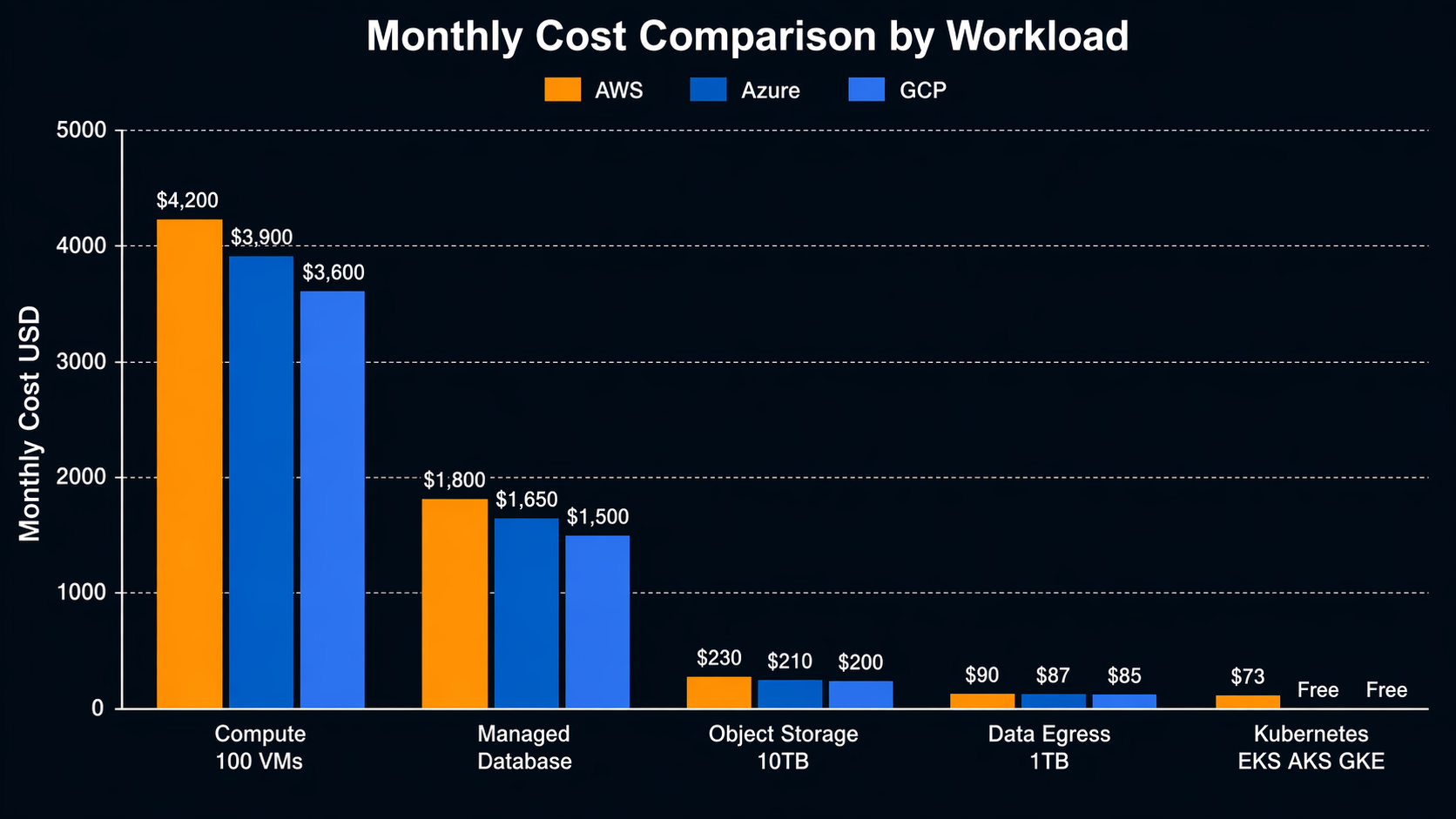
Pricing varies by region, reservation type, and negotiated discounts. The numbers below are for US-East-1 / East US / us-central1, on-demand, as of early 2026. Your actual costs will differ, but the relative positions are consistent.
| Workload | AWS | Azure | GCP |
|---|---|---|---|
| General compute (4 vCPU, 16 GB RAM) | m6i.xlarge: $0.192/hr (~$141/mo) | D4s_v5: $0.192/hr (~$141/mo) | n2-standard-4: $0.190/hr (~$139/mo) |
| ARM compute (4 vCPU, 16 GB RAM) | m7g.xlarge (Graviton): $0.144/hr (~$105/mo) | D4ps_v5: $0.154/hr (~$113/mo) | t2a-standard-4: $0.148/hr (~$108/mo) |
| GPU training (single A100) | p4d.24xlarge: $32.77/hr | Standard_NC24ads_A100_v4: $32.11/hr | a2-highgpu-1g: $29.39/hr |
| Managed Kubernetes (control plane) | EKS: $0.10/hr ($73/mo) | AKS: Free | GKE Standard: $0.10/hr ($73/mo); Autopilot: Free |
| Object storage (1 TB, standard) | S3: ~$23/mo | Blob (Hot): ~$18/mo | Cloud Storage: ~$20/mo |
| Object storage (1 TB, archive) | S3 Glacier Deep Archive: ~$1/mo | Blob (Archive): ~$2/mo | Archive: ~$1.20/mo |
| Managed PostgreSQL (2 vCPU, 8 GB) | RDS (db.r6g.large): ~$145/mo | Flexible Server: ~$135/mo | Cloud SQL: ~$130/mo |
| Data egress (1 TB out) | $0.09/GB = $90 | $0.087/GB = $87 | $0.085/GB = $85 (Premium: $0.14/GB) |
| Serverless functions (1M invocations, 256MB, 500ms) | Lambda: ~$12.50 | Functions: ~$12.50 | Cloud Functions: ~$12.00 |
| CDN (10 TB delivery, North America) | CloudFront: ~$85 | Azure CDN: ~$75 | Cloud CDN: ~$70 |
Sources: AWS Pricing, Azure Pricing, Google Cloud Pricing, Gartner Cloud Infrastructure Magic Quadrant 2025.
Key takeaways from real billing data:
- Compute pricing is roughly equal across providers. The differences are in the 2-5% range for comparable instances. AWS Graviton instances are the notable exception – ARM workloads can be 20-35% cheaper on AWS.
- Storage pricing favors Azure slightly for standard tiers, but the differences are small enough that they shouldn’t drive provider selection.
- Data egress is expensive everywhere. This is the real multi-cloud cost trap. Moving 10 TB between AWS and Azure monthly adds $1,700+ in egress charges alone.
- GCP has the edge on GPU pricing and sustained-use discounts kick in automatically. If you’re running training workloads continuously, GCP often comes out ahead.
- AKS control plane is free. EKS and GKE Standard charge $73/month per cluster. At scale (dozens of clusters), this matters.
For a structured approach to cost optimization regardless of provider, see this FinOps and Well-Architected guide. The principles apply across all three clouds even though the specific tools differ.
The Decision Matrix: Multi-Cloud vs. Single-Cloud
This is the framework I use with clients. Score each factor honestly. If multi-cloud scores below 15, stay single-cloud.
| Factor | Single-Cloud Score | Multi-Cloud Score | Weight |
|---|---|---|---|
| Team expertise depth (can your team be deep in one, or must they be competent in multiple?) | Deeper expertise, faster delivery (5) | Shallow knowledge across providers (2) | High |
| Regulatory compliance (data residency, sovereignty, industry-specific rules) | Acceptable for most cases (3) | Required in some jurisdictions (5) | Critical |
| Operational complexity (monitoring, alerting, incident response, on-call) | Single toolchain, unified dashboards (5) | Multiple toolchains or complex federated setup (2) | High |
| Cost management (discounts, reservations, negotiated commits) | Higher volume = better commit discounts (5) | Split volume = worse commit deals per provider (2) | High |
| Vendor lock-in risk tolerance (comfort with deep dependency on one provider) | Higher lock-in, but faster to build (3) | Lower lock-in, but more abstraction tax (4) | Medium |
| Negotiation leverage (ability to play providers against each other) | Limited leverage once committed (2) | Real negotiating power at renewal (5) | Medium |
| Disaster recovery posture (cross-provider redundancy) | Regional DR within provider (3) | Cross-provider DR for critical workloads (5) | Medium |
| Workload fit (does one provider have unique services you need?) | Acceptable services, good enough (3) | Best-of-breed per workload (5) | High |
| Hiring market (availability of engineers familiar with your stack) | Large talent pool for any single provider (4) | Must hire for multiple clouds; smaller pool per role (2) | Medium |
| Time to market (speed of new feature delivery) | Faster with focused expertise (5) | Slower due to abstraction and testing overhead (2) | High |
Scoring guide:
- Below 15 weighted points for multi-cloud: Stay single-cloud. The overhead isn’t justified.
- 15-25 points: Targeted multi-cloud. Use a second provider for specific workloads (ML on GCP, identity on Azure) while keeping the core on one provider.
- Above 25 points: Strategic multi-cloud makes sense. Invest in the abstraction layer and tooling.
When to Use Each Provider: Specific Scenarios
Theory is fine. Here are the concrete scenarios where I’d pick each provider first, based on production experience.
| Scenario | Primary Provider | Why | Secondary Option |
|---|---|---|---|
| SaaS startup, first 2 years | AWS | Largest ecosystem, most tutorials, best community support, easiest to learn | GCP (if ML-heavy from day one) |
| Enterprise with existing Microsoft stack | Azure | Active Directory, SQL Server, Office 365, Teams integration – it all works together natively | AWS (for workloads that need specific AWS services) |
| ML/AI-first company | GCP | Vertex AI, TPU access, BigQuery, TensorFlow native integration, best GPU pricing | AWS (SageMaker + Bedrock if you need broader cloud services too) |
| Highly regulated industry (finance, healthcare) | Azure or AWS | Both have the deepest compliance certifications; Azure has an edge in government clouds | The other one (Azure or AWS) for geographic redundancy |
| Global consumer application | AWS or GCP | AWS has the most regions; GCP has the best global network (Premium Tier) | GCP or AWS respectively |
| Data analytics warehouse | GCP | BigQuery is genuinely superior for most analytics workloads; serverless, no cluster management | AWS (Redshift) or Azure (Synapse) if you’re already there |
| Kubernetes-first platform | GCP | GKE Autopilot is the least operational overhead; GKE standard gets updates fastest | AWS (EKS) if your team already knows it well |
| Hybrid cloud (on-prem + cloud) | Azure | Azure Arc provides the most coherent management plane across on-prem and cloud | AWS (Outposts) for specific workloads that need AWS services on-prem |
| Serverless event-driven architecture | AWS | Lambda has the most mature trigger ecosystem; Step Functions for orchestration | GCP (Cloud Run + Cloud Functions) for simpler setups |
| E-commerce platform | AWS | Broadest service catalog; proven at scale (Amazon runs on it); SQS, DynamoDB, CloudFront | Azure if your org is Microsoft-centric |
| Migration from on-prem data center | Any | Depends on existing stack – Windows goes Azure, anything goes AWS, data-heavy goes GCP | Use structured migration strategies regardless of provider |
The Decision Tree: Choosing Your Cloud Provider
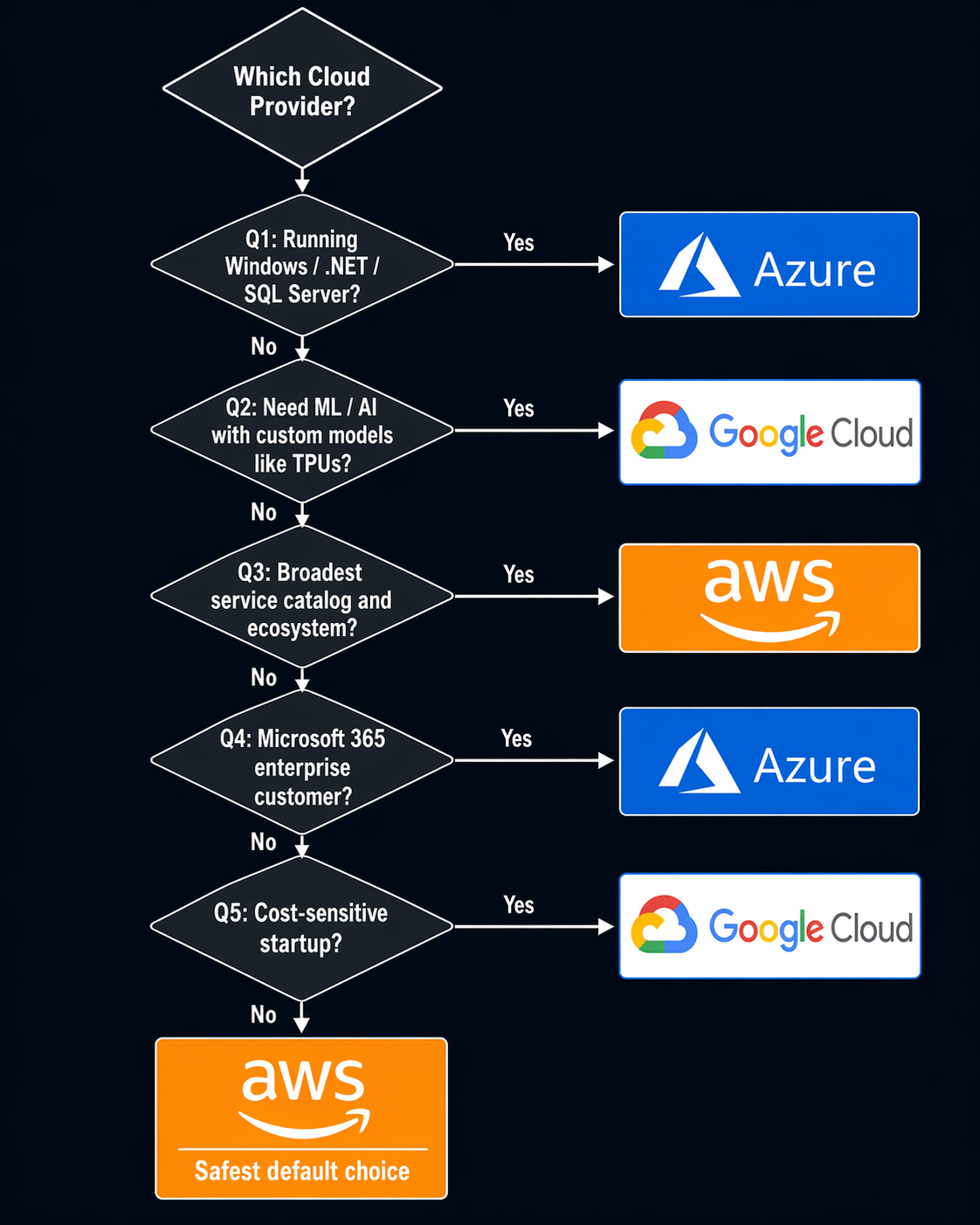
This is the decision process I walk through with teams. Start at the top and follow the path that matches your situation.
START: Choosing a Cloud Provider
│
├── Q1: Do you have significant existing Microsoft infrastructure?
│   ├── YES → Azure as primary
│   │   ├── Need ML/AI at scale? → Add GCP as secondary for Vertex AI
│   │   └── Need broadest service catalog? → Add AWS for specific workloads
│   │
│   └── NO → Continue to Q2
│
├── Q2: Is ML/AI a core competency (not a feature, THE product)?
│   ├── YES → GCP as primary
│   │   ├── Need enterprise compliance? → Add Azure for identity/governance
│   │   └── Need broadest ecosystem? → Add AWS for general workloads
│   │
│   └── NO → Continue to Q3
│
├── Q3: Do you have regulatory requirements forcing specific regions/providers?
│   ├── YES → Primary provider for main workloads
│   │   └── Secondary provider only where required by regulation
│   │
│   └── NO → Continue to Q4
│
├── Q4: Is your team already experienced with one provider?
│   ├── YES, with AWS → AWS as primary (don't switch expertise for marginal gains)
│   ├── YES, with Azure → Azure as primary
│   ├── YES, with GCP → GCP as primary
│   │
│   └── NO (greenfield team) → Continue to Q5
│
├── Q5: What's the primary workload type?
│   ├── Data analytics at scale → GCP (BigQuery)
│   ├── Enterprise SaaS with compliance needs → Azure
│   ├── General-purpose / unsure → AWS (safest default, largest community)
│   └── Kubernetes-native platform → GCP (GKE)
│
└── DECISION MADE
    │
    └── After 12 months: Re-evaluate
        ├── Multi-cloud needed? → Use the scoring matrix above
        └── Single-cloud working? → Double down on expertise and commit discounts
The key insight: for most companies, the best multi-cloud strategy is to be excellent at one provider and deliberately ignorant of the others until you have a specific reason not to be. Expertise depth beats provider breadth almost every time.
The Multi-Cloud Cost Trap: Egress and Abstraction
If you do go multi-cloud, two costs will blindside you.
Egress charges. Moving data between providers is expensive. AWS charges $0.09/GB for data leaving its network. Azure charges $0.087/GB. GCP charges $0.085/GB. If your architecture has a database on AWS and an analytics pipeline on GCP that processes 5 TB daily, you’re paying $450-500/day in egress alone. That’s $13,500-15,000/month just for the privilege of crossing provider boundaries.
I’ve seen companies architecture their way around this with batch transfers, compression, and data local replication. All of those add complexity and latency. There’s no free lunch.
The abstraction tax. Every abstraction layer – Terraform modules that target multiple providers, Kubernetes as a portability layer, service meshes that span clouds – adds overhead. Sometimes that overhead is small (a few percent on deployments). Sometimes it’s enormous. The “cloud-agnostic platform” I mentioned at the start of this post added 40% overhead because every change had to be tested against three providers, every feature had to work within the least-common-denominator of what all three supported, and every incident required understanding how the abstraction interacted with three different underlying systems.
Infrastructure as Code tools like Terraform help manage multi-cloud complexity, but they don’t eliminate it. You still need separate state files, provider configurations, and module versions for each cloud. The IaC tool makes it manageable; it doesn’t make it free.
Real-World Multi-Cloud Architecture Patterns
When multi-cloud is the right call, these are the patterns I’ve seen work in production.
Pattern 1: Primary/Secondary with Failover
Core workloads run on Provider A. Critical workloads have a warm standby on Provider B. Failover is manual or semi-automated. Data replicates asynchronously.
Works well for: Companies with genuine disaster recovery requirements that can’t be met within a single provider’s geography.
Cost impact: Roughly 1.4-1.6x a single-cloud deployment (you’re paying for the standby infrastructure but not running active workloads on it).
Pattern 2: Best-of-Breed per Domain
ML runs on GCP. Enterprise identity and compliance runs on Azure. Application platform runs on AWS. Data flows between them through well-defined APIs and event buses.
Works well for: Companies where each provider has a genuine competitive advantage for a specific domain.
Cost impact: 1.2-1.3x single-cloud, but the productivity gains from using the right tool for each job can offset the overhead.
Pattern 3: Acquired Entity Integration
Company A runs on AWS. They acquire Company B which runs on Azure. Both run independently while a unified platform is built. Eventually one absorbs the other.
Works well for: M&A situations where immediate migration isn’t practical.
Cost impact: Variable, but budget for running two full environments for 12-18 months plus the migration cost.
Pattern 4: Geographic Regulatory Split
EU customer data stays on EU-based Azure regions because of specific contractual requirements. US operations run on AWS because that’s where the team and existing infrastructure live.
Works well for: Global companies facing different regulatory regimes in different markets.
Cost impact: Two separate environments, but each is optimized for its region. The “multi-cloud” cost is essentially running two single-cloud setups.
What I’d Do Today: A Practical Recommendation
If you’re reading this and trying to decide, here’s what I’d tell you over coffee.
If you’re a startup or small team: Pick one provider and get good at it. AWS is the safest default because of the breadth of services and the size of the community. GCP if ML is your core. Azure if you’re building for the enterprise Microsoft ecosystem. Don’t even think about multi-cloud until you have 50+ engineers and a specific reason.
If you’re a mid-size company on one provider: Stay put unless you have a specific, measurable reason to add another. The migration cost is real. The operational overhead is real. The hiring complexity is real. “Vendor lock-in fear” is not a reason. “We need TPU access for our ML training and that’s only on GCP” is a reason.
If you’re an enterprise: You probably already have multiple clouds from acquisitions or shadow IT. The question isn’t whether to be multi-cloud – you already are. The question is whether to formalize it. Use the scoring matrix. If specific workloads genuinely benefit from a specific provider, formalize that. If you’re paying for three clouds but only using services that exist on all three, consolidate.
If you’re being told to go multi-cloud by a consultant or vendor: Ask for the specific numbers. What’s the cost of the abstraction layer? What’s the cost of cross-cloud data transfer? What’s the cost of hiring for three clouds instead of one? What’s the cost of the additional incident response complexity? If they can’t give you numbers, they’re selling you architecture theater.
Tools That Help Manage Multi-Cloud
If you do go multi-cloud, these are the tools I’ve seen make it survivable.
Terraform remains the most practical multi-cloud IaC tool. One language, multiple providers, state management that works. OpenTofu is the open-source fork worth watching. Crossplane is strong if you’re Kubernetes-native and want a control-plane approach. Both are covered in depth in the Infrastructure as Code tools comparison.
Kubernetes as a workload portability layer works better than I expected – but only for stateless workloads. Stateful services (databases, caches, message queues) are still provider-specific. EKS, AKS, and GKE are all solid managed Kubernetes offerings.
HashiCorp Consul or a service mesh like Istio can span clouds for service discovery and traffic management. The operational overhead is significant. Only do this if you have a dedicated platform team.
Unified observability through Datadog, Grafana Cloud, or a self-hosted Prometheus/Thanos stack is essential. You cannot run multi-cloud without a single pane of glass for monitoring. Each provider’s native tools only show you their piece.
Final Thoughts
Multi-cloud is not a strategy. It’s an implementation detail of a strategy. The strategy is about risk management, cost optimization, or technical capability. Multi-cloud is one way to address those concerns. Often it’s not the best way.
The companies I’ve seen succeed with multi-cloud are the ones that chose it deliberately, for specific reasons, with clear metrics for whether it’s working. The ones that struggled chose it out of fear, built abstractions to paper over complexity, and ended up paying more for less.
Pick a provider. Get excellent at it. Add a second provider when you have a concrete, measurable reason. Not before.
References:
- Flexera 2025 State of the Cloud Report
- Gartner Magic Quadrant for Cloud Infrastructure and Platform Services, 2025
- AWS, Azure, and GCP public pricing pages (Q1 2026)
- Synergy Research Group: Cloud Infrastructure Market Share Q4 2025
Explore more like this

Cloud IoT Security: Zero Trust, Identity, and Signed Updates
On September 11, 2026, the Cyber Resilience Act’s incident-reporting rules start applying in the European Union. That is 22 days after this article’s publication date. A manufacturer that learns of...

Kill the Docker Hub Token: OIDC Trust for GitHub Actions
On July 31, 2026, Docker shipped OIDC connections for GitHub Actions to any organization on a Docker Team, Docker Business, or Docker Hardened Images subscription, plus organizations in the Docker-Sponsored...

Lambda SQS Provisioned Mode Now Scales to 10,000 Pollers: The Throughput Math That Decides If You Need It
AWS raised the poller ceiling on August 3, 2026. Provisioned Mode for Amazon SQS event source mappings went from a maximum of 2,000 event pollers to 10,000, which puts the...

Comments