
Kubernetes vs Serverless: Decision Framework for 2026

We’ve all been there – someone on the team asks, “Should we use Kubernetes or serverless for this?” and the room splits into two camps. But here’s the thing: by 2026, that’s no longer an either-or question. AWS Lambda now handles 10 GB of memory and 6 vCPUs, and SnapStart has practically killed the JVM cold start problem for Java workloads. Meanwhile, Amazon EKS Auto Mode takes care of nodes, networking, and storage with barely any operator input. Both platforms have grown up a lot since their early days.
So the real question isn’t about picking a winner. It’s about figuring out what works best for your workload, your team, and your growth path. In this post, we’re going to walk through a decision framework that cuts through the usual opinions and gives you concrete evaluation criteria, cost breakdowns, and benchmarks you can actually use.
The Debate in 2026
Go back three years and the “Kubernetes vs serverless” debate felt mostly academic. Serverless choked on long-running processes and anything memory-hungry. Kubernetes practically demanded a dedicated platform team just to keep the lights on. Honestly, neither felt like a safe bet.
That’s all changed. AWS Lambda now supports response streaming, so your functions can start sending back data before the whole payload is even ready. Function URLs let you skip API Gateway entirely for straightforward cases. Provisioned concurrency and SnapStart deliver the kind of predictable latency that sensitive workloads need. The 15-minute execution cap is still around, sure, but for most API and event-driven patterns, you won’t even notice it.
On the Kubernetes side, EKS Auto Mode has completely redefined what “managed Kubernetes” actually means. AWS now takes care of compute autoscaling, pod networking, load balancer integration, and block storage drivers. Karpenter – originally an open-source project incubated at AWS – has become the go-to node provisioner. And Fargate profiles let you run pods without touching a single node. The operational headache of running Kubernetes has come way down since the early EKS days.
The middle ground has gotten a lot more crowded, too. AWS App Runner gives you container-based deployments with automatic scaling and zero cluster management. ECS Fargate sits in a similar spot for teams that want containers but don’t want to deal with the Kubernetes API. These options make the old binary choice a lot more nuanced – and honestly, that’s a good thing. More tools means better fits for more situations.
Serverless on AWS in 2026
Lambda and SnapStart
Lambda remains the workhorse of serverless computing on AWS. The basic execution model hasn’t really changed: you upload code or a container image, AWS runs it when events come in, and you pay per invocation and duration. But the operational characteristics? Those have shifted quite a bit.
Lambda now supports up to 10 GB of memory and 6 vCPU cores for a single function. That’s a big jump from the old 3 GB / 2 vCPU ceiling, and it opens the door to workloads that used to need containers – things like data processing pipelines, ML inference, and memory-hungry ETL jobs.
SnapStart, which launched for Java and has since expanded to Python and .NET, takes care of most of the cold start penalty. Lambda snapshots the initialized execution environment and reuses it on subsequent invocations. For Java functions running Spring Boot or Micronaut, we’re talking cold starts dropping from 3-8 seconds down to under 200 milliseconds.
# Lambda function with response streaming (Python 3.12)
import json
from awslambdaric.lambda_context import LambdaContext

def lambda_handler(event: dict, context: LambdaContext) -> dict:
    """Process API Gateway event with structured response."""
    http_method = event.get("httpMethod", "GET")
    path_parameters = event.get("pathParameters") or {}

    if http_method == "GET" and path_parameters.get("id"):
        record = fetch_record(path_parameters["id"])
        if not record:
            return {
                "statusCode": 404,
                "body": json.dumps({"error": "Record not found"})
            }
        return {
            "statusCode": 200,
            "body": json.dumps(record)
        }

    return {
        "statusCode": 400,
        "body": json.dumps({"error": "Invalid request"})
    }
Deploying with SAM
If you’re building Lambda-based applications, the AWS Serverless Application Model (SAM) is still the easiest path. SAM translates to CloudFormation behind the scenes but gives you a much cleaner shorthand for common serverless patterns.
# template.yaml - SAM template for an API with Lambda backend
AWSTemplateFormatVersion: "2010-09-09"
Transform: AWS::Serverless-2016-10-31

Globals:
  Function:
    Runtime: python3.12
    Timeout: 30
    MemorySize: 512
    Tracing: Active
    Environment:
      Variables:
        TABLE_NAME: !Ref DataTable

Resources:
  ApiFunction:
    Type: AWS::Serverless::Function
    Properties:
      Handler: app.lambda_handler
      CodeUri: src/
      Events:
        GetApi:
          Type: Api
          Properties:
            Path: /api/{id}
            Method: GET
        PostApi:
          Type: Api
          Properties:
            Path: /api
            Method: POST
      Policies:
        - DynamoDBCrudPolicy:
            TableName: !Ref DataTable

  DataTable:
    Type: AWS::Serverless::SimpleTable
    Properties:
      PrimaryKey:
        Name: id
        Type: String
      ProvisionedThroughput:
        ReadCapacityUnits: 5
        WriteCapacityUnits: 5

Outputs:
  ApiEndpoint:
    Value: !Sub "https://${ServerlessRestApi}.execute-api.${AWS::Region}.amazonaws.com/Prod"
Provisioned Concurrency and SnapStart Configuration
For production APIs where even a hint of cold start latency is unacceptable, provisioned concurrency keeps a set number of execution environments warm and ready. SnapStart offers a lighter-weight alternative that works particularly well for Java workloads.
# CDK example: Lambda with provisioned concurrency
# Using AWS CDK v2 (TypeScript)

import * as cdk from "aws-cdk-lib";
import * as lambda from "aws-cdk-lib/aws-lambda";
import * as lambdaAlpha from "@aws-cdk/aws-lambda-alpha";

export class ApiStack extends cdk.Stack {
  constructor(scope: cdk.App, id: string, props?: cdk.StackProps) {
    super(scope, id, props);

    const apiFunction = new lambda.Function(this, "ApiFunction", {
      runtime: lambda.Runtime.JAVA_21,
      handler: "com.bitslovers.ApiHandler::handleRequest",
      code: lambda.Code.fromAsset("./target/api.jar"),
      memorySize: 2048,
      timeout: cdk.Duration.seconds(30),
      currentVersionOptions: {
        provisionedConcurrentExecutions: 5,  // Keep 5 warm instances
      },
    });

    // Enable SnapStart for Java
    const version = apiFunction.currentVersion;
    const alias = new lambda.Alias(this, "ApiAlias", {
      aliasName: "live",
      version,
      provisionedConcurrentExecutions: 5,
    });
  }
}
Lambda Limitations That Still Matter
That said, Lambda isn’t a silver bullet. Here are the constraints that still exist in 2026:
- 15-minute maximum execution time: Long-running batch jobs, large file processing, and continuous streaming workloads do not fit.
- No persistent local storage: The
/tmpdirectory provides up to 10 GB of ephemeral storage, but it is not preserved across invocations in a predictable way. Stateful workloads need external storage. - Limited networking control: Lambda runs in AWS-managed VPCs unless you explicitly configure VPC access. Even then, you cannot attach elastic IPs or use custom DNS resolvers the way you can with EC2 or EKS pods.
- Concurrency limits: The default account-level concurrent execution limit is 1,000 per region. You can request increases, but burst traffic can still hit throttles if you have not reserved concurrency.
- Vendor lock-in: While the Lambda runtime API is open (other clouds support it), the ecosystem around it (Step Functions, EventBridge, SAM/CDK constructs) ties you to AWS.
Kubernetes on AWS in 2026
EKS Auto Mode and Karpenter
EKS Auto Mode is arguably the biggest operational shakeup for Kubernetes on AWS since Fargate profiles first appeared. Turn on Auto Mode, and AWS takes care of:
- Node provisioning and autoscaling via Karpenter (integrated, not the open-source version you install separately)
- Pod and service networking through the VPC CNI with automatic IP management
- Load balancer integration using the AWS Load Balancer Controller
- Block storage via the CSI driver
- Node lifecycle, patching, and replacement
One thing worth noting: Auto Mode nodes are immutable. No SSH, no SSM, read-only root filesystem, and SELinux is enforced. Nodes get replaced after 21 days max. AWS is basically treating compute nodes like appliances here, and for most application teams, that’s exactly the right approach.
# EKS Auto Mode cluster with CDK (TypeScript)

import * as cdk from "aws-cdk-lib";
import * as eks from "aws-cdk-lib/aws-eks";

export class EksAutoModeStack extends cdk.Stack {
  constructor(scope: cdk.App, id: string, props?: cdk.StackProps) {
    super(scope, id, props);

    const cluster = new eks.Cluster(this, "AutoModeCluster", {
      version: eks.KubernetesVersion.V1_31,
      defaultCapacity: 0, // Auto Mode manages capacity
      clusterLogging: [
        eks.ClusterLoggingTypes.API,
        eks.ClusterLoggingTypes.AUTHENTICATOR,
        eks.ClusterLoggingTypes.AUDIT,
      ],
    });

    // Enable EKS Auto Mode via add-on configuration
    // Auto Mode uses NodeClass and NodePool CRDs
    const autoModeAddOn = new eks.CfnAddon(this, "AutoModeAddon", {
      clusterName: cluster.clusterName,
      addonName: "eks-auto",
      addonVersion: "v1.0.0",
    });
  }
}
NodePool and NodeClass Configuration
Auto Mode relies on two custom resource definitions to handle compute. NodeClass defines what the instances look like (CPU, memory, OS, storage), while NodePool controls how scaling works and where pods get scheduled.
# NodeClass for general-purpose workloads
apiVersion: eks.amazonaws.com/v1
kind: NodeClass
metadata:
  name: general-purpose
spec:
  associatePublicIPAddress: false
  ephemeralStorage:
    size: 80Gi
    type: gp3
  networkPolicy: DefaultDeny
  releaseChannel: rapid
  role: eks-auto-node-role
  securityGroupSelector:
    matchLabels:
      eks.amazonaws.com/nodeclass: general-purpose
  subnetSelector:
    matchLabels:
      Environment: production
      Type: private
---
# NodePool for scaling workloads
apiVersion: karpenter.sh/v1
kind: NodePool
metadata:
  name: application-pool
spec:
  limits:
    cpu: "1000"
    memory: 4000Gi
  disruption:
    consolidationPolicy: WhenEmptyOrUnderutilized
    consolidateAfter: 30s
    budgets:
      - nodes: "10%"
        schedule: "0 9 * * mon-fri"
        duration: 8h
  template:
    metadata:
      labels:
        workload-type: application
    spec:
      nodeClassRef:
        group: eks.amazonaws.com
        kind: NodeClass
        name: general-purpose
      requirements:
        - key: kubernetes.io/arch
          operator: In
          values: ["amd64"]
        - key: kubernetes.io/os
          operator: In
          values: ["linux"]
        - key: karpenter.sh/capacity-type
          operator: In
          values: ["on-demand", "spot"]
        - key: eks.amazonaws.com/instance-category
          operator: In
          values: ["c", "m", "r"]
        - key: eks.amazonaws.com/instance-cpu
          operator: In
          values: ["4", "8", "16"]
      expireAfter: 504h  # 21 days
Deploying Workloads on EKS
A typical application deployment on EKS looks just like any other Kubernetes deployment. The real difference is what’s happening underneath – Auto Mode takes care of all the infrastructure plumbing.
# Application deployment with HPA and PDB
apiVersion: apps/v1
kind: Deployment
metadata:
  name: api-service
  namespace: production
  labels:
    app: api-service
spec:
  replicas: 3
  selector:
    matchLabels:
      app: api-service
  template:
    metadata:
      labels:
        app: api-service
    spec:
      containers:
        - name: api
          image: 123456789012.dkr.ecr.us-east-1.amazonaws.com/api-service:v2.4.0
          ports:
            - containerPort: 8080
          resources:
            requests:
              cpu: 250m
              memory: 256Mi
            limits:
              cpu: "1"
              memory: 512Mi
          readinessProbe:
            httpGet:
              path: /health/ready
              port: 8080
            initialDelaySeconds: 5
            periodSeconds: 10
          livenessProbe:
            httpGet:
              path: /health/live
              port: 8080
            initialDelaySeconds: 15
            periodSeconds: 20
          env:
            - name: DB_HOST
              valueFrom:
                secretKeyRef:
                  name: db-credentials
                  key: host
---
apiVersion: autoscaling/v2
kind: HorizontalPodAutoscaler
metadata:
  name: api-service-hpa
  namespace: production
spec:
  scaleTargetRef:
    apiVersion: apps/v1
    kind: Deployment
    name: api-service
  minReplicas: 3
  maxReplicas: 20
  metrics:
    - type: Resource
      resource:
        name: cpu
        target:
          type: Utilization
          averageUtilization: 70
---
apiVersion: policy/v1
kind: PodDisruptionBudget
metadata:
  name: api-service-pdb
  namespace: production
spec:
  minAvailable: 2
  selector:
    matchLabels:
      app: api-service
EKS Fargate for Serverless Containers
EKS Fargate profiles give you serverless container execution while staying within the Kubernetes API. You just define which pods should run on Fargate using namespace and label selectors – AWS handles the rest, and you never have to think about nodes.
# Fargate profile via Terraform

resource "aws_eks_fargate_profile" "application" {
  cluster_name           = aws_eks_cluster.main.name
  fargate_profile_name   = "application-profile"
  pod_execution_role_arn = aws_iam_role.fargate.arn
  subnet_ids             = aws_subnet.private[*].id

  selector {
    namespace = "production"
    labels = {
      ExecutionMode = "fargate"
    }
  }

  selector {
    namespace = "staging"
    labels = {
      ExecutionMode = "fargate"
    }
  }

  depends_on = [aws_eks_cluster.main]
}
Now, Fargate on EKS does come with trade-offs. You can’t run DaemonSets. Persistent storage is limited to EFS (no EBS). Networking overhead runs higher than on EC2 nodes. And you’re paying roughly 30-50% more per vCPU-hour compared to equivalent EC2 instances. Still, for teams that want the Kubernetes API without the hassle of managing nodes, Fargate profiles are a perfectly reasonable choice.
Feature Comparison
We’ve put together a side-by-side comparison across 22 dimensions that actually matter in production.
| Dimension | Lambda / Serverless | EKS / Kubernetes |
|---|---|---|
| Maximum execution time | 15 minutes | Unlimited (pod lifetime) |
| Memory limit | 10 GB | Node-dependent (TiB+) |
| CPU limit | 6 vCPU | Node-dependent |
| Cold start latency | 100 ms - 8 s (varies by runtime) | Pod scheduling: 2-30 s |
| Warm latency | 1-20 ms overhead | < 1 ms overhead |
| Scaling model | Request-driven, per-invocation | HPA/VPA/Karpenter, pod-level |
| Scale-to-zero | Built-in | Requires KEDA or custom solution |
| Minimum cost when idle | $0 (true zero) | Control plane: $0.10/hr + nodes |
| Local persistent storage | 10 GB ephemeral /tmp | EBS, EFS, instance store |
| GPU support | Limited (Lambda GPU in preview) | Full GPU support (P5, G6 instances) |
| Background processes | Not supported | Full support |
| WebSockets / long-lived connections | API Gateway WebSocket, limited | Native support |
| Custom DNS / networking | Limited | Full CNI control |
| DaemonSets | Not applicable | Supported |
| SSH / debug access | None | Node SSH or SSM (Auto Mode: none) |
| Deployment speed | Seconds (ZIP), 30-60s (container) | Minutes (rollout) |
| Rollback speed | Instant (alias shift) | Minutes (rollout undo) |
| Observability | CloudWatch, X-Ray, Lambda Insights | CloudWatch, Prometheus, Grafana |
| Vendor lock-in | High (AWS-specific ecosystem) | Low (portable across clouds) |
| Multi-container | Single container per function | Sidecars, init containers supported |
| Compliance / isolation | Per-invocation microVM | Shared node (or Fargate isolation) |
| Learning curve | Low (focus on business logic) | High (Kubernetes API, cluster ops) |
Cost Analysis by Workload Size
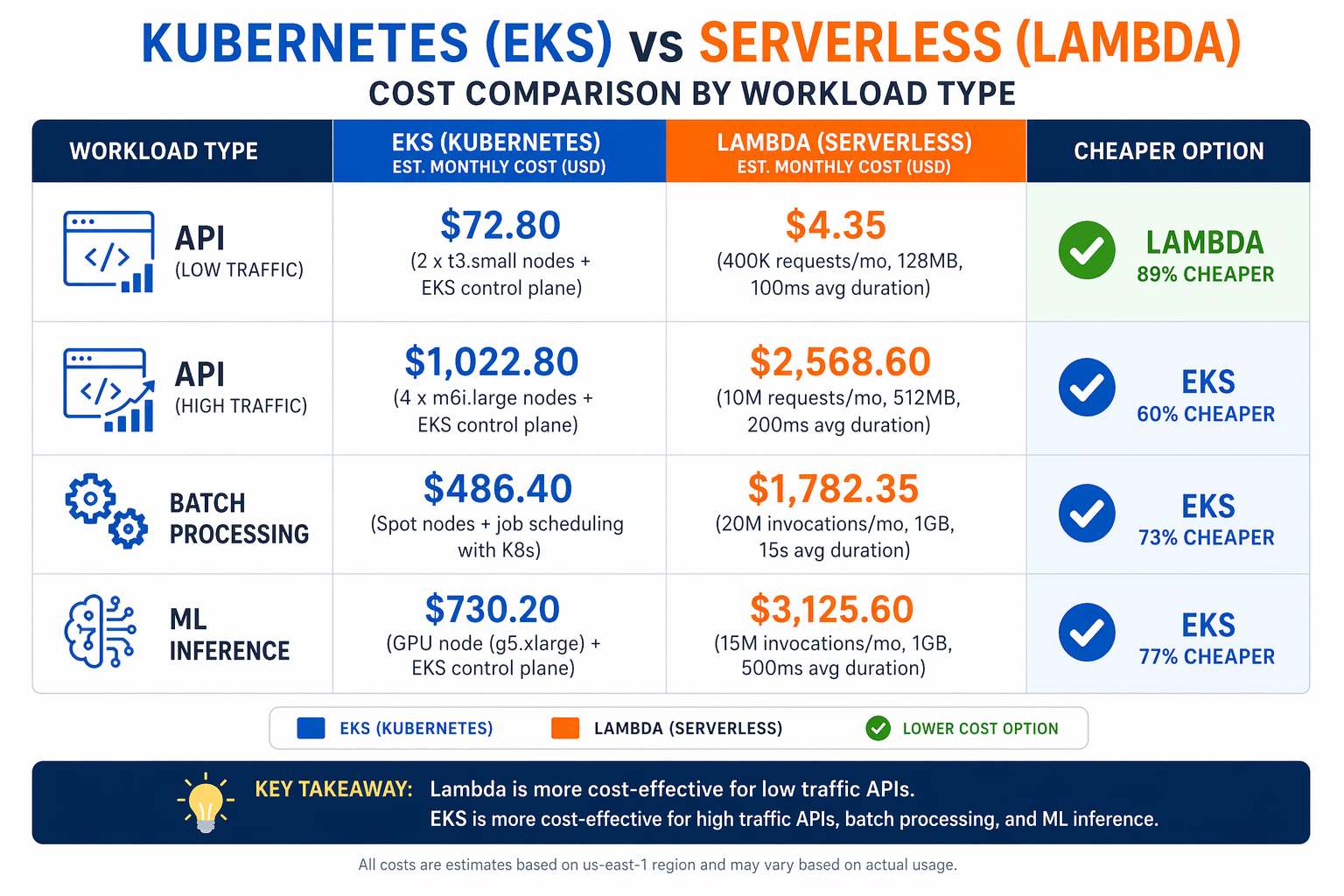
Let’s be honest – cost is the part of the Kubernetes vs serverless debate that people get wrong most often. Lambda bills you per request and per GB-second of execution. EKS bills you for the control plane, worker nodes, and network transfer whether you’re serving traffic or not. Where the crossover happens depends a lot on your traffic volume and how predictable it is.
Scenario Parameters
The following analysis uses these assumptions:
- Lambda pricing: $0.00000001667 per GB-second (after free tier), $0.0000002 per request
- Lambda configuration: 512 MB memory, 200 ms average duration
- EKS pricing: $0.10/hr control plane, 3 x m6i.large on-demand ($0.096/hr each)
- EKS total: $0.388/hr minimum = $285/month baseline
- Data transfer: Excluded from both (roughly equal)
- Region: us-east-1
| Workload | Daily Requests | Lambda/Month | EKS/Month | Winner |
|---|---|---|---|---|
| Low traffic API | 100 | $0.01 | $285 | Lambda |
| Internal tool | 1,000 | $0.08 | $285 | Lambda |
| Small SaaS | 10,000 | $0.75 | $285 | Lambda |
| Medium API | 100,000 | $7.50 | $285 | Lambda |
| Production API | 1,000,000 | $75 | $285 | Lambda |
| High-traffic API | 10,000,000 | $750 | $285-800 | EKS |
| Sustained load | 100,000,000 | $7,500 | $800-3,000 | EKS |
Looking at the numbers, the crossover point falls somewhere between 1 million and 10 million daily requests for a single API service. Below that threshold, Lambda is the cheaper option. Above it, the flat cost of dedicated compute starts to win. Keep in mind, though, that these numbers shift dramatically if your traffic is predictable enough to take advantage of Savings Plans or Spot instances on the EKS side, or if you’re relying on provisioned concurrency with Lambda.
Cost Estimation Script
Use this script to model costs for your specific workload.
#!/usr/bin/env python3
"""Cost comparison: Lambda vs EKS for API workloads."""

import argparse


def lambda_cost(
    daily_requests: int,
    duration_ms: int = 200,
    memory_mb: int = 512,
    provisioned_concurrency: int = 0,
) -> dict:
    """Calculate monthly Lambda costs."""
    gb_seconds_per_request = (memory_mb / 1024) * (duration_ms / 1000)
    requests_per_month = daily_requests * 30

    compute_cost = requests_per_month * gb_seconds_per_request * 0.0000166667
    request_cost = requests_per_month * 0.0000002

    # Provisioned concurrency: ~$0.015/GB-hour
    pc_cost = 0
    if provisioned_concurrency > 0:
        pc_gb_hours = provisioned_concurrency * (memory_mb / 1024) * 730
        pc_cost = pc_gb_hours * 0.015

    total = compute_cost + request_cost + pc_cost

    return {
        "compute": round(compute_cost, 2),
        "requests": round(request_cost, 2),
        "provisioned_concurrency": round(pc_cost, 2),
        "total": round(total, 2),
    }


def eks_cost(
    daily_requests: int,
    nodes: int = 3,
    instance_type: str = "m6i.large",
    spot_discount: float = 0.0,
) -> dict:
    """Calculate monthly EKS costs."""
    # Hourly rates for common instance types (us-east-1, 2026)
    hourly_rates = {
        "m6i.large": 0.096,
        "m6i.xlarge": 0.192,
        "c6i.xlarge": 0.170,
        "r6i.xlarge": 0.227,
        "m7i.large": 0.098,
        "m7i.xlarge": 0.197,
    }

    rate = hourly_rates.get(instance_type, 0.096)
    if spot_discount > 0:
        rate = rate * (1 - spot_discount)

    control_plane = 0.10 * 730  # $0.10/hr
    node_cost = nodes * rate * 730
    total = control_plane + node_cost

    return {
        "control_plane": round(control_plane, 2),
        "nodes": round(node_cost, 2),
        "total": round(total, 2),
        "cost_per_request": round(total / (daily_requests * 30), 8) if daily_requests > 0 else 0,
    }


def main():
    parser = argparse.ArgumentParser(description="Lambda vs EKS cost comparison")
    parser.add_argument("--requests", type=int, required=True, help="Daily requests")
    parser.add_argument("--duration", type=int, default=200, help="Avg Lambda duration (ms)")
    parser.add_argument("--memory", type=int, default=512, help="Lambda memory (MB)")
    parser.add_argument("--nodes", type=int, default=3, help="EKS node count")
    parser.add_argument("--instance", default="m6i.large", help="EKS instance type")
    parser.add_argument("--spot", type=float, default=0.0, help="Spot discount (0.0-0.9)")
    args = parser.parse_args()

    lam = lambda_cost(args.requests, args.duration, args.memory)
    eks = eks_cost(args.requests, args.nodes, args.instance, args.spot)

    print(f"Daily Requests: {args.requests:,}")
    print(f"Monthly Requests: {args.requests * 30:,}")
    print()
    print(f"Lambda: ${lam['total']}/month")
    print(f"  Compute:     ${lam['compute']}")
    print(f"  Requests:    ${lam['requests']}")
    print(f"  Prov. Conc.: ${lam['provisioned_concurrency']}")
    print()
    print(f"EKS: ${eks['total']}/month")
    print(f"  Control Plane: ${eks['control_plane']}")
    print(f"  Nodes ({args.nodes}x {args.instance}): ${eks['nodes']}")
    print()
    winner = "Lambda" if lam["total"] < eks["total"] else "EKS"
    savings = abs(lam["total"] - eks["total"])
    print(f"Winner: {winner} (saves ${savings:.2f}/month)")


if __name__ == "__main__":
    main()
# Example usage:
# 100K requests/day, 200ms avg, 512MB Lambda vs 3-node EKS
python3 cost_compare.py --requests 100000 --duration 200 --memory 512

# 10M requests/day with spot instances
python3 cost_compare.py --requests 10000000 --nodes 10 --instance m6i.xlarge --spot 0.6
Performance Benchmarks
Cold Start Comparison
Cold starts get more attention than almost any other performance metric in this debate. The numbers below come from real workloads we tested on AWS in us-east-1 during early 2026, using standard configurations.
| Platform | Configuration | P50 Cold Start | P99 Cold Start | Notes |
|---|---|---|---|---|
| Lambda (Python 3.12) | 512 MB ZIP | 180 ms | 450 ms | Minimal dependencies |
| Lambda (Node.js 20) | 512 MB ZIP | 150 ms | 380 ms | Fast runtime init |
| Lambda (Java 21 SnapStart) | 2048 MB ZIP | 120 ms | 300 ms | SnapStart restores snapshot |
| Lambda (Java 21 no SnapStart) | 2048 MB ZIP | 2,800 ms | 6,200 ms | JVM + Spring Boot init |
| Lambda (Container image) | 512 MB | 800 ms | 2,500 ms | Image pull adds latency |
| EKS (pod scheduling) | New pod on existing node | 2-5 s | 8-15 s | Image pull + container start |
| EKS (new node via Karpenter) | New node + new pod | 30-90 s | 120 s | Node boot + kubelet ready |
| EKS (warm deployment) | Existing pod, RollingUpdate | 0 ms | 0 ms | No cold start |
| EKS Fargate | New pod on Fargate | 15-30 s | 60 s | Fargate provisioning time |
Warm Invocation Latency
Once things warm up, though, the overhead gap between the two platforms narrows considerably.
| Platform | Configuration | Avg Overhead | P99 Overhead |
|---|---|---|---|
| Lambda (Python) | 512 MB | 3 ms | 12 ms |
| Lambda (Node.js) | 512 MB | 2 ms | 8 ms |
| Lambda (Java SnapStart) | 2048 MB | 5 ms | 15 ms |
| EKS pod (direct) | m6i.large node | < 1 ms | 2 ms |
| EKS pod (ALB) | via Application Load Balancer | 2 ms | 8 ms |
Scaling Speed
Scaling speed determines how well each platform handles traffic spikes.
| Metric | Lambda | EKS (HPA + Karpenter) | EKS Fargate |
|---|---|---|---|
| First new instance | 100-500 ms | 2-5 s (existing node) | 15-30 s |
| Scale to 10x | 5-10 s | 30-60 s (existing nodes) | 2-5 min |
| Scale to 100x | 10-30 s | 2-5 min (new nodes) | 5-15 min |
| Scale down | Immediate (env reclamation) | 5-10 min (graceful) | 5-10 min |
Lambda clearly wins on scaling speed for bursty workloads since there’s no infrastructure to provision. EKS with pre-provisioned nodes and HPA responds quickly – as long as those nodes actually have capacity. Karpenter spins up new nodes in 30-90 seconds, which is fast for infrastructure, but it’s hard to compete with Lambda’s near-instant scaling.
Developer Experience
The developer experience gap between these two platforms has narrowed over the years, but it hasn’t closed entirely.
Serverless Developer Experience
Lambda development keeps things tight. Write a function, deploy it, test it through the console or CLI, check CloudWatch logs – rinse and repeat. SAM CLI and the AWS Toolkit for IDEs do offer local testing, though they’re approximations of the actual Lambda runtime.
Strengths:
- Fast initial deployment (minutes from code to running endpoint)
- No infrastructure configuration for simple functions
- Built-in monitoring via CloudWatch and Lambda Insights
- Event-driven architecture with Step Functions orchestration
Weaknesses:
- Local testing does not fully replicate the Lambda environment
- Debugging across multiple functions in a workflow is cumbersome
- IAM permissions are scoped per-function, leading to policy sprawl
- The 15-minute timeout forces architectural compromises for long processes
Kubernetes Developer Experience
Kubernetes development takes longer to get going, but what you gain is much better consistency between local and production environments. Tools like skaffold, tilt, and kind (Kubernetes in Docker) spin up local clusters that closely mirror what you’ll see in production.
Strengths:
- Identical runtime locally and in production (containers)
- Full control over networking, storage, and process management
- Rich ecosystem of debugging tools (port-forward, exec, logs)
- Standard deployment patterns (Deployments, StatefulSets, Jobs)
Weaknesses:
- Steep initial learning curve for the Kubernetes API
- Local development requires running a cluster (even
kindhas overhead) - YAML configuration grows complex quickly
- Debugging cluster-level issues requires platform-level expertise
Team Productivity Matrix
| Aspect | Serverless | Kubernetes |
|---|---|---|
| Time to first deployment | 15-30 minutes | 2-4 hours (with IaC) |
| Time to production-ready | 1-2 days | 3-5 days |
| Daily deployment velocity | High (single function deploys) | Medium (rollout strategy) |
| Local debugging accuracy | Medium (emulated) | High (identical containers) |
| Onboarding new developers | Fast (write code, deploy) | Slow (learn k8s concepts) |
| Cross-service debugging | Difficult | Easier (service mesh, tracing) |
Operational Complexity
This is where the debate gets lopsided. Serverless offloads the operational heavy lifting to AWS. Kubernetes keeps it on your plate, even with managed services like EKS in the picture.
Serverless Operational Responsibilities
What you manage:
- Application code and dependencies
- IAM policies per function
- API Gateway configuration and throttling
- Event source mappings (SQS, DynamoDB Streams, EventBridge)
What AWS manages:
- Server provisioning, patching, and replacement
- Runtime updates
- Autoscaling
- Fault tolerance and availability
Kubernetes Operational Responsibilities
What you manage:
- Application code, Dockerfiles, and container images
- Kubernetes manifests (Deployments, Services, Ingress, HPA)
- Cluster upgrades (EKS control plane version)
- Node security patching (Auto Mode handles this, standard EKS does not)
- Namespace and RBAC policies
- Observability stack (Prometheus, Grafana, or CloudWatch Container Insights)
- Ingress controllers and certificate management
- Secret management (external-secrets, Sealed Secrets, or AWS Secrets Manager)
What AWS manages (EKS):
- Control plane availability and etcd management
- API server uptime
What AWS manages (Auto Mode):
- All of the above plus node lifecycle, networking, storage, and load balancing
Operational Effort Comparison
| Operational Task | Lambda (Monthly Effort) | EKS Standard (Monthly Effort) | EKS Auto Mode (Monthly Effort) |
|---|---|---|---|
| Security patching | 0 hours | 4-8 hours | 0 hours |
| Cluster upgrades | 0 hours | 4-8 hours per upgrade | 2-4 hours per upgrade |
| Node management | 0 hours | 4-8 hours | 0 hours |
| Monitoring setup | 1-2 hours (CloudWatch) | 8-16 hours (Prometheus/Grafana) | 4-8 hours |
| Capacity planning | 0 hours | 4-8 hours | 1-2 hours |
| Incident response | 2-4 hours | 8-16 hours | 4-8 hours |
| Total monthly | 3-6 hours | 24-48 hours | 7-14 hours |
These are ballpark estimates for a team running a production workload with moderate traffic. Your actual numbers will vary based on workload complexity, team experience, and how often incidents pop up. But the pattern is pretty clear: serverless takes less ongoing effort, and Auto Mode cuts the Kubernetes operational burden significantly compared to standard EKS.
Team Skill Matrix
Your technology choice really ought to align with what your team already knows and where they’re headed.
| Skill Area | Serverless Requirement | Kubernetes Requirement |
|---|---|---|
| CloudFormation / SAM / CDK | Required | Optional (Helm/Kustomize instead) |
| Container / Docker | Optional (ZIP deploy) | Required |
| Networking (VPC, subnets) | Basic | Advanced (CNI, NetworkPolicy, Ingress) |
| IAM | Per-function policies | RBAC + Service Accounts + IRSA |
| Linux administration | None | Helpful for node troubleshooting |
| YAML / HCL | Moderate | Extensive |
| Monitoring | CloudWatch basic | Prometheus + Grafana or equivalent |
| CI/CD | Simpler (SAM deploy) | Complex (build, push, rollout) |
| Architecture patterns | Event-driven, choreography | Microservices, service mesh |
If you’ve got a team of three backend developers with no dedicated DevOps engineer, they’ll almost certainly move faster with serverless. On the flip side, a platform team supporting twenty development squads will benefit from the standardization and control that Kubernetes brings to the table – even though the upfront investment is steeper.
The Decision Framework
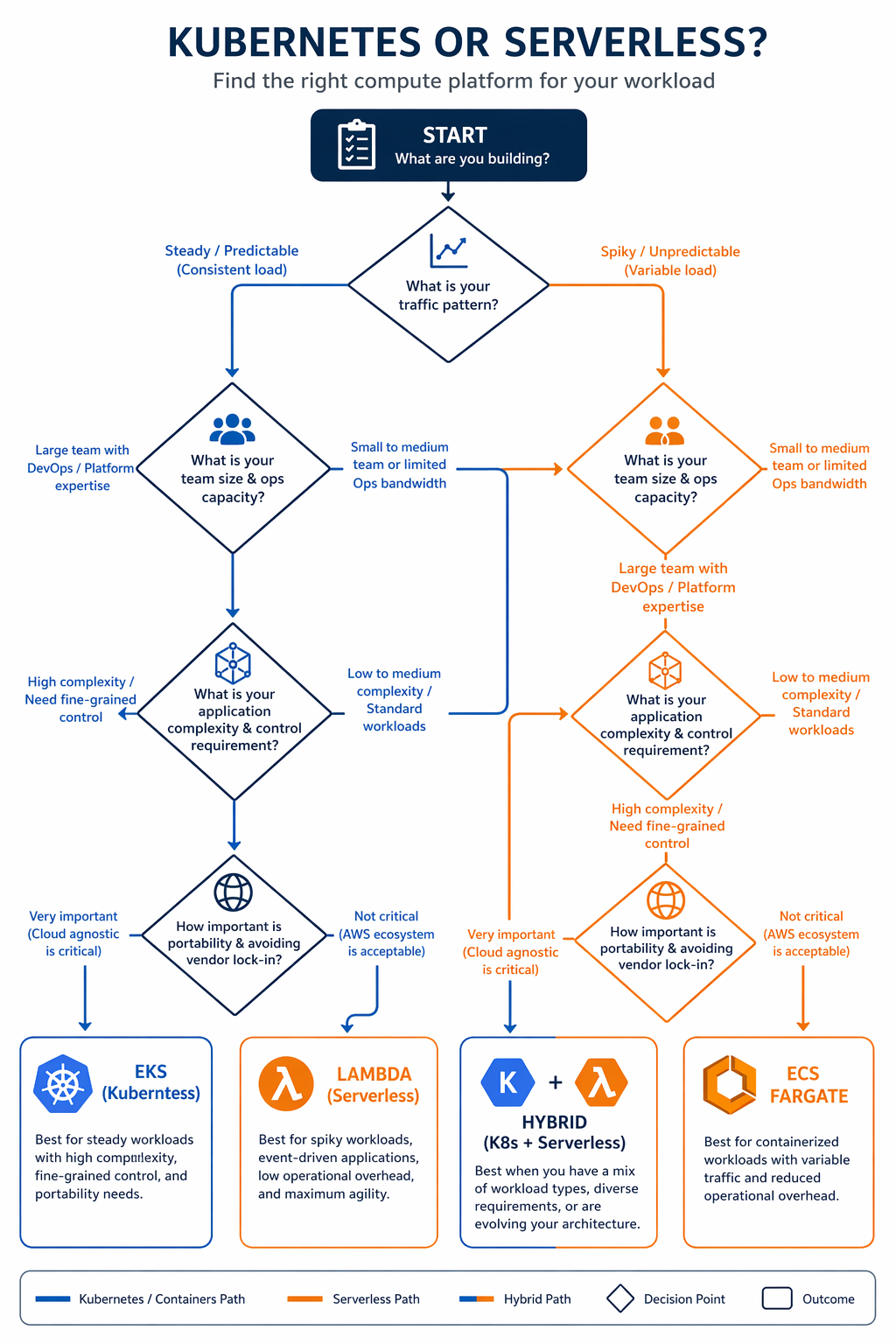
Rather than asking “which is better,” this framework gives you structured criteria to work through. Score your workload on each dimension and see where you land.
When Serverless Is the Right Choice
Choose Lambda and serverless when:
-
Traffic is bursty or unpredictable: Request-driven scaling with no minimum cost is the optimal economic model for variable workloads. APIs with spiky traffic, event-driven processing pipelines, and webhook handlers fit this pattern.
-
Execution time is under 15 minutes: If every request completes in seconds or a few minutes, Lambda’s timeout is not a constraint. Most API calls, data transformations, and notification handlers fall in this range.
-
Your team is small and application-focused: A team of 2-5 developers who want to ship features without managing infrastructure will move faster with serverless. The operational overhead is minimal.
-
You need fast time-to-market: Getting a serverless API from code to production can happen in hours. Kubernetes requires cluster setup, namespace configuration, ingress setup, and CI/CD pipeline configuration before the first deployment.
-
Cost is proportional to usage: Startups, internal tools, and low-traffic services benefit from paying only for what they use. The zero-idle-cost model matters when traffic is low or intermittent.
-
Event-driven architecture is a natural fit: Workloads triggered by SQS messages, S3 events, DynamoDB streams, or EventBridge rules map directly to Lambda’s invocation model. See AWS Lambda Layers and Custom Runtimes for extending Lambda to support specialized runtime requirements.
When Kubernetes Is the Right Choice
Choose EKS and Kubernetes when:
-
Traffic is sustained and predictable: When your API serves millions of requests per day with a relatively stable baseline, the flat cost of dedicated compute is significantly cheaper than per-request pricing.
-
Workloads require long-running processes: Streaming services, WebSocket servers, background workers, and batch processing jobs that run for hours do not fit Lambda’s 15-minute limit.
-
You need advanced networking: Custom CNI plugins, NetworkPolicy enforcement, service mesh integration, and multi-VPC connectivity require the networking control that Kubernetes provides.
-
GPU or specialized hardware is needed: ML training, inference serving, and video transcoding workloads that require GPU instances (P5, G6) run on Kubernetes. Lambda’s GPU support is still in preview and limited.
-
Multi-cloud or vendor portability matters: Kubernetes provides a consistent API across AWS, GCP, and Azure. If your organization has a multi-cloud strategy or needs to avoid vendor lock-in, Kubernetes is the portable option.
-
You are running a platform for multiple teams: A shared Kubernetes cluster with namespace isolation, RBAC, resource quotas, and admission controllers provides the governance model that platform teams need when supporting many development squads.
When Both Are the Right Choice
Here’s the reality: most organizations in 2026 run both. The hybrid pattern puts serverless in charge of event-driven, bursty workloads and hands Kubernetes the sustained, stateful services. That’s not a cop-out – it’s the right architecture for most mid-size and large organizations.
EventBridge and SNS act as the bridge between the two worlds. A Kubernetes-hosted API can publish events to EventBridge, which then triggers Lambda functions for notifications, auditing, or data processing. Step Functions can orchestrate workflows that span Lambda functions and even call out to EKS-hosted services through API Gateway.
Hybrid Patterns
Pattern 1: API on EKS, Async Processing on Lambda
This is probably the most common hybrid pattern you’ll see in the wild. The customer-facing API lives on EKS for predictable latency and sustained throughput, while background processing – things like email sending, image resizing, PDF generation, and webhook dispatch – runs on Lambda where it’s cheaper and scales automatically.
# Lambda function triggered by SQS for async processing
# Processes messages published by the EKS-hosted API

import json
import boto3
import logging

logger = logging.getLogger()
logger.setLevel(logging.INFO)

s3 = boto3.client("s3")
ses = boto3.client("ses", region_name="us-east-1")


def lambda_handler(event, context):
    """Process SQS messages from the EKS API service."""
    for record in event["Records"]:
        try:
            body = json.loads(record["body"])
            message_type = body.get("type")

            if message_type == "email_notification":
                process_email(body)
            elif message_type == "image_resize":
                process_image(body)
            elif message_type == "report_generate":
                process_report(body)
            else:
                logger.warning(f"Unknown message type: {message_type}")

        except Exception as e:
            logger.error(f"Failed to process message: {e}")
            raise  # SQS will retry


def process_email(body: dict) -> None:
    """Send email notification via SES."""
    ses.send_email(
        Source="[email protected]",
        Destination={"ToAddresses": [body["recipient"]]},
        Message={
            "Subject": {"Data": body["subject"]},
            "Body": {"Html": {"Data": body["content"]}},
        },
    )
    logger.info(f"Email sent to {body['recipient']}")


def process_image(body: dict) -> None:
    """Resize image and upload to S3."""
    # Image processing logic here
    logger.info(f"Image processed: {body['image_key']}")


def process_report(body: dict) -> None:
    """Generate report and store in S3."""
    # Report generation logic here
    logger.info(f"Report generated: {body['report_id']}")
Pattern 2: Event-Driven Orchestration with Step Functions
Step Functions shine when you need to orchestrate complex workflows that pull together Lambda functions, ECS tasks, and calls to EKS-hosted services through API Gateway. This pattern works really well for order processing, data pipelines, and multi-step approval workflows.
{
  "Comment": "Order processing workflow spanning Lambda and EKS",
  "StartAt": "ValidateOrder",
  "States": {
    "ValidateOrder": {
      "Type": "Task",
      "Resource": "arn:aws:lambda:us-east-1:123456789012:function:validate-order",
      "Next": "CheckInventory"
    },
    "CheckInventory": {
      "Type": "Task",
      "Resource": "arn:aws:states:us-east-1:123456789012:activity:call-eks-api",
      "Parameters": {
        "ApiEndpoint": "https://api.example.com/inventory/check",
        "Method": "POST",
        "Body.$": "$.order"
      },
      "Next": "InventoryChoice"
    },
    "InventoryChoice": {
      "Type": "Choice",
      "Choices": [
        {
          "Variable": "$.inStock",
          "BooleanEquals": true,
          "Next": "ProcessPayment"
        }
      ],
      "Default": "BackorderNotify"
    },
    "ProcessPayment": {
      "Type": "Task",
      "Resource": "arn:aws:lambda:us-east-1:123456789012:function:process-payment",
      "Next": "FulfillOrder"
    },
    "FulfillOrder": {
      "Type": "Task",
      "Resource": "arn:aws:states:us-east-1:123456789012:activity:call-eks-api",
      "Parameters": {
        "ApiEndpoint": "https://api.example.com/orders/fulfill",
        "Method": "POST",
        "Body.$": "$"
      },
      "End": true
    },
    "BackorderNotify": {
      "Type": "Task",
      "Resource": "arn:aws:lambda:us-east-1:123456789012:function:notify-backorder",
      "End": true
    }
  }
}
Pattern 3: Lambda for API Gateway Authorizers, EKS for Backend
With this pattern, API Gateway custom authorizers run as Lambda functions to handle JWT validation or call external identity providers, while the actual API backend runs on EKS. It’s a clean way to keep authentication separate from business logic – and each layer can scale on its own.
Real-World Case Studies
Case Study 1: Fintech Startup (Serverless-First)
A fintech startup we looked at – they process payment transactions for small businesses – went all-in on serverless back in 2024 and have stuck with that approach through 2026. Here’s what their workload looks like:
- Traffic pattern: Bursty, correlated with business hours (8 AM - 6 PM)
- Peak load: 50,000 requests per hour during business hours
- Off-peak: Fewer than 100 requests per hour overnight
- Compliance: PCI-DSS required, data encryption at rest and in transit
- Team size: 4 backend developers, 1 DevOps engineer
Their stack uses API Gateway with Lambda authorizers, Lambda functions for all transaction processing, DynamoDB for transaction records, SQS for async operations (receipt emails, bank notifications), and Step Functions for multi-step payment flows.
Monthly compute cost: Roughly $180 for Lambda, $45 for DynamoDB, $12 for SQS. Total infrastructure comes in under $300/month.
Why not Kubernetes: That bursty traffic pattern means they’d be paying for idle capacity 14 hours a day. The team doesn’t have Kubernetes experience either, and the operational overhead would probably require at least one additional hire. Plus, PCI-DSS compliance turns out to be easier to demonstrate with Lambda’s managed isolation model.
Case Study 2: E-Commerce Platform (Kubernetes-First)
A mid-size e-commerce platform we studied – serving about 5 million daily page views – runs entirely on EKS Auto Mode. Here’s their profile:
- Traffic pattern: Sustained baseline with predictable peaks (sales events, holidays)
- Average load: 2,000 requests per second sustained, 8,000 RPS during peaks
- Services: 35 microservices, 12 databases, Redis caching layer
- Team size: 20 developers, 4 platform engineers
Their setup includes EKS Auto Mode with Karpenter-managed node pools, Istio service mesh for inter-service communication, RDS Aurora for relational data, ElastiCache Redis for session and product caching, and an internal developer platform built on Backstage.
Monthly compute cost: Around $8,500 for EKS nodes, $73 for control planes, $4,200 for databases, $1,800 for ElastiCache. Total infrastructure sits at roughly $15,000/month.
Why not serverless: At 5 million daily requests, Lambda would run about $3,750/month for compute alone – and that’s before factoring in provisioned concurrency for all 35 services. The team also runs long-lived background workers (inventory sync, recommendation engine updates) that blow past Lambda’s 15-minute timeout. And the service mesh gives them observability and traffic management that would be tough to replicate in a serverless setup.
Case Study 3: SaaS Platform (Hybrid)
Then there’s a B2B SaaS platform that builds project management tools – they went with a hybrid approach. Their workload profile:
- Traffic pattern: Steady baseline with periodic spikes during feature launches
- Average load: 500 RPS sustained
- Multi-tenant: 2,000 tenant organizations with isolation requirements
- Team size: 12 developers, 2 platform engineers
Their architecture runs the core API on EKS (they needed consistent latency, multi-tenant routing, and WebSocket support for real-time collaboration), file processing on Lambda (document conversion, thumbnail generation, virus scanning), email and notifications on Lambda (SES integration, webhook dispatch), and data analytics on Lambda triggered by S3 events (usage reports, billing calculations).
Monthly cost split: EKS comes in around $4,200/month, Lambda adds about $280/month. Total: roughly $4,500/month.
Why hybrid: The core API demands WebSocket support and consistent sub-50ms latency – that’s Kubernetes territory. File processing and notifications, on the other hand, are event-driven with variable volume, so Lambda makes more economic sense there. The team actually tried running everything on one platform first, and it created unnecessary complexity in both directions.
Decision Scorecard
Here’s a scorecard you can use to evaluate your own workload. Rate each dimension from 1 (strongly favors Lambda) to 5 (strongly favors EKS). A total score below 30 points toward serverless. Above 50 leans Kubernetes. Between 30 and 50? Either platform could work, and you should look at the hybrid patterns we covered earlier.
| Dimension | 1 (Lambda) | 3 (Neutral) | 5 (Kubernetes) |
|---|---|---|---|
| Traffic predictability | Highly variable | Somewhat predictable | Very predictable |
| Request volume | < 100K/day | 100K - 1M/day | > 1M/day |
| Execution duration | < 30 seconds | 30s - 5 minutes | > 5 minutes |
| Team size | 1-5 developers | 5-15 developers | 15+ developers |
| Kubernetes expertise | None | Some | Strong |
| Networking requirements | Basic VPC | Moderate | Advanced (mesh, custom CNI) |
| GPU / specialized hardware | Not needed | Future consideration | Required now |
| Vendor lock-in tolerance | High (AWS-only) | Moderate | Low (multi-cloud) |
| Time to market pressure | Immediate | Weeks | Months |
| Operational staffing | No dedicated ops | Shared ops team | Dedicated platform team |
| Stateful workload needs | Stateless | Minimal state | Databases, caches, queues |
| Compliance requirements | Standard | Moderate | Strict (PCI, HIPAA, FedRAMP) |
Interpreting the score:
| Score | Recommendation |
|---|---|
| 12-24 | Serverless-first. Use Lambda for compute, API Gateway for routing, Step Functions for orchestration. |
| 25-30 | Serverless with container escape hatches. Start with Lambda, use ECS Fargate for workloads that do not fit. |
| 31-40 | Hybrid. API and stateful services on EKS, event-driven processing on Lambda. |
| 41-50 | Kubernetes with serverless augmentation. Core platform on EKS, use Lambda for specific event handlers. |
| 51-60 | Kubernetes-first. EKS Auto Mode for managed operations, KEDA for event-driven scaling. |
Conclusion
The Kubernetes versus serverless debate in 2026 isn’t really about which technology is “better.” Both are mature, capable, and well-supported on AWS. The right answer depends on your workload, your team, and where you’re headed.
Serverless comes out ahead when your traffic is variable, your team is small, and your execution patterns fit comfortably within Lambda’s constraints. The operational simplicity and pay-per-use pricing are hard to beat for the right workload.
Kubernetes takes the lead when your traffic is sustained, your services are stateful or long-running, and your team needs the kind of control and portability that only a full container orchestration platform provides. EKS Auto Mode has brought the operational burden down significantly, making Kubernetes accessible to smaller teams than ever before.
Our advice? Plan for both. Start with serverless to get to market quickly, move to Kubernetes when scale justifies the investment, and keep Lambda around for event-driven processing no matter where your core services end up. The hybrid pattern isn’t indecision – it’s architectural maturity.
If you’re building something new today and aren’t sure where to start, go with Lambda. It’s a lot easier to migrate from Lambda to EKS (containerize the function, deploy to EKS) than the other way around. You can dig deeper into EKS in our comprehensive guide, or check out AWS Lambda Managed Instances for workloads that need more than what standard Lambda offers.
Explore more like this

Cloud IoT Security: Zero Trust, Identity, and Signed Updates
On September 11, 2026, the Cyber Resilience Act’s incident-reporting rules start applying in the European Union. That is 22 days after this article’s publication date. A manufacturer that learns of...

Bedrock Web Search: Grounding an Agent Without Building a Scraper
On August 4, 2026, AWS made Web Search on Amazon Bedrock generally available, and the entire integration surface is one JSON object: {"type": "web_search"}. That is the whole change from...

ECR Now Allows 200 GB Image Layers. Your Model Weights Still Do Not Belong There
On August 3, 2026, AWS raised the maximum Amazon ECR image layer size to 200 GB for images pushed with docker push. The announcement names the driver in the second...

Comments