
Amazon Nova 2 Sonic: Build Production Voice AI Agents on AWS in 2026

I have lost count of how many times someone told me voice was “finally here.” Siri let us down. Alexa hit a wall. Google Assistant got folded into something else and nobody really noticed. The mics and speakers were fine – the real bottleneck was always what happened between them. Stitching together speech-to-text, then an LLM, then text-to-speech sounds reasonable on paper, but each handoff adds a chunk of latency. The result? A conversation that feels stilted and disconnected. Users notice that lag instantly, and most of them just give up.
Amazon Nova 2 Sonic is AWS’s answer to this problem. It is a speech-to-speech foundation model that processes audio input and generates audio output in a single, unified pipeline. No transcription step in the middle. No separate text-to-speech bolt-on at the end. The model understands speech natively and responds in kind, preserving tone, emotion, and conversational rhythm. It runs on Amazon Bedrock, integrates with Bedrock AgentCore for full agent workflows, and is purpose-built for production voice AI agents.
In this post, you will learn what Nova 2 Sonic is, how it differs from the text-only Nova models, how to architect a voice agent pipeline on AWS, and how to build one step by step. You will also see real code for an omnichannel ordering system, understand latency and cost characteristics, and learn when Nova 2 Sonic is the right choice versus alternatives.
What is Amazon Nova 2 Sonic
Nova 2 Sonic is part of the Amazon Nova family of foundation models. While Nova Micro, Lite, and Pro handle text and image modalities, Nova 2 Sonic is designed specifically for speech understanding and speech generation. It accepts audio as input, reasons over it, and produces audio as output – all within a single model invocation.
The key difference between Nova 2 Sonic and a traditional voice pipeline is architectural. A conventional system chains three separate models: Amazon Transcribe converts speech to text, a text-based LLM (like Claude or Nova Pro) generates a text response, and Amazon Polly converts that text back to speech. Each step adds latency, and each handoff is a place where conversational context can break down. Prosody, speaker emotion, and conversational cues get lost in the transcription step and cannot be recovered by the text-to-speech step.
Nova 2 Sonic eliminates those handoffs. The model processes audio embeddings directly, reasons over the speech signal, and generates audio output with natural intonation. This architecture is called speech-to-speech (S2S), and it is the same approach behind OpenAI’s GPT-4o voice mode and Google’s Gemini Live API.
Nova Model Comparison
| Model | Input Modality | Output Modality | Latency Tier | Best For |
|---|---|---|---|---|
| Nova Micro | Text | Text | Lowest (~50ms) | Classification, summarization, quick Q&A |
| Nova Lite | Text, Image | Text | Low (~150ms) | Multimodal tasks on a budget |
| Nova Pro | Text, Image, Video | Text | Medium (~300ms) | Complex reasoning, document analysis |
| Nova Premier | Text, Image, Video | Text | Higher (~500ms) | Deepest reasoning tasks |
| Nova 2 Sonic | Audio (speech) | Audio (speech) | Low (~200ms) | Voice agents, conversational AI, phone systems |
Nova 2 Sonic sits in a different category entirely. It does not compete with the text models – it complements them. You use Nova Pro for your chatbot’s text interface and Nova 2 Sonic for your phone-based voice agent. Behind both, Bedrock AgentCore can orchestrate the same tools and memory.
Key Specifications
- Audio Input Formats: PCM (16-bit, 16kHz), WAV, MP3, OGG/Opus
- Audio Output Formats: PCM, WAV, MP3
- Supported Languages: English (US, UK, AU), Spanish, French, German, Japanese, Portuguese (GA), with additional languages in preview
- Max Input Duration: 30 seconds per utterance (streaming extends this)
- Streaming: Supported via
invoke_model_with_response_streamfor real-time conversations - Voice Activity Detection: Built-in, no separate VAD component needed
- Tool Use: Compatible with AgentCore Gateway for function calling during voice conversations
Voice AI Architecture on AWS
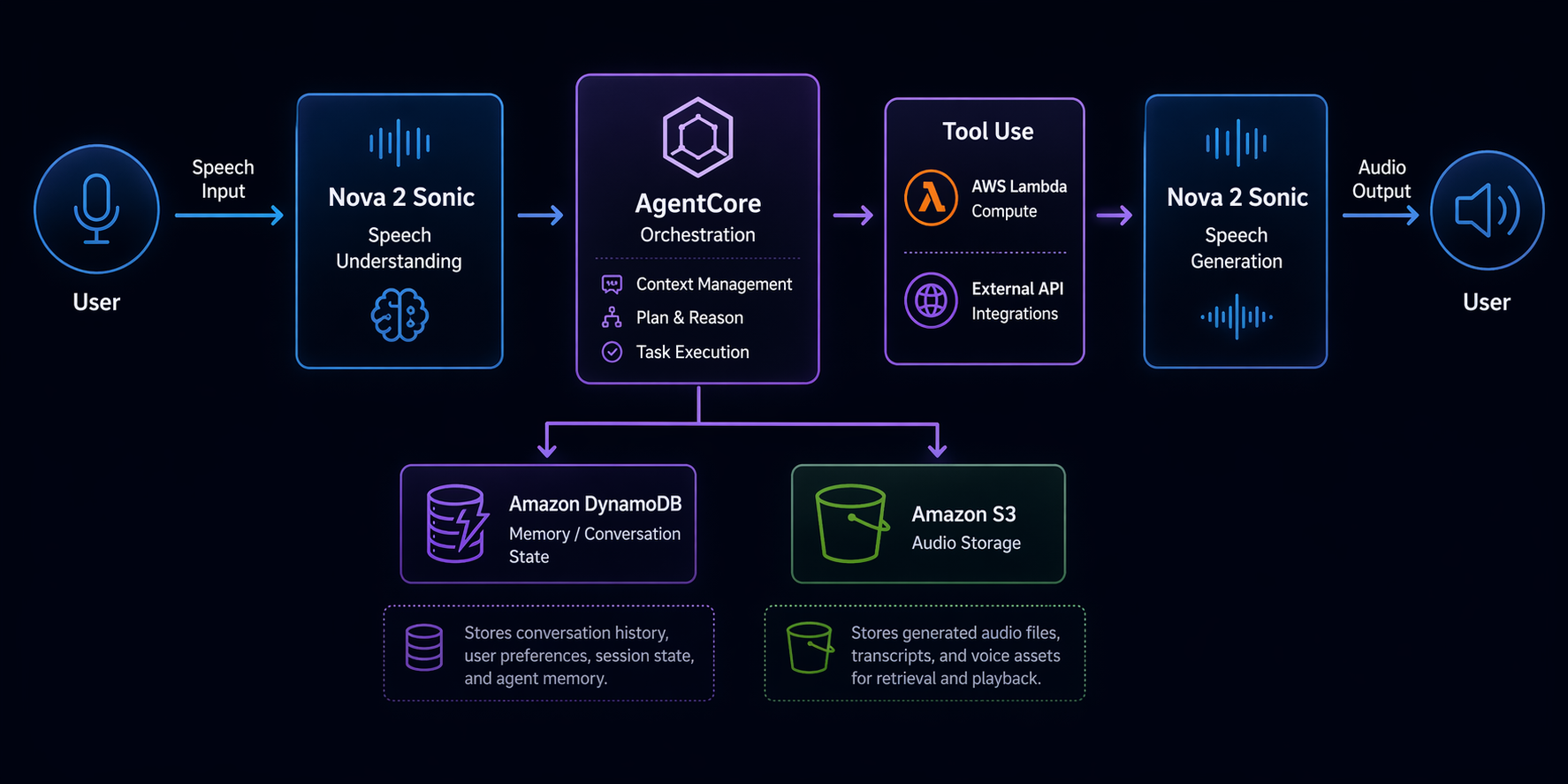
Building a production voice agent on AWS involves more than just calling a model. You need infrastructure for audio ingestion, session management, tool execution, and observability. Here is what the architecture looks like.
Architecture Components
The end-to-end pipeline has six layers:
-
Audio Ingestion Layer: The user speaks into a phone line, web app, or mobile SDK. Audio streams in via WebSocket or HTTP/2. For phone-based agents, Amazon Connect handles the telephony and streams audio to your backend. For web and mobile, a WebSocket API Gateway endpoint receives audio chunks.
-
Nova 2 Sonic (Bedrock): The audio is sent to Nova 2 Sonic via the Bedrock Runtime API. If you are using streaming, audio chunks are forwarded in real time. The model processes speech, decides what to do, and generates a spoken response. If the user’s request requires an action (checking an order, booking a table), the model emits a tool call instead of – or in addition to – a spoken response.
-
Bedrock AgentCore: The agent runtime manages the conversation loop. It holds session memory (the current conversation context), long-term memory (user preferences, past interactions), and routes tool calls through the AgentCore Gateway. If you have used AgentCore for text agents, the voice agent uses the same runtime – the difference is that the model is Nova 2 Sonic instead of Claude or Nova Pro.
-
Tool Execution (Lambda + DynamoDB): When the agent calls a tool, AgentCore Gateway invokes your backend. For most use cases, this is a Lambda function that reads from or writes to DynamoDB, calls a third-party API, or triggers a Step Functions workflow. The tool result is returned to the agent, which incorporates it into its spoken response.
-
Audio Output: The spoken response from Nova 2 Sonic is streamed back through the same WebSocket or telephony connection. The user hears the reply in natural speech, usually within a second.
-
Observability: CloudWatch Logs capture every model invocation, tool call, and session event. X-Ray traces the full request path from audio ingestion to response. Bedrock’s built-in evaluation tools let you measure response quality over time.
How the Pipeline Works End-to-End
Here is the flow for a typical voice interaction:
User speaks → Audio streams via WebSocket/Connect
    → Lambda proxy forwards audio to Nova 2 Sonic (Bedrock)
        → Model understands speech, decides action
            → If tool call needed: AgentCore Gateway → Lambda → DynamoDB/API
                → Tool result returned to model
            → Model generates spoken response
        → Audio response streamed back
    → User hears reply
The critical detail is that Nova 2 Sonic handles understanding and generation in one call. There is no Transcribe step converting audio to text before the model processes it. There is no Polly step converting text to audio after the model responds. The model speaks and listens natively.
For session management, AgentCore maintains conversation state. If the user says “book a table for two” and then follows up with “make it three instead,” the agent remembers the context. You do not build this state management yourself – AgentCore handles it.
Setting Up Your First Voice Agent
This section walks you through building a voice-enabled agent from scratch. You will enable the model in Bedrock, create an AgentCore agent with voice capabilities, configure the speech pipeline, add tool use, and test with audio input.
Step 1: Enable Nova 2 Sonic in Bedrock
Before you can invoke the model, you need to enable it in the Bedrock console. Not all models are enabled by default in every AWS account.
# Verify model access
aws bedrock list-foundation-models \
  --region us-east-1 \
  --query "modelSummaries[?contains(modelId, 'sonic')].{ID:modelId,Name:modelName,Provider:providerName}"
If the model does not appear, navigate to the Bedrock console, select Model Access in the left sidebar, find Amazon Nova 2 Sonic, and request access. Approval is usually immediate for standard accounts.
Step 2: Create an AgentCore Agent with Voice Capability
Create an agent that uses Nova 2 Sonic as its foundation model and is configured for voice interaction.
import boto3

bedrock_agent = boto3.client("bedrock-agent", region_name="us-east-1")

# Create the agent
agent = bedrock_agent.create_agent(
    agentName="voice-ordering-agent",
    agentResourceRoleArn="arn:aws:iam::123456789012:role/BedrockAgentRole",
    foundationModel="amazon.nova2-sonic-v1:0",
    description="Voice-based ordering agent for restaurant menu",
    idleSessionTTLInSeconds=300,
    agentCollaboration="DISABLED",
    orchestrationType="DEFAULT",
)

agent_id = agent["agent"]["agentId"]
print(f"Agent created: {agent_id}")
Notice the foundationModel parameter. You specify amazon.nova2-sonic-v1:0 instead of a text model. AgentCore recognizes this as a voice-capable model and adjusts the runtime accordingly – it expects audio input and returns audio output rather than text.
Step 3: Configure the Speech Pipeline
This is where you tell the agent what it’s actually supposed to do. Think of it as writing a script for someone who’s never taken a phone order before – you have to spell out the basics. Voice agents tend to need different instructions than text agents, mainly because spoken conversation is looser and less structured than typing back and forth.
# Prepare the agent instruction
bedrock_agent.prepare_agent(agentId=agent_id)

# Create an agent alias for invocation
alias = bedrock_agent.create_agent_alias(
    agentId=agent_id,
    agentAliasName="production",
)

alias_id = alias["agentAlias"]["agentAliasId"]
The agent’s instruction is set during creation or update. For a voice ordering agent:
bedrock_agent.update_agent(
    agentId=agent_id,
    instruction="""You are a friendly voice ordering assistant for a restaurant.
The customer is speaking to you over the phone. Keep responses concise and natural.
Confirm orders before submitting. If the customer is unclear, ask brief clarifying
questions. Never read out long lists -- offer categories and let the customer choose.
Available tools: lookup_menu, add_to_order, confirm_order, process_payment.""",
)
Voice instructions differ from text instructions. You explicitly tell the agent to keep responses short. You warn it against reading long lists aloud. You emphasize natural conversational flow. These adjustments matter because what reads well in text often sounds terrible when spoken.
Step 4: Add Tool Use
Tools are the actions your agent can take. For a voice ordering system, you need tools for menu lookup, adding items to an order, confirming the order, and processing payment.
# Define the menu lookup tool
bedrock_agent.create_agent_action_group(
    agentId=agent_id,
    actionGroupName="MenuLookup",
    description="Look up menu items, prices, and availability",
    actionGroupExecutor={"lambda": "arn:aws:lambda:us-east-1:123456789012:function:menu-lookup"},
    apiSchema={
        "payload": json.dumps({
            "openapi": "3.0.0",
            "info": {"title": "MenuLookup", "version": "1.0.0"},
            "paths": {
                "/menu/search": {
                    "get": {
                        "description": "Search menu items by category or name",
                        "parameters": [
                            {
                                "name": "category",
                                "in": "query",
                                "required": False,
                                "schema": {"type": "string"},
                                "description": "Menu category: appetizers, mains, desserts, drinks"
                            },
                            {
                                "name": "query",
                                "in": "query",
                                "required": False,
                                "schema": {"type": "string"},
                                "description": "Search term for menu item name"
                            }
                        ]
                    }
                }
            }
        })
    },
)
Define the order tool similarly:
bedrock_agent.create_agent_action_group(
    agentId=agent_id,
    actionGroupName="OrderManagement",
    description="Add items to the current order, modify quantities, or cancel",
    actionGroupExecutor={"lambda": "arn:aws:lambda:us-east-1:123456789012:function:order-manager"},
    apiSchema={
        "payload": json.dumps({
            "openapi": "3.0.0",
            "info": {"title": "OrderManagement", "version": "1.0.0"},
            "paths": {
                "/order/add": {
                    "post": {
                        "description": "Add an item to the current order",
                        "requestBody": {
                            "required": True,
                            "content": {
                                "application/json": {
                                    "schema": {
                                        "type": "object",
                                        "properties": {
                                            "item_name": {"type": "string"},
                                            "quantity": {"type": "integer", "default": 1},
                                            "special_instructions": {"type": "string"}
                                        },
                                        "required": ["item_name"]
                                    }
                                }
                            }
                        }
                    }
                }
            }
        })
    },
)
Each tool maps to a Lambda function. The Lambda reads from DynamoDB tables (menu items, orders) and returns structured JSON. AgentCore handles the routing – the agent decides when to call the tool, the Gateway invokes the Lambda, and the result flows back to the model.
Step 5: Test with Audio Input
Now invoke the agent with audio. The simplest test uses a pre-recorded WAV file:
import base64
import json

bedrock_runtime = boto3.client("bedrock-agent-runtime", region_name="us-east-1")

# Read a test audio file
with open("test_order.wav", "rb") as f:
    audio_bytes = f.read()

audio_b64 = base64.b64encode(audio_bytes).decode("utf-8")

# Invoke the voice agent
response = bedrock_runtime.invoke_agent(
    agentId=agent_id,
    agentAliasId=alias_id,
    sessionId="test-session-001",
    input={
        "contentType": "audio/wav",
        "body": audio_bytes,
    },
)

# Collect the audio response
output_audio = b""
for event in response["completion"]:
    chunk = event["chunk"]
    output_audio += chunk["bytes"]

# Save the response audio
with open("response.wav", "wb") as f:
    f.write(output_audio)

print("Response audio saved. Play response.wav to hear the agent's reply.")
If you want a real back-and-forth conversation – the kind where the user talks and gets a reply without awkward pauses – you’ll want to use a WebSocket. It pipes audio chunks to the agent and pipes audio chunks back. That’s basically how any live phone or web voice experience works under the hood.
# Streaming invocation for real-time conversations
response = bedrock_runtime.invoke_agent(
    agentId=agent_id,
    agentAliasId=alias_id,
    sessionId="live-session-001",
    input={
        "contentType": "audio/pcm; sample-rate=16000; bit-depth=16",
        "body": audio_stream,  # Streaming audio body
    },
    streamingConfigurations={
        "streamFinalResponse": True,
    },
)

for event in response["completion"]:
    chunk = event["chunk"]
    # Forward each audio chunk to the client immediately
    # for near-real-time playback
    yield chunk["bytes"]
The streaming configuration is what makes the difference between a one-second perceived latency and a four-second lag. The model starts producing audio before it has finished reasoning, so the user hears the beginning of the response almost immediately.
Building an Omnichannel Ordering System
Let us build a complete, real-world example: a voice ordering system for a restaurant that handles phone orders and web orders through the same backend.
The Flow
A customer calls the restaurant. The call routes through Amazon Connect to your voice agent. The conversation goes like this:
- Agent greets and asks what they want to order
- Customer says “I want two margherita pizzas and a Caesar salad”
- Agent calls
lookup_menuto verify items and prices - Agent calls
add_to_orderwith the items - Agent reads back the order and total price
- Customer confirms
- Agent calls
process_paymentwith the amount - Agent confirms the order and provides an estimated pickup time
Each step involves a tool call routed through AgentCore Gateway to a Lambda function.
Intent Recognition in Voice
With Nova 2 Sonic, you do not build a separate intent classifier. The model understands intent from speech directly. Your instructions and tool definitions guide the model:
INSTRUCTION = """You are a voice ordering assistant for Mario's Pizzeria.

GREETING: When the call starts, greet the customer and ask how you can help.

ORDERING FLOW:
1. Listen to the customer's request
2. Use lookup_menu to verify items exist and get current prices
3. Use add_to_order to build the order
4. Read back the full order with total price
5. Ask for confirmation
6. Use confirm_order only after explicit customer confirmation
7. Use process_payment to charge the order

RULES:
- If a menu item is unavailable, suggest alternatives
- Never guess prices -- always use lookup_menu
- Keep spoken responses under 15 words when possible
- If background noise is heavy, ask the customer to repeat once, then offer to switch to SMS
- For payments, never speak credit card numbers back aloud"""
The instruction is detailed because voice agents need explicit guidance on conversational behavior. The “keep responses under 15 words” rule prevents the model from delivering monologues. The background noise handling rule gives the agent a graceful degradation path.
Lambda Function: Menu Lookup
import json
import boto3
from decimal import Decimal

dynamodb = boto3.resource("dynamodb")
menu_table = dynamodb.Table("restaurant-menu")

def lambda_handler(event, context):
    # Parse the request from AgentCore Gateway
    body = json.loads(event["body"]) if isinstance(event["body"], str) else event["body"]

    category = event.get("queryStringParameters", {}).get("category")
    query = event.get("queryStringParameters", {}).get("query", "").lower()

    if category:
        response = menu_table.query(
            KeyConditionExpression=boto3.dynamodb.conditions.Key("category").eq(category)
        )
    else:
        response = menu_table.scan()

    items = response.get("Items", [])

    if query:
        items = [item for item in items if query in item["name"].lower()]

    # Format for the voice agent -- keep descriptions short for spoken output
    result = []
    for item in items:
        result.append({
            "name": item["name"],
            "price": float(item["price"]),
            "available": item.get("available", True),
            "spoken_description": item.get("short_description", item["name"]),
        })

    return {
        "statusCode": 200,
        "body": json.dumps({"items": result})
    }
The spoken_description field matters. A menu item might have a full description like “Hand-tossed dough with San Marzano tomato sauce, fresh mozzarella, and basil” but the voice agent should say “Margherita pizza with fresh mozzarella.” You optimize the data for the output modality.
Lambda Function: Order Management
import json
import boto3
import uuid
from datetime import datetime

dynamodb = boto3.resource("dynamodb")
orders_table = dynamodb.Table("restaurant-orders")
sessions_table = dynamodb.Table("order-sessions")

def lambda_handler(event, context):
    body = json.loads(event["body"]) if isinstance(event["body"], str) else event["body"]
    action = body.get("action")
    session_id = body.get("session_id")

    if action == "add":
        return add_to_order(session_id, body)
    elif action == "confirm":
        return confirm_order(session_id)
    elif action == "get_total":
        return get_order_total(session_id)

def add_to_order(session_id, body):
    item_name = body["item_name"]
    quantity = body.get("quantity", 1)
    special = body.get("special_instructions", "")

    # Get current session order
    session = sessions_table.get_item(Key={"session_id": session_id})
    order = session.get("Item", {"session_id": session_id, "items": []})

    # Look up price from menu
    menu = dynamodb.Table("restaurant-menu")
    menu_response = menu.scan(
        FilterExpression=boto3.dynamodb.conditions.Attr("name").eq(item_name)
    )

    if not menu_response["Items"]:
        return {
            "statusCode": 404,
            "body": json.dumps({"error": f"{item_name} not found on menu"})
        }

    price = float(menu_response["Items"][0]["price"])

    order["items"].append({
        "name": item_name,
        "quantity": quantity,
        "unit_price": price,
        "line_total": price * quantity,
        "special_instructions": special,
    })

    total = sum(item["line_total"] for item in order["items"])
    order["total"] = total

    sessions_table.put_item(Item=order)

    return {
        "statusCode": 200,
        "body": json.dumps({
            "added": item_name,
            "quantity": quantity,
            "running_total": round(total, 2),
        })
    }

def confirm_order(session_id):
    session = sessions_table.get_item(Key={"session_id": session_id})
    order = session.get("Item")

    if not order or not order.get("items"):
        return {
            "statusCode": 400,
            "body": json.dumps({"error": "No items in order"})
        }

    order_id = str(uuid.uuid4())[:8]

    orders_table.put_item(Item={
        "order_id": order_id,
        "session_id": session_id,
        "items": order["items"],
        "total": order["total"],
        "status": "confirmed",
        "created_at": datetime.utcnow().isoformat(),
        "estimated_ready": "25-30 minutes",
    })

    return {
        "statusCode": 200,
        "body": json.dumps({
            "order_id": order_id,
            "total": round(order["total"], 2),
            "estimated_ready": "25-30 minutes",
        })
    }
This Lambda handles the full order lifecycle. The voice agent calls add_to_order for each item the customer mentions, then confirm_order after the customer verbally confirms. The estimated_ready field gives the agent something specific to say at the end – “Your order will be ready in 25 to 30 minutes” is better than “Your order has been placed.”
Payment Integration
Payment processing in a voice agent requires extra care because you are handling sensitive data in an audio channel. The pattern is to tokenize payment information immediately and never store raw card data.
def process_payment(session_id, payment_token):
    """Process payment using a tokenized card reference."""
    session = sessions_table.get_item(Key={"session_id": session_id})
    order = session.get("Item")

    if not order:
        return {"statusCode": 400, "body": json.dumps({"error": "No order found"})}

    # Call payment gateway with token (Stripe, Square, etc.)
    payment_result = call_payment_gateway(
        amount=order["total"],
        token=payment_token,
    )

    if payment_result["success"]:
        orders_table.update_item(
            Key={"order_id": order.get("order_id")},
            UpdateExpression="SET #s = :s, payment_id = :p",
            ExpressionAttributeNames={"#s": "status"},
            ExpressionAttributeValues={
                ":s": "paid",
                ":p": payment_result["transaction_id"],
            },
        )

    return {
        "statusCode": 200,
        "body": json.dumps({
            "success": payment_result["success"],
            "transaction_id": payment_result.get("transaction_id"),
        })
    }
The voice agent never speaks payment details aloud. The customer enters card information via the phone keypad (DTMF tones), which the telephony layer captures separately from the voice stream. The agent only confirms whether payment succeeded.
Performance and Latency
Latency is the single most important metric for voice agents. If the response takes more than a second, users perceive the interaction as slow. If it takes more than two seconds, they start wondering if the system is broken. Human conversational latency – the gap between one person finishing a sentence and the other responding – is around 200 milliseconds. That is your target.
Latency Benchmarks
| Pipeline Configuration | Time to First Audio Byte | Full Response (5-second utterance) |
|---|---|---|
| Nova 2 Sonic (streaming) | 180-250ms | 1.2-1.8s |
| Nova 2 Sonic (batch) | 300-500ms | 2.0-3.0s |
| Transcribe + Nova Pro + Polly (cascaded) | 600-900ms | 3.5-5.0s |
| Transcribe + Claude Sonnet + Polly | 700-1100ms | 4.0-6.0s |
| Human conversational baseline | ~200ms | N/A |
The numbers tell the story. Streaming Nova 2 Sonic gets you close to human conversational latency. The cascaded pipeline – what most teams build today – is two to three times slower.
Optimization Strategies
Use streaming everywhere. The invoke_model_with_response_stream API starts returning audio before the model finishes generating the full response. The user hears the first word while the model is still producing the rest of the sentence. This cuts perceived latency in half.
Deploy in the right region. This one catches people off guard more often than you’d think. Nova 2 Sonic is available in us-east-1, us-west-2, eu-west-1, and ap-northeast-1. Put your agent in whichever region is physically closest to your users. I’ve seen cross-region calls tack on 50-100ms per hop, which doesn’t sound like much until you realize that’s half your latency budget gone before the model even starts.
Cache tool responses. If your agent frequently calls lookup_menu and the menu does not change between calls, cache the response in the Lambda function using DynamoDB DAX or ElastiCache. This saves 30-50ms per tool call.
Minimize tool chain depth. Each tool call adds a round trip: model decides to call tool, AgentCore routes to Lambda, Lambda executes, result returns to model, model continues reasoning. If your agent needs three sequential tool calls, that triples the latency. Design your tools to be coarse-grained – one place_order tool instead of validate_item, check_inventory, add_to_cart, calculate_total.
Pre-warm WebSocket connections. Establish the WebSocket connection before the user starts speaking. Connection setup takes 100-200ms. If you do it on demand, the user experiences that delay before they even hear a greeting.
Cost Analysis
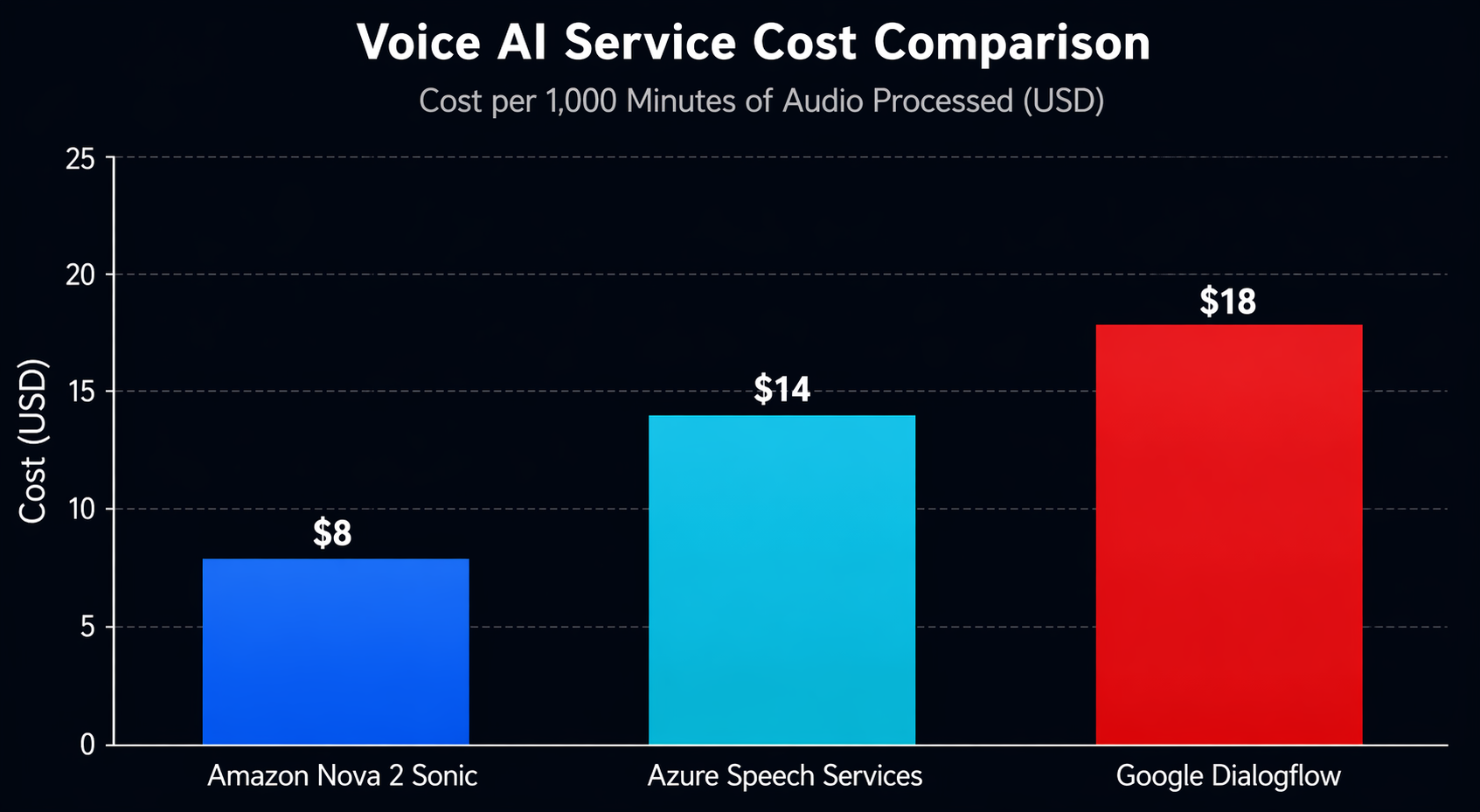
Voice AI doesn’t work the same way as text when it comes to pricing. Instead of tokens, you’re paying for audio processing measured in seconds. Here’s what that actually looks like in practice.
Cost Breakdown
| Component | Pricing (US East) | Cost per 1,000 Conversations (avg 3 min each) |
|---|---|---|
| Nova 2 Sonic | $0.008/minute (input + output) | $72.00 |
| Bedrock AgentCore Runtime | $0.015/session + $0.002/turn | $33.00 |
| AgentCore Gateway (tool calls) | $0.50/million requests | ~$1.50 |
| Lambda (tool execution) | $0.0000166667/ms (128MB) | ~$3.00 |
| DynamoDB (order storage) | On-demand pricing | ~$1.25 |
| CloudWatch Logs | $0.50/GB ingested | ~$2.00 |
| Total | ~$112.75 |
So you’re looking at roughly $0.11 per conversation or $0.038 per minute of voice interaction. Put that next to a human agent earning $15-25 per hour and the math speaks for itself – for routine interactions, voice AI cuts costs by over 95%.
Cost Comparison with Alternatives
| Service | Cost per Minute (Voice AI) | Notes |
|---|---|---|
| Nova 2 Sonic + AgentCore | $0.038 | End-to-end on AWS, includes agent runtime |
| Azure AI Speech + OpenAI | $0.055-0.080 | Separate STT, GPT-4o, TTS components |
| Google Dialogflow CX + Gemini | $0.045-0.065 | Per-session pricing, audio addon |
| Twilio Voice AI | $0.07-0.12 | Includes telephony, uses third-party models |
| LiveKit + OpenAI Realtime | $0.06-0.10 | Open-source infrastructure, API costs separate |
AWS holds up well on cost, and the gap widens if your infrastructure is already sitting on AWS. You don’t pay egress fees between Bedrock and your Lambda functions. And if you’re already running DynamoDB for other things, session storage doesn’t add a separate line item to your bill.
Cost Optimization Tips
- Use Nova Micro for non-voice interactions. If your agent supports both text and voice channels, route text users to Nova Micro (which is much cheaper) and voice users to Nova 2 Sonic. AgentCore handles both through the same agent definition.
- Set session TTLs aggressively. A five-minute session TTL means idle conversations expire quickly. If a user puts the phone down without hanging up, you stop paying for session memory after five minutes instead of the default 30.
- Compress audio before sending. PCM audio is uncompressed and large. If your client can encode to Opus or MP3 before streaming, you reduce the data transfer and the model processes faster. This can cut costs by 20-30% on the input side.
- Monitor with CloudWatch alarms. Set a billing alarm on your Bedrock usage. Voice workloads can scale unexpectedly if your agent goes viral or gets deployed to a high-traffic phone line.
Production Considerations
Getting a voice agent working in a demo is one thing. Shipping it to production is where it gets interesting, because voice introduces failure modes that simply don’t exist in text-based systems. I’ve run into most of these the hard way, so here’s what to watch for and how I’ve learned to deal with them.
Error Handling
Voice connections drop. Microphones cut out. Users mumble. Your agent needs to handle all of these gracefully.
Implement a retry layer in your WebSocket proxy. If the Bedrock invocation fails (throttling, model error, timeout), retry once with exponential backoff. If the retry fails, play a pre-recorded fallback message: “I’m having trouble understanding. Let me connect you to a team member.”
import backoff

@backoff.on_exception(
    backoff.expo,
    Exception,
    max_tries=2,
    max_time=10,
)
def invoke_voice_agent(session_id, audio_data):
    """Invoke Nova 2 Sonic with automatic retry."""
    response = bedrock_runtime.invoke_agent(
        agentId=agent_id,
        agentAliasId=alias_id,
        sessionId=session_id,
        input={
            "contentType": "audio/wav",
            "body": audio_data,
        },
    )
    return response
Fallback to Text
Not every user wants to talk. Some are in a noisy environment. Some have speech impairments. Some just prefer typing. Your agent should support a text fallback channel through the same AgentCore agent.
# Text-based invocation (same agent, different modality)
response = bedrock_runtime.invoke_agent(
    agentId=agent_id,
    agentAliasId=alias_id,
    sessionId=session_id,
    input={
        "contentType": "text/plain",
        "body": "I want to order two margherita pizzas",
    },
)
AgentCore routes the text input to the same agent but processes it through a text-based model path instead of the Nova 2 Sonic audio path. The same tools, the same memory, the same session – different input modality. This is where the AgentCore abstraction pays off.
Background Noise Handling
Nova 2 Sonic includes built-in Voice Activity Detection (VAD). The model distinguishes speech from background noise and only processes actual speech. However, in extremely noisy environments (restaurants, construction sites), the VAD may struggle.
When that happens, you’ll want to clean up the audio before it ever reaches the model. I’ve found that running it through a noise reduction step first makes a real difference. Amazon Transcribe’s real-time streaming API has a built-in noise reduction filter you can use as a preprocessing pass:
# Use Transcribe as a noise gate / VAD preprocessor
transcribe = boto3.client("transcribe")

# If Transcribe confidence is below threshold, ask user to repeat
# rather than passing garbled audio to Nova 2 Sonic
If noise persists, your agent’s instruction (from earlier) tells it to offer switching to SMS. This is a production-grade degradation path.
Recording and Compliance
If you record voice conversations (required in some jurisdictions for quality assurance), store recordings in S3 with server-side encryption. Use S3 Lifecycle policies to delete recordings after your retention period. Tag recordings with the session ID so you can correlate them with CloudWatch logs.
s3 = boto3.client("s3")
s3.put_object(
    Bucket="voice-recordings-bucket",
    Key=f"recordings/{session_id}/{timestamp}.wav",
    Body=audio_recording,
    ServerSideEncryption="aws:kms",
    SSEKMSKeyId="arn:aws:kms:us-east-1:123456789012:key/your-key-id",
    Metadata={
        "session-id": session_id,
        "agent-id": agent_id,
        "retention-days": "90",
    },
)
Multi-Language Support
Nova 2 Sonic supports multiple languages natively. You do not need a separate translation layer. Set the language preference in the agent configuration or detect it automatically from the first utterance:
# Configure agent for multi-language support
bedrock_agent.update_agent(
    agentId=agent_id,
    instruction="""You are a voice ordering assistant. Respond in the same language
the customer speaks. Support English, Spanish, and Portuguese. If the customer
switches languages mid-conversation, switch with them.""",
)
The model handles code-switching (mixing languages in one conversation) better than cascaded pipelines because it processes speech directly without losing context in a transcription step.
Security and Compliance
Voice data is sensitive. It contains biometric information (voice prints), potentially PII (names, addresses spoken aloud), and in regulated industries, it may contain health or financial information. Your architecture needs to treat audio data with the same rigor as any other sensitive data type.
Data Encryption
All audio sent to Nova 2 Sonic is encrypted in transit using TLS 1.3. At rest, Bedrock does not store your audio or responses. However, your application layer might store recordings or transcripts, and those need encryption.
- In transit: TLS 1.3 between your client and Bedrock, enforced by the SDK
- At rest: KMS-encrypted S3 for recordings, KMS-encrypted DynamoDB for session data
- In processing: Bedrock runs in your VPC if you use VPC endpoints; audio never traverses the public internet
# Use a VPC endpoint for Bedrock to keep traffic private
bedrock_runtime = boto3.client(
    "bedrock-agent-runtime",
    region_name="us-east-1",
    endpoint_url="https://vpce-xxxxx.bedrock-agent-runtime.us-east-1.vpce.amazonaws.com",
)
PII Handling in Audio
When a customer speaks their name, address, or credit card number, that PII exists in the audio stream, the model’s processing buffer, and potentially in your logs. AgentCore Guardrails can detect and redact PII in the model’s text-based reasoning, but audio PII requires additional handling.
- Never log raw audio in CloudWatch. Log only metadata (session ID, duration, tool calls).
- Use Guardrails to block PII in spoken responses. If the model’s reasoning contains a customer email, the guardrail prevents it from being spoken.
- Tokenize payment data at the telephony layer. DTMF (keypad) input should be captured and tokenized before reaching the voice agent.
# Create a guardrail for PII redaction
bedrock_client = boto3.client("bedrock", region_name="us-east-1")

guardrail = bedrock_client.create_guardrail(
    name="voice-agent-pii-guardrail",
    description="Redact PII from voice agent responses",
    sensitiveInformationPolicyConfig={
        "piiEntitiesConfig": [
            {"type": "EMAIL", "action": "BLOCK"},
            {"type": "PHONE", "action": "BLOCK"},
            {"type": "CREDIT_DEBIT_CARD_NUMBER", "action": "BLOCK"},
            {"type": "SSN", "action": "BLOCK"},
            {"type": "ADDRESS", "action": "ANONYMIZE"},
            {"type": "NAME", "action": "ANONYMIZE"},
        ]
    },
)

guardrail_id = guardrail["guardrailId"]
HIPAA Considerations
For healthcare voice agents (appointment scheduling, prescription refills, symptom triage), you need a BAA (Business Associate Agreement) with AWS for the services handling PHI. Bedrock and AgentCore are both eligible for BAA coverage. Store voice recordings containing health information in a HIPAA-compliant S3 bucket with strict access controls.
The key requirement is that no Protected Health Information (PHI) appears in logs. Configure CloudWatch Logs to exclude session content and log only operational metadata. Use the guardrail to prevent the agent from speaking back health data it should not repeat.
Recording and Audit Requirements
Financial services and healthcare require conversation recording and audit trails. Build this into your architecture from day one:
- Record every session with timestamps and store in encrypted S3
- Log every tool invocation with input/output metadata (not full content)
- Maintain an immutable audit trail in DynamoDB or QLDB
- Implement retention policies that automatically delete data after the required period
If you are already building text-based agents and want to understand how Bedrock Agents vs Nova Pro compares for your workload, the same security patterns apply to voice agents with the added consideration of audio data handling.
When to Use Nova 2 Sonic vs Alternatives
Nova 2 Sonic is not the only option for building voice AI agents. Azure, Google, and open-source alternatives all offer speech-to-speech capabilities. Here is how to decide.
Comparison Table
| Feature | Nova 2 Sonic + AgentCore | Azure OpenAI Voice | Google Gemini Live API |
|---|---|---|---|
| Speech-to-Speech | Yes, native | Yes, via GPT-4o realtime | Yes, native |
| Tool / Function Calling | AgentCore Gateway (MCP) | Azure Functions | Google Function Calling |
| Session Memory | Built-in (AgentCore) | Custom implementation | Custom or Vertex AI Agent |
| Latency (TTFB) | 180-250ms | 200-300ms | 150-250ms |
| Languages | 6 GA, more in preview | 20+ | 15+ |
| Telephony Integration | Amazon Connect native | Azure Communication Services | Not native |
| Cost (per minute) | $0.038 | $0.055-0.080 | $0.045-0.065 |
| Multi-Agent Support | AgentCore multi-agent | Not native | Vertex AI Agent Builder |
| On-Premises / Hybrid | Outposts (limited) | Azure Stack | Anthos |
| Compliance (HIPAA/FedRAMP) | Yes, with BAA | Yes | Yes |
| Fine-Tuning | Available (see below) | Custom voice training | Not available |
Decision Criteria
Choose Nova 2 Sonic if:
- Your infrastructure is already on AWS
- You need telephony integration via Amazon Connect
- You want managed agent runtime with memory, tools, and guardrails
- You are building multi-agent systems that need coordination
- Cost optimization matters and you want per-minute pricing
Choose Azure OpenAI Voice if:
- You are already in the Azure ecosystem
- You need the broadest language support
- Your enterprise has an existing Azure AI Services contract
- You want GPT-4o’s reasoning depth in a voice agent
Choose Google Gemini Live API if:
- You need the absolute lowest latency
- You are building consumer-facing apps on Google Cloud
- You want tight integration with Android/Google Assistant
- Your use case benefits from Google’s search-grounded responses
Consider a hybrid approach if:
- You have global users and need multi-region redundancy – deploy Nova 2 Sonic in AWS regions and Gemini Live in Google Cloud regions, route based on user geography
- You want to A/B test different voice models – use AgentCore Gateway to route to different model backends behind the same agent interface
If you want to customize the model for your specific domain vocabulary, fine-tuning Nova models is available through the Bedrock console. Fine-tuning Nova 2 Sonic on your domain-specific audio (medical terminology, legal jargon, product names) can significantly improve recognition accuracy and response relevance.
Conclusion
Voice AI agents are crossing the threshold from experimental to production-ready. The technology has reached the point where latency, cost, and accuracy are good enough for real customer-facing deployments. Restaurants taking phone orders, banks handling balance inquiries, hospitals scheduling appointments – these are not hypothetical use cases anymore. They are live in production today.
Amazon Nova 2 Sonic gives AWS developers a native speech-to-speech model that integrates with the same Bedrock AgentCore infrastructure they already use for text agents. The same tools, the same memory, the same guardrails – just a different input and output modality. If you have already built a text-based agent, extending it to voice is an architecture change, not a rewrite.
The practical path forward is clear. Start with a focused use case – a single voice workflow like ordering, scheduling, or FAQ – and deploy it on AgentCore with Nova 2 Sonic. Measure latency, cost, and user satisfaction. Iterate from there. If you are also exploring AI-assisted development workflows for building these agents, the Kiro IDE can accelerate your implementation cycle.
For teams that need to ground their voice agents in enterprise data, Hybrid RAG on AWS provides the retrieval layer that makes voice agents actually knowledgeable instead of just conversational.
Voice is the next interface. The models are ready. The infrastructure is managed. The question is what you build with it.
Explore more like this

Cloud IoT Security: Zero Trust, Identity, and Signed Updates
On September 11, 2026, the Cyber Resilience Act’s incident-reporting rules start applying in the European Union. That is 22 days after this article’s publication date. A manufacturer that learns of...

Bedrock Web Search: Grounding an Agent Without Building a Scraper
On August 4, 2026, AWS made Web Search on Amazon Bedrock generally available, and the entire integration surface is one JSON object: {"type": "web_search"}. That is the whole change from...

ECR Now Allows 200 GB Image Layers. Your Model Weights Still Do Not Belong There
On August 3, 2026, AWS raised the maximum Amazon ECR image layer size to 200 GB for images pushed with docker push. The announcement names the driver in the second...

Comments