
Python for DevOps: Automating AWS with Boto3 - Practical Guide 2026

I spent my first year as a DevOps engineer doing the same thing every Friday: logging into the AWS console, finding EC2 instances that needed backups, creating snapshots manually, tagging them, and then going back to delete old ones. It took about 45 minutes if nothing went wrong. Usually something went wrong.
One Friday I forgot to snapshot a database volume before a weekend maintenance window. Monday morning the database corrupted and I had no recent backup. That was the week I learned Boto3 properly, not just copy-pasting snippets from Stack Overflow, but actually understanding how to write automation scripts that handle errors, log what they do, and run reliably on a schedule.
This post is the guide I wish I had back then. Five real scripts that solve actual problems: EC2 snapshot management, S3 lifecycle rules, cost reporting, Lambda deployments, and security group auditing. Each one is ready to run, with proper error handling and logging.
What is Boto3 and Why It Matters for DevOps
Boto3 is the official AWS SDK for Python. It gives you a Pythonic interface to every AWS service API. If you can do it in the AWS console, you can do it with Boto3. The difference is that Boto3 lets you do it repeatedly, consistently, and without clicking through twelve screens.
The SDK provides two main interfaces:
- Client: Low-level, 1:1 mapping to AWS service APIs. Every operation returns a raw dictionary response. Use this when you need full control over API parameters.
- Resource: Higher-level, object-oriented abstraction.
ec2.instances.filter()instead ofec2.describe_instances(). Easier to read, but not every service has a resource interface.
For most DevOps automation, you’ll use a mix of both. Resources for common operations, clients for anything the resource interface doesn’t cover.
Boto3 Service Coverage
Boto3 covers every AWS service that has a public API. Here are the services DevOps teams interact with most:
| AWS Service | Boto3 Client Name | Common DevOps Use Cases |
|---|---|---|
| EC2 | ec2 |
Instance management, snapshots, security groups, AMI creation |
| S3 | s3 |
Bucket lifecycle, object management, static hosting |
| Lambda | lambda |
Function deployment, layer management, concurrency settings |
| IAM | iam |
Role creation, policy management, access key rotation |
| CloudWatch | cloudwatch |
Alarm creation, metric dashboards, log group management |
| CloudFormation | cloudformation |
Stack management, drift detection, template validation |
| Cost Explorer | ce |
Cost reporting, budget alerts, reservation coverage |
| SSM | ssm |
Parameter Store, Run Command, Session Manager |
| ECS | ecs |
Service management, task definitions, scaling policies |
| EKS | eks |
Cluster management, node group operations |
| RDS | rds |
Snapshot management, instance scaling, read replica setup |
| Secrets Manager | secretsmanager |
Secret rotation, retrieval, cross-account sharing |
| CloudTrail | cloudtrail |
API audit logging, event queries |
| SQS | sqs |
Queue management, dead-letter configuration |
| SNS | sns |
Topic management, subscription handling, alert routing |
The full list is much longer. Boto3 currently supports over 300 service clients. If AWS added a service last week, Boto3 typically gets support within days through botocore updates.
Setting Up Boto3
Before writing any automation, get the basics right:
pip install boto3
Authentication should never go in your code. Use one of these approaches:
# Option 1: AWS CLI profile (recommended for local development)
aws configure --profile devops-automation

# Option 2: Environment variables (works well in CI/CD)
export AWS_ACCESS_KEY_ID=AKIA...
export AWS_SECRET_ACCESS_KEY=wJalrXU...
export AWS_DEFAULT_REGION=us-east-1

# Option 3: IAM role (best for EC2, Lambda, ECS)
# Boto3 picks up instance/task roles automatically
In your Python code, reference a specific profile or let Boto3 use the default credential chain:
import boto3

# Use default credentials (env vars, profile, or IAM role)
session = boto3.Session()

# Use a named profile
session = boto3.Session(profile_name='devops-automation', region_name='us-east-1')

# Then create service clients from the session
ec2 = session.client('ec2')
s3 = session.client('s3')
For IAM best practices, including least-privilege policy design and cross-account role setup, check the AWS IAM roles and policies guide.
Python DevOps Tools: Where Boto3 Fits
Boto3 isn’t the only way to interact with AWS. Here’s how it compares to the alternatives:
| Feature | Boto3 (Python) | AWS CLI | Terraform |
|---|---|---|---|
| Language | Python | Bash/shell | HCL |
| Approach | Imperative (scripts) | Imperative (commands) | Declarative (state) |
| State Management | You handle it | None | Built-in state file |
| Error Handling | Python try/except | Exit codes | Plan + apply workflow |
| Complexity | Low-to-medium | Low | Medium-to-high |
| Best For | Runbooks, one-off tasks, reporting | Quick operations, shell scripts | Infrastructure provisioning |
| CI/CD Integration | Native Python | Shell steps in pipelines | Dedicated pipeline stages |
| Dry Run | Manual implementation | --dry-run flag |
terraform plan |
| Idempotency | You write it | Not guaranteed | Built-in |
| Learning Curve | Python + AWS APIs | AWS APIs only | HCL + AWS provider |
| Multi-service Orchestration | Excellent (full Python) | Limited (shell chaining) | Good (resource dependencies) |
The right answer is usually “all three.” Terraform for infrastructure provisioning, AWS CLI for quick one-liners, and Boto3 for automation scripts that need logic, error handling, and multi-step workflows. That’s the pattern I see in teams that run AWS smoothly.
Python Automation Architecture on AWS
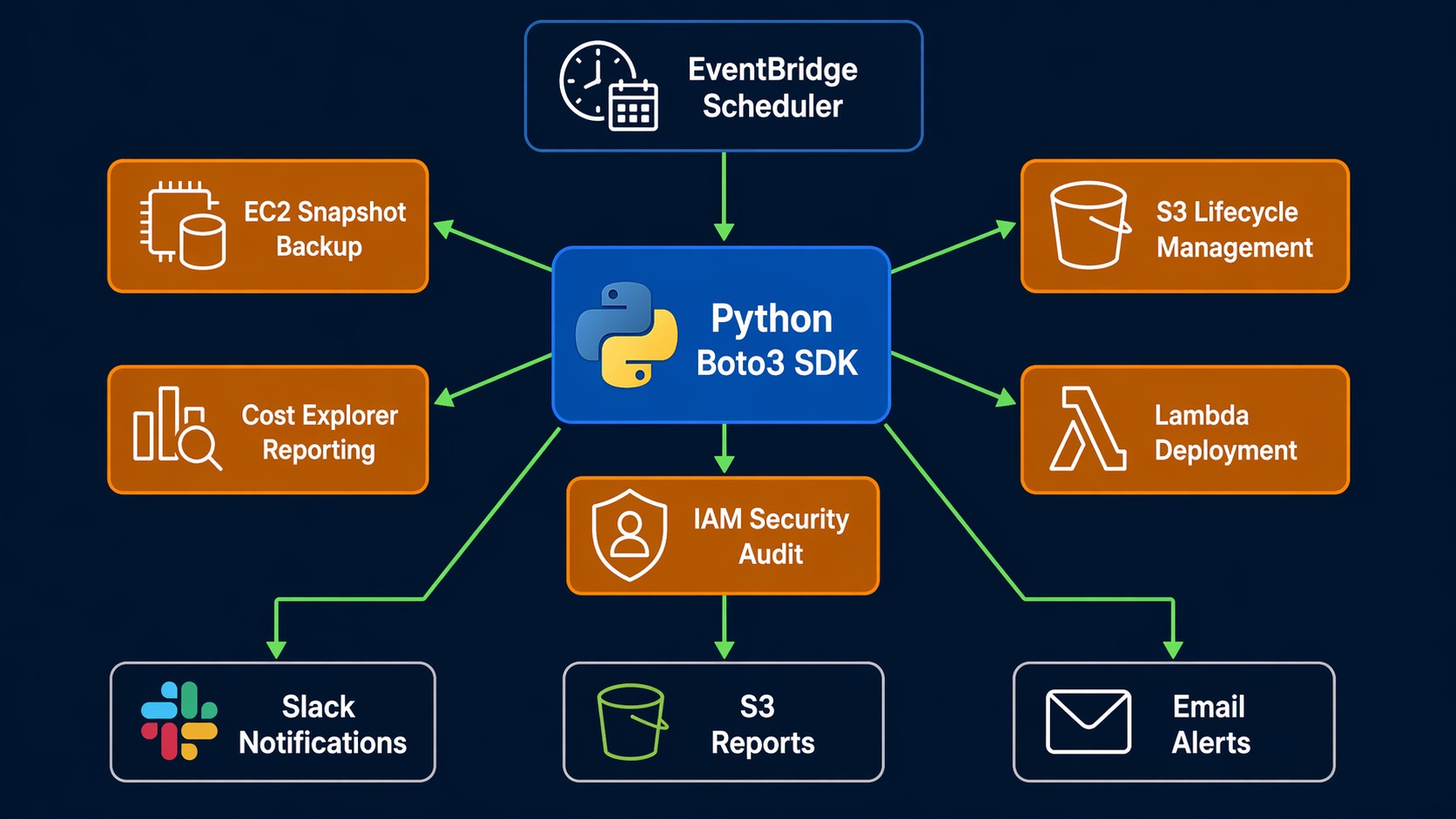
Here’s how a typical Boto3 automation setup looks in production:
+-------------------+
|  Trigger Source   |    CloudWatch Event (schedule)
|                   |    EventBridge (pattern match)
|  +-------------+  |    GitLab CI / GitHub Actions (pipeline)
|  |  Scheduler  |  |    Manual invocation (ad-hoc)
|  +-------------+  |
+--------+----------+
         |
         v
+--------+----------+     +---------------------+
|  Python Script    |     |  AWS Services        |
|  (Boto3 SDK)      +---->|                      |
|                   +---->|  EC2   S3   Lambda   |
|  - Auth via IAM   |    |  IAM   RDS  CloudWatch|
|  - Logging        |    |  CE    SSM  SQS      |
|  - Error handling |    |                      |
+--------+----------+     +----------+----------+
         |                           |
         v                           v
+--------+----------+     +----------+----------+
|  Notification      |     |  Storage            |
|                    |     |                     |
|  SNS  Slack Email |     |  S3 (reports/logs)  |
|  PagerDuty        |     |  CloudWatch Logs    |
+--------------------+     +---------------------+
The key design principle: your scripts should be stateless. Each run should be able to figure out the current state of the world and act accordingly. If your script relies on local state files, you’re building a fragile version of Terraform.
Script 1: EC2 Snapshot Backup Automation
This is the script that replaced my Friday routine. It finds all EC2 instances with a Backup tag set to true, creates snapshots of every attached EBS volume, tags them with a retention period, and cleans up snapshots older than the retention window.
#!/usr/bin/env python3
"""
EC2 Snapshot Backup Automation
Creates snapshots for tagged instances and removes expired ones.
Run daily via EventBridge or cron.
"""

import boto3
from datetime import datetime, timedelta, timezone
from botocore.exceptions import ClientError
import logging

logging.basicConfig(level=logging.INFO, format='%(asctime)s - %(levelname)s - %(message)s')
logger = logging.getLogger(__name__)

ec2 = boto3.client('ec2')
RETENTION_DAYS = 30
BACKUP_TAG = {'Key': 'Backup', 'Value': 'true'}


def create_snapshots():
    """Create snapshots for all volumes attached to tagged instances."""
    # Find instances tagged for backup
    response = ec2.describe_instances(
        Filters=[
            {'Name': 'tag:Backup', 'Values': ['true']},
            {'Name': 'instance-state-name', 'Values': ['running', 'stopped']}
        ]
    )

    snapshots_created = 0

    for reservation in response['Reservations']:
        for instance in reservation['Instances']:
            instance_id = instance['InstanceId']
            instance_name = get_instance_name(instance)

            for block_device in instance.get('BlockDeviceMappings', []):
                if 'Ebs' not in block_device:
                    continue

                volume_id = block_device['Ebs']['VolumeId']
                device_name = block_device['DeviceName']
                timestamp = datetime.now(timezone.utc).strftime('%Y-%m-%d-%H%M')

                description = f"Automated backup of {volume_id} from {instance_id}"
                snapshot_tags = [
                    {'Key': 'Name', 'Value': f'{instance_name}-{device_name}-{timestamp}'},
                    {'Key': 'CreatedBy', 'Value': 'backup-automation'},
                    {'Key': 'InstanceId', 'Value': instance_id},
                    {'Key': 'DeviceName', 'Value': device_name},
                    {'Key': 'DeleteAfter', 'Value': get_delete_date(RETENTION_DAYS)},
                ]

                try:
                    snapshot = ec2.create_snapshot(
                        VolumeId=volume_id,
                        Description=description,
                        TagSpecifications=[
                            {
                                'ResourceType': 'snapshot',
                                'Tags': snapshot_tags
                            }
                        ]
                    )
                    logger.info(
                        f"Created snapshot {snapshot['SnapshotId']} "
                        f"for volume {volume_id} (instance {instance_id})"
                    )
                    snapshots_created += 1
                except ClientError as e:
                    logger.error(f"Failed to create snapshot for {volume_id}: {e}")

    logger.info(f"Total snapshots created: {snapshots_created}")
    return snapshots_created


def cleanup_expired_snapshots():
    """Delete snapshots past their DeleteAfter date."""
    response = ec2.describe_snapshots(
        Filters=[{'Name': 'tag:CreatedBy', 'Values': ['backup-automation']}],
        OwnerIds=['self']
    )

    deleted = 0
    now = datetime.now(timezone.utc).strftime('%Y-%m-%d')

    for snapshot in response['Snapshots']:
        delete_after = get_tag_value(snapshot['Tags'], 'DeleteAfter')
        if delete_after and now >= delete_after:
            snapshot_id = snapshot['SnapshotId']
            try:
                ec2.delete_snapshot(SnapshotId=snapshot_id)
                logger.info(f"Deleted expired snapshot {snapshot_id}")
                deleted += 1
            except ClientError as e:
                logger.error(f"Failed to delete snapshot {snapshot_id}: {e}")

    logger.info(f"Total snapshots deleted: {deleted}")
    return deleted


def get_instance_name(instance):
    """Extract instance Name tag or fall back to instance ID."""
    tags = instance.get('Tags', [])
    name = get_tag_value(tags, 'Name')
    return name if name else instance['InstanceId']


def get_tag_value(tags, key):
    """Get the value of a specific tag from a tag list."""
    if not tags:
        return None
    for tag in tags:
        if tag['Key'] == key:
            return tag['Value']
    return None


def get_delete_date(days):
    """Calculate the date string when a snapshot should be deleted."""
    delete_date = datetime.now(timezone.utc) + timedelta(days=days)
    return delete_date.strftime('%Y-%m-%d')


if __name__ == '__main__':
    logger.info("=== Starting EC2 Snapshot Backup ===")
    create_snapshots()
    cleanup_expired_snapshots()
    logger.info("=== Backup Complete ===")
Schedule this with EventBridge to run daily. The DeleteAfter tag drives cleanup, so you don’t need to track snapshot ages in a database.
Script 2: S3 Bucket Lifecycle Management
S3 storage classes can save significant money when data access patterns change over time. This script applies lifecycle rules to move objects through storage tiers: Standard to Intelligent-Tiering after 60 days, to Glacier after 180 days, and delete after 365 days.
For more S3 features and storage options, see the S3 performance optimization guide.
#!/usr/bin/env python3
"""
S3 Bucket Lifecycle Management
Applies tiered storage lifecycle rules to specified buckets.
Adjust the days and storage classes for your needs.
"""

import boto3
from botocore.exceptions import ClientError
import logging

logging.basicConfig(level=logging.INFO, format='%(asctime)s - %(levelname)s - %(message)s')
logger = logging.getLogger(__name__)

s3 = boto3.client('s3')

# Buckets to configure (add your own)
TARGET_BUCKETS = [
    'my-app-logs',
    'my-data-lake-raw',
    'my-backup-bucket',
]

LIFECYCLE_RULES = [
    {
        'ID': 'TransitionToIntelligentTiering',
        'Status': 'Enabled',
        'Filter': {'Prefix': ''},
        'Transitions': [
            {
                'Days': 60,
                'StorageClass': 'INTELLIGENT_TIERING'
            }
        ]
    },
    {
        'ID': 'TransitionToGlacier',
        'Status': 'Enabled',
        'Filter': {'Prefix': ''},
        'Transitions': [
            {
                'Days': 180,
                'StorageClass': 'GLACIER'
            }
        ]
    },
    {
        'ID': 'ExpireOldObjects',
        'Status': 'Enabled',
        'Filter': {'Prefix': ''},
        'Expiration': {
            'Days': 365
        }
    }
]


def apply_lifecycle(bucket_name, rules):
    """Apply lifecycle configuration to a bucket."""
    lifecycle_config = {
        'Rules': rules
    }

    try:
        s3.put_bucket_lifecycle_configuration(
            Bucket=bucket_name,
            LifecycleConfiguration=lifecycle_config
        )
        logger.info(f"Applied lifecycle rules to {bucket_name}")
        return True
    except ClientError as e:
        logger.error(f"Failed to apply lifecycle to {bucket_name}: {e}")
        return False


def get_lifecycle(bucket_name):
    """Retrieve and display current lifecycle configuration."""
    try:
        response = s3.get_bucket_lifecycle_configuration(Bucket=bucket_name)
        rules = response.get('Rules', [])
        logger.info(f"Bucket {bucket_name} has {len(rules)} lifecycle rules:")
        for rule in rules:
            logger.info(f"  - {rule['ID']}: {rule['Status']}")
        return rules
    except ClientError as e:
        if e.response['Error']['Code'] == 'NoSuchLifecycleConfiguration':
            logger.info(f"Bucket {bucket_name} has no lifecycle configuration")
            return []
        logger.error(f"Error reading lifecycle for {bucket_name}: {e}")
        return []


def apply_to_all_buckets():
    """Apply lifecycle rules to all target buckets."""
    success = 0
    for bucket in TARGET_BUCKETS:
        if apply_lifecycle(bucket, LIFECYCLE_RULES):
            success += 1
    logger.info(f"Applied lifecycle to {success}/{len(TARGET_BUCKETS)} buckets")


if __name__ == '__main__':
    logger.info("=== S3 Lifecycle Management ===")
    apply_to_all_buckets()

    # Verify what was applied
    for bucket in TARGET_BUCKETS:
        get_lifecycle(bucket)

    logger.info("=== Done ===")
The lifecycle rules here are a starting point. Logs might need aggressive expiration (30 days), while compliance data might need Glacier with a 7-year lock. Adjust the LIFECYCLE_RULES list per bucket instead of using the same rules everywhere.
Script 3: AWS Cost Reporting
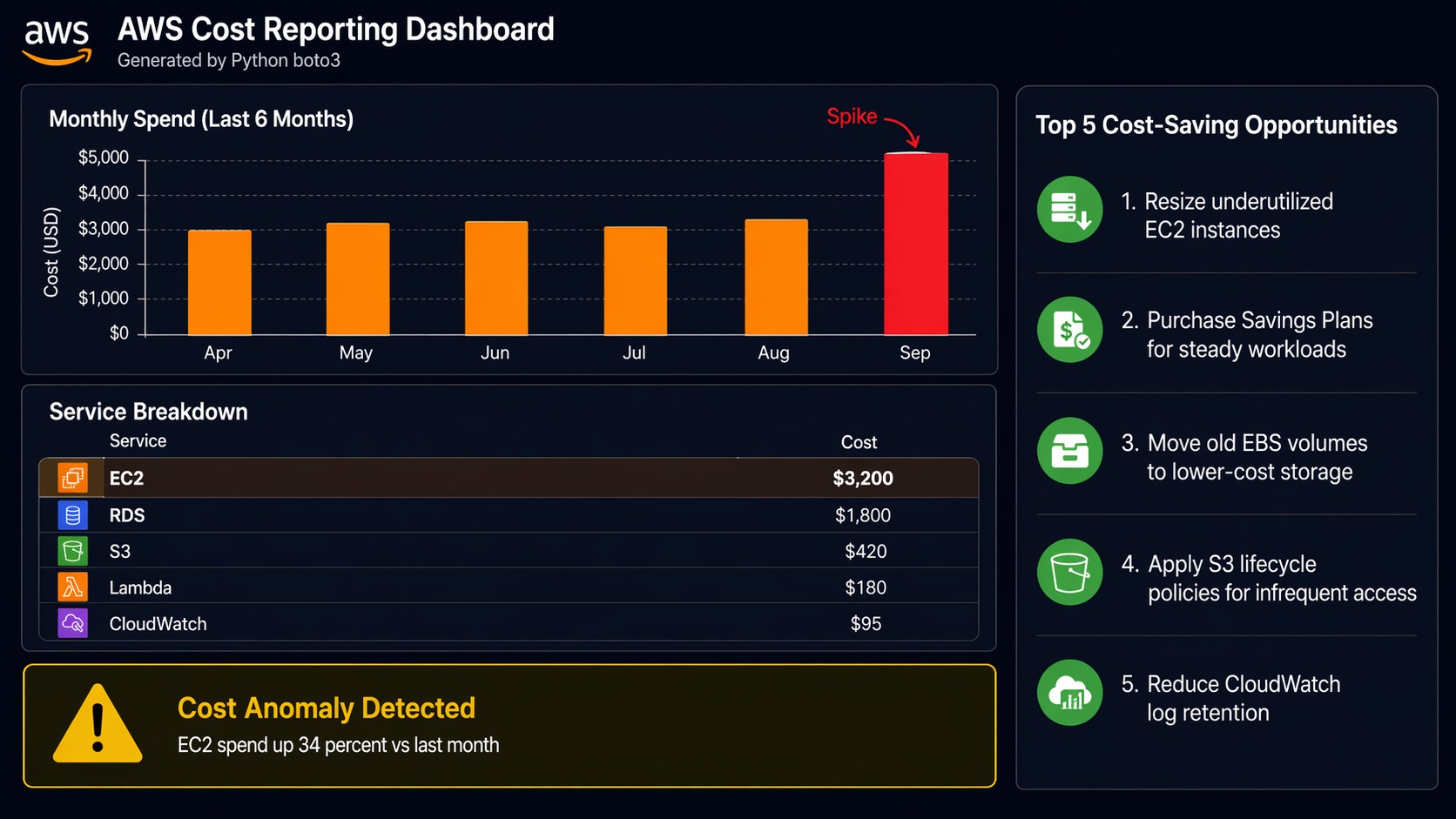
This one pays for itself. The Cost Explorer API (ce client in Boto3) lets you pull cost data programmatically. This script generates a weekly cost report broken down by service, with month-over-month comparison, and sends it via SNS.
For a broader view of cloud financial management, the AWS FinOps and Well-Architected framework guide covers cost optimization as a structured practice.
#!/usr/bin/env python3
"""
AWS Cost Report
Generates weekly cost breakdown by service with month-over-month delta.
Posts a summary to SNS for email/Slack delivery.
"""

import boto3
from datetime import datetime, timedelta, timezone
from botocore.exceptions import ClientError
import logging
import json

logging.basicConfig(level=logging.INFO, format='%(asctime)s - %(levelname)s - %(message)s')
logger = logging.getLogger(__name__)

ce = boto3.client('ce')
sns = boto3.client('sns')

SNS_TOPIC_ARN = 'arn:aws:sns:us-east-1:123456789012:cost-reports'
ACCOUNT_ID = boto3.client('sts').get_caller_identity()['Account']


def get_cost_data(start_date, end_date):
    """Query Cost Explorer for cost broken down by service."""
    try:
        response = ce.get_cost_and_usage(
            TimePeriod={
                'Start': start_date,
                'End': end_date
            },
            Granularity='DAILY',
            Metrics=['UnblendedCost'],
            GroupBy=[
                {'Type': 'DIMENSION', 'Key': 'SERVICE'}
            ]
        )
        return response
    except ClientError as e:
        logger.error(f"Cost Explorer query failed: {e}")
        return None


def build_report():
    """Build a cost report for the last 7 days and compare with the prior 7 days."""
    today = datetime.now(timezone.utc).date()
    week_ago = today - timedelta(days=7)
    two_weeks_ago = today - timedelta(days=14)

    # Current week costs
    current = get_cost_data(str(week_ago), str(today))
    # Previous week costs
    previous = get_cost_data(str(two_weeks_ago), str(week_ago))

    if not current or not previous:
        logger.error("Could not retrieve cost data")
        return None

    # Aggregate by service
    current_costs = aggregate_by_service(current)
    previous_costs = aggregate_by_service(previous)

    # Build report
    report_lines = [
        f"=== AWS Cost Report: {week_ago} to {today} ===",
        f"Account: {ACCOUNT_ID}",
        "",
        "Service                          This Week    Last Week     Change",
        "-" * 70
    ]

    all_services = sorted(set(list(current_costs.keys()) + list(previous_costs.keys())))
    total_current = 0.0
    total_previous = 0.0

    for service in all_services:
        curr = current_costs.get(service, 0.0)
        prev = previous_costs.get(service, 0.0)
        total_current += curr
        total_previous += prev

        delta = curr - prev
        arrow = "+" if delta > 0 else ""

        # Truncate service name for alignment
        name = service[:30].ljust(31)
        report_lines.append(
            f"{name}${curr:>9.2f}   ${prev:>9.2f}   {arrow}${delta:>8.2f}"
        )

    report_lines.append("-" * 70)
    total_delta = total_current - total_previous
    arrow = "+" if total_delta > 0 else ""
    report_lines.append(
        f"{'TOTAL'.ljust(31)}${total_current:>9.2f}   ${total_previous:>9.2f}   "
        f"{arrow}${total_delta:>8.2f}"
    )
    report_lines.append("")
    report_lines.append(f"Month-to-date estimate: ${total_current * (30/7):.2f}")

    return "\n".join(report_lines)


def aggregate_by_service(cost_data):
    """Sum daily costs per service from Cost Explorer response."""
    totals = {}
    for result in cost_data.get('ResultsByTime', []):
        for group in result.get('Groups', []):
            service = group['Keys'][0]
            amount = float(group['Metrics']['UnblendedCost']['Amount'])
            totals[service] = totals.get(service, 0.0) + amount
    return totals


def send_report(report_text):
    """Publish the report to an SNS topic."""
    try:
        sns.publish(
            TopicArn=SNS_TOPIC_ARN,
            Subject=f'AWS Cost Report - Week of {datetime.now(timezone.utc).strftime("%b %d")}',
            Message=report_text
        )
        logger.info("Report sent to SNS")
    except ClientError as e:
        logger.error(f"Failed to send report: {e}")


if __name__ == '__main__':
    logger.info("=== Generating Cost Report ===")
    report = build_report()
    if report:
        print(report)
        send_report(report)
    logger.info("=== Report Complete ===")
Run this every Monday via EventBridge. The SNS topic can fan out to email, Slack (via webhook), or PagerDuty. I have seen teams catch a misconfigured resource that was burning $200/day because this report showed a sudden spike in the “last week” column.
Script 4: Lambda Function Deployment Helper
Deploying Lambda functions through the console is fine for testing. For production, you want a script that zips the code, uploads it, updates the function configuration, and verifies the deployment.
For more advanced Lambda patterns including layers and custom runtimes, check the AWS Lambda layers and custom runtimes guide.
#!/usr/bin/env python3
"""
Lambda Deployment Helper
Packages, uploads, and deploys a Lambda function with configuration.
Supports updating environment variables, memory, timeout, and concurrency.
"""

import boto3
from botocore.exceptions import ClientError
import zipfile
import os
import io
import logging
import hashlib

logging.basicConfig(level=logging.INFO, format='%(asctime)s - %(levelname)s - %(message)s')
logger = logging.getLogger(__name__)

lambda_client = boto3.client('lambda')
iam = boto3.client('iam')


def package_function(source_dir, output_zip=None):
    """Zip a directory into an in-memory bytes buffer for Lambda deployment."""
    buf = io.BytesIO()
    with zipfile.ZipFile(buf, 'w', zipfile.ZIP_DEFLATED) as zf:
        for root, dirs, files in os.walk(source_dir):
            for filename in files:
                file_path = os.path.join(root, filename)
                arcname = os.path.relpath(file_path, source_dir)
                zf.write(file_path, arcname)

    buf.seek(0)
    return buf


def deploy_function(
    function_name,
    source_dir,
    runtime='python3.12',
    handler='lambda_function.lambda_handler',
    role_arn=None,
    memory_size=256,
    timeout=30,
    environment_vars=None,
    description='Deployed by automation'
):
    """Deploy or update a Lambda function."""

    # Package the code
    logger.info(f"Packaging function from {source_dir}...")
    zip_buffer = package_function(source_dir)
    zip_bytes = zip_buffer.read()

    # Check if function already exists
    existing = get_function_config(function_name)

    if existing:
        # Update existing function
        logger.info(f"Updating existing function: {function_name}")
        return update_function(
            function_name, zip_bytes, memory_size, timeout,
            environment_vars, description
        )
    else:
        # Create new function
        if not role_arn:
            logger.error("role_arn is required for creating a new function")
            return None
        logger.info(f"Creating new function: {function_name}")
        return create_function(
            function_name, zip_bytes, runtime, handler,
            role_arn, memory_size, timeout, environment_vars, description
        )


def get_function_config(function_name):
    """Check if a Lambda function exists."""
    try:
        config = lambda_client.get_function_configuration(
            FunctionName=function_name
        )
        return config
    except ClientError as e:
        if e.response['Error']['Code'] == 'ResourceNotFoundException':
            return None
        raise


def create_function(name, zip_bytes, runtime, handler, role_arn,
                    memory, timeout, env_vars, description):
    """Create a new Lambda function."""
    params = {
        'FunctionName': name,
        'Runtime': runtime,
        'Role': role_arn,
        'Handler': handler,
        'Code': {'ZipFile': zip_bytes},
        'Timeout': timeout,
        'MemorySize': memory,
        'Description': description,
    }
    if env_vars:
        params['Environment'] = {'Variables': env_vars}

    try:
        response = lambda_client.create_function(**params)
        logger.info(f"Created function {name}: {response['FunctionArn']}")
        wait_for_active(name)
        return response
    except ClientError as e:
        logger.error(f"Failed to create function: {e}")
        return None


def update_function(name, zip_bytes, memory, timeout, env_vars, description):
    """Update an existing Lambda function's code and configuration."""
    # Update code first
    try:
        lambda_client.update_function_code(
            FunctionName=name,
            ZipFile=zip_bytes
        )
        logger.info(f"Updated code for {name}")
    except ClientError as e:
        logger.error(f"Failed to update code: {e}")
        return None

    # Update configuration
    config_params = {
        'FunctionName': name,
        'Timeout': timeout,
        'MemorySize': memory,
        'Description': description,
    }
    if env_vars:
        config_params['Environment'] = {'Variables': env_vars}

    try:
        response = lambda_client.update_function_configuration(**config_params)
        logger.info(f"Updated configuration for {name}")
        return response
    except ClientError as e:
        logger.error(f"Failed to update config: {e}")
        return None


def wait_for_active(function_name):
    """Wait for a newly created function to reach Active state."""
    waiter = lambda_client.get_waiter('function_active')
    waiter.wait(FunctionName=function_name)
    logger.info(f"Function {function_name} is active")


if __name__ == '__main__':
    # Example: deploy a Lambda function
    deploy_function(
        function_name='my-api-handler',
        source_dir='./src/lambda/my-api-handler',
        runtime='python3.12',
        handler='lambda_function.lambda_handler',
        role_arn='arn:aws:iam::123456789012:role/lambda-execution-role',
        memory_size=512,
        timeout=60,
        environment_vars={
            'LOG_LEVEL': 'INFO',
            'TABLE_NAME': 'my-table',
        },
        description='API handler deployed via automation'
    )
The script handles both create and update paths, so it works for first-time deployments and ongoing updates. In a CI/CD pipeline, call this from your deploy stage and pass environment-specific variables.
Script 5: Security Group Audit
Security groups tend to drift. Someone opens port 22 to 0.0.0.0/0 for “quick testing,” and it stays open for eight months. This script scans all security groups in a region and flags overly permissive rules.
#!/usr/bin/env python3
"""
Security Group Audit
Scans security groups for overly permissive ingress rules.
Flags: open SSH (22), open RDP (3389), all ports to 0.0.0.0/0.
"""

import boto3
from botocore.exceptions import ClientError
import logging
import json

logging.basicConfig(level=logging.INFO, format='%(asctime)s - %(levelname)s - %(message)s')
logger = logging.getLogger(__name__)

ec2 = boto3.client('ec2')

# Rules that should be flagged
FLAGGED_PORTS = {
    22: 'SSH',
    3389: 'RDP',
    3306: 'MySQL',
    5432: 'PostgreSQL',
    27017: 'MongoDB',
}

OPEN_CIDRS = ['0.0.0.0/0', '::/0']


def audit_all_security_groups():
    """Scan all security groups and return findings."""
    findings = []

    try:
        paginator = ec2.get_paginator('describe_security_groups')
        for page in paginator.paginate():
            for sg in page['SecurityGroups']:
                sg_findings = audit_security_group(sg)
                findings.extend(sg_findings)
    except ClientError as e:
        logger.error(f"Failed to describe security groups: {e}")
        return []

    return findings


def audit_security_group(sg):
    """Check a single security group for risky rules."""
    findings = []
    group_id = sg['GroupId']
    group_name = sg.get('GroupName', 'N/A')
    vpc_id = sg.get('VpcId', 'EC2-Classic')

    for rule in sg.get('IpPermissions', []):
        protocol = rule.get('IpProtocol', 'all')
        from_port = rule.get('FromPort', 0)
        to_port = rule.get('ToPort', 0)

        # Check IPv4 ranges
        for ip_range in rule.get('IpRanges', []):
            cidr = ip_range['CidrIp']
            if cidr in OPEN_CIDRS:
                severity = classify_severity(protocol, from_port, to_port)
                findings.append({
                    'group_id': group_id,
                    'group_name': group_name,
                    'vpc_id': vpc_id,
                    'protocol': protocol,
                    'from_port': from_port,
                    'to_port': to_port,
                    'cidr': cidr,
                    'severity': severity,
                    'description': ip_range.get('Description', ''),
                })

        # Check IPv6 ranges
        for ipv6_range in rule.get('Ipv6Ranges', []):
            cidr = ipv6_range['CidrIpv6']
            if cidr in OPEN_CIDRS:
                severity = classify_severity(protocol, from_port, to_port)
                findings.append({
                    'group_id': group_id,
                    'group_name': group_name,
                    'vpc_id': vpc_id,
                    'protocol': protocol,
                    'from_port': from_port,
                    'to_port': to_port,
                    'cidr': cidr,
                    'severity': severity,
                    'description': ipv6_range.get('Description', ''),
                })

    return findings


def classify_severity(protocol, from_port, to_port):
    """Determine severity of an open rule."""
    # All traffic open to the world is critical
    if protocol == '-1':
        return 'CRITICAL'

    # Known dangerous ports open to the world
    if from_port in FLAGGED_PORTS or to_port in FLAGGED_PORTS:
        return 'HIGH'

    # Port range open
    if to_port - from_port > 100:
        return 'HIGH'

    # Anything else open to the world
    return 'MEDIUM'


def generate_report(findings):
    """Print a readable audit report."""
    if not findings:
        logger.info("No security group issues found. Nice work.")
        return

    # Sort by severity
    severity_order = {'CRITICAL': 0, 'HIGH': 1, 'MEDIUM': 2}
    findings.sort(key=lambda f: severity_order.get(f['severity'], 3))

    print("\n" + "=" * 80)
    print("SECURITY GROUP AUDIT REPORT")
    print(f"Total findings: {len(findings)}")
    print("=" * 80)

    # Summary
    counts = {}
    for f in findings:
        sev = f['severity']
        counts[sev] = counts.get(sev, 0) + 1

    for sev in ['CRITICAL', 'HIGH', 'MEDIUM']:
        print(f"  {sev}: {counts.get(sev, 0)}")

    print("-" * 80)

    for f in findings:
        port_info = f"port {f['from_port']}" if f['from_port'] == f['to_port'] else f"ports {f['from_port']}-{f['to_port']}"
        if f['protocol'] == '-1':
            port_info = "ALL TRAFFIC"

        print(
            f"[{f['severity']}] {f['group_id']} ({f['group_name']}) - "
            f"{port_info} open to {f['cidr']}"
        )
        if f['description']:
            print(f"         Description: {f['description']}")

    print("=" * 80)

    # Output JSON for programmatic use
    return json.dumps(findings, indent=2, default=str)


if __name__ == '__main__':
    logger.info("=== Starting Security Group Audit ===")
    findings = audit_all_security_groups()
    report = generate_report(findings)
    logger.info("=== Audit Complete ===")
Run this weekly. Feed the JSON output into a ticketing system or send it to a Slack channel. The severity classification helps prioritize: CRITICAL means all traffic is open, HIGH means a sensitive port like SSH or a database port is exposed, and MEDIUM covers other open ports.
Boto3 Best Practices Checklist
After running these scripts in production for years, here is what I consider essential:
| Practice | Why It Matters | How to Implement |
|---|---|---|
| Use IAM roles, not hardcoded keys | Keys leak. Roles are temporary and scoped. | EC2 instance profiles, Lambda execution roles, ECS task roles |
| Always handle ClientError | AWS APIs fail. Network blips, throttling, permission changes. | Wrap every Boto3 call in try/except ClientError |
| Use paginators for list operations | describe_instances can return thousands of results. Single calls get truncated. |
ec2.get_paginator('describe_instances') then iterate pages |
| Set retries and timeouts | Default retries cover some cases but not all. Slow APIs can hang scripts. | boto3.client('ec2', config=Config(retries={'max_attempts': 5}, read_timeout=60)) |
| Tag everything you create | Untagged resources are invisible in cost reports and hard to clean up. | Use TagSpecifications on create calls, create_tags after the fact |
| Log every action with resource IDs | When something goes wrong at 3am, you need to know exactly which snapshot, instance, or bucket. | logging.info(f"Created snapshot {snapshot_id}") after each operation |
| Use separate sessions for cross-account | When operating across AWS accounts, explicit sessions prevent accidental changes in the wrong account. | boto3.Session(profile_name='production') per account |
| Validate before destructive actions | Deleting the wrong snapshot or terminating the wrong instance is painful. | Check tags, confirm state, log what you’re about to do before doing it |
| Dry-run mode for new scripts | Test against production safely. | Add a --dry-run flag that logs actions without executing them |
| Pin boto3 version in requirements.txt | API changes between versions can break scripts silently. | boto3==1.37.0 in requirements.txt, update deliberately |
Running These Scripts on a Schedule
The simplest way to run these on a schedule is EventBridge (formerly CloudWatch Events). For the snapshot backup script:
# Create an EventBridge rule that runs daily at 2am UTC
aws events put-rule \
  --name daily-snapshot-backup \
  --schedule-expression "cron(0 2 * * ? *)"

# Target the Lambda function that runs your backup script
aws events put-targets \
  --rule daily-snapshot-backup \
  --targets '[{
    "Id": "1",
    "Arn": "arn:aws:lambda:us-east-1:123456789012:function:snapshot-backup",
    "InputTransformer": {
      "InputPathsMap": {},
      "InputTemplate": "{}"
    }
  }]'
Alternatively, run the scripts from a CI/CD pipeline. GitLab CI, GitHub Actions, or Jenkins can all run Python scripts on a schedule with the advantage of version control, audit logs, and the ability to add approval gates before destructive operations.
Sources and Further Reading
- Boto3 Documentation - Official SDK reference with service-by-service examples
- AWS SDK for Python (Boto3) GitHub Repository - Source code, issue tracker, and release notes
- AWS Cost Explorer API Reference - Detailed parameters for cost queries
- Python Logging Documentation - Production-grade logging configuration
- AWS Lambda Developer Guide - Python-specific Lambda development patterns
- EventBridge Scheduler Documentation - Scheduling automation runs
When to Choose Boto3 Over Other Tools
Boto3 shines in specific situations. If you need to orchestrate multiple AWS services in a single workflow (snapshot a volume, wait for completion, copy it to another region, send a notification), Boto3 handles the coordination that would require chaining multiple CLI commands or writing fragile shell scripts. If you need custom logic (only snapshot instances with specific tags, calculate retention based on instance type, send alerts only when costs exceed a threshold), Python gives you that flexibility.
For infrastructure provisioning, Terraform or CloudFormation is still the right choice. For quick one-off operations, the AWS CLI works fine. But for repeatable automation with real business logic, Boto3 is the tool that scales with you.
The five scripts in this post cover the patterns you’ll see again and again: describe resources, filter by tags or state, take action, handle errors, log results. Once you internalize that pattern, you can automate almost anything on AWS.
Explore more like this

Cloud IoT Security: Zero Trust, Identity, and Signed Updates
On September 11, 2026, the Cyber Resilience Act’s incident-reporting rules start applying in the European Union. That is 22 days after this article’s publication date. A manufacturer that learns of...

Kill the Docker Hub Token: OIDC Trust for GitHub Actions
On July 31, 2026, Docker shipped OIDC connections for GitHub Actions to any organization on a Docker Team, Docker Business, or Docker Hardened Images subscription, plus organizations in the Docker-Sponsored...

Bedrock Web Search: Grounding an Agent Without Building a Scraper
On August 4, 2026, AWS made Web Search on Amazon Bedrock generally available, and the entire integration surface is one JSON object: {"type": "web_search"}. That is the whole change from...

Comments