
Why and How you should use Terraform Modules

I’ve gotten quite a few requests to write about Terraform Modules. The topic comes up a lot because people get confused about where modules end and resources begin. Let me clear that up.
Terraform is gaining traction everywhere now. More teams are picking it up because it makes infrastructure work less painful and supports environments that need constant changes. If you’re building anything that changes frequently, you’ve probably run into this already.
Terraform and Complex Infrastructure Projects
Before diving into modules, let me walk through some problems you hit when your infrastructure grows.
New projects start small. A few resources, a couple of files. Then a few releases pass, and suddenly you have dozens of resources and files scattered everywhere.
If your project only has two resources, you probably don’t need modules. That’s overkill.
But what about a project that spins up a whole environment? VPC, subnets, a gateway, a bastion host, security groups, multiple instances. That easily adds up to 70 resources or more. In that scenario, modules start making a lot of sense.
Here’s what you’re up against without modules:
Challenges
- Your directory structure becomes harder to navigate. More files, more places to look.
- Changing things gets risky. You might not see how a change in one place breaks something in another until you’ve already pushed.
- Duplication creeps in. You copy a resource config for one environment, then find the same bug in three other environments. Now you’re updating four places instead of one.
- Sharing code between teams means either copying files around or maintaining some fragile versioning system.
What is a Terraform Module?
A Terraform module is simply a container for a group of resources. You group related resources together, give them a name, and then you can reuse that group elsewhere without copy-pasting everything.
You pass values into modules using input variables. You get values back through outputs. The registry also has pre-built modules you can use directly or customize to your needs.
Most modules use three things:
- Resources - the actual infrastructure pieces the module manages
- Input variables - parameters the module accepts from the calling configuration
- Output values - results the module returns to whoever called it
Terraform Directory Structure
Here’s what a typical module setup looks like:
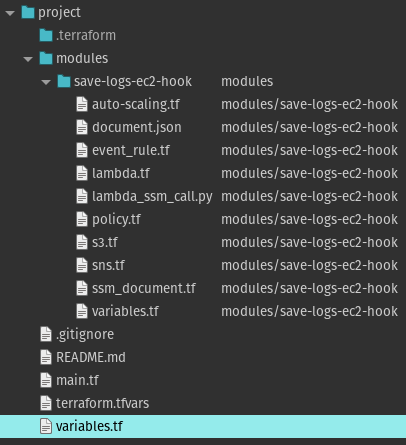
Auto Scaling Lifecycle Hooks - Terraform Module
To create a module, you make a directory and drop in some .tf files. Terraform reads any file with a .tf extension, so file names don’t really matter.
You can keep it flat or nest modules inside each other, but Terraform recommends keeping the tree shallow. Use composition instead of deep nesting - it makes modules easier to reuse in different combinations.
A common root module structure looks like this:
.
├── README.md
├── main.tf
├── variables.tf
├── outputs.tf
These files aren’t required. Terraform doesn’t care what you name your files. Using names like main.tf, variables.tf, and outputs.tf is just a convention that helps humans navigate the project.
File breakdown
main.tf - The main entry point for your module. Some people put everything here; others split resources across multiple files by type. I like making a separate file for each resource type - keeps things organized when configs get large.
variables.tf - Defines what inputs your module accepts. If you try to run terraform plan without setting a required variable, you’ll get an error. Variables can have defaults, or you can override them when calling the module. Values typically come from .tfvars files.
outputs.tf - Declares what your module returns. Without outputs, you can’t pass information from one module to another. For example, if your module creates a security group and you need that security group ID in a different module (say, for an EC2 instance), you expose it as an output. Terraform also prints all output values at the end of a run, which helps with debugging.
Important Note about .tfvars Files
One thing to watch out for: if you’re defining variable values in .tfvars files, remember these files often contain environment-specific settings like hostnames and database credentials.
Don’t share these files. They shouldn’t be part of your module because they’re specific to your environment. And definitely don’t commit them to version control - add them to .gitignore.
Files Terraform Creates
After running Terraform, you’ll see some new files in your project:
terraform.tfstate - The state file. This tracks the relationship between your configuration and actual infrastructure. Terraform creates it when you run terraform apply. Don’t share it, and add it to .gitignore.
.terraform - This directory holds provider plugins and module code that Terraform downloaded. You can delete it after deployment - Terraform recreates it when you run terraform init.
Terraform Module Example
Modules can call other modules, which lets you build larger configurations from smaller pieces.
You can also call the same module multiple times with different inputs.
Let’s say you have a root module with this structure:
.
├── README.md
├── main.tf
├── variables.tf
├── outputs.tf
You want to add a module that provisions an EC2 instance with Apache. Create a modules directory and put the module files there:
├── README.md
├── main.tf
├── modules
│   └── webserver
├── variables.tf
├── outputs.tf
The modules/webserver directory contains its own main.tf with EC2 configuration. Add as many supporting files as you need in that directory.
Now link the module to your root module.
Adding a Child Module
Your root module starts like this:
provider "aws" {
  alias = "usa1"
  region = "us-east-1"
}
terraform {
  backend "s3" {
    bucket  = "bitslovers-terraform-state"
    key     = "api/prod/terraform.tfstate"
    region  = "us-east-1"
    encrypt = true
  }
}
data "aws_vpc" "myvpc" {
  id = "vpc-2ccfbf2d"
}
No resources yet. You add a module like this:
module "ec2_instances" {
  source  = "modules/webserver"
  name           = "bitslovers-webserver"
  asg_min = 2
  asg_max = 4
  ami                    = "ami-0c4314620f811e0f4"
  instance_type          = "m5a.xlarge"
  vpc_security_group_ids = [module.vpc.default_security_group_id]
  subnet_id              = module.vpc.public_subnets[0]
  tags = {
    Created-By   = "Terraform"
    Environment = "production"
  }
}
The label after module (here, “ec2_instances”) is just a local name for referring to that instance within your configuration.
Module Source
The source argument tells Terraform where to find the module. It’s the only required argument besides your input variables.
You can point to a local directory or a remote source like a Git repository. Remote sources get downloaded during terraform init.
Note: the source must be a literal string. Expressions and templates don’t work here.
Reusing Modules
Yes, you can call the same module multiple times with different inputs. This is useful when you need similar infrastructure in different configurations.
Important: whenever you add, edit, or remove a module, run terraform init again. Use terraform init -update to refresh existing modules.
Terraform Meta Arguments
Terraform has a few special arguments that work across resources and modules.
Using Count on Modules
You can use count to create multiple instances of a module from a single block. This works the same way as with regular resources. You can also use for_each if you prefer.
Module Depends On
If a module depends on something that isn’t directly referenced (for example, you need a resource created before the module runs but the module doesn’t actually read any data from that resource), you can use depends_on to make that dependency explicit.
Provider Inheritance
When you define a provider in the root module, child modules inherit that configuration automatically.
If a child module needs a different provider configuration, you can override it within the module block:
module "load_balance" {
  source = "./another-module"
  providers = {
    aws = aws.usw2
  }
}
You’d do this when a child module needs a different region or a different provider alias.
Module Outputs
Resources inside a module are encapsulated. The parent can’t read their attributes directly. That’s what outputs are for - they expose specific values to the calling module.
Migrating Existing Resources into Modules
Moving resources into a module changes their addresses in state. Terraform sees this as destroying the old resources and creating new ones. In production, this is a problem.
Terraform 1.5+ supports moved blocks to handle this gracefully. You tell Terraform the old and new addresses, and it updates the state without touching actual infrastructure. Before that, you had to use terraform state mv manually.
Best Practices
Modules are like libraries or packages in programming - they give you reuse and consistency. If you’re writing Terraform for anything non-trivial, use modules from the start.
Even for small setups run by one person, modules pay off faster than you’d expect. The upfront time is small compared to what you save later.
You don’t always need to build from scratch. The Terraform Registry has modules for every major cloud provider. Find one close to what you need, download it, and customize. This saves a lot of time.
Here’s what the final root module looks like with our webserver module added:
provider "aws" {
  alias = "usa1"
  region = "us-east-1"
}
terraform {
  backend "s3" {
    bucket  = "bitslovers-terraform-state"
    key     = "api/prod/terraform.tfstate"
    region  = "us-east-1"
    encrypt = true
  }
}
data "aws_vpc" "myvpc" {
  id = "vpc-2ccfbf2d"
}
module "ec2_instances" {
  source  = "modules/webserver"
  name           = "bitslovers-webserver"
  asg_min = 2
  asg_max = 4
  ami                    = "ami-0c4314620f811e0f4"
  instance_type          = "m5a.xlarge"
  vpc_security_group_ids = [module.vpc.default_security_group_id]
  subnet_id              = module.vpc.public_subnets[0]
  tags = {
    Created-By   = "Terraform"
    Environment = "production"
  }
}
Wrapping Up
Once you understand how modules work, organizing larger infrastructure projects becomes much more manageable. The key insight is that modules let you build once and reuse - which means fewer bugs, easier changes, and configurations that actually scale.
You don’t need to build every module from scratch. The registry has well-maintained options for most cloud provider resources. Start there and customize as needed.
When your modules need to run scripts, trigger remote commands, or execute local steps that don’t fit a standard resource, see Terraform Null Resource — it fills the gap for provisioners and side-effects inside module workflows.
For teams on Kubernetes, Crossplane vs Terraform compares a Kubernetes-native alternative to traditional module patterns.
Terraform Debug: Inspect State and Troubleshoot — state inspection, taint workflows, and import patterns for debugging module-level issues.
Terraform lookup(): Access Map Values Without Headaches — HCL map access patterns and defaults for module inputs and outputs.
Terraform and Ansible: The Integration That Actually Works — the pull model, S3 handoff, and bootstrap script patterns for post-provisioning configuration.
Explore more like this

Terraform State Locking with S3 and DynamoDB in 2026
The moment two engineers run terraform apply at the same time without state locking, you have a race condition that can corrupt your entire infrastructure state. Both processes read the...

GitLab CI Environments and Review Apps in 2026
Review apps changed how my team does code review. Instead of reading diffs, reviewers click a link and see the actual change running. The designer can verify spacing on the...
Scrum + Team Topologies: Why Your DevOps Team Structure Might Be Slowing You Down
I spent three years at a company that spent $4 million on “DevOps transformation.” New tools, new cloud infrastructure, training budgets, the works. The velocity of the platform stayed flat....

Comments