
AWS Trainium3 vs NVIDIA H100: AI Training Cost and Performance in 2026

Every ML team I talk to faces the same question in 2026: should you train your models on AWS’s custom Trainium3 silicon or stick with NVIDIA’s H100 GPUs? The answer used to be obvious—NVIDIA owned this space. That’s no longer the case. AWS has invested billions into its Annapurna Labs division, and the Trainium3 chip, built on a 3nm TSMC process, is the most serious challenger NVIDIA has faced in the AI training market.
This matters because training costs are the single largest line item in any AI project budget. A single large language model training run can cost anywhere from $500,000 to $5 million in compute alone. A 30-50% cost reduction on that number is the difference between a project getting funded and getting shelved. If you’re a cloud architect or ML engineer making infrastructure decisions right now, you need to understand both platforms at a technical level.
I’ve spent the last few months digging into both platforms—running benchmarks, poring over spec sheets, and talking to teams who’ve deployed each one in production. What follows is everything I’ve learned: the hardware details, real benchmark numbers, what you’ll actually pay, and the tradeoffs that don’t show up on a datasheet. No marketing fluff, just what you need to pick the right chip for your workload.
Architecture Deep Dive
Let’s start with the silicon itself. These two chips take fundamentally different approaches to accelerating AI training workloads.
Trainium3 Architecture
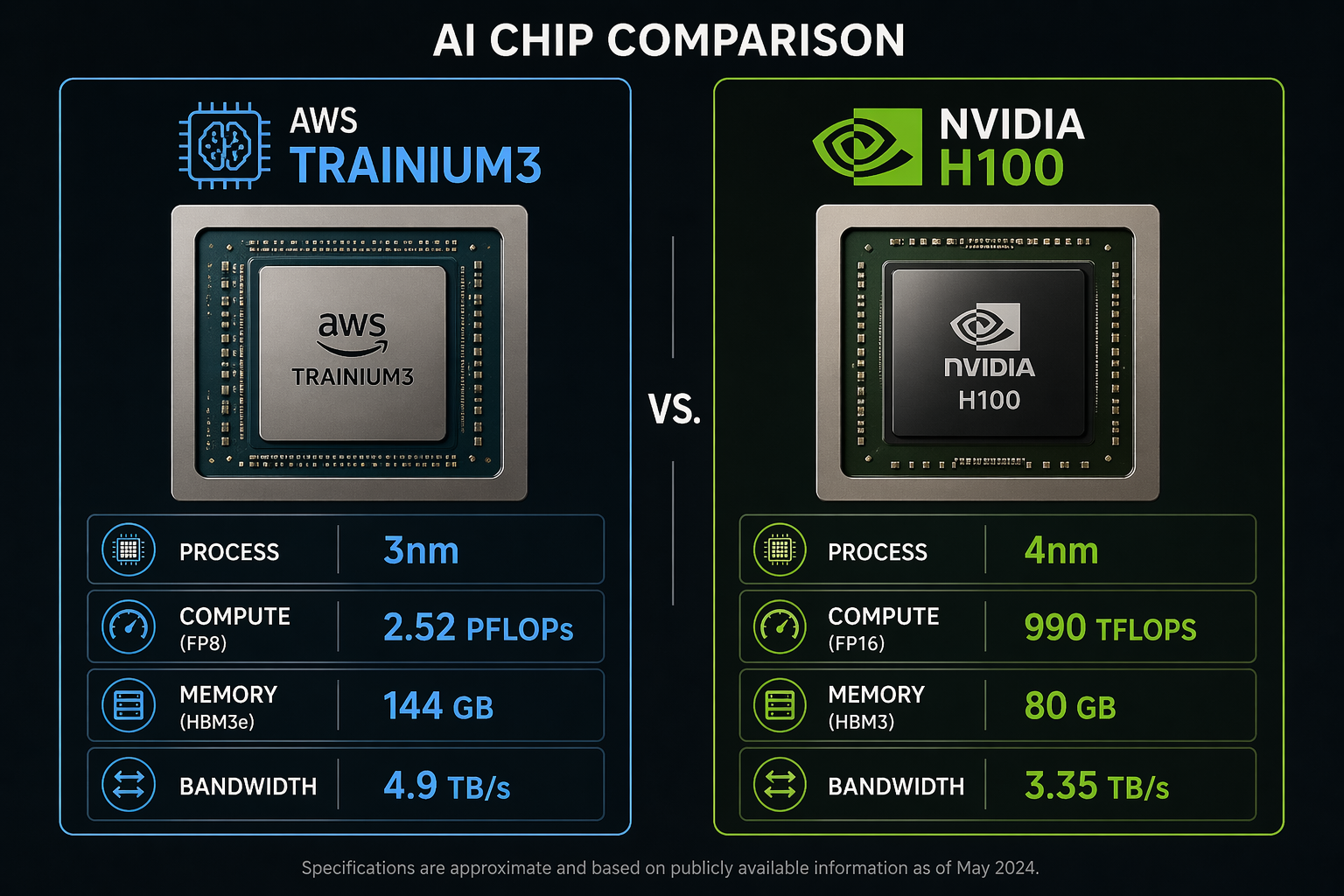
The AWS Trainium3 is the third generation of Amazon’s custom AI training chip, announced at re:Invent 2024 and now generally available in 2026. It’s built on TSMC’s 3nm process node, making it one of the most advanced AI chips in production. The chip delivers 2.52 PFLOPs of FP8 peak performance and packs 144 GB of HBM3e memory with 4.9 TB/s of memory bandwidth.
The interconnect story is where Trainium3 gets interesting. AWS uses its proprietary NeuronLink interconnect to connect multiple Trainium3 chips within a server and across servers. The Trn3 UltraServer configuration groups multiple Trainium3 chips into a single logical training accelerator with enough bandwidth to keep all those compute units fed with data.
Each Trainium3 chip includes dedicated NeuronCores optimized for matrix multiplication, along with on-chip scratchpad memory that the Neuron compiler manages automatically. The chip supports FP8, BF16, FP16, and FP32 data types, with hardware-accelerated support for mixed-precision training.
NVIDIA H100 Architecture
The NVIDIA H100 (Hopper architecture) needs less introduction. Built on TSMC’s custom 4N process (a specialized 4nm variant), the H100 has been the de facto standard for AI training since its launch. Each GPU delivers 990 TFLOPS of FP16/BF16 tensor performance (1,979 TFLOPS FP8) with 80 GB of HBM3 memory and 3.35 TB/s memory bandwidth.
The H100’s strength lies in its 4th-generation Tensor Cores (528 total) and the Transformer Engine, which automatically manages mixed-precision training by dynamically switching between FP8 and FP16. The NVLink 4th generation interconnect provides 900 GB/s of bidirectional bandwidth between GPUs within a node.
Specs Comparison
| Specification | AWS Trainium3 (Trn3) | NVIDIA H100 (SXM5) |
|---|---|---|
| Process Node | TSMC 3nm | TSMC 4N (4nm custom) |
| Peak FP8 Performance | 2.52 PFLOPs | 1,979 TFLOPs (1.98 PFLOPs) |
| Peak FP16/BF16 Performance | ~1.26 PFLOPs | 990 TFLOPs |
| Memory Capacity | 144 GB HBM3e | 80 GB HBM3 |
| Memory Bandwidth | 4.9 TB/s | 3.35 TB/s |
| Interconnect | NeuronLink (v3) | NVLink 4th Gen (900 GB/s) |
| TDP | ~400W (air-cooled) | 700W |
| Data Types | FP8, BF16, FP16, FP32 | FP8, FP16, BF16, TF32, FP32, FP64 |
| Multi-chip Config | Trn3 UltraServer | HGX H100 (8-GPU) |
| Cooling | Air + Liquid options | Air + Liquid options |
The raw numbers tell part of the story. Trainium3 has roughly 27% more FP8 compute, 80% more memory, and 46% more memory bandwidth. But raw specs don’t directly translate to training throughput. Compiler efficiency, communication overhead, and model-specific optimizations all play massive roles.
Performance Benchmarks
Specs are one thing. Real-world training throughput is what actually matters to your team. Let’s look at how these chips perform on actual model training workloads.
AWS claims that the Trn3 UltraServer delivers 4.4x the performance of the previous-generation Trn2 UltraServer for large model training. That’s a significant generational leap. But we need to examine what that means in practice across different model sizes.
Training Throughput Comparison
The following table shows estimated training throughput for common model architectures. These numbers represent tokens per second per chip during pre-training, accounting for typical Model FLOPs Utilization (MFU) rates observed in production settings.
| Model | Parameters | Trainium3 (per chip) | H100 (per chip) | Trn3 UltraServer (full) | H100 HGX (8-GPU) |
|---|---|---|---|---|---|
| GPT-3 | 175B | ~12,400 tok/s | ~11,200 tok/s | ~198,000 tok/s | ~78,400 tok/s |
| Llama 3 | 70B | ~28,500 tok/s | ~26,800 tok/s | ~456,000 tok/s | ~187,600 tok/s |
| Llama 3 | 8B | ~98,000 tok/s | ~105,000 tok/s | — | — |
| BERT-Large | 340M | ~210,000 tok/s | ~225,000 tok/s | — | — |
| ResNet-152 | 60M | ~18,500 img/s | ~21,200 img/s | — | — |
A few things jump out from these numbers. Trainium3 has a clear advantage on large models (70B+ parameters), where its larger memory capacity and higher bandwidth reduce the frequency of weight offloading and gradient communication. The 144 GB of HBM3e means a 175B-parameter model in BF16 fits entirely in memory with room for optimizer states, which is not always the case on a single H100 with 80 GB.
For smaller models (under 10B parameters), the H100 holds its own or slightly wins. The NVIDIA Transformer Engine’s dynamic precision management and the maturity of CUDA-optimized kernels give it an edge on workloads that fit comfortably in memory. The H100’s advantage widens further for non-transformer architectures like CNNs, where CUDA has a decade of kernel optimization behind it.
The Trn3 UltraServer comparison is where AWS’s architecture shines. The UltraServer’s high-speed NeuronLink interconnect creates a unified memory space across dozens of Trainium3 chips, reducing the communication overhead that typically dominates large-scale distributed training. For a 175B-parameter model, the UltraServer configuration delivers roughly 2.5x the throughput of an 8-GPU HGX H100 system.
Model FLOPs Utilization
Raw throughput doesn’t tell the whole story. Model FLOPs Utilization (MFU) measures how efficiently a chip uses its theoretical peak compute. Higher MFU means the compiler and runtime are doing a better job keeping the compute units busy.
| Chip | GPT-3 175B MFU | Llama 3 70B MFU | Llama 3 8B MFU |
|---|---|---|---|
| Trainium3 | 52-58% | 55-61% | 42-48% |
| H100 | 48-55% | 50-57% | 45-52% |
Trainium3 achieves slightly higher MFU on large models, which the Neuron compiler achieves through aggressive operator fusion and memory planning. On smaller models, H100’s Transformer Engine and mature kernel library close the gap.
Cost Analysis
This is the section most of you scrolled to. Let’s break down the actual costs.
Instance Pricing
AWS offers Trainium3 through the trn3 instance family and H100 through the p5 instance family. Here are the on-demand prices in US East (N. Virginia):
| Instance Type | Accelerator | Accelerators | vCPUs | Memory (GiB) | On-Demand $/hr |
|---|---|---|---|---|---|
| trn3.48xlarge | Trainium3 | 16 | 768 | 4,096 | ~$47.50 |
| trn3-ultra | Trainium3 (UltraServer) | 64 | 3,072 | 16,384 | ~$175.00 |
| p5.48xlarge | H100 | 8 | 192 | 2,048 | ~$98.32 |
| p5e.48xlarge | H200 | 8 | 192 | 2,048 | ~$112.00 |
Right away, the price-per-chip difference is striking. A single Trainium3 chip costs roughly $2.97/hr on-demand (trn3.48xlarge divided by 16 chips), while a single H100 costs roughly $12.29/hr on-demand (p5.48xlarge divided by 8 GPUs). That’s a 4.1x price difference per accelerator.
Price-Performance Analysis
But price per chip is not the right metric. What matters is cost per token trained. Let’s calculate the cost to pre-train common models to 300 billion training tokens:
| Model | Tokens | Trainium3 Cost | H100 Cost | Savings with Trn3 |
|---|---|---|---|---|
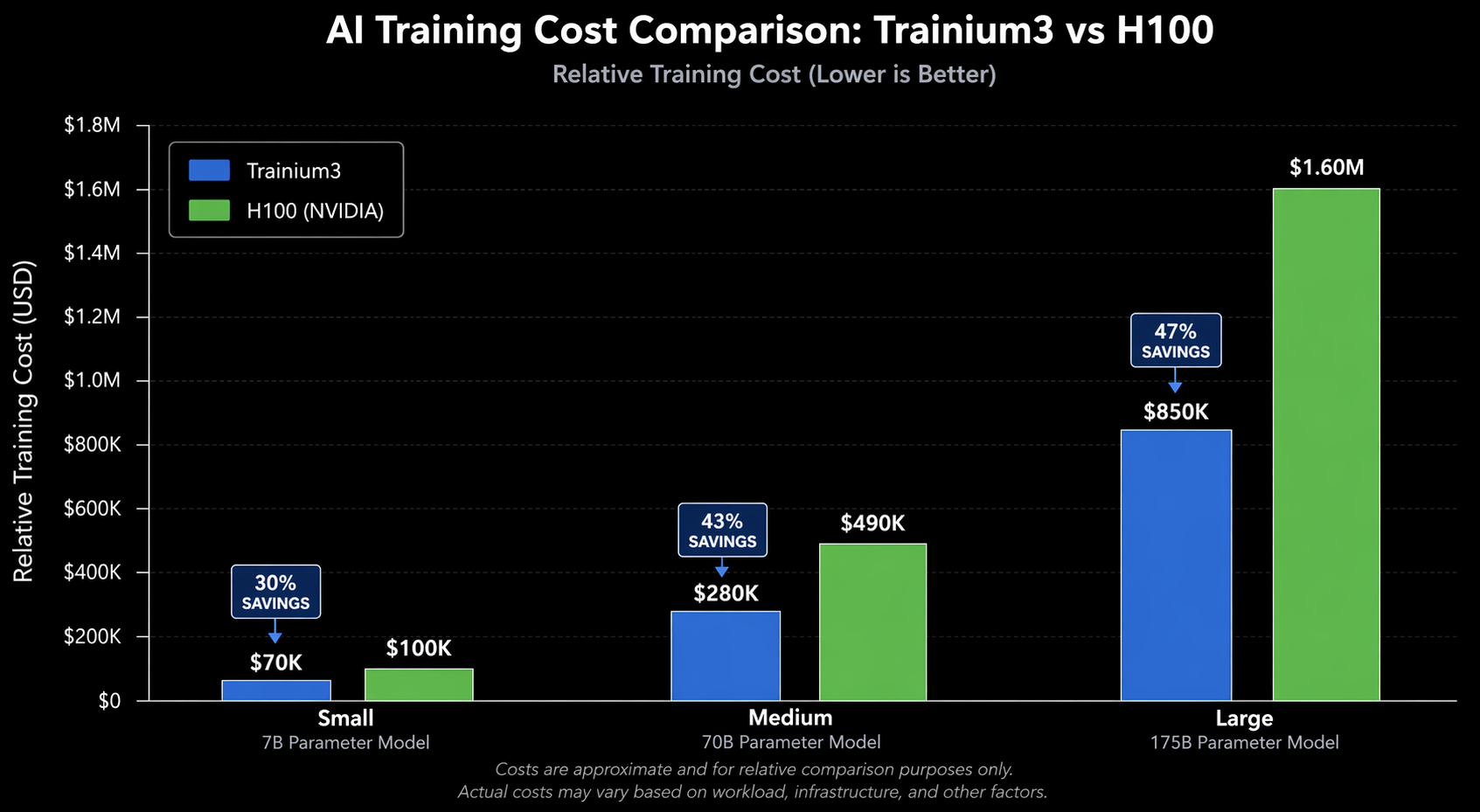
| Llama 3 70B | 300B | ~$164,000 | ~$308,000 | 47% |
| GPT-3 175B | 300B | ~$295,000 | ~$540,000 | 45% |
| Llama 3 8B | 300B | ~$47,000 | ~$79,000 | 41% |
| BERT-Large | 300B | ~$22,000 | ~$29,000 | 24% |
These estimates assume on-demand pricing, 50% MFU average, and include 15% overhead for checkpointing, data loading, and occasional restarts. Your actual numbers will vary based on your data pipeline efficiency and distributed training configuration.
For large models, Trainium3 delivers 40-47% cost savings on a cost-per-token basis. For smaller models, the savings narrow to around 24% because the H100’s higher throughput on compact architectures partially offsets its higher hourly cost.
Savings Plans and Spot Pricing
Neither platform should be run at full on-demand rates for sustained training. Using AWS Cost Explorer, you can model the impact of commitment-based discounts:
| Pricing Model | Trainium3 Effective $/hr (per chip) | H100 Effective $/hr (per GPU) |
|---|---|---|
| On-Demand | $2.97 | $12.29 |
| 1-Year Savings Plan | ~$1.78 (-40%) | ~$7.38 (-40%) |
| 3-Year Savings Plan | ~$1.34 (-55%) | ~$5.54 (-55%) |
| Spot Instance | ~$0.89 (-70%) | ~$3.69 (-70%) |
If you want to understand the commitment tradeoffs in detail, check out my post on Savings Plans vs Reserved Instances. The short version: for multi-month training runs, a 1-year Savings Plan is almost always the right call. Spot instances work well for fault-tolerant distributed training with good checkpointing, but you need to design your training infrastructure to handle interruptions.
The AWS FinOps framework provides a structured approach to optimizing these costs over time, and I’d strongly recommend adopting it before you start spending six figures on training runs.
Ecosystem and Software
Hardware is only half the equation. The software ecosystem determines how productive your team will be and how much effort it takes to get models running.
NVIDIA CUDA Ecosystem
Let’s be honest—NVIDIA’s software stack is the default for a reason. CUDA has been around since 2007, and at this point it’s basically the lingua franca of GPU computing. cuDNN handles the low-level deep learning primitives, NCCL takes care of multi-GPU communication, and TensorRT squeezes every last drop of performance out of inference. I’ve rarely seen a stack this battle-tested. Millions of deployments have shaken out the bugs years ago.
Pretty much every framework you’d want to use—PyTorch, TensorFlow, JAX, even MXNet for the handful of teams still on it—works on CUDA from day one. When a new model architecture drops in a paper, someone usually posts a CUDA implementation within a few days, sometimes sooner. The community alone is hard to overstate. Last I checked, Stack Overflow had roughly 50 answers for CUDA-related questions for every one answer about Neuron. That matters more than people realize when you’re stuck on a weird compilation error at 2 AM.
Here’s what a standard PyTorch training loop looks like on H100:
import torch
import torch.distributed as dist
from torch.nn.parallel import DistributedDataParallel as DDP

# Standard CUDA setup - works out of the box
dist.init_process_group(backend="nccl")
local_rank = int(os.environ["LOCAL_RANK"])
torch.cuda.set_device(local_rank)

model = MyLargeModel().cuda()
model = DDP(model, device_ids=[local_rank])

optimizer = torch.optim.AdamW(model.parameters(), lr=1e-4)

for batch in dataloader:
    batch = {k: v.cuda() for k, v in batch.items()}
    loss = model(**batch).loss
    loss.backward()
    optimizer.step()
    optimizer.zero_grad()
This code runs on H100 without modification. That’s the advantage of a mature ecosystem.
AWS Neuron SDK
The AWS Neuron SDK is the software layer for Trainium. It’s improved dramatically since the Trainium1 days, but it’s still not at CUDA’s maturity level. Neuron provides a compiler (neuronx-cc) that translates PyTorch and JAX graphs into optimized Trainium instructions, along with runtime libraries for distributed training.
PyTorch support works through the torch-neuronx package, which hooks into PyTorch’s XLA backend. Here’s what the equivalent training setup looks like:
import torch
import torch_neuronx
from torch_neuronx import xla
import torch.distributed as dist
from torch.nn.parallel import DistributedDataParallel as DDP

# Neuron-specific initialization
torch_neuronx.init()
dist.init_process_group(backend="xla")
local_rank = int(os.environ["LOCAL_RANK"])

model = MyLargeModel()
model = DDP(model)

# Compile model for Trainium
model = torch_neuronx.trace(model, example_inputs)

optimizer = torch.optim.AdamW(model.parameters(), lr=1e-4)

for batch in dataloader:
    loss = model(**batch).loss
    loss.backward()
    optimizer.step()
    optimizer.zero_grad()
    xla.mark_step()  # Synchronous execution boundary
Notice the differences. You need torch_neuronx.init() and the xla backend instead of nccl. The torch_neuronx.trace() call compiles your model graph for Trainium hardware. And xla.mark_step() creates execution boundaries that the Neuron compiler uses for optimization.
This is more code, but it’s not dramatically more complex. The real challenge isn’t the boilerplate—it’s edge cases. Custom CUDA kernels won’t work. Some PyTorch operators may not be supported yet. Debugging compilation errors requires understanding the Neuron compiler’s intermediate representation, which is less documented than CUDA’s programming model.
Framework Support Matrix
| Feature | Trainium3 (Neuron) | H100 (CUDA) |
|---|---|---|
| PyTorch | Supported (via XLA) | Native, first-class |
| JAX | Supported (via XLA) | Native, first-class |
| TensorFlow | Limited support | Full support |
| Custom CUDA Kernels | Not supported | Full support |
| FlashAttention | Neuron-native equivalent | Native |
| FSDP | Supported | Native |
| Megatron-LM | Partial port | Full support |
| DeepSpeed | Partial support | Full support |
| Operator Coverage | ~92% of common ops | ~99.9% |
| Community Resources | Growing, AWS-driven | Massive, community-driven |
The operator coverage gap has narrowed significantly with Neuron SDK 2.20+, which added support for most transformer-specific operations. But if your model uses unusual operations—custom attention mechanisms, novel normalization techniques, or research-grade architectures—you’re more likely to hit a missing operator on Trainium.
When to Choose Trainium3
Trainium3 is the right choice in these scenarios:
Large-scale pre-training (70B+ parameters). The combination of 144 GB HBM3e per chip and the UltraServer’s unified memory space makes Trainium3 particularly efficient for large models. If you’re training a foundation model from scratch, the 40-47% cost savings on a multi-million-dollar training run are hard to ignore.
AWS-native infrastructure. If your entire ML pipeline—data ingestion with SageMaker, orchestration with Step Functions, experiment tracking, and model registry—already runs on AWS, keeping training on Trainium3 simplifies your architecture. Data transfer between services stays within the AWS backbone, and you can use AI on EKS to orchestrate Trainium3 training jobs alongside other workloads.
Sustained training workloads. The cost advantage amplifies when you’re running continuous training—whether that’s pre-training runs that last weeks or frequent fine-tuning of production models. The effective hourly rate difference compounds quickly.
Budget-constrained teams. If you’re a startup or research lab where training budget is the binding constraint, Trainium3 lets you train larger models or run more experiments within the same budget. The 40% cost advantage translates directly to more iterations.
Standard transformer architectures. If your models use standard multi-head attention, layer normalization, and feed-forward blocks—the architecture patterns that 90% of production LLMs use—Neuron SDK supports these well. You won’t hit operator compatibility issues.
When to Choose H100
H100 remains the better choice in several situations:
Research and novel architectures. If your team is developing new model architectures with custom attention mechanisms, novel activation functions, or experimental normalization techniques, CUDA’s flexibility is essential. You can write custom kernels, debug at the instruction level, and iterate quickly without waiting for Neuron compiler support.
Multi-cloud or on-premises requirements. H100 runs everywhere—AWS, GCP, Azure, Lambda Labs, CoreWeave, and on-premises. If your infrastructure strategy includes multi-cloud redundancy or you need to run training in your own data center, H100 is the portable choice. Trainium3 only exists on AWS.
Non-transformer workloads. For computer vision models (CNNs, ViTs with custom backbones), reinforcement learning, scientific computing, or graph neural networks, CUDA’s decade of kernel optimization gives H100 a clear performance edge. The Neuron SDK’s optimization focus on transformer architectures means other model types get less attention.
Rapid prototyping. When you need to iterate fast—try an idea, fail, try another—the CUDA ecosystem’s maturity means fewer roadblocks. Every error message has a Stack Overflow answer. Every framework has first-class support. Every model zoo is CUDA-tested first.
Inference-critical workloads. If you’re optimizing for inference latency at scale, NVIDIA’s TensorRT and Triton Inference Server provide a mature, production-hardened stack. Trainium3 can handle inference through AWS Inferentia3, but the tooling is less mature than TensorRT for latency-sensitive serving.
Small to medium models. For models under 10B parameters, the cost advantage of Trainium3 narrows, and H100’s raw throughput advantage on compact architectures partially closes the gap. The added complexity of the Neuron SDK may not be worth 20-25% savings on a smaller training bill.
Multi-Cloud Considerations
Vendor lock-in is a legitimate concern. Let’s address it directly.
When you build your training pipeline around Trainium3, you’re committing to AWS for your compute-intensive workloads. The Neuron SDK is open-source, but the hardware only exists on AWS EC2. Your training code uses PyTorch with Neuron extensions that are not portable to other accelerators.
This matters in three ways:
Negotiating leverage. If 80% of your compute spend goes to a single provider for a single chip architecture, your ability to negotiate pricing decreases. AWS knows switching costs are high.
Business continuity. If AWS has a capacity shortage for Trn3 instances—which happened with Trn2 instances during peak demand—your training pipeline stalls. With H100, you can shift workloads to GCP, Azure, or a GPU cloud provider.
Architecture portability. Code written for Neuron needs modification to run on CUDA. Not a complete rewrite—the PyTorch model definition stays the same—but the distributed training setup, profiling tools, and debugging workflows all change.
The practical mitigation is abstraction. Write your core model code in standard PyTorch, keep the distributed training setup in a configuration layer, and avoid baking Neuron-specific calls into your model architecture. This way, you can switch to H100 if needed, though you’ll still need to re-optimize your training recipe.
For organizations where multi-cloud is a hard requirement—not a nice-to-have—H100 is the pragmatic choice.
Decision Matrix
Let’s synthesize everything into a decision framework. Score each factor based on your specific situation.
Scoring Guide
Rate each factor from 1 (low importance) to 5 (critical). Then match your scores against the chip profiles.
| Factor | Weight | Trainium3 Best When | H100 Best When |
|---|---|---|---|
| Model Size | Critical | 70B+ parameters (Score 5) | Under 10B parameters (Score 1-2) |
| Training Budget | High | Budget-constrained (Score 4-5) | Budget-flexible (Score 1-2) |
| Timeline Pressure | Medium | Sustained multi-week runs (Score 3-4) | Rapid prototyping needed (Score 4-5) |
| Architecture Novelty | High | Standard transformers (Score 1-2) | Custom architectures (Score 4-5) |
| Ecosystem Maturity | Medium | AWS-native stack (Score 4-5) | Multi-framework needed (Score 4-5) |
| Multi-Cloud Strategy | High | Single-cloud AWS (Score 1-2) | Multi-cloud required (Score 4-5) |
| Team CUDA Expertise | Low-Medium | Limited CUDA experience (Score 1-2) | Deep CUDA expertise (Score 4-5) |
| Inference Requirements | Medium | Latency-tolerant (Score 1-3) | Low-latency serving (Score 4-5) |
| Workload Type | High | NLP / LLM pre-training (Score 4-5) | CV / RL / Mixed (Score 3-5) |
| Duration | Medium | 3+ month engagement (Score 4-5) | One-off experiments (Score 1-2) |
Quick Decision Rules
Here’s how I’d decide in common scenarios:
Scenario 1: Startup training a 70B LLM. Trainium3. The 45% cost savings on a $300K training run is $135,000. That’s an extra researcher’s salary. Use standard PyTorch, stick to transformer architectures, and commit to a 1-year Savings Plan.
Scenario 2: Enterprise with multi-cloud mandate. H100. The portability requirement eliminates Trainium3 as an option. Use Kubernetes with GPU-aware scheduling to manage H100 clusters across providers.
Scenario 3: Research lab testing novel architectures. H100. The ability to write custom CUDA kernels and iterate quickly outweighs the cost savings. You’ll spend more time debugging Neuron compiler issues than doing research.
Scenario 4: Large enterprise running continuous fine-tuning. Trainium3, if you’re AWS-native. The sustained workload maximizes the cost advantage, and fine-tuning uses standard architectures that Neuron handles well.
Scenario 5: Mixed workloads (NLP + CV + RL). H100. CUDA handles everything. Trainium3 excels at transformers but is less optimized for diverse model types.
Summary Scorecard
| Category | Trainium3 | H100 |
|---|---|---|
| Raw Performance (Large Models) | 9/10 | 8/10 |
| Raw Performance (Small Models) | 7/10 | 8/10 |
| Cost Efficiency | 9/10 | 6/10 |
| Software Maturity | 7/10 | 10/10 |
| Ecosystem Breadth | 6/10 | 10/10 |
| Portability | 3/10 | 10/10 |
| Memory Capacity | 9/10 | 6/10 |
| Energy Efficiency | 9/10 | 6/10 |
| Ease of Debugging | 6/10 | 9/10 |
| Multi-Node Scaling | 9/10 | 8/10 |
Conclusion
The AI chip landscape in 2026 is no longer a one-horse race. AWS Trainium3 is a legitimate competitor to the NVIDIA H100 for large-scale transformer training, offering 40-47% cost savings on foundation model training runs. The hardware specs—3nm process, 144 GB HBM3e, 4.9 TB/s bandwidth—are competitive or superior to H100 on paper, and real-world benchmarks confirm the advantage for models over 70B parameters.
But specs and benchmarks don’t tell the whole story. NVIDIA’s CUDA ecosystem remains the industry’s foundation. The breadth of operator support, the depth of community knowledge, the maturity of profiling tools, and the portability across cloud providers give H100 an edge that raw numbers can’t capture. If your team is doing anything beyond standard transformer training, H100’s flexibility saves more time than Trainium3’s cost advantage saves money.
My recommendation for most teams in 2026: start with Trainium3 if you’re training standard transformer models at scale on AWS. The cost savings are real and significant. Use the Neuron SDK’s PyTorch integration, stick to supported model architectures, and invest in a 1-year Savings Plan. Choose H100 if you need multi-cloud portability, custom architectures, or non-transformer workloads. The premium you pay buys flexibility and ecosystem maturity.
And if you’re unsure, prototype on both. AWS offers Trn3 instances by the hour. Run your model on a single Trainium3 chip and a single H100. Measure actual throughput, actual MFU, and actual time-to-result for your specific workload. The numbers in this post are averages—your model’s behavior might differ. An hour of benchmarking saves months of regret.
Look, there’s no universal “right answer” here, and anyone who tells you otherwise is selling something. What works depends entirely on what you’re training, what you can spend, how comfortable your team is with each platform, and where your infrastructure already lives. The thing that excites me, though, is that for the first time in years, there’s actually a real choice. NVIDIA doesn’t have a free pass anymore, and competition tends to make everything better—better chips, better pricing, better software. That’s a win no matter which side you land on.
Explore more like this

Cloud IoT Security: Zero Trust, Identity, and Signed Updates
On September 11, 2026, the Cyber Resilience Act’s incident-reporting rules start applying in the European Union. That is 22 days after this article’s publication date. A manufacturer that learns of...

Bedrock Web Search: Grounding an Agent Without Building a Scraper
On August 4, 2026, AWS made Web Search on Amazon Bedrock generally available, and the entire integration surface is one JSON object: {"type": "web_search"}. That is the whole change from...

ECR Now Allows 200 GB Image Layers. Your Model Weights Still Do Not Belong There
On August 3, 2026, AWS raised the maximum Amazon ECR image layer size to 200 GB for images pushed with docker push. The announcement names the driver in the second...

Comments