
Ansible for AWS Automation: The Complete Guide for 2026

The first time I tried managing 40 EC2 instances with a bash script and a for loop, I ended up with 12 servers running Nginx 1.18 and 28 running Nginx 1.22. Same script, same repo, different results depending on whether the apt cache decided to cooperate that particular Tuesday. That was the afternoon I stopped pretending shell scripts counted as configuration management and installed Ansible.
If you are running workloads on AWS and still configuring instances by hand – or worse, baking custom AMIs every time a package version changes – this guide is for you. Ansible has matured significantly for AWS automation, and the integration story in 2026 is genuinely solid. Dynamic inventories that actually work, modules for nearly every AWS service, and a workflow that fits cleanly alongside Terraform without stepping on its toes.
What Ansible Actually Does Well on AWS
Let me be upfront about what Ansible is and is not. Ansible is a configuration management and orchestration tool. It connects to machines over SSH (or WinRM for Windows), runs tasks described in YAML playbooks, and stops when everything matches the state you declared.
What Ansible does well:
- Configuration management – Install packages, write config files, manage services, set up users. The idempotent design means running a playbook ten times produces the same result as running it once.
- Orchestration – Coordinate multi-step deployments across multiple servers. Run task A on the database tier, then task B on the app tier, then task C on the load balancer.
- Ad-hoc commands – Need to check disk space on every server in us-east-1? One command. Patch a vulnerability across 200 instances? One command.
What Ansible does not do well:
- Infrastructure provisioning at scale – Creating VPCs, subnets, route tables, and security groups is possible with Ansible’s AWS modules, but Terraform handles state tracking, dependency resolution, and change planning far better. For infrastructure provisioning, stick with Terraform. We covered this split in detail in our post about Terraform and Ansible integration.
- Drift detection – Ansible will correct drift when you run a playbook, but it does not continuously monitor for it. Terraform’s
plancommand shows you drift before you fix it.
Think of it this way: Terraform builds the house. Ansible furnishes it, sets the thermostat, and changes the locks when needed.
Setting Up Ansible for AWS
Before writing any playbooks, you need the right pieces in place. Ansible needs AWS credentials and the Amazon collection installed.
Installing the AWS Collection
# Install the community AWS collection
ansible-galaxy collection install amazon.aws

# Verify it installed
ansible-galaxy collection list | grep amazon
The amazon.aws collection includes modules for EC2, S3, RDS, IAM, VPC, Route 53, and dozens of other services. It replaced the old individual modules (ec2, ec2_instance, etc.) that shipped with Ansible core. If you find blog posts referencing ec2: as a module name, they are outdated – the correct format is amazon.aws.ec2_instance:.
AWS Authentication
Ansible uses the same credential chain as the AWS CLI. Pick one:
- Environment variables (good for CI/CD):
export AWS_ACCESS_KEY_ID=AKIA... export AWS_SECRET_ACCESS_KEY=wJalrX... export AWS_DEFAULT_REGION=us-east-1 - AWS CLI profile (good for local development):
aws configure --profile production # Then set: export AWS_PROFILE=production -
IAM Instance Profile (good for EC2-based runners): If your Ansible control node runs on an EC2 instance with an attached IAM role, Ansible picks up the credentials automatically. This is what I use in production – no credentials stored anywhere.
- Assume Role (good for cross-account):
# In your playbook or inventory
vars:
  ansible_aws_assume_role_arn: "arn:aws:iam::123456789012:role/AnsibleCrossAccount"
  ansible_aws_assume_role_session_name: "ansible-deploy"
I strongly recommend option 3 or 4 for anything touching production. Hardcoded access keys in Ansible variables files are a security incident waiting to happen.
Dynamic Inventories: The Feature That Changed Everything
Static inventory files – where you manually list server IP addresses – work fine when you have five servers that never change. On AWS, where auto-scaling groups spin up and tear down instances constantly, static inventories break fast.
Dynamic inventories solve this. Instead of maintaining a list of servers, Ansible queries the AWS API at runtime and builds the inventory automatically. Every server that exists right now gets included. Servers that were terminated yesterday disappear.
The aws_ec2 Plugin
The amazon.aws.aws_ec2 inventory plugin is the standard approach. Here is a working configuration:
# aws_ec2.yml - place this in your project root or inventory directory
plugin: amazon.aws.aws_ec2
regions:
  - us-east-1
  - us-west-2

# Group instances by tags
 keyed_groups:
  - key: tags.Environment
    prefix: env
  - key: tags.Role
    prefix: role
  - key: tags.Application
    prefix: app

# Filter to specific instances
filters:
  tag:ManagedBy: ansible
  instance-state-name: running

# Add useful host variables
compose:
  ansible_host: public_ip_address
  private_ip: private_ip_address

# Include extra variables from tags
hostvars_prefix: aws_
When you run a playbook with this inventory:
ansible-inventory -i aws_ec2.yml --graph
You get something like:
@all:
  |--@aws_ec2:
  |  |--i-0abc123def456
  |  |--i-789ghi012jkl345
  |--@env_production:
  |  |--i-0abc123def456
  |  |--i-789ghi012jkl345
  |--@role_web:
  |  |--i-0abc123def456
  |--@role_worker:
  |  |--i-789ghi012jkl345
Every instance gets automatically grouped by its tags. You can target env_staging or role_database directly in your playbooks without maintaining any server lists. When auto-scaling adds three new web servers, they show up in the role_web group next time you run the playbook.
Dynamic Inventory Plugin Comparison
Not all inventory plugins work the same way. Here is how the main options compare:
| Feature | aws_ec2 | aws_rds | constructed | static file |
|---|---|---|---|---|
| Auto-discovers instances | Yes | No (RDS only) | No | No |
| Groups by tags | Yes | Limited | Yes | Manual |
| Supports filters | Yes | Yes | N/A | N/A |
| Composes host vars | Yes | Yes | Yes | Manual |
| Refresh on each run | Yes | Yes | N/A | Never |
| Works offline | No | No | Yes | Yes |
| Best for | EC2 fleets | RDS instances | Post-processing | Dev/testing |
| Included in | amazon.aws | amazon.aws | ansible.builtin | ansible.builtin |
The constructed plugin is worth knowing about – it sits on top of another inventory source and lets you create new groups based on Jinja2 conditions. I use it to add conditional groups like “needs-restart” based on uptime thresholds.
# constructed.yml
plugin: ansible.builtin.constructed
strict: false
groups:
  needs_restart: "hostvars[inventory_hostname].aws_uptime_days | int > 30"
  uses_python3: "'python3' in hostvars[inventory_hostname].aws_installed_packages"
EC2 Provisioning with Ansible
Yes, I said Terraform is better for provisioning. But sometimes you need to create instances as part of an Ansible workflow – bootstrapping a test environment, spinning up a temporary cluster, or handling a use case where a full Terraform setup is overkill.
Here is a playbook that provisions EC2 instances properly:
---
# provision-ec2.yml
- name: Provision EC2 instances for web tier
  hosts: localhost
  connection: local
  gather_facts: false

  vars:
    instance_type: t3.medium
    ami_id: ami-0c7217cdde317cfec  # Amazon Linux 2023 in us-east-1
    key_name: my-deploy-key
    security_group: sg-0123456789abcdef0
    subnet_id: subnet-0123456789abcdef0
    instance_count: 3

  tasks:
    - name: Launch EC2 instances
      amazon.aws.ec2_instance:
        name: "web-"
        image_id: ""
        instance_type: ""
        key_name: ""
        security_groups:
          - ""
        vpc_subnet_id: ""
        tags:
          Environment: production
          Role: web
          ManagedBy: ansible
          Application: storefront
        wait: true
        wait_timeout: 300
      loop: ""
      register: ec2_results

    - name: Wait for SSH to come up on all instances
      ansible.builtin.wait_for:
        host: ""
        port: 22
        delay: 10
        timeout: 180
        search_regex: OpenSSH
      loop: ""
      when: item.instances is defined

    - name: Add new instances to in-memory inventory
      ansible.builtin.add_host:
        name: ""
        groups: newly_provisioned
        ansible_user: ec2-user
        ansible_ssh_private_key_file: ~/.ssh/my-deploy-key.pem
      loop: ""
      when: item.instances is defined

# Now configure the new instances
- name: Configure newly provisioned web servers
  hosts: newly_provisioned
  become: true
  gather_facts: true

  tasks:
    - name: Install Nginx
      ansible.builtin.yum:
        name: nginx
        state: present

    - name: Deploy Nginx configuration
      ansible.builtin.template:
        src: templates/nginx.conf.j2
        dest: /etc/nginx/nginx.conf
        owner: root
        group: root
        mode: '0644'
      notify: restart nginx

    - name: Ensure Nginx is running and enabled
      ansible.builtin.service:
        name: nginx
        state: started
        enabled: true

  handlers:
    - name: restart nginx
      ansible.builtin.service:
        name: nginx
        state: restarted
Two things worth noting here. First, the provisioning play runs against localhost because Ansible is calling the AWS API, not SSH-ing into anything. Second, the add_host task bridges the provisioning play to the configuration play by building a temporary inventory of the newly created instances. This pattern – provision then configure in the same playbook – is what makes Ansible useful for end-to-end workflows.
Configuration Management at Scale
Once your instances exist, Ansible shines at keeping them configured consistently. Here is a realistic playbook for a web server fleet:
---
# configure-web-tier.yml
- name: Configure web server tier
  hosts: role_web
  become: true
  gather_facts: true
  serial: 5  # Process 5 servers at a time for rolling updates

  tasks:
    - name: Install required packages
      ansible.builtin.yum:
        name:
          - nginx
          - python3
          - amazon-cloudwatch-agent
          - amazon-ssm-agent
        state: present

    - name: Create application directory
      ansible.builtin.file:
        path: /opt/storefront
        state: directory
        owner: nginx
        group: nginx
        mode: '0755'

    - name: Deploy application from S3
      amazon.aws.aws_s3:
        bucket: my-artifacts-bucket
        object: "releases//storefront.tar.gz"
        dest: /tmp/storefront.tar.gz
        mode: get
      vars:
        app_version: "2.4.1"

    - name: Extract application
      ansible.builtin.unarchive:
        src: /tmp/storefront.tar.gz
        dest: /opt/storefront
        remote_src: true
        owner: nginx
        group: nginx
      notify: restart nginx

    - name: Configure CloudWatch agent
      ansible.builtin.template:
        src: templates/cloudwatch-config.json.j2
        dest: /opt/aws/amazon-cloudwatch-agent/etc/amazon-cloudwatch-agent.json
        owner: root
        group: root
        mode: '0644'
      notify: restart cloudwatch

    - name: Deploy Nginx site configuration
      ansible.builtin.template:
        src: templates/storefront.conf.j2
        dest: /etc/nginx/conf.d/storefront.conf
        owner: root
        group: root
        mode: '0644'
      notify: reload nginx

  handlers:
    - name: restart nginx
      ansible.builtin.service:
        name: nginx
        state: restarted

    - name: reload nginx
      ansible.builtin.service:
        name: nginx
        state: reloaded

    - name: restart cloudwatch
      ansible.builtin.service:
        name: amazon-cloudwatch-agent
        state: restarted
The serial: 5 line is important for production. Instead of updating all servers simultaneously, Ansible processes them in batches of five. If something goes wrong with the first batch, you can stop the playbook before it touches the rest of your fleet. This is basic rolling deployment behavior without needing a separate orchestration tool.
Handlers only fire when a task reports a change. If the Nginx config template does not change, the reload handler does not run. That is idempotency in action – safe to run every hour, every day, or every week without side effects.
Ansible AWS Module Reference
The amazon.aws collection covers most AWS services you would interact with from Ansible. Here are the modules I use most often:
| Module | Purpose | Common Use Case |
|---|---|---|
ec2_instance |
Manage EC2 instances | Provision, start, stop, terminate |
ec2_vol |
Manage EBS volumes | Attach extra storage, create snapshots |
ec2_group |
Manage security groups | Open/close ports, restrict access |
ec2_elb |
Manage Classic Load Balancers | Register/deregister instances |
ec2_asg |
Manage auto-scaling groups | Scale capacity up or down |
s3_bucket |
Manage S3 buckets | Create buckets, set policies |
aws_s3 |
Upload/download S3 objects | Deploy artifacts, fetch configs |
rds_instance |
Manage RDS databases | Create snapshots, modify parameters |
iam_user |
Manage IAM users | Create users, attach policies |
iam_role |
Manage IAM roles | Create roles, manage trust policies |
iam_policy |
Manage IAM policies | Attach/detach inline policies |
route53 |
Manage DNS records | Create A records, CNAMEs, update IPs |
lambda |
Manage Lambda functions | Deploy function code, update config |
cloudformation_stack |
Manage CloudFormation | Deploy stacks from Ansible |
ecs_service |
Manage ECS services | Update task definitions, scale |
ecs_taskdefinition |
Manage ECS task definitions | Register new task definition revisions |
ssm_parameter |
Manage SSM Parameter Store | Read/write configuration values |
cloudwatch_metric_alarm |
Manage CloudWatch alarms | Set up alerting thresholds |
elasticache |
Manage ElastiCache | Create cache clusters, modify settings |
elb_application_lb |
Manage ALBs | Create listeners, rules, target groups |
Full documentation for all modules is at docs.ansible.com/ansible/latest/collections/amazon/aws.
Ansible and Terraform: Making Them Work Together
This is the integration point that matters most in practice. Most teams I work with use Terraform to build infrastructure and Ansible to configure it. The question is always: how do you pass information between them cleanly?
The Terraform-to-Ansible Handoff
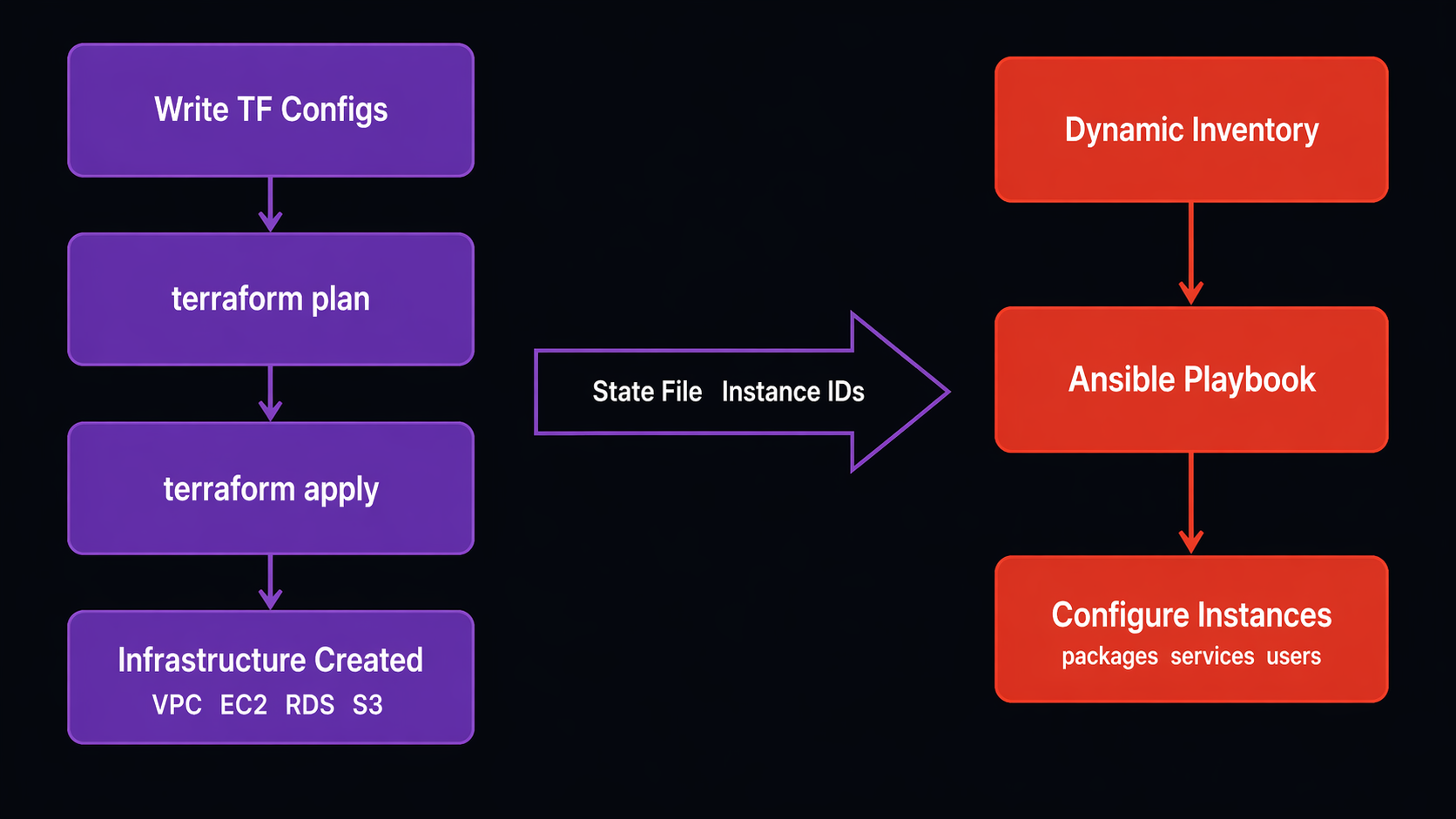
Terraform creates your instances. Ansible configures them. The bridge between them is usually one of two approaches:
Approach 1: Terraform writes an inventory file
# In your Terraform configuration
resource "local_file" "ansible_inventory" {
  content = templatefile("inventory.tftpl", {
    web_servers = aws_instance.web
    db_servers  = aws_instance.db
  })
  filename = "inventory/terraform_hosts.ini"
}
With a template like:
# inventory.tftpl
[web]
%{ for server in web_servers ~}
${server.public_ip} ansible_user=ec2-user
%{ endfor ~}

[database]
%{ for server in db_servers ~}
${server.private_ip} ansible_user=ec2-user
%{ endfor ~}
After terraform apply, you run:
ansible-playbook -i inventory/terraform_hosts.ini configure-web.yml
Approach 2: Skip the inventory file, use dynamic inventory with tags
Tag your Terraform resources with the same convention Ansible expects:
resource "aws_instance" "web" {
  # ... instance configuration ...

  tags = {
    Environment = "production"
    Role        = "web"
    ManagedBy   = "terraform"
  }
}
Then Ansible’s dynamic inventory plugin discovers them automatically via the role_web and env_production groups. No file handoff needed. This is the approach I prefer because it eliminates the stale inventory problem – if Terraform replaces an instance, the next Ansible run automatically targets the new one.
Both approaches work. The tag-based method scales better and is less fragile. But the file-based method is simpler to reason about when you are getting started.
For CI/CD integration of both tools together, check out our guide on building a GitLab CI Terraform IaC pipeline – the same pattern applies to running Ansible playbooks in your pipeline stages.
Ansible vs Terraform for AWS Tasks
Here is a head-to-head comparison for common AWS operations:
| Task | Ansible | Terraform | My Pick |
|---|---|---|---|
| Create VPC/subnets | Possible, awkward | Native, excellent | Terraform |
| Create EC2 instances | Good for temporary | Stateful, planned | Terraform |
| Configure EC2 instances | Native, excellent | Painful (user_data) | Ansible |
| Manage security groups | Possible | Natural fit | Terraform |
| Install packages | Native, excellent | Not designed for this | Ansible |
| Deploy applications | Native, excellent | Wrong tool entirely | Ansible |
| Manage IAM policies | Good | Good | Either (Terraform preferred) |
| Create RDS instances | Possible | Better state management | Terraform |
| Configure RDS parameters | Good module support | Limited | Ansible |
| DNS records (Route 53) | Good | Good | Terraform for initial, Ansible for updates |
| Create S3 buckets | Possible | Better lifecycle management | Terraform |
| Upload artifacts to S3 | Native (aws_s3 module) | Not designed for this | Ansible |
| Manage auto-scaling config | Possible | Better dependency tracking | Terraform |
| Rolling application deploy | Excellent (serial batches) | Not designed for this | Ansible |
| Patch OS packages | Native, excellent | Not designed for this | Ansible |
| Create Lambda functions | Good | Good | Terraform for infra, Ansible for code updates |
| Manage ECS services | Good for updates | Better for initial creation | Terraform + Ansible |
| State management | Stateless (unless you configure it) | Built-in state file | Context-dependent |
The pattern is clear: Terraform for creating resources, Ansible for configuring what runs on them. There is overlap in the middle – IAM, Route 53, Lambda – where either tool works. For those, consistency within your team matters more than which tool is slightly better.
Architecture Diagram: Ansible + AWS Workflow
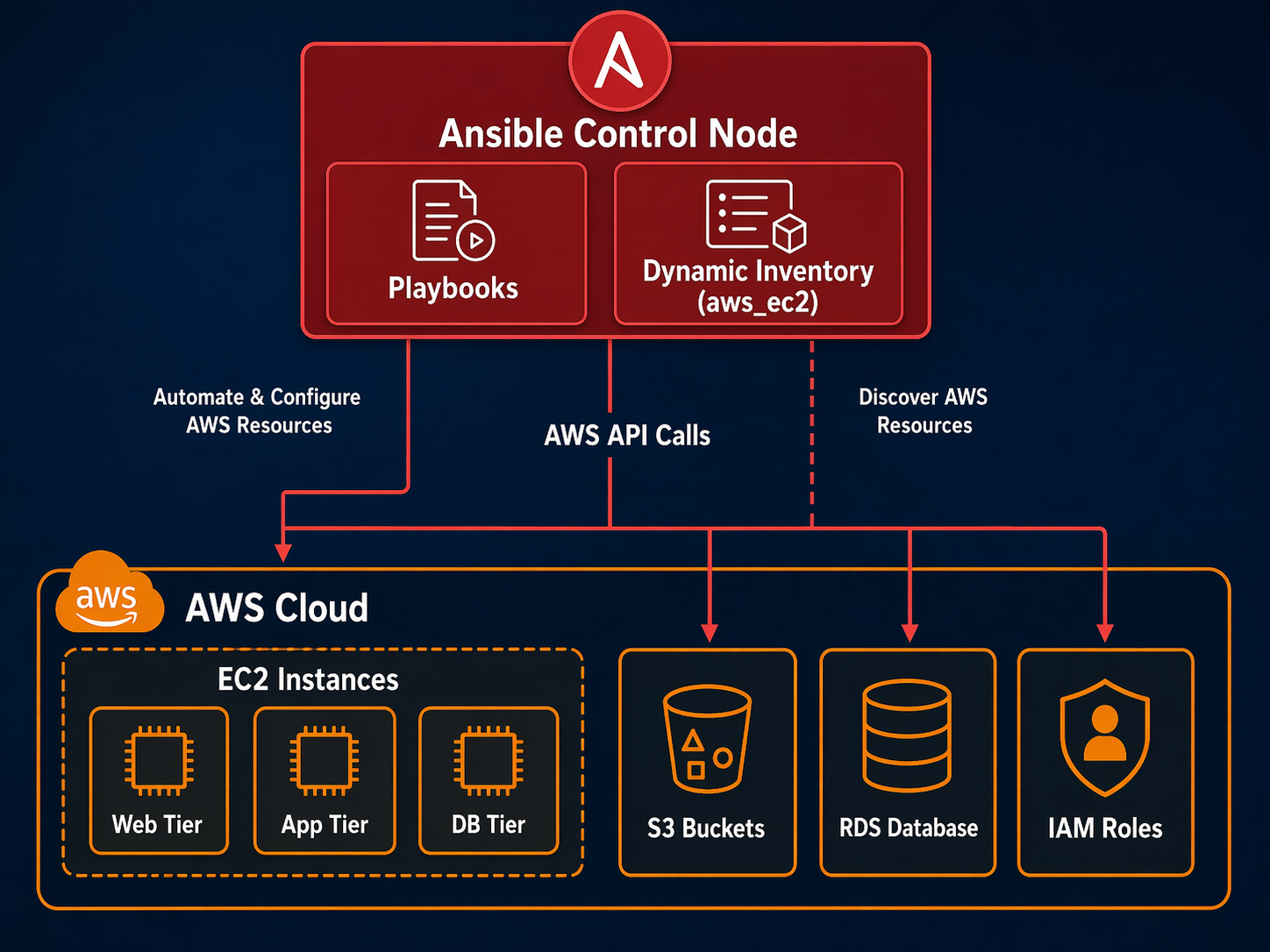
Here is how the pieces fit together in a typical production setup:
                    +-----------------------+
                    |   CI/CD Pipeline      |
                    |  (GitLab CI / GitHub) |
                    +-----------+-----------+
                                |
                    +-----------v-----------+
                    |   Ansible Control     |
                    |   Node (or runner)    |
                    +-----------+-----------+
                                |
              +-----------------+-----------------+
              |                 |                 |
    +---------v------+ +-------v--------+ +------v---------+
    | AWS API Calls  | | Dynamic        | | S3 Artifact    |
    | (provisioning) | | Inventory      | | Downloads      |
    +----------------+ | (aws_ec2)      | +----------------+
                       +-------+--------+
                               |
              +----------------+----------------+
              |                |                |
    +---------v-----+ +-------v------+ +-------v------+
    | EC2 Web Tier  | | EC2 Worker   | | RDS / Elasti |
    | (SSH config)  | | (SSH config) | | Cache (API)  |
    +---------------+ +--------------+ +--------------+

    Terraform creates:  VPC, Subnets, SGs, EC2, RDS, IAM, S3
    Ansible manages:    Packages, configs, apps, certs, patches
The control node can be your laptop for small setups, a dedicated EC2 instance with an IAM role for production, or an ephemeral container spun up by your CI/CD pipeline. The dynamic inventory plugin queries AWS on every playbook run, so your target list is always current.
A Real-World Playbook: Post-Terraform Bootstrap
This is the playbook I run after Terraform finishes provisioning. It handles everything Terraform leaves unfinished:
---
# post-terraform-bootstrap.yml
- name: Bootstrap all new EC2 instances
  hosts: all
  become: true
  gather_facts: true
  serial: ""

  pre_tasks:
    - name: Wait for cloud-init to finish
      ansible.builtin.wait_for:
        path: /var/lib/cloud/instance/boot-finished
        timeout: 600
        delay: 15

    - name: Update all packages (security patches)
      ansible.builtin.yum:
        name: "*"
        state: latest
        update_only: true
      when: ansible_os_family == "RedHat"
      register: patch_result

    - name: Reboot if kernel was updated
      ansible.builtin.reboot:
        reboot_timeout: 300
        post_reboot_delay: 60
      when: >
        patch_result is changed and
        'kernel' in patch_result.changes.updated | default([]) | join(' ')

  tasks:
    - name: Install common utilities
      ansible.builtin.yum:
        name:
          - amazon-cloudwatch-agent
          - amazon-ssm-agent
          - unzip
          - curl
          - jq
        state: present

    - name: Configure timezone
      ansible.builtin.timezone:
        name: UTC

    - name: Create deploy user
      ansible.builtin.user:
        name: deploy
        shell: /bin/bash
        groups: wheel
        append: true

    - name: Set up SSH authorized keys for deploy user
      ansible.posix.authorized_key:
        user: deploy
        key: ""
        state: present
      loop: ""
      when: admin_ssh_keys is defined

    - name: Configure CloudWatch agent from SSM
      amazon.aws.ssm_parameter:
        name: "/cloudwatch-agent/config"
      delegate_to: localhost
      register: cw_config

    - name: Write CloudWatch config
      ansible.builtin.copy:
        content: ""
        dest: /opt/aws/amazon-cloudwatch-agent/etc/amazon-cloudwatch-agent.json
        owner: root
        group: root
        mode: '0644'
      notify: restart cloudwatch

    - name: Harden SSH configuration
      ansible.builtin.lineinfile:
        path: /etc/ssh/sshd_config
        regexp: ""
        line: ""
        validate: "sshd -t -f %s"
      loop:
        - { regexp: "^#?PermitRootLogin", line: "PermitRootLogin no" }
        - { regexp: "^#?PasswordAuthentication", line: "PasswordAuthentication no" }
        - { regexp: "^#?PubkeyAuthentication", line: "PubkeyAuthentication yes" }
      notify: restart sshd

  handlers:
    - name: restart cloudwatch
      ansible.builtin.service:
        name: amazon-cloudwatch-agent
        state: restarted

    - name: restart sshd
      ansible.builtin.service:
        name: sshd
        state: restarted
This playbook handles the stuff Terraform cannot do well: waiting for cloud-init, applying OS patches, installing agents, creating users, and hardening SSH. The serial variable controls batch size, which I crank down to 2 or 3 for production runs and bump up to 20 for staging.
The SSH hardening task is a good example of why Ansible matters. If I tried doing this in Terraform with user_data, a typo in the sshd_config would lock me out of the instance permanently. Ansible’s validate: sshd -t -f %s parameter tests the config before writing it – if the new config fails validation, the task fails and the old config stays in place.
When to Use Ansible vs Terraform: A Decision Framework
After running both tools in production for years, here is the decision framework I use:
Use Terraform when:
- You are creating, modifying, or destroying AWS resources (VPCs, EC2, RDS, IAM, S3)
- You need to track state and plan changes before applying them
- Multiple engineers need to collaborate on infrastructure changes with code review
- You need dependency management between resources (this security group must exist before this instance)
- You are building something that will persist and evolve over time
Use Ansible when:
- You need to configure what runs inside instances (packages, services, configs)
- You need to deploy or update application code across a fleet
- You need to run the same configuration task on many servers simultaneously
- You need ad-hoc operational commands (patch, restart, check status)
- You need rolling updates with controlled batch sizes
- You are doing post-provisioning bootstrap work
Use both together when:
- Terraform builds the infrastructure, Ansible configures it (the most common pattern)
- You need a full pipeline from infrastructure creation through application deployment
- You want infrastructure changes reviewed via Terraform plan, then configuration applied via Ansible
If you are currently using only one tool for everything, start by splitting your workflow. Move infrastructure provisioning to Terraform if it is living in Ansible playbooks. Move configuration management to Ansible if it is buried in Terraform user_data and null_resource blocks. The separation of concerns pays off quickly.
For broader DevOps practices and how these tools fit into a complete automation strategy, the combination of Terraform for infrastructure and Ansible for configuration remains one of the most battle-tested approaches in 2026.
Sources
- Ansible AWS Collection Documentation – Official module reference for all AWS modules
- Ansible Dynamic Inventory for AWS – Configuration reference for the aws_ec2 inventory plugin
- AWS IAM Best Practices – Credential management patterns for automation tools
- Red Hat Ansible Automation Platform – Enterprise Ansible with supported AWS integrations
- Terraform AWS Provider – For comparison and integration patterns
Explore more like this

Cloud IoT Security: Zero Trust, Identity, and Signed Updates
On September 11, 2026, the Cyber Resilience Act’s incident-reporting rules start applying in the European Union. That is 22 days after this article’s publication date. A manufacturer that learns of...

Kill the Docker Hub Token: OIDC Trust for GitHub Actions
On July 31, 2026, Docker shipped OIDC connections for GitHub Actions to any organization on a Docker Team, Docker Business, or Docker Hardened Images subscription, plus organizations in the Docker-Sponsored...

Bedrock Web Search: Grounding an Agent Without Building a Scraper
On August 4, 2026, AWS made Web Search on Amazon Bedrock generally available, and the entire integration surface is one JSON object: {"type": "web_search"}. That is the whole change from...

Comments