
Automate Public TLS with AWS ACM ACME: cert-manager, Certbot, and IAM Guardrails

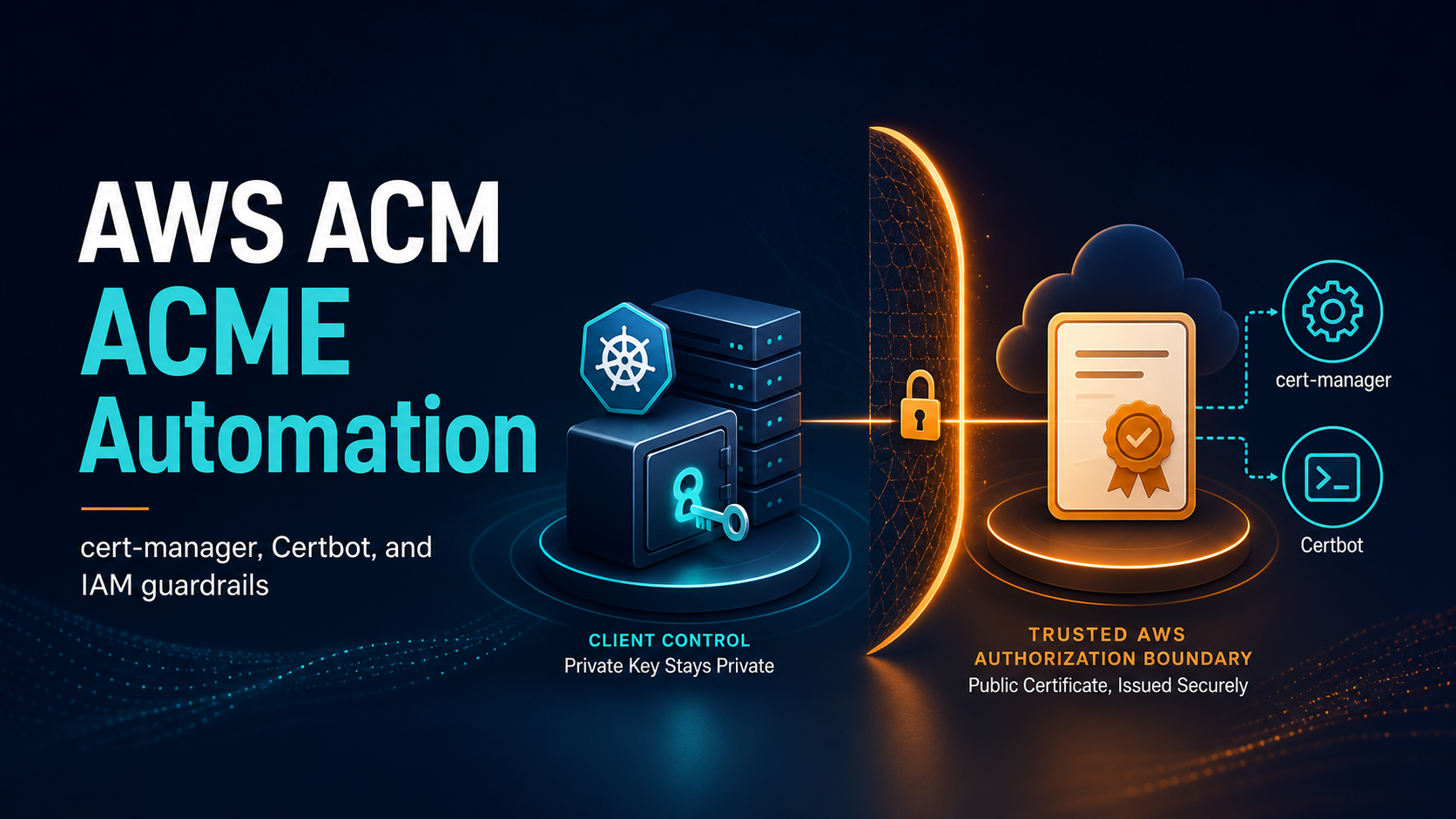
AWS Certificate Manager can now issue public certificates through the Automated Certificate Management Environment protocol. That sentence sounds like ACM became another generic ACME certificate authority. The implementation is more interesting: AWS provides an ACME v2 endpoint, but issuance is tied to a pre-approved ACM domain validation and an IAM role through External Account Binding. Your ACME client generates and retains the private key, installs the certificate, and performs renewal. ACM supplies the public certificate and records it under an ACM ARN.
This closes a long-standing gap for TLS endpoints that cannot consume ordinary ACM-managed certificates: Kubernetes ingress controllers, service meshes, on-premises proxies, EC2 web servers, and appliances. It does not replace normal ACM certificates on an Application Load Balancer, CloudFront distribution, API Gateway API, or another integrated AWS service. That boundary determines the right design.
This guide builds the control plane first, then shows a Certbot path and a Kubernetes cert-manager design. It also covers the operational work people tend to discover only after the first certificate succeeds: 45-day lifetimes, renewal ownership, IAM trust, private-key storage, observability, revocation, and safe cutover.
Choose ACM managed or ACM ACME deliberately
Both paths issue publicly trusted certificates from ACM, but they solve different delivery problems.
| Question | Standard ACM certificate | ACM-issued ACME certificate |
|---|---|---|
| Who creates and stores the private key? | ACM | Your ACME client and target system |
| Who renews and deploys it? | ACM for supported integrations | Your client and automation |
| Can it attach directly to ALB, CloudFront, or API Gateway? | Yes | No |
| Can it terminate TLS inside NGINX, Envoy, Kubernetes, or an appliance? | Only after using an exportable-certificate design where supported | Yes; this is the primary use case |
| How is domain control proven? | DNS or email validation | A persistent ACM domain validation is pre-approved before ACME issuance |
| What identity authorizes issuance? | IAM caller using ACM APIs | ACME account bound to an IAM role through EAB |
| Who owns renewal failure? | AWS for the integrated path | Your platform team |
AWS explicitly says certificates issued through the ACME service cannot be associated with ACM-integrated AWS services. If TLS ends on an ALB, request a regular ACM certificate and let the load balancer consume it. If TLS ends inside an EKS pod, an NGINX server, or a non-AWS appliance, ACME is a better fit.
That separation avoids an expensive anti-pattern: exporting, copying, and rotating a private key simply because an application is behind a load balancer. Terminate at the managed service when the security requirements allow it. Add end-to-end TLS with an internal certificate or the new public ACME path only when the upstream connection actually needs that identity.
Understand the two-plane design
ACM ACME has a control plane and a data plane. Treating them separately makes both IAM and troubleshooting clearer.
The control plane contains three durable objects:
- An ACM domain validation representing the DNS names an AWS account is allowed to request.
- An IAM role that the ACM ACME service can assume and that permits specific ACM certificate actions.
- External Account Binding credentials connecting an ACME account to that role.
The data plane is the normal ACME lifecycle. An ACME client creates an account, submits an order, generates a private key and certificate signing request, downloads the issued chain, installs it, and repeats the process before expiration. AWS replaces the normal live HTTP-01 or DNS-01 challenge with the pre-approved domain authorization from the control plane.
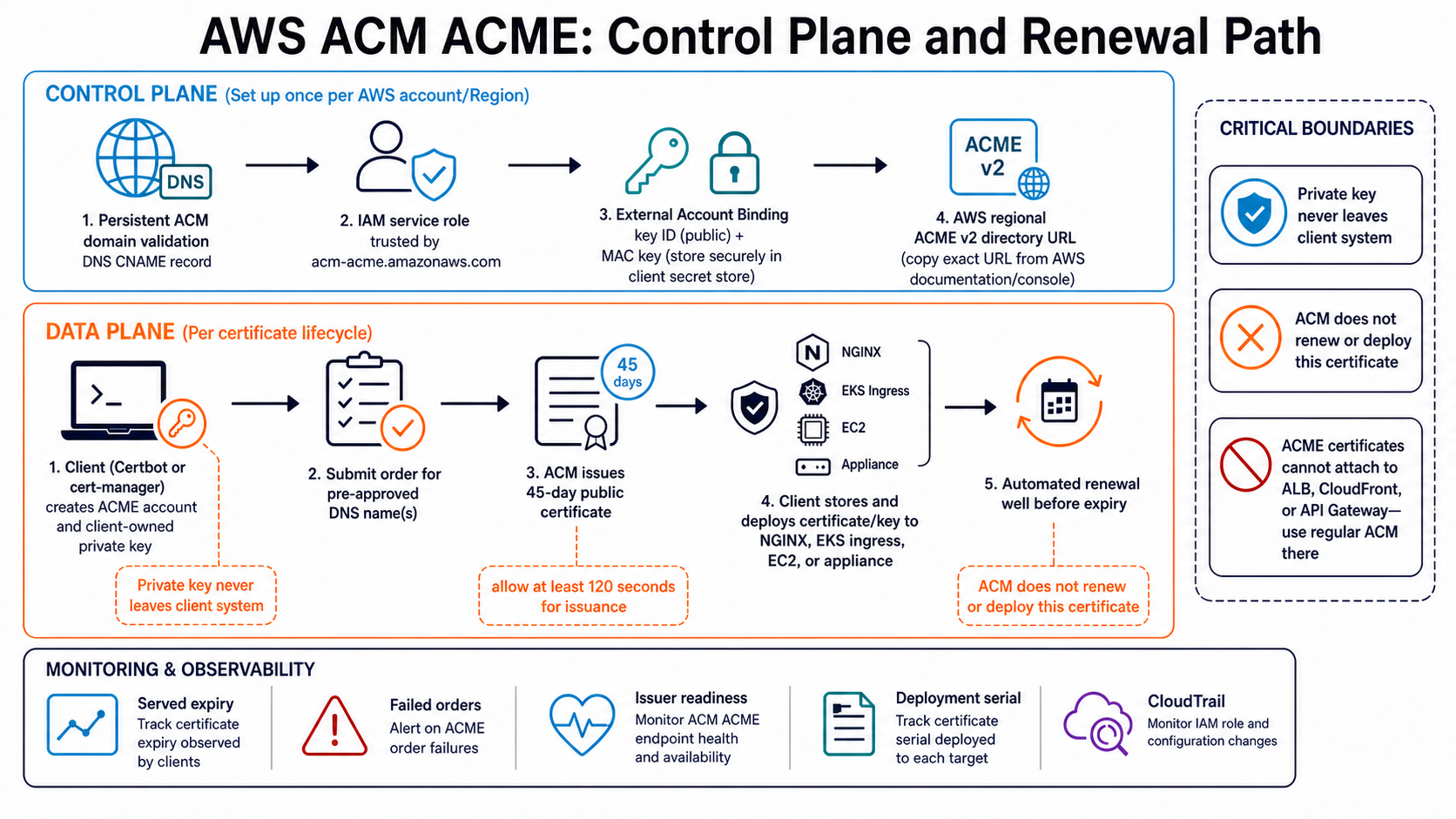
This distinction matters during an incident. A failed order can originate in DNS validation, the IAM role, EAB credentials, the ACME client, private-key storage, or the target deployment. “ACM is down” is rarely a useful first hypothesis.
Create the domain validation before the client
Start in ACM by creating an ACME domain validation for the names the client may request. ACM gives you one or more CNAME records. Publish them in the authoritative DNS zone and wait for the validation to become successful before configuring Certbot or cert-manager.
Design the validation scope as an authorization boundary. A validation for api.example.com should not automatically become permission to issue admin.example.com. A wildcard helps a platform team serve many application names, but it also increases the consequence of a compromised ACME account.
| Validation strategy | Advantage | Risk and operational cost |
|---|---|---|
| Exact host names | Smallest blast radius and easiest ownership mapping | More validations and changes as services appear |
| Bounded subdomain | Good platform-team balance for *.apps.example.com |
Compromise reaches every name under that boundary |
| Broad organizational wildcard | Low administrative friction | Weak separation between teams and environments |
| Separate production and non-production domains | Clear identity and policy boundary | Requires deliberate DNS naming and additional configuration |
Use separate AWS accounts, validations, roles, and EAB credentials for production and non-production. DNS is not merely setup plumbing here; the persistent validation is part of the authorization chain.
If the zone is in Route 53, manage the validation record with the same infrastructure-as-code review used for other security-sensitive DNS. If it is hosted elsewhere, ensure deletion and ownership-transfer procedures include the ACM validation records. A stale validation after a domain is sold is a security problem, not cosmetic debt.
Give the service a narrow IAM role
Create a role trusted by the ACM ACME service. AWS documentation requires the service principal acm-acme.amazonaws.com and permits sts:AssumeRole, sts:TagSession, and sts:SetSourceIdentity. Then give the role only the ACM actions required for issuance and revocation.
The trust relationship follows this shape:
{
  "Version": "2012-10-17",
  "Statement": [
    {
      "Effect": "Allow",
      "Principal": {
        "Service": "acm-acme.amazonaws.com"
      },
      "Action": [
        "sts:AssumeRole",
        "sts:TagSession",
        "sts:SetSourceIdentity"
      ]
    }
  ]
}
Attach a policy allowing the ACM ACME certificate operations described by the current issuance guide, including acm:RequestCertificate and acm:RevokeCertificate. Restrict resources and conditions wherever the documented action semantics permit. Do not attach AdministratorAccess to make the first order pass.
This role is assumed by the AWS service, not by the ACME client. That is an important review detail. The client authenticates to the ACME endpoint with its ACME account and EAB binding; you do not place AWS access keys inside the Kubernetes issuer or Certbot renewal configuration.
Use CloudTrail to monitor role and certificate activity. The CloudTrail deep dive explains how management and data events differ, while the IAM roles and policies guide provides a practical way to review trust relationships and permissions before rollout.
Treat EAB as a bootstrap secret
External Account Binding associates the ACME account key with the authorized ACM context. AWS provides a key identifier and a MAC key. Together with the AWS ACME directory URL, they are enough to bootstrap an account that can submit permitted orders.
Store the EAB MAC key like a credential:
- Deliver it through a secret manager or tightly controlled bootstrap process.
- Never commit it to Git, a Helm values file, a ticket, or a terminal transcript.
- Prevent it from appearing in CI logs and shell history.
- Give the consuming workload access only during issuer bootstrap when possible.
- Rotate or replace the binding when ownership changes or exposure is suspected.
In Kubernetes, a Secret is not automatically a secret boundary. Kubernetes stores Secret objects in the API and, unless configured otherwise, etcd may hold them unencrypted. Enable envelope encryption, restrict get, list, and watch, isolate the certificate controller namespace, and audit access. The EKS RBAC security guide provides a starting point, and the Secrets Manager rotation pattern is useful when designing the external source of truth.
Avoid reusing one EAB credential across unrelated clusters and appliances. Per-environment bindings improve attribution and reduce the work required after a suspected leak.
Prove the path with Certbot first
Certbot is a useful control test because it removes Kubernetes controllers, admission webhooks, ingress reconciliation, and Secret projection from the first issuance attempt. Use a current Certbot version with EAB support and the exact ACM ACME directory URL shown in the AWS console or current documentation.
The registration and issuance command has this general form:
sudo certbot certonly \
  --server "https://acme.<aws-region>.amazonaws.com/directory" \
  --eab-kid "$ACM_ACME_EAB_KEY_ID" \
  --eab-hmac-key "$ACM_ACME_EAB_MAC_KEY" \
  --email "[email protected]" \
  --agree-tos \
  --non-interactive \
  --preferred-challenges pre-approved \
  --domain "api.example.com"
Copy the endpoint and option names from the current AWS issuance documentation rather than guessing the regional hostname. AWS notes that issuance may take approximately two minutes, so configure the client or surrounding job with a timeout of at least 120 seconds. A one-minute CI timeout creates a misleading failure while ACM may still be processing the order.
After issuance, inspect all four outputs: leaf certificate, chain, full chain, and private key. Verify the subject alternative names, issuer, validity window, key algorithm, filesystem permissions, and chain order. Then test the intended server with openssl s_client from outside the trust boundary.
openssl x509 -in /etc/letsencrypt/live/api.example.com/cert.pem \
  -noout -subject -issuer -dates -ext subjectAltName

openssl s_client \
  -connect api.example.com:443 \
  -servername api.example.com \
  -showcerts </dev/null
Do not stop at “Certbot reported success.” The deployed endpoint may still serve an older certificate, omit an intermediate, or select the wrong virtual host without SNI.
Integrate cert-manager without assuming challenge behavior
cert-manager models an ACME account through an Issuer or ClusterIssuer, stores the account key in a Kubernetes Secret, creates orders and challenges, and writes the resulting TLS key pair to a target Secret. Its standard ACME configuration supports External Account Binding through a key ID and a Secret containing the MAC key.
A safe starting fragment looks like this:
apiVersion: cert-manager.io/v1
kind: ClusterIssuer
metadata:
  name: aws-acm-acme-production
spec:
  acme:
    email: [email protected]
    server: https://acme.<aws-region>.amazonaws.com/directory
    privateKeySecretRef:
      name: aws-acm-acme-account-key
    externalAccountBinding:
      keyID: REPLACE_WITH_EAB_KEY_ID
      keySecretRef:
        name: aws-acm-acme-eab
        key: secret
The AWS flow uses a PRE_APPROVED authorization instead of the public ACME HTTP-01 or DNS-01 challenge. cert-manager versions and its validation schema have historically expected solver configuration for ordinary ACME issuers. Validate the exact installed cert-manager release against AWS’s documented pre-approved flow before shipping this manifest. Do not add a fake HTTP or DNS solver merely to satisfy a schema without understanding which authorization the client will request.
Pin the Helm chart and application version, render the resources in CI, and test the issuer in an isolated cluster. The Helm charts on EKS guide covers version pinning and upgrade control.
Once the issuer reports ready, a certificate request remains familiar:
apiVersion: cert-manager.io/v1
kind: Certificate
metadata:
  name: api-example-com
  namespace: ingress-system
spec:
  secretName: api-example-com-tls
  issuerRef:
    name: aws-acm-acme-production
    kind: ClusterIssuer
  dnsNames:
    - api.example.com
  renewBefore: 240h
  privateKey:
    rotationPolicy: Always
ACM ACME certificates have a 45-day validity period at launch. A ten-day renewBefore value leaves a useful recovery window, but it is not universally correct. Model controller downtime, change freezes, rate limits, and deployment lag, then choose a window that gives operators multiple attempts without causing continuous renewals.
Prefer namespace-scoped Issuer resources when teams should not share issuance authority. A ClusterIssuer is convenient, but any namespace allowed to reference it may be able to request names within its approved scope unless admission policy adds another boundary. Use ValidatingAdmissionPolicy, Kyverno, or Gatekeeper to constrain allowed DNS suffixes by namespace.
Protect the private key and delivery path
The main security change from standard ACM is private-key ownership. With ACM ACME, the key is generated and stored on your system. AWS cannot deploy or rotate it for you.
For Kubernetes:
- Enable KMS envelope encryption for Secret data at rest.
- Limit Secret access to the ingress controller and a small operator group.
- Do not grant application service accounts broad namespace Secret reads.
- Use
rotationPolicy: Alwayswhen the application can safely reload a new key. - Verify that the ingress controller reloads the Secret without dropping connections.
- Prevent TLS Secrets from entering backup systems without encryption and access control.
- Avoid copying the same key pair across clusters; request independently instead.
For EC2 or on-premises servers, run the client under a dedicated account, make private-key files readable only by the TLS process, use an atomic deployment hook, and test reload before replacing the live files. A renewal that writes a new certificate but fails to reload NGINX is still a production failure.
Workload identity complements TLS identity but does not replace it. The SPIFFE and SPIRE on EKS guide is the better pattern for short-lived internal workload identities; public ACM ACME certificates are most useful where clients need a publicly trusted DNS identity.
Build renewal as an SLO
Renewal is a recurring production workload. Monitor it like one.
At minimum, alert on:
| Signal | Warning | Critical response |
|---|---|---|
| Certificate time to expiry | Renewal has not completed by the planned window | Page before the remaining time is shorter than repair lead time |
| Issuer or ACME account readiness | Repeated not-ready state | Check EAB, endpoint, account key, and controller logs |
| Failed Orders/Challenges | More than one transient retry | Correlate reason with validation and IAM events |
| Served certificate mismatch | Endpoint serial or expiry differs from Secret/files | Repair deployment or reload hook |
| IAM role or validation change | Any unplanned change | Investigate through CloudTrail and configuration history |
Monitor the certificate actually served over the network, not only the file or Secret that should be served. An external probe catches stale ingress replicas, misrouted DNS, and failed reloads.
Run a renewal rehearsal immediately after onboarding by temporarily using an isolated test certificate and a short, controlled renewal threshold. You are testing the full chain: order, key creation, Secret update, controller watch, proxy reload, and remote handshake.
Document who receives the page. “The platform owns certificates” is not enough if no team owns the cert-manager deployment, DNS validation, IAM role, and endpoint simultaneously.
Plan revocation and compromise response
ACM does not renew ACME certificates for you, and the ordinary ACM ExportCertificate, RenewCertificate, and RevokeCertificate APIs are not the management surface for this path. AWS directs clients to revoke through the same ACME endpoint that issued the certificate.
Maintain the ACME account material needed for revocation and test the client’s revocation command. If a private key is exposed:
- Stop or isolate the affected workload.
- Revoke the certificate through the ACM ACME endpoint.
- Generate a new private key; never reuse the exposed key.
- Issue and deploy a replacement certificate.
- Rotate EAB credentials if the binding may also be exposed.
- Investigate Secret, filesystem, CI log, artifact, and backup access.
- Verify the new serial from outside the environment.
Revocation propagation is not instant across every relying client. The strongest recovery is a new key, a new certificate, and removal of the compromised key everywhere it was copied.
Troubleshoot by layer
When issuance fails, inspect the layers in order:
- Domain validation: ACM status is successful and the requested SANs are inside the approved scope.
- IAM trust: the principal and three STS actions match AWS documentation.
- IAM permissions: the role allows required ACM actions and no SCP or permissions boundary blocks them.
- EAB: key ID and MAC key belong together, are encoded as the client expects, and have not been truncated.
- Endpoint and region: the ACME directory is the intended AWS region and environment.
- Client timing: the order is allowed at least 120 seconds and retries are bounded.
- Deployment: the correct Secret or files reach every TLS endpoint and the server reloads them.
- Network verification: SNI, DNS, certificate chain, SANs, and expiry are correct from the client side.
Avoid deleting and recreating everything after the first error. That destroys useful order and controller evidence. Capture ACME problem documents, cert-manager conditions, CloudTrail events, and validation status first.
A safe production rollout
Roll out one low-risk hostname before a wildcard or fleet migration.
- Confirm that the endpoint cannot use an ordinary ACM-integrated certificate more safely.
- Create a narrowly scoped domain validation and publish its CNAME records.
- Create the service trust role and review its permissions.
- Generate and deliver a dedicated EAB binding through a secret channel.
- Prove issuance and remote TLS verification with Certbot or another known-compatible client.
- Test the selected cert-manager release against the AWS pre-approved authorization flow.
- Deploy a single
Issueror constrainedClusterIssuerand certificate. - Measure propagation from certificate order to the externally served serial.
- Configure expiry, order-failure, and served-certificate alerts.
- Rehearse renewal, key rotation, rollback, and revocation.
- Expand by environment and domain boundary, not with one global issuer.
The feature is valuable because it makes ACM usable beyond AWS-managed TLS termination. It also moves key custody and renewal into your platform. Use the same discipline you would apply to any certificate authority integration: narrow authorization, short-lived credentials, observable renewal, rehearsed recovery, and a clear reason not to use the simpler managed path.
Sources
Explore more like this

Cloud IoT Security: Zero Trust, Identity, and Signed Updates
On September 11, 2026, the Cyber Resilience Act’s incident-reporting rules start applying in the European Union. That is 22 days after this article’s publication date. A manufacturer that learns of...

Kill the Docker Hub Token: OIDC Trust for GitHub Actions
On July 31, 2026, Docker shipped OIDC connections for GitHub Actions to any organization on a Docker Team, Docker Business, or Docker Hardened Images subscription, plus organizations in the Docker-Sponsored...

Bedrock Web Search: Grounding an Agent Without Building a Scraper
On August 4, 2026, AWS made Web Search on Amazon Bedrock generally available, and the entire integration surface is one JSON object: {"type": "web_search"}. That is the whole change from...

Comments