
Kill the Docker Hub Token: OIDC Trust for GitHub Actions

On July 31, 2026, Docker shipped OIDC connections for GitHub Actions to any organization on a Docker Team, Docker Business, or Docker Hardened Images subscription, plus organizations in the Docker-Sponsored Open Source program (Docker blog, July 31, 2026). That single sentence has a consequence most teams have been putting off for years: the DOCKERHUB_TOKEN secret sitting in your GitHub repository settings no longer needs to exist.
Go look at it right now. In most repos I’ve audited, that secret was created once, by somebody who has since changed teams, with Read/Write/Delete permissions, and no expiration date anyone remembers setting. It has pushed every production image you run. Nobody has rotated it. Nobody can tell you which of the 40 workflows in the org still reference it.
That’s the thing OIDC connections delete. Not reduce, not rotate faster. Delete.
What a leaked push token actually buys an attacker
Registry credentials get treated as second-class secrets, somewhere below cloud keys and database passwords in most threat models. That ranking is wrong, and it’s wrong in a specific way worth spelling out.
A Docker Hub personal access token with Write scope lets the holder push a tag. Pushing a tag is not “modifying a build artifact.” It’s modifying what every consumer of that tag will run on their next pull. If your Kubernetes deployments reference my-org/api:latest or even my-org/api:v2.4, and tags aren’t immutable, an attacker who pushes over that tag has just changed the code running in production without touching your repository, your CI logs, or your pull request history. Your git history stays clean. Your commit signatures stay valid. The malicious layer arrives through the registry.
The push is also quiet by design. Registry pushes generate the same audit events as legitimate CI pushes, from the same token, and often from an IP range that looks like a runner because the attacker is running it from a runner. The detection story is bad. You find out when someone diffs an image digest against the digest their pipeline recorded, which is exactly the discipline most teams skip.
Scale matters here. GitGuardian’s State of Secrets Sprawl 2026 counted roughly 28.65 million new hardcoded secrets pushed to public GitHub during 2025, a 34% year-over-year increase, and reported that AI-assisted code leaks credentials at about twice the baseline rate. The npm nx compromise of August 26, 2025 is the concrete version of that statistic: GitGuardian’s analysis counted 2,349 distinct stolen secrets across 1,079 repositories, with more than 1,100 of them still valid when they looked. A stolen credential that stays valid is the whole problem. Long-lived tokens are valid until a human notices.
I’ve written before about what an actual Docker Hub credential compromise looks like from the incident-response side, and the painful part is never the detection. It’s the blast radius question you can’t answer: which images were pushed with this token, over what window, and are any of them still deployed.
What Docker actually shipped
OIDC connections create a trust relationship between Docker and a third-party identity provider so no long-lived credential has to exist on either side. Per the Docker OIDC connections documentation, GitHub issues a JWT ID token for the workflow run, Docker verifies that token against GitHub’s public key registry, matches its claims against rulesets you configured, and returns a short-lived Docker access token scoped to the resources in the matching ruleset. Every token in that chain is issued per workflow run.
Four constraints are worth knowing before you plan anything:
GitHub is the only supported trusted third party today. The docs state this plainly. If your builds run on GitLab CI, Jenkins, CircleCI, or Buildkite, this launch does nothing for you, and Docker’s own announcement says other CI providers “will follow based on demand.”
Personal accounts aren’t supported. The username value in your workflow must be a Docker organization name.
The supported resource types are Docker Hub repositories and Docker Build Cloud. That’s the current list in the rulesets documentation.
Connection management sits with organization owners and editors, under Identity & auth in Docker Home. Developers can’t self-serve a connection, which is the correct default and also the thing that will bottleneck your rollout if you don’t plan for it.
How the handshake works
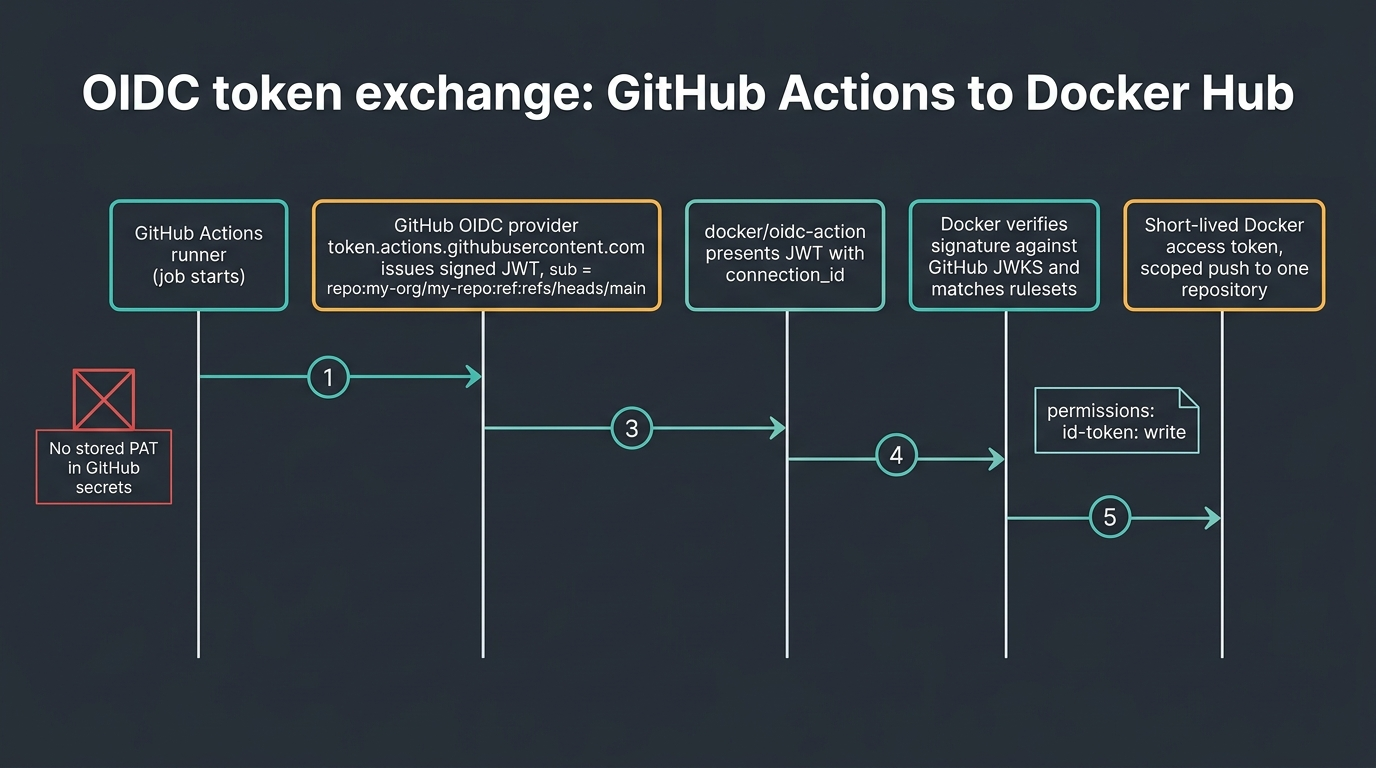
The mechanism is standard OpenID Connect, applied to a registry instead of a cloud control plane. Walk it step by step.
The job starts and requests an ID token from GitHub’s OIDC provider at token.actions.githubusercontent.com. This only works if the workflow grants id-token: write. Without that permission the request fails, and the failure message is unhelpful enough that it’s the first thing to check when a migration breaks.
GitHub signs a JWT describing the run. The interesting fields are iss (always https://token.actions.githubusercontent.com on github.com), aud (by default the URL of the repository owner), and sub, which encodes repository, ref, and environment into one string. GitHub’s OpenID Connect reference documents the full claim set, and the sub format is the part you’ll spend your configuration time on.
The action presents that JWT to Docker along with your connection ID. Docker verifies the signature against GitHub’s published keys, then evaluates the token’s claims against every ruleset attached to the connection.
On a match, Docker mints a short-lived access token limited to the resources and scopes defined by the matching ruleset, and docker/login-action uses it for docker login. Everything downstream is unchanged. docker build, docker push, and docker pull behave exactly as they did with a PAT.
The token cannot be replayed after it expires, and Docker’s announcement describes the expiry as minutes rather than hours. Docker does not publish an exact TTL value in the docs I could find, so treat the precise number as unverified and design as if it’s short.
The workflow YAML, verified against primary sources
This is where blog posts about new auth features go wrong, so I checked both documented paths against the source rather than reconstructing them from the announcement. There are two, and they are not interchangeable.
Path A: single step, docker/login-action v4.5.0 or later. The login-action README documents this form. The action performs the token exchange itself when DOCKERHUB_OIDC_CONNECTIONID is set in the step environment, you pass the Docker organization name as username, and you omit password entirely.
name: ci

on:
  push:
    branches: main

permissions:
  contents: read
  id-token: write

jobs:
  login:
    runs-on: ubuntu-latest
    steps:
      - name: Login to Docker Hub
        uses: docker/login-action@v4
        env:
          DOCKERHUB_OIDC_CONNECTIONID: $
        with:
          username: $
Note the use of vars rather than secrets for both values. Neither the connection ID nor the organization name is a credential, and putting them in vars is a small signal to the next engineer that there is nothing sensitive left in this workflow.
OIDC support landed in docker/login-action v4.5.0, released July 23, 2026. The latest tag as of this writing is v4.6.0 from July 29, 2026. If you pin by SHA (you should), pin to a commit at or after v4.5.0 or the OIDC path silently isn’t there.
Path B: two steps, docker/oidc-action plus docker/login-action. The Docker create-and-manage documentation shows this form, where a dedicated action performs the exchange and exposes the resulting token as a step output.
permissions:
  id-token: write

jobs:
  login:
    runs-on: ubuntu-latest
    steps:
      - name: OIDC connections
        id: docker_oidc
        uses: docker/oidc-action@v1
        with:
          connection_id: <YOUR_CONNECTION_ID>

      - name: Sign in to Docker Hub
        uses: docker/login-action@v4
        with:
          username: <YOUR_ORGANIZATION_NAME>
          password: $
Which one should you use? Path A, for almost everyone. Fewer moving parts, one action to pin and audit, and no exchanged token sitting in a step output where a careless echo can print it. Reach for Path B when you need the raw Docker token for something other than docker login, such as calling the Docker Hub API in the same job, or when you’re stuck on a login-action version older than v4.5.0 and can’t bump it yet.
A full build-and-push job with nothing in secrets looks like this:
name: build-and-push

on:
  push:
    branches: [main]

permissions:
  contents: read
  id-token: write

jobs:
  build:
    runs-on: ubuntu-latest
    steps:
      - uses: actions/checkout@v4

      - name: Set up Buildx
        uses: docker/setup-buildx-action@v3

      - name: Login to Docker Hub via OIDC
        uses: docker/login-action@v4
        env:
          DOCKERHUB_OIDC_CONNECTIONID: $
        with:
          username: $

      - name: Build and push
        uses: docker/build-push-action@v6
        with:
          context: .
          push: true
          tags: $/api:$
Tag by commit SHA, not by latest. That’s unrelated to OIDC and it’s still the single highest-value change most teams can make to their push workflows. Since you’re editing the workflow file anyway, it’s a cheap thing to fix in the same commit.
Scoping trust with subject claims
The id-token: write permission is a blunt instrument. It lets a workflow request an identity token, and it says nothing about what that identity may do. All the actual authorization lives on Docker’s side, in the rulesets you attach to the connection. GitHub’s own documentation is emphatic about this: you must define at least one condition, so untrusted repositories can’t request access tokens for your resources.
Docker evaluates the sub claim as the primary condition. The default format is repo:<org>/<repo>:ref:refs/heads/<branch>, and the exact shape changes with the trigger.
| Subject claim pattern | What it matches | Source |
|---|---|---|
repo:my-org/my-repo:ref:refs/heads/main |
Only the main branch of one repository |
Docker rulesets docs |
repo:my-org/my-repo:ref:refs/heads/release-* |
Every branch starting with release- |
Docker rulesets docs |
repo:my-org/my-repo:* |
Every branch of that repository | Docker blog, 2026-07-31 |
repo:my-org/* |
Any repository in the org (Docker labels this not recommended) | Docker blog, 2026-07-31 |
repo:octo-org/octo-repo:environment:Production |
Jobs that reference the Production environment |
GitHub OIDC reference |
repo:octo-org/octo-repo:pull_request |
Pull-request-triggered runs with no environment reference | GitHub OIDC reference |
repo:octo-org/octo-repo:ref:refs/tags/demo-tag |
A specific tag, when no environment is referenced | GitHub OIDC reference |
Two ordering rules in that table trip people up. The environment name replaces the ref in the sub claim when a job references an environment, and pull_request replaces the ref when the trigger is a pull request and no environment is referenced. So a ruleset pinned to ref:refs/heads/main will not match a job that also declares environment: Production on main. That’s not a bug; it’s the documented precedence, and it’s the single most common reason a first migration attempt fails.
Environments are the strongest lever available, and I’d argue they’re the reason to bother with this at all. Point your push ruleset at repo:my-org/my-repo:environment:release, put a required reviewer on the release environment in GitHub, and now a Docker Hub push requires a human approval that Docker enforces cryptographically. No PAT arrangement gets you that.
If you need finer conditions than sub offers, GitHub supports customizing the claim via REST API with include_claim_keys, including job_workflow_ref, which pins trust to one specific reusable workflow file at one ref. That’s the enterprise pattern: a central .github/workflows/publish.yml in a platform repo is the only thing on earth that can push, and every product team calls it. Docker’s docs describe sub matching against the value it receives, so verify the custom format matches your rulesets before you flip it on, since GitHub warns the provider will reject tokens if the condition isn’t synchronized first.
Rulesets, resources, and scopes
A ruleset carries four things: a label, one or more rules expressed as subject claim strings, the Docker resources it grants, and the scopes on those resources. You get between 1 and 5 rulesets per connection. When more than one ruleset matches an incoming token, Docker merges the resources from all matching rulesets and grants the union.
That merge behavior deserves a warning. If ruleset A grants read on all repositories to repo:my-org/* and ruleset B grants write on api to repo:my-org/api:ref:refs/heads/main, a push from main in api matches both and gets the union. Broad read rulesets are convenient and they quietly widen every narrow ruleset they overlap. Write your narrow ones first, and only add a broad one after you’ve confirmed you actually need it.
Five rulesets per connection is also a real constraint at scale. An org with 60 repositories cannot express per-repository write scope inside one connection. You’ll end up with multiple connections (one per product area, one per environment tier) and multiple connection IDs to distribute. Plan the connection topology before you create the first one, because reshuffling later means editing every workflow that references the old ID.
The immutable subject claim trap
Here’s the gotcha that will bite teams migrating in the second half of 2026. GitHub repositories created after July 15, 2026 use immutable identifiers in the default subject claim. The format changed from repo:octo-org/octo-repo:ref:refs/heads/main to repo:OWNER@OWNER-ID/REPO@REPO-ID:ref:refs/heads/BRANCH, for example repo:octocat@123456/my-repo@456789:ref:refs/heads/main (GitHub changelog, April 23, 2026).
The reason is sound. OIDC requires sub values to be locally unique and never reassigned, and the old name-based format could be recreated by a different owner after a namespace was recycled. The practical effect is that a ruleset written by copying the pattern from an older repository will not match a token from a newer one, and the string looks close enough to correct that you’ll stare at it for a while.
The fix is mechanical: after a failed exchange, open the connection in Docker Home and read the Failures tab, which shows the incoming sub value. Copy it. Build your ruleset from the value Docker actually received rather than from the value you expected. GitHub also notes that owner and repo IDs stay in the repo segment even when you customize claims with include_claim_keys, so you can’t strip them.
What this does not replace
Docker is explicit that OIDC connections don’t replace organization access tokens. OATs govern programmatic access at the organization level through membership; OIDC connections authenticate a workflow as if it were a user and then authorize it. Both still exist, and per the OAT documentation they remain the right tool for anything that isn’t a GitHub Actions run.
Existing PATs and OATs keep working. Nothing breaks on a schedule, which means nothing forces the migration, which means it won’t happen unless someone owns it. That’s the honest read on this launch. Local development still uses PATs. Non-GitHub CI still uses PATs or OATs. If half your builds run in GitLab, this halves the problem rather than solving it, and you’ll want short-lived credential patterns from elsewhere in the stack, which is where a Vault-based approach to dynamic secrets still earns its keep.
The numbers side by side
Everything in this table comes from Docker’s own documentation or the GitHub Actions reference. The differences that matter aren’t philosophical; they’re lifetimes and blast radius.
| Property | Docker Hub PAT | Organization access token (OAT) | OIDC connection |
|---|---|---|---|
| Lifetime | Expiration set at creation; not editable afterward | Expiration set at creation | Per workflow run, minutes (exact TTL not published) |
| Stored in GitHub secrets | Yes | Yes | No |
| Rotation work | Manual, per token, per repository | Manual, per token | None |
| Scope granularity | Read / Write / Delete, account-wide | Up to 50 repositories per token, pull or push each | Per ruleset: repositories plus scopes |
| Count limit | 5 auto-generated per account; fair-use throttling on excess | 10 per org (Team), 100 per org (Business); expired tokens still count | 1 to 5 rulesets per connection |
| Bound to a git ref or environment | No | No | Yes, via sub claim |
| Survives the creator leaving | No (personal) | Yes | Yes |
Works for local docker login |
Yes | Yes | No |
| Works outside GitHub Actions | Yes | Yes | No (GitHub only today) |
| Subscription required | Any, including free | Team or Business | Team, Business, DHI, or DSOS |
| Value if exfiltrated from a log | Full push access until revoked | Push access to its 50 repos until revoked | Expired minutes later |
Sources: Docker personal access tokens, Docker organization access tokens, Docker OIDC rulesets and subject claims, Docker blog announcement.
The last row is the whole argument. A PAT in a build log is an incident with an unbounded window. An OIDC-minted token in a build log is a curiosity.
Compared to the AWS ECR pattern
If you already deploy to AWS from GitHub Actions, you’ve built this before. The OIDC and IAM role setup for GitHub Actions deploying to AWS is the same trust exchange with different vocabulary, and the comparison is instructive because the two implementations made different tradeoffs.
| Aspect | Docker Hub OIDC connection | AWS ECR via OIDC |
|---|---|---|
| Trust object you configure | OIDC connection with 1 to 5 rulesets, in Docker Home | IAM OIDC identity provider plus IAM role trust policy |
| Where conditions live | Ruleset rules, subject claim strings | Condition block on sts:AssumeRoleWithWebIdentity, e.g. token.actions.githubusercontent.com:sub |
| Authorization language | Resources plus scopes per ruleset | Full IAM policy (ecr:PutImage, ecr:BatchGetImage, and so on) |
| Action that does the exchange | docker/login-action v4.5.0+ or docker/oidc-action@v1 |
aws-actions/configure-aws-credentials |
| Credential lifetime | Minutes, per run (exact TTL not published) | Role session default 1 hour, configurable 900 to 43,200 seconds via role-duration-seconds |
| Registry credential lifetime | Same as the issued Docker token | ECR authorization token valid 12 hours |
| Wildcard support in conditions | Yes, repo:my-org/*, release-* |
Yes, via StringLike conditions |
| Conditions expressible | Subject claim, primarily | Any claim in the token, plus IAM’s full condition language |
| Cost | Requires Docker Team or above | No additional cost for the OIDC provider or role |
| Configuration as code | Docker Home UI today | Terraform, CloudFormation, CDK |
Sources: Amazon ECR registry authentication, aws-actions/configure-aws-credentials README, Docker docs as cited above.
Two honest observations. AWS gives you a far richer policy language and full infrastructure-as-code support, and Docker’s version is simpler to get right in an afternoon. But AWS’s 12-hour ECR authorization token is a much longer window than Docker’s per-run token, which is a point in Docker’s favor that nobody expected. The gap that actually hurts is configuration as code. Rulesets live in a UI today, so your connection topology isn’t in git, isn’t reviewed, and isn’t reproducible across orgs. If you’re the sort of team that manages GitHub Actions pipelines through Terraform, that will grate.
Rolling this out across dozens of workflows
The mistake is treating this as a one-line workflow edit repeated 40 times. It’s a trust topology design followed by 40 edits, and getting the topology wrong means doing the 40 edits twice.
Here’s the order I’d run it, and I’d defend this order against the more common instinct of starting with production.
| Wave | Scope | Ruleset subject | Exit criteria |
|---|---|---|---|
| 0 | One throwaway repo, pull only | repo:my-org/oidc-canary:ref:refs/heads/main |
A green run, and a Failures tab you’ve deliberately triggered once |
| 1 | Internal tooling repos, pull only | repo:my-org/tools-*:* |
100% of pull-only workflows migrated, old PAT still present |
| 2 | Non-production push (dev and staging tags) | repo:my-org/api:ref:refs/heads/develop |
Two weeks of clean runs, digest comparison against previous builds |
| 3 | Production push, gated on a GitHub environment | repo:my-org/api:environment:release |
Required reviewer configured, one real release shipped |
| 4 | Credential removal | n/a | Every PAT deleted from GitHub secrets and revoked in Docker Home |
| 5 | Enforcement | Custom job_workflow_ref claim |
Only the central reusable workflow can push |
Wave 0 exists for one reason: to make the Failures tab familiar before you need it under pressure. Deliberately break a ruleset, watch what shows up, learn to read the sub value it reports. Ten minutes there saves an hour later.
Pull-only before push-only is the ordering people skip, and it’s the cheapest possible test of the whole chain. A failed pull migration means a slow build. A failed push migration means a broken release.
Wave 4 is the wave teams never finish, and it’s the only wave that delivers any security value. A workflow using OIDC while its old PAT still sits in repository secrets has strictly more attack surface than before, not less, because you’ve added a code path without removing one. Docker’s own migration checklist ends with “remove stored credentials” for exactly this reason. Put a date on it. Assign a name to it.
Wave 5 is optional and it’s where large orgs should end up. When only one reusable workflow at one ref can obtain a push token, individual repository compromise stops being sufficient to tamper with an image.
Rollback, honestly
You need a rollback story before wave 2, and the shape of it is unusual because there are two independent kill switches.
Docker’s side: deactivate the connection. A deactivated connection can’t issue access tokens, and docker/oidc-action fails at the token-exchange step until you activate it again. Deactivation is reversible. Deletion is not, and any workflow still referencing a deleted connection_id fails at exchange time, so treat delete as a decommissioning step rather than a troubleshooting one.
GitHub’s side: keep the old PAT in place through waves 1 through 3, and structure the login step so reverting is a one-line change rather than an archaeology project. Once you’re in wave 4, rollback means creating a fresh PAT, which is fine, because by then you have weeks of green runs.
What I would not do is build a conditional fallback that tries OIDC and silently drops to a PAT on failure. It sounds resilient. What it actually does is guarantee the PAT never gets removed, hide every ruleset misconfiguration behind a working build, and leave you exactly where you started with more YAML. Fail loudly.
Gotchas worth writing on the wall
id-token: write is not inherited the way you expect. Setting permissions at the job level replaces the workflow-level block for that job rather than merging, so a job that declares its own permissions without id-token: write cannot request a token even if the workflow granted it at the top. Then set contents: read alongside it, because declaring any permissions block drops every default permission you didn’t list.
Forked pull requests won’t work, and they shouldn’t. A pull_request run from a fork doesn’t get the same token treatment, which is deliberate. Don’t try to engineer around it; build on PR and push on merge.
Reusable workflows change the claim you need to match. If the push happens inside a called workflow, the sub still describes the caller’s repository and ref, while job_workflow_ref describes the called file. Match on the one you actually mean.
Matrix builds multiply exchanges, not credentials. A 12-cell matrix performs 12 exchanges and gets 12 tokens. That’s fine and it’s a nice property, since one leaked cell’s token doesn’t help with the other 11.
Version pinning cuts both ways. Pinning docker/login-action to a SHA is correct practice, and if that SHA predates v4.5.0 the OIDC path doesn’t exist in the code you pinned. Bump deliberately.
The Docker Hub username field wants the organization, not a person. It’s the single most common configuration error, because every prior example on the internet put a username there.
When to do this, and when to skip it
Do it now if you push images to Docker Hub from GitHub Actions and you’re already on Team, Business, DHI, or DSOS. The work is a connection, a ruleset, and a two-line workflow edit per repository, and it removes an entire class of credential from your organization. There’s no meaningful downside.
Do it now with higher urgency if your tags are mutable, if you can’t answer “which images did this token push,” or if the PAT in your secrets was created by someone who has left. Those are the three conditions that turn a leaked token from a rotation chore into an incident.
Skip it, for the moment, if your builds don’t run on GitHub Actions, since GitHub is the only supported provider today. Skip it if you’d have to upgrade from Docker Personal purely for this, unless you can justify the seats on other grounds; the security win is real but so is the invoice. And skip the enterprise-grade version (custom claims, job_workflow_ref pinning, per-product connections) until you’ve finished wave 4 on something small, because the failure modes get much harder to read once the trust graph has branches.
The broader pattern is the point. Registry credentials were the last long-lived secret many teams still kept in CI, after cloud keys moved to OIDC and database passwords moved to a secrets manager. Closing that gap is a bigger deal than the feature announcement suggests, and it composes with everything else in the supply chain story: SBOM and provenance generation in the pipeline, hardened base images with signed attestations, and runtime scanning that catches what the build missed. Authentication was the weakest link in that chain, and it just got shorter-lived by orders of magnitude. Teams still weighing platforms may also find the GitHub Actions and GitLab CI comparison useful here, since GitHub-only support is a genuine differentiator for the first time in a while.
Delete the token. That’s the deliverable. Everything before wave 4 is preparation, and a workflow that authenticates with OIDC while its old PAT still sits in repository secrets has not improved anything.
Sources
- Docker OIDC connections for GitHub Actions available for Docker Orgs, Docker blog, July 31, 2026
- OIDC connections overview, Docker docs
- Create and manage OIDC connections, Docker docs
- OIDC connections rulesets and subject claims, Docker docs
- docker/login-action README, Docker Hub section and v4.5.0 release notes
- OpenID Connect reference, GitHub Actions docs
- Immutable subject claims for GitHub Actions OIDC tokens, GitHub changelog, April 23, 2026
- Personal access tokens and Organization access tokens, Docker docs
- Private registry authentication, Amazon ECR User Guide
- aws-actions/configure-aws-credentials, GitHub
- State of Secrets Sprawl 2026, GitGuardian
Explore more like this

Cloud IoT Security: Zero Trust, Identity, and Signed Updates
On September 11, 2026, the Cyber Resilience Act’s incident-reporting rules start applying in the European Union. That is 22 days after this article’s publication date. A manufacturer that learns of...

Bedrock Web Search: Grounding an Agent Without Building a Scraper
On August 4, 2026, AWS made Web Search on Amazon Bedrock generally available, and the entire integration surface is one JSON object: {"type": "web_search"}. That is the whole change from...

ECR Now Allows 200 GB Image Layers. Your Model Weights Still Do Not Belong There
On August 3, 2026, AWS raised the maximum Amazon ECR image layer size to 200 GB for images pushed with docker push. The announcement names the driver in the second...

Comments