
HashiCorp Vault on AWS: Secrets Management Deep Dive for 2026

I once watched a team rotate a database password by editing a YAML file, pushing it to a private Git repo, and manually restarting three services. That worked right up until someone pushed the old password back during a hotfix, two services authenticated and one didn’t, and we spent four hours at 2 AM trying to figure out why half the application was throwing 500 errors. The password was in the git history. It was in Slack. It was in a Confluence page that someone had accidentally made public.
That was the week we started taking secrets management seriously. And after evaluating the options, we landed on HashiCorp Vault running on AWS. Not because it was the easiest choice, but because it was the one that actually solved the problem end-to-end: dynamic credentials, automatic rotation, audit logging, and a single source of truth that wasn’t a Git repository.
This post covers what I’ve learned running Vault on AWS in production: the deployment patterns that work, KMS auto-unseal so you’re not managing Shamir keys at 3 AM, the PKI secrets engine for internal TLS, dynamic AWS credentials that make static access keys unnecessary, and an honest comparison with AWS Secrets Manager so you can decide which one fits your situation.
Why Vault on AWS
Vault does two fundamental things. It stores secrets securely (static secrets like API keys and passwords) and it generates secrets on demand (dynamic secrets like temporary database credentials or short-lived AWS access keys). The second part is what makes Vault different from a glorified encrypted key-value store.
On AWS, Vault gets particularly interesting because you can combine it with native services. AWS KMS handles the auto-unseal process. IAM roles give Vault the permissions it needs without storing long-lived credentials. And if you’re running containers on ECS or EKS, Vault’s agent sidecar pattern injects secrets directly into your workloads without them ever touching disk in plaintext.
The question I get most often is: “Why not just use AWS Secrets Manager?” Fair question. I’ll get to a detailed comparison later, but the short answer is that Secrets Manager is excellent for AWS-native workloads with straightforward credential storage and rotation. Vault is what you reach for when you need dynamic secret generation, multi-cloud or hybrid environments, internal PKI, or fine-grained access policies across teams and applications.
Vault Architecture on AWS
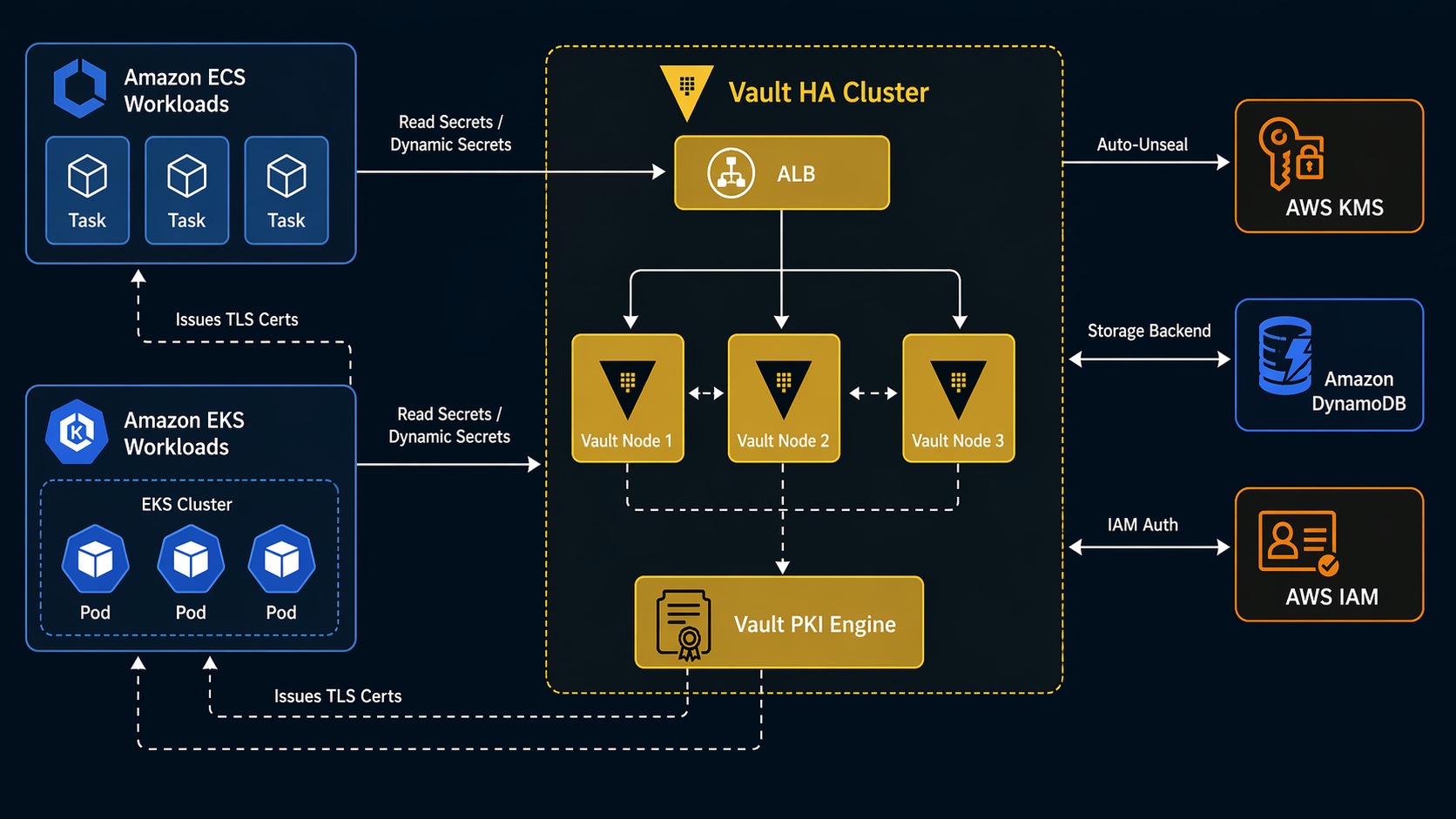
Here’s what a production Vault setup on AWS looks like:
                        ┌──────────────────────┐
                        │   AWS KMS (auto-unseal)│
                        └──────────┬───────────┘
                                   │ encrypt/decrypt
                        ┌──────────▼───────────┐
                        │   DynamoDB / S3       │
                        │   (storage backend)   │
                        └──────────┬───────────┘
                                   │
              ┌────────────────────┼────────────────────┐
              │                    │                    │
   ┌──────────▼─────────┐ ┌───────▼──────────┐ ┌───────▼──────────┐
   │  Vault Server      │ │  Vault Server    │ │  Vault Server    │
   │  (AZ-a)            │ │  (AZ-b)          │ │  (AZ-c)          │
   │  Leader / Standby  │ │  Standby         │ │  Standby         │
   └──────────┬─────────┘ └───────┬──────────┘ └───────┬──────────┘
              │                   │                    │
              └───────────────────┼────────────────────┘
                                  │
                        ┌─────────▼──────────┐
                        │  ALB / NLB         │
                        │  (TLS termination) │
                        └─────────┬──────────┘
                                  │
              ┌───────────────────┼────────────────────┐
              │                   │                    │
   ┌──────────▼─────┐  ┌─────────▼──────┐  ┌─────────▼──────┐
   │  ECS Service   │  │  EKS Pod       │  │  EC2 Instance  │
   │  + Vault Agent │  │  + Vault Agent │  │  + Vault Agent │
   │  (sidecar)     │  │  (sidecar)     │  │                │
   └────────────────┘  └────────────────┘  └────────────────┘
Three Vault servers across three AZs behind a load balancer. One is the active node, the other two are standbys. KMS handles auto-unseal so you don’t need to manually provide unseal keys when Vault restarts. DynamoDB (or S3 with a DynamoDB table for locking) stores the encrypted vault data. The Vault Agent sidecar runs alongside your application workloads, authenticating with Vault and retrieving secrets.
This architecture gives you HA, automated unseal, and a storage backend that scales without you managing Consul or another storage cluster.
KMS Auto-Unseal: No More 3 AM Phone Calls
Vault stores everything encrypted. When Vault starts, it’s sealed. The encryption keys needed to read the stored data aren’t in memory yet. Unsealing is the process of providing enough key shares to reconstruct the master key.
With Shamir’s Secret Sharing (the default), you need a quorum of operators to each provide their key share. That’s fine for a single-node dev server. In production, it means if Vault restarts at 2 AM, someone has to manually run vault operator unseal multiple times with different key shares. I’ve been that person. It gets old fast.
KMS auto-unseal solves this. Vault uses a KMS key to encrypt and decrypt the master key automatically. When Vault starts, it calls KMS to decrypt its master key, unseals itself, and starts serving requests. No human intervention required.
Here’s the Terraform configuration to set up auto-unseal:
resource "aws_kms_key" "vault_auto_unseal" {
  description             = "Vault auto-unseal key"
  deletion_window_in_days = 30
  enable_key_rotation     = true

  policy = jsonencode({
    Version = "2012-10-17"
    Statement = [
      {
        Sid       = "Enable IAM User Permissions"
        Effect    = "Allow"
        Principal = { AWS = "arn:aws:iam::${data.aws_caller_identity.current.account_id}:root" }
        Action    = "kms:*"
        Resource  = "*"
      },
      {
        Sid       = "Allow Vault to use the key"
        Effect    = "Allow"
        Principal = { AWS = aws_iam_role.vault_server.arn }
        Action = [
          "kms:Encrypt",
          "kms:Decrypt",
          "kms:DescribeKey",
          "kms:GenerateDataKey"
        ]
        Resource = "*"
      }
    ]
  })
}

resource "aws_kms_alias" "vault_auto_unseal" {
  name          = "alias/vault-auto-unseal"
  target_key_id = aws_kms_key.vault_auto_unseal.key_id
}
Then in Vault’s server configuration file:
storage "dynamodb" {
  region = "us-east-1"
  table  = "vault-storage"
}

seal "awskms" {
  region    = "us-east-1"
  kms_key_id = "alias/vault-auto-unseal"
}

listener "tcp" {
  address     = "0.0.0.0:8200"
  tls_cert_file = "/opt/vault/tls/tls.crt"
  tls_key_file  = "/opt/vault/tls/tls.key"
}

cluster_addr  = "https://:8201"
api_addr      = "https://vault.internal.example.com:8200"
ui            = true
With this configuration, Vault comes back online on its own after a restart. The KMS key is the only thing protecting auto-unseal, so treat it like any other critical key: enable rotation, restrict the key policy, and audit KMS API calls through CloudTrail.
Deploying Vault on ECS and EKS
There are three main ways to run Vault on AWS, and each has trade-offs. I’ve used all three.
| Pattern | Best For | HA Complexity | Cost | Notes |
|---|---|---|---|---|
| ECS Fargate | Teams already on ECS, simpler workloads | Medium | Low | No EC2 to manage, but persistent storage requires EFS. Use aws secrets engine for ECS task IAM roles. |
| EKS (Helm chart) | Kubernetes-native teams, complex workloads | Medium-High | Medium | Official Helm chart with Raft storage. Pod identity or IRSA for Vault-to-AWS auth. |
| EC2 (Auto Scaling Group) | Maximum control, compliance requirements | High | High | Full control over OS and runtime. Good for air-gapped or strict compliance environments. |
Vault on ECS with Fargate
Running Vault on ECS Fargate means you don’t manage the underlying EC2 instances. The trade-off is storage: Vault needs persistent storage for its data, and Fargate tasks are ephemeral. The solution is to use DynamoDB as the storage backend (which I recommend regardless of compute platform) and mount EFS for any file-based operations.
The ECS task definition for Vault:
{
  "family": "vault-server",
  "networkMode": "awsvpc",
  "requiresCompatibilities": ["FARGATE"],
  "cpu": "1024",
  "memory": "2048",
  "taskRoleArn": "arn:aws:iam::123456789012:role/vault-ecs-task",
  "executionRoleArn": "arn:aws:iam::123456789012:role/vault-ecs-execution",
  "containerDefinitions": [
    {
      "name": "vault",
      "image": "hashicorp/vault:1.18",
      "essential": true,
      "portMappings": [
        { "containerPort": 8200, "protocol": "tcp" },
        { "containerPort": 8201, "protocol": "tcp" }
      ],
      "environment": [
        { "name": "VAULT_ADDR", "value": "http://127.0.0.1:8200" },
        { "name": "VAULT_API_ADDR", "value": "https://vault.internal.example.com:8200" }
      ],
      "secrets": [
        {
          "name": "AWS_ACCESS_KEY_ID",
          "valueFrom": "arn:aws:secretsmanager:us-east-1:123456789012:secret:vault-aws-creds"
        }
      ],
      "mountPoints": [
        {
          "sourceVolume": "vault-config",
          "containerPath": "/vault/config"
        }
      ],
      "healthCheck": {
        "command": ["CMD-SHELL", "vault status"],
        "interval": 30,
        "timeout": 5,
        "retries": 3
      }
    }
  ],
  "volumes": [
    {
      "name": "vault-config",
      "efsVolumeConfiguration": {
        "fileSystemId": "fs-0123456789abcdef0",
        "rootDirectory": "/vault-config"
      }
    }
  ]
}
The IAM role attached to this task needs KMS permissions for auto-unseal and DynamoDB permissions for the storage backend:
{
  "Version": "2012-10-17",
  "Statement": [
    {
      "Effect": "Allow",
      "Action": [
        "kms:Encrypt",
        "kms:Decrypt",
        "kms:DescribeKey",
        "kms:GenerateDataKey"
      ],
      "Resource": "arn:aws:kms:us-east-1:123456789012:key/your-key-id"
    },
    {
      "Effect": "Allow",
      "Action": [
        "dynamodb:DescribeTable",
        "dynamodb:GetItem",
        "dynamodb:PutItem",
        "dynamodb:DeleteItem",
        "dynamodb:List",
        "dynamodb:Scan",
        "dynamodb:Query"
      ],
      "Resource": "arn:aws:dynamodb:us-east-1:123456789012:table/vault-storage"
    }
  ]
}
Vault on EKS with the Helm Chart
If you’re running EKS, the official HashiCorp Vault Helm chart is the way to go. It handles the StatefulSet, service accounts, and pod disruption budgets. With Raft integrated storage, you don’t even need DynamoDB; Vault stores data on the pod’s persistent volume.
helm repo add hashicorp https://helm.releases.hashicorp.com
helm repo update

helm install vault hashicorp/vault \
  --namespace vault \
  --create-namespace \
  --set server.standalone.enabled=false \
  --set server.ha.enabled=true \
  --set server.ha.replicas=3 \
  --set server.ha.raft.enabled=true \
  --set server.ha.raft.setNodeId=true \
  --set 'server.ha.config=\
listener "tcp" {\n  address = "0.0.0.0:8200"\n  cluster_address = "0.0.0.0:8201"\n  tls_disable = false\n  tls_cert_file = "/vault/tls/tls.crt"\n  tls_key_file = "/vault/tls/tls.key"\n}\n\nstorage "raft" {\n  path = "/vault/data"\n  retry_join {\n    leader_api_addr = "https://vault-0.vault-internal:8200"\n  }\n  retry_join {\n    leader_api_addr = "https://vault-1.vault-internal:8200"\n  }\n  retry_join {\n    leader_api_addr = "https://vault-2.vault-internal:8200"\n  }\n}\n\nseal "awskms" {\n  region = "us-east-1"\n  kms_key_id = "alias/vault-auto-unseal"\n}\n\nservice_registration "kubernetes" {}'
After the pods come up, initialize and unseal one node. With KMS auto-unseal, the remaining nodes unseal automatically:
kubectl exec -n vault vault-0 -- vault operator init \
  -recovery-shares=5 \
  -recovery-threshold=3

kubectl exec -n vault vault-0 -- vault operator unseal
# vault-1 and vault-2 auto-unseal via KMS
For EKS workloads that need to authenticate with Vault, use the Kubernetes auth method. Your application pods authenticate using their service account JWT token, and Vault maps that to a set of policies:
vault auth enable kubernetes

vault write auth/kubernetes/config \
  kubernetes_host="https://$(kubectl get svc kubernetes -o jsonpath='{.spec.clusterIP}'):443" \
  kubernetes_ca_cert=@/var/run/secrets/kubernetes.io/serviceaccount/ca.crt \
  token_reviewer_jwt="$(kubectl create token vault-reviewer --duration=8760h)"
Then define a role that maps a Kubernetes service account to Vault policies:
vault write auth/kubernetes/role/my-app \
  bound_service_account_names=my-app-sa \
  bound_service_account_namespaces=production \
  policies=my-app-policy \
  ttl=1h
Your application pod now authenticates to Vault using its native Kubernetes identity. No shared secrets, no credential files, no environment variables with tokens. This is the cleanest integration I’ve used.
The PKI Secrets Engine: Internal TLS Without the Pain
One of the most underrated features of Vault is the PKI secrets engine. It acts as a private certificate authority. Instead of managing self-signed certificates or paying for internal certs from a public CA, Vault generates them on demand with proper chain validation.
This is a big deal for microservices. Every service-to-service call should use mTLS, but rotating certificates manually across dozens of services is impractical. Vault handles it automatically.
Setting up a root CA and intermediate CA:
# Enable the PKI engine for the root CA
vault secrets enable pki
vault secrets tune -max-lease-ttl=87600h pki

# Generate the root CA
vault write -field=certificate pki/root/generate/internal \
  common_name="internal.example.com" \
  ttl=87600h > root_ca.crt

# Configure CA and CRL URLs
vault write pki/config/urls \
  issuing_certificates="https://vault.internal.example.com:8200/v1/pki/ca" \
  crl_distribution_points="https://vault.internal.example.com:8200/v1/pki/crl"

# Create an intermediate CA
vault secrets enable -path=pki_int pki
vault secrets tune -max-lease-ttl=43800h pki_int

vault write -format=json pki_int/intermediate/generate/internal \
  common_name="internal.example.com Intermediate Authority" \
  ttl=43800h | jq -r '.data.csr' > intermediate.csr

# Sign the intermediate CSR with the root CA
vault write -format=json pki/root/sign-intermediate \
  [email protected] \
  format=pem_bundle ttl=43800h | jq -r '.data.certificate' > intermediate.crt

# Set the signed certificate on the intermediate CA
vault write pki_int/intermediate/set-signed \
  [email protected]
Now create a role that issues certificates for your services:
vault write pki_int/roles/microservice \
  allowed_domains="internal.example.com" \
  allow_subdomains=true \
  max_ttl=72h \
  key_type=ec \
  key_bits=256 \
  server_flag=true \
  client_flag=true
Your services request certificates on startup. The certificate has a short TTL (72 hours in this example), so even if a certificate is compromised, it expires quickly. The Vault Agent handles renewal automatically.
vault write pki_int/issue/microservice \
  common_name="api.internal.example.com" \
  ttl=24h
This returns the certificate, private key, and issuing CA chain. Your service uses them for mTLS with other services. When the cert is about to expire, Vault Agent renews it. No manual rotation, no expired certificates taking down production.
Dynamic AWS Credentials
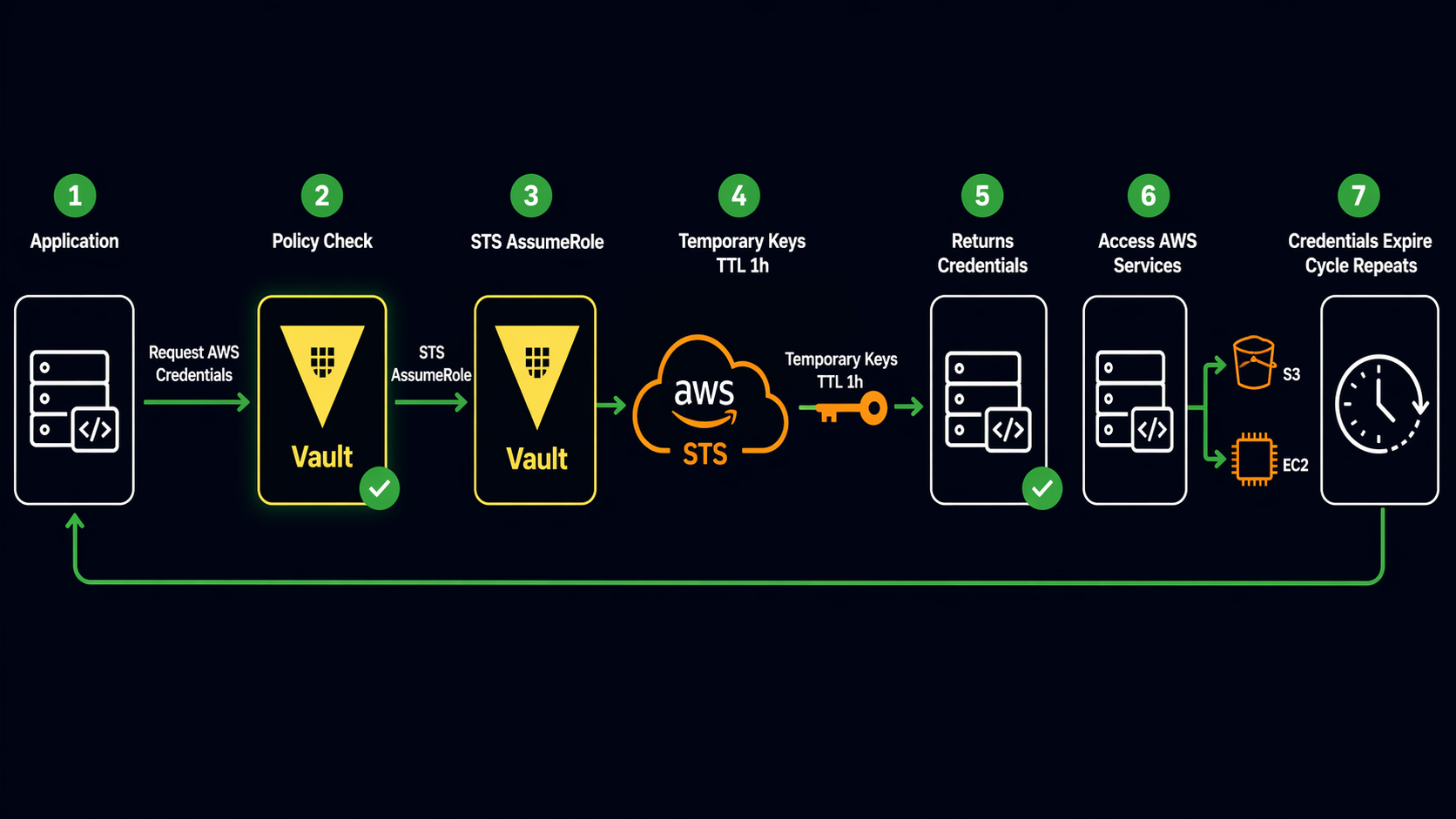
This is the feature that sold me on Vault. Instead of creating long-lived IAM access keys and storing them as static secrets, Vault generates temporary AWS credentials on demand with configurable TTLs and IAM policies.
Enable the AWS secrets engine and configure it:
vault secrets enable aws

vault write aws/config/root \
  access_key=AKIAIOSFODNN7EXAMPLE \
  secret_key=wJalrXUtnFEMI/K7MDENG/bPxRfiCYEXAMPLEKEY \
  region=us-east-1
The root credentials here are only used by Vault to generate dynamic credentials. Protect them carefully, and consider using IAM roles with narrow permissions if Vault runs on EC2 or ECS.
Create a role that generates credentials with specific IAM policies:
vault write aws/roles/s3-read-only \
  credential_type=iam_user \
  policy_document=-<<EOF
{
  "Version": "2012-10-17",
  "Statement": [
    {
      "Effect": "Allow",
      "Action": [
        "s3:GetObject",
        "s3:ListBucket"
      ],
      "Resource": [
        "arn:aws:s3:::my-bucket",
        "arn:aws:s3:::my-bucket/*"
      ]
    }
  ]
}
EOF
When an application needs S3 access, it requests credentials from Vault:
vault read aws/creds/s3-read-only
Vault returns temporary IAM credentials with a lease TTL. When the lease expires, Vault automatically revokes the IAM user. The credentials are short-lived and scoped to exactly what the application needs. If the application is compromised, the credentials expire on their own.
You can also use credential_type=assumed_role with STS for session-based credentials that don’t create IAM users at all:
vault write aws/roles/ec2-read-only \
  credential_type=assumed_role \
  role_arns=arn:aws:iam::123456789012:role/s3-read-only-role \
  default_sts_ttl=1h \
  max_sts_ttl=4h
This approach creates fewer IAM entities and works well when you have pre-defined IAM roles. The trade-off is that you need to manage the IAM roles separately.
Vault Secrets Engines Comparison
Vault’s power comes from its secrets engines. Each one handles a specific type of secret or credential. Here are the engines I use most on AWS:
| Secrets Engine | Type | Use Case | TTL Support | Rotation |
|---|---|---|---|---|
| KV (v2) | Static | API keys, passwords, config values | Yes (configurable) | Manual or custom webhook |
| AWS | Dynamic | Temporary IAM credentials (iam_user or assumed_role) | Yes (lease-based) | Automatic (Vault revokes on lease expiry) |
| PKI | Dynamic | TLS certificates for internal mTLS | Yes (cert expiry) | Automatic via Vault Agent |
| Database | Dynamic | Temporary database credentials (PostgreSQL, MySQL, etc.) | Yes (lease-based) | Automatic (Vault rotates on lease renewal) |
| Totp | Static | Time-based OTP codes for MFA | N/A | N/A |
| Transit | Encryption-as-a-service | Encrypt/decrypt data without exposing keys | N/A | Key rotation supported |
| SSH | Dynamic | Short-lived SSH keys or OTP for instance access | Yes (configurable) | Automatic |
The key insight: prefer dynamic secrets engines over static ones whenever possible. Dynamic credentials have built-in expiration. If someone steals a dynamic credential, it stops working after the lease TTL. Static credentials live until someone manually rotates them.
Vault vs AWS Secrets Manager
This comes up in every conversation about secrets on AWS. Both are good tools. They solve different problems.
| Feature | HashiCorp Vault | AWS Secrets Manager |
|---|---|---|
| Secret Types | Static + dynamic (DB creds, AWS creds, certs, SSH keys) | Static only (passwords, API keys, DB creds) |
| Credential Rotation | Dynamic generation with automatic revocation | Scheduled rotation via Lambda functions |
| Multi-Cloud | Yes (AWS, GCP, Azure, on-prem, any combination) | AWS only |
| PKI / Certificate Authority | Built-in PKI engine for internal mTLS | Not available |
| Encryption-as-a-Service | Transit engine for encrypt/decrypt without exposing keys | Not available |
| Access Control | Vault policies (path-based, fine-grained) | IAM policies + resource-based policies |
| Audit Logging | Built-in audit devices (file, syslog, socket) | CloudTrail integration |
| Pricing Model | Self-managed is free (HCP Vault has managed tiers) | $0.40/secret/month + API calls |
| Operational Overhead | You run and maintain it (or use HCP Vault) | Fully managed by AWS |
| Kubernetes Integration | Native auth method + agent sidecar injector | External Secrets Operator or CSI driver |
| Secret Caching | Agent caches locally, reduces API calls | No native caching |
| Compliance | SOC 2, HIPAA, PCI (self-managed requires your own audit) | SOC 2, HIPAA, PCI, FIPS 140-2 (AWS managed) |
My practical recommendation: if all your infrastructure runs on AWS, your secrets are mostly static (database passwords, API keys), and you want zero operational overhead, AWS Secrets Manager is the right call. It integrates natively with RDS rotation, ECS task definitions, and CloudFormation. You don’t have to run anything.
If you need dynamic credentials, internal PKI, encryption-as-a-service, or you operate across multiple clouds or on-premises, Vault is worth the operational investment. The dynamic credential generation alone saves enough security incident response time to justify the setup cost.
For teams running both, a hybrid pattern works well: Vault for dynamic secrets and PKI, Secrets Manager for static secrets consumed by AWS-native services like RDS and Lambda. There’s no rule that says you have to pick just one.
Production Checklist
Here’s what I make sure is in place before Vault goes near production:
Storage Backend: Use DynamoDB with point-in-time recovery enabled. Add a DynamoDB table for stg/lock for HA locking. Enable encryption at rest with a separate KMS key.
Auto-Unseal: Always configure KMS auto-unseal. Shamir’s Secret Sharing is fine for learning, but in production you want Vault to come back online without human intervention after a restart or AZ failover.
TLS Everywhere: Vault should listen on HTTPS, not HTTP. Terminate TLS at the load balancer with certificates from a trusted CA or ACM, and use the PKI engine for internal service-to-service communication.
Audit Logging: Enable at least two audit devices. I use a file audit device (logs to disk, shipped to CloudWatch by a sidecar) and a syslog audit device (sends to a centralized logging stack). Never run Vault in production without audit logging.
vault audit enable file file_path=/var/log/vault/audit.log
vault audit enable syslog tag="vault-audit" address="logs.internal.example.com:514"
Backup Strategy: DynamoDB point-in-time recovery handles the storage backend. But also take regular snapshots of Vault’s Raft data (if using Raft) or DynamoDB on-demand backups. Test your restore process at least quarterly. I didn’t test my first backup strategy. When I needed it, it didn’t work. That was a learning experience I wouldn’t wish on anyone.
IAM Least Privilege: The IAM role attached to Vault should only have permissions for the specific KMS key, DynamoDB table, and any AWS services the secrets engines need. Nothing more.
Namespace Isolation: If multiple teams use the same Vault cluster, use Vault namespaces (Enterprise) or separate secret engine paths with carefully scoped policies to prevent cross-team access.
Key Takeaways
Vault on AWS is not a weekend project. The initial setup takes planning: storage backend, auto-unseal, TLS certificates, IAM policies, and a deployment strategy that survives AZ failures. But once it’s running, it does things that no static secret store can match.
Dynamic credentials eliminate the problem of long-lived secrets. The PKI engine makes internal mTLS practical. KMS auto-unseal removes the operational burden of manual unsealing. And the audit logging gives you a complete record of who accessed what and when.
If you’re managing secrets in environment variables, config files, or Git repositories, stop. Pick either Vault or Secrets Manager based on your needs, and move everything into a proper secrets management system. Future you will be grateful, especially at 2 AM when something goes wrong and the secrets are at least one thing you don’t have to worry about.
Further Reading:
Explore more like this

Cloud IoT Security: Zero Trust, Identity, and Signed Updates
On September 11, 2026, the Cyber Resilience Act’s incident-reporting rules start applying in the European Union. That is 22 days after this article’s publication date. A manufacturer that learns of...

Kill the Docker Hub Token: OIDC Trust for GitHub Actions
On July 31, 2026, Docker shipped OIDC connections for GitHub Actions to any organization on a Docker Team, Docker Business, or Docker Hardened Images subscription, plus organizations in the Docker-Sponsored...

Bedrock Web Search: Grounding an Agent Without Building a Scraper
On August 4, 2026, AWS made Web Search on Amazon Bedrock generally available, and the entire integration surface is one JSON object: {"type": "web_search"}. That is the whole change from...

Comments