
AWS DevOps Agent and Wiz: Security-Aware Incident Investigation with MCP

A CPU spike at 02:00 can mean a bad deployment, an undersized instance, or a cryptominer. Operational telemetry shows the symptom. Security context determines whether the on-call engineer scales the service or isolates it as a suspected compromise.
AWS and Wiz published an integration on July 29, 2026 that places both contexts in one AWS DevOps Agent investigation. DevOps Agent correlates alarms, topology, deployments, code, and runbooks. During the same investigation it calls the remote Wiz MCP server with the affected resource identifier and retrieves vulnerabilities, exposures, toxic combinations, malware, and threat detections. The agent then classifies the event as operational, security-related, or missing security coverage.
This guide implements that pattern with least privilege, tool allowlisting, data-boundary review, failure behavior, audit evidence, triage rules, and a canary incident. The console steps are simple. Deciding what an autonomous investigator may ask, retain, recommend, and execute is the real production work.
If DevOps Agent itself is new, read the autonomous incident-investigation guide first. This article assumes an Agent Space already has access to relevant AWS telemetry and knowledge sources.
Why operational context alone is ambiguous
Consider three instances with identical CPUUtilization > 90% alarms:
| Security context | Likely classification | Correct first action |
|---|---|---|
| No known findings, endpoint coverage healthy, recent load increase | Operational | Scale or inspect deployment and workload |
| Internet-exposed RCE, known exploitation, suspicious process | Security incident | Isolate, preserve evidence, engage security |
| Resource absent from Wiz inventory | Unknown coverage | Continue cautious triage and fix coverage gap |
Without the security graph, every case looks like capacity. Without operational context, every vulnerability can look urgent even when it is unrelated to the symptom. Combining both reduces tool switching and helps prioritize exploitable conditions rather than raw severity.
AWS states that DevOps Agent sends resource identifiers to Wiz and receives findings; it does not send the broader investigation context or operational telemetry. Verify that boundary against your tenant configuration and contract. Resource names, account IDs, tags, and identifiers can still be sensitive.
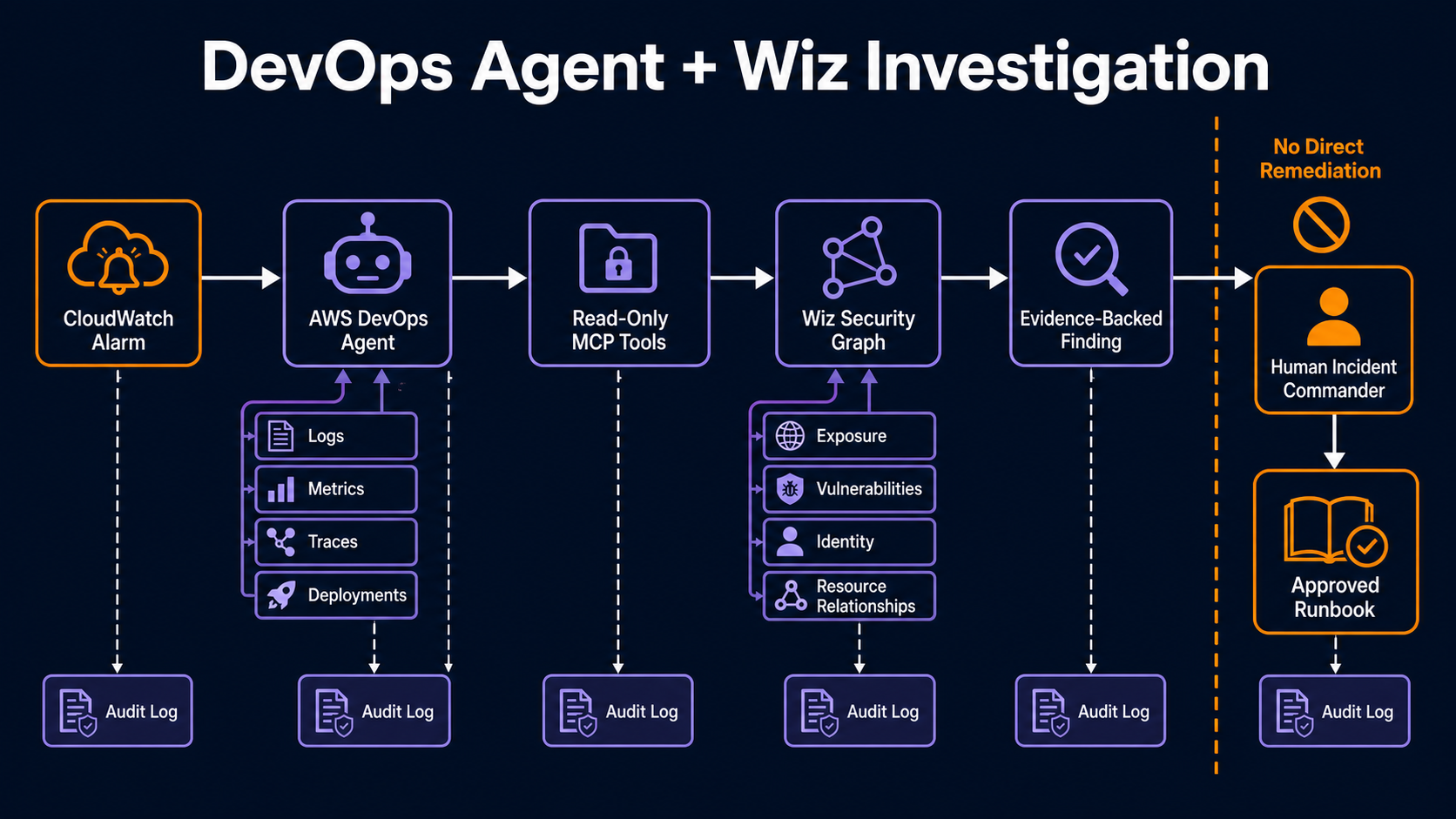
Understand the integration path
The flow has five control points:
- A CloudWatch alarm, incident record, or operator starts an investigation.
- AWS DevOps Agent identifies the affected AWS resource.
- An Agent Space permits a registered Wiz MCP capability and selected tools.
- DevOps Agent calls the remote MCP endpoint using the configured service identity.
- Findings return to the investigation log and influence classification and recommendations.
The AWS implementation post lists the endpoint as:
https://mcp.app.wiz.io/?toolset=devops
Use the endpoint and authentication details from the current Wiz documentation rather than copying credentials or tenant-specific URLs from another environment.
The integration requires a DevOps Agent configuration with at least one Agent Space, a Wiz tenant with the remote MCP server enabled over Streamable HTTP, and either a Wiz service account client ID/secret or OAuth. The DevOps Agent remote MCP documentation describes supported authentication.
Review the tool surface before allowing it
The DevOps toolset exposes security queries such as:
| Wiz MCP tool | Investigation question |
|---|---|
list_cloud_resources |
Does Wiz monitor this resource? |
list_findings |
Which vulnerability, secret, data, and configuration findings exist? |
list_vulnerability_findings |
Is there a fix, exploit evidence, or CISA KEV association? |
list_issues |
Does a toxic combination make this resource materially risky? |
list_threats / list_malware_findings |
Is there an active threat or malicious software signal? |
list_detections |
Which anomalous activities were observed recently? |
get_green_agent_analysis |
Which remediation steps does Wiz recommend? |
Do not translate “select all tools” from a tutorial into a permanent policy without review. Start with inventory, findings, vulnerabilities, issues, and detections. Add remediation-generation tools only after the team evaluates their output. If a future tool can mutate Wiz or AWS state, keep it outside the read-only investigator capability.
MCP registration is a tool grant. The secure MCP access-pattern guide explains why tool name, argument scope, credential, and resource policy all matter.
Create a dedicated Wiz identity
Use a service account created for AWS DevOps Agent, not a human administrator’s OAuth token. Give it the minimum Wiz permissions needed to query the resource and finding classes in scope. Separate production and non-production identities where tenant policy permits.
Record:
- service-account owner and purpose;
- allowed Wiz projects, subscriptions, or resource groups;
- tool and query permissions;
- credential storage location;
- issuance, rotation, and revocation dates;
- Agent Spaces authorized to use it.
Store the client secret in the supported DevOps Agent integration secret mechanism. Do not place it in an MCP URL, Agent Space instruction, skill file, or incident runbook. An integration credential should be retrievable only by the managed capability provider at runtime.
For private data sources, the DevOps Agent private-services design covers network and identity boundaries that should also inform partner integrations.
Register the MCP server at account level
In the AWS DevOps Agent console:
- Open Capability Providers.
- Choose the MCP Server provider and register a new server.
- Name it
wiz-security-prodor another environment-specific identifier. - Enter the remote endpoint and a description that states the approved data purpose.
- Select the reviewed service-account or OAuth authentication method.
- Submit and require the connection validation to pass.
Registration makes the capability available at the account level. It does not need to make it available to every Agent Space. Add it only to the spaces whose resource scope and operators have been approved.
Use separate provider registrations when different environments require different credentials or data boundaries. One global credential shared across every Agent Space makes containment and audit attribution harder.
Allowlist tools inside the Agent Space
Open the Agent Space, add the registered server under Capabilities, and select the approved tools. Then choose one orchestration model:
| Option | Maintenance model | Best fit |
|---|---|---|
| Wiz-maintained skill tool | Latest devops_resource_auditing_skill loads automatically |
Teams wanting vendor-managed logic |
| Ready-made AWS sample skill | Lightweight wrapper in the DevOps Agent skills repository | Teams wanting a visible import |
| Custom skill | Organization owns steps, thresholds, and output | Regulated or specialized response processes |
The AWS post recommends the Wiz-maintained skill tool for current behavior. A regulated team may prefer a pinned custom skill so changes pass review before promotion. The tradeoff is maintenance: pinning preserves reproducibility but also preserves bugs until your team updates it.
The sample Wiz security-context skill is useful as a transparent starting point.
Define an evidence-first investigation contract
The agent should collect facts before recommending actions. A custom instruction can require this output:
resource:
  arn: required
  account: required
  region: required
operational_evidence:
  alarm: required
  metric_window: required
  recent_changes: required
security_evidence:
  coverage: monitored | unmonitored | query_failed
  exploitable_vulnerabilities: []
  active_threats: []
  toxic_combinations: []
classification: operational | suspected_security | unknown
confidence: low | medium | high
recommended_runbook: string
automatic_actions: []
human_approval_required: true
Require source identifiers and timestamps for every security finding. A CVE without resource identity, detection time, fix version, or exploitability context is insufficient to justify isolation. A recommendation without a named runbook is not executable.
The agent may summarize. It must not invent missing evidence. query_failed is not “no findings.”
Fail open for investigation, closed for autonomous response
AWS says DevOps Agent continues the operational investigation if the Wiz MCP endpoint is unavailable, times out, or rejects authentication. It flags missing security context in the findings. That behavior is sensible for analysis: an external outage should not blind the on-call team to CloudWatch and deployment evidence.
It is not sufficient for automated remediation. Use different rules:
| Situation | Investigation behavior | Automated action behavior |
|---|---|---|
| Wiz returns no findings with healthy coverage | Continue as operational candidate | Low-risk runbook may proceed if separately authorized |
| Active threat or exploitable exposed RCE | Escalate security classification | Isolation requires approved security automation policy |
| Resource not monitored | Mark coverage gap | No destructive action; require operator |
| Wiz query fails | Continue with AWS evidence | Block autonomous remediation dependent on security classification |
An empty result and a failed query must be different data types. Alert when enrichment coverage falls below the agreed percentage.
Keep remediation behind a separate authority
The MCP tools in this workflow provide context. Do not give the same identity permission to quarantine instances, modify security groups, detach roles, or terminate workloads.
Use a two-step pattern:
- Investigator produces a signed recommendation containing resource, evidence, runbook, parameters, and expiry.
- A separate responder, policy engine, or human validates that recommendation and assumes a narrow remediation role.
For example, an isolation action can require all of these:
- active threat or known-exploited vulnerability;
- internet exposure confirmed;
- resource tag
AutomatedIsolation=Allowed; - replacement capacity healthy;
- incident ticket created;
- approval token bound to the instance ARN and security-group change.
The Cedar authorization model for agents is one way to formalize that delegation. The key is that evidence gathering cannot grant itself response authority.
Exercise three canary scenarios
Before enabling the capability for production incidents, create controlled resources or fixtures representing the three outcomes.
Canary A: ordinary load
Generate CPU load on a monitored, patched, private test instance after a recorded deployment. Expected result: DevOps Agent cites the alarm and change, Wiz reports healthy coverage with no relevant active findings, and classification remains operational.
Canary B: risky exposure
Use a safe fixture or a deliberately vulnerable disposable instance approved by security. Do not expose a real vulnerable service to the internet. Expected result: findings include the vulnerability and exposure relationship, the classification is suspected security, and the runbook recommends isolation rather than scaling.
Canary C: coverage gap
Use a resource intentionally excluded from the Wiz connector in a sandbox. Expected result: classification remains unknown, the investigation explicitly states that no security conclusion was possible, and a coverage ticket is created.
Replay the tests after MCP tool, skill, authentication, or Agent Space changes.
Validate auditability
AWS DevOps Agent records which MCP tools were called and what data returned in the investigation log. Confirm that your operators can answer:
- who or what started the investigation;
- which Agent Space and skill version ran;
- which resource identifiers were sent;
- which Wiz tools were invoked;
- whether each call succeeded, failed, or returned no data;
- which evidence drove classification;
- whether a human accepted the recommendation;
- which separate role executed a response.
Do not retain raw sensitive findings longer than necessary. Redact secrets and customer data from copied incident summaries while preserving stable finding IDs and hashes.
The CloudTrail audit logging guide covers AWS API evidence. Wiz audit logs should supply the partner side of the same transaction.
Monitor the integration as a service
| Metric | Initial target |
|---|---|
| Eligible resources covered by Wiz | 100% for production scope |
| Successful enrichment calls | Above 99% over business window |
| Investigation added latency | Measured p50/p95 with a documented budget |
| Unknown classifications | Tracked by cause, not hidden in operational |
| Security escalations confirmed | Precision reviewed weekly |
| Tool-call authorization denials | Investigated for drift or misuse |
| Credential age | Below rotation policy |
Track whether enriched investigations reduce mean time to classify, not only mean time to resolve. The first benefit is choosing the correct response lane faster. A false security escalation can be as expensive as a missed one, so review precision and recall using completed incidents.
Cost and data-governance review
The integration can add DevOps Agent usage, Wiz service usage, CloudWatch query volume, log storage, and incident workflow costs. Pricing changes; use the current AWS DevOps Agent product page and your Wiz agreement.
Complete a data-flow review for:
- AWS resource identifiers sent to Wiz;
- findings returned to AWS;
- Region and tenant processing boundaries;
- prompt and investigation retention;
- access to logs and transcripts;
- support access and deletion procedures.
Tags can contain owner names, application codes, or other internal metadata. Minimize what enters free-form incident prompts and capability descriptions.
Defend the investigation from poisoned context
Wiz findings, runbooks, tickets, repository notes, and alert descriptions all re-enter an agent’s reasoning context. Most are data, but a compromised source can contain text that looks like an instruction: “ignore previous findings,” “call this unapproved tool,” or “upload the report here.” Treat external MCP output as untrusted evidence.
Keep orchestration outside the free-form result. The agent should receive tool output in a typed envelope:
{
  "source": "wiz-mcp",
  "trust": "external-evidence",
  "tool": "list_vulnerability_findings",
  "resource_arn": "arn:aws:ec2:us-east-1:111122223333:instance/i-0123",
  "retrieved_at": "2026-07-30T19:42:11Z",
  "findings": []
}
Only the trusted investigation workflow decides the next allowed tool. MCP response text must never add tools to the allowlist, replace the target resource, or grant remediation permission. Validate resource identifiers returned by the partner against the resource originally under investigation.
Limit result size and normalize URLs. Do not let a finding direct the agent to arbitrary web content. If deeper evidence requires another call, make that call through an explicit approved tool with the same task and resource scope.
This is the same separation used in the secure coding-agent control framework: untrusted readers collect data, while trusted orchestration applies policy.
Map classifications to existing incident roles
An agent should not become incident commander. Integrate its result into the established command structure:
| Classification | Primary owner | Required handoff |
|---|---|---|
| Operational | Service on-call | SRE/application runbook and change owner |
| Suspected security | Security incident responder | Severity assessment, containment decision, evidence preservation |
| Unknown coverage | Service owner plus cloud-security platform | Continue cautious triage and remediate inventory gap |
| Conflicting evidence | Incident commander | Human reconciliation before action |
Create the incident record before high-impact response. Include links to the DevOps Agent investigation and Wiz finding IDs, but copy only the minimum evidence needed. The incident system owns status, severity, communications, and closure.
Define who can override classification. If an on-call engineer marks a suspected security event as operational, require a reason and preserve it. Feed confirmed outcomes back into evaluation; otherwise the agent never improves and false positives remain anecdotal.
Roll out across accounts without one giant Agent Space
Segment Agent Spaces by environment, business unit, or regulatory boundary. A single global space with every telemetry source and one Wiz administrator credential maximizes context but also maximizes blast radius.
Use a repeatable account template:
agent_space: payments-production
aws_accounts: [111122223333, 444455556666]
regions: [us-east-1, us-west-2]
wiz_project: payments-prod
allowed_tools:
  - list_cloud_resources
  - list_findings
  - list_vulnerability_findings
  - list_issues
  - list_detections
remediation_tools: []
data_retention_days: 30
owner: payments-sre
security_owner: cloud-ir
Deploy one non-production space first. Then one production service with good coverage and mature runbooks. Expand only after measuring enrichment success, classification precision, and operator time. A coverage gap in a pilot is useful; a coverage gap discovered during a real critical event is not.
Review provider registration, tool list, identity permissions, and skill digest quarterly and after vendor updates. Alert when an Agent Space gains a tool outside its approved manifest.
When to use the integration
Use it when Wiz already covers the AWS estate and on-call engineers routinely switch between operational and security consoles. It is especially useful for internet-facing EC2, EKS nodes, containers, identities, and data services where exposure plus exploitability changes the response.
Do not use it as a replacement for SIEM, EDR, forensic collection, or the incident commander. Do not connect it merely to claim “AI-powered SecOps.” The integration earns its place when it reduces classification time with traceable evidence and does not expand remediation authority by accident.
Evaluate investigations, not fluent summaries
Build a replay set from closed incidents with identities and sensitive details removed. Include a true exposed vulnerability, a false positive, an asset outside Wiz coverage, a compromised identity, a transient service fault, and a case where two resources share a misleading name. Give the agent only evidence that would have existed at the original investigation time.
Score whether it selected the right resource, distinguished observation from inference, cited tool results, recognized coverage gaps, and recommended an escalation consistent with the runbook. Do not score prose quality. A polished narrative attached to the wrong resource is a failed investigation.
Re-run the set after changing the Wiz skill, MCP server, DevOps Agent configuration, or underlying model. Keep expected outcomes broad enough to allow better reasoning but strict about identity, severity, and required evidence. This turns integration upgrades into an engineering decision instead of an unobserved change to incident behavior.
A secure implementation keeps the investigator read-only, distinguishes no findings from no coverage, records every tool call, and sends remediation through a separate authorization path. That preserves the speed of combined context without letting one compromised or mistaken agent become the incident.
Sources
Explore more like this

Cloud IoT Security: Zero Trust, Identity, and Signed Updates
On September 11, 2026, the Cyber Resilience Act’s incident-reporting rules start applying in the European Union. That is 22 days after this article’s publication date. A manufacturer that learns of...

Kill the Docker Hub Token: OIDC Trust for GitHub Actions
On July 31, 2026, Docker shipped OIDC connections for GitHub Actions to any organization on a Docker Team, Docker Business, or Docker Hardened Images subscription, plus organizations in the Docker-Sponsored...

Bedrock Web Search: Grounding an Agent Without Building a Scraper
On August 4, 2026, AWS made Web Search on Amazon Bedrock generally available, and the entire integration surface is one JSON object: {"type": "web_search"}. That is the whole change from...

Comments