
AWS Lambda MicroVMs: Build a Stateful AI Code Sandbox

AWS Lambda MicroVMs gives application developers direct control of a serverless Firecracker virtual machine. That sentence needs one qualification: this is not a long-running EC2 replacement, and it is not another spelling of a Lambda function. It is a separate Lambda capability for isolated, stateful sessions that can run for up to eight hours, expose a dedicated HTTPS endpoint, suspend while preserving memory and disk, and resume when work returns.
AWS announced the service on June 22, 2026. The timing makes sense. AI agents, browser sessions, coding environments, pull-request previews, and customer-supplied plugins all need more state and freedom than a function invocation. They also need a harder boundary than a shared-kernel container. A managed microVM sits in that gap.
This guide builds a real example: one Python execution sandbox per tenant session. The guest exposes a small FastAPI service, accepts Python source, runs it with guest-level resource limits, stores files in a session workspace, implements all image and runtime lifecycle hooks, and proves that a file survives suspend and resume. CloudFormation creates the supporting bucket, IAM roles, and log group. A deployment script builds the MicroVM image, while a Python client launches and tears down the session.
The complete project was tested locally with pytest, Ruff, shell syntax checks, a CloudFormation-aware linter, and the current Boto3 service model. I did not run the deployment against an AWS account while writing this guide, because it creates billable resources. The code is deployable, but the security decisions still belong to whoever owns the account.
The follow-up Lambda MicroVM code-agent implementation deep dive examines the public repository’s LangChain loop, bounded tools, nested bubblewrap sandbox, S3 persistence, Terraform IAM, deployment hashes, and server-controlled final test.
What Lambda MicroVMs changes
Lambda has used Firecracker underneath normal functions for years. In a function, however, AWS owns the lifecycle. You submit a handler, configure memory and timeouts, and Lambda decides when an execution environment appears or disappears. The environment is intentionally disposable. You should never design around its local disk surviving.
Lambda MicroVMs makes the microVM itself an application resource. You create a reusable image, call RunMicrovm, wait for a RUNNING state, issue an authentication token, and communicate with that one guest through its endpoint. You can suspend it, resume it, and terminate it explicitly. The runtime can listen for HTTP/1.1, HTTP/2, WebSockets, gRPC, or Server-Sent Events rather than conforming to the Lambda handler contract.
That difference is easiest to see side by side:
| Property | Lambda function | Lambda MicroVM | Fargate task | EC2 instance |
|---|---|---|---|---|
| Primary unit | Invocation | Stateful session | Container task | Virtual machine |
| Isolation exposed to customer | Managed execution environment | Dedicated Firecracker MicroVM | Task/container boundary | Full VM |
| Local state contract | Ephemeral, no survival promise | Memory and disk preserved across suspend/resume | Ephemeral unless externalized | Persistent volumes available |
| Maximum session | 15 minutes per invocation | 8 hours | No equivalent task limit | No service-imposed session limit |
| Ingress | Function URL/API integration | Dedicated token-protected HTTPS endpoint | Load balancer/public/VPC networking | Full networking control |
| Best fit | Stateless events and APIs | Sandboxes, agents, previews, interactive sessions | Services and batch containers | Maximum control or long duration |
If your only problem is function initialization, read the Lambda cold-start optimization guide. Lambda MicroVMs does not turn an ordinary function into a stateful machine. It introduces a different lifecycle and a different billing model.
The project and its trust boundary
Our API has four jobs:
- Receive the Lambda MicroVM lifecycle callbacks.
- Create a workspace that is unique to the session.
- Run Python code in a child process with time, memory, file, process, and output limits.
- Preserve workspace files when the platform suspends and restores the guest.
The child-process limits are not the security boundary. Python can import modules, make syscalls, and open outbound connections. RLIMIT_CPU can stop a loop, but it cannot make arbitrary hostile code safe on a shared host. The dedicated Firecracker MicroVM is the outer isolation boundary. The limits merely prevent one job from making its own guest useless too quickly.
That distinction is important. A production system should assign one tenant or one trust domain to a MicroVM. Do not multiplex unrelated customers in the same guest and call the subprocess boundary “multi-tenant isolation.” This follows the same principle discussed in the Docker Sandboxes microVM security model, but the Lambda version is managed in AWS and controlled through APIs.
The project tree is intentionally small:
lambda-microvm-sandbox/
├── app/
│   ├── app.py
│   ├── Dockerfile
│   └── requirements.txt
├── infra/
│   └── template.yaml
├── scripts/
│   ├── deploy.sh
│   └── demo.py
├── tests/
│   └── test_app.py
├── pyproject.toml
└── requirements-dev.txt
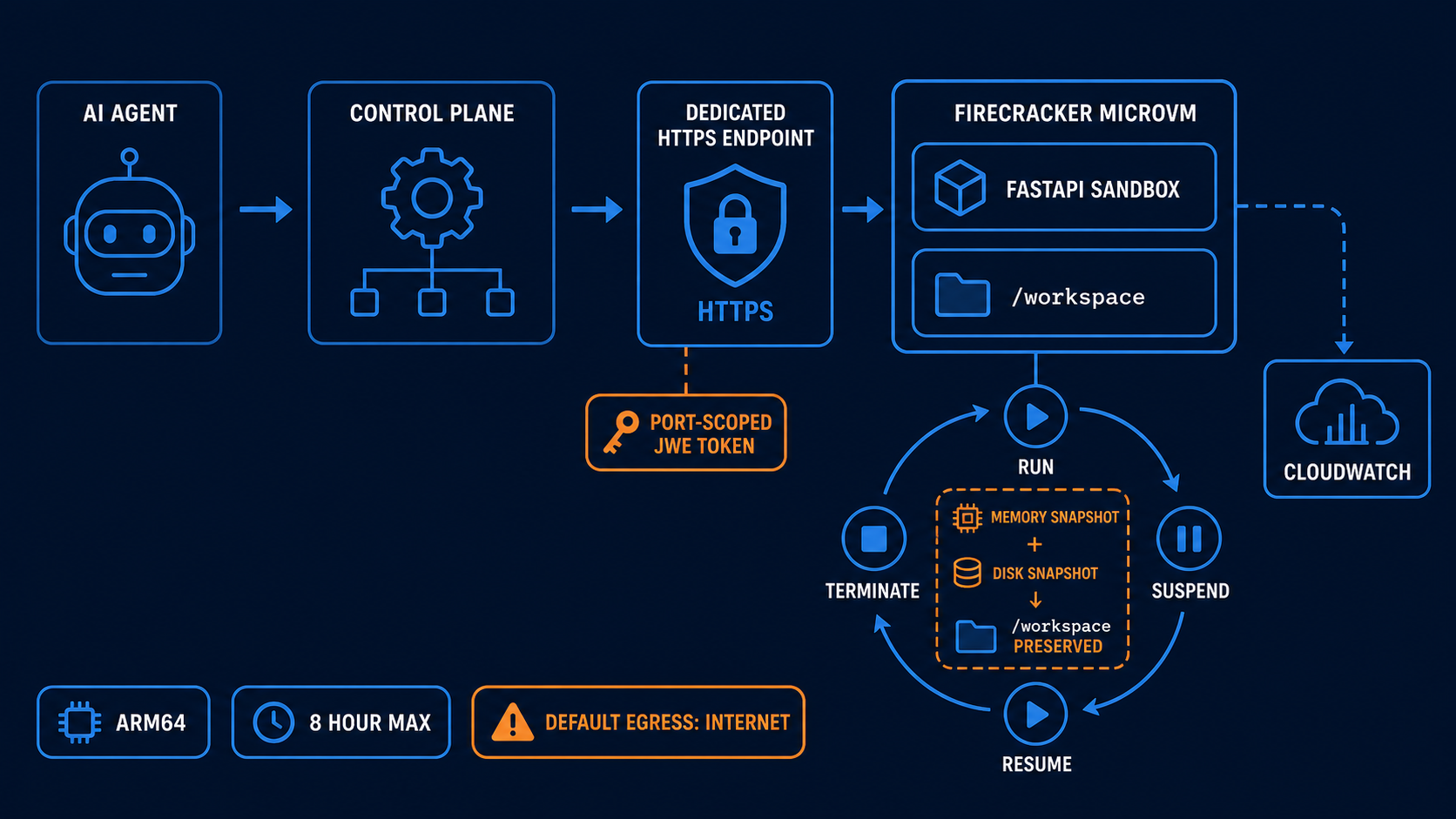
The control plane is deliberately outside the guest. It decides who may start a session, maps the tenant to an image and role, mints short-lived endpoint tokens, and guarantees termination. The guest receives only the session information it needs.
Build the sandbox API
The application creates /workspace/<session-id>, sanitizes the ID before using it as a path, and runs each job from that directory. Python’s isolated mode (-I) ignores user site packages and Python environment variables. shell=True is never used. Output is capped at 64 KiB, source is capped at 32 KiB, and a job can run for no more than ten seconds in this tutorial.
These are the core execution functions from app/app.py:
import os
import resource
import subprocess
import sys
import uuid
from pathlib import Path

from fastapi import HTTPException

MAX_OUTPUT_BYTES = 65_536

def apply_limits(timeout_seconds: int) -> None:
    resource.setrlimit(resource.RLIMIT_CPU,
                       (timeout_seconds, timeout_seconds + 1))
    resource.setrlimit(resource.RLIMIT_AS,
                       (256 * 1024**2, 256 * 1024**2))
    resource.setrlimit(resource.RLIMIT_FSIZE,
                       (4 * 1024**2, 4 * 1024**2))
    resource.setrlimit(resource.RLIMIT_NPROC, (32, 32))
    resource.setrlimit(resource.RLIMIT_NOFILE, (64, 64))

def run_python(code: str, timeout_seconds: int, workdir: Path) -> dict:
    script = workdir / f".job-{uuid.uuid4().hex}.py"
    script.write_text(code, encoding="utf-8")
    child_env = {
        "HOME": str(workdir),
        "PATH": "/usr/local/bin:/usr/bin:/bin",
        "PYTHONUNBUFFERED": "1",
    }

    try:
        completed = subprocess.run(
            [sys.executable, "-I", "-B", str(script)],
            cwd=workdir,
            env=child_env,
            capture_output=True,
            text=True,
            timeout=timeout_seconds + 1,
            check=False,
            preexec_fn=lambda: apply_limits(timeout_seconds),
        )
    except subprocess.TimeoutExpired as error:
        raise HTTPException(status_code=408,
                            detail="execution timed out") from error
    finally:
        script.unlink(missing_ok=True)

    stdout = completed.stdout.encode()[:MAX_OUTPUT_BYTES].decode(
        errors="replace"
    )
    stderr = completed.stderr.encode()[:MAX_OUTPUT_BYTES].decode(
        errors="replace"
    )
    return {
        "exit_code": completed.returncode,
        "stdout": stdout,
        "stderr": stderr,
    }
The actual file adds Pydantic input limits, output-truncation reporting, a file-list endpoint, health checks, and session-path handling. Keep the API narrow. Adding pip install, a generic shell endpoint, or a way to select arbitrary ports radically expands what the sandbox can do. It also expands the abuse cases, build time, dependency risk, and potential egress cost.
There is no AWS credential handling in the execution endpoint. If the launched MicroVM does not need AWS APIs, omit the execution role entirely. AWS explicitly supports that model. A guest with no execution role has no AWS permissions, which is a much better default for customer-supplied code than an oversized “sandbox role.”
Implement every lifecycle hook
Lambda MicroVMs supports two image-build hooks and four runtime hooks. The image hooks let AWS confirm that the service booted and validate the captured image. The runtime hooks let the application react to a newly launched, suspending, resumed, or terminating guest.
| Hook | Phase | What this project does |
|---|---|---|
/ready |
Image build | Creates the workspace root and reports readiness |
/validate |
Image build | Confirms the workspace is writable |
/run |
Runtime launch | Parses the per-session payload and creates the tenant directory |
/suspend |
Before snapshot | Calls sync() so dirty filesystem buffers are flushed |
/resume |
After restore | Records the resume time; the workspace is already present |
/terminate |
Before termination | Flushes remaining filesystem state |
The /run body includes the MicroVM ID and the runHookPayload supplied by the control plane. Use that payload for identifiers or references, not a bundle of credentials. AWS’s current documentation is inconsistent here: the narrative says 16 KiB, while the CLI/API constraint shown on the same page is 4,096 characters. Until those definitions converge, stay under the stricter 4 KiB limit.
@app.post("/run")
def on_run(body: dict[str, Any]) -> dict[str, str]:
    payload = parse_run_payload(body)
    runtime_state["microvm_id"] = body.get("microvmId")
    runtime_state["session_id"] = safe_session_id(
        str(payload.get("session_id",
                        body.get("microvmId", "anonymous")))
    )
    runtime_state["started_at"] = int(time.time())
    session_workspace()
    return {"status": "running",
            "session_id": runtime_state["session_id"]}

@app.post("/suspend")
def on_suspend(_: dict[str, Any] | None = None) -> dict[str, str]:
    os.sync()
    return {"status": "suspend-ready"}

@app.post("/resume")
def on_resume(_: dict[str, Any] | None = None) -> dict[str, str]:
    runtime_state["resumed_at"] = int(time.time())
    return {"status": "resumed"}

@app.post("/terminate")
def on_terminate(_: dict[str, Any] | None = None) -> dict[str, str]:
    os.sync()
    return {"status": "terminate-ready"}
Do not fetch a secret in /run and assume it remains fresh forever. A resumed guest restores memory as well as disk; a credential cached before suspension may be expired when the session wakes up. Store a reference in the run payload, retrieve short-lived credentials through the execution role when required, and refresh them after resume.
Package an image instead of a Lambda function
Lambda MicroVM image creation starts with an AWS-managed Amazon Linux 2023 MicroVM base. The build service runs the supplied Dockerfile inside that environment and captures a memory-and-disk snapshot. This is not the normal Lambda container-image workflow, even though the input looks familiar.
Our Dockerfile installs Python, copies two dependencies, creates a non-root user, and starts Uvicorn on port 8080:
FROM public.ecr.aws/amazonlinux/amazonlinux:2023

RUN dnf install -y python3.12 python3.12-pip shadow-utils \
    && dnf clean all \
    && useradd --create-home --uid 10001 sandbox

WORKDIR /opt/sandbox
COPY requirements.txt .
RUN python3.12 -m pip install --no-cache-dir -r requirements.txt

COPY app.py .
RUN mkdir -p /workspace \
    && chown -R sandbox:sandbox /workspace /opt/sandbox

USER sandbox
ENV WORKSPACE_ROOT=/workspace \
    PYTHONDONTWRITEBYTECODE=1 \
    PYTHONUNBUFFERED=1
EXPOSE 8080

CMD ["python3.12", "-m", "uvicorn", "app:app", "--host", "0.0.0.0",
     "--port", "8080", "--no-access-log"]
The image supports ARM64 only today. Do not smuggle architecture-specific x86 wheels or binaries into the ZIP and expect the managed build to repair them. Pin dependencies, inspect their transitive packages, and rebuild when the AWS-managed base image moves through AVAILABLE, DEPRECATED, EXPIRING, or EXPIRED. An image snapshot is a deployment artifact, not something to keep untouched forever.
The baseline resource setting determines both reserved capacity and peak burst capacity:
| Baseline memory / vCPU | Peak memory / vCPU | Disk |
|---|---|---|
| 0.5 GiB / 0.25 | 2 GiB / 1 | 8 GiB |
| 1 GiB / 0.5 | 4 GiB / 2 | 8 GiB |
| 2 GiB / 1 | 8 GiB / 4 | 8 GiB |
| 4 GiB / 2 | 16 GiB / 8 | 16 GiB |
| 8 GiB / 4 | 32 GiB / 16 | 32 GiB |
The tutorial selects 2 GiB and 1 vCPU. That leaves enough room for the API and a constrained Python child without starting at the top of the price curve. Measure your own guest. The peak is not a license to size every session for a best-case burst.
Create separate build and execution roles
The CloudFormation template creates an encrypted, private S3 bucket for the build ZIP, a 14-day CloudWatch log group, a build role, and a runtime role. Both trust policies include sts:AssumeRole and sts:TagSession, as required by the service. Their permissions are intentionally different.
The build role can read only objects in the artifact bucket and write to the tutorial log group. The execution role can write logs, but it cannot read the build artifact, list buckets, invoke models, or access a database. Add application permissions only when the guest has an explicit use case.
BuildRole:
  Type: AWS::IAM::Role
  Properties:
    AssumeRolePolicyDocument:
      Version: "2012-10-17"
      Statement:
        - Effect: Allow
          Principal:
            Service: lambda.amazonaws.com
          Action:
            - sts:AssumeRole
            - sts:TagSession
    Policies:
      - PolicyName: ReadBuildArtifactAndWriteLogs
        PolicyDocument:
          Version: "2012-10-17"
          Statement:
            - Effect: Allow
              Action: s3:GetObject
              Resource: !Sub ${ArtifactBucket.Arn}/*
            - Effect: Allow
              Action:
                - logs:CreateLogStream
                - logs:PutLogEvents
              Resource: !Sub ${SandboxLogGroup.Arn}:*

ExecutionRole:
  Type: AWS::IAM::Role
  Properties:
    AssumeRolePolicyDocument:
      Version: "2012-10-17"
      Statement:
        - Effect: Allow
          Principal:
            Service: lambda.amazonaws.com
          Action:
            - sts:AssumeRole
            - sts:TagSession
    Policies:
      - PolicyName: WriteRuntimeLogsOnly
        PolicyDocument:
          Version: "2012-10-17"
          Statement:
            - Effect: Allow
              Action:
                - logs:CreateLogStream
                - logs:PutLogEvents
              Resource: !Sub ${SandboxLogGroup.Arn}:*
Tag sessions and infrastructure with a tenant-safe internal identifier, environment, application, and owner. Do not put an email address, customer name, access token, or source code in an AWS tag. Tags propagate into billing and governance systems where secret handling is usually weaker.
Build and publish the MicroVM image
You need an AWS CLI version that contains the lambda-microvms command group. On the machine used for this article, AWS CLI 2.34.36 was too old; the official command reference is already in the 2.35/2.36 line. Test the command itself rather than comparing version strings:
aws lambda-microvms help >/dev/null
The deployment script runs CloudFormation, discovers the current managed base image, places Dockerfile, app.py, and requirements.txt at the ZIP root, uploads it to S3, and calls create-microvm-image:
BASE_IMAGE="$(aws lambda-microvms list-managed-microvm-images \
  --region "$REGION" --query 'items[0].imageArn' --output text)"

cp app/{Dockerfile,app.py,requirements.txt} "$BUILD_DIR/"
(cd "$BUILD_DIR" && zip -q sandbox.zip \
  Dockerfile app.py requirements.txt)
aws s3 cp "$BUILD_DIR/sandbox.zip" \
  "s3://$BUCKET/builds/sandbox.zip" --region "$REGION"

IMAGE_ARN="$(aws lambda-microvms create-microvm-image \
  --region "$REGION" \
  --name "$IMAGE_NAME" \
  --base-image-arn "$BASE_IMAGE" \
  --build-role-arn "$BUILD_ROLE" \
  --code-artifact "uri=s3://$BUCKET/builds/sandbox.zip" \
  --cpu-configurations architecture=ARM_64 \
  --resources minimumMemoryInMiB=2048 \
  --logging "cloudWatch={logGroup=$LOG_GROUP}" \
  --hooks 'port=8080,microvmHooks={run=ENABLED,runTimeoutInSeconds=30,resume=ENABLED,resumeTimeoutInSeconds=30,suspend=ENABLED,suspendTimeoutInSeconds=30,terminate=ENABLED,terminateTimeoutInSeconds=30},microvmImageHooks={ready=ENABLED,readyTimeoutInSeconds=300,validate=ENABLED,validateTimeoutInSeconds=300}' \
  --query imageArn --output text)"
Image creation is asynchronous. Poll get-microvm-image until the state is CREATED; stop and inspect the build logs on CREATE_FAILED. The default build logs live under /aws/lambda/microvms/<image-name>, or you can select a custom log group as the project does.
MicroVM image names are unique within an account. The complete script appends a UTC timestamp by default, which makes a tutorial rebuild predictable without silently changing an existing image. A production release process should use a stable logical name plus the service’s image-version workflow, retain the last known-good version, and delete obsolete test images after their retention and rollback window closes.
Avoid selecting items[0] blindly in a mature pipeline. Resolve an approved base-image ARN and version, record both in build metadata, and update them through a controlled rebuild. “Latest at deployment time” is convenient for a tutorial but weak for reproducibility.
Run, authenticate, suspend, and resume
RunMicrovm returns a MicroVM ID, state, and endpoint. The endpoint is dedicated to that guest; it is not a load-balanced service URL. The control plane creates a JWE authentication token scoped to port 8080 and sends it in X-aws-proxy-auth. Lambda removes its X-aws-proxy-* headers before forwarding the request, so the application does not parse or verify the platform token itself.
Here is the important part of scripts/demo.py:
client = boto3.client("lambda-microvms", region_name="us-east-1")

microvm = client.run_microvm(
    imageIdentifier=image_arn,
    executionRoleArn=execution_role_arn,
    runHookPayload=json.dumps({"session_id": "demo-tenant-42"}),
    maximumDurationInSeconds=3_600,
    idlePolicy={
        "maxIdleDurationSeconds": 300,
        "suspendedDurationSeconds": 1_800,
        "autoResumeEnabled": True,
    },
)
microvm_id = microvm["microvmId"]

running = wait_for(client, microvm_id, "RUNNING")
endpoint = running["endpoint"].rstrip("/")
token_response = client.create_microvm_auth_token(
    microvmIdentifier=microvm_id,
    expirationInMinutes=15,
    allowedPorts=[{"port": 8080}],
)
token = token_response["authToken"]["X-aws-proxy-auth"]

response = httpx.post(
    f"{endpoint}/execute",
    headers={"X-aws-proxy-auth": token},
    json={
        "code": "from pathlib import Path\n"
                "Path('memory.txt').write_text('state survived')"
    },
    timeout=30,
)
response.raise_for_status()

client.suspend_microvm(microvmIdentifier=microvm_id)
wait_for(client, microvm_id, "SUSPENDED")
client.resume_microvm(microvmIdentifier=microvm_id)
wait_for(client, microvm_id, "RUNNING")

# Mint a fresh capability after resume instead of hoarding a long-lived token.
token = create_port_8080_token(client, microvm_id)
result = execute(endpoint, token,
                 "from pathlib import Path\n"
                 "print(Path('memory.txt').read_text())")
print(result["stdout"])  # state survived
Put terminate_microvm in a finally block. Maximum duration is a backstop, not the normal cleanup path. If the client disconnects, a queue worker or reconciler should still discover and terminate abandoned sessions. This is the same operational lesson behind session cleanup in Bedrock AgentCore shell and storage: a stateful agent runtime needs ownership, expiry, and reconciliation.
Auto-resume is useful for an interactive client. The first request to a suspended endpoint is held while Lambda restores the guest. If the resume hook fails, the caller gets a 502. Clients should use bounded retries with jitter and distinguish a transient resume failure from an application error.
Network security is where easy demos become dangerous
Every endpoint request needs a platform token, and tokens can be limited to one port, a range, or all ports. Choose one port. Keep expiration short. Mint the token in a trusted control plane after checking tenant authorization. Never place it in query strings, logs, browser storage, or the run payload.
The less obvious risk is outbound traffic. Lambda MicroVMs has public internet egress by default. Omitting an egress connector does not create an offline sandbox. Untrusted Python could call a public endpoint, scan exposed services, download a second-stage payload, or leak data it found inside the guest.
For a production code runner, route egress through the supported VPC egress connector and use security groups, network ACLs, DNS controls, and an application proxy to enforce an allowlist. Network controls should deny link-local metadata targets, private address ranges not explicitly required, and arbitrary internet destinations. If the job genuinely needs package downloads, resolve and mirror approved dependencies rather than granting open internet access.
The optional shell ingress capability deserves the same skepticism. It requires a separate shell token and SHELL_INGRESS connector. That can be valuable during development, but enabling an interactive shell in production adds another administrative path into the guest. Prefer application diagnostics and immutable rebuilds. If you must enable it, gate it behind a break-glass workflow with a short expiry and an audit trail.
You can carry this threat model into broader agent systems with the Kubernetes Agent Sandbox guide and the aws-bench isolation guide. The platform changes; the rules do not: one trust domain per sandbox, narrow credentials, restricted network paths, explicit expiry, and verifiable cleanup.
Test locally before paying for an image build
The local tests call the lifecycle endpoint, execute a simple expression, write and read a workspace file across requests, verify session path sanitization, and confirm that an infinite loop is stopped. They do not prove Firecracker isolation. They prove the application contract you will freeze into the image.
python3 -m venv .venv
.venv/bin/pip install \
  -r app/requirements.txt \
  -r requirements-dev.txt

.venv/bin/pytest -q
.venv/bin/ruff check app tests scripts
.venv/bin/ruff format --check app tests scripts
cfn-lint infra/template.yaml
bash -n scripts/deploy.sh
The project passes four tests. Add integration tests in a non-production AWS account for the platform behaviors a local process cannot reproduce:
- build from a pinned base image and wait for
CREATED - launch at each supported size used by the product
- reject a token minted for the wrong port
- suspend after a disk and memory change, then verify both after resume
- exercise auto-resume and its 502 failure path
- confirm the execution role cannot call APIs outside its allowlist
- confirm egress deny rules block unapproved destinations
- kill the client mid-session and verify the reconciler terminates the orphan
CloudTrail records management events, but MicroVM data events such as run, suspend, resume, terminate, and token creation need explicit configuration. Turn them on for the account or data-event selector that owns the service. Logs tell you what the guest printed; CloudTrail tells you who changed its lifecycle.
Practice the failures, not only the demo
The happy path hides the hardest control-plane work. An image can be healthy while one guest fails its /run hook because the tenant payload is malformed. A guest can enter RUNNING and still return an application error. A suspend request can arrive while a code job is writing a file. A token can expire between a queue consumer receiving work and sending the request. Those cases need different responses; putting all of them behind one generic “sandbox unavailable” retry loop creates duplicate jobs and abandoned machines.
I would give every run request an idempotency token and every code job a separate job ID. The control plane should persist the MicroVM ID, image version, tenant ID, endpoint state, token expiry, job state, and absolute session deadline. It should never persist the token itself. If RunMicrovm times out at the client, query by the idempotency record before launching another guest. If the application request times out, ask the guest for job status only if the API implements durable job IDs; do not blindly execute the source again.
Suspension also needs an admission gate. Mark the session SUSPENDING, stop accepting new jobs, wait for the active job or cancel it, flush state, and only then call the platform API. Our /suspend hook calls sync(), but sync() cannot turn a half-written application file into a transaction. Real notebook or coding products should write critical metadata atomically, checkpoint their job queue, and make resume recovery explicit.
Finally, build a regional circuit breaker. The starting quotas for run/resume and suspend calls are low enough that a burst can throttle even a modest fleet. When throttling rises, queue new sessions, preserve capacity for termination, and show users an honest admission delay. Retrying every lifecycle operation at once is how a small incident becomes a control-plane storm. Exponential backoff with jitter is necessary, but prioritization matters too: cleanup should outrank new work.
| Failure | Safe response |
|---|---|
Image enters CREATE_FAILED |
Stop the release; keep the prior image version; inspect build and validation-hook logs |
| Run call has an uncertain result | Resolve the idempotency record before issuing another run |
/run or /resume hook fails |
Quarantine and terminate that guest; do not reuse it for another tenant |
| Endpoint returns 401/403 | Reauthorize the caller and mint a new narrow token; never log the old one |
| Endpoint returns 502 during auto-resume | Retry with bounded jitter, then surface a session-recovery error |
| Session owner disappears | Reconciler terminates the guest at its policy deadline |
| Lifecycle APIs throttle | Queue admission and preserve terminate capacity |
Quotas and costs to model before production
Lambda MicroVM pricing has more moving parts than Lambda function pricing. You pay for baseline vCPU and memory while the guest exists, additional peak usage, snapshot reads and writes, snapshot storage, and data transfer. Image storage has a one-week minimum retention charge. Suspension can reduce active compute, but preserved state is not free.
Using the published ARM rates for US East (N. Virginia), a 2 GiB/1 vCPU MicroVM costs roughly this much for baseline compute alone:
| Workload | vCPU calculation | Memory calculation | Baseline compute |
|---|---|---|---|
| One 10-minute session | 600 × $0.0000276944 | 1,200 GiB-sec × $0.0000036667 | about $0.021 |
| 100 ten-minute sessions | 60,000 × $0.0000276944 | 120,000 GiB-sec × $0.0000036667 | about $2.10 |
Those figures exclude peak bursts, snapshot I/O and retention, network transfer, logs, S3, and any downstream AWS APIs. They are a floor, not a quote. AWS’s own larger developer-environment example reaches $1,241.22 per month for 100 developers under its stated active, idle, and suspend/resume assumptions.
Quotas can surprise a control plane before spend does. The service is ARM64-only. A guest can live for at most 28,800 seconds. The default regional memory quota is 400 GiB in some regions and 1,024 GiB in the larger launch regions, with adjustment available. Run and resume API throughput starts at five requests per second; suspend starts at two; terminate starts at ten. A launch storm therefore needs a queue, jitter, and admission control even when the aggregate memory quota looks comfortable.
Supported regions at launch are US East (N. Virginia and Ohio), US West (Oregon), Asia Pacific (Tokyo), and Europe (Ireland). Check the current regional table before designing latency or residency commitments. The Lambda Managed Instances guide is also worth reading before choosing a nearby Lambda option on name alone; its workload model is different.
When I would choose it
Lambda MicroVMs is compelling when a session needs strong isolation, private local state, direct protocols, and a lifecycle measured in minutes or hours, while the team does not want to operate a VM fleet. Good candidates include:
- AI-generated code execution with one customer session per guest
- browser automation whose cookies and profile need to survive a pause
- short-lived development or pull-request preview environments
- interactive notebooks and data tools with a bounded lifetime
- plugin execution where the code owner is not the platform owner
- security labs and CI jobs that need more freedom than a container should receive
I would not use it for a stateless API that fits a normal Lambda function, a service intended to run for days, an x86-only binary, a workload that needs host-level tuning, or a high-throughput service that expects a load balancer to spread requests across interchangeable replicas. The dedicated endpoint maps to one MicroVM. If you need a fleet, your control plane owns fleet placement and routing.
The shortest decision rule is this: choose Lambda functions for events, Fargate for container services, EC2 for long-lived control, Kubernetes Agent Sandbox when you already operate the cluster-level agent platform, and Lambda MicroVMs for bounded stateful sessions that deserve a VM boundary.
Production checklist
Before letting an agent or customer submit code, verify all of these:
- one tenant or trust domain maps to one MicroVM
- the image is ARM64-clean, pinned, scanned, and rebuilt on a schedule
- the process runs as a non-root user without unnecessary OS capabilities
- the build and execution roles are separate and least-privileged
- sessions have an idle policy, maximum duration, owner tag, and reconciler
- endpoint tokens are short-lived and restricted to the application port
- public egress is replaced with an enforceable VPC/proxy policy
- secrets are fetched just in time and refreshed after resume
- source, output, time, file, process, and memory limits are enforced
- shell ingress is disabled or controlled through a break-glass workflow
- CloudWatch retention and CloudTrail data events are configured
- cost allocation includes compute, snapshots, storage, logs, and transfer
- quota alarms cover memory capacity and lifecycle API throttling
- termination runs in both the happy path and every failure path
Lambda MicroVMs removes a lot of undifferentiated Firecracker plumbing. It does not remove platform engineering. The valuable part is that the remaining work is the part specific to your product: tenant admission, policy, image provenance, token issuance, session reconciliation, and cost control.
That is a good trade. A team can now build a VM-isolated, stateful sandbox through an API without maintaining hosts or writing its own snapshot orchestrator. Just resist the demo shortcut of treating “inside a microVM” as the end of the security review. It is the beginning of a useful boundary, not a complete policy.
Sources and further reading
- AWS Lambda MicroVMs launch announcement
- AWS Compute Blog: Lambda MicroVM architecture and use cases
- AWS News Blog: isolated sandboxes with lifecycle control
- Lambda MicroVM developer guide
- Build and manage MicroVM images
- Run and manage MicroVM instances
- MicroVM networking and endpoint authentication
- MicroVM security and IAM
- MicroVM monitoring and CloudTrail behavior
- Lambda quotas, including MicroVM limits
- AWS Lambda pricing
- Firecracker project
Explore more like this

Cloud IoT Security: Zero Trust, Identity, and Signed Updates
On September 11, 2026, the Cyber Resilience Act’s incident-reporting rules start applying in the European Union. That is 22 days after this article’s publication date. A manufacturer that learns of...

Kill the Docker Hub Token: OIDC Trust for GitHub Actions
On July 31, 2026, Docker shipped OIDC connections for GitHub Actions to any organization on a Docker Team, Docker Business, or Docker Hardened Images subscription, plus organizations in the Docker-Sponsored...

Bedrock Web Search: Grounding an Agent Without Building a Scraper
On August 4, 2026, AWS made Web Search on Amazon Bedrock generally available, and the entire integration surface is one JSON object: {"type": "web_search"}. That is the whole change from...

Comments