
Cloudflare Terraform Provider v4 to v5: tf-migrate Without State Surgery

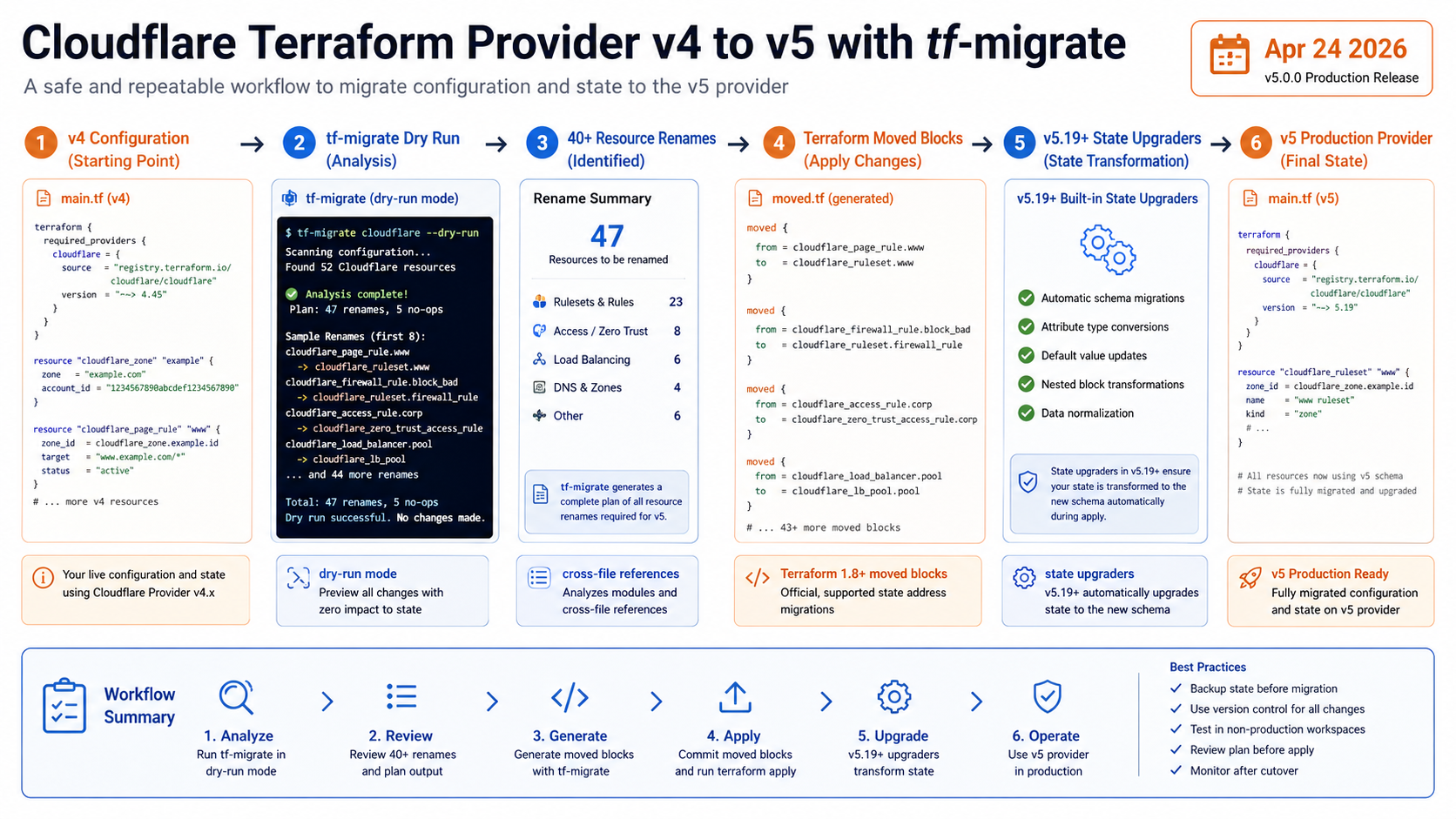
Cloudflare released cf-terraforming tf-migrate on April 24, 2026, and the target audience is every team that looked at the Cloudflare Terraform provider v4 to v5 migration and quietly postponed it. The tool handles 40+ resource renames, cross-file references, Terraform 1.8+ moved blocks, and dry-run previews.
That last part matters. Terraform provider migrations get risky when config changes and state changes drift apart. The best migration is boring: review the generated config diff, keep state addresses mapped, and let the provider state upgraders do the parts they are designed to do.
What Changed
Cloudflare says provider v5 is stable and ready for production. The migration pain came from renamed resources and changed attributes. Examples include resource type renames and field transforms such as DNS record value fields moving to newer names.
tf-migrate operates on configuration. It updates resource names, adjusts references across files, and generates moved blocks so Terraform understands the old state address and the new resource address are the same object. Combined with automatic state upgraders introduced in provider v5.19+, the manual state-editing burden drops a lot.
If you already maintain Terraform state fundamentals carefully, this is the difference between a controlled refactor and a scary terraform state mv spreadsheet.
The Numbers That Matter
| Fact | Number or date | Source |
|---|---|---|
| Release date | April 24, 2026 | Cloudflare Changelog |
| Tool | cf-terraforming tf-migrate |
Cloudflare Changelog |
| Resource renames | 40+ renamed resources | Cloudflare Changelog |
| Moved blocks | Terraform 1.8+ moved blocks |
Cloudflare Changelog |
| State support | automatic state upgraders in provider v5.19+ | Cloudflare Changelog |
Those facts are the reason this post should be published now, not next quarter. The dates are fresh, the limits are concrete, and the operational impact is clear enough for an engineer to act on today.
How It Works in Practice
Run the migration in a branch with a locked provider version. Start with dry-run mode and save the output in CI artifacts or a pull request comment. The point is not to trust the tool blindly; the point is to let it produce a repeatable diff you can review.
After the config rewrite, run terraform init -upgrade, then terraform plan against a non-production workspace first. A good plan should show address moves, not destructive replacements. If resources are unsupported by tf-migrate, handle them manually using Cloudflare’s v5 upgrade guide.
Put a state backup in the runbook. Even if moved blocks do the right thing, provider migrations are exactly when you want an easy rollback path.
git checkout -b cloudflare-provider-v5

# Preview before changing files.
cf-terraforming tf-migrate --path ./infra/cloudflare --dry-run

# Apply the config migration in a branch, then review the diff.
cf-terraforming tf-migrate --path ./infra/cloudflare

terraform init -upgrade
terraform plan
The review question is simple: did Terraform understand this as a rename, or is it trying to destroy and recreate production DNS, Zero Trust, or ruleset resources?
Gotchas I Would Check First
- Unsupported resources still need manual migration with the v5 upgrade guide.
- Terraform 1.8+ is required for the generated
movedblocks pattern Cloudflare describes. - A clean config migration does not remove the need for a state backup and a reviewed plan.
Decision Guide
| Situation | Recommendation |
|---|---|
| Many Cloudflare resources in one repo | Use tf-migrate and review the generated diff |
| A few simple DNS records | Manual migration may be fine |
| Regulated production zone | Dry run, plan review, state backup, then maintenance window |
| Unsupported resource type | Follow the v5 upgrade guide manually |
For related background, keep these existing BitsLovers posts close: Terraform Cloud tradeoffs, Terraform modules, Terraform state fundamentals, Terraform tests in CI, Terraform data sources versus null resources.
Sources
tf-migrate does not make provider upgrades risk-free. It does make the risky part visible, repeatable, and reviewable.
Explore more like this

Kill the Docker Hub Token: OIDC Trust for GitHub Actions
On July 31, 2026, Docker shipped OIDC connections for GitHub Actions to any organization on a Docker Team, Docker Business, or Docker Hardened Images subscription, plus organizations in the Docker-Sponsored...

Lambda SQS Provisioned Mode Now Scales to 10,000 Pollers: The Throughput Math That Decides If You Need It
AWS raised the poller ceiling on August 3, 2026. Provisioned Mode for Amazon SQS event source mappings went from a maximum of 2,000 event pollers to 10,000, which puts the...

CloudWatch Managed Prometheus Collectors on EKS: Delete the Scraper, Keep the Metrics
On July 31, 2026, AWS shipped managed Prometheus collectors for Amazon CloudWatch. The pitch is short: you hand CloudWatch a scrape configuration and a VPC connection, and AWS provisions, scales,...

Comments