
Kafka vs Apache Pulsar: Usability, Workflows, Tradeoffs, and Paradoxes


Kafka vs Apache Pulsar is no longer a simple “streaming log versus cloud-native queue” debate. That shortcut used to be useful, but it is now too shallow for real platform decisions. Kafka has moved beyond its older ZooKeeper era, with Kafka 4.0 running entirely in KRaft mode and Kafka 4.2 making Kafka Queues, also called share groups, production-ready. Pulsar has kept leaning into the design choices that made it different from the beginning: brokers separated from durable storage, tenant and namespace administration, multiple subscription types, and built-in patterns that feel natural when one platform has to serve many product teams.
As of May 1, 2026, the current Kafka line listed by Apache includes Kafka 4.2.0, released on February 17, 2026. The current Pulsar release notes list Apache Pulsar 4.2.1, released on April 27, 2026. That timing matters. A comparison written for Kafka 2.x versus Pulsar 2.x misses the operational reality of both systems today.
The right question is not “which one is faster?” Benchmarks are fragile. A benchmark usually tests one shape of workload, one client configuration, one retention policy, one storage profile, and one team that already knows how to tune the tool they are testing. The better question is: which system produces fewer wrong decisions for your organization over the next three years?
If your team already runs Kafka well, has a deep ecosystem around Kafka Connect and Kafka Streams, and mostly needs a durable event log with huge client and vendor support, Kafka remains the conservative default. If your platform is multi-tenant by design, needs queue and stream semantics side by side, expects long backlogs and geo-replication to be first-class operating concerns, or wants tenant-level administration to be part of the platform model, Pulsar deserves a serious look.
This article focuses on usability, learning curve, scenarios, paradoxes, and tradeoffs. There is no code. The goal is to help you reason about the decision before a vendor pitch, benchmark spreadsheet, or migration plan pushes you toward a conclusion too early.
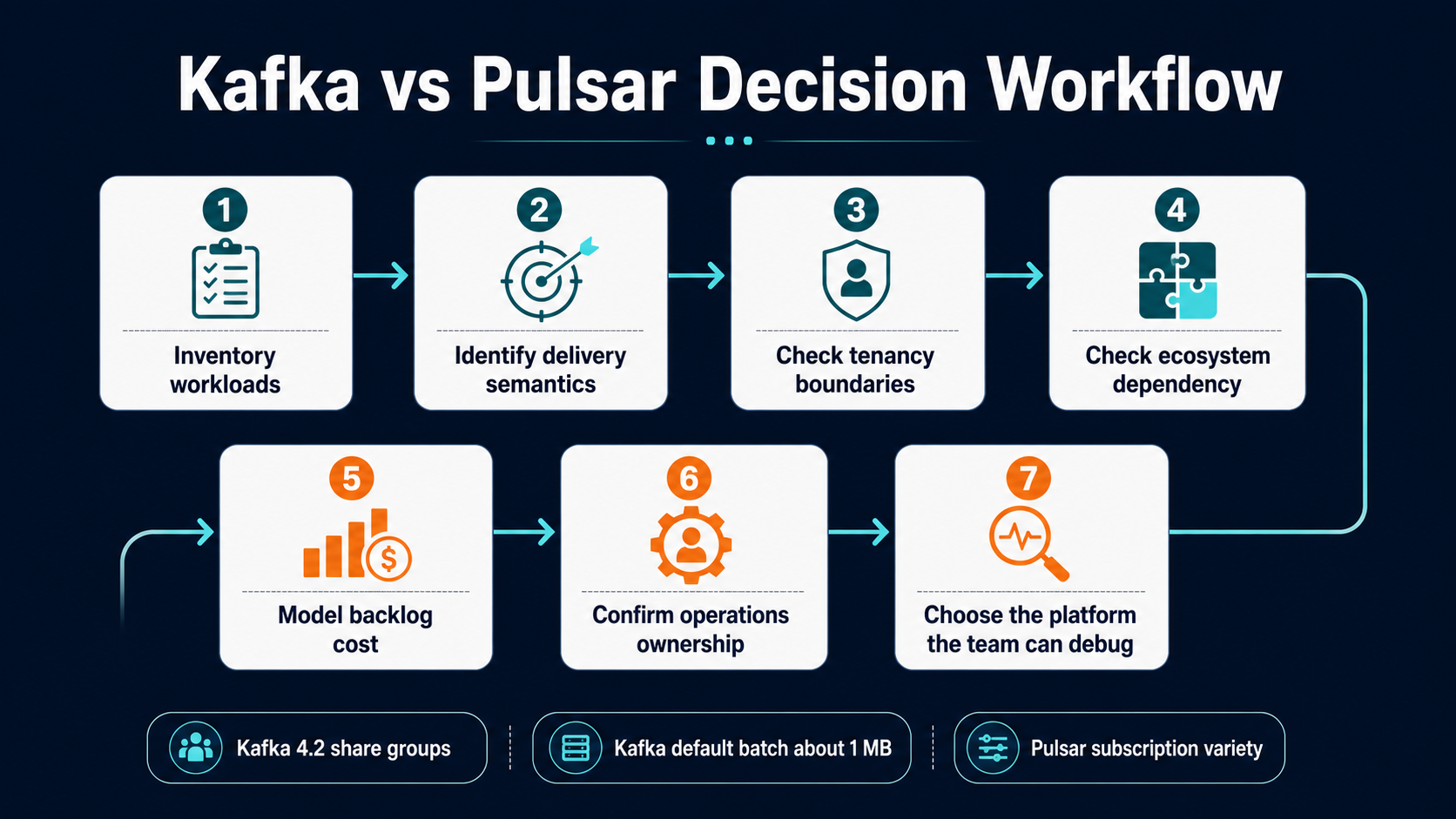
The Short Version
Kafka is usually the safer default when the organization values ecosystem gravity above architectural flexibility. Pulsar is often the better fit when the organization wants one messaging platform to behave like a multi-tenant service, not only a high-throughput distributed log.
That sounds clean, but it hides the hard part. Kafka’s simplicity is partly real and partly inherited from its massive ecosystem. Pulsar’s flexibility is partly real and partly paid for with more moving parts. Both tools can be operated badly. Both tools can be tuned well. Both can be overused as a universal integration layer until they become the architecture.
Use this short decision table as the first pass, not the final answer.
| Decision pressure | Kafka tends to fit better when… | Pulsar tends to fit better when… |
|---|---|---|
| Existing skills | Your engineers, vendors, and managed-service options already orbit Kafka | You can invest in a smaller but more specialized Pulsar operating model |
| Core mental model | The platform is primarily an ordered, replayable event log | The platform must mix streams, queues, subscriptions, tenants, and long backlog workflows |
| Queue semantics | Queue-like work is important but still adjacent to an event-log strategy | Queue-like delivery is central and needs different subscription behavior per workload |
| Multi-tenancy | You can implement tenancy with topic naming, quotas, ACLs, and platform conventions | Tenant and namespace administration should be visible in the platform itself |
| Storage model | Local broker storage and page-cache design are an advantage you know how to operate | Separating serving brokers from BookKeeper storage is worth the extra components |
| Ecosystem | Kafka Connect, Kafka Streams, vendor support, and hiring market are major drivers | Built-in subscription flexibility, geo-replication, and tenancy outweigh ecosystem size |
| Learning curve | You want a smaller conceptual surface for most application teams | You accept more concepts to reduce custom platform glue later |
The paradox is that Kafka is easier to adopt and easier to misuse. Pulsar is harder to adopt and can remove entire classes of custom glue when the use case matches its model.
The Architecture Difference You Actually Feel
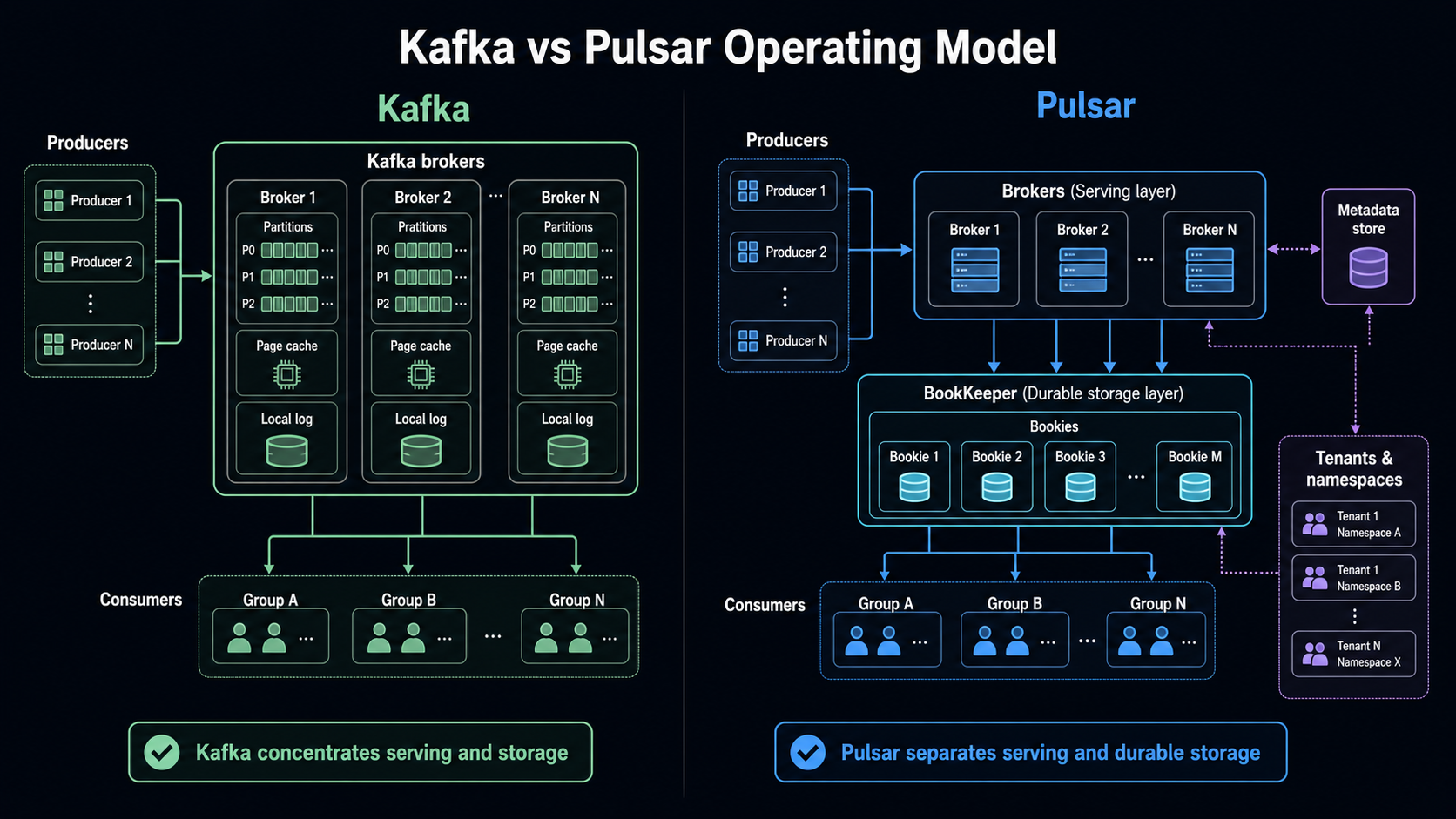
Kafka’s design is famously log-centered. Producers write records to topics. Topics are split into partitions. Partitions are ordered logs. Consumers read from partitions and track their progress. The broker owns serving and storage for those logs. Kafka’s design documentation emphasizes sequential disk access, batching, page cache, and the practical performance difference between linear and random I/O. The docs give the historical example of linear disk throughput being roughly 600 MB/sec while random writes were around 100 KB/sec, a difference of more than 6000x. That point is not trivia. It explains why Kafka can be so efficient when the workload aligns with append, batch, read, and replay.
Pulsar splits the system differently. The broker is primarily the serving layer. Durable storage lives in Apache BookKeeper, where bookies store message data. A metadata store coordinates cluster information. Pulsar’s own architecture docs describe a cluster as brokers, BookKeeper bookies, and a metadata store, while brokers handle incoming producers, dispatch consumers, coordinate through metadata, and store messages in BookKeeper. This separation changes how teams think about scaling. In Kafka, broker capacity and storage capacity are tightly coupled. In Pulsar, broker capacity and storage capacity can be reasoned about more separately.
That difference becomes visible in operations.
With Kafka, a platform team tends to ask: how many partitions, which brokers own them, what is the replication factor, how much disk is left, how much page cache is warm, what is the consumer lag, and how expensive will rebalancing be?
With Pulsar, the questions shift: which tenants and namespaces own the workload, which brokers are serving it, how large is the backlog in BookKeeper, which subscription type is active, what policies apply at the namespace, and whether offload to long-term storage is part of the retention plan.
Neither model is universally better. Kafka gives you a very direct operating model once you accept the partitioned log. Pulsar gives you more administrative vocabulary, which helps when you are building a shared messaging platform, but increases what engineers must learn before they can debug confidently.
Hard Facts That Should Anchor The Debate
Before choosing, pin the discussion to concrete facts. Otherwise, the decision becomes a proxy fight between “Kafka is the industry standard” and “Pulsar is more modern.”
| Fact | Kafka | Apache Pulsar | Why it matters |
|---|---|---|---|
| Current release signal | Apache lists Kafka 4.2.0 as a supported release, released February 17, 2026 | Pulsar 4.2.1 release notes are dated April 27, 2026 | Both projects are active; this is not a mature-versus-abandoned comparison |
| ZooKeeper story | Kafka 4.0 runs entirely without ZooKeeper and defaults to KRaft | Pulsar architecture still includes a metadata store and BookKeeper storage tier | Kafka simplified a major historical operating burden; Pulsar still has more visible components |
| Queue semantics | Kafka 4.2 says Kafka Queues/share groups are production-ready | Pulsar has long exposed multiple subscription types: exclusive, shared, failover, and key-shared | Kafka is closing a feature gap, but Pulsar’s subscription model is still broader and older |
| Default message size posture | Kafka broker message.max.bytes defaults to 1,048,588 bytes in current 4.2 broker config docs | Older Pulsar messaging docs describe a 5 MB default maximum message size; current 4.2 docs point to the reference configuration site | Large messages remain a design smell in both systems, but limits shape migration surprises |
| Storage design | Broker-local log and page cache are central to Kafka efficiency | Brokers serve traffic while BookKeeper bookies store persistent message data | Kafka concentrates responsibilities; Pulsar separates serving and storage |
| Multi-tenancy | Kafka supports quotas for network, request rate, controller mutation, producer, consumer, and more | Pulsar says it was built from the ground up as multi-tenant, with tenants and namespaces as visible concepts | Both can isolate clients; Pulsar makes tenancy part of the naming and administration model |
| Retention and backlog | Kafka retention is topic/log oriented and very strong for replay | Pulsar’s segment-oriented architecture supports tiered storage where older backlog can be moved from BookKeeper to cheaper storage | The cost model for long backlogs can look very different |
The message-size row needs care. It is tempting to say Pulsar is better because 5 MB is larger than Kafka’s roughly 1 MB default. That is usually the wrong conclusion. Event platforms are not blob stores. Large messages hurt batching, retries, replication, cache behavior, observability, and downstream error handling. If a system regularly carries documents, images, reports, or model artifacts, the better design is often a claim-check pattern or object storage reference. That is the same lesson behind the BitsLovers guide on serverless 1 MB payloads: a higher limit creates options, not permission to inflate every message.
Learning Curve: Day 1, Day 30, Day 90
Kafka feels easier on day 1 if the team already understands topics, partitions, producers, consumers, and consumer groups. The basic story fits on a whiteboard. A topic is split into partitions. Producers publish. Consumers read. Consumer groups share work. Retention allows replay. Most engineers have heard these words before, and many cloud providers, vendors, and SaaS tools integrate with Kafka directly.
Kafka becomes harder around day 30. That is when teams realize the partition count is not just a scaling number; it affects ordering, consumer parallelism, reassignment cost, failover behavior, and future growth. Consumer lag is easy to graph but harder to interpret. A lag spike could mean slow consumers, a hot partition, bad batching, a downstream outage, a rebalance, or a producer shape change. Multi-tenancy sounds simple until one team creates a noisy producer and another team pays the latency bill. Kafka supports quotas and strong controls, but the platform team must decide how to package those controls into a product experience.
Kafka becomes political around day 90. By then, multiple teams want topic naming standards, schema governance, retention exceptions, replay access, personally identifiable information controls, dead letter handling, connector ownership, and cost visibility. Kafka itself is not the problem. The problem is that Kafka is useful enough to attract unrelated workloads.
Pulsar has the opposite curve. Day 1 can feel harder because there are more nouns: tenants, namespaces, topics, subscriptions, brokers, bookies, ledgers, bundles, offload, and subscription types. An application engineer who only needs “send event, receive event” may feel that Pulsar exposes platform concepts too early.
By day 30, Pulsar can start to feel more coherent for a platform team. Tenants and namespaces create a natural place for policies. Subscription types let the same topic support different consumption patterns without inventing as much wrapper logic. Shared and key-shared subscriptions are easier to explain to teams that want queue behavior but still need replay and topic-based publication.
By day 90, Pulsar’s complexity is either paying rent or becoming a tax. It pays rent when the organization actually uses tenant isolation, namespace policy, geo-replication, backlog offload, and mixed queue/stream consumption. It becomes a tax when the organization only needed a simple event log and now has to operate brokers, bookies, and metadata stores for no meaningful product benefit.
| Stage | Kafka learning curve | Pulsar learning curve |
|---|---|---|
| Day 1 | Easier for most teams because the ecosystem and mental model are familiar | Harder because the platform exposes more concepts early |
| Day 30 | Partitioning, consumer lag, and governance become the real work | Subscription choices, namespaces, and storage separation become the real work |
| Day 90 | Organizational governance becomes harder than basic operations | The extra model either removes platform glue or feels like unnecessary complexity |
The hiring curve also matters. Kafka expertise is easier to find. Pulsar expertise exists, but the pool is smaller. A small team that chooses Pulsar must either buy managed support, invest in training, or keep the platform scope narrow enough that the team can become genuinely competent.
Workflow 1: Choosing The Platform
The first workflow is not technical benchmarking. It is workload classification.
Start by listing every use case that wants the platform. Separate durable event streams from job queues, integration events, telemetry firehoses, state-change logs, audit trails, long-retention replay, fan-out notifications, delayed retries, and cross-region replication. Then mark which workloads need strict ordering, which need ordering only by key, which tolerate duplicates, which require replay, which have backlogs measured in minutes versus days, and which teams own the producers and consumers.
If most workloads are event logs and analytical streams, Kafka’s model is clean. You can standardize topic naming, partitioning rules, schemas, consumer group ownership, retention classes, and connector policy. The platform product becomes a high-throughput, replayable event backbone.
If the workload list mixes queues, fan-out, multi-tenant departmental workloads, cross-region replication, long backlog retention, and per-team administrative boundaries, Pulsar’s model becomes more attractive. Its tenant and namespace hierarchy is not decoration; it is a way to represent platform ownership.
A practical decision workflow looks like this:
| Step | Question | Decision hint |
|---|---|---|
| 1 | Is Kafka already a strategic platform in the company? | Prefer Kafka unless Pulsar solves a specific and expensive pain |
| 2 | Are queue semantics central or occasional? | Occasional queue behavior can now fit Kafka better than before; central queue behavior still favors Pulsar evaluation |
| 3 | Do teams need independent tenant-level policy? | Pulsar’s tenant and namespace model is a first-class advantage |
| 4 | Is the organization standardized on Kafka Connect or Kafka Streams? | Kafka ecosystem gravity is a real business constraint |
| 5 | Is long backlog storage a major cost driver? | Pulsar plus tiered storage deserves a cost model |
| 6 | Can the team operate BookKeeper and metadata stores well? | If no, Pulsar’s design benefit may not justify the operational surface |
| 7 | Does a managed service hide the hardest parts? | Re-run the decision using the managed service’s limits, not the open-source ideal |
This is similar to choosing between AWS-native event services. In EventBridge Pipes, the question is not “is EventBridge better than SQS?” It is “which workflow shape are we building?” The same discipline applies here. Kafka and Pulsar overlap, but they are not the same workflow product.
Workflow 2: Operating A Shared Platform
The second workflow is the day-two platform workflow. Imagine a team opens a ticket: “We need a new event stream for order state changes. Five consumers need it. One consumer is real-time fraud detection. One is analytics. One is a warehouse loader. One is a retryable enrichment worker. One is a regional backup process.”
In Kafka, the platform design usually starts with topic and partition strategy. You decide the key, partition count, retention, replication factor, schema rules, access controls, quota, and consumer group conventions. Fraud, analytics, loader, enrichment, and backup become separate consumer groups or connectors. If enrichment behaves like a work queue, you can now evaluate share groups in Kafka 4.2, but you still need to decide how queue semantics coexist with the broader log model.
In Pulsar, the platform design starts with tenant, namespace, topic, and subscription strategy. Fraud may use one subscription. Analytics may use another. The enrichment worker may use shared or key-shared behavior. Regional backup may use replication. Namespace policy becomes part of the operating surface. That is powerful when teams are truly separate tenants. It is overhead when all five consumers are owned by the same team and only need a durable log.
The operating workflow should include these gates:
| Gate | Kafka review | Pulsar review |
|---|---|---|
| Ownership | Which team owns the topic, schema, retention, and ACLs? | Which tenant and namespace own the policy boundary? |
| Scaling | How many partitions now, and what is the future reassignment plan? | How will brokers, bookies, bundles, and backlog scale independently? |
| Consumption | Which consumer groups exist, and what lag is acceptable? | Which subscription types exist, and what redelivery behavior is acceptable? |
| Failure | What is the dead-letter policy, and who replays or repairs records? | What retry, dead-letter, and subscription redelivery behavior applies? |
| Cost | How much broker disk and network does retention consume? | How much BookKeeper storage and offloaded backlog does retention consume? |
| Governance | What quotas prevent one client from harming the cluster? | Which tenant and namespace policies prevent noisy neighbors? |
This is where observability maturity matters. A queue/stream platform without high-quality dashboards becomes a rumor mill. Consumer lag, publish latency, broker saturation, storage growth, failed acknowledgments, rebalance events, retry volume, and dead-letter growth need to be visible. If the platform runs on AWS, the same thinking from OpenTelemetry and CloudWatch observability applies: do not wait for the outage to decide what signals matter.
Workflow 3: Migrating Without Fooling Yourself
Migration is where many Kafka/Pulsar comparisons become dangerous. Teams compare features, choose the new tool, then discover that the real project is not “move messages.” It is “preserve application meaning while changing delivery semantics.”
Do not begin with replication tools. Begin with semantics.
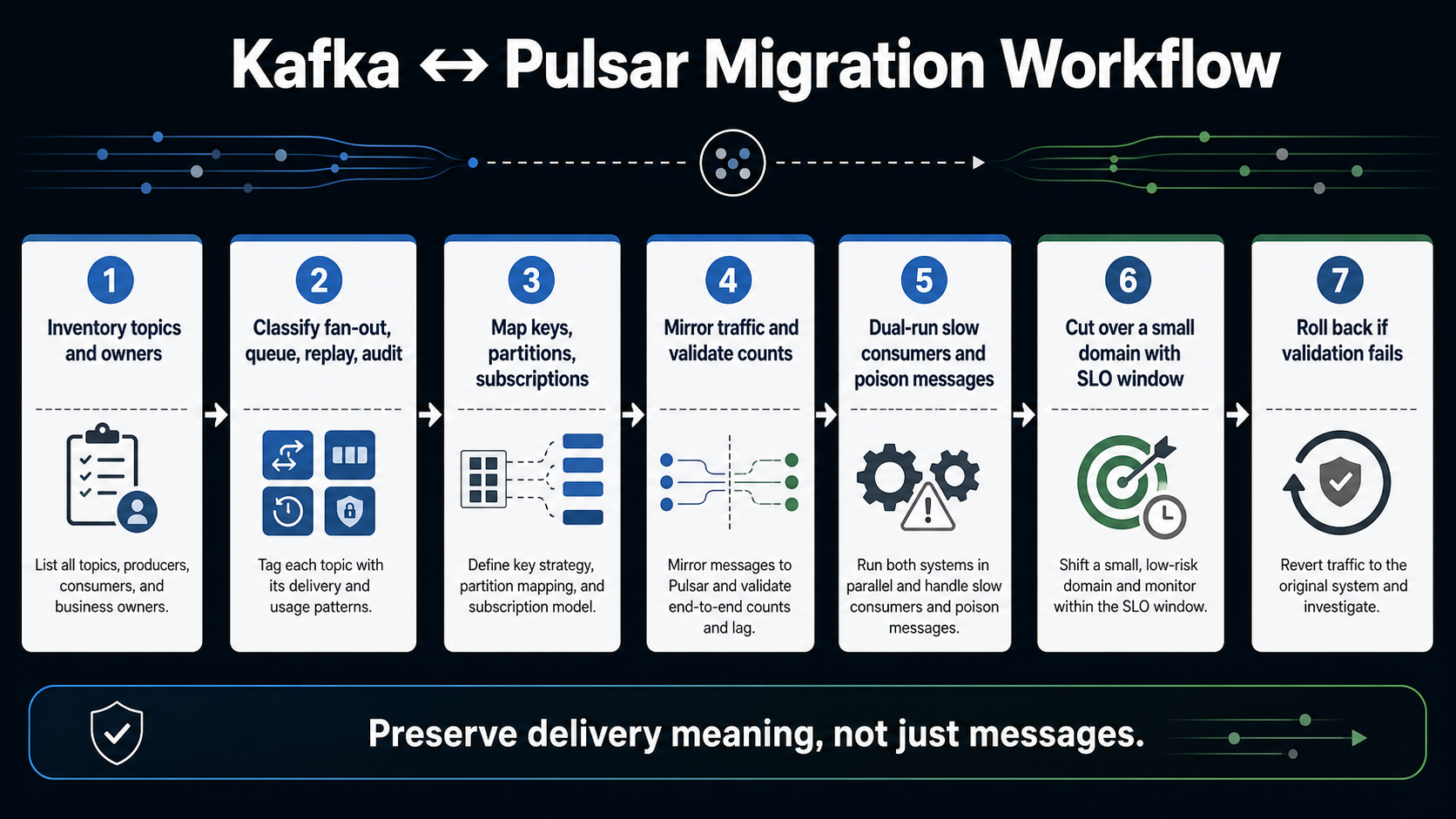
Inventory each topic or stream. For each one, capture producer owners, consumer owners, message key, partitioning strategy, ordering assumptions, retention policy, replay expectations, schema compatibility, dead-letter behavior, security classification, and downstream service-level objectives. Then classify the workload:
| Migration class | Meaning | Risk |
|---|---|---|
| Simple fan-out | Multiple consumers read the same events independently | Usually moderate if ordering and schema are clear |
| Ordered key stream | Consumers depend on ordering by customer, account, tenant, or device | High if key mapping changes |
| Work queue | Consumers divide jobs and acknowledge success or failure | High if ack, retry, and redelivery semantics change |
| Long replay | Consumers may replay days or weeks of history | High if retention, offset, and backlog cost models differ |
| Connector-heavy pipeline | Kafka Connect or similar tools own ingestion/egress | High if connector parity is weaker on the target |
| Regulated audit trail | Records support audit, compliance, or forensics | Very high; migration must be provable |
Next, dual-run the smallest representative workload. Do not pick the easiest topic. Pick a topic that has at least one slow consumer, one replay use case, one schema evolution event, and one failure path. Mirror traffic, validate counts, validate ordering assumptions, validate consumer-visible timestamps, and validate recovery after a forced consumer failure.
The migration paradox is that the most impressive demo is often the least useful test. A demo usually shows publish and consume. A production migration needs duplicate handling, poison message handling, replay, backpressure, schema drift, quota enforcement, and rollback.
If you are moving from Kafka to Pulsar, pay special attention to partition-to-key assumptions and connector parity. Kafka workloads often hide assumptions inside partition count, consumer group behavior, and library defaults. Pulsar can represent some of those behaviors differently, especially when subscriptions become the main abstraction.
If you are moving from Pulsar to Kafka, pay attention to subscription semantics and tenant policy. A Pulsar shared or key-shared workload might not map cleanly to a traditional Kafka consumer group without either Kafka share groups, extra routing logic, or a change in failure behavior.
For Kubernetes-based consumers, autoscaling deserves its own test. A streaming platform can look fine until a backlog spike triggers a scale-out event that reshuffles consumers, breaks ordering expectations, or floods a downstream dependency. The same backlog-driven thinking from KEDA on EKS applies here.
The Paradoxes
Kafka and Pulsar both have paradoxes that only show up after the tool is popular inside the company.
| Paradox | What it means in practice |
|---|---|
| Kafka is simple until it becomes central | The core model is clean, but once every team depends on it, governance, quotas, schema ownership, and replay policy become the hard parts |
| Pulsar is complex until it prevents custom complexity | The platform surface is larger, but tenant, namespace, and subscription models can remove custom routing and policy glue |
| Kafka has more ecosystem, which can slow decisions | The answer to every problem becomes “there is a Kafka connector for that,” even when a smaller workflow service would be clearer |
| Pulsar has more built-in semantics, which can hide product risk | Teams may choose a subscription type before they understand their real ordering, retry, and redelivery requirements |
| Kafka’s partition model is a strength and a trap | Partitions give scale and order, but bad key design becomes expensive to repair later |
| Pulsar’s storage separation is a strength and a trap | Independent broker and storage scaling is powerful, but BookKeeper competence becomes part of the platform requirement |
| Kafka’s popularity lowers adoption risk but raises overuse risk | A familiar tool can spread into workloads that should have stayed in SQS, EventBridge, a database outbox, or a workflow engine |
| Pulsar’s flexibility lowers glue-code risk but raises learning risk | More native patterns reduce wrappers, but every engineer has more concepts to debug |
The most important paradox is this: the better platform may be the one your team can make boring. Streaming infrastructure should be remarkable in design and boring in operation. If Kafka is boring for your team, use Kafka. If Pulsar is the only way to stop writing platform glue for tenancy, queue behavior, and backlog handling, Pulsar may become the boring option after the learning curve.
Scenario Matrix
Use scenarios, not abstract preference, to decide.
| Scenario | Better default | Reason |
|---|---|---|
| Enterprise event backbone with many vendors and existing Kafka skills | Kafka | Ecosystem, hiring, managed services, and connector maturity reduce adoption risk |
| SaaS platform with strong tenant isolation requirements | Pulsar | Tenant and namespace concepts map naturally to platform boundaries |
| Analytics ingestion from many producers into lakehouse pipelines | Kafka | Kafka’s log model and ecosystem are usually sufficient and well understood |
| Unified platform for queues and streams | Pulsar, with Kafka 4.2 share groups evaluated | Pulsar has mature subscription variety; Kafka is improving but needs careful validation |
| Long backlog and replay where hot broker disk is expensive | Pulsar | BookKeeper plus tiered storage can change the economics of old backlog |
| Existing Kafka estate that needs some point-to-point behavior | Kafka | Kafka share groups may avoid a platform migration |
| Small team with limited ops bandwidth and no managed service | Kafka, or a cloud-native managed queue/event service | Pulsar’s extra components may be too much unless the benefits are specific |
| Regulated audit stream where replay and immutability are central | Kafka | The append-log model and ecosystem make this a conservative fit |
| Multi-region messaging with tenant-level policy | Pulsar | Built-in geo-replication and tenant policy can be compelling |
| Serverless workflow integration | Neither by default | SQS, EventBridge, Step Functions, or a database outbox may be more appropriate |
That last row is important. Kafka and Pulsar are not the answer to every asynchronous problem. Sometimes the right design is an SQS queue with a clear dead-letter queue policy. Sometimes it is SQS with Lambda event-source mapping. Sometimes it is EventBridge. Sometimes it is a workflow engine. A streaming platform is justified when replay, fan-out, throughput, ordering, or shared event infrastructure create enough value to pay for the platform.
Usability Tradeoffs
For producers, Kafka is often straightforward: choose a topic, choose a key, publish records, tune batching when needed. The hard part is choosing the key well. A bad key creates hot partitions or broken ordering. Changing that later can require new topics, consumer migrations, and compatibility windows.
Pulsar producers also publish to topics, but the surrounding administrative model is more explicit. Tenants and namespaces make the platform boundary visible. That is helpful when producers belong to different business units or products. It can feel heavy when a small application only wants one stream.
For consumers, Kafka’s normal model is clean when the workload is “read this ordered partitioned log and track progress.” Consumer groups are familiar. Replay is familiar. Lag is familiar. The usability challenge is interpreting what consumer lag means and deciding when rebalancing or partition count becomes the bottleneck.
Pulsar consumers expose more choices. Exclusive, failover, shared, and key-shared subscriptions let the consumer model fit the workload instead of forcing everything through one consumer-group shape. Shared subscriptions are useful for queue-like distribution but do not preserve ordering. Key-shared subscriptions preserve per-key delivery to one consumer at a time, but the producer’s batching behavior can affect correctness. Pulsar’s docs are explicit that key-shared consumers need batching disabled or key-based batching. That is a good example of Pulsar’s tradeoff: powerful semantics, but more details that must be taught.
For platform teams, Kafka’s usability comes from standardization. Decide how topics are named, how schemas evolve, what retention classes exist, how quotas are assigned, and how teams request access. Kafka’s multi-tenancy docs show quota categories across network bandwidth, request rate, controller mutation, consumer, producer, and IP-level enforcement. That gives platform teams primitives. The product experience still has to be built.
Pulsar’s usability comes from administration being closer to the platform model. Tenants are the basic categorization unit. Namespaces group topics and carry policies. The docs state that tenants can have their own authentication and authorization schemes and that storage quotas, message TTL, and isolation policies are managed at that level. That is excellent when the organization thinks in tenants. It is extra ceremony when it does not.
When I Would Choose Kafka
I would choose Kafka when the organization already has Kafka skills, when the primary need is a durable event log, when ecosystem integration is a first-order business requirement, and when the platform team can commit to governance.
Kafka is also the better default when the risk of choosing a smaller ecosystem is higher than the architectural benefit of Pulsar. That is not a technical purity argument; it is engineering economics. Hiring, support, managed services, runbooks, connectors, and third-party tooling matter. A platform is only successful if the organization can operate it when the original champions are on vacation.
I would also choose Kafka for audit trails, analytics pipelines, event sourcing, and broad enterprise integration where replay and ordering by partition are central. Kafka’s page-cache-oriented design, batching, and zero-copy path are mature ideas. They are not trendy, but they explain why Kafka remains durable in the market.
If a team only needs point-to-point jobs or retries, I would not automatically choose Kafka. I would first check whether a simpler queue or workflow system is enough. If Kafka is already the standard and the job workload is adjacent to existing topics, Kafka 4.2 share groups now make that conversation more reasonable than it was a few years ago.
When I Would Choose Pulsar
I would choose Pulsar when the platform is explicitly multi-tenant, when different teams need different subscription behaviors on the same logical streams, when queue and stream semantics are equally important, and when storage/backlog economics are a major part of the architecture.
Pulsar is especially compelling when a company is building a shared internal messaging product rather than a single application pipeline. Tenants and namespaces give product vocabulary to the platform. Subscription types reduce the need to create one-off routing services. BookKeeper separation can make long backlog and storage growth easier to reason about if the team has the skill to operate it.
I would also choose Pulsar for a greenfield platform where the team has enough senior operations depth and the use cases are already known to need Pulsar’s model. The strongest Pulsar decision is not “we want something more modern than Kafka.” It is “we have these specific workloads, and Pulsar removes custom infrastructure we would otherwise build.”
Pulsar is a weaker choice when the organization wants Kafka ecosystem compatibility above all else, when the team cannot support BookKeeper, or when the workload is mostly a normal append-only event log. In those cases, Pulsar’s flexibility may not pay for itself.
What I Would Pick In 2026
For most existing enterprises, I would start with Kafka. Not because Kafka wins every technical category, but because the ecosystem and operating familiarity are hard to beat. Kafka 4.x has also removed one of the biggest historical complaints by moving fully into the KRaft era, and Kafka 4.2 makes queue-like use cases more credible with production-ready share groups.
For a new multi-tenant messaging platform, I would seriously evaluate Pulsar before defaulting to Kafka. If tenants, namespaces, geo-replication, mixed subscription types, and long backlog storage are not edge cases but the platform’s core, Pulsar may be the more honest architecture.
The final decision should come from a proof of operation, not a proof of concept. A proof of concept proves that messages can move. A proof of operation proves that the team can govern tenants, control cost, debug lag, handle poison messages, replay safely, survive consumer churn, and explain the system to the next team that joins.
That is the practical standard. Choose the platform whose failure modes your team can understand at 2 AM.
Sources
- Apache Kafka downloads page, supported releases and Kafka 4.2.0 release date: kafka.apache.org/community/downloads
- Apache Kafka 4.2.0 release announcement, including production-ready Kafka Queues/share groups: kafka.apache.org/blog/2026/02/17/apache-kafka-4.2.0-release-announcement
- Apache Kafka 4.0.0 release announcement, including KRaft-only operation and Java baseline changes: kafka.apache.org/blog/2025/03/18/apache-kafka-4.0.0-release-announcement
- Apache Kafka design documentation, including sequential I/O, page cache, batching, and log design: kafka.apache.org/42/design/design
- Apache Kafka multi-tenancy documentation, including quota categories: kafka.apache.org/42/operations/multi-tenancy
- Apache Kafka broker configuration documentation, including message.max.bytes default: kafka.apache.org/42/configuration/broker-configs
- Apache Pulsar 4.2.1 release notes: pulsar.apache.org/release-notes/versioned/pulsar-4.2.1
- Apache Pulsar architecture overview, including brokers, BookKeeper, and metadata store: pulsar.apache.org/docs/4.2.x/concepts-architecture-overview
- Apache Pulsar messaging concepts, including subscriptions, acknowledgments, retry/dead-letter behavior, and key-shared constraints: pulsar.apache.org/docs/4.2.x/concepts-messaging
- Apache Pulsar multi-tenancy concepts, including tenants and namespaces: pulsar.apache.org/docs/4.2.x/concepts-multi-tenancy
- Apache Pulsar tiered storage concepts: pulsar.apache.org/docs/4.1.x/concepts-tiered-storage
Explore more like this

Cloud IoT Security: Zero Trust, Identity, and Signed Updates
On September 11, 2026, the Cyber Resilience Act’s incident-reporting rules start applying in the European Union. That is 22 days after this article’s publication date. A manufacturer that learns of...

Kill the Docker Hub Token: OIDC Trust for GitHub Actions
On July 31, 2026, Docker shipped OIDC connections for GitHub Actions to any organization on a Docker Team, Docker Business, or Docker Hardened Images subscription, plus organizations in the Docker-Sponsored...

Lambda SQS Provisioned Mode Now Scales to 10,000 Pollers: The Throughput Math That Decides If You Need It
AWS raised the poller ceiling on August 3, 2026. Provisioned Mode for Amazon SQS event source mappings went from a maximum of 2,000 event pollers to 10,000, which puts the...

Comments