
SageMaker vs Bedrock for AI Inference: When to Use Each in 2026

You have a trained model. You need to serve predictions. And now you are staring at the AWS console wondering: SageMaker or Bedrock?
This is the inference dilemma that thousands of ML engineers and cloud architects face in 2026. The answer is not obvious because both services have evolved dramatically over the past year. SageMaker is no longer just a training platform with clunky hosting. Bedrock is no longer just a wrapper around other people’s models. The overlap between them has grown, and the decision has become genuinely confusing.
The stakes are real. Choose wrong and you could overspend by 3x on inference costs, lock yourself into an architecture that cannot scale, or spend weeks building infrastructure you did not need. Choose right and you get production AI that runs reliably, scales automatically, and fits your budget. This post gives you the analytical framework to make that choice with confidence.
Two hands-on examples make that boundary concrete: the SageMaker G7 Blackwell inference guide shows what you own when hosting model weights, while the Claude Opus 5 Bedrock guide shows the managed-model path.
If you are an ML engineer deploying models to production, a cloud architect designing an AI platform, or a technical lead evaluating AWS AI services, this guide is for you. We will cover architecture, pricing, performance, and real cost scenarios with actual math. By the end, you will know exactly which service fits your use case and when to use both.
The Two Paths to AI Inference on AWS
Here is where things get confusing: AWS gives you two paths to the same destination, and they couldn’t be more different under the hood. On the surface, both let you run AI models and get predictions back. But the shared responsibility model — what you manage versus what AWS handles — is night and day.
Amazon Bedrock: The Managed API Path
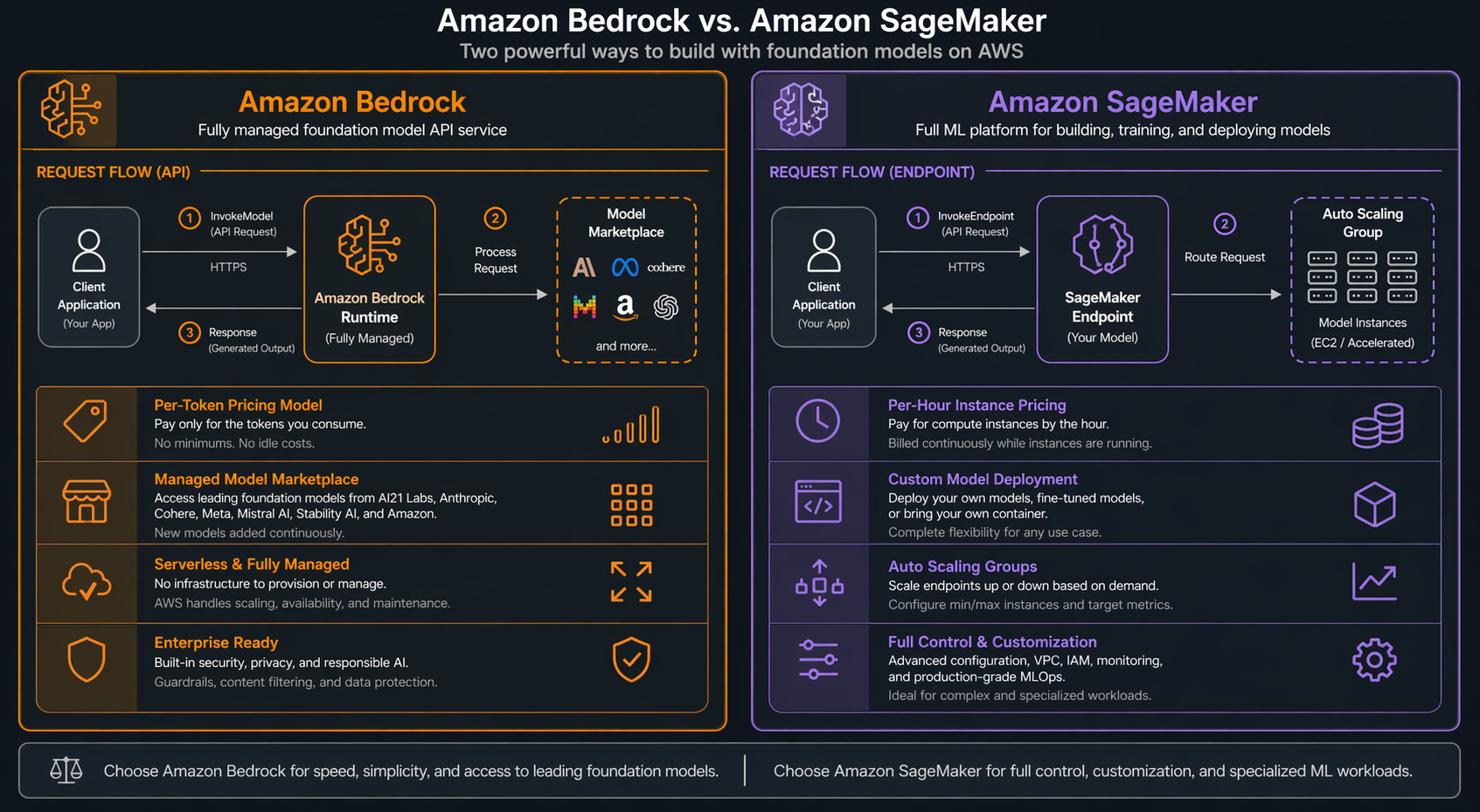
Amazon Bedrock is a fully managed service that gives you API access to foundation models from multiple providers. You do not provision instances. You do not manage containers. You make an API call and get a response. The pricing is per-token, meaning you pay only for the input and output text that flows through the model.
Think of Bedrock as the “serverless” path for AI inference. AWS handles everything beneath the API layer: model loading, GPU allocation, scaling, failover, and model version updates. You select a model from the marketplace (Claude, Amazon Nova, Llama, Mistral, Cohere, and others), configure your parameters, and start calling the API.
The architecture is straightforward. Your application sends requests to the Bedrock API endpoint. AWS routes those requests to the appropriate model infrastructure. Responses come back as JSON, optionally streamed in real-time. You never see the underlying compute.
SageMaker AI: The Custom Hosting Path
SageMaker AI (formerly SageMaker, rebranded in late 2025) gives you full control over model hosting. You choose the instance type, you configure the endpoint, you manage the deployment lifecycle. Pricing is per-hour for the instances you provision, regardless of how many requests they serve.
Think of SageMaker as the “EC2 for AI models” path. You have granular control over the hardware, the serving container, the autoscaling policies, and the model artifacts. You can deploy any model from any framework: PyTorch, TensorFlow, Hugging Face Transformers, custom ONNX models, or even compiled TensorRT engines.
The architecture is more involved. You create a model artifact, configure an endpoint configuration (instance type, initial count, variant weights), and create an endpoint. SageMaker provisions the instances, deploys your model container, and provides a stable HTTPS endpoint for inference.
If you choose SageMaker because you need custom hosting control, the next operational problem is capacity. The SageMaker capacity-aware inference guide covers instance pools, fallback hardware, and per-instance-type metrics.
Key Differences at a Glance
| Dimension | Amazon Bedrock | SageMaker AI |
|---|---|---|
| Pricing Model | Per-token (pay-per-use) | Per-instance-hour (reserved capacity) |
| Infrastructure | Fully managed, invisible | You choose instance types and counts |
| Model Sources | Marketplace (Claude, Nova, Llama, Mistral) | Any model you bring or train |
| Cold Starts | Sub-second (AWS pre-provisions) | 2-15 minutes depending on model size |
| Customization | Prompt engineering, guardrails, limited fine-tuning | Full control over model, container, runtime |
| Minimum Commitment | None (on-demand) | Instance hours (can be zero with serverless) |
| Scaling | Automatic, invisible | Configurable auto-scaling policies |
| Best For | Foundation model use cases, fast time-to-market | Custom models, specific latency/throughput needs |
Bedrock for Inference: Deep Dive
How Bedrock Inference Works
When you call the Bedrock API, your request goes through several layers. First, it hits the Bedrock control plane, which authenticates your request and checks your model access. Then it routes to the model’s inference infrastructure, which AWS manages across multiple availability zones. The model processes your input and returns the result.
You never interact with the compute layer. AWS handles GPU provisioning, model distribution, load balancing, and failover. This means you cannot SSH into the instance, customize the serving framework, or control which GPU your model runs on. That is the trade-off for simplicity.
Supported Models
Bedrock offers a growing marketplace of foundation models as of 2026:
- Anthropic Claude: Claude 3.5 Sonnet, Claude 3.5 Haiku, Claude 3 Opus
- Amazon Nova: Nova Pro, Nova Lite, Nova Micro
- Meta Llama: Llama 3.1 (8B, 70B, 405B), Llama 3.2 (1B, 3B, 11B, 90B)
- Mistral AI: Mistral Large, Mistral Small, Mixtral 8x7B, Mixtral 8x22B
- Cohere: Command R, Command R+
- Stability AI: Stable Diffusion 3.5, SDXL
- AI21 Labs: Jamba 1.5 Large, Jamba 1.5 Mini
Now, here’s the thing nobody tells you upfront: these models don’t just differ in capability. Pricing, context windows, throughput caps — they’re all over the map. A request that costs pennies on Nova Lite might run you dollars on Claude Opus. The good news is that swapping between them is trivial. Change one parameter in your API call and you’re hitting a completely different model.
Pricing Models
Bedrock offers two pricing options:
| Pricing Option | How It Works | Best For |
|---|---|---|
| On-Demand | Pay per 1,000 input/output tokens | Variable, unpredictable workloads |
| Provisioned Throughput | Reserve capacity per hour/month | Consistent, high-volume workloads |
On-demand pricing (selected models, US East region):
| Model | Input (per 1K tokens) | Output (per 1K tokens) |
|---|---|---|
| Claude 3.5 Sonnet | $0.003 | $0.015 |
| Claude 3.5 Haiku | $0.001 | $0.005 |
| Nova Pro | $0.0008 | $0.004 |
| Nova Lite | $0.00006 | $0.00024 |
| Llama 3.1 70B | $0.00099 | $0.00099 |
| Mistral Large | $0.002 | $0.006 |
Provisioned throughput pricing varies by model and commitment level (1 month, 6 months, or 12 months). It provides guaranteed capacity and consistent latency, which matters for production workloads.
Intelligent Prompt Routing
One of Bedrock’s most powerful cost optimization features is Intelligent Prompt Routing. Available for select model families, it automatically routes each request to the most cost-effective model that can handle it accurately. A complex reasoning prompt might go to Claude 3.5 Sonnet, while a simple formatting task gets routed to Haiku.
AWS reports up to 30% cost reduction with prompt routing enabled. The router evaluates prompt complexity in real-time and selects the optimal model from a model group you define. You set quality thresholds, and the router ensures responses meet those standards while minimizing spend.
Model Distillation
Model Distillation in Bedrock lets you create smaller, faster, cheaper models that approximate the behavior of larger ones. You provide a dataset of prompts, and Bedrock uses a larger teacher model to train a smaller student model. The result can be up to 75% cheaper to run while maintaining acceptable quality for your specific use case.
This is particularly powerful for high-volume, narrow tasks. If you need a chatbot that answers FAQ questions, you do not need a 70B parameter model. Distill it down to a 3B model that costs a fraction per token.
Additional Features
Bedrock Guardrails let you define content filters, denied topics, and word filters without modifying the underlying model. This is critical for production deployments where you need safety controls.
Bedrock Agents and Bedrock AgentCore handle the orchestration of multi-step AI workflows, including tool use, chain-of-thought reasoning, and API integrations. If you are building agentic systems, see our comparison of Bedrock Agents vs Nova Pro.
Batch inference in Bedrock lets you submit large datasets for offline processing. This is useful for evaluation, embeddings generation, and bulk classification tasks. You upload your input data to S3, configure a batch job, and retrieve results when complete.
SageMaker for Inference: Deep Dive
How SageMaker Endpoints Work
SageMaker inference starts with a model artifact, typically an S3 path containing your trained model files. You create a model resource that points to this artifact and specifies the serving container. Then you create an endpoint configuration that defines the instance type, initial instance count, and variant settings. Finally, you create the endpoint, which provisions the compute and deploys your model.
Once it’s live, you get a stable HTTPS URL that doesn’t change. Your app just POSTs inference payloads to it and gets predictions back — pretty standard stuff. What you don’t see is SageMaker keeping the whole thing running: managing the container, running health checks, spinning instances up or down based on traffic.
Instance Types for Inference
SageMaker gives you a wide range of instance types. Here are the most relevant for AI inference in 2026:
| Instance Family | GPU/Accelerator | Best For | Approx. Hourly Cost |
|---|---|---|---|
| ml.g7e.xlarge | NVIDIA RTX PRO 6000 (Blackwell) | LLM inference, high throughput | ~$2.50 |
| ml.g7e.2xlarge | 2x NVIDIA RTX PRO 6000 | Large models, batch inference | ~$5.00 |
| ml.g7e.8xlarge | 8x NVIDIA RTX PRO 6000 | Multi-model serving | ~$20.00 |
| ml.inf2.xlarge | AWS Inferentia2 | Cost-effective inference | ~$0.75 |
| ml.inf2.24xlarge | 6x AWS Inferentia2 | Large model serving | ~$6.50 |
| ml.trn1.2xlarge | AWS Trainium | Inference + fine-tuning | ~$1.35 |
| ml.g5.xlarge | NVIDIA A10G | General GPU inference | ~$1.00 |
| ml.g6.xlarge | NVIDIA L4 | Mid-range GPU inference | ~$0.80 |
The G7e instances with NVIDIA RTX PRO 6000 Blackwell GPUs are the newest addition. They offer significantly better performance-per-dollar for LLM inference compared to the previous G5 generation, with higher memory bandwidth and more efficient transformer model execution.
Endpoint Types
SageMaker offers four endpoint types, each suited to different workload patterns:
Real-Time Endpoints are always-on instances that serve predictions with low latency. You provision a fixed number of instances and configure auto-scaling to adjust. Best for interactive applications that need sub-second responses.
Serverless Endpoints scale to zero when not in use and scale up automatically on demand. You pay only for the compute time used, measured in millisecond increments. Cold starts can take 5-30 seconds depending on model size. Similar to Lambda cold starts but with ML-specific optimizations.
Asynchronous Endpoints handle long-running inference jobs. You submit a request, get a job ID, and poll for results. Best for large-batch processing, video analysis, or heavy model inference where latency is not critical.
Batch Transform processes entire datasets offline. You provide an S3 location for input and output, and SageMaker handles the rest. Best for scoring datasets, generating embeddings, or processing large document collections.
Auto-Scaling and Multi-Model Endpoints
SageMaker endpoints support target-tracking auto-scaling. You set a target metric (typically invocations per instance or CPU utilization), and SageMaker adjusts instance counts to maintain that target. Scaling policies can be aggressive (responding within minutes) or conservative (for steady workloads).
Multi-Model Endpoints (MME) let you host thousands of models on a single endpoint. Models are loaded on-demand from S3 and cached in memory. This is useful when you have many fine-tuned variants (for example, one model per customer) and cannot afford dedicated instances for each.
Multi-Variant Endpoints let you route traffic between different model versions for A/B testing or canary deployments. You configure the traffic split (for example, 90/10) and SageMaker routes requests accordingly.
Head-to-Head Comparison
This table compares SageMaker and Bedrock across the dimensions that matter most for production inference:
| Dimension | Amazon Bedrock | SageMaker AI |
|---|---|---|
| Pricing Model | Per-token (input + output) | Per-instance-hour |
| Typical Latency | 200-800ms (varies by model) | 50-500ms (depends on instance + model) |
| Max Throughput | Provisioned throughput limits apply | Limited only by instance count and auto-scaling |
| Model Selection | Marketplace models only | Any model, any framework |
| Custom Models | Not supported (only available models) | Full support |
| Fine-Tuning | Limited (see fine-tuning Nova models) | Full fine-tuning with any technique |
| Observability | CloudWatch metrics, invocation logs | Full CloudWatch integration, container logs, custom metrics |
| Auto-Scaling | Automatic, not configurable | Configurable target-tracking policies |
| Cold Starts | Sub-second (pre-provisioned) | Real-time: none; Serverless: 5-30s; Async: varies |
| Multi-Model | Switch models via API parameter | Multi-Model Endpoints, up to thousands |
| Edge Deployment | Not supported | SageMaker Edge Manager for IoT devices |
| Compliance | HIPAA, SOC 2, ISO, FedRAMP | HIPAA, SOC 2, ISO, FedRAMP + custom VPC |
| VPC Isolation | Not available (public API) | Full VPC endpoint support, private link |
| Custom Containers | Not supported | Full custom container support |
| Batch Processing | Bedrock batch jobs | Batch Transform, Async endpoints |
| Streaming | Supported via API | Supported via API |
| Content Filtering | Built-in Guardrails | Custom implementation required |
| Prompt Routing | Intelligent Prompt Routing (built-in) | Custom routing logic required |
| Time to Production | Hours | Days to weeks |
Cost Comparison Scenarios
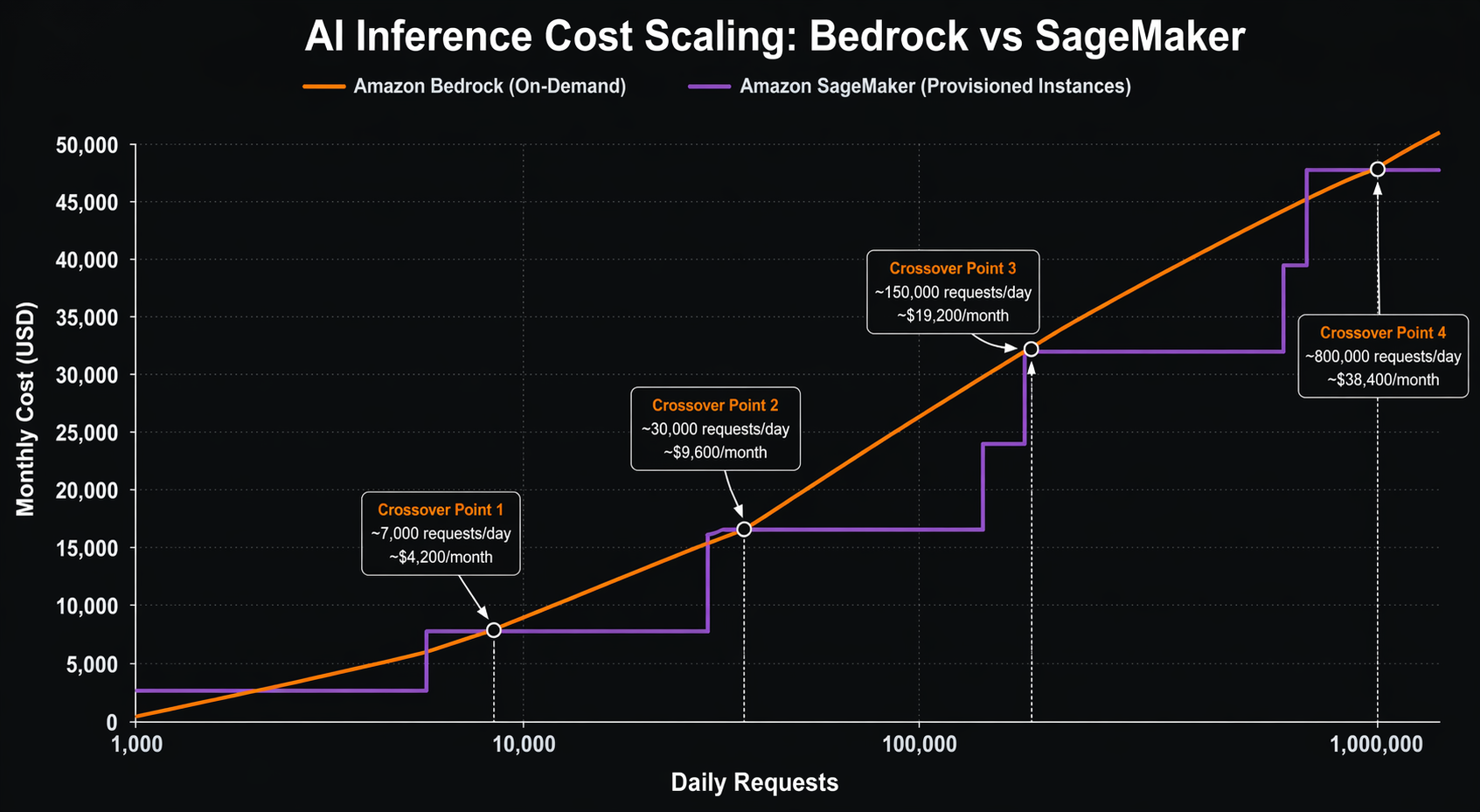
Theory is useful, but nothing beats real numbers. Let us walk through four scenarios with actual cost calculations. All prices are based on US East (N. Virginia) region pricing as of early 2026.
Scenario 1: Low-Volume Chatbot (1,000 requests/day)
You are building an internal chatbot that handles 1,000 requests per day. Each request has an average of 500 input tokens and 200 output tokens. The workload runs 24/7 but volume is low.
Bedrock (Claude 3.5 Sonnet, On-Demand):
- Daily input tokens: 1,000 x 500 = 500,000 tokens
- Daily output tokens: 1,000 x 200 = 200,000 tokens
- Daily input cost: (500,000 / 1,000) x $0.003 = $1.50
- Daily output cost: (200,000 / 1,000) x $0.015 = $3.00
- Daily total: $4.50
- Monthly total (30 days): $135.00
SageMaker (ml.g5.xlarge, Real-Time Endpoint):
- Hourly cost: $1.006
- Running 24/7: $1.006 x 24 x 30 = $724.32/month
| Service | Monthly Cost | Notes |
|---|---|---|
| Bedrock On-Demand | $135 | Pay only for what you use |
| SageMaker Real-Time | $724 | Pay for idle capacity |
| SageMaker Serverless | ~$15-30 | Scale-to-zero saves money |
Verdict: For low-volume workloads, Bedrock on-demand is significantly cheaper than always-on SageMaker endpoints. SageMaker Serverless could be competitive, but cold starts may be unacceptable for interactive chat.
Scenario 2: Medium-Volume API (100,000 requests/day)
Now your API is handling 100,000 requests per day. Same token counts: 500 input, 200 output. This is a production workload with consistent traffic during business hours and reduced traffic at night.
Bedrock (Claude 3.5 Sonnet, On-Demand):
- Daily input tokens: 100,000 x 500 = 50,000,000 tokens
- Daily output tokens: 100,000 x 200 = 20,000,000 tokens
- Daily input cost: (50,000,000 / 1,000) x $0.003 = $150.00
- Daily output cost: (20,000,000 / 1,000) x $0.015 = $300.00
- Daily total: $450.00
- Monthly total (30 days): $13,500
SageMaker (2x ml.g7e.xlarge with auto-scaling):
- 2 instances x $2.50/hour = $5.00/hour during peak
- Average 20 hours/day at peak, 4 hours at 1 instance
- Daily cost: (2 x $2.50 x 20) + (1 x $2.50 x 4) = $110.00
- Monthly total (30 days): $3,300
| Service | Monthly Cost | Break-Even Point |
|---|---|---|
| Bedrock On-Demand | $13,500 | — |
| SageMaker (2x g7e) | $3,300 | ~24,000 req/day |
| Bedrock Nova Pro | $3,600 | Cheaper model helps |
Verdict: At medium volume, SageMaker with GPU instances becomes significantly cheaper. The break-even point between Bedrock on-demand and SageMaker is roughly 24,000 requests per day for Claude 3.5 Sonnet. Switching to Nova Pro on Bedrock ($0.0008/$0.004 per 1K tokens) would cost $3,600/month, making it competitive with SageMaker.
Scenario 3: High-Volume Production (1,000,000 requests/day)
This is a serious production workload: one million requests per day. Latency must be under 500ms at the 95th percentile. You need guaranteed capacity.
Bedrock (Provisioned Throughput, 6-month commitment):
- Provisioned throughput for Claude 3.5 Sonnet: ~$19,000/month per model unit
- Estimated 3-4 model units needed for this volume
- Monthly total: $57,000-$76,000
SageMaker (4x ml.g7e.2xlarge + auto-scaling):
- 4 instances x $5.00/hour = $20.00/hour
- Plus 4 additional instances during peak (8 hours/day)
- Base: 4 x $5.00 x 24 x 30 = $14,400/month
- Peak overflow: 4 x $5.00 x 8 x 30 = $4,800/month
- Monthly total: ~$19,200
- With Savings Plans: ~$13,400/month
| Service | Monthly Cost | Cost Per 1K Requests |
|---|---|---|
| Bedrock On-Demand | $135,000 | $4.50 |
| Bedrock Provisioned | $57,000-76,000 | $1.90-$2.53 |
| SageMaker (on-demand) | $19,200 | $0.64 |
| SageMaker (Savings Plan) | $13,400 | $0.45 |
Verdict: At high volume, SageMaker dominates on cost. You are looking at 3-5x savings compared to Bedrock, even with provisioned throughput. Use AWS Cost Explorer and AWS Compute Optimizer to right-size your instances.
Scenario 4: Batch Processing (10 million documents/day)
You need to process 10 million documents per day for classification and entity extraction. Each document averages 1,000 input tokens and 50 output tokens. Latency is not critical; throughput and cost are.
Bedrock Batch Inference (Nova Lite):
- Daily input tokens: 10,000,000 x 1,000 = 10 billion tokens
- Daily output tokens: 10,000,000 x 50 = 500 million tokens
- Daily input cost: (10,000,000,000 / 1,000) x $0.00006 = $600.00
- Daily output cost: (500,000,000 / 1,000) x $0.00024 = $120.00
- Daily total: $720.00
- Monthly total (30 days): $21,600
SageMaker Batch Transform (ml.inf2.24xlarge):
- Processing 10M documents at ~500 docs/sec per instance
- Need 2 instances running ~2.8 hours per batch
- Daily cost: 2 x $6.50 x 2.8 = $36.40
- Monthly total (30 days): $1,092
| Service | Monthly Cost | Time Per Batch |
|---|---|---|
| Bedrock Batch (Nova Lite) | $21,600 | Hours (managed) |
| Bedrock Batch (Haiku) | $90,000 | Hours (managed) |
| SageMaker Batch (Inf2) | $1,092 | ~2.8 hours |
| SageMaker Batch (G7e) | ~$2,800 | ~1.5 hours |
Verdict: For batch processing, SageMaker Batch Transform is dramatically cheaper. The per-hour pricing model works in your favor when you can pack inference into focused time windows. Bedrock’s per-token pricing adds up quickly at this scale.
When Bedrock Wins
I’ve worked with enough teams to know when Bedrock just makes more sense. If any of these sound like your situation, don’t overthink it — go with Bedrock.
1. Fast Prototyping and MVPs
You need to go from idea to working prototype in hours, not weeks. Bedrock requires zero infrastructure setup. Create an AWS account, enable model access, and start calling the API. No instance provisioning, no container building, no deployment pipelines. This is ideal for hackathons, proof-of-concepts, and early-stage startups.
2. Multi-Model Experimentation
You want to benchmark Claude, Nova, Llama, and Mistral on your task without managing separate deployments. With Bedrock, switching models is a one-line code change. You can A/B test different models on the same dataset in minutes. SageMaker would require separate endpoints for each model.
3. Variable or Unpredictable Traffic
Your traffic spikes unpredictably. Maybe you run a consumer app that goes viral, or a B2B product with seasonal peaks. Bedrock’s on-demand pricing means you pay per token with no idle capacity costs. You never pay for instances sitting unused during quiet periods.
4. No ML Infrastructure Expertise
Your team is strong on application development but light on ML ops. You do not have experience with GPU instance selection, container optimization, or model serving frameworks. Bedrock abstracts all of this away. Your developers call an API and get results.
5. Guardrails and Safety Controls
You need content filtering, PII redaction, or topic denial without building these features yourself. Bedrock Guardrails provide configurable safety layers that work across all supported models. You set policies once and they apply to every invocation. Building equivalent guardrails on SageMaker means developing and maintaining your own middleware. If your Bedrock usage spans multiple AWS accounts, the Bedrock Guardrails cross-account guide walks through the new organization-level and account-level enforcement model.
6. Intelligent Cost Optimization
You want automatic cost optimization through prompt routing and model distillation. Bedrock’s Intelligent Prompt Routing can reduce costs by up to 30% by routing simple requests to cheaper models. Model Distillation can cut costs by up to 75% for narrow, high-volume tasks. These features require zero custom engineering.
7. Agentic Workflows
You are building AI agents that use tools, chain reasoning steps, and orchestrate multi-step workflows. Bedrock AgentCore provides purpose-built infrastructure for agent deployment, memory management, and action execution. Building equivalent agent infrastructure on SageMaker is a significant engineering effort.
When SageMaker Wins
Here are the scenarios where SageMaker is the better choice:
1. Custom or Fine-Tuned Models
You have your own model trained on proprietary data. Maybe it is a specialized domain model for medical imaging, legal document analysis, or financial prediction. These models cannot run on Bedrock because Bedrock only supports its marketplace models. SageMaker lets you deploy any model artifact from any framework.
2. Predictable High Volume
You have consistent, high-volume inference traffic. If you are processing millions of requests daily with predictable patterns, the per-hour pricing of SageMaker instances will almost always beat per-token pricing. At scale, you are paying for raw compute, not a markup on someone else’s model.
3. Strict Latency Requirements
You need guaranteed sub-100ms latency. SageMaker real-time endpoints with appropriately sized instances can deliver consistent low latency because you control the hardware. Bedrock’s latency varies based on model, load, and AWS’s internal routing. You cannot provision specific hardware for your workload on Bedrock.
4. VPC Isolation and Network Control
Your compliance requirements mandate that inference traffic never leaves your VPC. SageMaker endpoints can be deployed with VPC endpoints, meaning all traffic stays on the AWS private network. Bedrock’s API is public, and while it encrypts data in transit, the inference itself happens on AWS-managed infrastructure outside your VPC.
5. Multi-Model Hosting
You need to serve hundreds or thousands of model variants, such as per-customer fine-tuned models. SageMaker Multi-Model Endpoints can host thousands of models on a single endpoint, loading them on demand from S3. Bedrock requires separate API calls per model and does not support custom model hosting at all.
6. Edge Deployment
You need to run inference on edge devices: factory floors, retail stores, vehicles, or IoT sensors. SageMaker Edge Manager packages your model for deployment on edge hardware and provides fleet management. Bedrock is a cloud-only service with no edge deployment capability.
7. Full Observability and Debugging
You need deep visibility into inference performance: GPU utilization, memory usage, request queue depth, batch sizes, and custom metrics. SageMaker gives you full access to container logs, CloudWatch metrics, and the ability to add custom instrumentation. Bedrock provides invocation-level metrics but no infrastructure visibility.
For a fleet-level operating model, the SageMaker inference meta-monitoring guide links predictions, delayed ground truth, model lineage, Iceberg history, drift windows, alert ownership, and Amazon Quick dashboards.
8. Advanced Serving Patterns
You want to implement custom serving logic: dynamic batching, request prioritization, model pipelines, or custom pre/post-processing chains. SageMaker lets you customize the serving container entirely. You can use your own inference server, add middleware, or chain multiple models. Bedrock’s API is fixed.
Hybrid Architecture: Using Both Together
The best answer is not always “one or the other.” Many production AI platforms in 2026 use both Bedrock and SageMaker together. Here is a common pattern:
The Router Pattern
You build an inference router that sits between your application and the AWS AI services. This router examines each request and routes it to the optimal backend:
- Simple, general-purpose requests (chat, Q&A, summarization) go to Bedrock. These use foundation models with per-token pricing, and you benefit from Bedrock’s built-in guardrails and prompt routing.
- Custom or specialized requests (domain-specific models, fine-tuned variants, high-throughput batch) go to SageMaker. These use your own models on reserved instances with predictable costs.
The router itself can be a lightweight service running on Lambda or ECS. It evaluates request metadata (model preference, latency requirements, cost tier) and forwards to the appropriate backend.
Cost Allocation
With a hybrid setup, you need clear cost attribution. Use Bedrock cost attribution tags to track Bedrock spending by project, team, or application. For SageMaker, use resource tags on endpoints and integrate with your cost management tools.
Shared Components
Both services can share:
- S3 for model artifacts, training data, and batch input/output
- CloudWatch for unified monitoring and alerting
- IAM for access control and cross-service authorization
- VPC endpoints for private connectivity (SageMaker endpoints, S3, CloudWatch)
Migration Path
Already invested in one service and considering the other? Here is what migration looks like in each direction.
From Bedrock to SageMaker
Moving from Bedrock to SageMaker typically happens when your volume grows to the point where per-token pricing becomes uneconomical. Here is the migration process:
-
Export your prompts and configurations: Bedrock stores your invocation history in CloudWatch Logs. Extract your prompt templates, model parameters, and guardrail configurations.
-
Select and deploy an equivalent model: Find an open-weight model that meets your quality requirements. Options include Llama, Mistral, or a fine-tuned variant. Package it as a SageMaker model artifact.
-
Build your serving container: Use the SageMaker inference toolkit or bring your own container. Implement the same pre/post-processing logic that Bedrock was handling for you.
-
Recreate guardrails: If you were using Bedrock Guardrails, you need to build equivalent content filtering. Options include custom middleware, third-party libraries, or AWS Comprehend for content moderation.
-
Implement auto-scaling: Configure target-tracking scaling policies to match your traffic patterns. Plan for warm-up time when new instances launch.
-
Switch traffic gradually: Use a canary deployment pattern. Route 10% of traffic to the new SageMaker endpoint, monitor quality and latency, then gradually increase.
Timeline: 2-4 weeks for a production migration, depending on complexity.
From SageMaker to Bedrock
Moving from SageMaker to Bedrock typically happens when you want to reduce operational overhead, or when a Bedrock marketplace model becomes “good enough” for your use case.
-
Evaluate model equivalence: Test the Bedrock models against your current SageMaker model. Measure quality, latency, and cost. Ensure the Bedrock model meets your accuracy requirements.
-
Adapt your prompts: If your SageMaker model uses specific prompt formats, adapt them for the Bedrock model. Different models respond differently to prompt structure.
-
Configure guardrails: Set up Bedrock Guardrails to match any content filtering you had in your SageMaker serving container.
-
Update your API calls: Replace SageMaker InvokeEndpoint calls with Bedrock InvokeModel calls. The request/response format differs.
-
Decommission SageMaker endpoints: After validating the migration, delete your SageMaker endpoints to stop incurring hourly charges.
Timeline: 1-2 weeks, assuming the Bedrock model quality is acceptable.
Decision Flowchart
Use this decision tree to choose between SageMaker and Bedrock:
START: You need to serve AI model inferences

→ Do you have a custom model (not available in Bedrock)?
  YES → Use SageMaker
  NO → Continue

→ Do you need VPC isolation for inference traffic?
  YES → Use SageMaker
  NO → Continue

→ Do you need sub-100ms guaranteed latency?
  YES → Use SageMaker (with appropriate GPU instances)
  NO → Continue

→ Do you need to serve >500K requests/day consistently?
  YES → Calculate break-even. Likely SageMaker is cheaper.
  NO → Continue

→ Do you need edge deployment?
  YES → Use SageMaker Edge Manager
  NO → Continue

→ Is your traffic unpredictable or spiky?
  YES → Use Bedrock (on-demand pricing)
  NO → Continue

→ Do you need built-in guardrails and content filtering?
  YES → Use Bedrock
  NO → Continue

→ Do you want to experiment with multiple models quickly?
  YES → Use Bedrock
  NO → Continue

→ Default → Use Bedrock for simplicity, switch to SageMaker if costs grow
The general rule: Start with Bedrock, move to SageMaker when scale demands it. Bedrock gets you to production fastest. SageMaker saves you money at volume. There is no shame in starting simple and optimizing later.
Conclusion
The SageMaker vs Bedrock decision is not about which service is better. It is about which service is better for your specific situation. Here is the TL;DR:
Choose Bedrock when: You need speed to market, you are using foundation models, your traffic is variable, you want built-in safety features, or you do not have ML infrastructure expertise. Bedrock’s per-token pricing and zero-ops model make it the right choice for most teams getting started with AI inference.
Choose SageMaker when: You have custom models, you need VPC isolation, you have predictable high-volume traffic, you need guaranteed low latency, or you need edge deployment. SageMaker’s per-hour pricing and full control make it the right choice for mature AI workloads at scale.
Use both when: You are running a hybrid AI platform that needs the agility of Bedrock for general tasks and the control of SageMaker for specialized workloads. The router pattern gives you the best of both worlds.
The cost break-even point between on-demand Bedrock and SageMaker GPU instances typically falls around 20,000-30,000 requests per day for mid-size models. Below that, Bedrock wins on simplicity and often on cost. Above that, SageMaker wins on cost and gives you more control.
Do not overthink the initial decision. Start with Bedrock, instrument your costs, and re-evaluate when your monthly inference bill crosses $5,000. That is the point where the economics of SageMaker start to matter, and you will have real traffic data to guide the migration.
Explore more like this

Cloud IoT Security: Zero Trust, Identity, and Signed Updates
On September 11, 2026, the Cyber Resilience Act’s incident-reporting rules start applying in the European Union. That is 22 days after this article’s publication date. A manufacturer that learns of...

Bedrock Web Search: Grounding an Agent Without Building a Scraper
On August 4, 2026, AWS made Web Search on Amazon Bedrock generally available, and the entire integration surface is one JSON object: {"type": "web_search"}. That is the whole change from...

ECR Now Allows 200 GB Image Layers. Your Model Weights Still Do Not Belong There
On August 3, 2026, AWS raised the maximum Amazon ECR image layer size to 200 GB for images pushed with docker push. The announcement names the driver in the second...

Comments