
AWS Lambda Self-Managed S3 Code Storage: Production Deployment, IAM, and Rollback

AWS Lambda deployment packages used to take an unavoidable detour. You uploaded a ZIP file to your S3 bucket, Lambda copied it into service-managed storage, and every published function or layer version consumed the regional code-storage quota. On July 15, 2026, AWS added REFERENCE mode. Lambda can now keep your S3 object as the authoritative package instead of making that internal copy.
The launch removed one capacity problem and transferred a reliability problem to you. Delete the object, break its bucket policy, disable its KMS key, or archive it into a Glacier storage class, and Lambda can no longer reoptimize the function. A function that loses access eventually enters Inactive. This is not “bring any S3 URL and forget it.” It is a new artifact-supply-chain contract.
This guide builds that contract with versioned objects, least-privilege bucket and key policies, immutable promotion, release aliases, rollback, audit events, lifecycle protection, and cross-Region recovery. The result is a deployment design you can operate after the engineer who created the bucket has moved to another team.
COPY and REFERENCE are different ownership models
Lambda still defaults to COPY. In that mode, the source bucket is a staging location. Once the update succeeds, Lambda owns the internal package copy used to optimize execution environments. Removing the original upload does not remove Lambda’s copy.
In REFERENCE mode, the original object stays in the dependency chain. Lambda records the bucket, key, and version ID, then reads that exact version when it needs to prepare code. There is no Lambda-managed duplicate.
| Property | COPY mode |
REFERENCE mode |
|---|---|---|
| Default when storage mode is omitted | Yes | No |
| Counts toward Lambda-managed code storage | Yes | No |
| Source object needed after deployment | No | Yes |
| Customer controls storage encryption and Object Lock | Only on staging copy | On authoritative package |
| Console inline code editor | Available when otherwise supported | Not available |
| ZIP package size limit | 250 MB uncompressed | 250 MB uncompressed |
| Function and layer ZIP support | Yes | Yes |
| Container image support | Uses ECR, not this setting | Not applicable |
AWS raised the default Lambda-managed code-storage quota from 75 GB to 300 GB per account and Region with the launch. REFERENCE objects do not consume that quota at all. The 250 MB uncompressed ZIP limit did not change. Large native dependencies may still fit better in a container image; the Lambda layers and custom runtimes guide compares those packaging choices.
The official self-managed S3 storage documentation supports all ZIP-compatible runtimes and every S3 storage class except Glacier classes. Same-account, cross-account, and cross-Region buckets are supported. Cross-Region retrieval adds transfer cost and deployment latency.
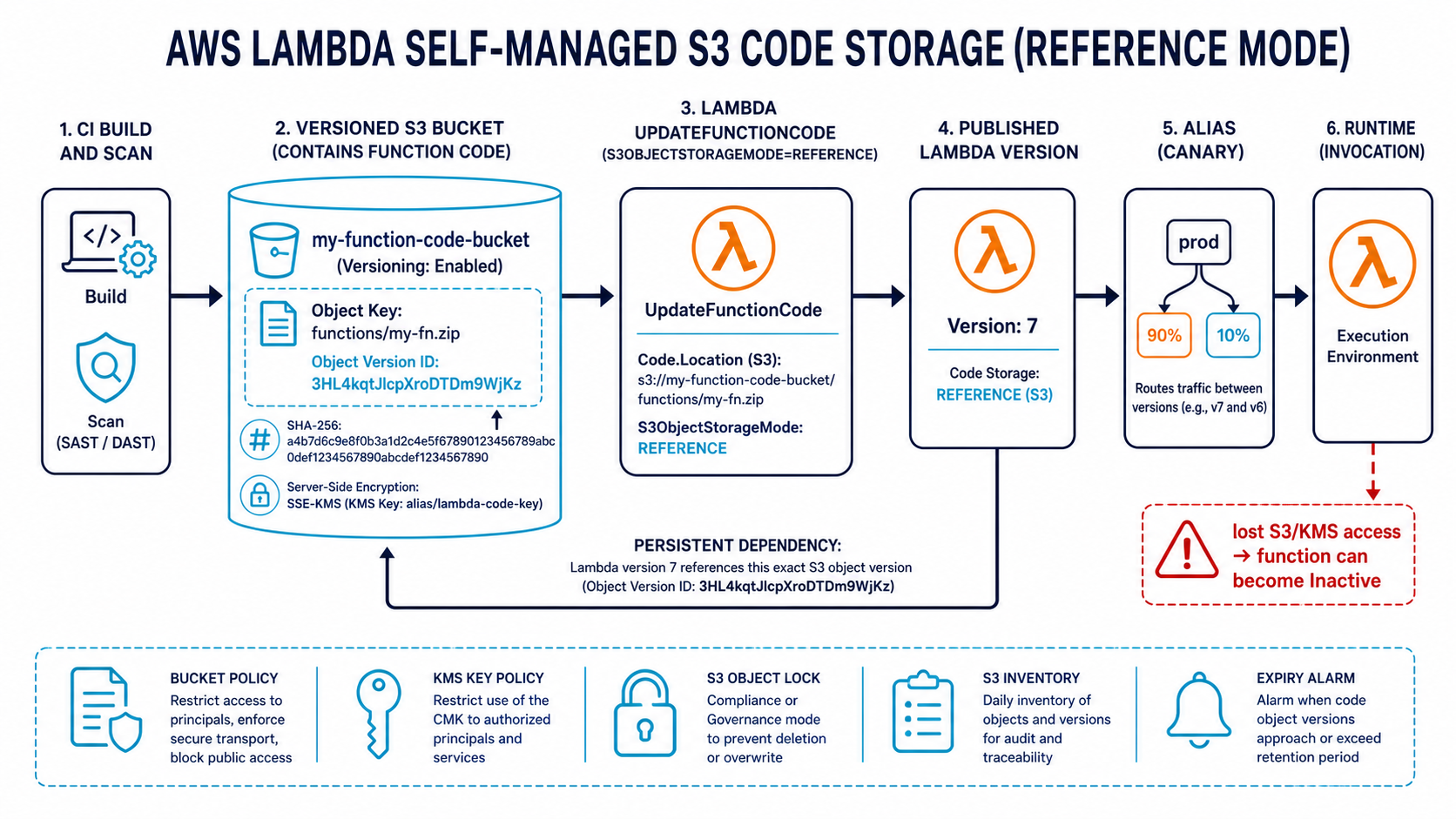
Start with an immutable artifact name
S3 Versioning is mandatory, but versioning alone is not a release strategy. A human can still upload a new current version under releases/orders.zip, and a careless pipeline can deploy “latest” without recording which version it chose.
Use a content-addressed or build-addressed key plus an S3 version ID:
s3://company-lambda-artifacts-us-east-1/
  orders-api/
    7c4b9f8c2d1a/orders-api.zip
    9fa0d5e87b44/orders-api.zip
The directory is the Git commit or build digest. The S3 version ID provides a second immutable identifier. Store both in the release record. Also calculate a SHA-256 digest before upload and attach it as object metadata:
set -euo pipefail

FUNCTION=orders-api
COMMIT=$(git rev-parse --short=12 HEAD)
ZIP="dist/${FUNCTION}.zip"
KEY="${FUNCTION}/${COMMIT}/${FUNCTION}.zip"
DIGEST=$(sha256sum "$ZIP" | awk '{print $1}')

VERSION_ID=$(aws s3api put-object \
  --bucket company-lambda-artifacts-us-east-1 \
  --key "$KEY" \
  --body "$ZIP" \
  --server-side-encryption aws:kms \
  --ssekms-key-id alias/lambda-artifacts \
  --metadata "git-sha=${COMMIT},sha256=${DIGEST}" \
  --query VersionId \
  --output text)

printf '%s\n' "$VERSION_ID" > dist/s3-version-id.txt
Do not pass latest from one pipeline stage to another. Pass the full tuple: bucket, key, version ID, digest, build ID, and commit. That record is the evidence that staging and production executed the same bytes.
If you deploy Lambda from GitLab today, the multi-account SAM pipeline pattern is a useful foundation. Replace its mutable artifact handoff with the version tuple above.
The bucket policy belongs to the Lambda service
The principal reading the artifact is lambda.amazonaws.com, not the function execution role. Confusing those identities leads to broad policies or a deployment that works only because an administrator granted the pipeline too much access.
Scope the resource to one exact key when possible and bind the request to the function ARN:
{
  "Version": "2012-10-17",
  "Statement": [
    {
      "Sid": "AllowOrdersLambdaToReadItsPackage",
      "Effect": "Allow",
      "Principal": { "Service": "lambda.amazonaws.com" },
      "Action": ["s3:GetObject", "s3:GetObjectVersion"],
      "Resource": "arn:aws:s3:::company-lambda-artifacts-us-east-1/orders-api/*",
      "Condition": {
        "ArnLike": {
          "aws:SourceArn": "arn:aws:lambda:us-east-1:111122223333:function:orders-api"
        },
        "StringEquals": {
          "aws:SourceAccount": "111122223333"
        }
      }
    }
  ]
}
A prefix wildcard is practical when every release gets a unique key. Keep each function under its own prefix. A bucket-wide arn:aws:s3:::bucket/* resource lets a compromised deployment path reference another team’s package and makes audit results harder to explain.
SSE-S3, SSE-KMS, customer-managed KMS keys, and DSSE-KMS are supported. With a customer-managed key, the key policy must also permit the Lambda service to decrypt within the intended context. Test disabling the key in a non-production account. The IAM design principles in the AWS roles and policies guide apply here, but remember that a resource policy and a key policy join the usual identity policy evaluation.
Deploy with CloudFormation
The CloudFormation resource now accepts S3ObjectStorageMode inside Code. Pass the S3 version as a parameter so a change produces an explicit stack update:
AWSTemplateFormatVersion: '2010-09-09'
Parameters:
  ArtifactBucket:
    Type: String
  ArtifactKey:
    Type: String
  ArtifactVersion:
    Type: String

Resources:
  OrdersFunction:
    Type: AWS::Lambda::Function
    Properties:
      FunctionName: orders-api
      Runtime: python3.13
      Handler: app.handler
      Role: !GetAtt OrdersExecutionRole.Arn
      Timeout: 15
      MemorySize: 1024
      Architectures: [arm64]
      Code:
        S3Bucket: !Ref ArtifactBucket
        S3Key: !Ref ArtifactKey
        S3ObjectVersion: !Ref ArtifactVersion
        S3ObjectStorageMode: REFERENCE

  LiveAlias:
    Type: AWS::Lambda::Alias
    Properties:
      FunctionName: !Ref OrdersFunction
      FunctionVersion: !GetAtt PublishedVersion.Version
      Name: live

  PublishedVersion:
    Type: AWS::Lambda::Version
    Properties:
      FunctionName: !Ref OrdersFunction
      Description: !Sub '${ArtifactKey}@${ArtifactVersion}'
Deploy the stack with the values captured by the upload step:
aws cloudformation deploy \
  --stack-name orders-api \
  --template-file infrastructure/orders.yaml \
  --capabilities CAPABILITY_IAM \
  --parameter-overrides \
    ArtifactBucket=company-lambda-artifacts-us-east-1 \
    ArtifactKey="$KEY" \
    ArtifactVersion="$VERSION_ID"
The same properties work for layers. You can mix modes, such as a referenced function package and a copied shared layer, but mixed ownership increases the number of failure paths. Document why each component differs. If the layer is large or changes independently, the production Lambda layers guide explains version and compatibility discipline.
One subtle CLI trap deserves a deployment test: every update-function-code call must include --s3-object-storage-mode REFERENCE. Omit it and the API defaults to COPY. A wrapper script should always pass the flag and then assert the returned configuration.
Promotion should move a reference, not rebuild code
A release pipeline should produce the ZIP once. Development tests it, staging references it, and production references the same object version. Rebuilding for production creates a new package even if the Git commit is unchanged, because timestamps, package repositories, and build images can differ.
| Stage | Action | Evidence retained |
|---|---|---|
| Build | Create ZIP, test, hash, upload | Commit, build image digest, SHA-256, key, version ID |
| Staging | Update function with REFERENCE, publish version |
Lambda version mapped to S3 version ID |
| Approval | Validate alarms and integration tests | Deployment record and approver |
| Production | Reference identical key and version | No rebuild and no mutable alias until validation |
| Rollback | Point at prior key/version, publish new Lambda version | Old and new mappings remain auditable |
Lambda versions are immutable snapshots of function code and configuration, while aliases are movable names. Use a live alias for traffic and keep the artifact tuple in the version description or an external deployment ledger. Weighted aliases can canary the new version before shifting 100% of traffic.
This pattern complements the cold-start and deployment tradeoffs in the Lambda cold-start optimization guide. REFERENCE can shorten creation or update time because the intermediate copy disappears, but it does not change the runtime initialization work in your handler.
AWS measured a roughly five-second reduction when creating a function from a 200 MB Python 3.13 package in its launch test. Treat that as an AWS example, not your SLA. Package size, Region, encryption, and network conditions differ.
Roll back without guessing
Rollback is another code update. Find the last known-good artifact tuple, update the function in REFERENCE mode, publish a new Lambda version, test it, then move the alias.
aws lambda update-function-code \
  --function-name orders-api \
  --s3-bucket company-lambda-artifacts-us-east-1 \
  --s3-key orders-api/7c4b9f8c2d1a/orders-api.zip \
  --s3-object-version '3Lg...known-good...' \
  --s3-object-storage-mode REFERENCE \
  --publish
Do not overwrite the current key and hope Versioning saves you. Explicitly reference the older version ID. Then record the new Lambda version returned by the API. The rollback must be reproducible from the deployment ledger without opening the S3 console.
Test the package before moving the production alias. aws lambda invoke --qualifier <version> targets the immutable candidate. Your normal API or event integration can continue to use live until the check passes.
Protect availability without keeping everything forever
Lambda periodically reads the object to reoptimize function code. If access disappears, the function moves to Inactive; restoring the object is not enough by itself. Restore access and update the function. A layer behaves differently: existing functions remain active, but configuration changes involving the inaccessible layer can fail.
These failure causes deserve alarms or configuration checks:
- The object version was permanently deleted.
- A lifecycle rule moved the active version into Glacier.
- A bucket policy or organization SCP began denying the service principal.
- A customer-managed KMS key was disabled or scheduled for deletion.
- A cross-account bucket owner removed the grant.
- A cross-Region artifact path became unavailable during deployment.
S3 Object Lock in Governance or Compliance mode can protect release artifacts from deletion. Choose a retention window based on rollback and audit requirements. Locking every version forever creates a storage and legal-retention problem; deleting after seven days creates a recovery problem when an old Lambda version is still serving traffic.
An inventory job should compare four sets: objects protected by retention, Lambda functions in REFERENCE, published function versions still referenced by aliases, and lifecycle rules that can transition or expire those versions. The comparison catches a policy change before Lambda needs the missing object.
CloudTrail data events or S3 server access logs can audit package reads. CloudTrail data events cost money, so scope selectors to the artifact bucket and required object operations. The CloudTrail deep dive covers management versus data events and retention design.
Cross-account and cross-Region design
A central artifact account can enforce versioning, encryption, logging, and Object Lock once. Workload accounts then reference approved prefixes through a bucket policy. This is attractive for regulated environments, but the artifact account becomes production infrastructure. Its SCPs, key administrators, and lifecycle changes need the same change controls as a runtime account.
Cross-Region references work within supported partitions, but local replicas are usually easier to operate. Use S3 Cross-Region Replication, wait for replication completion, and deploy the destination function from the destination bucket. Replication Time Control offers a 15-minute replication SLA when that guarantee is required. Never deploy a version in the secondary Region before verifying that exact version exists there.
| Architecture | Benefit | Cost or risk |
|---|---|---|
| Per-account, same-Region bucket | Small blast radius and simple access | Repeated governance controls |
| Central cross-account bucket | One artifact inventory and policy baseline | Shared account and KMS dependency |
| One cross-Region source bucket | Minimal copies | Transfer cost, longer activation, regional dependency |
| Replicated bucket per deployment Region | Regional independence and faster reads | Replication, storage, and promotion coordination |
For multi-Region application design beyond artifacts, use the active-active AWS architecture guide to separate data-plane failover from deployment-plane recovery.
When REFERENCE is the right choice
Use it when code-storage quota, centralized artifact governance, Object Lock, auditability, or cross-account promotion matters. It is especially compelling for platforms with hundreds of ZIP functions and many published versions.
Stay with COPY for small environments that value the lowest operational coupling. Lambda-managed storage now has a 300 GB default quota, and the source object can be deleted after a successful copy. That is a good trade when artifact-bucket reliability would otherwise become an unowned platform responsibility.
Use container images when the 250 MB uncompressed ZIP limit is the real blocker, when the build already produces OCI images, or when system packages make a ZIP awkward. The Lambda container image pipeline with GitLab and ECR covers that route.
Self-managed storage is not a free quota trick. It makes your S3 object part of the executable system. Treat that object like production: immutable identity, least privilege, encryption, deletion protection, replication where justified, access monitoring, and a rollback record that names the exact bytes. Do that, and REFERENCE becomes a cleaner supply chain rather than a new reason for a 2 a.m. Inactive function.
Build an immutable publishing pipeline
Reference mode makes the S3 object version part of the function’s supply chain. A pipeline should produce one immutable artifact, prove its contents, publish it to a versioned bucket, and deploy the exact returned version ID. Never look up “the latest object” during a production update.
A practical sequence is:
zip -r function.zip src/ python/ requirements.txt
sha256sum function.zip > function.zip.sha256

aws s3api put-object \
  --bucket "$CODE_BUCKET" \
  --key "releases/$GIT_COMMIT/function.zip" \
  --body function.zip \
  --server-side-encryption aws:kms \
  --ssekms-key-id "$CODE_KMS_KEY"
Capture VersionId from put-object in the real pipeline instead of discarding the JSON response. Store the Git commit, build identity, SHA-256 digest, bucket, key, object version, dependency manifest, and scanner results in a signed provenance record. The deployment stage should accept those values as immutable inputs.
Before calling Lambda, verify that the object version exists, its checksum matches the approved artifact, the bucket still has versioning enabled, and the Lambda service can use both the bucket policy and KMS key policy. Then update the function with S3ObjectStorageMode=REFERENCE and the exact S3ObjectVersion. Because the API defaults to copy mode when the storage mode is omitted, make that field a required deployment-library parameter and add a test that fails when it is absent.
Publish a Lambda version only after LastUpdateStatus is successful. Attach an alias to the new version through a canary or linear shift, observe errors, throttles, duration, initialization, and business metrics, then complete the move. An S3 object version is immutable, but a successful upload does not prove the function initializes or behaves correctly.
Keep an inventory table keyed by function version:
| Field | Purpose |
|---|---|
| Function and Lambda version | Locate the deployed runtime |
| Bucket, key, object version | Preserve the exact code dependency |
| Object digest and signer | Prove artifact integrity and origin |
| KMS key and policy version | Diagnose future access loss |
| Retention deadline | Prevent premature lifecycle deletion |
| Replacement version | Establish when cleanup becomes safe |
Rehearse the inaccessible-object failure
AWS documents that a function can become Inactive if Lambda loses access to its referenced object. That can happen after a bucket-policy edit, KMS-key change, cross-account role cleanup, lifecycle expiration, Object Lock configuration error, or deletion of the referenced object version.
The recovery playbook should preserve evidence before changing policies:
- Read function state, state-reason code, last update status, and CloudTrail events.
- Confirm the exact bucket, key, and version recorded for the deployed function version.
- Use IAM policy simulation and S3/KMS logs to find the denied layer.
- Restore access to the original version without replacing it with an unreviewed object.
- Invoke a controlled update after access is restored, as required by the Lambda recovery behavior.
- Test through the alias and verify business output before closing the incident.
Run that scenario in a sandbox: deny object access, observe state transition, restore policy, perform the update, and measure recovery time. A design that saves managed storage quota but cannot survive an accidental bucket-policy change is not production-ready.
Set lifecycle rules from the longest dependent function-version retention, not from upload age alone. S3 Inventory plus the deployment inventory can find unreferenced object versions. Delete only when no live function version, rollback plan, or investigation needs the artifact. Object Lock can protect releases from tampering, but retention settings must be deliberate because an incorrect locked artifact cannot be casually removed.
Add a preventive configuration rule that flags reference-mode functions whose object version is missing from the inventory, scheduled for expiration, encrypted by an unusable key, or stored outside the approved account and Region pattern. Prevention is cheaper than discovering the dependency during a cold restoration months later.
Sources
Explore more like this

Cloud IoT Security: Zero Trust, Identity, and Signed Updates
On September 11, 2026, the Cyber Resilience Act’s incident-reporting rules start applying in the European Union. That is 22 days after this article’s publication date. A manufacturer that learns of...

Kill the Docker Hub Token: OIDC Trust for GitHub Actions
On July 31, 2026, Docker shipped OIDC connections for GitHub Actions to any organization on a Docker Team, Docker Business, or Docker Hardened Images subscription, plus organizations in the Docker-Sponsored...

Bedrock Web Search: Grounding an Agent Without Building a Scraper
On August 4, 2026, AWS made Web Search on Amazon Bedrock generally available, and the entire integration surface is one JSON object: {"type": "web_search"}. That is the whole change from...

Comments