
Multi-Region Active-Active Architecture on AWS: Complete Implementation Guide

If your application serves users around the world, running everything in a single AWS region just doesn’t cut it anymore. Users in Tokyo shouldn’t have to wait 300 milliseconds for a response from a database sitting in Virginia. EU regulators want data to stay within European borders. And a single region outage – rare as they are – can take down your entire business in one shot.
Multi-region active-active architecture tackles all three of those problems at once. Every region handles live traffic, every region can survive the loss of any other, and data replication keeps users close to their data.
In this guide, we’re going to walk through the whole implementation: architecture patterns, data layer design, compute distribution, networking, traffic management, conflict resolution, cost analysis, and a phased migration path to get you from single-region to full active-active.
Table of Contents
- Why Multi-Region Active-Active in 2026
- Active-Active Architecture Patterns
- Data Layer Design
- Compute Layer Design
- Networking and Traffic Routing
- Traffic Management Strategies
- Data Consistency and Conflict Resolution
- Application Design for Multi-Region
- Disaster Recovery vs Active-Active
- Real-World Architecture: E-Commerce Platform
- Cost Analysis
- Monitoring and Observability
- Migration Path from Single-Region
- Best Practices and Lessons Learned
- Conclusion
Why Multi-Region Active-Active in 2026
The case for going multi-region active-active has never been stronger. Three converging forces have pushed it from “nice to have” to something you genuinely need to consider.
Global User Expectations
Users in 2026 expect pages to load fast – we’re talking sub-100-millisecond response times – no matter where they are. A single-region deployment in us-east-1 gives you roughly 20ms latency for users on the US East Coast, but that balloons to 180-300ms for anyone in Asia-Pacific. That gap hits your bottom line directly. Amazon famously calculated that every 100ms of latency costs them 1% in sales. Google found that a 500ms delay drops search traffic by 20%.
Active-active gets rid of that geography-induced latency by routing each user to the nearest region with a full read-write stack. Someone in Singapore hits ap-southeast-1. Someone in Frankfurt hits eu-central-1. Both get local-speed responses.
RPO=0 and RTO=0
Traditional disaster recovery setups accept an RPO of minutes or hours and an RTO measured by how long it takes to promote a standby region. Active-active achieves functional RPO=0 and RTO=0 because every region holds a complete, up-to-date copy of your data and serves live traffic around the clock.
When us-east-1 goes down, your traffic routing layer just stops sending requests there. Users in North America get routed to us-west-2 instead. No failover procedure to run, no DNS propagation to wait for, and no data loss to clean up.
For teams that have already put in the work on high availability within a single region, multi-region active-active is the logical next step – it takes those same resilience principles and stretches them across geographic boundaries.
Regulatory Compliance
Data sovereignty regulations – think GDPR, LGPD, and India’s Digital Personal Data Protection Act – require certain types of data to stay within specific jurisdictions. A multi-region architecture lets you pin EU citizen data to eu-central-1 and eu-west-1 while keeping US data in us-east-1 and us-west-2.
The tricky part is replicating data globally for disaster recovery without breaking compliance boundaries. Techniques like data classification at the application layer, field-level encryption, and regional data residency policies can help you thread that needle.
When Active-Active Is the Wrong Choice
That said, active-active isn’t always the answer. Internal tools with a single-country user base, batch processing systems, and development environments don’t really benefit from multi-region distribution. The operational complexity and cost are real. Before committing, make sure your use case actually demands global low-latency reads, zero-downtime region failover, or data residency compliance.
Active-Active Architecture Patterns
There are three fundamental patterns for building active-active on AWS, and each one strikes a different balance between consistency, latency, complexity, and cost.
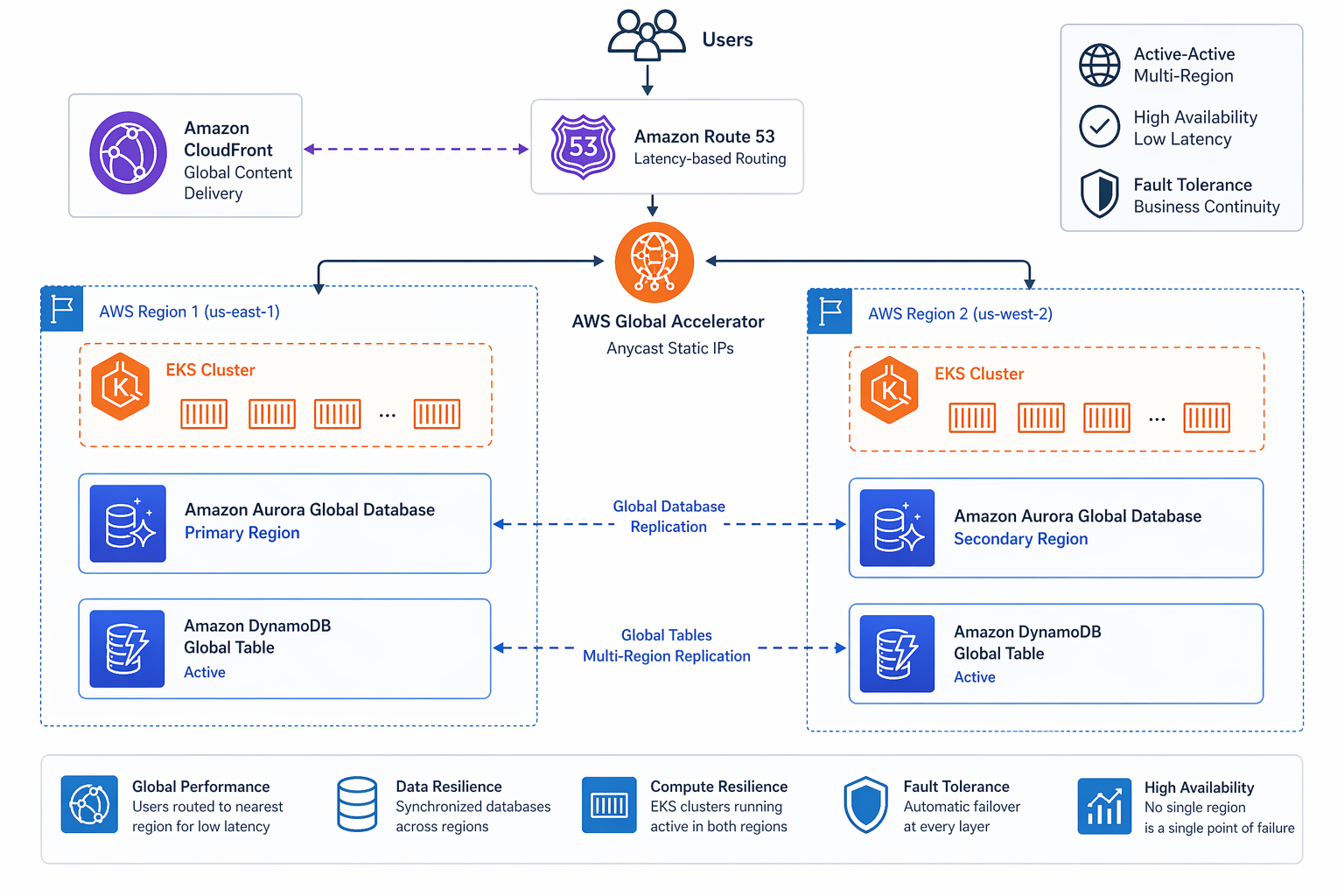
Pattern 1: Single Database with Global Replicas
One primary database handles all the writes and replicates to read replicas in other regions. Reads get served locally from those replicas.
Advantages: Strong consistency for reads-after-writes. Simpler conflict model since there is a single write source. Well-understood operational model.
Disadvantages: Write latency equals the round-trip time to the primary region. The primary region becomes a single point of failure for writes. Promoting a replica during failure can result in data loss.
Best for: Read-heavy workloads (95%+ reads) where a write latency of 100-200ms is acceptable. Content delivery platforms, product catalogs, and reporting dashboards tend to fit this pattern nicely.
If this sounds like your workload, it maps closely to Aurora Global Database, which gives you cross-region read replicas with replication lag typically under one second.
Pattern 2: Multi-Database with Synchronous Replication
Each region gets its own database instance, and writes get synchronously replicated to all regions before the client receives an acknowledgment.
Advantages: Strong consistency across all regions. Any region can serve as the source of truth. True zero-data-loss failover.
Disadvantages: Write latency equals the round-trip time to the farthest region. Network partitions block writes. Higher cost from running full database instances in every region.
Best for: Financial systems, order management – basically any workload where losing even a single transaction is unacceptable. Because of latency constraints, you’re typically limited to two regions with this approach.
Pattern 3: Event-Driven Eventual Consistency
Each region runs independently with its own database. Data changes spread asynchronously through event streams, and conflicts get resolved using application logic or conflict-free replicated data types (CRDTs).
Advantages: Local write latency in every region. Tolerates network partitions gracefully. Scales to any number of regions.
Disadvantages: Eventual consistency means reads may return stale data. Conflict resolution adds application complexity. Debugging data inconsistencies is difficult.
Best for: Collaborative applications, social media platforms, IoT data ingestion, and any workload where eventual consistency is acceptable. This is the pattern used by DynamoDB Global Tables, which you can learn more about in the DynamoDB Streams and Global Tables guide.
Pattern Comparison
| Criteria | Single DB + Replicas | Multi-DB Sync | Event-Driven |
|---|---|---|---|
| Read latency | Local | Local | Local |
| Write latency | Cross-region | Cross-region (slowest) | Local |
| Consistency | Eventual (replica lag) | Strong | Eventual |
| Conflict resolution | Last writer wins (automatic) | None needed | Application-level |
| Max regions | 5-6 | 2-3 | Unlimited |
| Complexity | Low | Medium | High |
| Cost | Medium | High | Medium |
| Failure tolerance | Reads survive, writes failover | Full | Full |
Data Layer Design
The data layer is the make-or-break component of any active-active architecture. Every AWS database service handles cross-region replication differently, so let’s dig into each one.
Aurora Global Database
Aurora Global Database replicates data from a primary cluster to up to 15 secondary clusters spread across different regions. The replication uses dedicated infrastructure that’s separate from the database engine, so it barely affects primary cluster performance.
Replication Characteristics:
- Typical replication lag: under 1 second
- Uses storage-level replication, not binlog replication
- Secondary clusters are readable but not writable by default
- Write forwarding allows secondary clusters to route writes to the primary
# Terraform: Aurora Global Database with clusters in us-east-1 and eu-central-1

# Primary cluster (us-east-1)
resource "aws_rds_global_cluster" "main" {
  provider             = aws.us_east_1
  global_cluster_id    = "ecommerce-global-cluster"
  engine               = "aurora-postgresql"
  engine_version       = "16.4"
  database_name        = "ecommerce"
  storage_encrypted    = true
}

resource "aws_rds_cluster" "primary" {
  provider                  = aws.us_east_1
  cluster_identifier        = "ecommerce-primary"
  global_cluster_identifier = aws_rds_global_cluster.main.id
  engine                    = "aurora-postgresql"
  engine_version            = "16.4"
  master_username           = var.db_username
  master_password           = var.db_password
  db_subnet_group_name      = aws_db_subnet_group.primary.name
  vpc_security_group_ids    = [aws_security_group.aurora_primary.id]

  serverlessv2_scaling_configuration {
    min_capacity = 2
    max_capacity = 16
  }
}

resource "aws_rds_cluster_instance" "primary" {
  provider              = aws.us_east_1
  count                 = 2
  cluster_identifier    = aws_rds_cluster.primary.id
  identifier            = "ecommerce-primary-${count.index}"
  instance_class        = "db.serverless"
  engine                = "aurora-postgresql"
  engine_version        = "16.4"
  performance_insights_enabled = true
}

# Secondary cluster (eu-central-1)
resource "aws_rds_cluster" "secondary" {
  provider                  = aws.eu_central_1
  cluster_identifier        = "ecommerce-secondary-eu"
  global_cluster_identifier = aws_rds_global_cluster.main.id
  engine                    = "aurora-postgresql"
  engine_version            = "16.4"
  db_subnet_group_name      = aws_db_subnet_group.secondary.name
  vpc_security_group_ids    = [aws_security_group.aurora_secondary.id]
  depends_on                = [aws_rds_cluster_instance.primary]

  serverlessv2_scaling_configuration {
    min_capacity = 2
    max_capacity = 16
  }
}

resource "aws_rds_cluster_instance" "secondary" {
  provider              = aws.eu_central_1
  count                 = 2
  cluster_identifier    = aws_rds_cluster.secondary.id
  identifier            = "ecommerce-secondary-eu-${count.index}"
  instance_class        = "db.serverless"
  engine                = "aurora-postgresql"
  engine_version        = "16.4"
  performance_insights_enabled = true
}
Write Forwarding Configuration:
When you need writes originating from a secondary region, Aurora supports write forwarding. It routes write statements from the secondary cluster to the primary over AWS’s backbone network.
# Enable write forwarding on the secondary cluster
aws rds modify-db-cluster \
  --db-cluster-identifier ecommerce-secondary-eu \
  --enable-global-write-forwarding \
  --region eu-central-1

# Verify write forwarding is enabled
aws rds describe-db-clusters \
  --db-cluster-identifier ecommerce-secondary-eu \
  --region eu-central-1 \
  --query 'DBClusters[0].GlobalWriteForwardingStatus'
Replication Lag by Region Pair:
| Primary Region | Secondary Region | Typical Lag | 99th Percentile Lag |
|---|---|---|---|
| us-east-1 | us-west-2 | 200ms | 450ms |
| us-east-1 | eu-west-1 | 400ms | 850ms |
| us-east-1 | ap-southeast-1 | 550ms | 1.1s |
| eu-central-1 | eu-west-1 | 80ms | 150ms |
| eu-central-1 | us-east-1 | 400ms | 800ms |
| ap-northeast-1 | ap-southeast-1 | 120ms | 250ms |
| us-west-2 | ap-northeast-1 | 450ms | 950ms |
These numbers were measured over AWS’s dedicated global network. Your actual performance will depend on write volume, transaction size, and instance class.
DynamoDB Global Tables
DynamoDB Global Tables give you multi-region, multi-active replication with automatic conflict resolution built in. Every replica is fully readable and writable, and changes propagate to all replicas within seconds.
# Terraform: DynamoDB Global Table spanning three regions

resource "aws_dynamodb_table" "products_us" {
  provider       = aws.us_east_1
  name           = "Products"
  billing_mode   = "PAY_PER_REQUEST"
  hash_key       = "productId"
  range_key      = "categoryId"
  stream_enabled  = true
  stream_view_type = "NEW_AND_OLD_IMAGES"

  attribute {
    name = "productId"
    type = "S"
  }

  attribute {
    name = "categoryId"
    type = "S"
  }

  attribute {
    name = "updatedAt"
    type = "N"
  }

  global_secondary_index {
    name            = "ByCategoryIndex"
    hash_key        = "categoryId"
    range_key       = "updatedAt"
    projection_type = "ALL"
  }

  replica {
    region_name = "eu-central-1"
  }

  replica {
    region_name = "ap-southeast-1"
  }

  ttl {
    attribute_name = "expiresAt"
    enabled        = true
  }

  point_in_time_recovery {
    enabled = true
  }
}
# AWS CLI: Create a DynamoDB Global Table with replicas

# Step 1: Create the table in us-east-1
aws dynamodb create-table \
  --table-name Products \
  --attribute-definitions \
    AttributeName=productId,AttributeType=S \
    AttributeName=categoryId,AttributeType=S \
    AttributeName=updatedAt,AttributeType=N \
  --key-schema \
    AttributeName=productId,KeyType=HASH \
    AttributeName=categoryId,KeyType=RANGE \
  --billing-mode PAY_PER_REQUEST \
  --stream-specification StreamEnabled=true,StreamViewType=NEW_AND_OLD_IMAGES \
  --region us-east-1

# Step 2: Enable global table version 2019
aws dynamodb update-table \
  --table-name Products \
  --replica-updates '[{"Create":{"RegionName":"eu-central-1"}}]' \
  --region us-east-1

# Step 3: Add third region
aws dynamodb update-table \
  --table-name Products \
  --replica-updates '[{"Create":{"RegionName":"ap-southeast-1"}}]' \
  --region us-east-1

# Step 4: Verify replication is active
aws dynamodb describe-table \
  --table-name Products \
  --region us-east-1 \
  --query 'Table.Replicas[*].{Region:RegionName,Status:ReplicaStatus}'
Conflict Resolution:
DynamoDB Global Tables use last-writer-wins (LWW) as their default conflict resolution strategy. When two regions update the same item at the same time, the version with the later timestamp takes precedence. This means you need to be thoughtful about how you design your application:
- Always include a timestamp field in every write operation
- Use conditional writes when business logic requires it
- Design your data model to minimize concurrent writes to the same item
- Consider using a distributed locking mechanism for high-contention items
# Python: Writing to DynamoDB Global Table with proper timestamp handling
import boto3
import time
from botocore.exceptions import ClientError

dynamodb = boto3.resource('dynamodb', region_name='us-east-1')
table = dynamodb.Table('Products')

def upsert_product(product_id, category_id, updates):
    """
    Update a product with proper timestamp for LWW conflict resolution.
    Uses conditional write to prevent stale overwrites.
    """
    current_time = int(time.time() * 1000)  # Millisecond precision

    update_expression_parts = []
    expression_attribute_values = {':updatedAt': current_time}
    expression_attribute_names = {}

    for key, value in updates.items():
        placeholder = f':{key}'
        name_placeholder = f'#{key}'
        update_expression_parts.append(f'{name_placeholder} = {placeholder}')
        expression_attribute_values[placeholder] = value
        expression_attribute_names[name_placeholder] = key

    update_expression = 'SET ' + ', '.join(update_expression_parts) + ', #updatedAt = :updatedAt'
    expression_attribute_names['#updatedAt'] = 'updatedAt'

    try:
        response = table.update_item(
            Key={
                'productId': product_id,
                'categoryId': category_id
            },
            UpdateExpression=update_expression,
            ConditionExpression='#updatedAt < :updatedAt',
            ExpressionAttributeNames=expression_attribute_names,
            ExpressionAttributeValues=expression_attribute_values,
            ReturnValues='ALL_NEW'
        )
        return response['Attributes']
    except ClientError as e:
        if e.response['Error']['Code'] == 'ConditionalCheckFailedException':
            # A newer version exists; fetch and return it instead
            return table.get_item(
                Key={'productId': product_id, 'categoryId': category_id}
            ).get('Item')
        raise
ElastiCache Global Datastore
On the caching side, ElastiCache Global Datastore provides cross-region replication for Redis clusters. This keeps your cache warm in every region, so you don’t get hit with cold-start latency after a failover.
# Create a Global Datastore for ElastiCache Redis

# Step 1: Create the primary cluster in us-east-1
aws elasticache create-replication-group \
  --replication-group-id ecommerce-cache-primary \
  --replication-group-description "E-commerce cache primary" \
  --engine redis \
  --engine-version 7.1 \
  --cache-node-type cache.r6g.large \
  --num-node-groups 3 \
  --replicas-per-node-group 2 \
  --automatic-failover-enabled \
  --at-rest-encryption-enabled \
  --transit-encryption-enabled \
  --region us-east-1

# Step 2: Create the global replication group
aws elasticache create-global-replication-group \
  --global-replication-group-id-suffix ecommerce \
  --primary-replication-group-id ecommerce-cache-primary \
  --region us-east-1

# Step 3: Add secondary cluster in eu-central-1
aws elasticache create-replication-group \
  --replication-group-id ecommerce-cache-eu \
  --replication-group-description "E-commerce cache EU secondary" \
  --global-replication-group-id ecommerce-cache-primary::ecommerce \
  --region eu-central-1
S3 Multi-Region Access Points
For object storage, S3 Multi-Region Access Points give you a single global endpoint that automatically routes requests to the nearest S3 bucket. Pair that with cross-region replication, and you’ve got yourself a globally distributed object store.
# Terraform: S3 cross-region replication with Multi-Region Access Point

# Primary bucket (us-east-1)
resource "aws_s3_bucket" "assets_primary" {
  provider = aws.us_east_1
  bucket   = "ecommerce-assets-us-east-1"
}

resource "aws_s3_bucket_versioning" "assets_primary" {
  provider = aws.us_east_1
  bucket   = aws_s3_bucket.assets_primary.id
  versioning_configuration {
    status = "Enabled"
  }
}

# Secondary bucket (eu-central-1)
resource "aws_s3_bucket" "assets_secondary" {
  provider = aws.eu_central_1
  bucket   = "ecommerce-assets-eu-central-1"
}

resource "aws_s3_bucket_versioning" "assets_secondary" {
  provider = aws.eu_central_1
  bucket   = aws_s3_bucket.assets_secondary.id
  versioning_configuration {
    status = "Enabled"
  }
}

# Replication rule: us-east-1 -> eu-central-1
resource "aws_s3_bucket_replication_configuration" "primary_to_eu" {
  provider = aws.us_east_1
  role     = aws_iam_role.replication.arn
  bucket   = aws_s3_bucket.assets_primary.id

  rule {
    id     = "replicate-to-eu"
    status = "Enabled"

    destination {
      bucket        = aws_s3_bucket.assets_secondary.arn
      storage_class = "STANDARD"
      metric {
        status = "Enabled"
      }
    }

    delete_marker_replication {
      status = "Enabled"
    }
  }
}

# Multi-Region Access Point
resource "aws_s3control_multi_region_access_point" "assets" {
  provider = aws.us_east_1
  name     = "ecommerce-assets"

  details {
    name = "ecommerce-assets"

    public_access_block {
      block_public_acls       = true
      block_public_policy     = true
      ignore_public_acls      = true
      restrict_public_buckets = true
    }

    region {
      bucket = aws_s3_bucket.assets_primary.id
    }

    region {
      bucket = aws_s3_bucket.assets_secondary.id
    }
  }
}
Data Layer Service Comparison
| Service | Replication Type | Write Latency | Read Latency | Max Replicas | Conflict Resolution |
|---|---|---|---|---|---|
| Aurora Global Database | Storage-level async | Cross-region (primary only) | Local | 15 read replicas | N/A (single writer) |
| DynamoDB Global Tables | Item-level async | Local (all regions) | Local | 50 replicas | Last-writer-wins |
| ElastiCache Global | Command-level async | Cross-region (primary) | Local | 2 replicas | Last-writer-wins |
| S3 Cross-Region Replication | Object-level async | Local (any region) | Local | Unlimited | Last-writer-wins |
| ElastiCache (Cluster mode) | Command-level async | Cross-region | Local | 2 | Last-writer-wins |
Compute Layer Design
Every region needs its own full compute stack – one that can serve all traffic independently. Your compute layer has to be stateless, health-checked, and able to scale on its own.
EKS Multi-Cluster with Istio Service Mesh
If you’re running containerized workloads, EKS clusters in each region connected through an Istio service mesh give you the most flexible compute foundation. Istio’s multi-cluster mesh handles service discovery and load balancing across regions seamlessly.
# Terraform: EKS cluster module for multi-region deployment

module "eks_us_east_1" {
  source  = "terraform-aws-modules/eks/aws"
  version = "~> 20.0"
  providers = {
    aws = aws.us_east_1
  }

  cluster_name    = "ecommerce-us-east-1"
  cluster_version = "1.31"

  vpc_id     = module.vpc_us_east_1.vpc_id
  subnet_ids = module.vpc_us_east_1.private_subnets

  cluster_endpoint_private_access = true
  cluster_endpoint_public_access  = true

  cluster_addons = {
    coredns = {
      most_recent = true
    }
    kube-proxy = {
      most_recent = true
    }
    vpc-cni = {
      most_recent = true
    }
    aws-load-balancer-controller = {
      most_recent = true
    }
  }

  eks_managed_node_groups = {
    application = {
      min_size       = 3
      max_size       = 20
      desired_size   = 6
      instance_types = ["m6i.xlarge", "m6i.2xlarge"]
      capacity_type  = "ON_DEMAND"

      taints = {
        workload = {
          key    = "workload"
          value  = "application"
          effect = "NO_SCHEDULE"
        }
      }
    }
    system = {
      min_size       = 2
      max_size       = 5
      desired_size   = 3
      instance_types = ["m6i.large"]
      capacity_type  = "ON_DEMAND"
    }
  }

  tags = {
    Environment = "production"
    Region      = "us-east-1"
    Architecture = "active-active"
  }
}

module "eks_eu_central_1" {
  source  = "terraform-aws-modules/eks/aws"
  version = "~> 20.0"
  providers = {
    aws = aws.eu_central_1
  }

  cluster_name    = "ecommerce-eu-central-1"
  cluster_version = "1.31"

  vpc_id     = module.vpc_eu_central_1.vpc_id
  subnet_ids = module.vpc_eu_central_1.private_subnets

  cluster_endpoint_private_access = true
  cluster_endpoint_public_access  = true

  cluster_addons = {
    coredns = {
      most_recent = true
    }
    kube-proxy = {
      most_recent = true
    }
    vpc-cni = {
      most_recent = true
    }
    aws-load-balancer-controller = {
      most_recent = true
    }
  }

  eks_managed_node_groups = {
    application = {
      min_size       = 3
      max_size       = 20
      desired_size   = 6
      instance_types = ["m6i.xlarge", "m6i.2xlarge"]
      capacity_type  = "ON_DEMAND"

      taints = {
        workload = {
          key    = "workload"
          value  = "application"
          effect = "NO_SCHEDULE"
        }
      }
    }
    system = {
      min_size       = 2
      max_size       = 5
      desired_size   = 3
      instance_types = ["m6i.large"]
      capacity_type  = "ON_DEMAND"
    }
  }

  tags = {
    Environment = "production"
    Region      = "eu-central-1"
    Architecture = "active-active"
  }
}
Lambda with Regional Endpoints
Serverless workloads spread across regions almost effortlessly. Just deploy the same Lambda function to every target region and set up regional API Gateway endpoints – Route 53 takes care of the global routing.
# Terraform: Multi-region Lambda deployment

module "lambda_us_east_1" {
  source  = "terraform-aws-modules/lambda/aws"
  version = "~> 7.0"
  providers = {
    aws = aws.us_east_1
  }

  function_name = "order-processor"
  description   = "Order processing service - us-east-1"
  handler       = "index.handler"
  runtime       = "python3.12"
  source_path   = "../src/order-processor"

  environment_variables = {
    REGION            = "us-east-1"
    DYNAMODB_TABLE    = "Orders"
    PRIMARY_REGION    = "us-east-1"
    CACHE_ENDPOINT    = aws_elasticache_replication_group.primary.primary_endpoint_address
    LOG_LEVEL         = "INFO"
  }

  vpc_subnet_ids         = module.vpc_us_east_1.private_subnets
  vpc_security_group_ids = [aws_security_group.lambda_us.id]

  allowed_triggers = {
    APIGateway = {
      service    = "apigateway"
      source_arn = "${module.api_gateway_us_east_1.execution_arn}/*/*"
    }
  }
}

module "lambda_eu_central_1" {
  source  = "terraform-aws-modules/lambda/aws"
  version = "~> 7.0"
  providers = {
    aws = aws.eu_central_1
  }

  function_name = "order-processor"
  description   = "Order processing service - eu-central-1"
  handler       = "index.handler"
  runtime       = "python3.12"
  source_path   = "../src/order-processor"

  environment_variables = {
    REGION            = "eu-central-1"
    DYNAMODB_TABLE    = "Orders"
    PRIMARY_REGION    = "us-east-1"
    CACHE_ENDPOINT    = aws_elasticache_replication_group.secondary.primary_endpoint_address
    LOG_LEVEL         = "INFO"
  }

  vpc_subnet_ids         = module.vpc_eu_central_1.private_subnets
  vpc_security_group_ids = [aws_security_group.lambda_eu.id]

  allowed_triggers = {
    APIGateway = {
      service    = "apigateway"
      source_arn = "${module.api_gateway_eu_central_1.execution_arn}/*/*"
    }
  }
}
Networking and Traffic Routing
Networking is what holds the whole architecture together. Each region needs its own VPC, and getting cross-region communication right takes some careful planning.
Multi-Region VPC Architecture
# Terraform: VPC configuration for us-east-1
module "vpc_us_east_1" {
  source  = "terraform-aws-modules/vpc/aws"
  version = "~> 5.0"
  providers = {
    aws = aws.us_east_1
  }

  name = "ecommerce-us-east-1"
  cidr = "10.0.0.0/16"

  azs             = ["us-east-1a", "us-east-1b", "us-east-1c"]
  private_subnets = ["10.0.1.0/24", "10.0.2.0/24", "10.0.3.0/24"]
  public_subnets  = ["10.0.101.0/24", "10.0.102.0/24", "10.0.103.0/24"]

  enable_nat_gateway     = true
  single_nat_gateway     = false
  one_nat_gateway_per_az = true

  enable_dns_hostnames = true
  enable_dns_support   = true

  tags = {
    Environment = "production"
    Region      = "us-east-1"
  }
}

# VPC configuration for eu-central-1
module "vpc_eu_central_1" {
  source  = "terraform-aws-modules/vpc/aws"
  version = "~> 5.0"
  providers = {
    aws = aws.eu_central_1
  }

  name = "ecommerce-eu-central-1"
  cidr = "10.1.0.0/16"

  azs             = ["eu-central-1a", "eu-central-1b", "eu-central-1c"]
  private_subnets = ["10.1.1.0/24", "10.1.2.0/24", "10.1.3.0/24"]
  public_subnets  = ["10.1.101.0/24", "10.1.102.0/24", "10.1.103.0/24"]

  enable_nat_gateway     = true
  single_nat_gateway     = false
  one_nat_gateway_per_az = true

  enable_dns_hostnames = true
  enable_dns_support   = true

  tags = {
    Environment = "production"
    Region      = "eu-central-1"
  }
}
VPC Peering vs Transit Gateway
For cross-region VPC connectivity, you have two options:
| Feature | VPC Peering | Transit Gateway |
|---|---|---|
| Max connections | 125 per VPC | 5,000 per TGW |
| Transitive routing | Not supported | Supported |
| Bandwidth | Up to 100 Gbps | Up to 50 Gbps per peering |
| Setup complexity | Low (pairwise) | Medium (hub-spoke) |
| Cost | Data transfer only | Hourly + data transfer |
| Use case | 2-3 regions | 4+ regions or complex topologies |
For a straightforward two-region active-active setup, VPC peering is simpler and easier on the wallet. Once you’re dealing with three or more regions, Transit Gateway with cross-region peering gives you a much more manageable topology.
# Terraform: Cross-region VPC peering
resource "aws_vpc_peering_connection" "us_to_eu" {
  provider    = aws.us_east_1
  vpc_id      = module.vpc_us_east_1.vpc_id
  peer_vpc_id = module.vpc_eu_central_1.vpc_id
  peer_region = "eu-central-1"
  auto_accept = false

  tags = {
    Name = "us-east-1-to-eu-central-1"
  }
}

resource "aws_vpc_peering_connection_accepter" "eu_accept" {
  provider                  = aws.eu_central_1
  vpc_peering_connection_id = aws_vpc_peering_connection.us_to_eu.id
  auto_accept               = true

  tags = {
    Name = "eu-central-1-accepts-us-east-1"
  }
}

# Route table updates for cross-region traffic
resource "aws_route" "us_to_eu" {
  provider                  = aws.us_east_1
  count                     = length(module.vpc_us_east_1.private_route_table_ids)
  route_table_id            = module.vpc_us_east_1.private_route_table_ids[count.index]
  destination_cidr_block    = module.vpc_eu_central_1.vpc_cidr_block
  vpc_peering_connection_id = aws_vpc_peering_connection.us_to_eu.id
}

resource "aws_route" "eu_to_us" {
  provider                  = aws.eu_central_1
  count                     = length(module.vpc_eu_central_1.private_route_table_ids)
  route_table_id            = module.vpc_eu_central_1.private_route_table_ids[count.index]
  destination_cidr_block    = module.vpc_us_east_1.vpc_cidr_block
  vpc_peering_connection_id = aws_vpc_peering_connection.us_to_eu.id
}
Route 53 Latency-Based Routing
Route 53 serves as the main traffic routing layer for active-active architectures. Its latency-based routing sends each user to whichever region gives them the best response times.
# Terraform: Route 53 latency-based routing configuration

resource "aws_route53_zone" "primary" {
  name = "ecommerce.example.com"
}

# Health checks for each region
resource "aws_route53_health_check" "us_east_1" {
  fqdn              = "api-us-east-1.ecommerce.example.com"
  port              = 443
  type              = "HTTPS"
  resource_path     = "/health"
  failure_threshold = 3
  request_interval  = 30

  regions = ["us-east-1"]
}

resource "aws_route53_health_check" "eu_central_1" {
  fqdn              = "api-eu-central-1.ecommerce.example.com"
  port              = 443
  type              = "HTTPS"
  resource_path     = "/health"
  failure_threshold = 3
  request_interval  = 30

  regions = ["eu-central-1"]
}

# Latency-based routing records
resource "aws_route53_record" "api_us_east_1" {
  zone_id        = aws_route53_zone.primary.zone_id
  name           = "api.ecommerce.example.com"
  type           = "A"
  set_identifier = "us-east-1"
  latency_routing_policy {
    region = "us-east-1"
  }
  alias {
    name                   = module.alb_us_east_1.dns_name
    zone_id                = module.alb_us_east_1.zone_id
    evaluate_target_health = true
  }
  health_check_id = aws_route53_health_check.us_east_1.id
}

resource "aws_route53_record" "api_eu_central_1" {
  zone_id        = aws_route53_zone.primary.zone_id
  name           = "api.ecommerce.example.com"
  type           = "A"
  set_identifier = "eu-central-1"
  latency_routing_policy {
    region = "eu-central-1"
  }
  alias {
    name                   = module.alb_eu_central_1.dns_name
    zone_id                = module.alb_eu_central_1.zone_id
    evaluate_target_health = true
  }
  health_check_id = aws_route53_health_check.eu_central_1.id
}
For a deeper dive into routing options, see the AWS Route 53 Routing Policies guide.
CloudFront with Lambda@Edge
CloudFront acts as the global front door for static assets, and it can also do some clever traffic routing through Lambda@Edge functions.
// Lambda@Edge: Origin-based traffic routing with health checking
// Deployed as viewer-request trigger

const REGIONAL_ORIGINS = {
  'us-east-1': {
    domain: 'api-us-east-1.ecommerce.example.com',
    healthPath: '/health'
  },
  'eu-central-1': {
    domain: 'api-eu-central-1.ecommerce.example.com',
    healthPath: '/health'
  },
  'ap-southeast-1': {
    domain: 'api-ap-southeast-1.ecommerce.example.com',
    healthPath: '/health'
  }
};

// Simple latency-based region selection using viewer country
const COUNTRY_REGION_MAP = {
  // North America
  'US': 'us-east-1', 'CA': 'us-east-1', 'MX': 'us-east-1',
  // Europe
  'DE': 'eu-central-1', 'FR': 'eu-central-1', 'GB': 'eu-central-1',
  'IT': 'eu-central-1', 'ES': 'eu-central-1', 'NL': 'eu-central-1',
  // Asia Pacific
  'JP': 'ap-southeast-1', 'SG': 'ap-southeast-1', 'AU': 'ap-southeast-1',
  'IN': 'ap-southeast-1',
};

exports.handler = async (event) => {
  const request = event.Records[0].cf.request;
  const viewerCountry = request.headers['cloudfront-viewer-country']
    ? request.headers['cloudfront-viewer-country'][0].value
    : 'US';

  // Select primary and fallback regions
  const primaryRegion = COUNTRY_REGION_MAP[viewerCountry] || 'us-east-1';
  const primaryOrigin = REGIONAL_ORIGINS[primaryRegion];

  // Modify the origin to route to the nearest region
  request.origin = {
    custom: {
      domainName: primaryOrigin.domain,
      port: 443,
      protocol: 'https',
      path: '',
      sslProtocols: ['TLSv1.2'],
      customHeaders: {
        'X-Viewer-Country': viewerCountry,
        'X-Primary-Region': primaryRegion,
        'X-Request-Id': request.headers['x-request-id']
          ? request.headers['x-request-id'][0].value
          : generateRequestId()
      }
    }
  };

  request.headers['host'] = [{ key: 'host', value: primaryOrigin.domain }];

  return request;
};

function generateRequestId() {
  return `req-${Date.now()}-${Math.random().toString(36).substr(2, 9)}`;
}
AWS Global Accelerator
Global Accelerator gives you static anycast IP addresses that route traffic to the best AWS endpoint based on health, geography, and routing policies. Unlike Route 53, it works at the network layer and sidesteps DNS caching issues entirely.
# Terraform: Global Accelerator for multi-region API
resource "aws_globalaccelerator_accelerator" "ecommerce_api" {
  name            = "ecommerce-api-accelerator"
  ip_address_type = "IPV4"
  enabled         = true

  attributes {
    flow_logs_enabled   = true
    flow_logs_s3_bucket = aws_s3_bucket.flow_logs.bucket
    flow_logs_s3_prefix = "global-accelerator/"
  }
}

resource "aws_globalaccelerator_listener" "https" {
  accelerator_arn = aws_globalaccelerator_accelerator.ecommerce_api.id
  client_affinity = "SOURCE_IP"
  protocol        = "TCP"

  port_range {
    from_port = 443
    to_port   = 443
  }
}

resource "aws_globalaccelerator_endpoint_group" "us_east_1" {
  listener_arn      = aws_globalaccelerator_listener.https.arn
  endpoint_group_region = "us-east-1"
  health_check_port     = 443
  health_check_protocol = "HTTPS"
  health_check_path     = "/health"
  health_check_interval_seconds = 10
  threshold_count       = 3

  endpoint_configuration {
    endpoint_id = module.alb_us_east_1.arn
    weight      = 128
  }
}

resource "aws_globalaccelerator_endpoint_group" "eu_central_1" {
  listener_arn          = aws_globalaccelerator_listener.https.arn
  endpoint_group_region = "eu-central-1"
  health_check_port     = 443
  health_check_protocol = "HTTPS"
  health_check_path     = "/health"
  health_check_interval_seconds = 10
  threshold_count       = 3

  endpoint_configuration {
    endpoint_id = module.alb_eu_central_1.arn
    weight      = 128
  }
}
Traffic Management Strategies
Traffic management is the brains of the operation – it decides which users hit which regions and handles failover when things go wrong.
DNS Routing Policies Comparison
| Policy Type | Routing Logic | Use Case | Failover Speed |
|---|---|---|---|
| Latency-based | Lowest network latency | Default for active-active | 30s (health check interval) |
| Geolocation | User country/continent | Data residency compliance | 30s |
| Weighted | Percentage distribution | Canary deployments, testing | Manual |
| Failover | Primary/backup | DR only | 30s |
| Geoproximity | Latency + bias | Fine-tuning regional preference | 30s |
| Multi-value answer | Random from healthy set | Simple load distribution | 30s |
Health Check and Failover Configuration
# Terraform: Comprehensive health check with alarm-based failover

resource "aws_route53_health_check" "region_health" {
  for_each = toset(["us-east-1", "eu-central-1", "ap-southeast-1"])

  fqdn              = "api-${each.key}.ecommerce.example.com"
  port              = 443
  type              = "HTTPS"
  resource_path     = "/health/detailed"
  failure_threshold = 2
  request_interval  = 10
  measure_latency   = true

  regions = ["us-east-1", "eu-west-1", "ap-northeast-1"]

  tags = {
    Name = "health-check-${each.key}"
  }
}

# CloudWatch alarm for elevated error rate triggers routing change
resource "aws_cloudwatch_metric_alarm" "region_error_rate" {
  for_each = toset(["us-east-1", "eu-central-1"])

  provider = each.key == "us-east-1" ? aws.us_east_1 : aws.eu_central_1

  alarm_name          = "api-error-rate-${each.key}"
  comparison_operator = "GreaterThanThreshold"
  evaluation_periods  = 2
  metric_name         = "HTTPCode_Target_5XX_Count"
  namespace           = "AWS/ApplicationELB"
  period              = 60
  statistic           = "Sum"
  threshold           = 100
  alarm_description   = "API error rate exceeds threshold in ${each.key}"
  treat_missing_data  = "notBreaching"

  alarm_actions = [aws_sns_topic.region_health.arn]

  dimensions = {
    LoadBalancer = each.key == "us-east-1"
      ? module.alb_us_east_1.arn_suffix
      : module.alb_eu_central_1.arn_suffix
  }
}
Circuit Breaker Pattern
At the application level, you’ll want circuit breakers to stop cascading failures when a region’s services start degrading:
# Python: Circuit breaker for cross-region service calls
import time
import logging
from functools import wraps
from typing import Callable, Optional

logger = logging.getLogger(__name__)

class CircuitBreaker:
    """Circuit breaker for cross-region service calls."""

    def __init__(
        self,
        failure_threshold: int = 5,
        recovery_timeout: int = 30,
        half_open_max_calls: int = 3,
    ):
        self.failure_threshold = failure_threshold
        self.recovery_timeout = recovery_timeout
        self.half_open_max_calls = half_open_max_calls
        self._state = "closed"
        self._failure_count = 0
        self._last_failure_time: Optional[float] = None
        self._half_open_calls = 0

    @property
    def state(self) -> str:
        if self._state == "open":
            if self._last_failure_time and \
               time.time() - self._last_failure_time >= self.recovery_timeout:
                self._state = "half-open"
                self._half_open_calls = 0
        return self._state

    def __call__(self, fallback: Optional[Callable] = None):
        def decorator(func):
            @wraps(func)
            def wrapper(*args, **kwargs):
                current_state = self.state

                if current_state == "open":
                    logger.warning(
                        f"Circuit breaker OPEN for {func.__name__}, "
                        f"using fallback"
                    )
                    if fallback:
                        return fallback(*args, **kwargs)
                    raise Exception(
                        f"Circuit breaker open for {func.__name__}"
                    )

                if current_state == "half-open":
                    if self._half_open_calls >= self.half_open_max_calls:
                        if fallback:
                            return fallback(*args, **kwargs)
                        raise Exception(
                            f"Circuit breaker half-open limit for {func.__name__}"
                        )
                    self._half_open_calls += 1

                try:
                    result = func(*args, **kwargs)
                    if current_state == "half-open":
                        self._state = "closed"
                        self._failure_count = 0
                        logger.info(
                            f"Circuit breaker CLOSED for {func.__name__}"
                        )
                    return result
                except Exception as e:
                    self._failure_count += 1
                    self._last_failure_time = time.time()
                    if self._failure_count >= self.failure_threshold:
                        self._state = "open"
                        logger.error(
                            f"Circuit breaker OPENED for {func.__name__} "
                            f"after {self._failure_count} failures: {e}"
                        )
                    raise
            return wrapper
        return decorator

# Usage: Cross-region order service with circuit breaker
eu_region_breaker = CircuitBreaker(failure_threshold=3, recovery_timeout=20)

@eu_region_breaker(fallback=lambda order_id: get_order_from_primary(order_id))
def get_order_from_eu(order_id: str):
    """Fetch order from EU region. Falls back to primary on failure."""
    response = eu_region_client.get_item(
        TableName='Orders',
        Key={'orderId': {'S': order_id}}
    )
    return response['Item']
Data Consistency and Conflict Resolution
Data consistency is the hard problem in distributed systems – the one nobody really wants to think about but everyone has to deal with. Active-active architectures have to handle concurrent updates to the same data happening across regions.
Consistency Model Comparison
| Model | Description | Latency Impact | Complexity | Example |
|---|---|---|---|---|
| Strong consistency | All reads see latest write | High (cross-region RTT) | Low | Aurora Global DB writes |
| Causal consistency | Preserves causal ordering | Medium | High | Custom vector clocks |
| Bounded staleness | Reads within T seconds of latest | Low | Medium | DynamoDB consistent reads |
| Eventual consistency | Reads converge over time | None | Medium | DynamoDB Global Tables |
| Eventual + CRDTs | Conflict-free convergence | None | High | Custom implementations |
Conflict Resolution Strategies
Strategy 1: Last-Writer-Wins (LWW)
The simplest strategy. Every write includes a timestamp. On conflict, the write with the later timestamp wins.
Advantages: No application logic needed. Works automatically with DynamoDB Global Tables.
Disadvantages: Can lose writes during clock skew. Does not merge concurrent updates to different fields of the same item.
Strategy 2: Application-Level Merge
The application detects conflicts and merges them using domain-specific logic. For example, a shopping cart merge combines items from both versions rather than overwriting.
# Python: Application-level conflict resolution for shopping cart
def merge_cart_versions(local_cart: dict, remote_cart: dict) -> dict:
    """
    Merge two versions of a shopping cart by combining items.
    For quantity conflicts, take the maximum (customer intent).
    """
    merged_items = {}

    # Index items by product ID
    for item in local_cart.get('items', []):
        merged_items[item['productId']] = item.copy()

    for item in remote_cart.get('items', []):
        pid = item['productId']
        if pid in merged_items:
            # Conflict: same item in both carts
            # Strategy: take the higher quantity (customer chose more)
            merged_items[pid]['quantity'] = max(
                merged_items[pid]['quantity'],
                item['quantity']
            )
            # Preserve the later price (in case of price changes)
            if item.get('updatedAt', 0) > merged_items[pid].get('updatedAt', 0):
                merged_items[pid]['price'] = item['price']
        else:
            merged_items[pid] = item.copy()

    # Recalculate total
    total = sum(
        item['price'] * item['quantity']
        for item in merged_items.values()
    )

    return {
        'items': list(merged_items.values()),
        'total': total,
        'mergedAt': int(time.time() * 1000),
        'mergeSource': 'auto'
    }
Strategy 3: CRDTs (Conflict-Free Replicated Data Types)
CRDTs are data structures designed to converge without conflicts. They use mathematical properties to guarantee that all replicas eventually reach the same state regardless of operation ordering.
| CRDT Type | Operation | Convergence | Use Case |
|---|---|---|---|
| G-Counter | Increment only | Sum of all increments | Page views, likes |
| PN-Counter | Increment and decrement | Sum of increments minus decrements | Account balance |
| G-Set | Add only | Union of all adds | Tags, categories |
| OR-Set | Add and remove | Last operation wins per element | Shopping cart |
| LWW-Register | Write | Latest timestamp wins | User preferences |
| LWW-Element-Set | Add, remove | Element in adds and not in removes | Friend lists |
# Python: G-Counter CRDT implementation for multi-region counting
from typing import Dict

class GCounter:
    """
    Grow-only counter CRDT.
    Each region maintains its own count.
    The global count is the sum of all regional counts.
    Merge is commutative, associative, and idempotent.
    """

    def __init__(self, region_id: str):
        self.region_id = region_id
        self.counts: Dict[str, int] = {}

    def increment(self, amount: int = 1) -> None:
        """Increment the counter for this region."""
        if amount < 0:
            raise ValueError("G-Counter only supports increments")
        self.counts[self.region_id] = self.counts.get(self.region_id, 0) + amount

    def value(self) -> int:
        """Get the global counter value."""
        return sum(self.counts.values())

    def merge(self, other: 'GCounter') -> 'GCounter':
        """Merge with another G-Counter. Returns a new counter."""
        result = GCounter(self.region_id)
        all_regions = set(list(self.counts.keys()) + list(other.counts.keys()))
        for region in all_regions:
            result.counts[region] = max(
                self.counts.get(region, 0),
                other.counts.get(region, 0)
            )
        return result

    def to_dict(self) -> dict:
        """Serialize for storage or transmission."""
        return {'counts': dict(self.counts), 'regionId': self.region_id}

    @classmethod
    def from_dict(cls, data: dict) -> 'GCounter':
        """Deserialize from storage."""
        counter = cls(data['regionId'])
        counter.counts = data['counts']
        return counter

# Usage across regions
us_counter = GCounter('us-east-1')
us_counter.increment(42)

eu_counter = GCounter('eu-central-1')
eu_counter.increment(18)

# Merge to get global count
global_counter = us_counter.merge(eu_counter)
assert global_counter.value() == 60  # 42 + 18
Distributed Transaction Patterns
For operations that require atomicity across regions, the saga pattern provides a practical alternative to distributed transactions:
# Python: Saga pattern for cross-region order processing
import uuid
from dataclasses import dataclass
from enum import Enum
from typing import List, Callable, Optional

class SagaStepStatus(Enum):
    PENDING = "pending"
    COMPENSATING = "compensating"
    COMPLETED = "completed"
    FAILED = "failed"

@dataclass
class SagaStep:
    name: str
    execute: Callable
    compensate: Callable
    status: SagaStepStatus = SagaStepStatus.PENDING

class DistributedSaga:
    """Saga orchestrator for multi-region transactions."""

    def __init__(self, saga_id: Optional[str] = None):
        self.saga_id = saga_id or str(uuid.uuid4())
        self.steps: List[SagaStep] = []
        self.completed_steps: List[SagaStep] = []

    def add_step(self, name: str, execute: Callable, compensate: Callable):
        self.steps.append(SagaStep(name, execute, compensate))
        return self

    def execute(self):
        """Execute all steps. On failure, compensate completed steps."""
        for step in self.steps:
            try:
                step.execute()
                step.status = SagaStepStatus.COMPLETED
                self.completed_steps.append(step)
            except Exception as e:
                step.status = SagaStepStatus.FAILED
                self._compensate()
                raise Exception(
                    f"Saga {self.saga_id} failed at step '{step.name}': {e}"
                )
        return self

    def _compensate(self):
        """Run compensation for all completed steps in reverse order."""
        for step in reversed(self.completed_steps):
            try:
                step.status = SagaStepStatus.COMPENSATING
                step.compensate()
                step.status = SagaStepStatus.FAILED
            except Exception as e:
                # Log but continue compensating other steps
                import logging
                logging.getLogger(__name__).error(
                    f"Compensation failed for step '{step.name}' "
                    f"in saga {self.saga_id}: {e}"
                )

# Usage: Order processing saga across regions
def create_order_saga(order_data: dict) -> DistributedSaga:
    saga = DistributedSaga()

    saga.add_step(
        name="reserve_inventory",
        execute=lambda: reserve_inventory(order_data['items']),
        compensate=lambda: release_inventory(order_data['items'])
    )

    saga.add_step(
        name="process_payment",
        execute=lambda: process_payment(order_data['payment']),
        compensate=lambda: refund_payment(order_data['payment']['id'])
    )

    saga.add_step(
        name="create_shipment",
        execute=lambda: create_shipment(order_data),
        compensate=lambda: cancel_shipment(order_data.get('shipment_id'))
    )

    saga.add_step(
        name="confirm_order",
        execute=lambda: confirm_order(order_data['order_id']),
        compensate=lambda: mark_order_failed(order_data['order_id'])
    )

    return saga
Application Design for Multi-Region
Your application code must be designed from the ground up to work in a distributed, eventually consistent environment.
Idempotency
Every write operation must be idempotent. Network retries, duplicate messages from event streams, and failover scenarios can cause the same operation to be processed multiple times.
# Python: Idempotency middleware for API requests
import hashlib
import json
import time
import boto3
from functools import wraps

dynamodb = boto3.resource('dynamodb')
idempotency_table = dynamodb.Table('IdempotencyKeys')

def idempotent(ttl_seconds: int = 3600):
    """
    Decorator that ensures idempotent API operations.
    Uses DynamoDB to track processed request IDs.
    """
    def decorator(func):
        @wraps(func)
        def wrapper(event, context):
            request_id = event.get('headers', {}).get(
                'x-idempotency-key'
            ) or event.get('requestContext', {}).get('requestId')

            if not request_id:
                raise ValueError("Idempotency key required")

            # Check if this request was already processed
            try:
                existing = idempotency_table.get_item(
                    Key={'requestId': request_id}
                )
                if 'Item' in existing:
                    return existing['Item']['response']
            except Exception:
                pass  # Table might not exist yet; proceed

            # Execute the operation
            result = func(event, context)

            # Store the result with TTL
            idempotency_table.put_item(
                Item={
                    'requestId': request_id,
                    'response': result,
                    'processedAt': int(time.time()),
                    'ttl': int(time.time()) + ttl_seconds,
                    'region': os.environ.get('AWS_REGION', 'unknown')
                }
            )

            return result
        return wrapper
    return decorator
Request Routing
Each request must carry metadata about which region it originated from and which region should process it.
# Python: Request routing middleware
from dataclasses import dataclass
from typing import Optional
import os

@dataclass
class RequestContext:
    """Context attached to every request for multi-region routing."""
    origin_region: str
    target_region: str
    user_region: Optional[str]
    session_region: str
    request_id: str
    trace_id: str

class RegionAwareRouter:
    """Routes requests to the appropriate region based on data residency
    and latency requirements."""

    DATA_RESIDENCY_RULES = {
        'EU': ['eu-central-1', 'eu-west-1'],
        'US': ['us-east-1', 'us-west-2'],
        'APAC': ['ap-southeast-1', 'ap-northeast-1'],
    }

    def __init__(self, current_region: str):
        self.current_region = current_region

    def route_request(
        self,
        user_country: str,
        data_classification: str,
        session_region: Optional[str] = None
    ) -> RequestContext:
        # Determine user's regulatory region
        regulatory_region = self._get_regulatory_region(user_country)

        # Select target region based on data classification
        if data_classification == 'restricted':
            # Restricted data must stay in the regulatory region
            target = self._nearest_region(regulatory_region)
        elif session_region:
            # Sticky sessions: route to the session's region
            target = session_region
        else:
            # Default: route to nearest region
            target = self.current_region

        return RequestContext(
            origin_region=self.current_region,
            target_region=target,
            user_region=regulatory_region,
            session_region=session_region or target,
            request_id=self._generate_request_id(),
            trace_id=self._generate_trace_id()
        )

    def _get_regulatory_region(self, country: str) -> str:
        eu_countries = {
            'DE', 'FR', 'IT', 'ES', 'NL', 'BE', 'AT', 'PT',
            'IE', 'FI', 'GR', 'PL', 'SE', 'DK', 'CZ'
        }
        apac_countries = {
            'JP', 'SG', 'AU', 'IN', 'KR', 'TH', 'MY', 'ID'
        }
        if country in eu_countries:
            return 'EU'
        elif country in apac_countries:
            return 'APAC'
        return 'US'

    def _nearest_region(self, regulatory_region: str) -> str:
        regions = self.DATA_RESIDENCY_RULES.get(regulatory_region, ['us-east-1'])
        if self.current_region in regions:
            return self.current_region
        return regions[0]
Session Management
Sessions in a multi-region architecture must be globally accessible or regionally sticky.
# Python: DynamoDB-backed session store for multi-region
import json
import time
import boto3
from typing import Optional

class GlobalSessionStore:
    """
    Session store backed by DynamoDB Global Tables.
    Sessions are replicated across all regions automatically.
    """

    def __init__(self, table_name: str = 'UserSessions'):
        self.table = boto3.resource('dynamodb').Table(table_name)
        self.region = os.environ.get('AWS_REGION', 'us-east-1')

    def create_session(self, user_id: str, session_data: dict) -> dict:
        session_id = self._generate_session_id()
        now = int(time.time() * 1000)

        item = {
            'sessionId': session_id,
            'userId': user_id,
            'data': json.dumps(session_data),
            'createdAt': now,
            'updatedAt': now,
            'expiresAt': now + 86400000,  # 24 hours
            'region': self.region,
            'ttl': now // 1000 + 86400  # DynamoDB TTL in seconds
        }

        self.table.put_item(Item=item)
        return {'sessionId': session_id, 'region': self.region}

    def get_session(self, session_id: str) -> Optional[dict]:
        response = self.table.get_item(Key={'sessionId': session_id})
        if 'Item' not in response:
            return None

        item = response['Item']
        return {
            'sessionId': item['sessionId'],
            'userId': item['userId'],
            'data': json.loads(item['data']),
            'region': item['region'],
            'updatedAt': item['updatedAt']
        }

    def update_session(self, session_id: str, updates: dict) -> None:
        now = int(time.time() * 1000)
        # Use atomic update to avoid lost updates
        self.table.update_item(
            Key={'sessionId': session_id},
            UpdateExpression='SET #data = :data, updatedAt = :now, '
                           '#region = :region',
            ExpressionAttributeNames={
                '#data': 'data',
                '#region': 'region'
            },
            ExpressionAttributeValues={
                ':data': json.dumps(updates),
                ':now': now,
                ':region': self.region
            }
        )

    def _generate_session_id(self) -> str:
        import uuid
        return f"s-{uuid.uuid4().hex}"
Feature Flags for Regional Rollout
Feature flags allow you to enable features in specific regions before rolling out globally:
# Python: Region-aware feature flags using DynamoDB Global Tables
class RegionFeatureFlags:
    """Feature flags with region-level granularity."""

    def __init__(self, table_name: str = 'FeatureFlags'):
        self.table = boto3.resource('dynamodb').Table(table_name)
        self.region = os.environ.get('AWS_REGION', 'us-east-1')
        self._cache = {}
        self._cache_ttl = 60  # seconds
        self._last_refresh = 0

    def is_enabled(
        self,
        feature: str,
        user_id: Optional[str] = None
    ) -> bool:
        """Check if a feature is enabled in the current region."""
        self._refresh_cache_if_needed()

        flag = self._cache.get(feature)
        if not flag:
            return False

        # Check region-specific override
        region_config = flag.get('regions', {}).get(self.region)
        if region_config is not None:
            return region_config.get('enabled', False)

        # Fall back to global default
        return flag.get('enabled', False)

    def _refresh_cache_if_needed(self):
        now = time.time()
        if now - self._last_refresh < self._cache_ttl:
            return

        response = self.table.scan()
        for item in response.get('Items', []):
            try:
                self._cache[item['featureName']] = json.loads(
                    item.get('config', '{}')
                )
            except (json.JSONDecodeError, KeyError):
                pass
        self._last_refresh = now
Disaster Recovery vs Active-Active
Before committing to active-active, understand how it compares to simpler DR strategies.
Strategy Comparison
| Aspect | Backup & Restore | Pilot Light | Warm Standby | Active-Active |
|---|---|---|---|---|
| RPO | Hours | Minutes | Seconds | Zero |
| RTO | Hours | 10-30 minutes | Minutes | Zero |
| Cost | 1x | 1.2x | 1.5x | 2-3x |
| Complexity | Low | Medium | Medium | High |
| Secondary serves traffic | No | No | Limited | Yes |
| Data replication | On-demand | Async | Async | Sync/Async |
| Operational overhead | Minimal | Low | Medium | High |
| Testing effort | Quarterly | Monthly | Weekly | Continuous |
Cost Comparison: Active-Active vs Pilot Light
The following table compares monthly costs for a medium-scale e-commerce platform processing 10,000 orders per day. Costs are estimated based on 2026 AWS pricing.
| Component | Pilot Light | Active-Active (2-Region) | Active-Active (3-Region) |
|---|---|---|---|
| Aurora (2 instances each) | $650 | $1,300 | $1,950 |
| Aurora Global Data transfer | $0 | $180 | $360 |
| DynamoDB (PAY_PER_REQUEST) | $400 | $800 | $1,200 |
| DynamoDB replicated writes | $0 | $200 | $400 |
| ElastiCache (2 nodes each) | $350 | $700 | $1,050 |
| EKS (6 nodes each region) | $1,080 | $2,160 | $3,240 |
| ALB (2 per region) | $80 | $160 | $240 |
| CloudFront | $300 | $300 | $300 |
| Route 53 | $15 | $30 | $45 |
| Global Accelerator | $0 | $90 | $135 |
| Cross-region data transfer | $50 | $250 | $500 |
| CloudWatch & X-Ray | $100 | $200 | $300 |
| Monthly Total | $3,025 | $6,370 | $9,720 |
Active-active roughly doubles your infrastructure cost for a two-region deployment. The key question is whether the business impact of downtime exceeds the incremental cost. For a platform generating $100K+ per day in revenue, active-active pays for itself after preventing a single multi-hour outage.
Real-World Architecture: E-Commerce Platform
Let us walk through a complete e-commerce platform architecture using multi-region active-active on AWS.
Architecture Overview
The platform serves users in North America, Europe, and Asia-Pacific. Three regions host the full stack: us-east-1, eu-central-1, and ap-southeast-1.
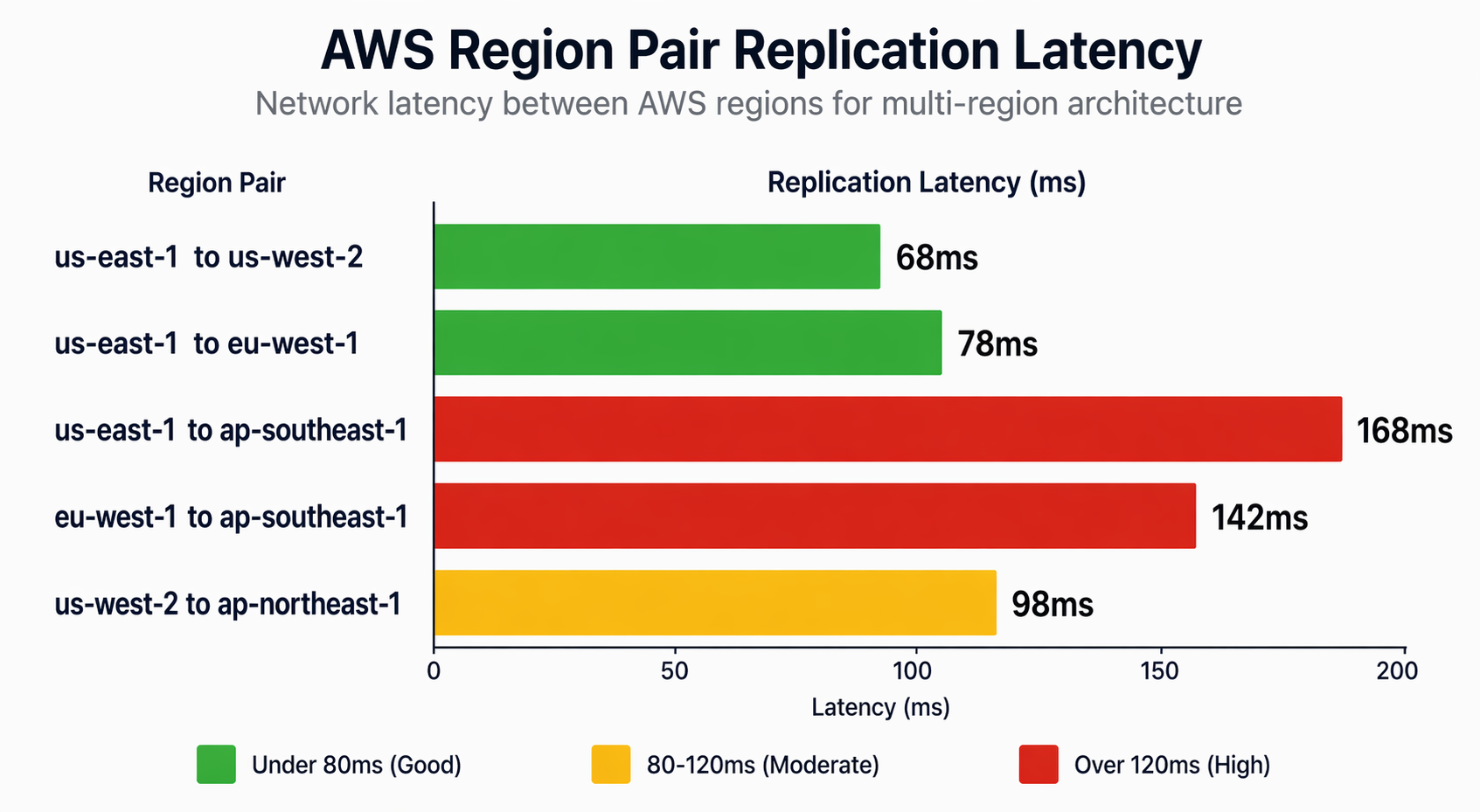
Component Mapping
| Component | Service | Primary Region | Secondary Regions |
|---|---|---|---|
| Product catalog | DynamoDB Global Tables | us-east-1 | eu-central-1, ap-southeast-1 |
| Order history | Aurora Global Database | us-east-1 | eu-central-1, ap-southeast-1 |
| User sessions | DynamoDB Global Tables | us-east-1 | eu-central-1, ap-southeast-1 |
| Shopping cart | DynamoDB Global Tables | us-east-1 | eu-central-1, ap-southeast-1 |
| Product images | S3 + CloudFront | us-east-1 | eu-central-1, ap-southeast-1 |
| Search index | OpenSearch with cross-cluster | us-east-1 | eu-central-1 |
| Cache | ElastiCache Global Datastore | us-east-1 | eu-central-1 |
| API services | EKS + Istio | All regions | All regions |
| Background jobs | SQS + Lambda | All regions | All regions |
| Notifications | SNS + SES | us-east-1 | eu-central-1 |
| Analytics | Kinesis Firehose + S3 | All regions | Centralized |
Data Flow
-
User visits website: CloudFront serves static assets from edge caches. API requests route to the nearest regional ALB via Route 53 latency-based routing.
-
Browse products: Product catalog reads hit the local DynamoDB replica. Search queries hit the local OpenSearch cluster. Product images serve from the S3 Multi-Region Access Point.
-
Add to cart: Cart updates write to the local DynamoDB Global Table replica. The update propagates to other regions asynchronously (typically under 1 second).
-
Place order: The order saga begins. Inventory is checked against the local DynamoDB replica. Payment processing writes to Aurora Global Database (routed to the primary if write forwarding is enabled). Order confirmation publishes to SNS, which fans out to SQS queues in all regions.
-
Region failure: Route 53 health checks detect the failure within 10-30 seconds. Traffic shifts to healthy regions. DynamoDB Global Tables and Aurora Global Database replicas in healthy regions serve reads. Writes to Aurora route to the promoted secondary cluster.
CloudFormation Template
For teams using CloudFormation instead of Terraform, here is a multi-region deployment template:
# CloudFormation: Multi-region Aurora Global Database
# Deploy this stack in the primary region first

AWSTemplateFormatVersion: '2010-09-09'
Description: 'E-Commerce Aurora Global Database - Primary Region'

Parameters:
  GlobalClusterIdentifier:
    Type: String
    Default: ecommerce-global-aurora
  DatabaseName:
    Type: String
    Default: ecommerce
  MasterUsername:
    Type: String
    Default: admin
    NoEcho: true
  MasterPassword:
    Type: String
    NoEcho: true
    MinLength: 16
  PrimaryInstanceClass:
    Type: String
    Default: db.serverless
  MinCapacity:
    Type: Number
    Default: 2
  MaxCapacity:
    Type: Number
    Default: 16

Resources:
  GlobalCluster:
    Type: AWS::RDS::GlobalCluster
    Properties:
      GlobalClusterIdentifier: !Ref GlobalClusterIdentifier
      Engine: aurora-postgresql
      EngineVersion: '16.4'
      DatabaseName: !Ref DatabaseName
      StorageEncrypted: true

  PrimaryCluster:
    Type: AWS::RDS::DBCluster
    Properties:
      DBClusterIdentifier: ecommerce-primary-cluster
      GlobalClusterIdentifier: !Ref GlobalCluster
      Engine: aurora-postgresql
      EngineVersion: '16.4'
      MasterUsername: !Ref MasterUsername
      MasterUserPassword: !Ref MasterPassword
      DBSubnetGroupName: !Ref DBSubnetGroup
      VpcSecurityGroupIds:
        - !Ref AuroraSecurityGroup
      ServerlessV2ScalingConfiguration:
        MinCapacity: !Ref MinCapacity
        MaxCapacity: !Ref MaxCapacity

  PrimaryInstance1:
    Type: AWS::RDS::DBInstance
    Properties:
      DBClusterIdentifier: !Ref PrimaryCluster
      DBInstanceIdentifier: ecommerce-primary-1
      Engine: aurora-postgresql
      DBInstanceClass: !Ref PrimaryInstanceClass
      PerformanceInsightsEnabled: true

  PrimaryInstance2:
    Type: AWS::RDS::DBInstance
    Properties:
      DBClusterIdentifier: !Ref PrimaryCluster
      DBInstanceIdentifier: ecommerce-primary-2
      Engine: aurora-postgresql
      DBInstanceClass: !Ref PrimaryInstanceClass
      PerformanceInsightsEnabled: true

  DBSubnetGroup:
    Type: AWS::RDS::DBSubnetGroup
    Properties:
      DBSubnetGroupDescription: Subnet group for Aurora primary
      SubnetIds: !Ref PrivateSubnetIds

  AuroraSecurityGroup:
    Type: AWS::EC2::SecurityGroup
    Properties:
      GroupDescription: Aurora database security group
      VpcId: !Ref VpcId
      SecurityGroupIngress:
        - IpProtocol: tcp
          FromPort: 5432
          ToPort: 5432
          SourceSecurityGroupId: !Ref EksSecurityGroupId

Outputs:
  GlobalClusterArn:
    Value: !Ref GlobalCluster
    Export:
      Name: EcommerceGlobalClusterArn
  PrimaryClusterEndpoint:
    Value: !GetAtt PrimaryCluster.Endpoint.Address
  PrimaryClusterPort:
    Value: !GetAtt PrimaryCluster.Endpoint.Port
Cost Analysis
Detailed cost analysis helps justify the investment and identify optimization opportunities.
Dual-Region Cost Breakdown (us-east-1 + eu-central-1)
| Service | Configuration | Monthly Cost | Notes |
|---|---|---|---|
| Aurora Global DB | 2 instances x 2 regions | $1,300 | Serverless v2, 2-16 ACU |
| Aurora data transfer | ~500GB/month replicated | $180 | $0.02/GB cross-region |
| DynamoDB Global Tables | 50M reads, 5M writes/region | $800 | PAY_PER_REQUEST |
| DynamoDB replicated writes | 5M writes x 2 replicas | $200 | $0.01/replicated write |
| ElastiCache Global | 2 nodes x 2 regions | $700 | r6g.large |
| EKS clusters | 6 nodes x 2 regions | $2,160 | m6i.xlarge, ON_DEMAND |
| Application Load Balancers | 2 x 2 regions | $160 | ~500GB processed |
| NAT Gateways | 3 AZ x 2 regions | $432 | $0.045/hour + data |
| CloudFront | 10TB/month | $300 | US + Europe |
| Route 53 | 100M queries | $30 | Latency + health checks |
| Global Accelerator | 2 endpoints | $90 | $0.025/GB + fixed |
| S3 + replication | 5TB + 500GB delta | $250 | Standard + CRR |
| CloudWatch | Logs, metrics, dashboards | $200 | Cross-region |
| X-Ray | 10M traces/month | $100 | Cross-region tracing |
| Total | $6,942 |
Triple-Region Cost Breakdown (+ ap-southeast-1)
| Category | 2-Region | 3-Region | Increment |
|---|---|---|---|
| Compute (EKS) | $2,160 | $3,240 | +$1,080 |
| Database (Aurora) | $1,300 | $1,950 | +$650 |
| Database (DynamoDB) | $1,000 | $1,500 | +$500 |
| Cache (ElastiCache) | $700 | $1,050 | +$350 |
| Networking | $822 | $1,547 | +$725 |
| Other | $960 | $1,075 | +$115 |
| Total | $6,942 | $10,362 | +$3,420 |
Cost Optimization Strategies
- Use Reserved Instances or Savings Plans: Commit to 1-year terms for EKS nodes and ElastiCache. Savings of 30-40% on compute.
- Spot Instances for non-critical workloads: Use Spot for batch processing, analytics, and development environments. Savings of 60-70%.
- DynamoDB auto-scaling: For predictable workloads, use provisioned capacity with auto-scaling instead of PAY_PER_REQUEST. Savings of 40-60%.
- Aurora Serverless v2: Scale to zero during low-traffic periods. Reduces cost by 50-70% for workloads with variable demand.
- CloudFront origin shield: Reduce cross-region data transfer by caching at the edge. Savings of 30-50% on data transfer.
- Compress data before replication: Use gzip or snappy compression for data replicated between regions. Reduces data transfer costs by 60-80%.
Monitoring and Observability
A multi-region architecture requires a unified observability stack that provides visibility across all regions from a single pane of glass.
CloudWatch Cross-Region Dashboards
# Terraform: CloudWatch cross-region dashboard
resource "aws_cloudwatch_dashboard" "multi_region" {
  dashboard_name = "ecommerce-multi-region"

  dashboard_body = jsonencode({
    widgets = [
      # Region health status
      {
        type   = "metric"
        x      = 0
        y      = 0
        width  = 12
        height = 6
        properties = {
          title   = "API Latency by Region"
          region  = "us-east-1"
          metrics = [
            ["AWS/ApplicationELB", "TargetResponseTime",
             "LoadBalancer", module.alb_us_east_1.arn_suffix,
             {"stat": "p99", "label": "us-east-1"}],
            ["AWS/ApplicationELB", "TargetResponseTime",
             "LoadBalancer", module.alb_eu_central_1.arn_suffix,
             {"stat": "p99", "label": "eu-central-1"}],
            ["AWS/ApplicationELB", "TargetResponseTime",
             "LoadBalancer", module.alb_ap_southeast_1.arn_suffix,
             {"stat": "p99", "label": "ap-southeast-1"}]
          ]
          period  = 60
          view    = "timeSeries"
          stacked = false
        }
      },
      # Aurora replication lag
      {
        type   = "metric"
        x      = 0
        y      = 6
        width  = 12
        height = 6
        properties = {
          title   = "Aurora Global Replication Lag"
          region  = "us-east-1"
          metrics = [
            ["AWS/RDS", "AuroraGlobalDatabaseReplicationLag",
             "GlobalClusterIdentifier", "ecommerce-global-cluster",
             {"stat": "Maximum", "label": "Max Lag"}],
            ["AWS/RDS", "AuroraGlobalDatabaseReplicationLag",
             "GlobalClusterIdentifier", "ecommerce-global-cluster",
             {"stat": "Average", "label": "Avg Lag"}]
          ]
          period  = 60
          view    = "timeSeries"
        }
      },
      # DynamoDB consumed capacity by region
      {
        type   = "metric"
        x      = 0
        y      = 12
        width  = 6
        height = 6
        properties = {
          title   = "DynamoDB Consumed Read Units"
          region  = "us-east-1"
          metrics = [
            ["AWS/DynamoDB", "ConsumedReadCapacityUnits",
             "TableName", "Products", "Region", "us-east-1"],
            ["AWS/DynamoDB", "ConsumedReadCapacityUnits",
             "TableName", "Products", "Region", "eu-central-1"],
            ["AWS/DynamoDB", "ConsumedReadCapacityUnits",
             "TableName", "Products", "Region", "ap-southeast-1"]
          ]
          period  = 300
          view    = "timeSeries"
          stacked = true
        }
      },
      # Error rates by region
      {
        type   = "metric"
        x      = 6
        y      = 12
        width  = 6
        height = 6
        properties = {
          title   = "5XX Error Rate by Region"
          region  = "us-east-1"
          metrics = [
            ["AWS/ApplicationELB", "HTTPCode_Target_5XX_Count",
             "LoadBalancer", module.alb_us_east_1.arn_suffix,
             {"label": "us-east-1"}],
            ["AWS/ApplicationELB", "HTTPCode_Target_5XX_Count",
             "LoadBalancer", module.alb_eu_central_1.arn_suffix,
             {"label": "eu-central-1"}],
            ["AWS/ApplicationELB", "HTTPCode_Target_5XX_Count",
             "LoadBalancer", module.alb_ap_southeast_1.arn_suffix,
             {"label": "ap-southeast-1"}]
          ]
          period  = 60
          view    = "timeSeries"
        }
      }
    ]
  })
}
X-Ray Cross-Region Tracing
# Python: X-Ray cross-region tracing configuration
from aws_xray_sdk.core import xray_recorder
from aws_xray_sdk.core import patch_all
from aws_xray_sdk.ext.flask.middleware import XRayMiddleware

# Patch all AWS SDK calls for tracing
patch_all()

# Configure X-Ray for cross-region tracing
xray_recorder.configure(
    service='ecommerce-api',
    sampling=True,
    context_missing='LOG_ERROR',
    daemon_address='127.0.0.1:2000',
    streaming_threshold=100,
)

# Custom subsegment for cross-region calls
@xray_recorder.capture('order_processing_saga')
def process_order(order_data: dict):
    """Process an order with cross-region tracing."""
    # This automatically creates traces that span regions
    # when calls are made to services in other regions
    with xray_recorder.capture('reserve_inventory'):
        inventory_result = reserve_inventory(order_data['items'])
        xray_recorder.put_annotation('region', os.environ['AWS_REGION'])
        xray_recorder.put_metadata('inventory', inventory_result)

    with xray_recorder.capture('process_payment'):
        payment_result = process_payment(order_data['payment'])
        xray_recorder.put_annotation('payment_id', payment_result['id'])

    with xray_recorder.capture('create_shipment'):
        shipment_result = create_shipment(order_data, payment_result)
        xray_recorder.put_annotation('shipment_id', shipment_result['id'])

    return {
        'orderId': order_data['orderId'],
        'status': 'confirmed',
        'shipmentId': shipment_result['id']
    }
Key Metrics to Monitor
| Metric | Source | Alert Threshold | Action |
|---|---|---|---|
| Aurora replication lag | RDS | > 5 seconds | Scale up primary |
| DynamoDB replication latency | CloudWatch | > 3 seconds | Check network, throttling |
| API p99 latency | ALB | > 500ms | Scale compute, check cache |
| 5XX error rate | ALB | > 1% | Trigger circuit breaker |
| Cross-region data transfer | CloudWatch | Budget threshold | Optimize data flow |
| Health check failures | Route 53 | > 2 consecutive | Initiate failover |
| ElastiCache replication lag | ElastiCache | > 1 second | Check memory pressure |
| EKS node CPU | CloudWatch | > 80% for 5 min | Scale node group |
| Order processing queue depth | SQS | > 10,000 | Scale Lambda concurrency |
| Global Accelerator health | GA | Any unhealthy | Investigate endpoint |
Migration Path from Single-Region
Moving from a single-region architecture to active-active is a multi-phase journey. Rushing the migration is the most common cause of failure.
Phase 1: Assessment and Planning (Weeks 1-3)
- Audit current architecture for multi-region compatibility
- Identify data that must be replicated and data residency requirements
- Choose primary and secondary regions based on user distribution
- Calculate projected costs and get budget approval
- Document application changes needed for multi-region support
Phase 2: Infrastructure Setup (Weeks 4-6)
- Deploy VPCs, subnets, and security groups in secondary regions
- Set up cross-region VPC peering or Transit Gateway
- Deploy compute infrastructure (EKS clusters, Lambda functions) in secondary regions
- Configure Route 53 health checks and latency-based routing
- Set up monitoring and alerting for the secondary region
# AWS CLI: Verify cross-region connectivity after VPC peering

# Test from us-east-1 to eu-central-1
aws ec2 describe-vpc-peering-connections \
  --region us-east-1 \
  --filters "Name=status-code,Values=active" \
  --query 'VpcPeeringConnections[*].{
    Id:VpcPeeringConnectionId,
    Status:Status.Code,
    Requester:RequesterVpcInfo.CidrBlock,
    Accepter:AccepterVpcInfo.CidrBlock
  }'

# Verify route propagation
aws ec2 describe-route-tables \
  --region us-east-1 \
  --filters "Name=vpc-id,Values=vpc-0123456789abcdef0" \
  --query 'RouteTables[*].Routes[?DestinationCidrBlock==`10.1.0.0/16`].{
    Destination:DestinationCidrBlock,
    Target:VpcPeeringConnectionId
  }'
Phase 3: Data Layer Migration (Weeks 7-10)
- Enable DynamoDB Global Tables for tables that need multi-region access
- Set up Aurora Global Database with secondary cluster
- Configure S3 cross-region replication
- Set up ElastiCache Global Datastore
- Validate replication lag and data consistency
# AWS CLI: Data migration validation

# Check DynamoDB Global Table replication status
aws dynamodb describe-table \
  --table-name Products \
  --region us-east-1 \
  --query 'Table.Replicas[*].{
    Region:RegionName,
    Status:ReplicaStatus,
    Progress:ReplicaStatusPercentProgress
  }'

# Verify Aurora Global Database secondary is caught up
aws rds describe-db-clusters \
  --db-cluster-identifier ecommerce-secondary-eu \
  --region eu-central-1 \
  --query 'DBClusters[0].{
    Status:Status,
    ReadReplicaIdentifiers:ReadReplicaIdentifiers,
    MultiAZ:MultiAZ
  }'

# Check replication lag
aws cloudwatch get-metric-statistics \
  --namespace AWS/RDS \
  --metric-name AuroraGlobalDatabaseReplicationLag \
  --dimensions Name=GlobalClusterIdentifier,Value=ecommerce-global-cluster \
  --start-time $(date -u -d '1 hour ago' +%Y-%m-%dT%H:%M:%S) \
  --end-time $(date -u +%Y-%m-%dT%H:%M:%S) \
  --period 60 \
  --statistics Average Maximum \
  --region us-east-1
Phase 4: Traffic Migration (Weeks 11-13)
- Deploy read-only traffic to the secondary region first
- Validate that reads return correct data from the secondary
- Gradually increase write traffic to the secondary using weighted routing
- Monitor error rates, latency, and data consistency
- Implement rollback capability at every step
# AWS CLI: Gradual traffic migration using weighted routing

# Start with 5% traffic to secondary region
aws route53 change-resource-record-sets \
  --hosted-zone-id Z1234567890ABC \
  --change-batch '{
    "Changes": [{
      "Action": "UPSERT",
      "ResourceRecordSet": {
        "Name": "api.ecommerce.example.com",
        "Type": "A",
        "SetIdentifier": "eu-central-1",
        "Weight": 5,
        "AliasTarget": {
          "DNSName": "alb-eu-central-1.ecommerce.example.com",
          "EvaluateTargetHealth": true,
          "HostedZoneId": "Z215JYRZR1TBD5"
        }
      }
    },{
      "Action": "UPSERT",
      "ResourceRecordSet": {
        "Name": "api.ecommerce.example.com",
        "Type": "A",
        "SetIdentifier": "us-east-1",
        "Weight": 95,
        "AliasTarget": {
          "DNSName": "alb-us-east-1.ecommerce.example.com",
          "EvaluateTargetHealth": true,
          "HostedZoneId": "Z35SXDOTRQ7X7K"
        }
      }
    }]
  }'

# Monitor for 48 hours, then increase to 25%, 50%, 100%
Phase 5: Validation and Optimization (Weeks 14-16)
- Run full-scale load testing across both regions
- Simulate region failure and validate failover
- Optimize cost with Reserved Instances and Savings Plans
- Document runbooks for common operational scenarios
- Conduct chaos engineering exercises
Best Practices and Lessons Learned
After implementing multi-region active-active architectures for production workloads, these are the practices that separate successful deployments from failed ones.
Design Practices
1. Design for eventual consistency from day one. Do not assume your data layer provides strong consistency. Write your application code to handle stale reads and conflict resolution. This is the single most important design decision.
2. Make every operation idempotent. Network retries, duplicate event deliveries, and failover scenarios will cause your operations to execute multiple times. Design your APIs and data models to be safe under repeated execution.
3. Use correlation IDs across all services. Every request must carry a unique correlation ID that flows through every service call, database write, and log entry. Without correlation IDs, debugging cross-region issues is nearly impossible.
4. Keep your conflict resolution strategy simple. Start with last-writer-wins for most data. Only implement custom merge logic for business-critical data where LWW would cause unacceptable data loss. CRDTs are powerful but add significant complexity.
5. Separate reads from writes at the application level. Even when using DynamoDB Global Tables (where every region can write), consider routing all writes for a given entity through a single region. This eliminates concurrent write conflicts while maintaining local read latency.
Operational Practices
6. Automate everything. Infrastructure provisioning, deployment, failover, scaling, and rollback must all be automated. Manual operations in a multi-region environment are error-prone and slow.
7. Test failover regularly. Run chaos engineering exercises monthly. Kill a database instance. Disable a VPC peering connection. Verify that your system recovers as expected. Untested failover is not failover.
8. Monitor replication lag obsessively. Set up alerts for replication lag on every data store. Elevated lag is the early warning sign of capacity issues, network problems, or configuration drift.
9. Use infrastructure as code exclusively. Every resource in every region must be defined in Terraform, CloudFormation, or CDK. Manual console changes will drift out of sync and cause inconsistencies.
10. Plan for split-brain scenarios. Network partitions can isolate regions from each other. Define clear policies for how your application behaves when it cannot reach other regions. Prefer availability over consistency for user-facing operations.
Common Pitfalls
Pitfall 1: Ignoring clock skew. AWS instances can have clock drift of several milliseconds between regions. If you rely on timestamps for ordering, use high-resolution timestamps and account for NTP synchronization delays.
Pitfall 2: Underestimating data transfer costs. Cross-region data transfer is expensive ($0.02/GB in each direction). Compress data before replication, use delta synchronization where possible, and audit your data transfer patterns regularly.
Pitfall 3: Treating secondary regions as second-class citizens. Every region must have the same monitoring, alerting, and operational tooling. A secondary region that is neglected will fail when you need it most.
Pitfall 4: Skipping the application-level changes. You cannot take a single-region application and make it multi-region by simply replicating the infrastructure. The application code must be designed for distributed operation.
Pitfall 5: Not testing at production scale. Your active-active architecture must handle full production load when a region fails. Test this scenario before going live, not during your first real outage.
Conclusion
Multi-region active-active architecture on AWS is a significant undertaking that demands careful planning across data, compute, networking, and application layers. The reward is a system that delivers local-latency performance to users worldwide, survives the loss of any single region without data loss or downtime, and meets data sovereignty requirements across jurisdictions.
The key architectural decisions center on the data layer. Aurora Global Database provides a familiar relational model with single-writer semantics, while DynamoDB Global Tables enables true multi-active writes with eventual consistency. Most production systems use a combination of both, routing each data type to the service that best matches its consistency and latency requirements.
Start with a clear understanding of your consistency requirements. Design your application for eventual consistency from the beginning. Migrate incrementally – first reads, then writes, then full traffic. Monitor replication lag and error rates obsessively. And test your failover procedures regularly, because the only thing worse than a region outage is discovering your failover does not work during one.
The patterns and code in this guide provide a concrete starting point. Adapt them to your specific workload, test thoroughly, and remember that active-active is not just an infrastructure pattern – it is an application design philosophy that embraces distribution, handles failures gracefully, and puts user experience above architectural simplicity.
Have questions about implementing multi-region architectures on AWS? Leave a comment below or explore our related guides on Aurora Global Database, DynamoDB Global Tables, and Route 53 Routing Policies for deeper dives into each component.
Explore more like this

Cloud IoT Security: Zero Trust, Identity, and Signed Updates
On September 11, 2026, the Cyber Resilience Act’s incident-reporting rules start applying in the European Union. That is 22 days after this article’s publication date. A manufacturer that learns of...

Bedrock Web Search: Grounding an Agent Without Building a Scraper
On August 4, 2026, AWS made Web Search on Amazon Bedrock generally available, and the entire integration surface is one JSON object: {"type": "web_search"}. That is the whole change from...

ECR Now Allows 200 GB Image Layers. Your Model Weights Still Do Not Belong There
On August 3, 2026, AWS raised the maximum Amazon ECR image layer size to 200 GB for images pushed with docker push. The announcement names the driver in the second...

Comments