
Unlocking the Benefits of S3 Multi-Region Access Points


S3 Multi-Region Access Points let you use one endpoint to reach data spread across multiple AWS regions. If you’ve ever managed buckets in us-east-1, eu-west-1, and ap-southeast-1, you know the pain of tracking which region has what. MRAPs try to fix that.
What You Get with Multi-Region Access Points
The main draw is simplicity. Instead of maintaining separate access point names for each region, you get one globally unique name that routes to whatever buckets you’ve attached. AWS handles the DNS and routing under the hood.
The replication part is where it gets interesting. S3 Replication Time Control (RTC) works well with MRAPs, keeping replication lag under 15 minutes for most configurations. That matters if you’re building anything where stale data causes problems.
You can also dial traffic between regions using the traffic dial percentage. If you want 100% of requests going to us-west-2 and 0% to the others during normal operations, you can set that. It is not quite a load balancer, but it gives you control when you need to shift traffic.
One thing I hear a lot: latency optimization. The catch is that MRAP routes based on bucket location, not user location. For true latency-based routing, you want Global Accelerator instead. More on that comparison later.
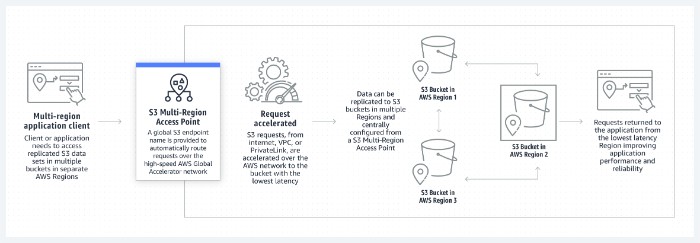
S3 Multi-Region Access Points
Getting Started
Here is the short version of setting up MRAPs:
- Create your S3 buckets in the regions you want
- Set up S3 Replication to keep data in sync between them
- Create the Multi-Region Access Point in the AWS console or CLI
- Attach your buckets to the MRAP
- Update your Route53 records if you need custom DNS names
The CLI commands look like this:
aws s3control create-multi-region-access-point \
    --region us-east-1 \
    --account-id 111122223333 \
    --details '{"Name": "my-mrap", "PublicAccessBlock": {"BlockPublicAcls": true}}'
Once everything is hooked up, your applications hit the MRAP endpoint and AWS figures out which bucket to pull from.
Security
MRAPs support the same IAM and bucket policies as regular S3 access points. That means you can restrict access by IAM principal, VPC endpoint, or whatever conditions you prefer.
For cross-region replication traffic, S3 encrypts data in transit automatically. At rest, your bucket encryption settings apply. So if you are using SSE-KMS on your buckets, that carries through to replicas.
One thing to watch: if you use a custom access point policy, make sure you are not inadvertently allowing access to buckets you did not intend to expose. IAM policy evaluation can be tricky when you mix bucket-level and access-point-level controls.
Where MRAPs Make Sense
Media streaming is a common use case. If your video assets live in multiple regions and your viewers are global, MRAPs plus a CDN can reduce the back-and-forth to origin servers.
Disaster recovery is where I see MRAPs used most often. Having data replicated to a secondary region and accessible through a single endpoint simplifies failover. You update the traffic dial, and your application starts pulling from the standby region.
Multi-regional applications where users in different geographies hit different buckets for the same logical dataset. Not quite multi-master write conflicts, just read distribution.
MRAPs vs CloudFront
CloudFront is a CDN. It caches content at edge locations worldwide and can reduce origin load significantly. MRAPs do not cache; they route requests to S3 buckets.
The decision is usually about caching. Static assets that benefit from being served from nearby edge locations? CloudFront. Data that changes frequently and needs to come directly from S3? MRAPs.
They are not mutually exclusive. Some architectures use both, with CloudFront in front of an MRAP for static assets.
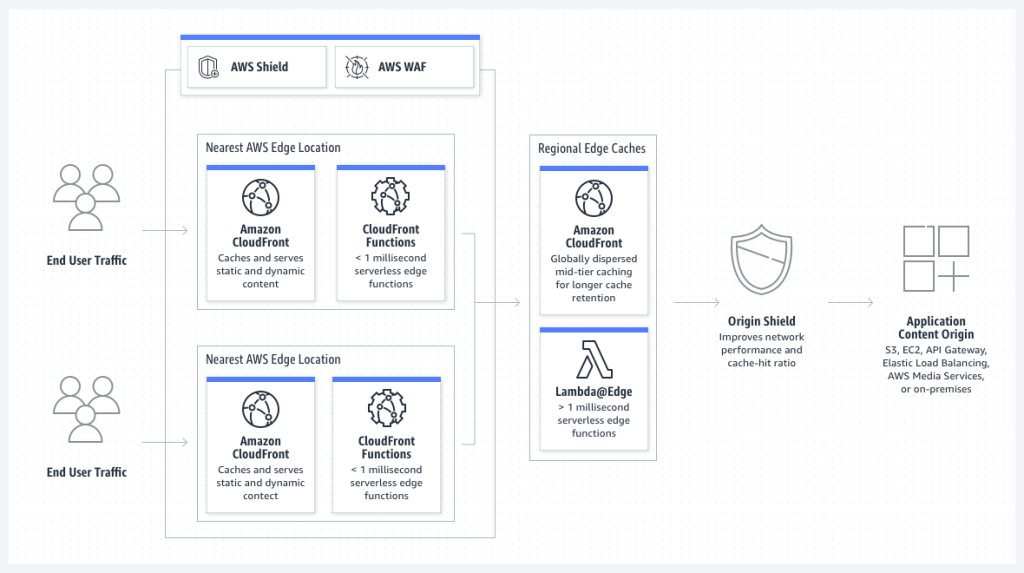
S3 Multi-Region Access Points vs CloudFront
Understand AWS using Mind Maps and you can boost your skills quickly.
MRAPs vs Global Accelerator
Global Accelerator uses AWS’s backbone network to route traffic to the nearest healthy endpoint. Unlike MRAPs, it works with any internet-facing application, not just S3.
Global Accelerator has two main advantages over MRAPs alone:
- It routes based on user location and health, not bucket configuration
- It can fail over faster because it monitors endpoint health continuously
For S3 specifically, Global Accelerator can be positioned in front of an MRAP to get the best of both: the global routing smarts and the multi-region bucket management.
AWS Global Accelerator costs more than basic MRAP routing. Whether the performance difference matters depends on your traffic patterns and how sensitive your application is to latency.
Wrapping Up
S3 Multi-Region Access Points solve a specific problem: managing data access across regions without maintaining multiple endpoints. They work well for disaster recovery setups, multi-regional read-heavy applications, and situations where you want centralized access management.
They are not a CDN replacement, and they are not a magic latency fix. For those cases, CloudFront and Global Accelerator respectively are better fits.
If you are already using S3 Replication and need a cleaner way to expose multi-region data to your applications, MRAPs are worth evaluating.
Explore more like this

Cloud IoT Security: Zero Trust, Identity, and Signed Updates
On September 11, 2026, the Cyber Resilience Act’s incident-reporting rules start applying in the European Union. That is 22 days after this article’s publication date. A manufacturer that learns of...

Bedrock Web Search: Grounding an Agent Without Building a Scraper
On August 4, 2026, AWS made Web Search on Amazon Bedrock generally available, and the entire integration surface is one JSON object: {"type": "web_search"}. That is the whole change from...

ECR Now Allows 200 GB Image Layers. Your Model Weights Still Do Not Belong There
On August 3, 2026, AWS raised the maximum Amazon ECR image layer size to 200 GB for images pushed with docker push. The announcement names the driver in the second...

Comments