
Object Lambda Access Point – Why you should use it

If you’ve worked with S3, you know the drill: your app requests an object, S3 returns it, end of story. But what if you need the same data in different formats depending on who’s asking? That’s where Object Lambda Access Points come in.
What is Object Lambda Access Point
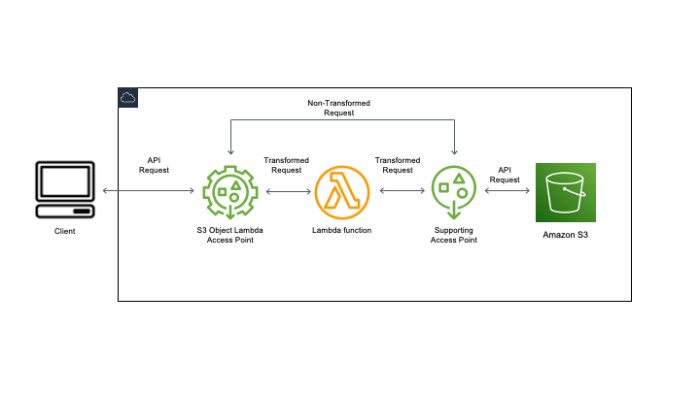
Object Lambda Access Point lets you intercept S3 requests and run your own code before returning the data. Instead of getting raw objects, you get processed objects tailored to your needs.
The way it works: you attach a Lambda function to an Object Lambda Access Point. When something asks for an object through that access point, S3 passes the request to your Lambda function first. Your function can then transform, filter, or enrich the data before it reaches the caller.
One thing I appreciate about this approach is that your application code doesn’t change at all. You just point it at a different endpoint. No proxies, no data duplication, no separate buckets for processed files.
How Object Lambda works
When you use Object Lambda with a GET request, your Lambda function receives the original object and can return a modified version. Common transformations include filtering rows from CSV or JSON files, resizing images on the fly, or redacting sensitive fields from documents.
For LIST requests, Object Lambda lets you present a filtered view of objects in a bucket. And with HEAD requests, you can modify the metadata that gets returned, like hiding the actual object size or changing content-type headers.
The Lambda function handles all of this serverless-style. AWS manages the infrastructure, and you only pay for the compute when requests come through.
Setting up an Object Lambda access point involves connecting your existing Lambda function to the S3 Object Lambda service endpoint through the AWS console or CLI.
Where you can use AWS S3 Object Lambda Access Point
Here are some scenarios where Object Lambda Access Points make sense:
A media company storing images in S3 can use Object Lambda to resize images on demand. Instead of storing thumbnails at multiple resolutions, you store the original and generate derivatives when needed. This cuts storage costs significantly.
For compliance-heavy industries, Object Lambda can redact PII from documents as they’re retrieved. A user with restricted access might see a filtered version of a file while someone with full access sees everything.
Content delivery is another angle. You can personalize content based on request parameters, like serving location-specific pricing or localized text.
For data processing, teams use Object Lambda to preprocess data before analysis. Instead of loading raw data and transforming it in your analytics app, the transformation happens at retrieval time, which simplifies downstream code.
In ML workflows, you can filter or subsample training data on the fly. If your model doesn’t need every record, Object Lambda can pre-filter inputs before they reach your inference pipeline.
Benefits of Using AWS S3 Object Lambda Access Point for Secure Data Access
The main advantages I’ve seen in practice:
You reduce data transfer by retrieving only what you need. If you’re pulling a filtered subset of a large file, you’re not paying to move the whole thing.
Security policies can be enforced at the access point level. When a user requests data, your Lambda function can check permissions and return appropriately filtered results.
Your data processing pipeline gets simpler. Instead of maintaining separate processed datasets, you compute transformations on retrieval.
Different consumers can get different views of the same underlying data without needing separate copies.
Best Practices for Using Object Lambda Access Points to Maximize Security and Efficiency
Keep an eye on what’s happening. AWS CloudTrail logs all API calls to your access point, so set up monitoring for anything suspicious.
Use server-side encryption. S3 already encrypts data at rest, but your Lambda function operates on decrypted data in memory, so make sure your function environment is secure.
Watch your Lambda resource usage. Memory and CPU affect both performance and cost. Over-provisioning wastes money; under-provisioning causes timeouts.
Security concerns for S3 Object Lambda access points
Before diving in, consider a few things:
Your Lambda function processes data in memory, so avoid logging sensitive information or leaving it in variables that could be captured.
Think about what happens if your Lambda fails. Do you return an error, or fall back to the original object? Design your error handling before going to production.
Lambda execution roles need careful permission scoping. Your function should only read from the specific S3 bucket it’s designed to work with.
CloudTrail captures access point requests, but you may also want custom CloudWatch metrics to track transformation-specific events.
Compliance requirements vary. Depending on your industry, you might need to log who accessed what data and when. Object Lambda supports this, but you need to configure it explicitly.
Costs
Object Lambda pricing has two components: request charges and Lambda compute. Request pricing follows standard S3 request rates based on the number of calls to your access point. Lambda compute is billed per millisecond based on function configuration.
For low-traffic use cases, costs stay minimal. For high-volume production systems, run the numbers through AWS pricing calculator before committing. The cost model is predictable if you estimate your request volume and function execution time.
One thing to factor in: if your Lambda function makes additional S3 calls to read source objects, those count toward your S3 costs too.
Conclusion
Object Lambda Access Points solve a real problem: you need different views of the same data without maintaining separate processed copies. The use cases span image resizing, data filtering, compliance redaction, and personalization.
Security setup matters. Get the IAM roles right, enable logging, and test your Lambda function’s error handling before going to production.
If you’re already using S3 and find yourself maintaining multiple versions of datasets for different consumers, Object Lambda is worth evaluating.
Image resizing is one of the most common Object Lambda use cases. For a deep dive into building a production image processing pipeline on Lambda using the Pillow library, see AWS Lambda + Pillow for complex image processing.
Explore more like this

Cloud IoT Security: Zero Trust, Identity, and Signed Updates
On September 11, 2026, the Cyber Resilience Act’s incident-reporting rules start applying in the European Union. That is 22 days after this article’s publication date. A manufacturer that learns of...

Bedrock Web Search: Grounding an Agent Without Building a Scraper
On August 4, 2026, AWS made Web Search on Amazon Bedrock generally available, and the entire integration surface is one JSON object: {"type": "web_search"}. That is the whole change from...

ECR Now Allows 200 GB Image Layers. Your Model Weights Still Do Not Belong There
On August 3, 2026, AWS raised the maximum Amazon ECR image layer size to 200 GB for images pushed with docker push. The announcement names the driver in the second...

Comments