
AWS Resilience Hub: Automated Disaster Recovery Testing and Compliance

Most teams have a disaster recovery plan. Far fewer have actually tested theirs. The gap between writing a runbook and executing one under real pressure is exactly where production outages turn into career-defining events.
AWS Resilience Hub was built to close that gap. It gives you a centralized service for defining resilience policies, running automated assessments against your applications, scoring your DR posture, and generating evidence for compliance auditors – all without having to manually spin up DR environments or schedule after-hours fire drills.
We’re going to walk through the full operational lifecycle in this post: why DR testing matters and what typically goes wrong, how Resilience Hub scores applications and maps them to resiliency policies, setting up your first assessment from scratch, comparing DR strategies with real cost and RPO data, automating DR tests with AWS Fault Injection Service, integrating Elastic Disaster Recovery, multi-region DR patterns, compliance mapping for SOC 2, ISO 27001, PCI-DSS, and HIPAA, SSM runbook automation, cost analysis, and a head-to-head comparison against manual DR testing.
Why DR Testing Matters
The numbers on DR readiness are pretty unforgiving. Industry surveys consistently show that roughly half of companies that experience a major outage without a tested DR plan end up going out of business within two years. The problem isn’t that teams don’t write DR plans – most of them do. The real problem is that plans start decaying the moment they’re written.
Infrastructure drifts. AMIs get deprecated. Security group rules change without anyone telling the DR team. Database snapshots grow stale. IAM roles get tightened down. That runbook that worked flawlessly in Q1? It’ll silently break by Q3 unless somebody actually runs it. Manual DR tests are supposed to catch this stuff, but they’re expensive, disruptive, and tend to get deprioritized when deadlines loom.
Common failure modes in untested DR plans:
| Failure Mode | Root Cause | Detection Method |
|---|---|---|
| Stale AMIs or launch templates | OS patches not applied to DR images | Launch test, verify boot |
| Database replication lag | Cross-region replica not caught up | Measure replication lag metric |
| Expired TLS certificates | Cert rotation not applied to DR region | TLS handshake test |
| Missing IAM permissions | Role policy drift between regions | AssumeRole test |
| DNS failover misconfiguration | Route 53 health check targets wrong endpoint | DNS resolution test |
| Network ACL asymmetry | DR VPC ACLs tightened without updating DR config | Connectivity test |
| Secrets Manager replication gap | Secret not replicated to DR region | Secret retrieval test |
| Auto Scaling Group capacity limits | Service quotas too low in DR region | Scale-up test |
Resilience Hub tackles this head-on by continuously assessing your applications against the policies you’ve defined, catching drift as it happens, and giving you structured evidence that your DR posture actually meets its targets. It shifts DR from a quarterly checkbox exercise to something you can validate continuously.
If you want a broader foundation on building resilient architectures first, check out our guide on how to achieve high availability in AWS.
Resilience Hub Overview
AWS Resilience Hub is a regional service that acts as your single place to define, validate, and track the resilience of your AWS applications. It pulls in your application definitions from CloudFormation, Terraform, EKS clusters, and resource groups, then evaluates them against the resiliency policies you set up.
Core capabilities:
- Application modeling: Import resources from CloudFormation stacks, Terraform state files, Amazon EKS clusters, or manually add resources. Group them into logical applications.
- Resiliency policies: Define RPO and RTO targets for each disruption category (AZ, Infrastructure, Region).
- Automated assessments: Analyze your architecture, configuration, and operational practices against your policy.
- Resilience scoring: Receive a numeric score (0-100) broken down by disruption category.
- Recommendations: Get prioritized, actionable recommendations to improve your score.
- Compliance mapping: Map assessments to compliance frameworks (SOC 2, ISO 27001, PCI-DSS, HIPAA).
- DR testing integration: Trigger automated DR tests via AWS Fault Injection Service (FIS).
- Operational runbooks: Generate and manage SSM-based runbooks for recovery procedures.
One thing worth understanding: Resilience Hub works at the application level, not the individual resource level. That’s an important distinction because resilience is a property of the whole system, not any single piece. A multi-AZ database doesn’t do you much good if the application tier connecting to it runs in just one AZ. Resilience Hub evaluates the entire application graph together.
You’ll find the service available across all commercial AWS Regions, and it integrates with AWS Elastic Disaster Recovery, AWS Backup, AWS Fault Injection Service, AWS Systems Manager, and Amazon CloudWatch.
Resilience Scoring
The resilience score is the metric you’ll care about most. It ranges from 0 to 100 and measures how well your application stacks up against its defined resiliency policy. Keep in mind, this isn’t some generic health check – it’s computed relative to the specific RPO and RTO targets you’ve set for yourself.
Scoring Components
| Component | Weight | What It Evaluates |
|---|---|---|
| Infrastructure resiliency | 40% | Multi-AZ deployment, backups, replication, scaling |
| Alarm coverage | 20% | CloudWatch alarms for critical metrics |
| SOP coverage | 15% | SSM runbooks for recovery procedures |
| FIS test coverage | 15% | Fault injection tests executed |
| Compliance checks | 10% | Well-Architected Reliability Pillar alignment |
Scoring Breakdown by Disruption Category
Each disruption category is scored independently:
| Disruption Category | Typical Controls | Score Impact if Missing |
|---|---|---|
| AZ (Availability Zone) | Multi-AZ deployment, AZ failover | -15 to -25 points |
| Infrastructure | Auto Scaling, instance replacement | -10 to -20 points |
| Region | Cross-region replication, Route 53 failover | -20 to -30 points |
| Software | Deployment rollbacks, circuit breakers | -5 to -10 points |
One thing to keep in mind: the scoring is additive. If your application is missing multi-AZ deployment AND cross-region replication AND CloudWatch alarms, the penalties pile up. That’s by design – it reflects the compounding risk of having multiple gaps in your controls.
Understanding the Assessment Workflow
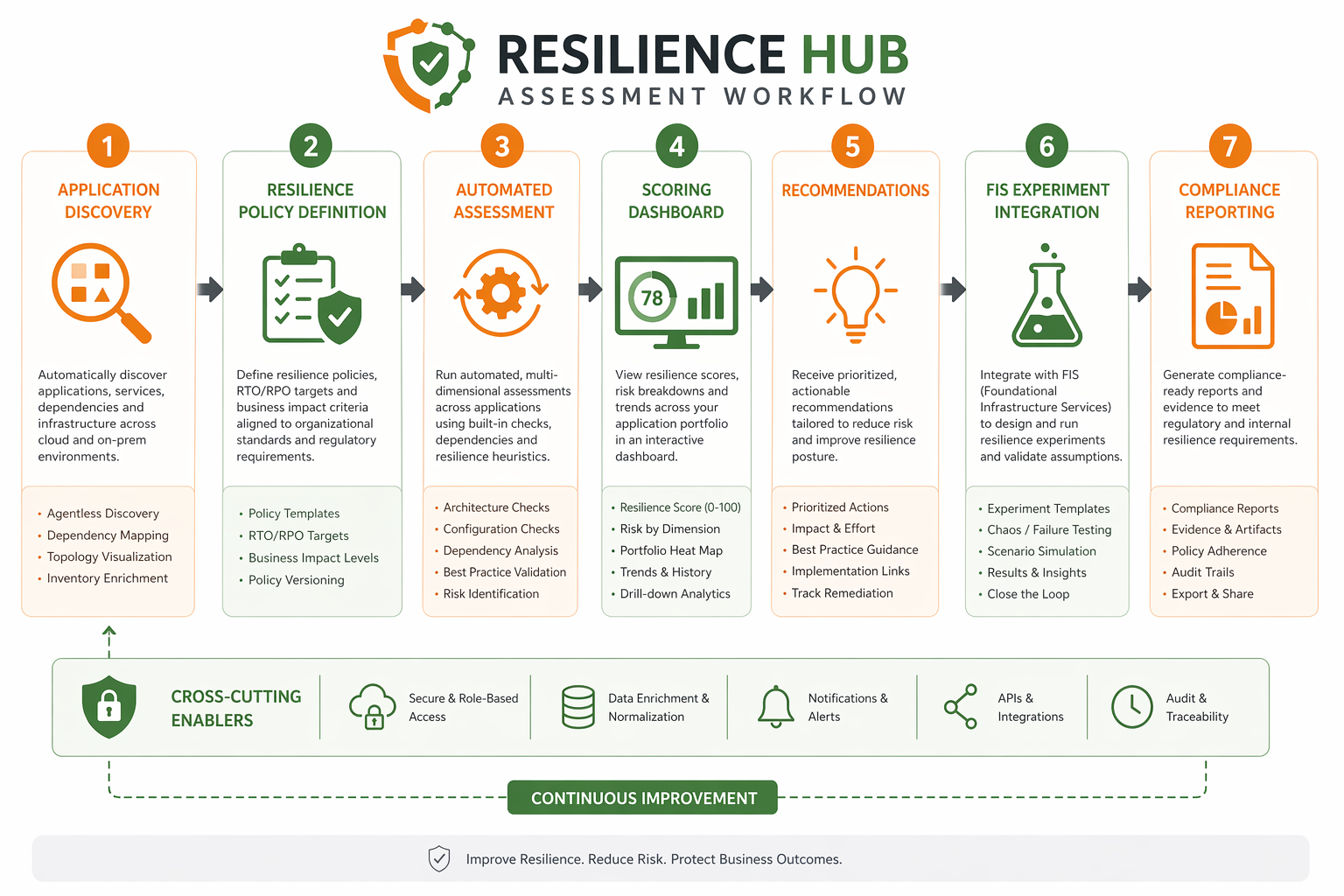
The assessment workflow is pretty straightforward once you see it laid out:
- Define application – Import or create an application with its resources.
- Assign resiliency policy – Define RPO/RTO targets per disruption category.
- Run assessment – Resilience Hub analyzes the application architecture and configuration.
- Generate score – A numeric score is produced with per-category breakdowns.
- Review recommendations – Prioritized list of improvements with estimated score impact.
- Implement changes – Apply recommendations (enable multi-AZ, add alarms, create runbooks).
- Re-assess – Run another assessment to measure improvement.
- Track over time – Historical trend of scores across assessment runs.
Don’t think of scores as pass or fail. A score of 75 just means your application meets roughly three-quarters of the controls your policy requires. The real goal here is continuous improvement over time, not hitting some binary threshold.
Setting Up Your First Assessment
Let’s get hands-on. We’ll walk through creating a resiliency policy, importing an application, and kicking off your first assessment using the AWS CLI and CloudFormation.
Step 1: Create a Resiliency Policy
aws resiliencehub create-resiliency-policy \
  --policy-name "ProductionTierPolicy" \
  --policy-description "Production DR policy with 1-hour RTO and 15-minute RPO" \
  --tier "Production" \
  --policy '{"AZ": {"rpoInSecs": 900, "rtoInSecs": 3600}, "Hardware": {"rpoInSecs": 900, "rtoInSecs": 3600}, "Software": {"rpoInSecs": 0, "rtoInSecs": 1800}, "Region": {"rpoInSecs": 3600, "rtoInSecs": 7200}}' \
  --region us-east-1
This policy defines:
- AZ disruption: RPO of 15 minutes, RTO of 1 hour
- Hardware disruption: RPO of 15 minutes, RTO of 1 hour
- Software disruption: RPO of 0 (no data loss), RTO of 30 minutes
- Region disruption: RPO of 1 hour, RTO of 2 hours
Step 2: Create an Application from a CloudFormation Stack
aws resiliencehub create-app \
  --name "payment-processing-app" \
  --description "Payment processing service with Aurora and ECS" \
  --resource-mappings '[{"appRegistryAppName": "payment-processing-app", "stackName": "payment-prod-stack", "mappingType": "CfnStack"}]' \
  --region us-east-1
Step 3: Run the Assessment
aws resiliencehub start-app-assessment \
  --app-arn "arn:aws:resiliencehub:us-east-1:123456789012:app/payment-processing-app" \
  --assessment-name "Q2-2026-Production-Assessment" \
  --region us-east-1
Step 4: Check Assessment Status
aws resiliencehub describe-app-assessment \
  --assessment-arn "arn:aws:resiliencehub:us-east-1:123456789012:app-assessment/assessment-abc123" \
  --region us-east-1 \
  --query 'assessment.{Status: status, Score: resilienceScore}'
CloudFormation Template for a Complete Setup
Here is a CloudFormation template that creates a Resilience Hub application, resiliency policy, and binds them together:
AWSTemplateFormatVersion: '2010-09-09'
Description: Resilience Hub application and policy setup

Parameters:
  ApplicationName:
    Type: String
    Default: prod-web-application
  RTOSeconds:
    Type: Number
    Default: 3600
  RPOSeconds:
    Type: Number
    Default: 900

Resources:
  ResiliencyPolicy:
    Type: AWS::ResilienceHub::ResiliencyPolicy
    Properties:
      PolicyName: !Sub "${ApplicationName}-policy"
      PolicyDescription: !Sub "Resiliency policy for ${ApplicationName}"
      Tier: Production
      Policy:
        AZ:
          RpoInSecs: !Ref RPOSeconds
          RtoInSecs: !Ref RTOSeconds
        Hardware:
          RpoInSecs: !Ref RPOSeconds
          RtoInSecs: !Ref RTOSeconds
        Software:
          RpoInSecs: 0
          RtoInSecs: 1800
        Region:
          RpoInSecs: !Mul [!Ref RPOSeconds, 4]
          RtoInSecs: !Mul [!Ref RTOSeconds, 2]

  ResilienceApp:
    Type: AWS::ResilienceHub::App
    Properties:
      AppName: !Ref ApplicationName
      AppTemplateBody: !Sub |
        {
          "resources": [
            {"logicalResourceId": {"identifier": "WebServerGroup"}, "resourceType": "AWS::AutoScaling::AutoScalingGroup"},
            {"logicalResourceId": {"identifier": "DBCluster"}, "resourceType": "AWS::RDS::DBCluster"},
            {"logicalResourceId": {"identifier": "CacheCluster"}, "resourceType": "AWS::ElastiCache::CacheCluster"}
          ]
        }
      ResiliencyPolicyArn: !GetAtt ResiliencyPolicy.PolicyArn

Outputs:
  PolicyArn:
    Value: !GetAtt ResiliencyPolicy.PolicyArn
  AppArn:
    Value: !GetAtt ResilienceApp.AppArn
Once the stack finishes deploying, you can trigger the first assessment through the console or CLI. Expect the initial run to take somewhere between 5 and 15 minutes, depending on how complex your application is.
DR Strategy Comparison
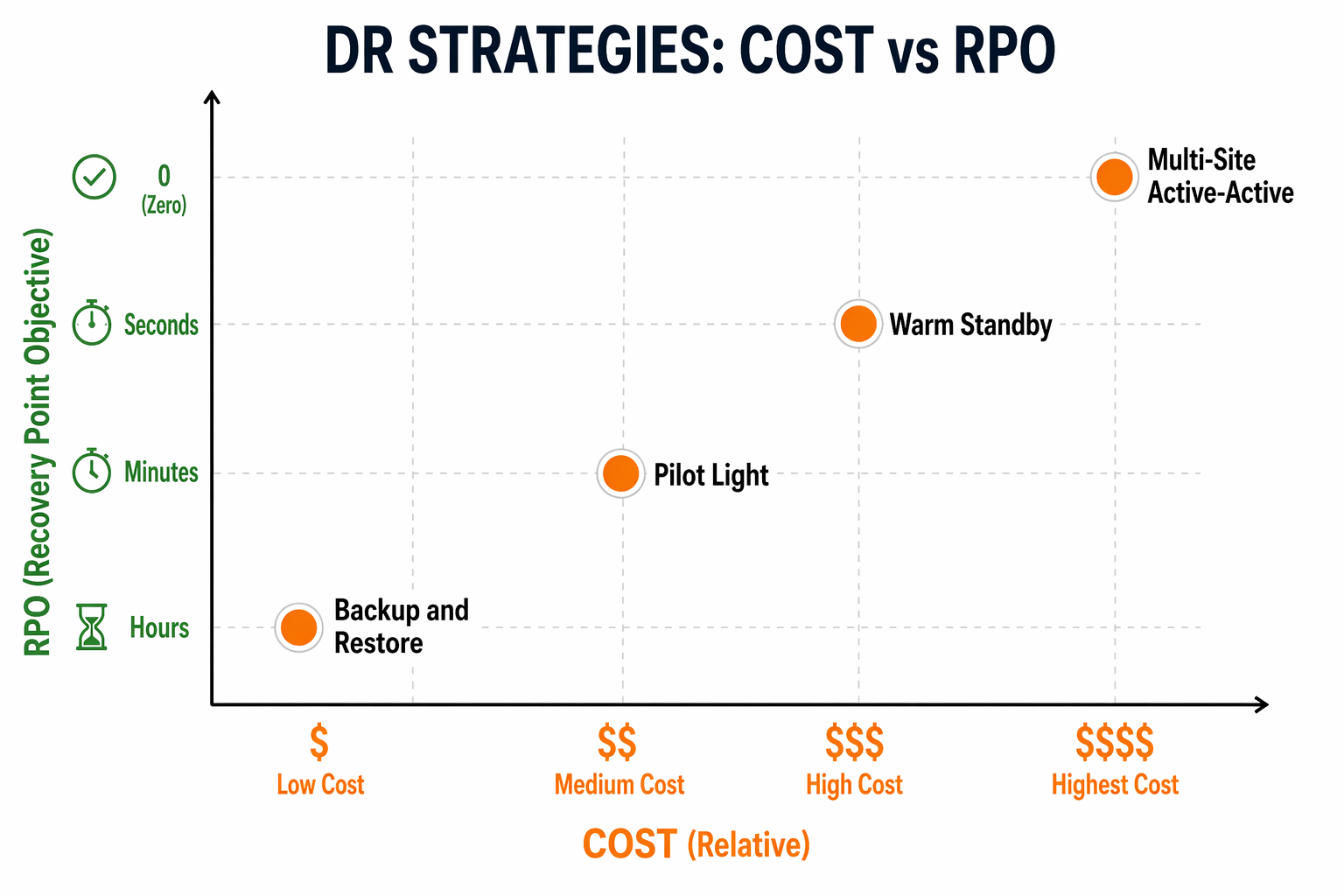
Resilience Hub evaluates your architecture against four classic DR strategies, and each one comes with different cost, RPO, RTO, and complexity trade-offs. Getting a handle on these differences is key to setting resiliency policies that actually make sense for your situation.
Strategy Overview
| Strategy | RPO | RTO | Relative Cost | Complexity | Use Case |
|---|---|---|---|---|---|
| Backup & Restore | Hours | Hours (12-24) | 1x baseline | Low | Non-critical workloads, archives |
| Pilot Light | Minutes | Minutes to hours | 1.2-1.5x | Medium | Critical databases, core services |
| Warm Standby | Seconds to minutes | Minutes | 1.5-2.5x | Medium-High | Revenue-generating applications |
| Multi-Site Active-Active | Near-zero | Near-zero | 2-3x | High | Mission-critical, zero-downtime SLA |
Backup & Restore
This is the simplest and cheapest approach. Data gets backed up to S3 or through AWS Backup at regular intervals, and if disaster strikes, you restore from that backup into a fresh environment. Your RPO is basically whatever your backup interval is, and RTO depends on how much data you have and how fast you can restore it.
# Create a backup plan with cross-region copy
aws backup create-backup-plan \
  --backup-plan '{
    "BackupPlanName": "dr-backup-plan",
    "BackupRules": [{
      "RuleName": "DailyBackup",
      "TargetBackupVaultName": "DR-Vault",
      "ScheduleExpression": "cron(0 5 ? * * *)",
      "StartWindowMinutes": 60,
      "CompletionWindowMinutes": 1440,
      "Lifecycle": {"DeleteAfterDays": 90},
      "CopyActions": [{
        "DestinationBackupVaultArn": "arn:aws:backup:us-west-2:123456789012:backup-vault:DR-Vault-West",
        "Lifecycle": {"DeleteAfterDays": 90}
      }]
    }]
  }'
For more details on configuring AWS Backup for production workloads, see our AWS Backup guide.
Pilot Light
With pilot light, a bare-bones version of your core infrastructure stays running in the DR region at all times – usually just the database (a cross-region read replica) and essential configuration like Route 53 and IAM. When you need to fail over, you spin up compute resources around that always-running core.
# CloudFormation: Aurora Global Database for pilot light DR
AWSTemplateFormatVersion: '2010-09-09'
Description: Aurora Global Database with DR region

Resources:
  PrimaryCluster:
    Type: AWS::RDS::DBCluster
    Properties:
      Engine: aurora-postgresql
      EngineVersion: '16.4'
      DatabaseName: production
      MasterUsername: admin
      MasterUserPassword: !Ref DBPassword
      DBClusterParameterGroupName: default.aurora-postgresql16
      VpcSecurityGroupIds: [!Ref DBSecurityGroup]
      AvailabilityZones: [us-east-1a, us-east-1b, us-east-1c]
      BackupRetentionPeriod: 35

  GlobalCluster:
    Type: AWS::RDS::GlobalCluster
    Properties:
      GlobalClusterIdentifier: prod-global-cluster
      SourceDBClusterIdentifier: !Ref PrimaryCluster

  DRCluster:
    Type: AWS::RDS::DBCluster
    Properties:
      Engine: aurora-postgresql
      EngineVersion: '16.4'
      GlobalClusterIdentifier: !Ref GlobalCluster
      AvailabilityZones: [us-west-2a, us-west-2b, us-west-2c]
      VpcSecurityGroupIds: [!Ref DRDBSecurityGroup]
      EnableCloudwatchLogsExports: ['postgresql']

Outputs:
  PrimaryEndpoint:
    Value: !GetAtt PrimaryCluster.Endpoint.Address
  DREndpoint:
    Value: !GetAtt DRCluster.Endpoint.Address
Learn more about Aurora global replication in our Aurora Global Database guide.
Warm Standby
Warm standby keeps a scaled-down but fully functional copy of your production environment running continuously in the DR region. Everything’s active – compute, database, cache, queues – just at reduced capacity. When failover happens, you scale everything up to full production levels.
In our experience, this tends to be the most popular strategy for revenue-facing applications that can’t stomach hours of downtime but also can’t justify the cost of going full active-active.
# Python/boto3: Scale up warm standby on failover trigger
import boto3

autoscaling = boto3.client('autoscaling', region_name='us-west-2')
ecs = boto3.client('ecs', region_name='us-west-2')

def scale_up_dr_environment():
    """Scale DR environment from warm standby to production capacity."""

    # Scale EC2 Auto Scaling Groups
    asg_response = autoscaling.update_auto_scaling_group(
        AutoScalingGroupName='dr-web-servers',
        MinSize=6,
        MaxSize=24,
        DesiredCapacity=12
    )

    # Scale ECS service
    ecs_response = ecs.update_service(
        cluster='dr-production-cluster',
        service='payment-service',
        desiredCount=8
    )

    # Scale ElastiCache (if using cluster mode)
    elasticache = boto3.client('elasticache', region_name='us-west-2')
    elasticache.modify_replication_group(
        ReplicationGroupId='dr-cache-cluster',
        AutomaticFailover='enabled',
        CacheNodeType='cache.r6g.xlarge'
    )

    return {
        'asg': asg_response['ResponseMetadata']['HTTPStatusCode'],
        'ecs': ecs_response['ResponseMetadata']['HTTPStatusCode']
    }
Multi-Site Active-Active
In an active-active setup, both regions handle live traffic at the same time. Global load balancing (Route 53 latency routing or Global Accelerator) splits requests between them, and data replication is synchronous or near-synchronous. There’s no real “failover” in the traditional sense – both regions are already up and serving.
# CloudFormation: Route 53 latency-based routing for active-active
AWSTemplateFormatVersion: '2010-09-09'
Description: Multi-region active-active DNS configuration

Resources:
  PrimaryRecord:
    Type: AWS::Route53::RecordSet
    Properties:
      HostedZoneName: example.com.
      Name: api.example.com
      Type: A
      AliasTarget:
        HostedZoneId: Z215LB...  # ALB hosted zone ID
        DNSName: primary-alb.us-east-1.amazonaws.com
      HealthCheckId: !Ref PrimaryHealthCheck
      Region: us-east-1
      SetIdentifier: primary-region

  SecondaryRecord:
    Type: AWS::Route53::RecordSet
    Properties:
      HostedZoneName: example.com.
      Name: api.example.com
      Type: A
      AliasTarget:
        HostedZoneId: Z215LB...
        DNSName: secondary-alb.us-west-2.amazonaws.com
      HealthCheckId: !Ref SecondaryHealthCheck
      Region: us-west-2
      SetIdentifier: secondary-region

  PrimaryHealthCheck:
    Type: AWS::Route53::HealthCheck
    Properties:
      HealthCheckConfig:
        Port: 443
        Type: HTTPS
        ResourcePath: /health
        FullyQualifiedDomainName: api-primary.example.com
        RequestInterval: 30
        FailureThreshold: 3

  SecondaryHealthCheck:
    Type: AWS::Route53::HealthCheck
    Properties:
      HealthCheckConfig:
        Port: 443
        Type: HTTPS
        ResourcePath: /health
        FullyQualifiedDomainName: api-secondary.example.com
        RequestInterval: 30
        FailureThreshold: 3
For active-active data layer replication, DynamoDB Streams and Global Tables provide multi-region write capability with conflict resolution.
Automated DR Testing with AWS Fault Injection Service
Manual DR testing is slow, expensive, and honestly rarely covers enough ground. AWS Fault Injection Service (FIS) integrates directly with Resilience Hub to automate DR tests as part of your assessment workflow.
How FIS Integration Works
What’s nice about this integration is that Resilience Hub can actually recommend and create FIS experiments based on your application’s architecture and resiliency policy. These experiments inject controlled faults – think AZ outages, instance terminations, network partitions – and then measure whether your application holds up to its RPO and RTO targets.
The integration follows this flow:
- Resilience Hub analyzes your application and identifies which fault scenarios are relevant.
- It creates FIS experiment templates targeting your application’s resources.
- You review and approve the experiment templates (FIS requires explicit opt-in for each resource type).
- Resilience Hub executes the experiments and collects results.
- Results feed back into your resilience score.
Creating an FIS Experiment Template for AZ Failure
{
  "description": "AZ failure simulation for payment-processing-app",
  "targets": {
    "Instances-Target": {
      "resourceType": "aws:ec2:instance",
      "selectionMode": "COUNT(3)",
      "parameters": {
        "AvailabilityZoneIdentifier": "us-east-1b"
      },
      "filters": [
        {
          "path": "State.Name",
          "values": ["running"]
        }
      ]
    }
  },
  "actions": {
    "terminate-az-instances": {
      "actionId": "aws:ec2:terminate-instances",
      "parameters": {
        "forceTerminate": "true"
      },
      "targets": {
        "Instances": "Instances-Target"
      },
      "description": "Terminate all instances in us-east-1b to simulate AZ failure"
    },
    "wait-before-recovery": {
      "actionId": "aws:fis:wait",
      "parameters": {
        "duration": "PT5M"
      },
      "description": "Wait 5 minutes to observe application behavior"
    }
  },
  "stopConditions": [
    {
      "source": "aws:cloudwatch:alarm",
      "value": "arn:aws:cloudwatch:us-east-1:123456789012:alarm:fis-safety-alarm"
    }
  ],
  "roleArn": "arn:aws:iam::123456789012:role/FISExperimentRole",
  "logConfiguration": {
    "logSchemaVersion": 2,
    "cloudWatchLogsConfiguration": {
      "logGroupArn": "arn:aws:logs:us-east-1:123456789012:log-group:/fis-experiments"
    }
  }
}
Running the Experiment via AWS CLI
# Create the experiment template
aws fis create-experiment-template \
  --cli-input-json file://fis-az-failure-template.json \
  --region us-east-1

# Run the experiment
aws fis start-experiment \
  --experiment-template-id "EXT-abc123def456" \
  --region us-east-1 \
  --tags '{"Project": "DR-Testing", "Environment": "Production"}'

# Monitor experiment progress
aws fis get-experiment \
  --experiment-id "EXP-xyz789" \
  --region us-east-1 \
  --query 'experiment.{State: state, StartTime: startTime, Actions: actions}'
Safety Controls for Production FIS Experiments
Running fault injection in production requires guardrails. FIS provides several:
| Safety Control | Description | Configuration |
|---|---|---|
| Stop conditions | CloudWatch alarms that auto-abort the experiment | Link alarm ARN to experiment template |
| IAM role scoping | FIS can only affect resources its IAM role allows | Create dedicated FIS role with minimal permissions |
| Resource targeting | Target specific instances, not entire fleets | Use tags or resource IDs to narrow scope |
| Duration limits | Maximum experiment runtime | Set in experiment template |
| Rollback actions | Automatic cleanup after experiment | Define post-experiment actions |
Resilience Hub integrates with CloudTrail for full audit logging of all FIS experiments. See our AWS CloudTrail deep dive for configuring comprehensive audit trails.
Elastic Disaster Recovery Integration
AWS Elastic Disaster Recovery (DRS) provides continuous block-level replication of your servers to a staging area in a target AWS Region. Resilience Hub integrates with DRS to include replication status in its assessments.
How DRS Works
DRS installs a lightweight agent on your source servers (EC2 or on-premises). The agent continuously replicates block-level changes to a staging area subnet in the DR region. The staging area uses minimal resources – just enough to receive replication data. On failover, DRS launches recovery instances from the staging area within minutes.
Key characteristics:
- RPO: Seconds (continuous replication)
- RTO: Minutes (launch recovery instances from staging area)
- Cost: Low (staging area uses minimal compute; you pay primarily for storage and data transfer)
Setting Up DRS via AWS CLI
# Create a replication configuration for a source server
aws drs create-replication-configuration-template \
  --staging-area-subnet-id "subnet-0abc123def456" \
  --staging-area-security-group-ids '["sg-0123456789abcdef0"]' \
  --associate-default-security-group \
  --replication-server-instance-type "t3.small" \
  --replication-server-hard-drive-type "SSD" \
  --use-dedicated-replication-server false \
  --default-large-staging-disk-type "GP3" \
  --bandwidth-throttling-daily-start-time "00:00:00" \
  --bandwidth-throttling-daily-end-time "23:59:59" \
  --bandwidth-throttling-max-bandwidth 1000 \
  --region us-west-2

# Initialize a source server for replication
aws drs initialize-service \
  --region us-west-2

# List source servers and their replication status
aws drs describe-source-servers \
  --filters '{"hardwareId": "i-0abc123def456"}' \
  --region us-west-2 \
  --query 'items[*].{SourceServerID: sourceServerID, ReplicationStatus: replicationStatus, RPO: stagedRecoveryData.rpo}'
Running a Non-Disruptive DR Drill
DRS supports non-disruptive recovery drills – you launch test instances from the staging area without affecting the production source or the ongoing replication.
# Launch a recovery drill (non-disruptive)
aws drs start-recovery \
  --source-servers '[{"sourceServerID": "s-1234567890abcdef0"}]' \
  --is-drill true \
  --region us-west-2

# Check drill status
aws drs describe-recovery-instances \
  --filters '{"sourceServerIDs": ["s-1234567890abcdef0"]}' \
  --region us-west-2 \
  --query 'items[*].{RecoveryInstanceID: recoveryInstanceID, Status: status, Drill: isDrill}'
DRS Cost Comparison
| Component | Monthly Cost (Estimate) | Notes |
|---|---|---|
| Staging area storage | $0.08/GB (EBS GP3) | Replicated data from source servers |
| Data transfer | $0.02/GB (cross-region) | Varies by change rate |
| Staging compute | ~$15-30/month (t3.small) | Minimal for receiving replication |
| Recovery instance (drill) | Instance-type hourly rate | Only during drills |
| Recovery instance (failover) | Instance-type hourly rate | Only during actual failover |
For a single server with 100GB of data and 5% daily change rate, expect roughly $20-40/month in DRS costs per server.
Multi-Region DR Patterns
Building on the DR strategies, multi-region patterns require coordination across several AWS services. Here are three production-tested patterns.
Pattern 1: Active-Passive with Aurora Global Database
The most common pattern for applications that need sub-minute RPO. The primary region serves all traffic; the DR region has a read-only Aurora replica that can be promoted.
| Component | Primary Region (us-east-1) | DR Region (us-west-2) |
|---|---|---|
| Compute (ECS/EKS) | Full capacity | None (pilot light) or minimal (warm standby) |
| Database | Aurora primary (read-write) | Aurora read replica (read-only, promotable) |
| Cache | ElastiCache primary | ElastiCache replica or empty |
| Static assets | S3 primary | S3 replica (cross-region replication) |
| DNS | Route 53 (active) | Route 53 (standby, failover routing policy) |
| Secrets | Secrets Manager | Secrets Manager (replicated) |
Failover sequence: Route 53 health check detects primary failure. Aurora replica is promoted to primary. ECS/EKS is scaled up in DR region. Route 53 fails over DNS. Total RTO: 5-15 minutes depending on scale-up time.
Pattern 2: Active-Active with DynamoDB Global Tables
For applications that can tolerate eventual consistency in the data layer. Both regions serve writes. DynamoDB Global Tables replicate writes bidirectionally.
# Python/boto3: Create a DynamoDB Global Table
import boto3

dynamodb = boto3.client('dynamodb')

# Create table in primary region
dynamodb.create_table(
    TableName='Orders',
    KeySchema=[
        {'AttributeName': 'order_id', 'KeyType': 'HASH'},
        {'AttributeName': 'created_at', 'KeyType': 'RANGE'}
    ],
    AttributeDefinitions=[
        {'AttributeName': 'order_id', 'AttributeType': 'S'},
        {'AttributeName': 'created_at', 'AttributeType': 'S'}
    ],
    BillingMode='PAY_PER_REQUEST',
    StreamSpecification={
        'StreamEnabled': True,
        'StreamViewType': 'NEW_AND_OLD_IMAGES'
    },
    Replicas=[
        {'RegionName': 'us-east-1'},
        {'RegionName': 'us-west-2'}
    ]
)
Pattern 3: Hub-and-Spoke for Global Enterprises
A centralized DR hub region replicates to multiple spoke regions. Each spoke region serves local traffic. The hub region acts as the authoritative DR target if a spoke fails.
This pattern is common in financial services and healthcare, where data residency requirements mandate specific regions but DR must still be centralized.
| Hub-and-Spoke Component | Configuration |
|---|---|
| Hub region | eu-west-1 (central DR) |
| Spoke regions | us-east-1, ap-southeast-1, sa-east-1 |
| Data replication | Aurora Global Database (hub as secondary for each spoke) |
| DNS | Route 53 latency routing with per-region health checks |
| Compliance | Data residency enforced via S3 bucket policies and KMS key policies |
Multi-Region Cost Estimate
| Component | Active-Passive (Monthly) | Active-Active (Monthly) |
|---|---|---|
| Aurora Global Database | $200-500 | $400-1000 |
| Cross-region data transfer | $50-200 | $100-500 |
| DR compute (minimal) | $100-300 | $500-1500 |
| Route 53 health checks | $1-5 | $1-5 |
| CloudWatch cross-region | $10-30 | $10-30 |
| Total (estimated) | $361-1035 | $1011-3035 |
These costs are additive to your primary region costs. The active-active column doubles compute because both regions run full capacity.
Compliance Mapping
Resilience Hub maps your resilience assessments to major compliance frameworks. This is where the service delivers value beyond operational resilience – it generates audit-ready evidence that your DR posture meets regulatory requirements.
Compliance Framework Coverage
| Framework | Relevant Controls | Resilience Hub Evidence |
|---|---|---|
| SOC 2 Type II | CC7.1 (Detection), CC7.2 (Monitoring), CC7.3 (Incident Response) | Assessment reports, alarm coverage, runbook existence |
| ISO 27001:2022 | A.5.29 (ICT Readiness), A.5.30 (ICT Preparedness) | Resilience scores, policy compliance, DR test results |
| PCI-DSS v4.0 | 12.10 (Incident Response), 12.10.1 (IR Plan) | DR plans, test execution logs, recovery time evidence |
| HIPAA | 164.308(a)(7) (Contingency Plan) | DR policy, data backup verification, recovery testing |
| NIST 800-34 | CP-2 (Contingency Plan), CP-3 (Contingency Training) | Full assessment reports, FIS test evidence |
SOC 2 Evidence Collection
For SOC 2, auditors need evidence that your organization can detect, respond to, and recover from disruptions. Resilience Hub provides this directly:
# Python/boto3: Export assessment report for SOC 2 evidence
import boto3
import json
from datetime import datetime

resiliencehub = boto3.client('resiliencehub', region_name='us-east-1')

def export_compliance_evidence(app_arn, output_path):
    """Export Resilience Hub assessment data for SOC 2 compliance."""

    # List all assessments for the application
    assessments = resiliencehub.list_app_assessments(
        appArn=app_arn
    )

    evidence_package = {
        'application': app_arn,
        'export_date': datetime.utcnow().isoformat(),
        'assessments': [],
        'compliance_status': {}
    }

    for assessment in assessments['appAssessments']:
        # Get detailed assessment results
        detail = resiliencehub.describe_app_assessment(
            assessmentArn=assessment['assessmentArn']
        )

        evidence_package['assessments'].append({
            'name': detail['assessment']['assessmentName'],
            'status': detail['assessment']['status'],
            'start_time': str(detail['assessment']['startTime']),
            'end_time': str(detail['assessment'].get('endTime', '')),
            'resilience_score': detail['assessment'].get('resilienceScore', 0),
            'compliance_status': detail['assessment'].get('complianceStatus', {})
        })

    # Write evidence to file
    with open(output_path, 'w') as f:
        json.dump(evidence_package, f, indent=2, default=str)

    return evidence_package

# Usage
result = export_compliance_evidence(
    app_arn='arn:aws:resiliencehub:us-east-1:123456789012:app/payment-app',
    output_path='/tmp/soc2-resilience-evidence.json'
)
print(f"Exported {len(result['assessments'])} assessments for SOC 2 review")
ISO 27001 Mapping
ISO 27001:2022 Annex A controls A.5.29 and A.5.30 specifically address ICT readiness for business continuity. Resilience Hub assessments map directly:
| ISO 27001 Control | Resilience Hub Evidence | Auditor Expectation |
|---|---|---|
| A.5.29 Information security during disruption | Resilience policy with RPO/RTO targets, assessment scores over time | Documented RPO/RTO targets with evidence of testing |
| A.5.30 ICT readiness for business continuity | FIS experiment results, DR drill reports, runbook execution logs | Regular testing with documented results |
| A.5.7 Threat intelligence | Integration with Security Hub for threat-aware assessments | Threat-informed resilience planning |
| A.8.14 Redundancy of information processing | Multi-AZ/multi-region architecture validation from assessments | Redundancy verified by automated assessment |
HIPAA Contingency Planning
HIPAA 164.308(a)(7) requires covered entities to establish and implement a contingency plan. Resilience Hub provides evidence for all required components:
| HIPAA Requirement | Resilience Hub Coverage |
|---|---|
| 164.308(a)(7)(i) - Contingency Plan | Application-level DR policy with defined RPO/RTO |
| 164.308(a)(7)(ii)(A) - Data Backup Plan | AWS Backup integration, backup compliance checks in assessment |
| 164.308(a)(7)(ii)(B) - Disaster Recovery Plan | DRS integration, recovery runbooks, automated DR testing |
| 164.308(a)(7)(ii)(C) - Emergency Mode Operation | Warm standby configuration, failover procedures documented in runbooks |
| 164.308(a)(7)(ii)(D) - Testing and Revision | Scheduled FIS experiments, assessment history, score trends |
Runbooks with AWS Systems Manager
Resilience Hub generates and manages operational runbooks using AWS Systems Manager (SSM) documents. These runbooks automate recovery procedures and are tracked as part of your resilience score (SOP coverage component).
Creating a Recovery Runbook
# SSM Runbook: Database failover procedure
schemaVersion: '2.2'
description: 'Automated Aurora failover for payment-processing-app DR'
parameters:
  DBClusterIdentifier:
    type: String
    description: 'Aurora cluster to fail over'
    default: 'payment-prod-cluster'
  TargetRegion:
    type: String
    description: 'DR region to promote'
    default: 'us-west-2'
  DryRun:
    type: Boolean
    description: 'Run in dry-run mode (no actual failover)'
    default: true

mainSteps:
  - name: ValidatePrimaryHealth
    action: 'aws:executeAwsApi'
    inputs:
      Service: rds
      Api: DescribeDBClusters
      DBClusterIdentifier: ''
    outputs:
      - Name: ClusterStatus
        Selector: '$.DBClusters[0].Status'
        Type: String
    nextStep: CheckReplicaLag

  - name: CheckReplicaLag
    action: 'aws:executeAwsApi'
    inputs:
      Service: cloudwatch
      Api: GetMetricStatistics
      Namespace: 'AWS/RDS'
      MetricName: 'AuroraReplicaLag'
      Dimensions:
        - Name: DBClusterIdentifier
          Value: ''
      StartTime: ''
      EndTime: ''
      Period: 60
      Statistics:
        - 'Maximum'
    outputs:
      - Name: MaxLag
        Selector: '$.Datapoints[0].Maximum'
        Type: Integer
    nextStep: FailoverDecision

  - name: FailoverDecision
    action: 'aws:branch'
    inputs:
      Choices:
        - Variable: ''
          NumericLessThan: 5
          NextStep: ExecuteFailover
      Default:
        NextStep: AbortHighLag

  - name: AbortHighLag
    action: 'aws:executeAwsApi'
    inputs:
      Service: sns
      Api: Publish
      TopicArn: 'arn:aws:sns:us-east-1:123456789012:dr-alerts'
      Message: 'DR abort: replica lag exceeds 5 seconds. Manual investigation required.'
    isEnd: true

  - name: ExecuteFailover
    action: 'aws:executeAwsApi'
    inputs:
      Service: rds
      Api: FailoverDBCluster
      DBClusterIdentifier: ''
      TargetDBInstanceIdentifier: '-replica'
    nextStep: VerifyFailover

  - name: VerifyFailover
    action: 'aws:waitForAwsResourceProperty'
    inputs:
      Service: rds
      Api: DescribeDBClusters
      DBClusterIdentifier: ''
      PropertySelector: '$.DBClusters[0].Status'
      DesiredValues:
        - 'available'
      WaitTimeout: '300'
    isEnd: true
Registering the Runbook with Resilience Hub
# Create an SSM document for the runbook
aws ssm create-document \
  --name "PaymentApp-DatabaseFailover" \
  --document-type "Automation" \
  --document-format "YAML" \
  --content file://db-failover-runbook.yaml \
  --tags '[{"Key": "ResilienceHubApplication", "Value": "payment-processing-app"}]' \
  --region us-east-1

# The runbook will be picked up in the next Resilience Hub assessment
# as part of the SOP coverage evaluation
Scheduling Regular DR Drills via EventBridge
{
  "RuleName": "monthly-dr-drill",
  "ScheduleExpression": "cron(0 2 15 * ? *)",
  "Description": "Run monthly DR drill on the 15th at 2 AM UTC",
  "Targets": [
    {
      "Arn": "arn:aws:ssm:us-east-1:123456789012:automation-definition/PaymentApp-DatabaseFailover",
      "Id": "DrillTarget",
      "Input": "{\"DryRun\": [\"true\"], \"DBClusterIdentifier\": [\"payment-prod-cluster\"]}"
    }
  ]
}
This runs the failover runbook in dry-run mode monthly, validating that the procedure is current and executable without actually triggering a failover.
Cost Analysis
Understanding the cost of DR is essential for making informed strategy decisions. Here is a breakdown of Resilience Hub pricing and associated DR costs.
Resilience Hub Pricing
| Resilience Hub Component | Cost |
|---|---|
| Application assessment | $0.002 per resource per assessment |
| Resiliency policy management | No additional charge |
| Recommendations engine | Included in assessment cost |
| Compliance reporting | Included in assessment cost |
| FIS experiment integration | FIS charges apply separately |
For an application with 50 resources assessed weekly, the monthly Resilience Hub cost is approximately:
50 resources x $0.002 x 4 assessments/month = $0.40/month
The Resilience Hub cost itself is negligible. The real cost is in the DR infrastructure it validates.
Total DR Cost by Strategy (Monthly Estimate for a Mid-Size Application)
| Cost Component | Backup & Restore | Pilot Light | Warm Standby | Multi-Site |
|---|---|---|---|---|
| Resilience Hub assessments | $0.50 | $0.50 | $0.50 | $0.50 |
| AWS Backup | $50-100 | $50-100 | $50-100 | $50-100 |
| DR compute (staging/standby) | $0 | $100-300 | $500-1500 | $2000-5000 |
| DR database replication | $0 | $200-500 | $200-500 | $400-1000 |
| Cross-region data transfer | $10-30 | $20-50 | $30-100 | $50-200 |
| FIS experiments (10/month) | $0.10 | $0.10 | $0.10 | $0.10 |
| Route 53 health checks | $1-3 | $1-3 | $1-3 | $1-3 |
| CloudWatch (DR monitoring) | $5-15 | $10-25 | $15-40 | $20-50 |
| Total (monthly) | $67-149 | $382-979 | $797-2244 | $2522-6354 |
These estimates assume a mid-size application: 10-20 EC2/ECS instances, Aurora PostgreSQL cluster, ElastiCache, S3 static assets. Costs scale linearly with application size.
Resilience Hub ROI
The question is not whether DR costs money. The question is whether automated DR validation is cheaper than manual DR testing. For most organizations, Resilience Hub pays for itself in reduced testing labor alone.
Comparison: Automated DR Testing vs. Manual DR Testing
This comparison is based on operational experience across multiple organizations running production AWS workloads.
| Dimension | Manual DR Testing | Resilience Hub + FIS |
|---|---|---|
| Frequency | Quarterly (if lucky) | Weekly or continuous |
| Time to execute | 4-8 hours per test | 30-60 minutes automated |
| Personnel required | 3-5 engineers | 1 engineer to review results |
| Test coverage | Limited to known scenarios | Systematic across all disruption categories |
| Drift detection | Manual comparison | Automatic on each assessment |
| Compliance evidence | Screenshots and documents | Structured reports with timestamps |
| Consistency | Varies by who runs the test | Identical execution every time |
| Risk of test causing outage | Moderate (human error) | Low (safety controls, stop conditions) |
| Cost per test | $2,000-5,000 (labor) | $50-200 (compute + service costs) |
| Time to detect regression | Weeks to months | Hours to days |
| Audit readiness | Weeks of documentation prep | On-demand report generation |
The labor cost differential is the most compelling argument. A quarterly manual DR test involving 4 engineers for 6 hours at $150/hour costs $14,400 per year. Automated testing with Resilience Hub costs roughly $2,400 per year in service charges and DR infrastructure overhead. The savings compound when you factor in the ability to test more frequently and catch regressions faster.
What Manual Testing Still Covers Better
Automated DR testing is not a complete replacement for manual testing. Some scenarios still require human judgment:
- Communication procedures: Can the on-call team be reached? Do escalation paths work?
- Vendor coordination: Can you engage AWS Support quickly enough? Are third-party SLAs adequate?
- Business process verification: After technical recovery, can the business actually resume operations?
- Non-technical dependencies: Building access, power, network provider failover.
Treat automated DR testing as the floor, not the ceiling. Automate what can be automated, then supplement with periodic manual exercises for the human elements.
Best Practices
Based on production deployments of Resilience Hub, these practices yield the best results.
1. Start with a Conservative Policy
Set your initial resiliency policy to match your current DR posture, not your aspirational target. If your current RTO is 4 hours, set the policy to 4 hours. Get a baseline score, then tighten the policy incrementally. Starting with aggressive targets produces low scores that feel demoralizing rather than motivating.
2. Assess After Every Significant Change
Run an assessment after infrastructure changes – new services added, AZ configuration changes, database upgrades. This catches drift immediately rather than accumulating it until the next quarterly review.
# Trigger assessment from CI/CD pipeline after deployment
aws resiliencehub start-app-assessment \
  --app-arn "$APP_ARN" \
  --assessment-name "Post-deploy-$(date +%Y%m%d-%H%M%S)" \
  --region us-east-1
3. Integrate Resilience Scores into Deployment Gates
Use the resilience score as a deployment gate. If a deployment drops the score below a threshold, block promotion to production.
# Python/boto3: Check resilience score before deployment
import boto3
import sys

resiliencehub = boto3.client('resiliencehub', region_name='us-east-1')

MINIMUM_RESILIENCE_SCORE = 70

def check_resilience_gate(app_arn):
    """Check if application resilience score meets deployment threshold."""

    assessments = resiliencehub.list_app_assessments(
        appArn=app_arn,
        maxResults=1
    )

    if not assessments['appAssessments']:
        print("FAIL: No assessments found. Run an assessment first.")
        sys.exit(1)

    latest = assessments['appAssessments'][0]
    detail = resiliencehub.describe_app_assessment(
        assessmentArn=latest['assessmentArn']
    )

    score = detail['assessment'].get('resilienceScore', 0)
    status = detail['assessment']['status']

    if status != 'Succeeded':
        print(f"FAIL: Latest assessment status is {status}, not Succeeded")
        sys.exit(1)

    if score < MINIMUM_RESILIENCE_SCORE:
        print(f"FAIL: Resilience score {score} below threshold {MINIMUM_RESILIENCE_SCORE}")
        print("Remediate recommendations before deploying.")
        sys.exit(1)

    print(f"PASS: Resilience score {score} meets threshold {MINIMUM_RESILIENCE_SCORE}")
    return True

check_resilience_gate('arn:aws:resiliencehub:us-east-1:123456789012:app/payment-app')
4. Use FIS Experiments Incrementally
Do not start by injecting AZ failures into production. Begin with non-disruptive experiments: terminate a single instance in an Auto Scaling Group and verify replacement. Scale up to more aggressive experiments as your team builds confidence.
5. Automate Compliance Evidence Collection
Schedule weekly assessment exports to an S3 bucket with a lifecycle policy. This creates a continuous audit trail without manual effort.
# Scheduled assessment export for compliance
aws resiliencehub start-app-assessment \
  --app-arn "$APP_ARN" \
  --assessment-name "Weekly-compliance-$(date +%Y-W%V)" \
  --region us-east-1

# Export results to compliance S3 bucket
aws s3 cp /tmp/soc2-resilience-evidence.json \
  s3://compliance-evidence-bucket/resilience-hub/$(date +%Y/%m/%d)/ \
  --sse aws:kms --sse-kms-key-id alias/compliance-key
6. Map Applications to Business Services
Resilience Hub assessments are most useful when they map to business services, not to technical components. A “payment processing” application that includes the API, database, queue, and cache is more meaningful than four separate assessments. Group resources by business function.
7. Track Score Trends, Not Absolute Values
A single resilience score of 65 is not meaningful on its own. A trend from 45 to 55 to 65 over three months tells a clear story of improvement. Track scores over time and report the trend to leadership, not the absolute number.
8. Keep Runbooks Current
Resilience Hub checks for the existence of SSM runbooks as part of its SOP coverage score. But existing runbooks that are outdated are worse than no runbooks. Schedule quarterly runbook reviews alongside your assessments.
Conclusion
AWS Resilience Hub transforms disaster recovery from a periodic, manual, error-prone exercise into a continuous, automated, measurable process. It does not replace the need for DR architecture design – you still need to decide between pilot light and warm standby, still need to configure cross-region replication, still need to write runbooks. What it does is validate that your DR posture actually works, continuously, without requiring after-hours fire drills.
The compliance integration is arguably the highest-value feature. Being able to generate structured evidence for SOC 2, ISO 27001, PCI-DSS, and HIPAA auditors on demand – without manually compiling screenshots and logs – reduces audit preparation from weeks to hours.
Start with a baseline assessment against a conservative policy. Implement the top recommendations. Run FIS experiments in a staging environment first. Integrate assessment checks into your CI/CD pipeline. Within a few cycles, you will have a resilience score trend that demonstrates continuous improvement – and the evidence to prove it to any auditor.
Explore more like this

Cloud IoT Security: Zero Trust, Identity, and Signed Updates
On September 11, 2026, the Cyber Resilience Act’s incident-reporting rules start applying in the European Union. That is 22 days after this article’s publication date. A manufacturer that learns of...

Kill the Docker Hub Token: OIDC Trust for GitHub Actions
On July 31, 2026, Docker shipped OIDC connections for GitHub Actions to any organization on a Docker Team, Docker Business, or Docker Hardened Images subscription, plus organizations in the Docker-Sponsored...

Bedrock Web Search: Grounding an Agent Without Building a Scraper
On August 4, 2026, AWS made Web Search on Amazon Bedrock generally available, and the entire integration surface is one JSON object: {"type": "web_search"}. That is the whole change from...

Comments