
Getting Data into AWS in 2026: Kinesis, DataSync, Transfer Family, and DMS

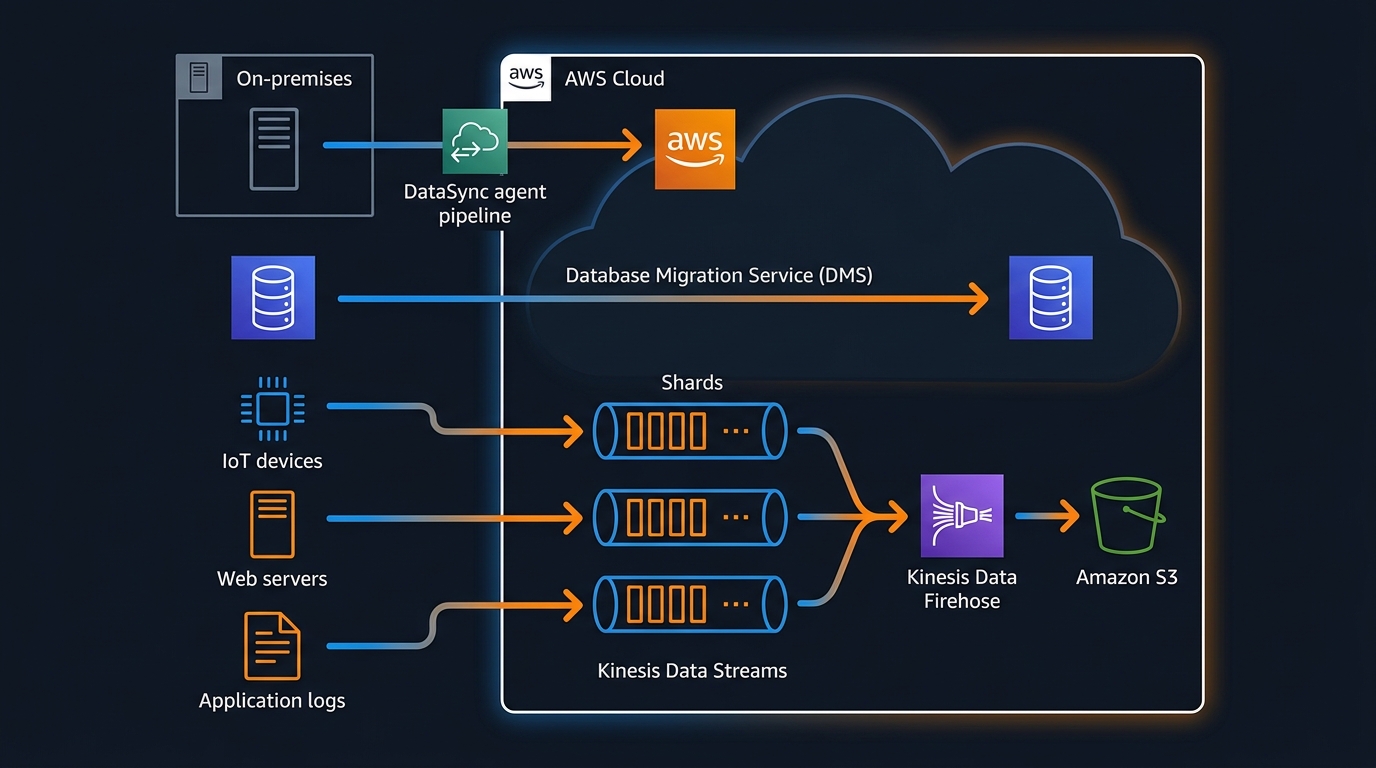
Getting data into AWS sounds straightforward until you’re actually doing it. The right approach for ingesting 50,000 IoT sensor events per second is completely different from the right approach for syncing a 10TB NAS share, or migrating an Oracle database, or receiving files from a partner who insists on SFTP. AWS has six or seven distinct ingestion services and they barely overlap in purpose — but that also means once you’ve mapped your use case to the right tool, the implementation is usually clean.
This post covers the main options, when each one makes sense, and what they actually cost at production scale.
The Landscape
Before picking a service, two questions narrow the field quickly:
Is this streaming or batch? Streaming means data arrives continuously and you need to process or store it with low latency — milliseconds to seconds. Batch means data accumulates somewhere and you move it on a schedule — hourly, nightly, or triggered.
Where is the source? On-premises hardware, another cloud, or an existing AWS service each has different network characteristics and authentication requirements. Getting data from an on-prem Oracle instance is fundamentally different from reading a Kafka topic in GCP.
With those answered, the service selection becomes mostly mechanical.
Kinesis Data Streams
Kinesis Data Streams is AWS’s managed real-time streaming service. You publish records to a stream, and consumers read from it. The core abstraction is the shard: each shard handles up to 1 MB/s write throughput and 2 MB/s read throughput. You provision the number of shards based on your peak write volume, or use on-demand mode which scales automatically.
A Python producer using boto3:
import boto3
import json
import time

kinesis = boto3.client("kinesis", region_name="us-east-1")
STREAM_NAME = "iot-sensor-events"

def publish_event(device_id: str, temperature: float, timestamp: float):
    record = {
        "device_id": device_id,
        "temperature": temperature,
        "timestamp": timestamp,
    }
    response = kinesis.put_record(
        StreamName=STREAM_NAME,
        Data=json.dumps(record).encode("utf-8"),
        PartitionKey=device_id,  # routes to consistent shard per device
    )
    return response["SequenceNumber"]

# For high-throughput scenarios, use put_records (up to 500 records per call)
def publish_batch(events: list[dict]):
    records = [
        {
            "Data": json.dumps(e).encode("utf-8"),
            "PartitionKey": e["device_id"],
        }
        for e in events
    ]
    return kinesis.put_records(StreamName=STREAM_NAME, Records=records)
On the consumer side, a Lambda function can be triggered directly from a Kinesis stream, or you can use the Kinesis Client Library (KCL) for long-running consumers that need more control over checkpoint management.
The partition key matters: it determines which shard a record lands on. If all your records have the same partition key, they pile up on one shard and you get hot-shard throttling. Distribute partition keys across your expected shard count — device ID, user ID, or a hash of the event source all work.
Kinesis competes with MSK (Managed Streaming for Apache Kafka) for the same real-time streaming use cases. The honest comparison: Kinesis is simpler to operate — no broker management, no topic replication configuration, no ZooKeeper. MSK gives you the full Kafka API surface, which matters if you have existing Kafka consumers, need Kafka Streams for stateful processing, or want to use the Kafka ecosystem (Kafka Connect, ksqlDB, Schema Registry). For greenfield AWS-native projects, Kinesis is usually less operational overhead. For teams already invested in Kafka, MSK is the cleaner path.
Amazon Data Firehose
Amazon Data Firehose (formerly Kinesis Data Firehose) is the zero-code path from a stream to a destination. You configure a source, a destination, and optional transformations — and Firehose handles batching, buffering, compression, format conversion, and retry logic. You write no consumer code.
Supported destinations include S3, Amazon Redshift, Amazon OpenSearch, Splunk, Datadog, New Relic, and HTTP endpoints. The S3 destination is the most common: Firehose buffers incoming records (configurable from 60 seconds to 900 seconds, or 1MB to 128MB), then writes Parquet or ORC files to S3 using an AWS Glue schema for format conversion.
When Firehose is the right answer:
- You need data in S3 or Redshift with no custom consumer logic
- Records can tolerate the buffer window (60s minimum latency)
- You want automatic retry, dead-letter delivery to S3, and CloudWatch metrics without building any infrastructure
When it’s not: if you need sub-second latency, you need to fan out to multiple independent consumers, or you need to process and route records differently based on content, you want Kinesis Data Streams with Lambda or a dedicated consumer application.
Firehose pricing is per GB ingested: $0.029/GB for the first 500 TB/month. At 1 TB/day, that’s about $870/month. No hourly charges for idle capacity — you pay only for what flows through.
AWS DataSync
DataSync is for moving files and objects between on-premises storage and AWS, or between AWS storage services. It handles NFS shares, SMB shares, HDFS, S3, EFS, and FSx. The use case is bulk transfer and ongoing sync — not real-time event streaming.
The architecture involves a DataSync agent: a VM you deploy on-premises (or in another cloud) that connects to your source storage and establishes an outbound TLS connection to the DataSync service. No inbound firewall rules required. The agent handles transfer optimization, including multi-part parallel transfers, data verification, and bandwidth throttling to avoid saturating your WAN link.
A typical use case: a media company has 50TB of raw footage on an on-prem NAS. They want to migrate it to S3, then keep the NAS and S3 in sync for 90 days during the transition period. DataSync handles both the initial bulk transfer (which it parallelizes aggressively across available bandwidth) and the incremental sync task that runs nightly via CloudWatch Events.
DataSync is not real-time. Minimum task frequency is hourly, and in practice most teams run it nightly or on-demand. If you need changes to appear in S3 within seconds of being written to your NAS, DataSync is the wrong tool — look at custom solutions using inotify or FSEvents to trigger S3 uploads directly.
When multiple teams or applications need access to the same S3 destination bucket with different permission boundaries, S3 Access Points let you create separate access policies per application without rewriting the bucket policy every time a new consumer is added.
Pricing is $0.0125 per GB transferred. For a 50TB initial migration: roughly $640. Ongoing incremental syncs at 100GB/night: $1.25/night.
AWS Transfer Family
Transfer Family is a managed SFTP, FTPS, and FTP server that stores files directly to S3 or EFS. From the client’s perspective, they’re connecting to a standard SFTP server with a hostname and port. On the backend, every uploaded file lands in an S3 bucket. There are no servers to manage, no SSH daemon to patch, no storage to provision.
The primary audience is external partners: banks sending transaction files, healthcare systems exchanging HL7 data, retailers sending EDI documents. These systems speak FTP or SFTP because they were built in 2003 and no one is going to rewrite them. Transfer Family lets you meet them where they are without running a SFTP server yourself.
Authentication options include service-managed users (credentials stored in Transfer Family), AWS Directory Service, or a custom identity provider via API Gateway and Lambda. The custom provider is worth knowing about: it lets you validate credentials against any external system — LDAP, a database, a third-party IdP — while the S3 storage and server management stay with AWS.
Each Transfer Family endpoint is an active server billed hourly ($0.30/hour for SFTP) plus $0.04/GB transferred. A single endpoint running 24/7 costs about $216/month before transfer costs. This is the right choice when the alternative is running your own SFTP infrastructure — it’s not cheap, but it’s operationally near-zero.
Database Migration Service (DMS)
DMS migrates data from a source database to a target database. It handles full-load migration (copy all existing data), change data capture (CDC, replicate ongoing changes), or both together. Common paths: Oracle on-prem to Aurora PostgreSQL, SQL Server on-prem to RDS SQL Server, MySQL to Redshift.
A DMS migration has three main components:
A replication instance — a managed EC2 instance that runs the migration workload. Size it based on your table count and row volume. For most migrations, a dms.t3.medium is sufficient for CDC; for full loads of multi-TB databases, you want dms.r5.xlarge or larger.
Source and target endpoints — connection definitions. For on-premises sources, DMS connects outbound over the internet or through Direct Connect. For RDS sources and targets, it uses VPC routing.
Migration tasks — the actual work. Task types:
- Full load: Copy all existing data from source to target. One-time operation.
- CDC only: Start replicating changes from a specific point in time. Requires the source to have binary logging (MySQL) or supplemental logging (Oracle) enabled.
- Full load + CDC: Copy existing data, then switch to CDC automatically when the initial load completes. This is the standard path for live migrations.
CDC depends on the source database’s transaction log. For Oracle, you need supplemental logging enabled at the table level. For MySQL, binary logging with binlog_format=ROW is required. For SQL Server, you need the MS-CDC feature enabled on the source database. DMS does not modify the source schema — it reads the log as a passive consumer.
One thing DMS does not do well: schema conversion. If you’re migrating from Oracle to PostgreSQL, you’ll hit data type incompatibilities, stored procedure syntax differences, and sequence handling gaps. AWS Schema Conversion Tool (SCT) handles the schema assessment and conversion separately. Plan for SCT work before the DMS task, especially for Oracle-to-Aurora migrations with significant stored procedure usage.
Decision Matrix
| Use case | Right tool |
|---|---|
| Real-time event streaming, sub-second latency | Kinesis Data Streams |
| Stream to S3/Redshift, latency tolerant (≥60s) | Amazon Data Firehose |
| Already using Kafka, need Kafka ecosystem | MSK |
| Bulk file sync from on-prem NAS/SMB/NFS | AWS DataSync |
| Partners sending files over SFTP/FTP | Transfer Family |
| Database migration with ongoing CDC | DMS |
| One-time bulk file migration | DataSync (or S3 CLI with multipart) |
| IoT telemetry to S3 data lake | Firehose (simplest) or Kinesis → Lambda → S3 |
Cost Example: 1 TB/Day of IoT Sensor Data
A realistic IoT workload: 10,000 devices, each sending a reading every 8 seconds. That’s 1,250 events/second, each about 200 bytes. Approximately 1 TB/day.
Option 1: Kinesis Data Streams + Lambda + S3
At 1,250 events/second × 200 bytes = 250 KB/s write throughput. One shard handles 1 MB/s, so one shard is sufficient with headroom. In on-demand mode:
- Kinesis on-demand: ~$0.08 per million PUT payload units. 1,250 events/s × 86,400s = 108M events/day × $0.08/million ≈ $8.64/day
- Lambda invocations to process and write to S3: Lambda triggers on the stream, processes batches. At 1,250 events/s, maybe 60 invocations/minute at 100ms each: ~$0.60/day
- S3 storage: 1TB/day × $0.023/GB/month. The ingestion cost is S3 PUT requests — roughly $0.50/day at this volume.
Total: roughly $10/day, or $300/month.
Option 2: Amazon Data Firehose directly to S3
- Firehose: $0.029/GB × 1,024 GB/day = $29.70/day
- No Lambda needed — Firehose handles the S3 writes natively.
- S3 storage: same as above.
Total: roughly $30/day, or $900/month.
Option 3: Direct S3 PUT from device agents
If devices (or edge gateways) can speak HTTPS, you can skip both Kinesis and Firehose and write directly to S3 using presigned URLs or IAM role credentials.
- S3 PUT requests: $0.005 per 1,000 requests. At 108M requests/day: $0.54/day
- S3 storage: same.
Total: under $2/day, or $60/month — but you’ve moved the batching, retry logic, and fan-out complexity to the device layer, which adds engineering cost.
The Kinesis option is the balanced choice for most IoT architectures: reasonable cost, server-side durability and replay capability, and clean fan-out to multiple consumers (S3, real-time dashboards, anomaly detection) without coupling them together.
For a deeper look at managing AWS costs at scale, see AWS FinOps in 2026. If your IoT data ends up in a Cassandra-compatible store, Amazon Keyspaces is worth evaluating as a managed alternative to self-hosted Cassandra. For analytical workloads once data lands in AWS, Amazon Redshift vs DynamoDB walks through when to use each for query-heavy workloads. And if you need to route processed events to downstream workflows, EventBridge and Step Functions covers the event-driven orchestration layer that typically sits after ingestion.
The ingestion layer is often where teams over-engineer. Firehose to S3 solves a large fraction of real-world data ingestion requirements with zero consumer code and minimal operational overhead. Start there, measure what you actually need, and add complexity only when the simpler option hits a real constraint.
Explore more like this

Bedrock Web Search: Grounding an Agent Without Building a Scraper
On August 4, 2026, AWS made Web Search on Amazon Bedrock generally available, and the entire integration surface is one JSON object: {"type": "web_search"}. That is the whole change from...

ECR Now Allows 200 GB Image Layers. Your Model Weights Still Do Not Belong There
On August 3, 2026, AWS raised the maximum Amazon ECR image layer size to 200 GB for images pushed with docker push. The announcement names the driver in the second...

Lambda SQS Provisioned Mode Now Scales to 10,000 Pollers: The Throughput Math That Decides If You Need It
AWS raised the poller ceiling on August 3, 2026. Provisioned Mode for Amazon SQS event source mappings went from a maximum of 2,000 event pollers to 10,000, which puts the...

Comments