
Kubernetes Dashboard to Headlamp: A Secure Migration Guide

The Kubernetes project archived Kubernetes Dashboard and selected Headlamp as the dashboard experience moving forward. That does not turn an old Dashboard deployment into Headlamp automatically. The two applications have different packaging, authentication choices, plugin capabilities, and operational assumptions. A secure migration is therefore a small platform change, not a Helm release rename.
The biggest mistake is to begin by creating a cluster-admin service-account token so the new interface “works.” Headlamp uses the Kubernetes API and respects Kubernetes RBAC. If an identity cannot perform an action with kubectl, it should not gain that action merely because a browser is easier to use. Authentication must identify the person or workload; RBAC must decide what that identity can do.
This guide moves a production cluster from Dashboard to an in-cluster Headlamp deployment with a reversible cutover. It covers workload discovery, Helm installation, OIDC, least-privilege RBAC, ingress protection, plugin governance, multi-cluster access, observability, and rollback.
Start with the transition boundary
Kubernetes Dashboard and Headlamp are both web interfaces for the Kubernetes API, but they should not be treated as interchangeable binaries.
| Area | Kubernetes Dashboard | Headlamp migration decision |
|---|---|---|
| Project state | Archived by the Kubernetes project | Actively developed as a Kubernetes SIG UI project |
| Primary authorization | Kubernetes RBAC | Kubernetes RBAC |
| Common login pattern | Bearer token and deployment-specific proxy | Service-account token, OIDC, or trusted identity-aware proxy |
| Extensibility | Limited for most operators | Plugin system and app catalog integration |
| Deployment | Historically manifests or Helm | Desktop application or in-cluster Helm deployment |
| Multi-cluster operation | Often one deployment or context at a time | Cluster profiles and multiple contexts are supported |
The project’s official transition announcement says Headlamp is the successor experience, not that the archived Dashboard must be removed immediately. Run both during a bounded verification window. Give Headlamp a separate namespace, hostname, identity integration, and release lifecycle. Only remove Dashboard after you have proved the workflows and audit trail people rely on.
Inventory how Dashboard is actually used
Before installing anything, collect evidence from the current deployment. The stated use case is often “developers view pods,” while audit logs show secret reads, workload restarts, log streaming, and ad hoc edits.
Record:
- Namespace, manifests or Helm release, image digest, and ingress route
- Service accounts, ClusterRoleBindings, tokens, and proxy configuration
- Identity provider or VPN controls in front of the UI
- Namespaces and API resources each user group needs
- Mutating actions such as delete, scale, restart, edit, exec, and port-forward
- Access to logs, events, Secrets, ConfigMaps, custom resources, and metrics
- Browser bookmarks, runbooks, support procedures, and automation that names the old URL
- NetworkPolicy, Pod Security, backup, and monitoring exceptions
- Audit events showing real verbs and resources during a representative period
Use Kubernetes audit logs and identity-provider logs rather than a survey alone. If all users share one service-account token, the current system cannot attribute actions to people. Fix that in the migration instead of preserving the weakness.
Group workflows into view, troubleshoot, operate, and administer. Most engineers need the first two; a small operations group may need selected mutations; cluster administration should remain outside a broadly reachable web UI.
Design identity before Helm
Headlamp supports several authentication patterns. Select one before making the Service public.
| Pattern | Appropriate use | Main limitation |
|---|---|---|
| Per-user Kubernetes/OIDC login | Normal production access | Requires a correctly configured cluster identity provider and redirect flow |
| Identity-aware proxy | Existing trusted proxy or cloud access layer | Proxy authentication is not automatically Kubernetes API authorization |
| Per-user short-lived token | Bootstrap and restricted operational use | Manual lifecycle and poor experience at scale |
| Shared service-account token | Isolated demonstration only | No human attribution and usually excessive standing privilege |
| HTTP basic authentication in front of Headlamp | Additional gate for a private environment | Does not grant a Kubernetes identity or replace RBAC |
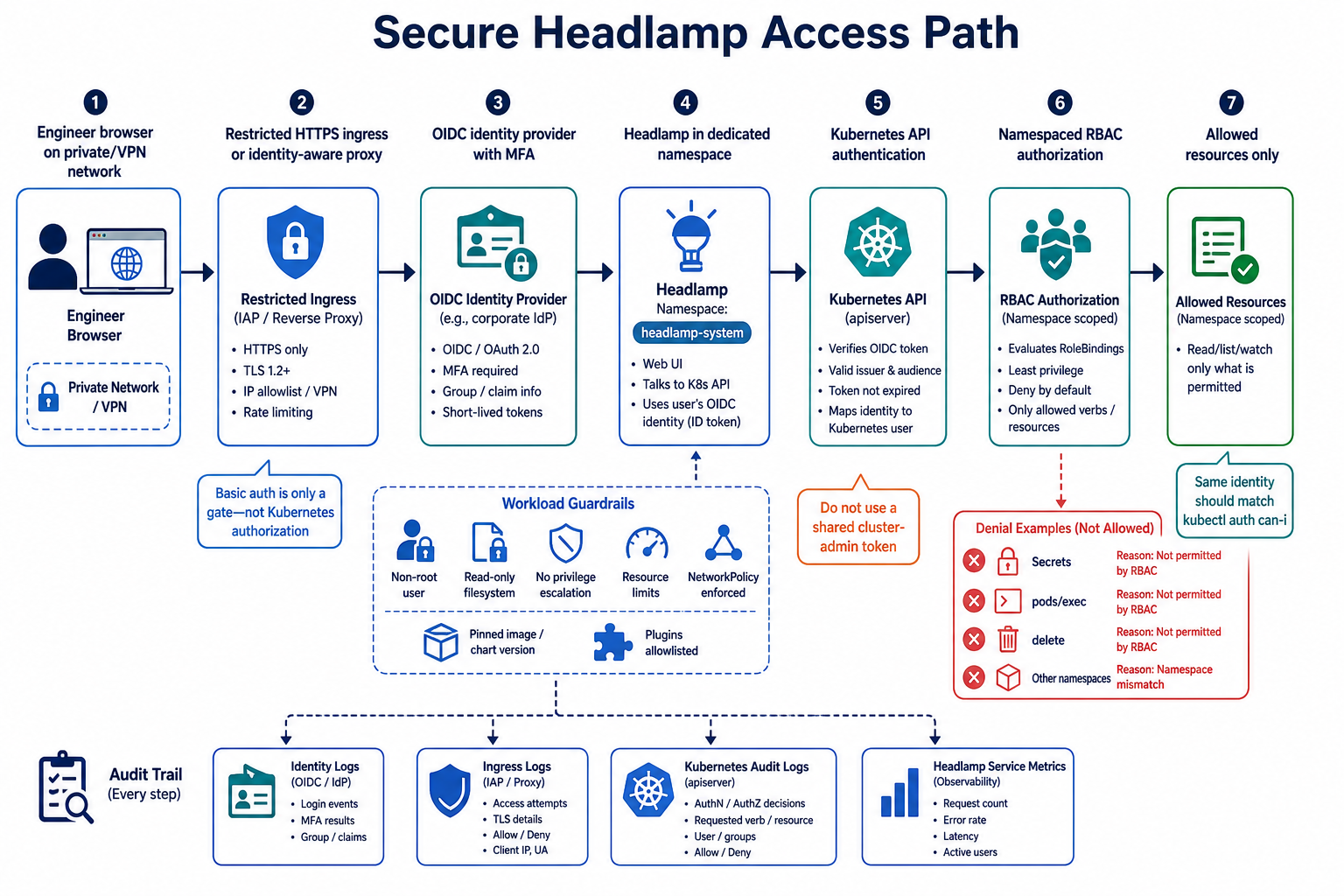
OIDC is the best general production pattern because the token reaching the API represents the user and can carry groups. Map those groups to namespaced Roles and carefully reviewed ClusterRoles. The same identity should receive the same result in Headlamp and kubectl auth can-i.
Headlamp documentation also describes identity-aware proxy integration. Be precise about the trust chain: a proxy can authenticate the browser, but Kubernetes still requires credentials and authorization for API calls. Do not configure a privileged shared backend identity and assume the proxy username makes the API audit log attributable.
Basic authentication is only a front-door gate. Headlamp explicitly distinguishes it from Kubernetes authorization. It can protect a private demonstration endpoint, but it does not decide which pods, logs, or Secrets a signed-in person can read.
Create a dedicated namespace and pinned release
Install Headlamp independently of the old Dashboard. Add the official Helm repository, inspect the chart, pin a tested version, and render the manifests before applying them.
helm repo add headlamp https://kubernetes-sigs.github.io/headlamp/
helm repo update

helm show values headlamp/headlamp --version 0.44.0 > headlamp-values-reference.yaml

helm template headlamp headlamp/headlamp \
  --version 0.44.0 \
  --namespace headlamp-system \
  --values values-production.yaml > rendered-headlamp.yaml
Version 0.44.0 is illustrative of the current migration window; confirm the latest supported release and review its notes before deployment. Pin both the chart and image digest in production policy where practical. Automatic image movement under a fixed tag defeats change review.
Create the namespace with Pod Security labels suited to the workload, then install:
kubectl create namespace headlamp-system

helm upgrade --install headlamp headlamp/headlamp \
  --version 0.44.0 \
  --namespace headlamp-system \
  --values values-production.yaml \
  --atomic \
  --timeout 5m
The --atomic option rolls back a failed Helm upgrade, but it does not validate identity, RBAC, ingress, or application behavior. Keep the rendered output as a pipeline artifact and scan it for privileged containers, host mounts, broad RBAC, mutable tags, and missing resource controls. The Helm charts on EKS guide shows a repeatable render-and-review workflow.
Harden the workload itself
Headlamp is an administrative interface connected to the Kubernetes API. Give its pods a tighter baseline than an ordinary public website.
Use values or policy to require:
- Non-root execution and a read-only root filesystem
- No privilege escalation and all Linux capabilities dropped
- Seccomp
RuntimeDefault - Explicit CPU and memory requests and limits
- A dedicated service account with token automount disabled unless the selected auth architecture requires it
- Topology spread or anti-affinity when availability justifies multiple replicas
- Readiness, liveness, and startup probes
- A PodDisruptionBudget for a multi-replica deployment
- NetworkPolicy limiting ingress to the trusted proxy and egress to DNS, the Kubernetes API, and approved identity endpoints
- Image digest and signature policy appropriate to your supply chain
Do not expose the Kubernetes API broadly just to make Headlamp connectivity simple. In EKS, place the interface in a private or restricted network path and keep cluster endpoint access aligned with the EKS RBAC security model.
If you use a service mesh, verify websocket, streaming log, and exec behavior explicitly. A strict proxy timeout or protocol downgrade can make ordinary lists work while interactive operations fail.
Model RBAC from workflows, not UI screens
Headlamp renders what the API permits. The interface may show a navigation item that later returns Forbidden; that is not a reason to grant broad access. Build roles from required API verbs and resources.
A read-only application support role might allow pods, deployments, replica sets, jobs, events, and logs in one namespace:
apiVersion: rbac.authorization.k8s.io/v1
kind: Role
metadata:
  name: application-observer
  namespace: payments
rules:
  - apiGroups: [""]
    resources: ["pods", "pods/log", "events", "services", "configmaps"]
    verbs: ["get", "list", "watch"]
  - apiGroups: ["apps"]
    resources: ["deployments", "replicasets", "statefulsets"]
    verbs: ["get", "list", "watch"]
  - apiGroups: ["batch"]
    resources: ["jobs", "cronjobs"]
    verbs: ["get", "list", "watch"]
Bind it to an OIDC group, not to the Headlamp pod:
apiVersion: rbac.authorization.k8s.io/v1
kind: RoleBinding
metadata:
  name: payments-observers
  namespace: payments
subjects:
  - kind: Group
    name: oidc:payments-support
    apiGroup: rbac.authorization.k8s.io
roleRef:
  kind: Role
  name: application-observer
  apiGroup: rbac.authorization.k8s.io
Notice what is absent: Secrets, pods/exec, workload updates, deletes, and cluster-scoped resources. Add each mutating capability through a separate operator role with a documented reason. pods/exec is remote command execution in a workload and deserves stronger approval than reading logs.
Test every persona before cutover:
kubectl auth can-i list pods \
  --namespace payments \
  --as [email protected] \
  --as-group oidc:payments-support

kubectl auth can-i get secrets \
  --namespace payments \
  --as [email protected] \
  --as-group oidc:payments-support
The first should be allowed and the second denied. Keep these expectations as policy tests in CI. Fine-grained node authorization is a separate concern; the kubelet authorization guide helps keep human dashboard roles away from node APIs.
Configure OIDC and ingress as one flow
OIDC failures often come from disagreement among four URLs: the browser URL, ingress host, Headlamp base URL, and identity-provider redirect URI. Decide on one canonical HTTPS origin such as https://headlamp.platform.example.com and configure all components from it.
The request path should be:
- Browser reaches a private ingress or identity-aware edge.
- TLS validates the expected public or internal hostname.
- Headlamp redirects to the approved OIDC issuer.
- The identity provider redirects only to the registered Headlamp callback.
- Headlamp submits the resulting user credential to the Kubernetes API.
- Kubernetes authentication maps claims to a username and groups.
- Kubernetes RBAC authorizes each API request.
Allow only HTTPS, enable HSTS after validating the domain, and apply an idle session limit aligned with administrative risk. Restrict ingress by VPN, corporate access proxy, or private load balancer. A login page on the public internet is not a sufficient security boundary.
If a regular ACM certificate can terminate at an AWS load balancer, use that managed path. The Application Load Balancer guide explains listener and health-check behavior. If TLS must terminate inside Kubernetes, use a supported certificate automation design and monitor renewal.
Test logout and token expiration. An identity-provider session ending does not always invalidate an already issued Kubernetes token. Set realistic token lifetime and understand revocation behavior before calling the session control complete.
Govern plugins like deployed code
Headlamp’s plugin system is one reason for the transition. Plugins can add resource views, commands, and integrations. They also execute code inside an administrative interface.
Use a plugin allowlist with an owner, version, source, checksum or signature, required permissions, data destinations, and review date. Build plugins into a reviewed image or deliver them through a controlled sidecar. Avoid unreviewed automatic updates in production even if the plugin manager supports them.
Review a plugin for:
- Kubernetes resources and verbs it invokes
- External endpoints and telemetry
- Rendering of untrusted resource fields
- Browser storage, cookies, and token handling
- Dependency vulnerabilities and build provenance
- Compatibility with the pinned Headlamp version
- Failure behavior when its backend is unavailable
Plugins do not escape RBAC, but they can make permitted operations easier to trigger and can expose data already available to the user’s session. Least privilege still provides the most important boundary.
Start the migration with no optional plugins. Add one only after the base identity, API, and audit path are stable. That keeps plugin failure from being confused with Headlamp failure.
Treat multi-cluster access as multiplied privilege
Headlamp supports multiple clusters and cluster profiles. That is convenient for platform operations, but a single browser session can become a bridge to many environments.
Do not upload a broad administrator kubeconfig to a shared server. Use per-user federation or separate bounded credentials, label clusters clearly, and visually separate production from non-production. Names and colors help prevent mistakes but are not authorization; require stronger roles and confirmation for production mutations.
For large fleets, start with a few representative clusters:
- One non-production cluster with standard Kubernetes resources
- One production-like cluster with strict RBAC and network policy
- One cluster with high pod cardinality and important custom resources
- One cluster using the intended identity proxy or private endpoint pattern
Headlamp 0.44.0 specifically highlighted performance improvements for clusters beyond 30,000 pods. Treat that as a reason to test your own fleet, not as a guarantee. Measure list latency, browser memory, API server load, and watch reconnects under realistic access.
Custom-resource pages also deserve verification. Operators may depend on CRD status, conditions, events, and scale subresources that a generic resource view represents differently from a specialized dashboard.
Observe the interface and the API
Application health and security audit answer different questions.
Headlamp metrics and logs should reveal deployment availability, HTTP failures, authentication loops, latency, and resource pressure. Kubernetes API audit logs should reveal who requested which resource, verb, namespace, and response code. Identity-provider logs prove authentication and group delivery. Ingress logs prove the client and route.
Build alerts for:
| Signal | Why it matters |
|---|---|
| Repeated 401 responses | OIDC token, redirect, or session problem |
| Repeated 403 responses | Missing RBAC, changed group claim, or attempted overreach |
| Spike in Secret, exec, delete, or patch requests | High-risk behavior requiring attribution |
| API watch disconnects or throttling | UI scale or API server pressure |
| Headlamp restart or probe failure | Bad release, resource limits, or dependency failure |
| Ingress 5xx and TLS expiry | The interface is unavailable before users reach Kubernetes |
Use Prometheus and Grafana on EKS for service-level signals and CloudWatch Container Insights where it fits the existing operations stack. Retain Kubernetes audit events in a separate protected destination so an in-cluster administrator cannot quietly erase the record.
Run a workflow-based acceptance test
A green Deployment and successful login are insufficient. Test named personas against a matrix of real work.
| Persona | Expected success | Expected denial |
|---|---|---|
| Developer observer | List workloads, view events, stream application logs in owned namespace | Secrets, exec, delete, other namespaces |
| Namespace operator | Restart or scale approved deployments, inspect jobs | ClusterRoleBinding, nodes, admission policy |
| Security observer | View selected policy and audit-related resources | Workload mutation and Secret values |
| Platform administrator | Approved cluster operations under separate strong role | Actions outside the emergency/admin process |
For each row, compare Headlamp behavior, kubectl auth can-i, and audit logs. Verify that the username is the human identity, not a shared service account. Check token expiry, logout, revoked group membership, and access after leaving the VPN.
Exercise logs, exec if deliberately allowed, resource edit, pagination, label filters, custom resources, metrics, and large namespaces. The Kubernetes resource-management guide offers useful high-cardinality and resource-control cases.
Cut over with a rollback path
Keep Dashboard read-only or access-restricted during the validation window. Announce the new URL and document the changed authentication flow. Do not redirect the old hostname immediately; a redirect can hide broken bookmarks and mix security assumptions.
A safe cutover sequence is:
- Freeze changes to the old Dashboard deployment and export its manifests and RBAC.
- Deploy Headlamp under a new namespace and hostname.
- Complete identity, RBAC, network, plugin, and workflow tests.
- Invite a small group from development, operations, and security.
- Compare usage and denied actions with the old audit baseline.
- Fix roles by adding narrow rules, not
cluster-admin. - Make Headlamp the documented default while keeping Dashboard restricted.
- Remove public access to Dashboard, wait through the agreed rollback window, then uninstall it.
- Delete Dashboard service accounts, tokens, bindings, ingress rules, DNS, and monitoring exceptions.
- Search for remaining cluster-admin bindings and stale credentials.
Rollback should restore access, not restore bad security. Keep the old manifests and image digest, but do not preserve an untracked shared administrator token as an emergency plan. A break-glass path should be time-limited, monitored, and independent of either web UI.
GitOps is useful here because it captures Helm values, RBAC, ingress, policies, and deletion in one reviewed history. The Argo CD on EKS guide shows how to manage that state without granting the dashboard itself deployment authority.
The migration is an authorization project
Headlamp provides a modern, extensible Kubernetes interface, and the project’s adoption gives operators a clearer future than the archived Dashboard. The UI is the easy part. The durable value comes from replacing shared tokens, proving least-privilege roles, controlling plugins, protecting the network path, and retaining attributable API audit logs.
If a user can do less after migration because the old shared token was overpowered, that can be a successful security outcome. Restore legitimate workflows with specific RBAC rules. Do not turn the successor dashboard into a browser-shaped root shell.
Sources
Explore more like this

Cloud IoT Security: Zero Trust, Identity, and Signed Updates
On September 11, 2026, the Cyber Resilience Act’s incident-reporting rules start applying in the European Union. That is 22 days after this article’s publication date. A manufacturer that learns of...

Kill the Docker Hub Token: OIDC Trust for GitHub Actions
On July 31, 2026, Docker shipped OIDC connections for GitHub Actions to any organization on a Docker Team, Docker Business, or Docker Hardened Images subscription, plus organizations in the Docker-Sponsored...

Bedrock Web Search: Grounding an Agent Without Building a Scraper
On August 4, 2026, AWS made Web Search on Amazon Bedrock generally available, and the entire integration surface is one JSON object: {"type": "web_search"}. That is the whole change from...

Comments