
Lambda SQS Provisioned Mode Now Scales to 10,000 Pollers: The Throughput Math That Decides If You Need It

AWS raised the poller ceiling on August 3, 2026. Provisioned Mode for Amazon SQS event source mappings went from a maximum of 2,000 event pollers to 10,000, which puts the concurrency ceiling for a single event source mapping at 100,000 concurrent Lambda invocations (AWS What’s New, August 3, 2026). Five times the headroom. Teams that needed to clear 20,000 concurrent invocations used to shard one logical queue across several mappings, then stitch the metrics, alarms, and dead letter routing back together by hand. That workaround is dead.
Here’s the part the announcement doesn’t spell out. Turning provisioned mode on costs money every second it’s enabled, whether messages arrive or not, and the always-on ceiling has not moved at all. The maximum is now 10,000 pollers. The minimum is still capped at 200. So the amount of capacity you can genuinely pre-warm is unchanged, and the new headroom is entirely autoscale headroom.
This article works through the throughput arithmetic behind that distinction. What an event poller actually is, how default event source mapping scaling behaves, the exact point where default scaling silently falls behind, what 10,000 pollers converts into in messages per second, and what the bill looks like. My conclusion up front, so you can stop reading if you disagree: the overwhelming majority of SQS-to-Lambda workloads should leave provisioned mode off.
What an event poller actually is
Start with the resource, because the vocabulary trips people up. An event source mapping is Lambda-managed plumbing that reads from a source and invokes your function. It isn’t in your VPC. You don’t run it, and in default mode you don’t pay for it as a line item. Against SQS it calls ReceiveMessage, groups what comes back into a batch, invokes your function synchronously with that batch, then calls DeleteMessage once the invocation succeeds (Using Lambda with Amazon SQS).
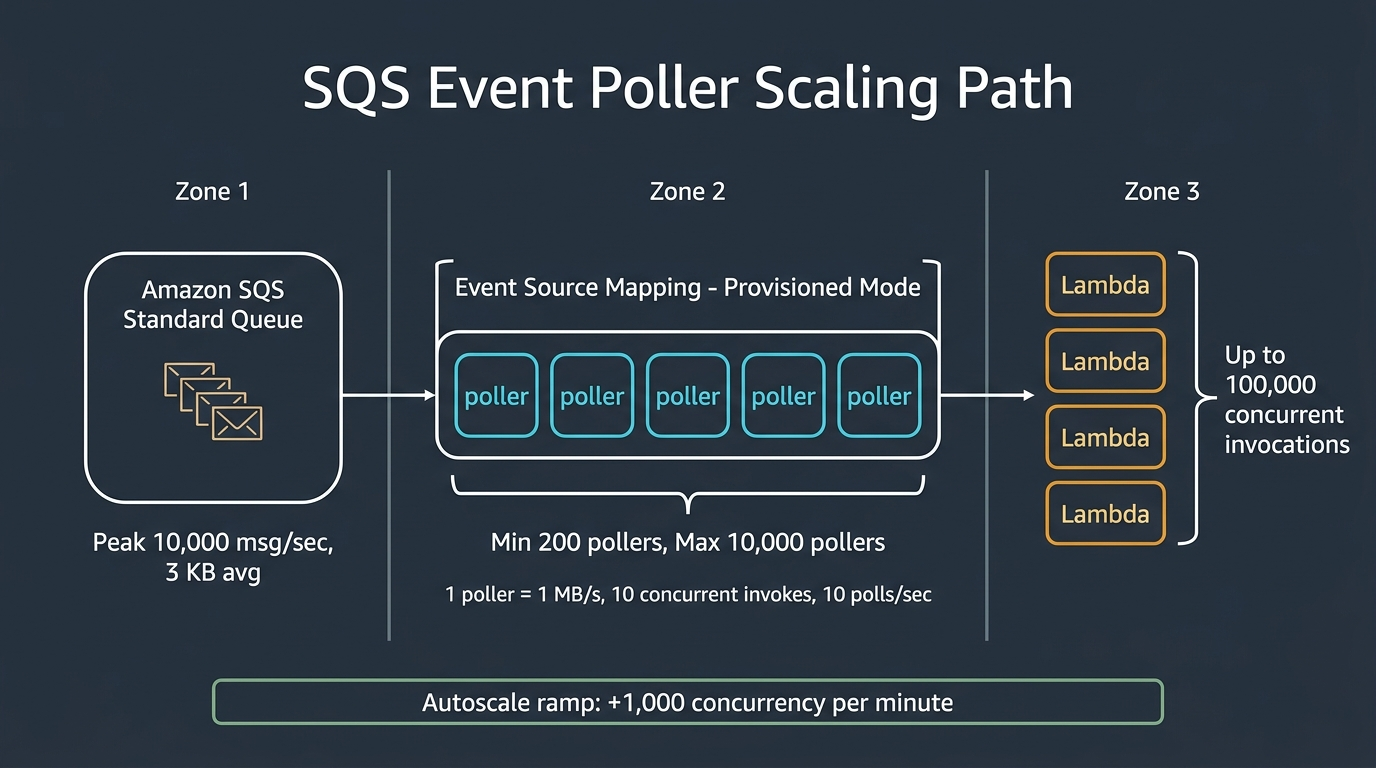
An event poller is the unit of that polling machinery that provisioned mode lets you allocate explicitly. AWS publishes three hard per-poller limits, and every capacity calculation in this article comes back to them:
- Up to 1 MB/s of throughput
- Up to 10 concurrent invocations
- Up to 10 SQS polling API calls per second
Those are ceilings on a single poller, and the binding one changes with your workload. A function processing 200 KB payloads hits the bandwidth wall long before the concurrency wall. A function that runs for eight seconds hits the concurrency wall while barely using any bandwidth. That’s the whole game, and it’s why a single “how many pollers do I need” answer doesn’t exist.
Worth sitting with that for a second, because it explains most of the confusion around this feature. A poller isn’t a fixed quantity of throughput. It’s three separate allowances that happen to be bundled together, and you only ever get to spend the smallest one.
The three ceilings also give you the headline number for free. Ten thousand pollers times ten concurrent invocations each equals 100,000 concurrent invocations, which is exactly the figure in the launch post. Multiply differently and you get 10 GB/s of aggregate polling bandwidth, or 100,000 ReceiveMessage calls per second. Hold on to that last one. It shows up on your bill later.
Default scaling is better than most people assume
Before reaching for provisioned mode, know what you already have. Default mode (AWS calls it standard mode in some places and on-demand in others) is not a toy.
Lambda long-polls a quiet standard queue. When messages appear, it starts with five batches and five concurrent invocations. If the backlog persists, it adds up to 300 more concurrent invocations per minute, and a single event source mapping tops out at 1,250 concurrent invocations (Configuring scaling behavior for SQS event source mappings). When traffic dies down it retreats to five concurrent invocations, and it can optimize as low as two to cut your SQS API calls. That last optimization disappears the moment you set the maximum concurrency parameter, which is a small detail with a real cost attached.
Now convert 1,250 concurrent invocations into messages per second. The formula is boring and it’s the only one you need:
messages per second = (concurrency / average function duration in seconds) x batch size
With a batch size of 10 and a 100 ms function, 1,250 concurrent invocations drains 125,000 messages per second. That is an enormous amount of work for a mode that charges you nothing extra. Default scaling doesn’t fall behind because the concurrency number is small. It falls behind when your functions are slow, because slow functions convert concurrency into throughput at a terrible exchange rate.
| Avg function duration | Batch size | Max sustained msg/sec at 1,250 concurrency | Verdict |
|---|---|---|---|
| 50 ms | 10 | 250,000 | Default mode is not your bottleneck |
| 100 ms | 10 | 125,000 | Default mode is not your bottleneck |
| 250 ms | 10 | 50,000 | Comfortable |
| 1 s | 10 | 12,500 | Comfortable for most queues |
| 2 s | 10 | 6,250 | Watch this |
| 5 s | 10 | 2,500 | Default mode is now the ceiling |
| 10 s | 10 | 1,250 | Default mode is badly outmatched |
| 1 s | 1 | 1,250 | Fix your batch size before anything else |
All of it derived from that same 1,250 ceiling in the SQS scaling behavior docs. Nothing exotic. Just division.
Look at the last row. A workload with batch size 1 and a one-second function gets the same throughput as a ten-second function with batching. Before you spend a dollar on pollers, raise your batch size. AWS says the same thing in the provisioned mode docs, recommending a batch size of 10 or higher specifically to make pollers efficient. Batching is free. Pollers are not.
The two failure modes of default scaling
Default scaling breaks in exactly two ways, and they need different fixes.
Failure one: the ceiling. Required concurrency exceeds 1,250. Compute it directly with (peak msg/sec / batch size) x duration and compare. If the answer is above 1,250, no amount of patience helps. The queue grows for as long as the peak lasts.
| Peak msg/sec | Batch | Duration | Required concurrency | Fits in default (1,250)? |
|---|---|---|---|---|
| 1,000 | 10 | 100 ms | 10 | Yes, trivially |
| 5,000 | 10 | 200 ms | 100 | Yes |
| 10,000 | 10 | 250 ms | 250 | Yes |
| 10,000 | 10 | 1 s | 1,000 | Yes, with 20% headroom |
| 10,000 | 10 | 2 s | 2,000 | No |
| 25,000 | 10 | 1 s | 2,500 | No |
| 50,000 | 10 | 2 s | 10,000 | No |
| 100,000 | 10 | 5 s | 50,000 | No |
Required concurrency calculated from the throughput formula above; the 1,250 ceiling is per event source mapping and can be raised by AWS Support on request.
Note the escape hatch in that table’s footnote. AWS will raise the 1,250 per-mapping concurrency for an SQS event source mapping if you ask. The docs say so plainly: “If this is insufficient for your use case, contact AWS support to discuss an increase to your account’s Amazon SQS event source mapping concurrency.” A support ticket costs nothing and does not commit you to a recurring charge. Try that before provisioned mode.
Failure two: the ramp. This is the one that hurts, and it’s the reason provisioned mode exists.
Default mode adds 300 concurrent invocations per minute from a standing start of five. Getting to 1,250 takes about 4 minutes and 9 seconds. During that ramp, messages pile up. Provisioned mode adds up to 1,000 concurrency per minute, which AWS describes as 3x faster scaling, and it starts from whatever floor your MinimumPollers value buys you rather than from five.
Let me put real numbers on that gap. Take a queue that jumps from idle to 10,000 messages per second instantly, with one-second functions and a batch size of 10. Steady state needs 1,000 concurrent invocations, which default mode can reach. The question is what happens on the way there.
| Configuration | Drain rate at t=0 | Time to match 10,000 msg/sec | Peak backlog accumulated | Worst-case message age | Monthly poller charge |
|---|---|---|---|---|---|
| Default (on-demand) | 50 msg/sec | ~199 s | ~990,000 messages | ~3 min 19 s | $0 |
| Provisioned, min 10 pollers | 1,000 msg/sec | ~54 s | ~243,000 messages | ~54 s | $67.53 |
| Provisioned, min 100 pollers | 10,000 msg/sec | 0 s | ~0 | near zero | $675.25 |
| Provisioned, min 200 pollers | 20,000 msg/sec | 0 s | 0 | near zero | $1,350.50 |
Modeled from AWS published ramp rates (300 concurrency/min default, 1,000 concurrency/min provisioned) and $0.00925 per EPU-hour over a 730-hour month. These are calculated projections from documented rates, not measurements from a load test. Your numbers will differ.
Nearly a million messages of backlog on a single spike, with the oldest message waiting more than three minutes. If your SLO reads “p99 end-to-end under five seconds,” default mode fails that spike and no dashboard will tell you why unless you’re watching ApproximateAgeOfOldestMessage. This is the “silently falls behind” case. Throughput recovers, the graph looks fine in aggregate, and a slice of your traffic missed its deadline.
That table is also the whole cost conversation in miniature. Going from 10 minimum pollers to 100 buys you 54 seconds of latency and costs roughly $600 a month. Whether that’s a bargain or a waste depends entirely on what those 54 seconds are worth, and most teams have never quantified it.
Sizing pollers from real numbers
AWS publishes a formula for events per second per poller, and it encodes the three per-poller ceilings:
EPS per event poller =
    minimum(
        ceiling(1024 / average event size in KB),
        ceiling(10 / average function duration in seconds) * batch size,
        min(100, 10 * batch size)
    )

Required event pollers = peak events per second / EPS per event poller
The three terms are bandwidth, concurrency, and API call rate, in that order. Whichever is smallest wins. Run it across realistic workload shapes and the spread is dramatic:
| Avg event size | Duration | Batch | Binding constraint | EPS per poller | Pollers for 10,000 msg/sec |
|---|---|---|---|---|---|
| 1 KB | 50 ms | 10 | API rate cap | 100 | 100 |
| 3 KB | 250 ms | 10 | API rate cap | 100 | 100 |
| 3 KB | 1 s | 10 | API rate cap | 100 | 100 |
| 3 KB | 2 s | 10 | Concurrency | 50 | 200 |
| 3 KB | 5 s | 10 | Concurrency | 20 | 500 |
| 64 KB | 200 ms | 10 | Bandwidth | 16 | 625 |
| 256 KB | 500 ms | 10 | Bandwidth | 4 | 2,500 |
| 1 KB | 100 ms | 1 | API rate cap | 10 | 1,000 |
Calculated with the formula published in the AWS provisioned mode documentation.
A 25x difference in poller count for the same 10,000 messages per second, driven entirely by payload size and function duration. Two rows deserve attention.
The 256 KB row is the expensive trap. Bandwidth pins you at 4 events per second per poller, so you need 2,500 pollers. Those 2,500 pollers hand you 25,000 concurrent invocations, but the workload only needs 500 concurrent invocations to keep up. You’re buying fifty times more concurrency than you’ll use because you’re really buying bandwidth. If your messages are large, move the payload to S3 and put a pointer in the queue before you touch provisioned mode. The tradeoffs of fat versus thin messages, including what changed when SQS and Lambda raised the payload ceiling to 1 MB, matter more here than any poller setting.
The batch-size-1 row is the self-inflicted one. Dropping from batch 10 to batch 1 costs you a factor of ten in poller efficiency, because the third term collapses to min(100, 10). If you can’t batch because your handler isn’t idempotent or your error handling can’t isolate a single bad message, fix that first. Partial batch responses and the failure paths around them are covered in depth in this walkthrough of SQS and Lambda event source mapping error handling.
There’s a clean shortcut hiding in the table. When function duration is the binding constraint, the poller count is always your required concurrency divided by ten. Check the 2-second row: 200 pollers, 2,000 concurrency, and required concurrency of (10000/10) x 2 = 2,000. The algebra cancels exactly. So for slow functions you can skip the formula and just size concurrency, then divide by 10.
A discrepancy in the AWS docs worth knowing about
The formula and AWS’s own worked example disagree. The docs describe a workload with 3 KB events, batch size 10, and a 100 ms duration, and correctly report 100 EPS per poller. Then the next sentence says that with the same characteristics but a one-second duration, “each poller supports only 10 EPS, requiring you to configure 100 minimum pollers.”
Push one-second duration through the published formula and you get min(342, ceiling(10/1) * 10, min(100, 100)), which is min(342, 100, 100), which is 100 EPS. Not 10. The middle term drops the batch multiplier somewhere in the prose. Ten times is not a rounding error, and it’s the difference between 100 pollers and 1,000 pollers on a 10,000 EPS queue, or roughly $675 versus $6,753 per month if you pin them as your minimum.
I can’t tell you which figure reflects the real implementation, and I’d be guessing if I claimed to. What I can tell you is that AWS closes that same doc section with “we recommend testing your specific workload to determine the actual EPS each event poller can drive.” Take that literally. Load test before you commit to a minimum poller count, because the published guidance contradicts itself by an order of magnitude on one of the most common workload shapes there is.
While you’re checking documentation against itself: the scaling behavior page still advertises provisioned mode as “up to 16 times higher processing capacity,” while the SQS page claims 80x and 100,000 concurrent invocations. Sixteen times 1,250 is 20,000, which is exactly the old 2,000-poller ceiling. That page simply hasn’t been updated for this launch.
What provisioned mode actually costs
Provisioned mode bills through a unit called the Event Poller Unit. For SQS the mapping is refreshingly simple: one EPU equals one event poller, priced at $0.00925 per EPU-hour in US East (N. Virginia), billed per second with a one-minute minimum (AWS Lambda pricing).
Kafka event source mappings work differently, with one EPU covering up to 20 MB/s and a default of 10 pollers per EPU at $0.185 per EPU-hour. Don’t carry Kafka intuition into SQS sizing. The SQS unit is a single poller.
One poller left running through a 730-hour month costs $6.75. Harmless. Nobody escalates a $6.75 line item. But MinimumPollers is a floor you pay for around the clock, and the floor multiplies, so here’s the whole ladder:
| MinimumPollers | Pre-warmed concurrency | Pre-warmed bandwidth | EPU-hours / month | Monthly EPU charge |
|---|---|---|---|---|
| 2 (default) | 20 | 2 MB/s | 1,460 | $13.51 |
| 10 | 100 | 10 MB/s | 7,300 | $67.53 |
| 25 | 250 | 25 MB/s | 18,250 | $168.81 |
| 50 | 500 | 50 MB/s | 36,500 | $337.63 |
| 100 | 1,000 | 100 MB/s | 73,000 | $675.25 |
| 200 (maximum) | 2,000 | 200 MB/s | 146,000 | $1,350.50 |
Calculated at $0.00925 per EPU-hour over a 730-hour month, US East (N. Virginia), from the Lambda pricing page. Autoscaled pollers above your minimum bill at the same rate for the seconds they exist.
Two things stand out. The floor for simply enabling provisioned mode is $13.51 a month, since MinimumPollers cannot go below 2. And the top of that table, 200 pollers, is the most you can pre-warm no matter what you set as your maximum.
Now the ceiling. If an event source mapping sat pinned at 10,000 pollers for a full month, the EPU charge alone would be 7,300,000 EPU-hours at $0.00925, or $67,525. That is before a single millisecond of Lambda compute, before request charges, and before SQS.
The SQS bill nobody budgets for
Each poller makes up to 10 SQS polling API calls per second. The docs mention this in one sentence and move on: “Each event poller uses long polling to your SQS queue with up to 10 polls per second, which incur SQS API requests cost.”
I went to the AWS Price List API for these numbers instead of a pricing page, because the tier boundaries are where the surprises live. Standard requests in us-east-1 bill at $0.40 per million up to 100 billion a month. The next 100 billion drop to $0.30 per million. Everything past 200 billion costs $0.24 per million. Effective date on that record is 2025-08-01, and it agrees with Amazon SQS pricing. Multiply by busy pollers and it gets uncomfortable fast.
| Pollers polling at 10 calls/sec | Requests per second | Requests per month | SQS request charge | EPU charge | SQS as % of poller cost |
|---|---|---|---|---|---|
| 10 | 100 | 262.8 M | $105.12 | $67.53 | 156% |
| 100 | 1,000 | 2.63 B | $1,051.20 | $675.25 | 156% |
| 200 | 2,000 | 5.26 B | $2,102.40 | $1,350.50 | 156% |
| 10,000 | 100,000 | 262.8 B | $85,072.00 | $67,525.00 | 126% |
Modeled at the full 10 polls/sec per poller over a 730-hour month using tiered standard-queue request pricing. Real workloads poll less than the maximum, and each successful batch adds a DeleteMessage call on top. Treat these as upper bounds on the polling component, not forecasts.
The SQS API bill exceeds the poller bill in every row. A fully saturated 10,000-poller mapping would run about $152,597 a month in pollers plus polling requests, still excluding all Lambda compute and duration charges. Nobody will actually run that configuration flat out for a month, and that’s the point of showing it. The published ceiling is a burst ceiling, not a shape you should design toward.
Two more billing details worth internalizing. SQS bills each 64 KB chunk of payload as a separate request, so a ReceiveMessage returning a full 1 MiB batch counts as 16 requests rather than one. And every successfully processed batch adds a delete call, so the steady-state cost per batch of 10 messages is at least three requests end to end: one send, one receive, one delete. If you’re tracking serverless spend against a budget, this belongs in the same review as the patterns in this guide to AWS FinOps under the Well-Architected Framework.
Configuring it
Provisioned mode is a property of the event source mapping, not the function. Turn it on with ProvisionedPollerConfig:
aws lambda update-event-source-mapping \
  --uuid a1b2c3d4-5678-90ab-cdef-EXAMPLE11111 \
  --provisioned-poller-config '{"MinimumPollers": 10, "MaximumPollers": 2000}'
Turn it off by passing an empty object, which returns the mapping to default on-demand scaling:
aws lambda update-event-source-mapping \
  --uuid a1b2c3d4-5678-90ab-cdef-EXAMPLE11111 \
  --provisioned-poller-config '{}'
In CloudFormation or SAM, the same settings live on the event source mapping resource:
OrderProcessorMapping:
  Type: AWS::Lambda::EventSourceMapping
  Properties:
    EventSourceArn: !GetAtt OrderQueue.Arn
    FunctionName: !Ref OrderProcessor
    BatchSize: 10
    MaximumBatchingWindowInSeconds: 0
    FunctionResponseTypes:
      - ReportBatchItemFailures
    ProvisionedPollerConfig:
      MinimumPollers: 10
      MaximumPollers: 2000
Enable event source mapping metrics too, because they’re opt-in and silently absent until you ask for them:
aws lambda update-event-source-mapping \
  --uuid a1b2c3d4-5678-90ab-cdef-EXAMPLE11111 \
  --metrics-config Metrics=EventCount
That gives you PolledEventCount, FilteredOutEventCount, InvokedEventCount, FailedInvokeEventCount, and DeletedEventCount for SQS sources. Provisioned mode adds ProvisionedPollers, which you should graph with the MAX statistic (Lambda metric types).
Here’s an observability gap to plan around. The EventPollerUnit metric, which reports actual EPU consumption, is documented as available for Amazon MSK and self-managed Kafka sources only. For SQS there’s no direct metric for your billing unit. You infer spend from MAX(ProvisionedPollers), which means your cost signal and your billing signal are different measurements. Build the alarm anyway:
aws cloudwatch put-metric-alarm \
  --alarm-name sqs-esm-pollers-near-max \
  --namespace AWS/Lambda \
  --metric-name ProvisionedPollers \
  --statistic Maximum \
  --period 300 \
  --evaluation-periods 2 \
  --threshold 1600 \
  --comparison-operator GreaterThanThreshold \
  --dimensions Name=EventSourceMappingArn,Value=<your-esm-arn>
Pair it with an alarm on the queue’s ApproximateAgeOfOldestMessage. That metric, not poller count, is the one that tells you whether you’re actually meeting your latency SLO. Wiring both into a single view is straightforward with the techniques in this CloudWatch metrics and alarms deep dive.
Gotchas that will bite you
The minimum is still 200. MinimumPollers accepts 2 through 200. MaximumPollers accepts 2 through 10,000. This launch moved only the maximum. Your genuinely pre-warmed capacity is capped at 2,000 concurrent invocations and 200 MB/s, exactly where it was before. Everything above that arrives at 1,000 concurrency per minute, which means climbing from 2,000 to the full 100,000 takes roughly 98 minutes. If someone on your team believes provisioned mode delivers 100,000 concurrent invocations on demand, correct that today.
Provisioned mode and maximum concurrency are mutually exclusive. You cannot set both. If you currently use MaximumConcurrency to protect a downstream RDS instance from connection exhaustion, switching to provisioned mode means re-expressing that ceiling as MaximumPollers, and pollers come in units of ten concurrent invocations. “Cap at 55” is not expressible. You get 50 or 60. For a lot of teams that single constraint disqualifies provisioned mode, because the maximum concurrency setting was doing safety work, not performance work.
Your account concurrency quota is the real ceiling. Default concurrent executions per Region sits at 1,000. The Lambda quotas page says it goes up to “tens of thousands.” Set MaximumPollers to 10,000 while your account is still at 1,000 and all you’ve bought is throttles. And “tens of thousands” doesn’t obviously stretch to the 100,000 concurrency that 10,000 pollers imply. I couldn’t confirm from public documentation that a 100,000 concurrency increase is generally available, so treat it as a question for your account team rather than a settled fact.
FIFO queues barely benefit. For FIFO sources, concurrent invocations are capped by the number of distinct MessageGroupId values or the concurrency setting, whichever is lower. Six message groups means six concurrent invocations, no matter how many pollers you provision. Non-high-throughput FIFO partitions also cap at 300 transactions per second per API action (SQS message quotas). Count your message group cardinality before enabling provisioned mode on anything covered by the FIFO queue ordering guarantees.
Pollers don’t fix a broken consumer. Provisioned mode increases the rate at which messages reach your function. If your function fails, faster delivery means faster retries, faster visibility timeout churn, and a dead letter queue filling at ten times the previous rate. Getting your SQS dead letter queue configuration right is a prerequisite, not a follow-up task.
Function-level cold starts are a separate problem. Pollers ramp polling capacity. They do not pre-initialize execution environments. Scaling from 100 to 2,000 concurrent invocations still means about 1,900 cold starts, and for a heavy runtime that’s seconds of added latency per environment. Provisioned mode and provisioned concurrency solve different halves of the same spike, and if initialization is your real cost you want the techniques in this guide to reducing Lambda cold start latency before you buy pollers.
One-minute minimum billing. Charges are per second with a one-minute floor per poller. Toggling provisioned mode around a nightly batch window is viable, but a 20-second burst still bills a full minute.
When to turn it on, and when not to
Be honest about which problem you have. There are only three.
You have a ceiling problem if required concurrency exceeds 1,250 during peaks that last long enough to matter. Confirm with (peak msg/sec / batch) x duration. First ask AWS Support to raise the per-mapping concurrency, since that’s free. If the number is far above 1,250, provisioned mode with a modest minimum and a generous maximum is the right tool, and this launch genuinely helps by removing the need to shard across mappings.
You have a ramp problem if you can drain peak traffic once you’re warm, but the four-minute climb blows your latency SLO. Quantify the miss before spending: multiply the ramp deficit by its duration to get backlog, then divide by drain rate to get worst-case message age. If that age exceeds your SLO on a spike pattern that recurs, a small MinimumPollers value is money well spent. Ten to twenty-five pollers, which is $68 to $169 a month, covers a surprising number of these cases.
You have neither, which is where most teams actually sit. Traffic is bursty but the bursts are small, p99 latency has slack, and nobody has an SLO tight enough for a 54-second ramp to violate. Leave provisioned mode off. You’ll save the money and the configuration surface.
One more thing about that third case. The temptation is to enable provisioned mode anyway, set a tiny minimum, and treat it as cheap insurance. I’d push back on that. A minimum of 2 pollers costs $13.51 a month, which is genuinely nothing, but it also buys you almost nothing: 20 concurrent invocations versus the 5 you already get. What you have actually bought is an incompatibility with MaximumConcurrency, the loss of the automatic scale-down to 2 concurrent invokes, and one more parameter that has to be right during an incident. Insurance that changes your failure modes isn’t insurance.
| Situation | Recommendation |
|---|---|
| Required concurrency under 1,250, no sub-minute latency SLO | Default mode. Do nothing. |
| Batch size is 1 or 2 | Raise batch size and re-measure before considering pollers |
| Average message over 64 KB | Move payloads to S3, keep pointers in the queue |
| Need 1,250 to ~5,000 concurrency, relaxed latency | Ask AWS Support for a concurrency increase first |
| Spiky traffic, latency SLO in the seconds | Provisioned mode, MinimumPollers 10 to 50 |
| Sustained above 12,500 msg/sec with 1 s functions | Provisioned mode, size from the poller formula |
| Above 20,000 concurrency needed per mapping | Provisioned mode, and this launch removes your sharding workaround |
Using MaximumConcurrency as a downstream safety valve |
Stay on default mode. The two settings are incompatible. |
| FIFO queue with few message groups | Default mode. Pollers cannot exceed group parallelism. |
A worked sizing example
Concrete beats abstract. An order-processing queue, 3 KB messages, a 250 ms function at 1,024 MB, batch size 10. Baseline is 500 messages per second. Twice a day a flash sale drives 10,000 messages per second for about 20 minutes. The SLO says 99% of orders acknowledge within 10 seconds.
Peak concurrency required: (10,000 / 10) x 0.25 = 250. That fits inside 1,250 with room to spare, so there’s no ceiling problem at all.
Ramp check for default mode. Drain rate climbs at 300 concurrency per minute from a floor of five, so (250 - 5) / 300 is about 49 seconds to full capacity. Backlog accumulated during that climb is roughly 245,000 messages, and worst-case message age is about 49 seconds.
That breaks a 10-second SLO. So this workload has a ramp problem, not a ceiling problem, and it needs the smallest fix that closes a 49-second gap.
Poller math from the formula: min(ceiling(1024/3), ceiling(10/0.25) x 10, min(100, 100)) equals min(342, 400, 100), so 100 EPS per poller. Baseline needs 5 pollers. Peak needs 100.
Three options, three prices. A minimum of 100 pollers covers peak instantly for $675.25 a month. A minimum of 10 delivers 1,000 messages per second right away and needs about 54 seconds to reach 10,000, which still blows the SLO during the first minute of the sale. A minimum of 50 handles 5,000 messages per second at t=0 and closes what’s left in roughly 30 seconds, for $337.63.
My call: MinimumPollers: 50, MaximumPollers: 400. Then measure ApproximateAgeOfOldestMessage through two real sales and adjust. The 400 maximum gives 4x headroom over measured peak without inviting a runaway bill, and it’s nowhere near 10,000. For this workload the new ceiling is completely irrelevant, which is true for the large majority of queues in production today.
Notice what this example did not need: it never approached the old 2,000-poller limit, let alone the new 10,000. The launch matters for a genuinely small population of workloads, mostly high-volume pipelines with slow functions or large payloads. If your architecture also fans messages out to multiple consumers, the topology choices in this comparison of SNS and SQS for real project fan-out will shape your poller math more than any single parameter, since splitting one hot queue into several changes both the concurrency requirement and the per-mapping ceiling you’re fighting.
The takeaway
Ten thousand pollers is a real increase for a narrow set of workloads, and it removes a legitimate architectural annoyance for teams that were sharding queues to get past 20,000 concurrent invocations. For everyone else the important number in this launch isn’t 10,000. It’s 200, the unchanged maximum for MinimumPollers, which means the capacity you can actually pre-warm is exactly what it was last week. Measure your required concurrency, fix your batch size, ask Support for a free quota increase, and only then decide whether a latency gap you’ve actually quantified is worth $6.75 per poller per month.
Sources
- AWS Lambda Provisioned Mode for Amazon SQS event source mappings now supports up to 10,000 event pollers (AWS What’s New, August 3, 2026)
- Using Lambda with Amazon SQS (per-poller limits, provisioned mode ranges, EPS formula)
- Configuring scaling behavior for SQS event source mappings (default ramp rate, 1,250 ceiling, maximum concurrency exclusivity)
- AWS Lambda pricing (Event Poller Unit pricing for SQS and Kafka ESMs)
- Amazon SQS pricing (request metering, 64 KB chunking, FIFO rates)
- Amazon SQS message quotas (FIFO throughput, message size, retention)
- AWS Lambda quotas (concurrent executions default and increase range)
- Types of metrics for Lambda functions (
ProvisionedPollers,EventPollerUnit, ESM metric groups) - AWS Price List API,
AWSQueueServiceus-east-1 (standard request tiers, effective 2025-08-01)
Explore more like this

Cloud IoT Security: Zero Trust, Identity, and Signed Updates
On September 11, 2026, the Cyber Resilience Act’s incident-reporting rules start applying in the European Union. That is 22 days after this article’s publication date. A manufacturer that learns of...

Kill the Docker Hub Token: OIDC Trust for GitHub Actions
On July 31, 2026, Docker shipped OIDC connections for GitHub Actions to any organization on a Docker Team, Docker Business, or Docker Hardened Images subscription, plus organizations in the Docker-Sponsored...

Bedrock Web Search: Grounding an Agent Without Building a Scraper
On August 4, 2026, AWS made Web Search on Amazon Bedrock generally available, and the entire integration surface is one JSON object: {"type": "web_search"}. That is the whole change from...

Comments