
Master AWS Databases: Tips for Your Exam


If you’re preparing for an AWS certification exam, you’ll need to know databases. This article covers what you need for the Database section.
1. Understand Different Database Types
AWS has several database types: relational, NoSQL, and data warehousing. Know the differences between them and when to use each:
- Relational databases (RDS): Good for structured data with transaction support. Examples: MySQL, PostgreSQL, Oracle, Aurora, MariaDB.
- NoSQL databases (DynamoDB) work well for unstructured or semi-structured data that needs low latency and high throughput. Popular for large-scale applications.
- Data warehousing (Redshift): Built for analytics and business intelligence with massive parallel processing.
2. Learn the Key Features of Amazon RDS
Amazon RDS has several features you should know:
- Automatic backups and snapshots
- High availability through Multi-AZ deployments
- Scalability via reading replicas and vertical scaling
- Encryption at rest and in transit
- Automated patching
3. Know When to Use Amazon Aurora vs Other RDS Solutions
Amazon Aurora is a managed relational database compatible with MySQL and PostgreSQL. It performs better than other RDS options:
- Up to five times faster than MySQL
- Up to three times faster than PostgreSQL
- Six copies of data stored across three Availability Zones
Aurora costs more than other RDS options, though.
4. NoSQL Database Diving: Amazon DynamoDB
Key things about DynamoDB:
- Supports key-value pairs and document formats
- Serverless, scales automatically based on demand
- Consistent performance
- Fine-grained access control and encryption
- Global tables and data replication across regions
5. Remember Amazon Redshift for Data Warehousing
Amazon Redshift is a managed data warehousing service. Key features:
- Scales from TB to PB of data
- Columnar storage for analytics performance
- Integrates with S3 and Glue for data ingestion
6. Get Familiar with AWS Database Migration Service (DMS)
AWS DMS migrates databases between engines or from on-premise to the cloud:
- Handles homogeneous (MySQL-to-MySQL) or heterogeneous (Oracle-to-DynamoDB) migrations
- Supports Continuous Data Replication for minimal downtime
7. Don’t Forget Elasticache
Amazon ElastiCache is a managed caching service:
- Supports Memcached and Redis
- Use it with RDS or DynamoDB to cache frequently accessed data
How to Become an AWS Expert
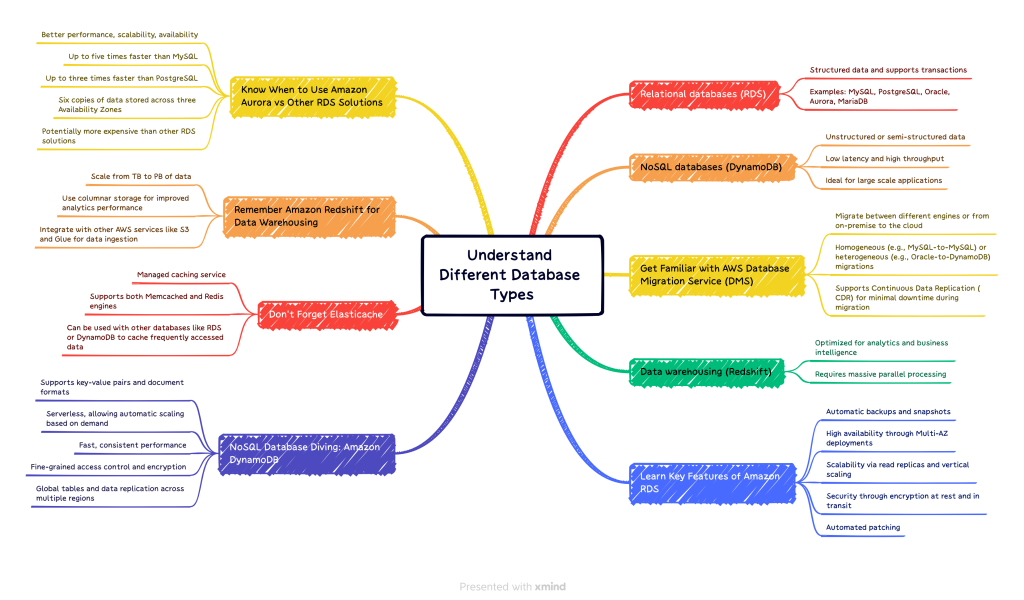
AWS Mind Map - Databases
Practice with AWS databases firsthand. The best way to learn is by building something real.
Conclusion
For the Database section of your AWS exam, understand the different database types AWS offers, know their key features, and learn which use cases fit each one. Practice with these databases and you’ll be ready. Good luck!
Explore more like this

Cloud IoT Security: Zero Trust, Identity, and Signed Updates
On September 11, 2026, the Cyber Resilience Act’s incident-reporting rules start applying in the European Union. That is 22 days after this article’s publication date. A manufacturer that learns of...

Bedrock Web Search: Grounding an Agent Without Building a Scraper
On August 4, 2026, AWS made Web Search on Amazon Bedrock generally available, and the entire integration surface is one JSON object: {"type": "web_search"}. That is the whole change from...

ECR Now Allows 200 GB Image Layers. Your Model Weights Still Do Not Belong There
On August 3, 2026, AWS raised the maximum Amazon ECR image layer size to 200 GB for images pushed with docker push. The announcement names the driver in the second...

Comments