
Amazon EKS Version Rollback: A Safe Upgrade and 7-Day Recovery Runbook

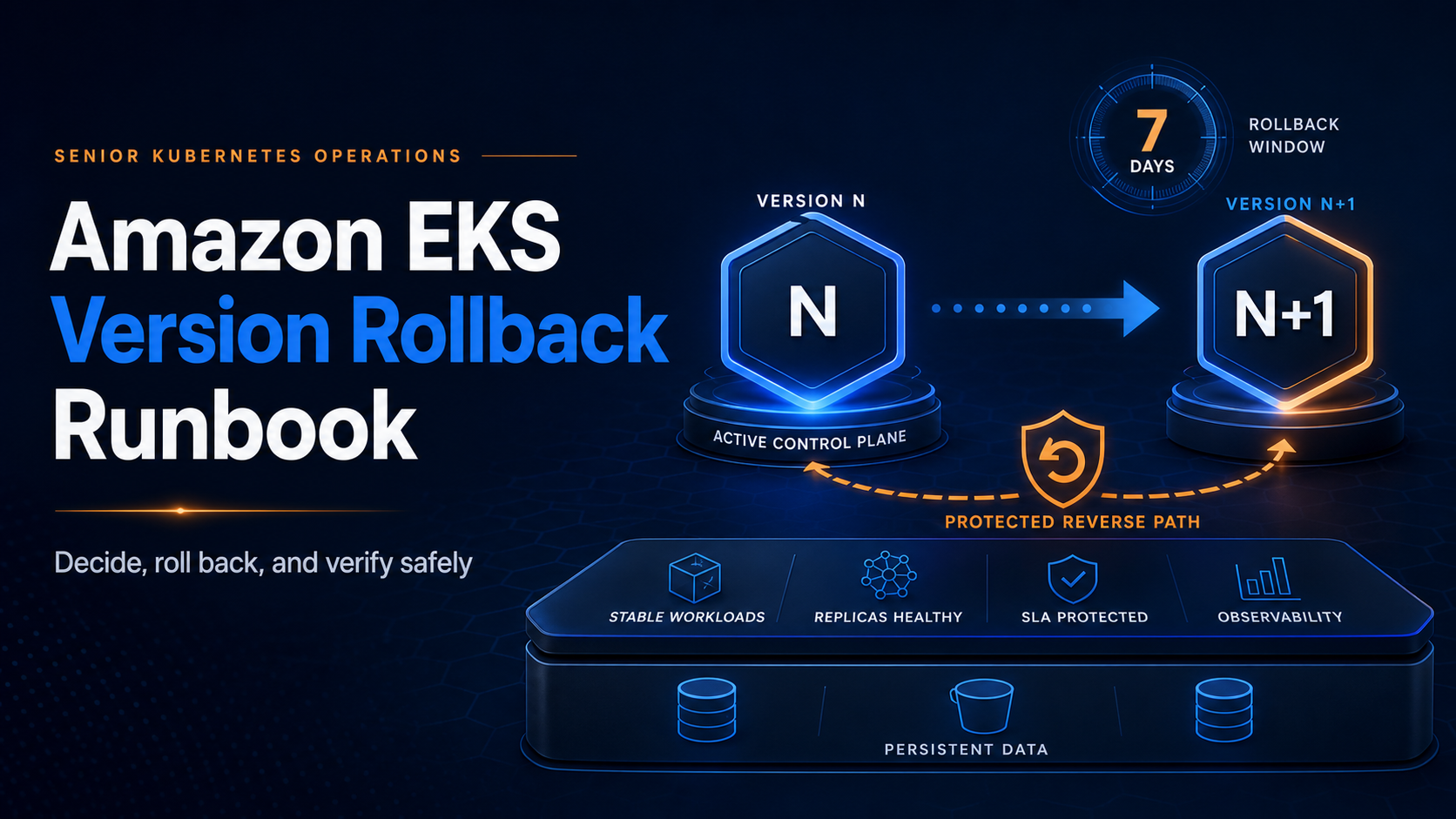
Amazon EKS can now reverse a Kubernetes control-plane upgrade. The rollback window is seven days, the target is exactly one minor version back, and the cluster must have reached its current version through an in-place upgrade. That is a real recovery path, but it is not an undo button for everything that changed after the upgrade.
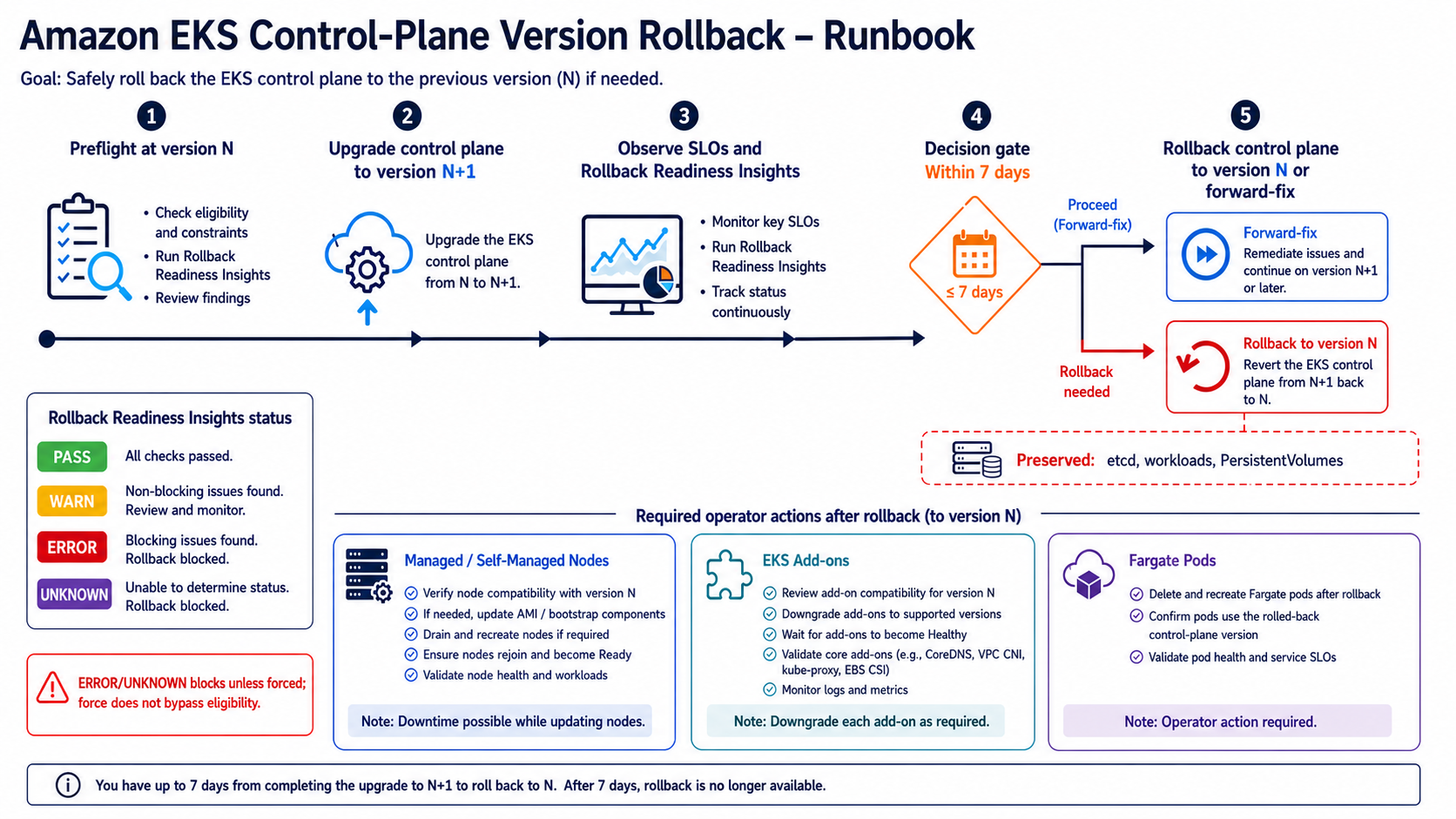
EKS preserves etcd data, Kubernetes resources, workloads, and persistent volumes. It reverts the API server, control-plane components, and platform version. Managed add-ons do not roll back automatically. Managed node groups, self-managed nodes, hybrid nodes, and Fargate pods remain your responsibility. EKS Auto Mode is the exception: it coordinates eligible node rollback before reverting the control plane.
The feature changes how a platform team should design the upgrade pipeline. The old pattern often rushed from control plane to add-ons to every node because there was no supported way back anyway. The safer 2026 pattern inserts a bake period after the control-plane upgrade, preserves compatibility with the previous version, watches Rollback Readiness Insights, and delays irreversible API adoption until the team is ready to close the rollback window.
This article turns that pattern into a runbook. It builds on the zero-downtime EKS upgrade guide and the EKS extended-support upgrade plan, but focuses on what must happen during the seven days after an upgrade.
What rollback changes and what it leaves alone
An EKS rollback moves the managed control plane from version N back to N-1. It is not a restore from an etcd snapshot and does not replace your workload backup strategy.
| Component | Rolled back by EKS | What the operator must do |
|---|---|---|
| Kubernetes API server and managed control-plane components | Yes | Monitor update and API health |
| EKS platform version | Yes | Verify logging and endpoint behavior |
| etcd data and Kubernetes objects | No; data is preserved | Remove objects or fields incompatible with N-1 |
| Persistent volumes | No | Validate CSI and application behavior |
| EKS managed add-ons | No | Select and install N-1-compatible versions |
| Managed node groups | No | Roll node group version back first |
| Self-managed and hybrid nodes | No | Replace AMI or kubelet configuration manually |
| Fargate worker environment | No automatic downgrade | Replace affected pods or accept skew with --force |
| EKS Auto Mode nodes | Yes, coordinated by EKS | Ensure disruption controls allow progress |
This distinction explains why “the control plane can roll back” and “the cluster can safely roll back” are different statements. A controller deployed after the upgrade may store a new API field in etcd. Reverting the API server does not rewrite that object. A new add-on may call an endpoint that did not exist in the old version. EKS does not pick its older image for you.
AWS documents the precise scope in Rollback cluster to the previous Kubernetes version. Read that page for the target version before declaring the runbook complete.
Eligibility is narrow by design
The API accepts rollback only when all prerequisites hold:
- The current cluster version came from an in-place upgrade. A cluster created at N cannot move down to N-1.
- The request starts within seven days after the upgrade completed.
- Only one minor version can be reversed.
- The previous version remains supported by EKS.
- The cluster is
ACTIVEand no other update is running. - No enabled EKS feature is incompatible with the previous version.
- A cluster automatically upgraded at the end of extended support cannot return to that expired version.
Some readiness failures can be bypassed with --force; eligibility failures cannot. Force does not make an expired seven-day window reopen. It does not let a newly created cluster move backward. It also cannot override an EKS feature that has no implementation on N-1.
If the target is in extended support, set the cluster upgrade policy to EXTENDED first. That can add extended-support charges, so the change belongs in the incident record and follow-up plan. The EKS version lifecycle documentation is the authority for current support status.
Redesign the upgrade pipeline around a bake period
Do not wait for an incident to decide the rollback sequence. Put it into the change plan before upgrading.
| Phase | Default action | Exit condition |
|---|---|---|
| Preflight | Upgrade Insights, deprecated API scan, backup, load and failover tests | No unexplained blockers |
| Control plane | Upgrade N-1 to N | Cluster returns ACTIVE; API checks pass |
| Bake | Hold major data-plane and API-only-N changes | SLOs, controllers, webhooks, and insights remain healthy |
| Add-ons and nodes | Advance in controlled waves | Each wave passes workload tests |
| Commit | Adopt version-N-only features | Team intentionally gives up simple rollback compatibility |
| Close | End seven-day watch and remove temporary controls | Change record documents outcome |
A 24-hour bake is not automatically safer than a four-hour bake. Choose the duration from workload cycles. A payroll batch that runs daily needs a daily cycle. A high-volume API may produce representative evidence in two hours. The hard constraint is seven days, not a universal wait time.
During the bake, prohibit version-N-only APIs and feature gates unless the change owner explicitly accepts losing rollback. Admission policy can help. A Kyverno rule can block known incompatible apiVersion or fields; the Kyverno policy-as-code guide shows how to make those constraints reviewable.
Capture a recovery baseline before upgrading
Before the N-1 to N update, export enough state to diagnose and rebuild. Rollback preserves etcd, but backups protect against operator mistakes, controller bugs, and application-level corruption that rollback does not address.
CLUSTER=payments-prod
REGION=us-east-1
STAMP=$(date -u +%Y%m%dT%H%M%SZ)

aws eks describe-cluster \
  --name "$CLUSTER" \
  --region "$REGION" > "${STAMP}-cluster.json"

aws eks list-addons \
  --cluster-name "$CLUSTER" \
  --region "$REGION" > "${STAMP}-addons.json"

kubectl get nodes -o wide > "${STAMP}-nodes.txt"
kubectl api-resources -o wide > "${STAMP}-api-resources.txt"
kubectl get validatingwebhookconfigurations,mutatingwebhookconfigurations -o yaml \
  > "${STAMP}-webhooks.yaml"
Back up application resources and volumes through your approved tool. The least-privilege Velero recovery guide for EKS covers namespace backups, S3, EBS snapshots, and recovery tests. A backup that has never been restored is an aspiration, not a control.
Record add-on versions, node AMI release versions, Helm releases, CRDs, admission webhooks, custom controllers, and IaC provider versions. Rollback Readiness Insights checks EKS-managed add-ons, not every self-managed controller in the cluster.
Read Rollback Readiness Insights immediately
EKS creates ROLLBACK_READINESS insights after the upgrade. They are point-in-time evaluations, automatically refreshed about every 24 hours. Refresh them after remediation instead of assuming a fixed issue disappeared.
aws eks list-insights \
  --cluster-name payments-prod \
  --region us-east-1 \
  --filter '{"categories":["ROLLBACK_READINESS"]}'

aws eks start-insights-refresh \
  --cluster-name payments-prod \
  --region us-east-1
For each ID, retrieve the affected resource and reason:
aws eks describe-insight \
  --cluster-name payments-prod \
  --region us-east-1 \
  --id 00000000-0000-0000-0000-000000000000
| Insight status | Meaning | Rollback behavior |
|---|---|---|
PASSING |
Check found no issue | Allowed |
WARNING |
Risk exists but is advisory | Allowed |
ERROR |
Known blocking compatibility issue | Blocked unless forced |
UNKNOWN |
EKS could not determine safety | Blocked unless forced |
The checks cover API compatibility, new fields and enum values, cluster health, kubelet and kube-proxy skew, and managed add-on compatibility. Auto Mode adds NodePool disruption budgets, do-not-disrupt annotations, and PodDisruptionBudget checks. The cluster insights guide documents what EKS sees and, just as important, what it does not.
Treat WARNING as work, not decoration. A warning about a restrictive PDB may turn a 30-minute Auto Mode node rollback into hours. An insight can pass while a proprietary admission webhook remains incompatible because EKS does not own that component.
Decide whether rollback is the correct incident action
Rollback is appropriate when the failure correlates with the control-plane version and returning to N-1 is safer than fixing forward. Examples include a controller/API incompatibility, a webhook assumption about server behavior, or a workload regression tied to kubelet skew.
It is usually the wrong first move for an application release, a bad ConfigMap, exhausted IP space, a broken security group, or an unrelated managed service outage. Reverting Kubernetes does not fix those causes and may add another change during an incident.
Use a decision gate:
| Question | If yes | If no |
|---|---|---|
| Did the symptom start immediately after the EKS version change? | Continue rollback assessment | Investigate other changes first |
| Is the cluster inside the seven-day window? | Check insights | Build a forward-fix or replacement plan |
| Can nodes and add-ons run safely with N-1? | Prepare them | Fix compatibility before control-plane rollback |
| Are new N-only APIs or fields in use? | Remove or transform them | Continue |
| Will rollback restore the failed contract? | Proceed under incident change control | Prefer targeted mitigation |
The change owner, incident commander, and platform operator should agree on the success condition. “Rollback completed” is not enough. Define API latency, workload error rate, controller reconciliation, DNS, ingress, autoscaling, and stateful application checks.
Prepare the data plane before the control plane
For managed node groups, move nodes back to a compatible release before the control plane. Use the previous Kubernetes version or an explicit launch-template/AMI version approved for that target:
aws eks update-nodegroup-version \
  --cluster-name payments-prod \
  --nodegroup-name applications-a \
  --kubernetes-version 1.35 \
  --update-config maxUnavailable=1 \
  --region us-east-1
Roll one node group at a time. Watch PDBs, topology spread, pending pods, and load. The Karpenter and EKS autoscaling guide is relevant if Karpenter manages capacity; pin compatible AMIs and controller versions before changing the control plane.
Self-managed and hybrid nodes need an N-1-compatible AMI and kubelet. EKS will not rewrite your Auto Scaling Group, bootstrapping script, or on-premises image.
Fargate is awkward. EKS cannot downgrade existing Fargate worker environments. Pods running at the newer kubelet version can trigger an ERROR version-skew insight. AWS recommends deleting affected pods before the control-plane rollback so replacements launch against the rolled-back environment, or using --force and accepting temporary skew. The first option is safer when disruption budgets and replica counts permit it. Review the EKS Fargate production guide before treating pod deletion as harmless.
For EKS Auto Mode, EKS rolls eligible nodes back before the control plane. A NodePool disruption budget of zero blocks progress. Restrictive PDBs and do-not-disrupt annotations can stretch the operation. Do not discover those settings during the incident.
Align add-ons and controllers
List EKS-managed add-on versions and query compatible builds for N-1:
aws eks list-addons \
  --cluster-name payments-prod \
  --region us-east-1

aws eks describe-addon-versions \
  --kubernetes-version 1.35 \
  --addon-name vpc-cni \
  --region us-east-1 \
  --query 'addons[].addonVersions[].{version:addonVersion,compat:compatibilities}'
Downgrade an incompatible add-on explicitly:
aws eks update-addon \
  --cluster-name payments-prod \
  --addon-name vpc-cni \
  --addon-version vX.Y.Z-eksbuild.N \
  --resolve-conflicts PRESERVE \
  --region us-east-1
Do not copy the placeholder version above. Select a build returned for the actual cluster version and Region. PRESERVE protects intentional settings but can cause update conflicts; test the command in a lower environment.
Repeat the compatibility check for CoreDNS, kube-proxy, EBS CSI, observability agents, ingress controllers, service meshes, policy engines, backup agents, and custom operators. The EKS networking and VPC CNI guide explains why a network add-on problem can look like a control-plane failure.
Start and monitor the rollback
Once the data plane, add-ons, API objects, and insights are acceptable, target the previous version with the same update operation used for upgrades:
aws eks update-cluster-version \
  --name payments-prod \
  --kubernetes-version 1.35 \
  --region us-east-1
Capture the returned update ID and monitor it:
aws eks describe-update \
  --name payments-prod \
  --update-id "$UPDATE_ID" \
  --region us-east-1 \
  --query 'update.{status:status,errors:errors,params:params}'
Use --force only after documenting every blocking insight and why the team accepts it:
aws eks update-cluster-version \
  --name payments-prod \
  --kubernetes-version 1.35 \
  --force \
  --region us-east-1
Force bypasses ERROR, WARNING, and UNKNOWN insight checks. It does not bypass the seven-day window, version relationship, incompatible EKS features, or Auto Mode disruption controls. “The command accepted --force” is not evidence that workloads will survive.
While the update runs, the control plane can continue scaling for API load, but EKS does not accept concurrent cluster updates. Avoid unrelated configuration changes. Keep incident notes timestamped with API health, node state, and user-facing symptoms.
Reconcile infrastructure as code
Terraform or CloudFormation may still declare version N after an emergency CLI rollback to N-1. The next pipeline can attempt to reapply N and undo the recovery.
Choose one of two patterns before the incident:
- The pipeline performs both upgrades and rollback. Version N-1 is committed through the expedited change path before the API call.
- Operators may use the CLI in an incident, but the pipeline is paused and the declared version is reconciled immediately afterward.
Run a plan after rollback and inspect every proposed cluster, add-on, launch-template, and node-group change. Do not approve a large “return to desired state” plan blindly. The desired state was just proven harmful or incompatible.
Validate recovery and close the window deliberately
After EKS reports ACTIVE, verify more than kubectl get nodes:
- API discovery and representative create/update/delete operations work.
- Admission webhooks respond within their timeout and fail according to policy.
- CoreDNS, CNI, CSI, ingress, metrics, and autoscaling controllers reconcile.
- New pods schedule in every AZ and receive working network and storage.
- Stateful workloads mount volumes and pass application checks.
- Error rate, p99 latency, queue depth, and saturation return to baseline.
- GitOps and IaC no longer try to advance the cluster to N.
Keep the old and new evidence in the change record. A successful rollback should produce a forward-fix backlog: reproduce the incompatibility, upgrade or replace the affected component, strengthen preflight tests, and schedule a new N upgrade. Rollback is a safety net, not a permanent version-management strategy. AWS makes the same recommendation in its EKS rollback best practices.
The most valuable change is not the CLI command. It is the pause between control-plane upgrade and irreversible adoption. Preserve N-1 compatibility long enough to observe real workloads, and the seven-day window becomes usable recovery capacity. Rush every component forward, and the new rollback API will exist mostly on paper.
Run a rollback game day before the upgrade
The seven-day eligibility window is not a recovery strategy by itself. A game day should prove that people, automation, and add-on compatibility can use it while the cluster is under pressure.
Create a representative non-production cluster at version N, including managed node groups, at least one Fargate workload if production uses Fargate, critical add-ons, admission controllers, storage drivers, and a stateful test workload. Upgrade the control plane to N+1 using the same pipeline planned for production. Then generate an application symptom that justifies a rollback decision without damaging the cluster.
Refresh Rollback Readiness Insights and record every status. Practice both a clean rollback and a blocked rollback caused by an ERROR insight. The exercise is successful only if the team explains the failed check and repairs it; routinely using --force teaches the wrong behavior.
After the control-plane rollback, verify more than the Kubernetes version:
- API discovery, admission webhooks, and aggregated APIs
- CoreDNS resolution, service routing, and ingress
- PersistentVolume attachment, writes, and recovery
- Workload rollout, scaling, and PodDisruptionBudget behavior
- Node and Fargate pod compatibility
- CNI, kube-proxy, CoreDNS, CSI, and observability add-ons
- GitOps reconciliation and controller leader election
- Audit logging and alert delivery
Measure time from the first symptom to decision, rollback start, control-plane completion, node/add-on compatibility, and restored application SLO. Those numbers determine whether rollback is faster than forward repair for the real platform.
Use a go/no-go record before each production upgrade:
| Gate | Required evidence |
|---|---|
| Pre-upgrade insights | No unresolved ERROR or UNKNOWN findings |
| Recovery eligibility | Upgrade is in-place and rollback deadline is recorded |
| Version compatibility | Nodes, add-ons, APIs, webhooks, and clients support both versions |
| State protection | Backup and restore tests cover state not guaranteed by control-plane rollback |
| Decision ownership | Named incident commander can initiate rollback |
| Validation | Synthetic transactions and platform checks are automated |
Do not wait until day six to decide whether a week-old regression warrants rollback. Track the deadline in the change record and page the upgrade owner well before it expires. After the window closes, the plan is forward repair or cluster replacement, not an unsupported downgrade.
Record the exercise in the same runbook used during an incident: commands, expected states, decision thresholds, owners, elapsed times, and evidence locations. A rollback document that has never been executed is a hypothesis. Repeat the game day after material changes to node strategy, add-ons, admission controls, or the upgrade pipeline.
Sources
Explore more like this

Cloud IoT Security: Zero Trust, Identity, and Signed Updates
On September 11, 2026, the Cyber Resilience Act’s incident-reporting rules start applying in the European Union. That is 22 days after this article’s publication date. A manufacturer that learns of...

Kill the Docker Hub Token: OIDC Trust for GitHub Actions
On July 31, 2026, Docker shipped OIDC connections for GitHub Actions to any organization on a Docker Team, Docker Business, or Docker Hardened Images subscription, plus organizations in the Docker-Sponsored...

Bedrock Web Search: Grounding an Agent Without Building a Scraper
On August 4, 2026, AWS made Web Search on Amazon Bedrock generally available, and the entire integration surface is one JSON object: {"type": "web_search"}. That is the whole change from...

Comments