
Amazon Inspector SBOM Generator Plugins: Build and Ship Custom Collectors

Amazon Inspector SBOM Generator 1.13 can load custom package collectors at runtime. That removes a frustrating delay from software inventory: security teams no longer have to modify the Go source, compile a private binary, or wait for AWS to recognize an internal package manager. A Lua plugin can discover a manifest, parse it, and add components to the CycloneDX SBOM immediately.
The flexibility comes with a new supply-chain boundary. A plugin reads files from container images, archives, directories, Lambda packages, or local systems. If teams copy arbitrary collectors into CI without review, the inventory tool becomes another executable dependency with access to build artifacts.
This guide builds a collector for a fictional internal lockfile, tests it, scans a real directory, validates the resulting Package URLs, and packages the plugin for controlled CI distribution. It also explains the sandbox, collision behavior, optional component scope, provenance, and the boundary between inventory and vulnerability matching.
For the broader pipeline around generation, signing, and release evidence, use the SBOM and container-signing guide. This article focuses on extending the scanner itself.
What changed in version 1.13
The standalone inspector-sbomgen tool powers parts of Amazon Inspector’s inventory pipeline for ECR images, Lambda functions, and agentless EC2 scanning. It can also scan local artifacts and produce CycloneDX documents before deployment. AWS added a runtime plugin system in version 1.13.
AWS says more than 20 ecosystems previously implemented in Go now ship as embedded plugins, including Apache Tomcat, NGINX, MySQL, Redis, WordPress, and OpenSSH. More than ten new ecosystems arrived as plugins, including Cassandra, Struts, Conda, Swift packages, and collectors for AI-agent tools such as Amazon Q Developer, Kiro CLI, Claude Code, GitHub Copilot, and Ollama.
The AWS announcement and walkthrough describes a two-stage model:
| Stage | Input | Output | Main responsibility |
|---|---|---|---|
| Discovery | Artifact file index | Matching file paths | Find manifests or binaries cheaply |
| Collection | One discovered file | Package components | Parse metadata and call push_package |
An event bus connects the stages. Discovery publishes file paths under an event name; one or more collectors subscribe. The artifact filesystem is walked once, and multiple collectors can reuse the result.
Install and verify the binary
Download the current build from the Inspector SBOM Generator documentation. AWS distributes the binary with checksums, license information, its own SBOM, and a change summary. Verify all of them before placing it in CI.
unzip inspector-sbomgen.zip -d inspector-sbomgen-release
cd inspector-sbomgen-release
sha256sum --check checksums.txt
chmod +x inspector-sbomgen
./inspector-sbomgen --version
The exact archive and signature process can differ by platform, so follow the current download instructions. Pin a version in the build image. “Download latest” turns a release job into an uncontrolled software update.
Keep these artifacts together:
- binary and SHA-256 digest;
- upstream checksum file;
- upstream license and SBOM;
- approved plugin bundle and digest;
- CI image digest;
- expected scanner inventory.
The existing Amazon Inspector v2 guide explains how the resulting inventory participates in continuous vulnerability scanning. A component appearing in an SBOM is not proof that Inspector has vulnerability intelligence for every custom ecosystem.
Scaffold a collector
The new command generates a working discovery/collection pair, tests, fixtures, local documentation, and editor configuration:
inspector-sbomgen plugin new \
  --with-example \
  --name acme-lock \
  --path inspector-plugins
The directory hierarchy is part of the plugin identity:
inspector-plugins/
├── discovery/cross-platform/extra-ecosystems/acme-lock/
│   ├── init.lua
│   ├── init_test.lua
│   └── _testdata/
├── collection/cross-platform/extra-ecosystems/acme-lock/
│   └── init.lua
├── library/sbomgen.lua
└── docs/
Use cross-platform when the manifest format is independent of the target operating system. Use linux, windows, or macos when discovery or parsing depends on that platform. The category influences scanner grouping and whether the scanner is enabled by default, so do not choose a directory merely to make it load.
The plugin developer guide documents the semantic path rules and optional overrides.
Implement discovery narrowly
Assume an internal tool writes acme.lock files in this form:
catalog-api|4.8.2|linux-amd64
fraud-rules|2026.07.4|any
render-codec|11.2.0|linux-amd64
The discovery plugin should only locate the exact filename:
-- discovery/cross-platform/extra-ecosystems/acme-lock/init.lua
function discover()
    return sbomgen.find_files_by_name({"acme.lock"})
end
Prefer the runtime’s find_files_by_name, find_files_by_name_icase, and related functions. They operate outside the Lua VM and avoid iterating the entire file list in Lua. Broad patterns increase scan time and the number of untrusted files passed to the parser.
Use an explicit event-name override only when the derived name collides or when several collectors intentionally share one discovery event. Scanner, collector, and event names must be unique. The tool reports a collision and skips the later plugin rather than silently replacing the first one.
Implement collection with identity semantics
Each line has a package name, version, and target platform. The collector validates fields and publishes a component:
-- collection/cross-platform/extra-ecosystems/acme-lock/init.lua
function collect(file_path)
    local content, err = sbomgen.read_file(file_path)
    if err or not content then
        sbomgen.log_warn("cannot read " .. file_path)
        return
    end

    for line in content:gmatch("[^\r\n]+") do
        local name, version, platform =
            line:match("^([%w%._%-]+)|([%w%._%-]+)|([%w%._%-]+)$")

        if name and version and platform then
            sbomgen.push_package({
                name = name,
                version = version,
                namespace = "acme",
                purl_type = "generic",
                component_type = sbomgen.component_types.LIBRARY,
                qualifiers = {
                    platform = platform,
                },
                properties = {
                    ["acme:sbom:manifest_path"] = file_path,
                    ["acme:sbom:format"] = "acme-lock-v1",
                },
            })
        else
            sbomgen.log_warn("invalid acme.lock record")
        end
    end
end
Three fields are required for every pushed package: name, purl_type, and component_type. A useful component also needs a correct version. Garbage identifiers reduce matching quality and can merge distinct packages.
Qualifiers versus properties
This choice affects component identity.
| Mechanism | Appears in | Use it for | Example |
|---|---|---|---|
| PURL qualifier | Package URL | Data that distinguishes the package build | architecture, distro where expected |
| CycloneDX property | Component metadata | Traceability or descriptive facts | manifest path, collector version |
Do not place every observation in the PURL. A package path usually describes where the scanner found the component; it does not define the package’s identity. Use a property.
Amazon reserves the amazon:inspector:sbom_generator:* and amazon:inspector:sbom_scanner:* property namespaces. Custom plugins should use an organization namespace such as acme:sbom:*. A property key without a colon may be automatically prefixed into the reserved namespace, which is another reason to name it explicitly.
The complete field contract is in the plugin API reference.
Test parsing and absence
Put a representative fixture at:
discovery/cross-platform/extra-ecosystems/acme-lock/_testdata/acme.lock
Then write co-located tests:
-- discovery/.../acme-lock/init_test.lua
function test_discovers_three_packages()
    local result = testing.scan_directory("_testdata")
    testing.assert_equals(3, #result.findings)
    testing.assert_equals("catalog-api", result.findings[1].name)
    testing.assert_equals("4.8.2", result.findings[1].version)
end

function test_empty_directory_has_no_findings()
    local result = testing.scan_directory("_testdata/empty")
    testing.assert_equals(0, #result.findings)
end
Run the built-in harness:
inspector-sbomgen plugin test --path inspector-plugins -v
Add cases for malformed separators, blank lines, extremely long input, duplicate packages, non-ASCII names, unsupported versions, nested files, and files the plugin must ignore. The plugin testing guide describes the testing.* API.
The most important negative test is “ordinary artifact without this ecosystem produces no findings.” False components create wasted vulnerability work and can block releases.
Scan a real artifact
Run only the Lua plugin first. Disabling native scanners makes the result easy to inspect:
inspector-sbomgen directory \
  --path ./sample-application \
  --plugin-dir ./inspector-plugins \
  --disable-native-scanners \
  -o acme-sbom.json
Validate the output mechanically:
jq -e '.bomFormat == "CycloneDX"' acme-sbom.json
jq -e '.components | length == 3' acme-sbom.json
jq -r '.components[] | [.name,.version,.purl,.scope] | @tsv' acme-sbom.json
Custom-plugin components carry CycloneDX scope: "optional"; official and native scanner components typically leave scope unset, which consumers interpret as required. That marker distinguishes extension output. Do not rewrite it merely to make a policy pass. Update the policy to understand the source and confidence of the component.
Next, run native and custom scanners together and look for duplicates:
inspector-sbomgen directory \
  --path ./sample-application \
  --plugin-dir ./inspector-plugins \
  -o complete-sbom.json

jq -r '.components[] | .purl // (.name + "@" + .version)' complete-sbom.json \
  | sort | uniq -d
If both scanners recognize the same ecosystem, prefer the official scanner unless the custom plugin captures a distinct package identity. Duplicate components can create duplicate findings downstream.
Understand the plugin sandbox
Plugins run in a restricted Lua VM. The runtime removes dangerous dynamic-loading functions and exposes file operations through the sbomgen API. This reduces risk and provides consistent behavior across artifact types.
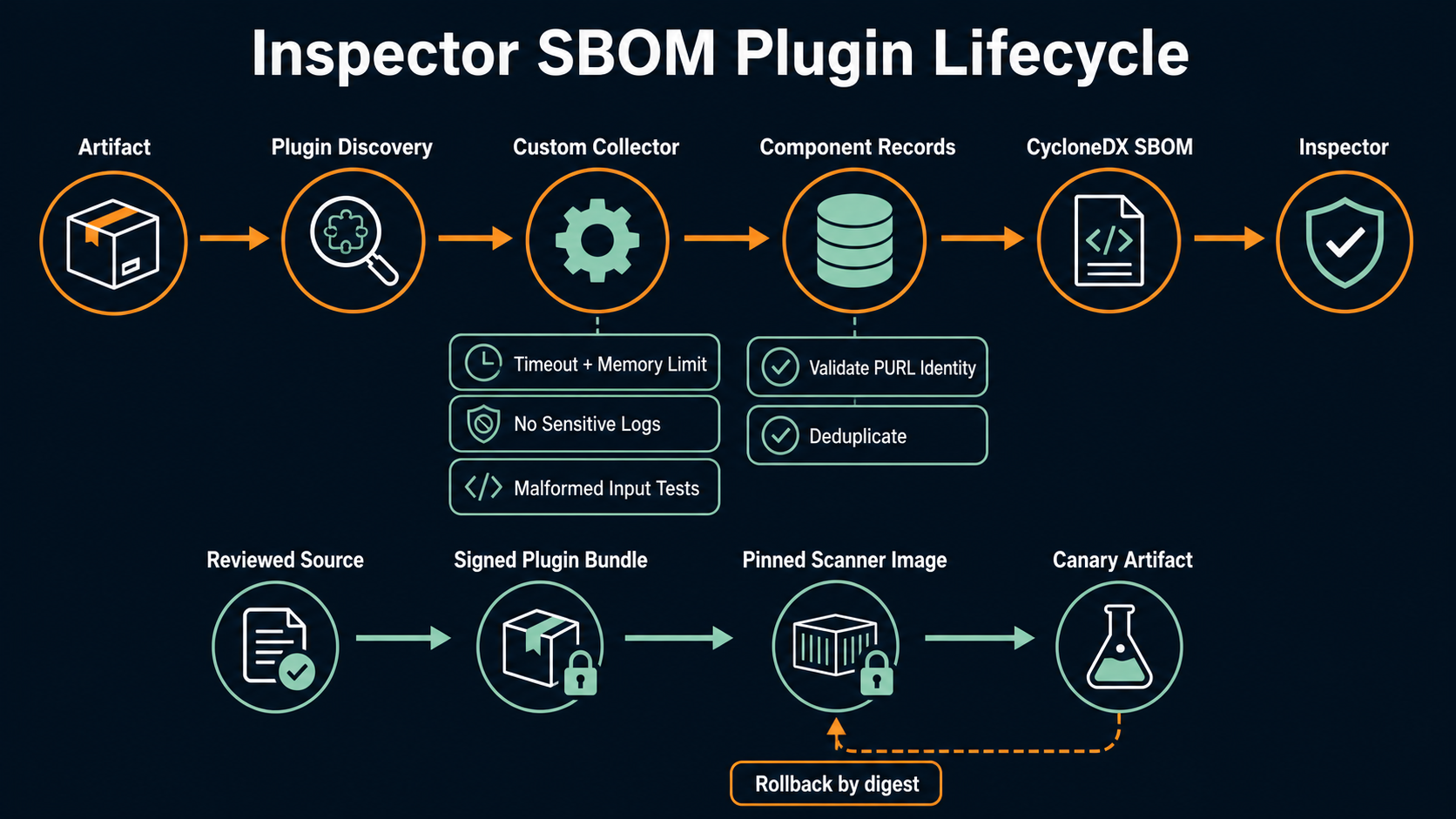
It does not eliminate the need for review. A plugin can still consume excessive CPU, parse data incorrectly, generate millions of components, log sensitive strings, or label a malicious artifact as trusted. Sandbox boundaries protect the host; they do not guarantee semantic correctness.
| Threat | Mitigation |
|---|---|
| Unreviewed plugin code | Signed approved bundle and mandatory code review |
| Resource exhaustion | CI timeout, memory limit, fixture fuzzing, maximum findings policy |
| Sensitive log output | No raw manifest lines; centralized redaction |
| Component spoofing | Strict parsing, allowed namespaces, PURL validation |
| Plugin collision | Assert the expected scanner list before scanning |
| Drift between teams | One versioned distribution channel |
Use inspector-sbomgen list-scanners --plugin-dir ... in CI and compare it to an approved snapshot. The output identifies native, official, and custom sources. A missing collector is as important as a failing scanner because it silently removes inventory coverage.
Package plugins as release artifacts
Do not copy plugin directories from a developer laptop into a production job. Build a release:
source commit -> unit tests -> fixture scan -> schema/PURL checks
-> archive -> digest/signature -> artifact repository -> pinned CI image
Create a manifest that records:
{
  "plugin": "acme-lock",
  "version": "1.2.0",
  "sbomgen": "1.13.x",
  "commit": "<git-commit>",
  "archive_sha256": "<digest>",
  "fixture_count": 14,
  "expected_scanner": "custom:acme-lock"
}
Sign the archive or its OCI container, retain provenance, and promote the same digest through development and production. The container security guide for EKS explains why build-time inventory and runtime controls need to complement each other.
Integrate it into CI without hiding failures
A practical job should fail on scanner errors, malformed CycloneDX, missing expected scanners, an implausible drop in component count, or components that violate naming policy. It should not fail merely because a vulnerability exists unless the organization’s vulnerability policy says so. Inventory generation and vulnerability gating are separate stages.
sbom:
  script:
    - inspector-sbomgen list-scanners --plugin-dir /opt/acme/plugins > scanners.txt
    - rg 'custom.*acme-lock' scanners.txt
    - inspector-sbomgen directory --path . --plugin-dir /opt/acme/plugins -o sbom.json
    - cyclonedx validate --input-file sbom.json
    - ./policy/check-component-identities.sh sbom.json
  artifacts:
    paths:
      - sbom.json
      - scanners.txt
Use the actual CycloneDX validator available in your toolchain; the command name above is illustrative. Pin it too. Upload the SBOM with the built artifact and attach its digest to the release attestation.
For GitLab environments, the advanced security pipeline guide provides a useful place to add the custom inventory stage. In AWS-native pipelines, store the output in an immutable S3 prefix and authorize the vulnerability service separately.
Know what a custom collector cannot promise
A collector proves that it found metadata matching its parser. It does not prove:
- the package is loaded at runtime;
- the package is reachable through a vulnerable path;
- its name maps to the correct vulnerability database ecosystem;
- the manifest is complete or untampered;
- the artifact is safe.
Use inventory as one signal. Combine it with signatures, provenance, SCA, exploitability context, runtime observations, and remediation ownership. The AWS Security Agent repository-review analysis offers another review layer, but model judgment should not rewrite component identity.
Engineer the parser for hostile input
Package manifests come from the artifact being inspected. Treat every byte as untrusted, even when the file format is internal. A malicious image can include a gigabyte-long line, pathological nesting, duplicate keys, invalid UTF-8, unexpected numeric values, or a million plausible package rows. The Lua sandbox limits host access, but it does not give your parser an unlimited resource budget safely.
Set format limits in the plugin contract:
| Input dimension | Example policy | Failure behavior |
|---|---|---|
| Manifest bytes | 10 MiB | Log one bounded warning and skip |
| Line length | 8 KiB | Reject the record |
| Components per file | 100,000 | Stop collection and mark scan incomplete |
| Name length | 256 characters | Reject the component |
| Version length | 128 characters | Reject the component |
| Parse warnings retained | First 100 | Aggregate the remainder |
Use sbomgen.open_file() for large line-oriented manifests instead of loading the full file through read_file(). Prefer the runtime JSON or XML parser for structured formats. Handwritten patterns are appropriate for a tiny grammar like name|version|platform; they become fragile when quoting, escaping, nesting, and optional fields appear.
Fuzz the collector outside production. Generate truncated documents, repeated delimiters, embedded nulls, very long strings, and valid records at the limit. The expected result is a bounded error, never a crash, hang, or partial component with a misleading identity.
Deterministic ordering helps reviews. Sort inputs or normalize the resulting component list before snapshot tests when the runtime does not guarantee discovery order. A test that passes only because one filesystem enumerates paths alphabetically will fail on a different build agent.
Validate Package URLs as an API contract
Package URL is the join key between inventory and much vulnerability intelligence. A generic PURL may be correct for proprietary software, but choosing generic for a package that really belongs to Maven, PyPI, npm, RPM, or Debian can prevent the downstream matcher from finding advisories.
For every ecosystem, document:
- the authoritative package name and namespace;
- how the manifest represents version and architecture;
- the matching PURL type;
- which qualifiers are part of identity;
- normalization for case, epochs, releases, and build metadata;
- examples that should and should not match.
Take RPM as an example. curl-8.5.0-1.amzn2023.0.4.x86_64 contains upstream version, package release, distribution, and architecture. Dropping the release and distribution may merge two builds with different patches. Inventing a custom format may make the component unmatchable. Use Inspector’s official collectors as a reference when the ecosystem already exists.
Add golden-output fixtures with the full expected PURL. Review changes to those snapshots as security-sensitive changes. A refactor that changes PURL identity can create or erase thousands of findings without altering the visible package name.
Operate plugin coverage over time
A custom ecosystem evolves. Lockfile version 2 adds a checksum; version 3 nests target-specific dependencies; the internal build tool starts emitting a different filename. Without coverage telemetry, the plugin still exits successfully while finding nothing.
Publish these scan metrics:
- artifacts scanned and artifacts containing the expected manifest;
- manifests discovered, parsed, skipped, and errored;
- components emitted by plugin and by PURL type;
- duplicate components shared with official scanners;
- scan duration and peak component count;
- plugin, sbomgen, and fixture-suite versions.
Use a sentinel artifact containing known components in every release of the scanner image. Run it after deployment and assert that the expected PURLs appear. Compare production component counts with a trailing baseline by artifact class. A sudden 80% drop should stop promotion even when no runtime error was logged.
Assign an owner and an end condition. When Inspector ships official support for the ecosystem, compare official and custom output on representative artifacts. Prefer the official collector once identity and coverage meet the requirement, then retire the custom plugin deliberately. Running both forever increases duplicates and maintenance cost.
Respond to a bad plugin release
Keep the previous signed bundle available. Rollback changes the plugin digest in the CI image or scanner job; it does not edit individual pipelines by hand. Re-scan artifacts produced during the affected window and regenerate their SBOM attestations.
Classify incidents by effect:
| Failure | Response |
|---|---|
| Plugin crashes scans | Roll back immediately and re-run failed jobs |
| Plugin omits components | Identify affected artifacts and regenerate SBOMs |
| Plugin creates wrong PURLs | Correct identity, re-scan, and reconcile vulnerability findings |
| Plugin logs sensitive data | Revoke access, purge under log policy, rotate exposed secrets |
| Plugin bundle is untrusted | Stop all consumers, verify provenance, rebuild from reviewed source |
An SBOM correction can change release evidence after deployment. Preserve both the original and corrected documents with a clear supersession link. Never silently replace an attestation that auditors or customers may already possess.
Production acceptance checklist
| Gate | Required evidence |
|---|---|
| Correctness | Positive, negative, malformed, duplicate, and scale tests |
| Identity | Valid PURL type, namespace, version, qualifiers, and custom properties |
| Safety | Runtime limits, no sensitive logging, sandbox assumptions documented |
| Compatibility | Tested against pinned sbomgen version and artifact types |
| Distribution | Signed bundle, checksum, provenance, and controlled repository |
| Operations | Expected scanner inventory, metrics, owner, and rollback version |
Review the result as a developer would
Before approving a plugin, give its SBOM to someone who owns the ecosystem but did not write the parser. Ask them to trace three components back to the original manifest, explain the version chosen, and find the same packages in the release artifact. This catches plausible-looking output that fixture assertions miss.
Also compare the custom inventory with the package manager’s native lockfile or dependency graph. Differences are not automatically defects: a lockfile can include development dependencies while a runtime image contains only production packages. Every material difference should still have a written explanation. That explanation becomes part of the plugin’s contract and helps responders understand whether a missing component is a scanner problem, a build optimization, or an artifact-packaging mistake.
Run this review again when the ecosystem changes its manifest format, resolver, or version syntax. A plugin that still executes after such a change may be more dangerous than one that fails loudly, because it can produce an incomplete document that looks valid.
The plugin system is most useful for the software only your organization understands: internal package registries, proprietary runtimes, vendor applications, and new ecosystems. Keep the parser small, keep identity semantics precise, and ship it through the same supply-chain controls it is meant to support.
Sources
- AWS: Extend Amazon Inspector SBOM Generator with plugins
- Amazon Inspector SBOM Generator
- SBOM Generator plugin developer guide
- SBOM Generator plugin testing guide
- SBOM Generator plugin API reference
- Inspector SBOM Generator version history
- CycloneDX specification overview
- CISA Software Bill of Materials resources
Explore more like this

Cloud IoT Security: Zero Trust, Identity, and Signed Updates
On September 11, 2026, the Cyber Resilience Act’s incident-reporting rules start applying in the European Union. That is 22 days after this article’s publication date. A manufacturer that learns of...

Kill the Docker Hub Token: OIDC Trust for GitHub Actions
On July 31, 2026, Docker shipped OIDC connections for GitHub Actions to any organization on a Docker Team, Docker Business, or Docker Hardened Images subscription, plus organizations in the Docker-Sponsored...

Bedrock Web Search: Grounding an Agent Without Building a Scraper
On August 4, 2026, AWS made Web Search on Amazon Bedrock generally available, and the entire integration surface is one JSON object: {"type": "web_search"}. That is the whole change from...

Comments