
AWS DMS: Database Migration with Zero Downtime Complete Guide

Migrating a production database without taking the application offline is one of the most nerve-wracking challenges in modern engineering. The stakes are high: every minute of downtime costs revenue, erodes user trust, and generates support tickets that drain engineering bandwidth for days afterward. AWS Database Migration Service (DMS) was built to solve exactly this problem, providing a managed platform that keeps source and target databases synchronized while you validate, test, and cut over on your own schedule.
This guide covers the full lifecycle of a zero-downtime database migration using AWS DMS, from architecture decisions and schema conversion through CDC replication, validation, and production cutover. Every section includes working CLI commands, Infrastructure as Code templates, and the operational details that documentation tends to skip.
The Migration Challenge
Database migrations fail for reasons that have nothing to do with data volume. The real difficulties fall into three categories: technical incompatibilities between source and target engines, operational risk during the transition window, and the organizational coordination required to execute a clean switchover.
Schema incompatibility is the first wall. Moving from Oracle to PostgreSQL means rewriting PL/SQL stored procedures into PL/pgSQL. SQL Server T-SQL window functions may not have direct PostgreSQL equivalents. Data types like NUMBER(18,2) in Oracle need explicit mapping to NUMERIC(18,2) in PostgreSQL, and subtle differences in numeric precision can cause silent data corruption if the mapping is wrong.
Downtime pressure is the second wall. A full export-and-import of a 5 TB Oracle database can take 12 to 24 hours depending on network bandwidth and disk I/O. Traditional dump-and-restore approaches require a hard cutover window where writes are blocked on the source. For applications serving global traffic, there is no “maintenance window” that does not impact someone.
Data validation is the third wall. After migration, you need to prove that every row, every constraint, every index, and every piece of application logic produces identical results on the target. Without automated validation tooling, this verification step alone can take longer than the migration itself.
AWS DMS addresses all three: the Schema Conversion Tool (SCT) handles incompatibility analysis, Change Data Capture (CDC) eliminates the downtime window, and built-in data validation provides row-level and table-level verification.
AWS DMS Architecture Overview
AWS DMS operates as a managed replication engine running on an EC2-based replication instance. The instance connects to a source endpoint (your current database) and a target endpoint (your destination database), executing migration tasks that move data in one or more phases.
The core components are:
| Component | Purpose | Sizing Considerations |
|---|---|---|
| Replication Instance | EC2 host running the DMS engine | CPU for CDC parsing, memory for caching, disk for spill files |
| Source Endpoint | Connection config for the source database | Network latency to source, SSL/TLS requirements |
| Target Endpoint | Connection config for the target database | Bulk insert throughput, index maintenance overhead |
| Migration Task | Defines what data moves and how | Task settings control parallelism, batching, error handling |
| Subnet Group | VPC networking for the replication instance | Placement affects latency to both source and target |
| Replication Task Assessment | Pre-migration compatibility check | Run before every migration to surface blocking issues |
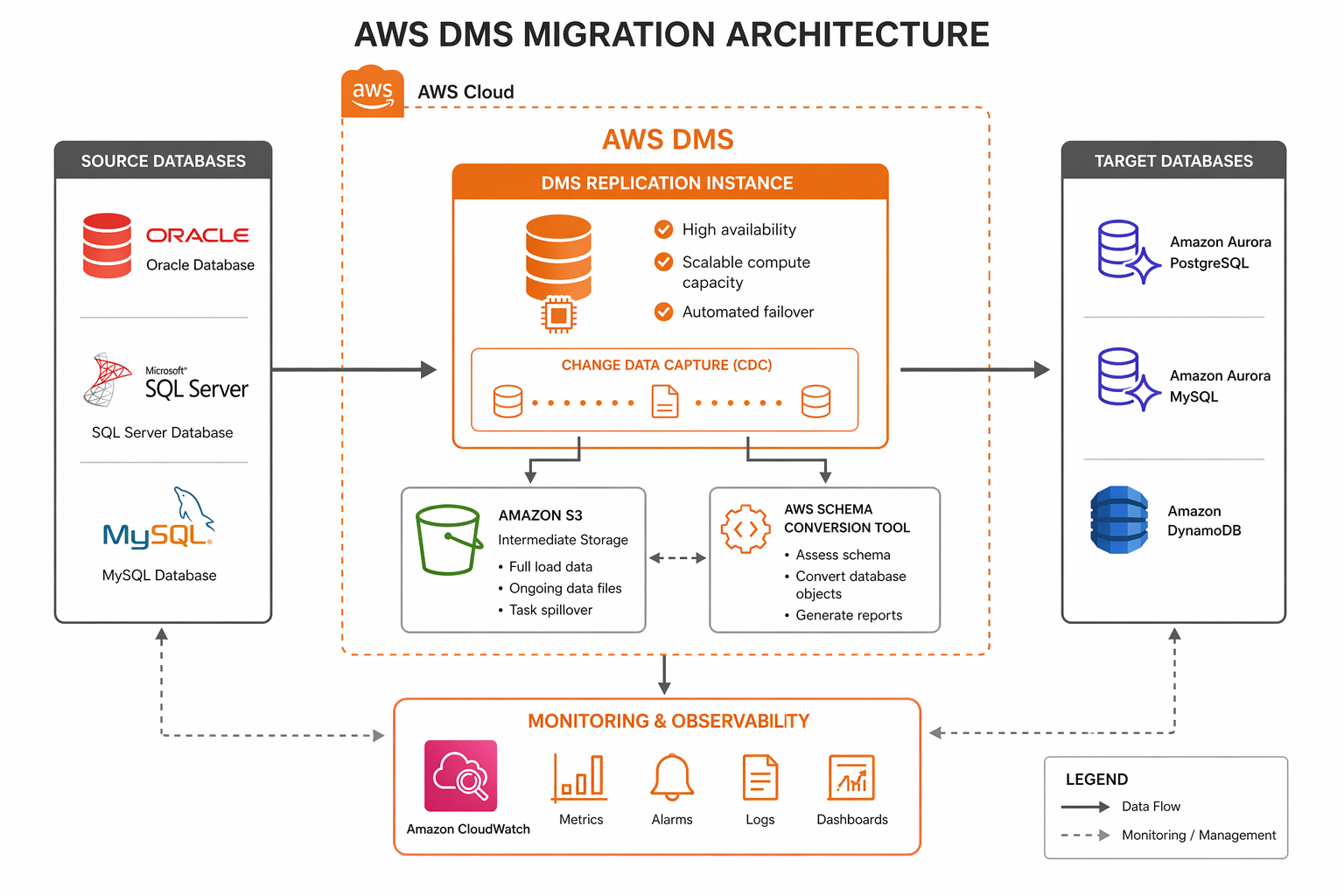
The replication instance is the workhorse. It reads from the source, transforms data if needed, and writes to the target. For CDC, it continuously reads the source database transaction log (redo logs, WAL, binlog, or transaction log depending on the engine), parses individual changes, and applies them to the target in commit order.
DMS supports three network topologies. In the most common setup, the replication instance lives in a VPC with network connectivity to both source and target. For migrations where the source is on-premises, you use either a VPN connection, AWS Direct Connect, or make the source database publicly accessible (not recommended for production). When both databases are in AWS, place the replication instance in a subnet with low-latency paths to both endpoints, ideally in the same Availability Zone.
AWS Schema Conversion Tool (SCT)
Before DMS moves any data, you need to convert the database schema from the source engine’s SQL dialect to the target engine’s dialect. AWS SCT analyzes the source schema, identifies objects that require conversion, generates equivalent target DDL, and produces an assessment report highlighting items that cannot be automatically converted.
SCT runs as a desktop application (Windows, macOS, Linux) or can be invoked from the command line for CI/CD integration. The typical workflow is:
- Connect SCT to the source database and let it extract the full schema.
- Connect SCT to the target database (or an empty Aurora/RDS instance).
- Run the assessment report to identify conversion issues.
- Review and manually fix items flagged as “cannot convert automatically.”
- Generate and apply the target DDL.
- Use the SCT data migration assessment to estimate transfer time.
# Install AWS SCT CLI on Linux
wget https://s3.amazonaws.com/publicsctdownload/Linux/aws-schema-conversion-tool-cli.tar.gz
tar -xzf aws-schema-conversion-tool-cli.tar.gz
cd aws-schema-conversion-tool-cli

# Run a schema assessment from the CLI
./aws-sct-cli \
  --action assess \
  --source-driver oracle \
  --source-host oracle-prod.internal.corp.com \
  --source-port 1521 \
  --source-database ORCLPROD \
  --source-user sct_readonly \
  --source-password "${SCT_SOURCE_PASS}" \
  --target-driver aurora-postgresql \
  --target-host aurora-pg.cluster-xxxxxxxxx.us-east-1.rds.amazonaws.com \
  --target-port 5432 \
  --target-database migrated_db \
  --target-user sct_admin \
  --target-password "${SCT_TARGET_PASS}" \
  --output-format json \
  --output-file sct-assessment-report.json
The assessment report categorizes schema objects into three groups:
| Category | Description | Action Required |
|---|---|---|
| Green (Auto-convert) | SCT can convert these objects automatically | Review generated DDL, apply to target |
| Yellow (Review) | Conversion is possible but needs manual review | Inspect SQL logic, adjust generated DDL |
| Red (Action items) | No automatic conversion exists | Rewrite manually using target engine features |
Common items that fall into the red category include Oracle packages, SQL Server CLR stored procedures, database triggers that reference engine-specific metadata views, and proprietary functions like NVL2 or ISNULL that have different signatures across engines.
-- Example: Oracle to PostgreSQL manual conversion
-- Oracle original
CREATE OR REPLACE FUNCTION get_customer_balance(
    p_customer_id IN NUMBER
) RETURN NUMBER IS
    v_balance NUMBER(18,2);
BEGIN
    SELECT NVL(SUM(amount), 0)
    INTO v_balance
    FROM transactions
    WHERE customer_id = p_customer_id
      AND NVL2(deleted_at, 'N', deleted_at) IS NULL;
    RETURN v_balance;
EXCEPTION
    WHEN NO_DATA_FOUND THEN
        RETURN 0;
END;
/

-- PostgreSQL equivalent
CREATE OR REPLACE FUNCTION get_customer_balance(
    p_customer_id INTEGER
) RETURNS NUMERIC(18,2) AS $$
DECLARE
    v_balance NUMERIC(18,2);
BEGIN
    SELECT COALESCE(SUM(amount), 0)
    INTO v_balance
    FROM transactions
    WHERE customer_id = p_customer_id
      AND deleted_at IS NULL;
    RETURN v_balance;
EXCEPTION
    WHEN NO_DATA_FOUND THEN
        RETURN 0;
END;
$$ LANGUAGE plpgsql;
Supported Database Engines
AWS DMS supports a wide range of source and target databases for both homogeneous (same engine family) and heterogeneous (different engine families) migrations.
| Source Database | Target Database | Migration Type | CDC Support |
|---|---|---|---|
| Oracle (11g, 12c, 19c, 21c) | Aurora PostgreSQL | Heterogeneous | Yes (LogMiner / Binary Reader) |
| SQL Server (2012-2022) | Aurora MySQL | Heterogeneous | Yes (CDC / Transaction log) |
| MySQL (5.6, 5.7, 8.0) | Aurora MySQL | Homogeneous | Yes (Binlog) |
| PostgreSQL (9.6, 10-16) | Aurora PostgreSQL | Homogeneous | Yes (Logical replication / WAL) |
| MongoDB (3.6-7.0) | DocumentDB | Homogeneous | Yes (Change streams) |
| MongoDB (3.6-7.0) | DynamoDB | Heterogeneous | Yes (Change streams) |
| MariaDB (10.x) | Aurora MySQL | Homogeneous | Yes (Binlog) |
| Oracle | Aurora MySQL | Heterogeneous | Yes (LogMiner) |
| Db2 LUW (9.7-11.5) | Aurora PostgreSQL | Heterogeneous | Yes (CDC API) |
| SAP ASE (15.7-16) | Aurora PostgreSQL | Heterogeneous | Yes (Transaction log) |
| Redis | ElastiCache Redis | Homogeneous | Snapshot-based |
| S3 (CSV/Parquet) | Any supported target | Bulk load | No |
| Any supported source | S3 (CSV/Parquet) | Ongoing replication | Yes |
The CDC mechanism varies by source engine. PostgreSQL uses logical replication slots to stream WAL changes. MySQL reads binlog events. Oracle supports both LogMiner (SQL-based redo log parsing) and Binary Reader (direct binary redo log access, which is faster). MongoDB relies on change streams, which must be explicitly enabled on the replica set.
Migration Types
DMS provides three migration modes, each suited to different scenarios.
Full Load Only
The simplest mode. DMS reads all data from the source tables and writes it to the target tables. No ongoing replication occurs after the initial load completes. Use this for static data, one-time migrations with an accepted downtime window, or populating a data warehouse where point-in-time consistency is sufficient.
The limitation is obvious: any writes to the source after the full load starts are not captured on the target. The migration window begins when the task starts and ends when the last table finishes loading.
Full Load Plus CDC
This is the mode for zero-downtime migrations. DMS performs the initial full load while simultaneously capturing changes from the source transaction log. After the full load completes, DMS applies the cached changes to bring the target to a consistent state, then continues replicating ongoing changes in near real-time.
The sequence of events is:
- Task starts. DMS begins reading the source transaction log and caching changes.
- Full load begins for each table (parallelized based on task settings).
- As each table finishes loading, DMS applies the cached changes for that table.
- After all tables are loaded and caught up, CDC continues streaming changes.
- The target remains continuously synchronized until you perform the cutover.
CDC Only
This mode skips the full load entirely. It assumes the target already contains the data (perhaps loaded via a snapshot restore or a separate bulk transfer tool) and only replicates ongoing changes. Use this when you have already seeded the target using a faster bulk mechanism like database snapshots, S3 import, or native dump/restore, and you need DMS only to keep changes flowing.
{
  "MigrationType": "full-load-and-cdc",
  "TaskSettings": {
    "TargetMetadata": {
      "TargetSchema": "",
      "SupportLobs": true,
      "FullLobMode": false,
      "LobChunkSize": 64,
      "LimitedSizeLobMode": true,
      "LobMaxSize": 32
    },
    "FullLoadSettings": {
      "TargetTablePrepMode": "DO_NOTHING",
      "MaxFullLoadSubTasks": 8,
      "CommitRate": 10000,
      "BulkApplySrcPauseCnt": 1000000,
      "BulkApplySrcResumeCnt": 800000
    },
    "Logging": {
      "EnableLogging": true,
      "LogComponents": [
        {"Id": "TRANSFORMATION", "Severity": "LOGGER_SEVERITY_DEFAULT"},
        {"Id": "SOURCE_UNLOAD", "Severity": "LOGGER_SEVERITY_DEFAULT"},
        {"Id": "TARGET_LOAD", "Severity": "LOGGER_SEVERITY_DEFAULT"},
        {"Id": "SOURCE_CAPTURE", "Severity": "LOGGER_SEVERITY_DEFAULT"},
        {"Id": "TARGET_APPLY", "Severity": "LOGGER_SEVERITY_DEFAULT"}
      ]
    },
    "StreamBufferSettings": {
      "StreamBufferCount": 60,
      "StreamBufferSizeInMB": 128
    },
    "ChangeProcessingTuning": {
      "BatchApplyEnabled": true,
      "MinTransactionSize": 1000,
      "CommitTimeout": 1,
      "MemoryLimitTotal": 1024,
      "MemoryKeepTime": 60,
      "StatementCacheSize": 50
    }
  }
}
Step-by-Step: Setting Up a DMS Migration
This section walks through creating a complete DMS migration environment using the AWS CLI. Each step builds on the previous one.
Step 1: Create the Replication Subnet Group
aws dms create-replication-subnet-group \
  --replication-subnet-group-identifier dms-subnet-group-prod \
  --replication-subnet-group-description "DMS subnet group for production migration" \
  --subnet-ids subnet-0a1b2c3d4e5f6g7h8 subnet-1b2c3d4e5f6g7h8i9 \
  --tags '[{"Key":"Project","Value":"DBMigration"},{"Key":"Environment","Value":"Production"}]'
Step 2: Create the Replication Instance
aws dms create-replication-instance \
  --replication-instance-identifier dms-prod-repl-instance \
  --replication-instance-class dms.r5.4xlarge \
  --allocated-storage 500 \
  --vpc-security-group-ids sg-0123456789abcdef0 \
  --replication-subnet-group-identifier dms-subnet-group-prod \
  --multi-az \
  --engine-version 3.5.2 \
  --publicly-accessible false \
  --tags '[{"Key":"Project","Value":"DBMigration"}]'
Choose the instance class based on your data volume and CDC throughput requirements. The r5 family is recommended for most migrations due to its memory-optimized profile. The following table provides sizing guidance:
| Data Volume | CDC Throughput | Recommended Instance | Storage | Estimated Full Load Rate |
|---|---|---|---|---|
| < 100 GB | < 1,000 rows/sec | dms.t3.medium | 50 GB | 20-40 GB/hr |
| 100 GB - 1 TB | 1,000-5,000 rows/sec | dms.r5.xlarge | 100 GB | 50-100 GB/hr |
| 1 TB - 10 TB | 5,000-20,000 rows/sec | dms.r5.4xlarge | 500 GB | 100-300 GB/hr |
| > 10 TB | > 20,000 rows/sec | dms.r5.16xlarge | 1 TB | 300-600 GB/hr |
Wait for the instance to become available:
aws dms describe-replication-instances \
  --filters Name=replication-instance-id,Values=dms-prod-repl-instance \
  --query "ReplicationInstances[0].ReplicationInstanceStatus"
Step 3: Create Source and Target Endpoints
# Source endpoint - Oracle
aws dms create-endpoint \
  --endpoint-identifier oracle-source-prod \
  --endpoint-type source \
  --engine-name oracle \
  --server-name oracle-prod.internal.corp.com \
  --port 1521 \
  --database-name ORCLPROD \
  --username dms_user \
  --password "${DMS_SOURCE_PASSWORD}" \
  --oracle-settings '{"EnableHomogeneousTablespace":false,"DirectPathParallelLoad":true,"UseLogminerReader":true,"AccessAlternateDirectly":false}'

# Target endpoint - Aurora PostgreSQL
aws dms create-endpoint \
  --endpoint-identifier aurora-pg-target \
  --endpoint-type target \
  --engine-name aurora-postgresql \
  --server-name aurora-pg.cluster-xxxxxxxxx.us-east-1.rds.amazonaws.com \
  --port 5432 \
  --database-name migrated_db \
  --username dms_admin \
  --password "${DMS_TARGET_PASSWORD}" \
  --postgresql-settings '{"ExecuteTimeout":3600,"MapBooleanAsBoolean":true}'
Test connectivity before proceeding:
aws dms test-connection \
  --replication-instance-arn arn:aws:dms:us-east-1:123456789012:rep:dms-prod-repl-instance \
  --endpoint-arn arn:aws:dms:us-east-1:123456789012:endpoint:oracle-source-prod
Step 4: Create the Migration Task
aws dms create-task \
  --task-identifier prod-oracle-to-aurora-pg \
  --source-endpoint-arn arn:aws:dms:us-east-1:123456789012:endpoint:oracle-source-prod \
  --target-endpoint-arn arn:aws:dms:us-east-1:123456789012:endpoint:aurora-pg-target \
  --replication-instance-arn arn:aws:dms:us-east-1:123456789012:rep:dms-prod-repl-instance \
  --migration-type full-load-and-cdc \
  --table-mappings '{
    "rules": [
      {
        "rule-type": "selection",
        "rule-id": "1",
        "rule-name": "include-all-tables",
        "object-locator": {
          "schema-name": "APP_OWNER",
          "table-name": "%"
        },
        "rule-action": "include",
        "filters": []
      },
      {
        "rule-type": "transformation",
        "rule-id": "2",
        "rule-name": "convert-schema",
        "rule-action": "convert-lowercase",
        "rule-target": "schema",
        "object-locator": {
          "schema-name": "APP_OWNER"
        }
      }
    ]
  }' \
  --task-settings file://task-settings.json \
  --enable-cloudwatch-logs true
Step 5: Start and Monitor the Task
aws dms start-replication-task \
  --replication-task-arn arn:aws:dms:us-east-1:123456789012:task:prod-oracle-to-aurora-pg \
  --start-replication-task-type start-replication

# Monitor task status
aws dms describe-replication-tasks \
  --filters Name=replication-task-id,Values=prod-oracle-to-aurora-pg \
  --query "ReplicationTasks[0].{Status:Status,Progress:ReplicationTaskStats.ProgressPercent,CDCPosition:CdcStartPosition}"
Infrastructure as Code with Terraform
For teams managing infrastructure as code, the complete DMS stack can be provisioned with Terraform:
resource "aws_dms_replication_subnet_group" "main" {
  replication_subnet_group_description = "DMS subnet group for ${var.project}"
  replication_subnet_group_id          = "${var.project}-dms-subnet-group"

  subnet_ids = var.subnet_ids

  tags = merge(var.tags, {
    Name = "${var.project}-dms-subnet-group"
  })
}

resource "aws_dms_replication_instance" "main" {
  allocated_storage                = var.allocated_storage
  apply_immediately                = true
  auto_minor_version_upgrade       = true
  engine_version                   = "3.5.2"
  multi_az                         = var.multi_az
  preferred_maintenance_window     = "sun:06:00-sun:08:00"
  publicly_accessible              = false
  replication_instance_class       = var.instance_class
  replication_instance_id          = "${var.project}-repl-instance"
  replication_subnet_group_id      = aws_dms_replication_subnet_group.main.id
  vpc_security_group_ids           = var.security_group_ids

  tags = merge(var.tags, {
    Name = "${var.project}-dms-instance"
  })
}

resource "aws_dms_endpoint" "source" {
  database_name    = var.source_db_name
  endpoint_id      = "${var.project}-source"
  endpoint_type    = "source"
  engine_name      = var.source_engine
  extra_connection_attributes = var.source_extra_connection_attrs
  password         = var.source_password
  port             = var.source_port
  server_name      = var.source_host
  ssl_mode         = "require"
  username         = var.source_username

  dynamic "oracle_settings" {
    for_each = var.source_engine == "oracle" ? [1] : []
    content {
      use_logminer_reader = true
      access_alternate_directly = false
    }
  }
}

resource "aws_dms_endpoint" "target" {
  database_name    = var.target_db_name
  endpoint_id      = "${var.project}-target"
  endpoint_type    = "target"
  engine_name      = var.target_engine
  password         = var.target_password
  port             = var.target_port
  server_name      = var.target_host
  ssl_mode         = "require"
  username         = var.target_username
}

resource "aws_dms_replication_task" "migration" {
  migration_type              = "full-load-and-cdc"
  replication_instance_arn    = aws_dms_replication_instance.main.replication_instance_arn
  replication_task_id         = "${var.project}-migration-task"
  source_endpoint_arn         = aws_dms_endpoint.source.endpoint_arn
  table_mappings              = var.table_mappings
  target_endpoint_arn         = aws_dms_endpoint.target.endpoint_arn
  replication_task_settings   = file("${path.module}/task-settings.json")

  tags = merge(var.tags, {
    Name = "${var.project}-migration-task"
  })
}
Homogeneous Migrations
Homogeneous migrations move data between databases of the same engine family. Because the SQL dialect is identical, schema conversion is minimal and the focus is on data transfer speed and CDC reliability.
PostgreSQL to Aurora PostgreSQL
This is the most common homogeneous migration path. Aurora PostgreSQL is wire-compatible with community PostgreSQL, so the application driver and connection string are the only things that change.
The key advantage of this path is that Aurora supports logical replication natively, which DMS leverages for CDC. You can also combine DMS with RDS PostgreSQL Blue/Green Deployment for additional safety during the cutover.
Source prerequisites:
-- On the source PostgreSQL instance
-- Enable logical replication
ALTER SYSTEM SET wal_level = logical;
ALTER SYSTEM SET max_replication_slots = 10;
ALTER SYSTEM SET max_wal_senders = 10;
SELECT pg_reload_conf();

-- Create a replication slot for DMS
SELECT pg_create_logical_replication_slot('dms_slot', 'pgoutput');

-- Grant permissions to the DMS user
GRANT USAGE ON SCHEMA public TO dms_user;
GRANT SELECT ON ALL TABLES IN SCHEMA public TO dms_user;
ALTER DEFAULT PRIVILEGES IN SCHEMA public GRANT SELECT ON TABLES TO dms_user;
Endpoint configuration:
aws dms create-endpoint \
  --endpoint-identifier pg-source \
  --endpoint-type source \
  --engine-name postgres \
  --server-name pg-source.internal.com \
  --port 5432 \
  --database-name app_db \
  --username dms_user \
  --password "${SOURCE_PASS}" \
  --postgresql-settings '{
    "SlotName": "dms_slot",
    "PluginName": "pgoutput",
    "ExecuteTimeout": 3600
  }'
For large tables, use parallel load to speed up the full load phase:
{
  "rules": [
    {
      "rule-type": "selection",
      "rule-id": "1",
      "object-locator": {
        "schema-name": "public",
        "table-name": "orders"
      },
      "rule-action": "include"
    },
    {
      "rule-type": "table-settings",
      "rule-id": "2",
      "object-locator": {
        "schema-name": "public",
        "table-name": "orders"
      },
      "parallel-load": {
        "type": "partitions-auto",
        "number-of-partitions": 8
      }
    }
  ]
}
MySQL to Aurora MySQL
MySQL to Aurora MySQL follows a similar pattern. Enable binlog on the source, configure DMS to read from the binlog for CDC, and proceed with a full-load-and-cdc task.
-- On the source MySQL instance
-- Ensure row-based binlog is enabled
SET GLOBAL binlog_format = 'ROW';
SET GLOBAL binlog_row_image = 'FULL';
SET GLOBAL log_bin_trust_function_creators = 1;

-- Verify binlog retention (must be long enough for full load + catchup)
SHOW VARIABLES LIKE 'binlog_retention_hours';
-- Set to at least 72 hours
CALL mysql.rds_set_configuration('binlog retention hours', 72);
For very large MySQL databases (multiple terabytes), consider using the native MySQL snapshot approach as the initial seed and DMS CDC-only mode for ongoing replication. This can reduce the initial sync time by 60-80% compared to a DMS full load.
Heterogeneous Migrations
Heterogeneous migrations involve different database engines. These require schema conversion via SCT and careful data type mapping. The migration complexity is significantly higher, but the payoff can be substantial: moving from commercial databases like Oracle or SQL Server to open-source-compatible Aurora can reduce database licensing costs by 90% or more.
Oracle to Aurora PostgreSQL
This is the highest-demand heterogeneous migration path. Organizations moving away from Oracle licensing typically target Aurora PostgreSQL for its PostgreSQL compatibility, performance, and managed operations.
Source setup for Oracle CDC:
-- On the source Oracle database
-- Enable ARCHIVELOG mode (required for LogMiner)
ALTER DATABASE ARCHIVELOG;

-- Enable supplemental logging at the database level
ALTER DATABASE ADD SUPPLEMENTAL LOG DATA;
ALTER DATABASE ADD SUPPLEMENTAL LOG DATA (ALL) COLUMNS;

-- Create a DMS-specific user
CREATE USER dms_user IDENTIFIED BY "&password";
GRANT CREATE SESSION TO dms_user;
GRANT SELECT ANY TRANSACTION TO dms_user;
GRANT SELECT ANY TABLE TO dms_user;
GRANT SELECT ON DBA_EXTENTS TO dms_user;
GRANT EXECUTE ON SYS.DBMS_LOGMNR TO dms_user;
GRANT EXECUTE ON SYS.DBMS_LOGMNR_D TO dms_user;

-- For Oracle 12c and later with multitenant architecture
ALTER SESSION SET CONTAINER = ORCLPDB;
GRANT SELECT ANY TABLE TO dms_user;
Data type mapping considerations:
| Oracle Data Type | Aurora PostgreSQL Type | Notes |
|---|---|---|
| NUMBER(p,0) | INTEGER or BIGINT | Use BIGINT if p > 9 |
| NUMBER(p,s) | NUMERIC(p,s) | Direct mapping |
| NUMBER (no precision) | NUMERIC(38,10) | Default maximum precision |
| VARCHAR2(n CHAR) | VARCHAR(n * 4) | UTF-8 char expansion |
| VARCHAR2(n BYTE) | VARCHAR(n) | Direct byte mapping |
| CLOB | TEXT | PostgreSQL TEXT handles up to 1 GB |
| BLOB | BYTEA | Max 1 GB in PostgreSQL |
| DATE | TIMESTAMP(0) | Oracle DATE includes time; PostgreSQL DATE does not |
| TIMESTAMP(p) | TIMESTAMP(p) | Direct mapping |
| TIMESTAMP(p) WITH TIME ZONE | TIMESTAMPTZ(p) | Time zone preserved |
| RAW(n) | BYTEA | Binary data mapping |
| XMLTYPE | XML | Requires XML extension in PostgreSQL |
Common pitfalls during Oracle to PostgreSQL migration:
- Oracle’s
VARCHAR2stores empty strings as NULL. PostgreSQL distinguishes between empty string and NULL. SCT generates conversion warnings for this. - Oracle’s
DATEincludes time to the second. PostgreSQL’sDATEis date-only. Map OracleDATEto PostgreSQLTIMESTAMP(0). - Oracle sequences are not automatically converted to PostgreSQL sequences. Use SCT to generate the equivalent
CREATE SEQUENCEstatements.
SQL Server to Aurora MySQL
# SQL Server source endpoint
aws dms create-endpoint \
  --endpoint-identifier sqlserver-source \
  --endpoint-type source \
  --engine-name sqlserver \
  --server-name sqlserver-prod.internal.com \
  --port 1433 \
  --database-name ProductionDB \
  --username dms_user \
  --password "${SOURCE_PASS}" \
  --microsoft-sql-server-settings '{
    "Port": 1433,
    "UseBcpFullLoad": true,
    "PasswordSecretId": "sqlserver-dms-secret"
  }'
Enable SQL Server CDC on the source:
-- Enable CDC at the database level
USE ProductionDB;
GO
EXEC sys.sp_cdc_enable_db;
GO

-- Enable CDC for each table to be migrated
EXEC sys.sp_cdc_enable_table
    @source_schema = N'dbo',
    @source_name = N'Customers',
    @role_name = N'dms_cdc_role';
GO

EXEC sys.sp_cdc_enable_table
    @source_schema = N'dbo',
    @source_name = N'Orders',
    @role_name = N'dms_cdc_role';
GO

-- Verify CDC is running
EXEC sys.sp_cdc_help_jobs;
GO
MongoDB to DynamoDB
For organizations moving document workloads from MongoDB to Amazon DynamoDB, DMS provides a dedicated path that maps MongoDB collections to DynamoDB tables.
aws dms create-endpoint \
  --endpoint-identifier mongodb-source \
  --endpoint-type source \
  --engine-name mongodb \
  --server-name mongodb-prod.internal.com \
  --port 27017 \
  --database-name app_db \
  --username dms_user \
  --password "${MONGO_PASS}" \
  --mongodb-settings '{
    "AuthType": "password",
    "AuthMechanism": "default",
    "NestingLevel": "one",
    "ExtractDocId": true,
    "DocsToInvestigate": 1000
  }'

aws dms create-endpoint \
  --endpoint-identifier dynamodb-target \
  --endpoint-type target \
  --engine-name dynamodb \
  --dynamodb-settings '{
    "ServiceAccessRoleArn": "arn:aws:iam::123456789012:role/dms-dynamodb-role"
  }'
Note that DMS maps MongoDB nested documents to DynamoDB attributes using a flattened structure by default. Set NestingLevel to "one" for single-level nesting or "none" to flatten all nested fields. For complex nested documents, consider pre-processing with an AWS Lambda function or using DynamoDB’s native JSON document support.
CDC Deep Dive
Change Data Capture is the mechanism that makes zero-downtime migration possible. Understanding how CDC works internally helps you tune performance and troubleshoot replication lag.
How CDC Works in DMS
DMS CDC operates in two phases: capture and apply. During capture, the DMS replication instance reads changes from the source database transaction log. During apply, it writes those changes to the target database. The two phases are decoupled, which means a slow target does not block reading from the source (up to the buffer limits).
Capture phase internals:
For each source engine, DMS uses a specific capture mechanism:
| Source Engine | Capture Method | Transaction Log | Configuration |
|---|---|---|---|
| PostgreSQL | Logical replication slot | WAL | wal_level = logical, pgoutput plugin |
| MySQL | Binlog reader | Binary log | binlog_format = ROW, binlog_row_image = FULL |
| Oracle | LogMiner or Binary Reader | Redo logs | Supplemental logging, ARCHIVELOG mode |
| SQL Server | CDC tables | Transaction log | sp_cdc_enable_table for each table |
| MongoDB | Change streams | Oplog | Replica set required, change streams enabled |
Apply phase tuning:
The apply phase is where most bottlenecks occur. The key tuning parameters control how DMS batches and applies changes:
{
  "ChangeProcessingTuning": {
    "BatchApplyEnabled": true,
    "BatchApplyPreserveTransaction": true,
    "BatchSplitSize": 0,
    "MinTransactionSize": 1000,
    "CommitTimeout": 1,
    "MemoryLimitTotal": 1024,
    "MemoryKeepTime": 60,
    "StatementCacheSize": 50,
    "TransactionFilesPerTransaction": 10
  },
  "StreamBufferSettings": {
    "StreamBufferCount": 60,
    "StreamBufferSizeInMB": 128,
    "CtrlStreamBufferSizeInMB": 128
  },
  "TTSettings": {
    "EnableTT": true,
    "TTS3Settings": {
      "EncryptionMode": "SSE_KMS",
      "ServerSideEncryptionKmsKeyId": "arn:aws:kms:us-east-1:123456789012:key/xxxxxxxxx"
    }
  }
}
When BatchApplyEnabled is true, DMS groups changes into batches and applies them as bulk operations instead of individual row-by-row statements. This dramatically improves throughput on the target. For a table receiving 10,000 updates per second, batch mode might achieve the same throughput with 100 batch statements instead of 10,000 individual UPDATE statements.
Monitoring CDC Lag
CDC lag is the most critical metric during a migration. It represents how far behind the target is compared to the source. You need this number to be near zero before cutover.
# Check CDC lag via AWS CLI
aws dms describe-replication-tasks \
  --filters Name=replication-task-id,Values=prod-oracle-to-aurora-pg \
  --query "ReplicationTasks[0].ReplicationTaskStats"
The response includes key metrics:
{
  "FullLoadProgressPercent": 100,
  "ElapsedTimeMillis": 86400000,
  "TablesLoaded": 42,
  "TablesErrored": 0,
  "TablesLoading": 0,
  "TablesQueued": 0,
  "FreshStartDate": 1713600000,
  "StartDate": 1713600000,
  "StopDate": 0,
  "FullLoadStartDate": 1713600000,
  "CDCStartPosition": "1713686400:0001",
  "CDCCurrentPosition": "1713686460:0452"
}
For continuous monitoring, use CloudWatch metrics:
# Create a CloudWatch alarm for CDC lag
aws cloudwatch put-metric-alarm \
  --alarm-name dms-cdc-lag-alarm \
  --alarm-description "Alert when DMS CDC lag exceeds 60 seconds" \
  --metric-name CDCLatency \
  --namespace AWS/DMS \
  --statistic Maximum \
  --period 60 \
  --threshold 60 \
  --comparison-operator GreaterThanThreshold \
  --dimensions Name=ReplicationTaskId,Value=prod-oracle-to-aurora-pg \
  --evaluation-periods 3 \
  --datapoints-to-alarm 2 \
  --treat-missing-data breaching \
  --alarm-actions arn:aws:sns:us-east-1:123456789012:dms-alerts
Python script for DMS task monitoring:
import boto3
import time
from datetime import datetime, timezone

dms = boto3.client('dms', region_name='us-east-1')
cloudwatch = boto3.client('cloudwatch', region_name='us-east-1')

TASK_ARN = 'arn:aws:dms:us-east-1:123456789012:task:prod-oracle-to-aurora-pg'

def get_task_status():
    response = dms.describe_replication_tasks(
        Filters=[{'Name': 'replication-task-arn', 'Values': [TASK_ARN]}]
    )
    task = response['ReplicationTasks'][0]
    stats = task['ReplicationTaskStats']

    return {
        'status': task['Status'],
        'full_load_pct': stats.get('FullLoadProgressPercent', 0),
        'tables_loaded': stats.get('TablesLoaded', 0),
        'tables_errored': stats.get('TablesErrored', 0),
        'elapsed_hours': round(stats.get('ElapsedTimeMillis', 0) / 3600000, 2),
        'cdc_lag_seconds': get_cdc_lag()
    }

def get_cdc_lag():
    response = cloudwatch.get_metric_statistics(
        Namespace='AWS/DMS',
        MetricName='CDCLatency',
        Dimensions=[{'Name': 'ReplicationTaskId', 'Value': TASK_ARN.split(':')[-1].split('/')[-1]}],
        StartTime=datetime.now(timezone.utc).timestamp() - 300,
        EndTime=datetime.now(timezone.utc),
        Period=60,
        Statistics=['Maximum']
    )
    datapoints = response.get('Datapoints', [])
    if datapoints:
        return max(dp['Maximum'] for dp in datapoints)
    return 0

def monitor():
    while True:
        status = get_task_status()
        print(f"[{datetime.now().isoformat()}] "
              f"Status: {status['status']} | "
              f"Load: {status['full_load_pct']}% | "
              f"Tables: {status['tables_loaded']} loaded, "
              f"{status['tables_errored']} errored | "
              f"CDC Lag: {status['cdc_lag_seconds']}s")

        if status['status'] == 'stopped' and status['full_load_pct'] == 100:
            print("Migration complete.")
            break

        time.sleep(60)

if __name__ == '__main__':
    monitor()
Task Monitoring and Validation
CloudWatch Dashboards
Create a comprehensive monitoring dashboard that tracks DMS task health:
aws cloudwatch put-dashboard \
  --dashboard-name "DMS-Migration-Monitor" \
  --dashboard-body '{
    "widgets": [
      {
        "type": "metric",
        "x": 0, "y": 0, "width": 12, "height": 6,
        "properties": {
          "metrics": [
            ["AWS/DMS", "CDCLatency", "ReplicationTaskId", "prod-oracle-to-aurora-pg"],
            ["AWS/DMS", "FullLoadProgressPercent", "ReplicationTaskId", "prod-oracle-to-aurora-pg"],
            ["AWS/DMS", "CPUUtilization", "ReplicationInstance", "dms-prod-repl-instance"],
            ["AWS/DMS", "FreeStorageSpace", "ReplicationInstance", "dms-prod-repl-instance"],
            ["AWS/DMS", "FreeableMemory", "ReplicationInstance", "dms-prod-repl-instance"]
          ],
          "period": 60,
          "stat": "Average",
          "region": "us-east-1",
          "title": "DMS Migration Health",
          "yAxis": {"left": {"min": 0, "max": 100}}
        }
      }
    ]
  }'
Data Validation
DMS includes built-in data validation that compares row counts, data integrity checksums, and table structures between source and target. Enable validation when creating the task:
aws dms start-replication-task \
  --replication-task-arn arn:aws:dms:us-east-1:123456789012:task:prod-oracle-to-aurora-pg \
  --start-replication-task-type start-replication \
  --cdc-start-time "$(date -u -d '1 hour ago' +%Y-%m-%dT%H:%M:%SZ)"
Check validation results:
aws dms describe-table-statistics \
  --replication-task-arn arn:aws:dms:us-east-1:123456789012:task:prod-oracle-to-aurora-pg \
  --query "TableStatistics[?ValidationState=='mismatched'].{Table:TableName,State:ValidationState,Inserts:Inserts,Updates:Updates,Deletes:Deletes}"
For deeper validation beyond what DMS provides natively, run custom queries on both databases:
-- Run on both source and target, compare results
SELECT
    table_name,
    COUNT(*) AS row_count,
    MD5(STRING_AGG(CAST(id AS TEXT), ',' ORDER BY id)) AS checksum
FROM information_schema.tables t
JOIN (
    SELECT 'public.orders' AS table_name, id FROM public.orders
    UNION ALL
    SELECT 'public.customers', id FROM public.customers
    UNION ALL
    SELECT 'public.products', id FROM public.products
) data ON data.table_name = t.table_name
WHERE t.table_schema = 'public'
GROUP BY table_name
ORDER BY table_name;
Performance Tuning
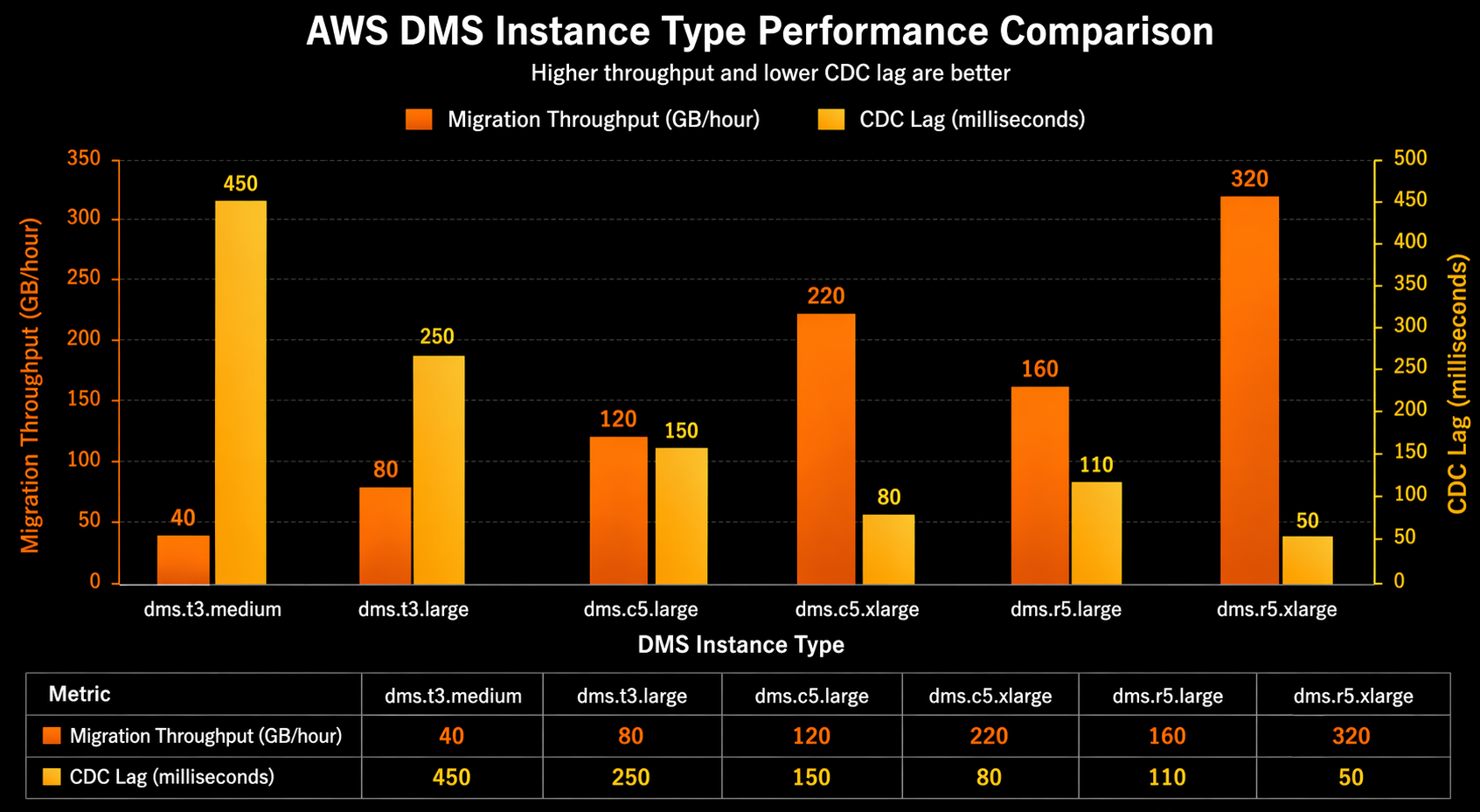
DMS performance depends on three factors: source read throughput, replication instance processing capacity, and target write throughput. The bottleneck is almost always the target write side, because the target is simultaneously serving read traffic and absorbing migration writes.
Replication Instance Tuning
{
  "ChangeProcessingTuning": {
    "BatchApplyEnabled": true,
    "MemoryLimitTotal": 2048,
    "MemoryKeepTime": 120,
    "StatementCacheSize": 100,
    "MinTransactionSize": 5000,
    "CommitTimeout": 1
  },
  "StreamBufferSettings": {
    "StreamBufferCount": 120,
    "StreamBufferSizeInMB": 256
  },
  "FullLoadSettings": {
    "MaxFullLoadSubTasks": 16,
    "CommitRate": 50000,
    "BulkApplySrcPauseCnt": 2000000,
    "BulkApplySrcResumeCnt": 1500000
  }
}
Key tuning recommendations:
| Parameter | Default | Recommended for Large Migrations | Effect |
|---|---|---|---|
BatchApplyEnabled |
false | true | Groups changes into batch statements |
MemoryLimitTotal |
1024 | 2048+ | More memory for CDC caching |
MaxFullLoadSubTasks |
8 | 16-32 | Parallel table loading |
CommitRate |
10000 | 50000 | Rows per commit on target |
StreamBufferCount |
60 | 120 | More buffers reduce spill to disk |
StreamBufferSizeInMB |
8 | 128-256 | Larger buffers for high-throughput CDC |
Target Database Tuning
The target database configuration has a significant impact on migration speed. Temporarily adjusting these parameters during migration can improve throughput:
-- Aurora PostgreSQL target optimizations (revert after migration)
ALTER SYSTEM SET synchronous_commit = off;
ALTER SYSTEM SET max_wal_senders = 20;
ALTER SYSTEM SET maintenance_work_mem = '2GB';
ALTER SYSTEM SET max_parallel_maintenance_workers = 4;
SELECT pg_reload_conf();

-- Disable non-critical indexes during full load, rebuild after
-- DMS can do this automatically with TargetTablePrepMode set appropriately
For Aurora MySQL targets:
-- Temporarily increase write throughput
SET GLOBAL innodb_flush_log_at_trx_commit = 2;
SET GLOBAL innodb_buffer_pool_size = 10737418240;  -- 10GB
SET GLOBAL innodb_write_io_threads = 16;
SET GLOBAL innodb_read_io_threads = 16;

-- After migration, revert to production-safe values
SET GLOBAL innodb_flush_log_at_trx_commit = 1;
LOB Handling
Large objects (BLOBs, CLOBs, TEXT columns larger than 32 KB) require special handling. DMS offers two modes:
- Limited LOB mode: DMS truncates LOBs to a configured maximum size. Fastest option but risks data loss if LOBs exceed the limit.
- Full LOB mode: DMS transfers LOBs of unlimited size by fetching them individually. Much slower than limited mode.
{
  "TargetMetadata": {
    "SupportLobs": true,
    "FullLobMode": false,
    "LimitedSizeLobMode": true,
    "LobMaxSize": 64,
    "LobChunkSize": 64
  }
}
For most migrations, use limited LOB mode with a LobMaxSize set to the actual maximum LOB size in your database plus a safety margin. Run a query to determine the actual maximum LOB size before starting the migration:
-- PostgreSQL: find maximum LOB size
SELECT
    schemaname,
    tablename,
    attname,
    pg_column_size(tablename::text) AS approx_size_bytes
FROM pg_stats
WHERE tablename IN ('documents', 'attachments', 'media')
ORDER BY approx_size_bytes DESC
LIMIT 20;

-- More accurate: check actual column sizes
SELECT MAX(LENGTH(column_name)) AS max_bytes
FROM your_table
WHERE column_name IS NOT NULL;
Security Considerations
Network Security
DMS replication instances should never be publicly accessible. Place them in private subnets with security groups that allow only the necessary database ports.
resource "aws_security_group" "dms_replication" {
  name        = "${var.project}-dms-sg"
  description = "Security group for DMS replication instance"
  vpc_id      = var.vpc_id

  # Outbound to source database
  egress {
    from_port   = 1521
    to_port     = 1521
    protocol    = "tcp"
    cidr_blocks = [var.source_db_cidr]
    description = "Outbound to Oracle source"
  }

  # Outbound to target database
  egress {
    from_port   = 5432
    to_port     = 5432
    protocol    = "tcp"
    cidr_blocks = [var.target_db_cidr]
    description = "Outbound to Aurora PostgreSQL target"
  }

  # HTTPS egress for CloudWatch and S3
  egress {
    from_port   = 443
    to_port     = 443
    protocol    = "tcp"
    cidr_blocks = ["0.0.0.0/0"]
    description = "HTTPS for CloudWatch logs"
  }

  tags = var.tags
}
For cross-account or cross-region migrations, use AWS PrivateLink to establish private connectivity without traversing the public internet.
Encryption
DMS supports encryption at rest and in transit. All replication instance storage is encrypted with AWS KMS. In-transit encryption uses SSL/TLS between the replication instance and both endpoints.
# Create encrypted replication instance
aws dms create-replication-instance \
  --replication-instance-identifier dms-encrypted-instance \
  --replication-instance-class dms.r5.4xlarge \
  --allocated-storage 500 \
  --kms-key-id arn:aws:kms:us-east-1:123456789012:key/xxxxxxxxx \
  --publicly-accessible false

# Enable SSL on endpoints
aws dms modify-endpoint \
  --endpoint-arn arn:aws:dms:us-east-1:123456789012:endpoint:oracle-source-prod \
  --ssl-mode require
IAM and Least Privilege
The DMS service role needs specific permissions. Follow the principle of least privilege:
{
  "Version": "2012-10-17",
  "Statement": [
    {
      "Effect": "Allow",
      "Action": [
        "dms:DescribeReplicationInstances",
        "dms:DescribeEndpoints",
        "dms:DescribeReplicationTasks",
        "dms:StartReplicationTask",
        "dms:StopReplicationTask",
        "dms:DescribeTableStatistics",
        "dms:DescribeReplicationTaskAssessmentResults"
      ],
      "Resource": "*"
    },
    {
      "Effect": "Allow",
      "Action": [
        "cloudwatch:PutMetricData",
        "cloudwatch:GetMetricStatistics",
        "logs:CreateLogGroup",
        "logs:CreateLogStream",
        "logs:PutLogEvents"
      ],
      "Resource": "*"
    },
    {
      "Effect": "Allow",
      "Action": [
        "kms:Decrypt",
        "kms:DescribeKey",
        "kms:GenerateDataKey"
      ],
      "Resource": "arn:aws:kms:us-east-1:123456789012:key/xxxxxxxxx"
    }
  ]
}
Rotate database credentials used by DMS endpoints through AWS Secrets Manager and reference them in endpoint configuration:
aws dms create-endpoint \
  --endpoint-identifier oracle-source-with-secrets \
  --endpoint-type source \
  --engine-name oracle \
  --server-name oracle-prod.internal.corp.com \
  --port 1521 \
  --database-name ORCLPROD \
  --oracle-settings '{
    "SecretsManagerSecretId": "arn:aws:secretsmanager:us-east-1:123456789012:secret:oracle-dms-creds",
    "SecretsManagerAccessRoleArn": "arn:aws:iam::123456789012:role/dms-secrets-role"
  }'
Migration Strategies
Choosing the right migration strategy depends on your application architecture, acceptable risk, and timeline.
Big Bang Migration
The entire database migrates in a single operation. The application is put into read-only mode (or fully stopped), DMS performs the final sync, and all traffic switches to the target.
Pros: Simple execution, single cutover event, minimal CDC lag management. Cons: High risk if rollback is needed, tight time window, all users affected simultaneously.
This approach works for applications with a true maintenance window (internal tools, batch processing systems) or when the database is small enough that the cutover completes in minutes.
Phased Migration
Tables or schemas migrate incrementally. You start with less critical tables, validate them, and progressively migrate more critical data. The application may read from both databases during the transition.
Pros: Lower risk per phase, allows incremental validation, rollback per phase. Cons: More complex application changes, dual-read logic, longer overall timeline.
{
  "rules": [
    {
      "rule-type": "selection",
      "rule-id": "1",
      "object-locator": {
        "schema-name": "APP_OWNER",
        "table-name": "audit_logs"
      },
      "rule-action": "include"
    },
    {
      "rule-type": "selection",
      "rule-id": "2",
      "object-locator": {
        "schema-name": "APP_OWNER",
        "table-name": "notifications"
      },
      "rule-action": "include"
    }
  ]
}
Start with non-critical tables in one task, then create additional tasks for critical tables after validating the first batch.
Dual-Write Strategy
The application writes to both the source and target databases simultaneously. DMS handles backfill of historical data. Once the backfill completes and CDC is caught up, reads are gradually shifted to the target.
Pros: No downtime, gradual traffic shift, easy rollback. Cons: Requires application code changes, dual-write consistency management, more complex.
This strategy pairs well with Aurora Global Database for read replicas that serve traffic during the transition. For a deeper comparison of Amazon Aurora features that support this approach, review the Aurora-specific configuration options.
Cost Analysis
DMS pricing has two components: the replication instance (charged per hour) and log storage (charged per GB-month). Data transfer costs depend on whether the source is in AWS or on-premises.
Cost Estimation by Migration Size
| Migration Size | Instance Type | Duration (Est.) | Instance Cost | Data Transfer | Estimated Total |
|---|---|---|---|---|---|
| 50 GB | dms.t3.medium | 4-8 hours | $2-4 | $0 (same region) | $2-4 |
| 500 GB | dms.r5.xlarge | 1-2 days | $15-30 | $0 (same region) | $15-30 |
| 5 TB | dms.r5.4xlarge | 3-7 days | $300-700 | $0 (same region) | $300-700 |
| 50 TB | dms.r5.16xlarge | 2-4 weeks | $3,000-6,000 | $0 (same region) | $3,000-6,000 |
| 5 TB (on-prem source) | dms.r5.4xlarge | 3-7 days | $300-700 | $460 (cross-region) | $760-1,160 |
Note: These estimates use us-east-1 pricing as of early 2026. Cross-region and cross-account data transfer costs vary. On-premises sources incur standard data transfer charges.
Cost Optimization Tips
- Use the smallest instance that meets your throughput requirements during CDC. Scale up for the full load phase, then scale down.
- Delete the replication instance immediately after migration completes to avoid ongoing hourly charges.
- Use spot-eligible instances for non-production migration rehearsals (DMS does not natively support spot, but you can use smaller instances for testing).
- Compress and pre-stage large LOBs in S3, then use DMS CDC-only mode for ongoing changes.
# Scale replication instance for full load phase
aws dms modify-replication-instance \
  --replication-instance-arn arn:aws:dms:us-east-1:123456789012:rep:dms-prod-repl-instance \
  --replication-instance-class dms.r5.8xlarge \
  --apply-immediately

# After full load completes, scale down for CDC
aws dms modify-replication-instance \
  --replication-instance-arn arn:aws:dms:us-east-1:123456789012:rep:dms-prod-repl-instance \
  --replication-instance-class dms.r5.xlarge \
  --apply-immediately

# After cutover, delete the instance
aws dms delete-replication-instance \
  --replication-instance-arn arn:aws:dms:us-east-1:123456789012:rep:dms-prod-repl-instance
Comparison: DMS vs Alternative Tools
AWS DMS is not the only option for database migration. Several commercial and open-source tools compete in this space.
| Feature | AWS DMS | Qlik Replicate (Attunity) | Fivetran | Striim |
|---|---|---|---|---|
| CDC support | Yes | Yes | Yes | Yes |
| Heterogeneous migration | Yes | Yes | Limited | Yes |
| Managed service | Yes (AWS managed) | No (self-hosted or Cloud) | Yes (SaaS) | No (self-hosted or Cloud) |
| Schema conversion | SCT (separate tool) | Built-in | No | Limited |
| Zero-downtime cutover | Yes | Yes | No (ELT focused) | Yes |
| Initial full load | Yes | Yes | No (incremental only) | Yes |
| Source: Oracle | Yes | Yes | Yes | Yes |
| Source: SQL Server | Yes | Yes | Yes | Yes |
| Source: MongoDB | Yes | Yes | Yes | Yes |
| Target: DynamoDB | Yes | No | No | No |
| Target: S3 | Yes | Yes | Yes | Yes |
| Data validation | Built-in | Built-in | Basic | Built-in |
| Pricing model | Instance-hour + storage | License-based | Monthly row volume | License-based |
| Latency | Sub-second to seconds | Sub-second | Minutes | Sub-second |
| AWS integration | Native (CloudWatch, KMS, IAM) | Moderate | Moderate | Moderate |
| Complexity | Medium | High | Low | High |
When to choose DMS: Migrations between AWS databases or from on-premises to AWS. Tight integration with the AWS ecosystem (CloudWatch, KMS, IAM, Secrets Manager) reduces operational overhead. No licensing cost beyond instance hours.
When to choose Qlik Replicate: Enterprise environments with complex transformation requirements, multiple source/target combinations, and existing Qlik infrastructure. Superior Oracle CDC performance with direct redo log access.
When to choose Fivetran: Analytics-focused ELT workloads where you are populating a data warehouse (Snowflake, BigQuery, Redshift) rather than performing a database migration. Not suitable for zero-downtime operational migrations.
When to choose Striim: Real-time streaming analytics scenarios where you need to process and transform data in-flight. Strong support for complex event processing and multi-target fan-out.
Best Practices
Based on production migration experience across dozens of engagements, these practices consistently reduce risk and improve outcomes.
Before Migration
- Run a rehearsal migration with a production-sized copy of the database. Measure full load time, CDC throughput, and replication instance resource utilization. Adjust instance sizing based on actual measurements, not estimates.
- Run the SCT assessment report early. Schema incompatibilities that require manual conversion are the most common source of migration delays. Start the SCT analysis weeks before the planned migration date.
- Validate network connectivity between the replication instance and both endpoints. DNS resolution, firewall rules, security groups, and VPC routing all need to be correct before migration day. Use the DMS
test-connectionAPI to verify. - Set up monitoring and alerting before starting the migration. Create CloudWatch alarms for CDC lag, replication instance CPU, and free storage space. Configure SNS notifications.
- Document the rollback procedure for every migration step. Know exactly how to revert if something goes wrong at each phase.
During Migration
- Monitor CDC lag continuously. If lag grows consistently, the replication instance or target database is the bottleneck. Scale the instance up or tune target database parameters.
- Enable data validation on the migration task. Row count and checksum validation catch data integrity issues that would otherwise surface as application errors after cutover.
- Watch for LOB-related errors in the task logs. LOBs that exceed the configured
LobMaxSizeare silently truncated in limited LOB mode. Check the DMS CloudWatch logs for truncation warnings. - Do not modify the target schema while DMS is replicating. Adding or dropping columns, indexes, or constraints on the target during active replication can cause task failures or data inconsistencies.
At Cutover
- Verify CDC lag is at or near zero before initiating the cutover. If the target is not caught up, the cutover will result in data loss.
- Put the source database in read-only mode (or stop application writes) before redirecting traffic to the target. This ensures no writes are lost during the final seconds of the transition.
- Run a final validation pass comparing row counts and critical query results between source and target before declaring success.
- Keep the DMS task running in CDC-only mode for at least 24-48 hours after cutover. This provides a safety net if you need to fail back to the source.
- Delete the DMS resources (replication instance, endpoints, tasks) only after confirming the migration is stable and no rollback will be needed.
- Update connection strings, DNS records, and application configuration to point to the new target database. Use Route 53 CNAME records for database endpoints to simplify future migrations.
Common Failure Modes and Recovery
| Failure Mode | Symptoms | Root Cause | Recovery |
|---|---|---|---|
| Task stopped unexpectedly | Status changes to “stopped” | Source connectivity loss, credentials expired | Fix connectivity, restart task with CDC resume position |
| CDC lag grows unbounded | Lag metric increases steadily | Target write bottleneck, insufficient instance resources | Scale instance, enable batch apply, tune target |
| Tables errored count > 0 | TablesErrored increasing | Constraint violations, data type mismatches | Check task logs, fix schema, reload specific tables |
| LOB truncation | Binary data corrupted on target | LobMaxSize too small for actual data | Increase LobMaxSize, restart task from last checkpoint |
| Replication instance disk full | FreeStorageSpace near zero | CDC changes spilling to disk faster than apply | Increase allocated storage, tune apply throughput |
# Restart a failed task from the last checkpoint
aws dms start-replication-task \
  --replication-task-arn arn:aws:dms:us-east-1:123456789012:task:prod-oracle-to-aurora-pg \
  --start-replication-task-type resume-processing

# Reload specific tables that failed
aws dms reload-tables \
  --replication-task-arn arn:aws:dms:us-east-1:123456789012:task:prod-oracle-to-aurora-pg \
  --tables-to-reload '[{"schema-name":"APP_OWNER","table-name":"FAILED_TABLE"}]'
Conclusion
AWS DMS provides a robust, managed platform for zero-downtime database migrations. The combination of Schema Conversion Tool for schema analysis, full-load-and-CDC for continuous replication, and built-in data validation gives you the tooling needed to migrate production databases without taking applications offline.
The critical success factors are preparation and rehearsal. Run SCT assessments early, perform a full rehearsal migration with production-scale data, and validate every step of the process before attempting the production migration. Monitor CDC lag obsessively during the migration, and keep rollback options open until the target database has proven stable under production load.
For homogeneous migrations (PostgreSQL to Aurora PostgreSQL, MySQL to Aurora MySQL), the process is straightforward and well-optimized. For heterogeneous migrations (Oracle to Aurora PostgreSQL, SQL Server to Aurora MySQL), budget significant time for schema conversion and manual SQL rewriting, and plan multiple rehearsal iterations before the production migration window.
The investment in a well-executed database migration pays dividends long after the migration is complete: lower licensing costs, managed operations, better scalability, and the ability to leverage AWS-native database features that were not available on the legacy platform.
Explore more like this

Cloud IoT Security: Zero Trust, Identity, and Signed Updates
On September 11, 2026, the Cyber Resilience Act’s incident-reporting rules start applying in the European Union. That is 22 days after this article’s publication date. A manufacturer that learns of...

Bedrock Web Search: Grounding an Agent Without Building a Scraper
On August 4, 2026, AWS made Web Search on Amazon Bedrock generally available, and the entire integration surface is one JSON object: {"type": "web_search"}. That is the whole change from...

ECR Now Allows 200 GB Image Layers. Your Model Weights Still Do Not Belong There
On August 3, 2026, AWS raised the maximum Amazon ECR image layer size to 200 GB for images pushed with docker push. The announcement names the driver in the second...

Comments