
Golden AMI Pipelines with EC2 Image Builder and AWS CDK L2 Constructs

An EC2 Image Builder component is immutable. Change one line and you need a new version. The recipe referencing that component is immutable too, and the pipeline references the recipe. Before native auto-versioning and CDK Layer 2 constructs, a small package update could require a chain of manual version edits across components, recipes, and pipelines.
AWS described that exact problem in a July 29, 2026 case study with Company 3. The team originally appended MD5 hashes to component names, then built custom resources to propagate versions. Native Image Builder auto-versioning and the new CDK L2 constructs let them delete the workaround. AWS reports that an L1 pipeline needing more than 50 lines and six CloudFormation resources can be represented by an L2 construct in fewer than ten lines for the simplest case.
Short code does not create a production golden-image program. Teams still own source provenance, component testing, CVE policy, distribution, AMI deprecation, launch-template promotion, rollback, and the monthly question nobody enjoys: which accounts are still booting a six-month-old image?
This guide builds that operating model. It uses CDK for the pipeline, wildcard build versions for immutable changes, automated tests, multi-account distribution, and a controlled promotion contract. If you need a refresher on CDK fundamentals, start with the AWS CDK TypeScript guide.
Understand the Image Builder resource chain
Component(s) -> Image recipe -> Infrastructure configuration
                    |          -> Distribution configuration
                    |          -> Image tests
                    +-> Image pipeline -> AMI version -> account/Region promotion
| Resource | What it controls | Why versioning matters |
|---|---|---|
| Component | Build or test document | Content is immutable after creation |
| Image recipe | Base image plus ordered components | Pins the exact image ingredients |
| Infrastructure configuration | Build instance, network, IAM, logs | Defines the privileged build environment |
| Distribution configuration | Regions, accounts, names, permissions | Determines where the AMI can launch |
| Pipeline | Schedule and recipe execution | Produces successive image versions |
Historically, every component content change required a version increment, a new component ARN in the recipe, a recipe version increment, and a new recipe ARN in the pipeline. Manual propagation creates mismatches and unnecessary image churn.
The Company 3 implementation explains how auto-versioning eliminates much of that propagation.
Use semantic versions and automatic build versions
Image Builder versions follow semantic versioning with a build component. AWS auto-versioning lets components with the same name and semantic line use an x wildcard, such as 1.2.x, so the service assigns the next build version. Recipes and pipelines can resolve the highest compatible version instead of requiring a hand-edited full ARN.
Use the semantic fields deliberately:
| Change | Version decision | Example |
|---|---|---|
| Rebuild same component definition for patched package | Auto build | 1.2.x |
| Backward-compatible component behavior | Minor | 1.3.x |
| Breaking path, service, or configuration change | Major | 2.0.x |
Do not use wildcards as an unbounded production dependency. Resolve and record the full component and recipe versions in every image-build manifest. The pipeline may select the latest compatible input; the produced AMI must remain traceable to the exact versions it used.
The Image Builder semantic-versioning guide is the current source for wildcard behavior and supported ARN forms.
Choose L2 constructs with the alpha tradeoff visible
The EC2 Image Builder L2 constructs provide higher-level defaults, automatic least-privilege IAM, and convenience wiring. At publication, AWS describes them as being in the alpha stabilization phase before possible migration into the core CDK library.
That means two things:
- The API is easier than six L1 resources and custom role plumbing.
- Your code must pin the alpha package version and treat upgrades as reviewed changes.
An abbreviated TypeScript stack follows the AWS L2 pattern:
import * as cdk from 'aws-cdk-lib';
import * as imagebuilder from '@aws-cdk/aws-imagebuilder-alpha';
import { Construct } from 'constructs';

export class GoldenAmiStack extends cdk.Stack {
  constructor(scope: Construct, id: string, props?: cdk.StackProps) {
    super(scope, id, props);

    const updateOs = imagebuilder.AwsManagedComponent.updateOS(
      this,
      'UpdateOS',
      { platform: imagebuilder.Platform.Linux }
    );

    const recipe = new imagebuilder.ImageRecipe(this, 'GoldenRecipe', {
      baseImage: imagebuilder.AwsManagedImage.amazonLinux2023(
        this,
        'AmazonLinux2023'
      ),
      components: [{ component: updateOs }],
    });

    new imagebuilder.ImagePipeline(this, 'GoldenPipeline', { recipe });
  }
}
Confirm imports and API names against the pinned Image Builder L2 construct documentation. Alpha packages can change independently of stable aws-cdk-lib.
For production, add explicit infrastructure, distribution, testing, logging, and schedules rather than relying only on defaults.
Build components as reviewed code
An Image Builder component document can install packages, configure services, or run tests. Keep build and test responsibilities separate.
name: ConfigureTelemetry
description: Install and configure the approved telemetry agent
schemaVersion: 1.0
phases:
  - name: build
    steps:
      - name: InstallPackage
        action: ExecuteBash
        inputs:
          commands:
            - dnf install -y acme-telemetry-4.8.2
      - name: EnableService
        action: ExecuteBash
        inputs:
          commands:
            - systemctl enable acme-telemetry
  - name: validate
    steps:
      - name: ValidateService
        action: ExecuteBash
        inputs:
          commands:
            - rpm -q acme-telemetry
            - systemctl is-enabled acme-telemetry
Pin package versions or repository snapshots when reproducibility matters. dnf update -y without a captured repository state creates a different image from the same source. That may be acceptable for a scheduled patch pipeline, but the resulting manifest must record package versions.
Do not download scripts over the internet and pipe them into a shell. Mirror approved artifacts to S3 or CodeArtifact, verify checksums or signatures, and restrict build-instance egress.
Harden the build environment
The build instance can install privileged software and create an AMI trusted by many workloads. Treat it like a release signer.
| Control | Production setting |
|---|---|
| Instance metadata | IMDSv2 required |
| Network | Private subnet, controlled egress, VPC endpoints where practical |
| IAM | Read approved components/packages, write logs and image artifacts only |
| Logs | Encrypted S3 and CloudWatch retention |
| Secrets | Retrieved at runtime, never baked into AMI |
| Filesystem | Cleanup package caches, temporary keys, and build tokens |
| Build instance | Dedicated security group and no inbound administration path |
Use Systems Manager for managed access if investigation is required; do not open SSH from corporate CIDRs “just in case.” The final AMI should not contain the build role’s credentials, shell history, temporary repository tokens, host keys intended to be unique, or cloud-init instance state.
The EC2 platform guide explains Nitro and instance-family choices around the image; Image Builder should test the actual families that launch it.
Add image tests that resemble a booted workload
Package presence is the first test, not the last. Run:
- OS and kernel inventory;
- required/forbidden package checks;
- service enablement and clean startup;
- filesystem permissions;
- IMDSv2 behavior;
- endpoint and DNS connectivity from the target subnets;
- SSM registration;
- vulnerability scan policy;
- application smoke test;
- reboot and second health check.
Use a test component for commands that can run inside the Image Builder workflow, then launch the AMI in a disposable integration VPC. An image can pass build-time tests and fail only after cloud-init, launch-template user data, attached IAM, encrypted EBS, or target-group registration participates.
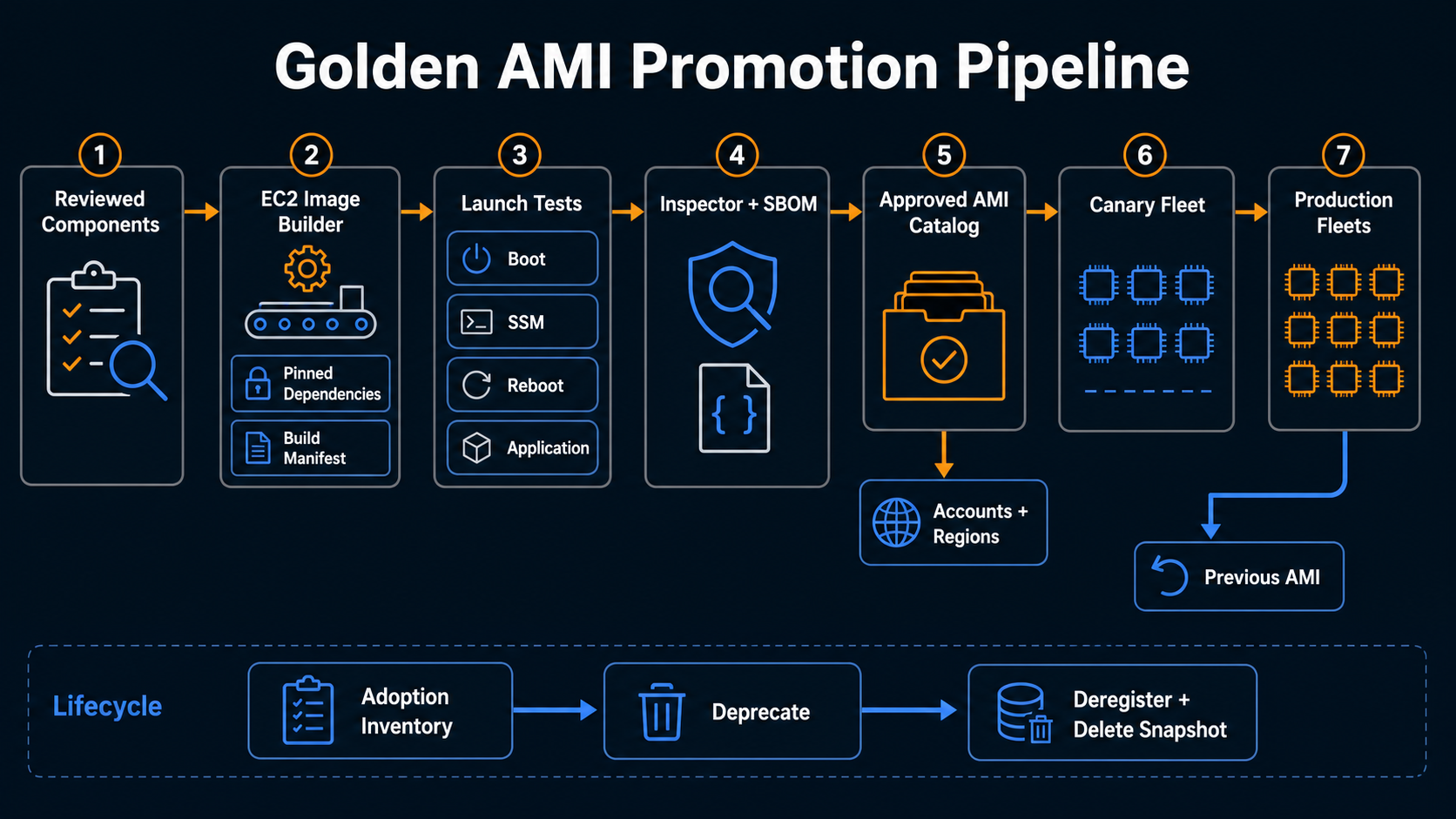
Image Builder test -> AMI available in build account
-> disposable launch template -> boot instance
-> SSM/health/application canary -> promotion decision
For container fleets, the ECS managed-daemon pattern separates platform agents from application images. Use the same instinct for AMIs: bake stable foundational software; keep fast-changing application releases outside the base image when possible.
Make vulnerability policy explicit
Image Builder can integrate with Amazon Inspector scanning. Define a promotion threshold by exploitability and fix availability, not only CVSS:
| Finding | Default action |
|---|---|
| Critical, known exploited, fix available | Block |
| Critical, no fix | Security owner exception with compensating control and expiry |
| High, internet-reachable package | Block or require named approval |
| High, unused package | Remove package or document evidence |
| Medium/low | Track against patch SLA |
The Inspector continuous-scanning guide explains EC2 and ECR findings. Keep the image’s SBOM, scan result, exceptions, and package inventory with the build manifest.
An allowlisted exception must name the CVE, image semantic line, reason, owner, compensating control, and expiry. Do not use a permanent “ignore all findings from package X” rule.
Distribute through a promotion account
A large organization should not let application accounts build their own golden AMIs. Use one or more image-factory accounts, then distribute approved versions to target Regions and accounts.
source account: build + test + scan
security gate: approve exact image version
distribution: copy/encrypt/share to target Regions/accounts
consumer: resolve approved AMI parameter or catalog entry
Use a customer-managed KMS key and the documented cross-account permissions for encrypted AMIs. Distribution configurations can name target Regions, launch permissions, and AMI naming conventions. Prefer AWS Organizations targeting when the service and governance model support it, but restrict distribution to accounts that need the image.
Publish the approved AMI ID to an SSM Parameter Store path such as:
/golden-ami/al2023/web/production/current
/golden-ami/al2023/web/production/previous
The parameter update is the promotion event. Consumers should not query “latest AMI by name” during every deployment because that makes infrastructure plans non-reproducible.
Promote launch templates separately
Building an AMI does not update an Auto Scaling group. Keep image creation and fleet rollout as separate pipelines:
- Image factory produces and approves AMI
2026.07.30.3. - Promotion updates a candidate SSM parameter.
- Application pipeline creates a launch-template version with that exact AMI.
- Instance Refresh or a blue/green group replaces a small canary percentage.
- Health, error, latency, and business canaries pass.
- Rollout expands;
currentandpreviousare updated.
Use bake time before full replacement. OS changes can affect TLS, DNS, JVM behavior, kernel networking, or monitoring in ways a boot test misses.
For Java fleets, the JVM container sizing guide is container-focused but highlights the same trap: platform defaults can change runtime behavior even when application code does not.
Roll back with an image, not a repair script
Rollback should set the launch template to the previous approved AMI and replace affected instances. Do not SSH into new instances to “undo” the image. That creates snowflakes and destroys the immutable-image benefit.
Retain at least:
- current and previous approved AMI IDs per environment and Region;
- their component/recipe manifest;
- KMS and launch permissions;
- launch-template versions;
- application compatibility test results;
- an automated Instance Refresh rollback command or runbook.
Do not deprecate the previous AMI until the current version completes its production bake period. Do not deregister it until every consumer account has moved and the rollback window closes.
Track image age and adoption
An image factory succeeds only when fleets consume its output. Build dashboards for:
| Metric | Why it matters |
|---|---|
| Time from upstream patch to approved AMI | Factory responsiveness |
| Build/test/scan success rate | Pipeline health |
| Oldest running AMI age | Exposure that image creation alone cannot fix |
| Accounts on current/previous/older | Adoption and rollback readiness |
| Build duration and cost | Factory efficiency |
| Exceptions by expiry | Security debt |
| Failed instance refreshes | Consumer compatibility |
Use AWS Config or inventory queries to compare running instance ImageId values with the approved catalog. Open tickets automatically when production exceeds the age policy.
Support multiple architectures and operating systems deliberately
An AMI pipeline is scoped to an operating system, architecture, and boot contract. Do not attach a component written for dnf to Ubuntu, or assume an x86 package exists for Graviton.
Create semantic image families:
al2023/x86_64/web/1.4.x
al2023/arm64/web/1.4.x
windows2025/x86_64/render/3.2.x
Share common intent through source templates only when the commands remain platform-specific. A cross-platform “install telemetry” component can compile into separate Linux shell and Windows PowerShell documents. Test each family on a representative instance type.
| Difference | Required validation |
|---|---|
| x86_64 versus arm64 | Package repository, binary architecture, kernel modules, application performance |
| Linux distribution | Package manager, service manager, paths, security policy |
| Windows | Sysprep, service accounts, reboot behavior, patch baseline |
| GPU image | Driver/CUDA compatibility and instance-family boot |
| Hardened benchmark image | Control exceptions and application compatibility |
Do not promote two architectures under one ambiguous current parameter. Consumers should select a family-specific path, and policy should reject an incompatible AMI in a launch template.
Make the CDK pipeline itself reproducible
Pin Node.js, CDK CLI, aws-cdk-lib, the alpha Image Builder module, and the lockfile. Run synth and tests in a clean build container. Commit the generated CloudFormation template as a review artifact even if it is not committed to source.
steps:
  - run: npm ci
  - run: npm test
  - run: npx cdk synth GoldenAmiStack --quiet > golden-ami.template.yaml
  - run: cfn-lint golden-ami.template.yaml
  - run: npx cdk diff GoldenAmiStack --fail
  - run: npx cdk deploy GoldenAmiStack --require-approval never
--require-approval never is appropriate only after the pipeline has its own reviewed approval gate. Do not use it to remove review. The CloudFormation pre-deployment validation guide shows how service-backed validation and change review fit around CDK.
Add snapshot tests for component order, base-image selection, network, distribution accounts, KMS keys, logging, and schedule. L2 defaults can evolve between alpha releases; a test should reveal a changed synthesized policy or subnet choice.
Define a patch emergency path
Normal image cadence may be weekly or monthly. A known-exploited vulnerability needs a different service-level objective.
An emergency path should:
- identify affected image families and running instances;
- update only the required package or base image where possible;
- build with the same component and provenance controls;
- run a compressed but explicit test suite;
- distribute and canary immediately;
- replace fleets by risk priority;
- verify the vulnerable package is absent from running instances.
Do not bypass tests entirely. Define which long-running tests can be deferred and which safety checks never can. Preserve the reason for expedited approval and schedule the deferred suite after containment.
The factory dashboard should measure time from advisory to approved AMI and from approved AMI to fleet adoption. Shipping the image in two hours is not useful if half the instances remain on the old launch-template version for a week.
Recover the image factory itself
Keep component source, CDK, manifests, and signing configuration in version control and backed-up artifact stores. The AMIs exist across target accounts, but rebuilding trust after losing the source account is harder if the release evidence and KMS strategy live only there.
Test restoration into a clean account or Region. Recreate the pipeline, import or rebuild the current semantic line, verify component digests, and publish to a recovery parameter path before touching production. Document which keys are multi-Region, which snapshots can be copied, and which account owns distribution.
The factory’s recovery time objective can differ from workload recovery. Existing approved AMIs keep launching during a short factory outage, provided consumers use pinned IDs and permissions remain intact. That is another reason not to resolve “latest” dynamically at boot.
Clean up without breaking recovery
Image Builder, EBS snapshots, logs, and replicated AMIs accumulate. Apply a lifecycle policy that retains recent successful releases, the active current/previous pair, investigation holds, and a limited number of historical versions. Deregister unused AMIs and delete their snapshots only after cross-account and cross-Region references are checked.
Separate failed-build artifacts from approved releases. Failed images can have short retention unless an incident requires them. Audit logs and manifests often need longer retention than the AMI itself.
L1 or L2 decision matrix
| Situation | Recommendation |
|---|---|
| New pipeline with standard needs | Pin and evaluate L2 constructs |
| Existing stable L1 code | Migrate when simplification offsets change risk |
| Required feature missing in alpha L2 | Use a small L1 escape hatch |
| Custom resource only for version propagation | Retire it in favor of auto-versioning |
| Regulated platform with strict API stability | Pilot L2, preserve L1 until alpha stabilizes |
Do not wrap every L2 with another proprietary abstraction on day one. Let teams learn the service model and keep the construct boundary visible. A thin organizational construct can later add mandatory logging, network, encryption, test, and distribution defaults.
Production checklist
| Area | Required evidence |
|---|---|
| Source | Reviewed component documents and pinned dependencies |
| Version | Semantic line, resolved component/recipe versions, build manifest |
| Build | Private hardened infrastructure and complete logs |
| Test | Component, reboot, launch, SSM, and application canaries |
| Security | Inspector results, SBOM, exceptions, secrets-cleanliness check |
| Distribution | Approved accounts/Regions, KMS, naming, catalog parameter |
| Rollout | Launch-template canary, bake period, previous AMI retained |
| Lifecycle | Adoption dashboard and safe deprecation/deregistration policy |
Audit consumers, not only the factory
A successful build does not prove the fleet adopted it. Maintain an inventory that maps launch templates, Auto Scaling groups, EC2 Fleets, and direct instances to the approved AMI catalog entry. Report current, previous, unknown, and expired versions by account and owner.
Set adoption objectives according to risk. An emergency kernel image may need rapid replacement, while a routine package refresh can move through longer bake windows. Escalate workloads that resolve the catalog parameter but never recycle instances; they appear correctly configured while continuing to run old bits.
Before deprecating an AMI, verify that no active template, recovery plan, or dormant Region still references it. Consumer evidence makes lifecycle automation safe. Without it, an efficient image factory can remove the exact version an application team expects during its next scale-out or disaster-recovery exercise.
Auto-versioning and CDK L2 constructs remove the most pointless part of golden-image work: manual ARN propagation. Use the saved effort on controls that matter. A good AMI is reproducible, tested as a running instance, traceable to its ingredients, promoted by digest-like identity, and replaceable with the previous version in one operation.
Sources
Explore more like this

Cloud IoT Security: Zero Trust, Identity, and Signed Updates
On September 11, 2026, the Cyber Resilience Act’s incident-reporting rules start applying in the European Union. That is 22 days after this article’s publication date. A manufacturer that learns of...

Kill the Docker Hub Token: OIDC Trust for GitHub Actions
On July 31, 2026, Docker shipped OIDC connections for GitHub Actions to any organization on a Docker Team, Docker Business, or Docker Hardened Images subscription, plus organizations in the Docker-Sponsored...

Bedrock Web Search: Grounding an Agent Without Building a Scraper
On August 4, 2026, AWS made Web Search on Amazon Bedrock generally available, and the entire integration surface is one JSON object: {"type": "web_search"}. That is the whole change from...

Comments