
IAM Policy Simulator in the IAM Console: Build Repeatable Permission Tests

AWS moved IAM Policy Simulator into the IAM console on July 30, 2026 and expanded what teams can model. The simulator can include service control policies, exclude selected policies for “what if we remove this?” tests, accept richer condition-key scenarios through the API, and return clearer per-policy decisions for cross-account evaluation.
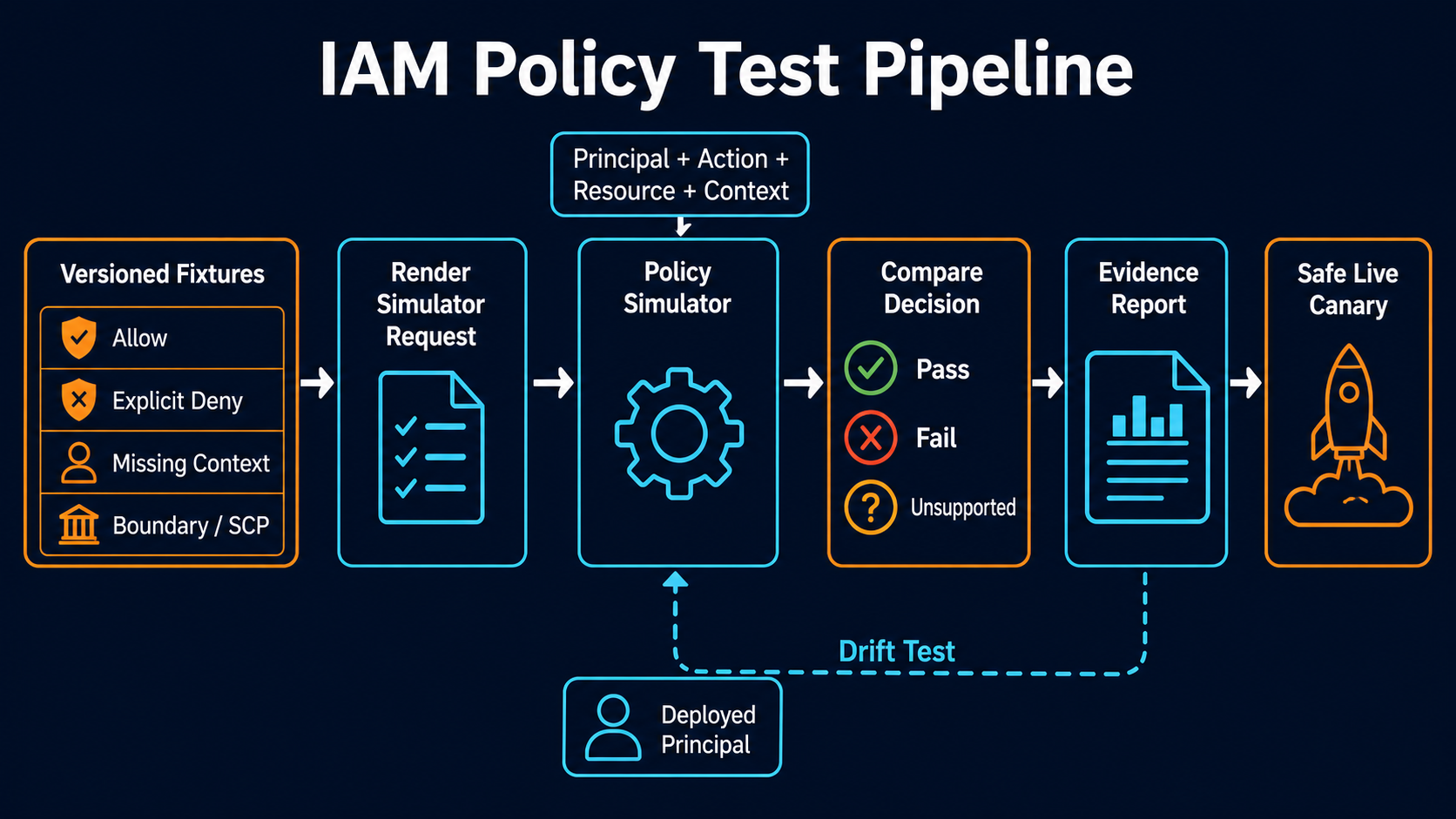
The new console is useful for an investigation. The API is where policy testing becomes an engineering control. A platform team can store expected allow and deny decisions beside its IAM JSON, run them in CI, and stop a role change before the first real request reaches production.
Simulation is not authorization. AWS explicitly warns that results can differ from the live environment. The simulator does not call the target service, cannot understand every service-specific control, and has gaps around resource policies, cross-account access, resource control policies, and some condition behavior. This guide builds a test harness that uses the simulator for fast policy feedback, then closes the gap with live non-destructive probes and CloudTrail evidence.
For the policy model itself, the IAM roles and policies guide explains identity policies, trust policies, resources, and conditions. The simulator assumes you already know which policy types participate in the decision.
What the July update adds
The AWS announcement describes four practical improvements:
| Capability | Why it matters |
|---|---|
| Simulator inside the IAM console | Testing lives beside identities and policies instead of a separate site |
| Include Organizations SCPs | Teams can see the maximum-permission guardrail with identity policies |
| Exclude individual policies | Removal and least-privilege scenarios no longer require editing originals |
| Richer API condition and cross-account detail | Automated tests can identify which policy drove a decision |
Existing policies remain unchanged when edited inside the simulator. No target service request is sent. An s3:DeleteBucket test cannot delete a bucket; it only returns an authorization decision.
That safety makes the simulator ideal for unit tests. It does not make the result a production guarantee.
Choose the correct API
IAM exposes two simulation families:
| API | Policy source | Typical use |
|---|---|---|
SimulateCustomPolicy |
JSON policy strings passed in the request | Test a proposed policy before attachment |
SimulatePrincipalPolicy |
Policies attached to a user, group, or role | Inspect effective identity permissions |
GetContextKeysForCustomPolicy |
Proposed policy strings | Discover required condition keys |
GetContextKeysForPrincipalPolicy |
Attached principal policies | Discover context inputs for effective-policy tests |
Use SimulateCustomPolicy in pull requests because the policy under review does not need to exist in AWS. Use SimulatePrincipalPolicy for drift checks, incident analysis, and a final test of the deployed principal.
The permissions to simulate attached principals can reveal how other identities are authorized. Restrict iam:SimulatePrincipalPolicy and iam:GetContextKeysForPrincipalPolicy to specific principal ARN paths. The policy-simulator permission examples show the required actions.
Store expected decisions as fixtures
A fixture should declare the action, resource, context, and expected decision. Do not test only the happy path.
name: application-readonly-s3
policy: policies/app-reader.json
cases:
  - id: list-approved-bucket
    actions: [s3:ListBucket]
    resources: [arn:aws:s3:::acme-prod-data]
    expect: allowed

  - id: read-approved-prefix
    actions: [s3:GetObject]
    resources: [arn:aws:s3:::acme-prod-data/tenant-42/*]
    context:
      aws:PrincipalTag/tenant: tenant-42
    expect: allowed

  - id: deny-other-tenant
    actions: [s3:GetObject]
    resources: [arn:aws:s3:::acme-prod-data/tenant-99/private.csv]
    context:
      aws:PrincipalTag/tenant: tenant-42
    expect: implicitDeny

  - id: deny-delete
    actions: [s3:DeleteBucket]
    resources: [arn:aws:s3:::acme-prod-data]
    expect: implicitDeny
Keep fixture IDs stable so CI reports remain comparable. Add a case for every incident, Access Analyzer finding, or review defect. The suite becomes executable knowledge of why a role exists.
For attribute-based policies, the IAM Identity Center session-tag pattern shows how principal attributes reach AWS. Tests must supply the same context-key shape the production federation path creates.
Discover context keys before simulation
Conditioned policies can produce misleading results when the test omits inputs. Ask IAM which context keys appear in the policy:
policy_document=$(jq -c . policies/app-reader.json)

aws iam get-context-keys-for-custom-policy \
  --policy-input-list "$policy_document"
Compare the returned list with the fixture. A policy using aws:RequestedRegion, aws:PrincipalTag/tenant, or s3:prefix needs representative values. Fail CI when a new context key appears without a test value or explicit rationale.
Do not confuse “missing context” with “deny works.” The simulator may return implicitDeny because a condition could not be evaluated, while production supplies a value that allows the request.
Run a custom-policy simulation
The CLI accepts policy JSON, actions, resources, and context entries. This example tests regional access:
aws iam simulate-custom-policy \
  --policy-input-list file://policies/regional-operator.json \
  --action-names ec2:StartInstances ec2:TerminateInstances \
  --resource-arns arn:aws:ec2:us-east-1:111122223333:instance/i-0123456789abcdef0 \
  --context-entries \
    ContextKeyName=aws:RequestedRegion,ContextKeyType=string,ContextKeyValues=us-east-1 \
  --query 'EvaluationResults[].{Action:EvalActionName,Decision:EvalDecision,Missing:MissingContextValues}' \
  --output table
Expected output is a decision per action-resource pair. allowed, explicitDeny, and implicitDeny are different outcomes. Tests should preserve that distinction. An explicit deny is a guardrail; an implicit deny may disappear when another policy is attached.
The SimulateCustomPolicy API reference documents the complete fields, pagination, permissions boundary input, resource policy input, caller ARN, and context entries.
Test the deployed principal separately
After deploying a role policy, simulate the role ARN:
aws iam simulate-principal-policy \
  --policy-source-arn arn:aws:iam::111122223333:role/application-reader \
  --action-names s3:GetObject s3:PutObject s3:DeleteObject \
  --resource-arns arn:aws:s3:::acme-prod-data/tenant-42/canary.txt \
  --query 'EvaluationResults[].{Action:EvalActionName,Decision:EvalDecision,Matched:MatchedStatements}'
This includes the identity policies attached to the principal. For a user, group memberships participate as well. It can include one permissions boundary and selected additional policies according to API rules.
It does not mean the role can be assumed. Trust-policy evaluation is a separate step. Test the sts:AssumeRole path with a dedicated canary identity, then invoke a non-destructive target action. The cross-account IAM roles guide explains the two-sided trust and permissions requirement.
Understand the policy layers
Effective AWS authorization can include identity policies, resource policies, permissions boundaries, session policies, SCPs, resource control policies, and service-specific controls. The simulator supports only a subset in each mode.
| Layer | Simulator use | Important caveat |
|---|---|---|
| Identity policy | Core support | Test all attached policies or selected subsets |
| Permissions boundary | Supported one at a time | Boundary limits; it does not grant permissions |
| SCP | Available in the updated console | Validate current condition support against docs/API |
| Resource policy | Limited services and scenarios | Role resource-policy simulation has restrictions |
| Session policy | Model with additional inputs where supported | Real STS session can carry other context |
| RCP | Not supported in current IAM guidance | Requires live validation and policy review |
| Service-specific authorization | Not executed | Simulator cannot reproduce service runtime behavior |
The IAM policy-testing documentation remains the source of truth for current limitations. Check it when a release changes the simulator; console capabilities and documentation can evolve faster than copied runbooks.
Include SCPs without misunderstanding them
An SCP defines the maximum available permissions for member accounts. It does not grant an action. A simulation that shows an SCP permits ec2:RunInstances still needs an identity or resource policy that grants it.
Use three cases for high-risk actions:
- Identity policy allows, SCP permits: expect allowed.
- Identity policy allows, SCP explicitly denies: expect explicit deny.
- Identity policy omits, SCP permits: expect implicit deny.
For region or tag conditions, supply the context through the API where supported and confirm the console’s effective Organizations hierarchy. If a current limitation prevents evaluation of an SCP condition, record the test as unsupported, not passed. Then use a sandbox member account for the live canary.
The EKS IAM condition-key guide demonstrates how SCPs and IAM conditions combine for service guardrails. Its lesson generalizes: a missing context test is often more dangerous than a missing allow test.
Build a minimal CI harness
The harness should validate policy syntax, discover context keys, execute fixtures, and fail on a decision mismatch.
#!/usr/bin/env bash
set -euo pipefail

task_policy="policies/app-reader.json"
task_action="s3:GetObject"
task_resource="arn:aws:s3:::acme-prod-data/tenant-42/canary.txt"

aws accessanalyzer validate-policy \
  --policy-type IDENTITY_POLICY \
  --policy-document "file://$task_policy" \
  --query 'findings[?findingType==`ERROR`]'

task_decision=$(aws iam simulate-custom-policy \
  --policy-input-list "file://$task_policy" \
  --action-names "$task_action" \
  --resource-arns "$task_resource" \
  --query 'EvaluationResults[0].EvalDecision' \
  --output text)

test "$task_decision" = "allowed"
This is the smallest useful form, not a complete harness. Production code should iterate a fixture document, support multiple context values and data types, inspect MissingContextValues, handle pagination, and emit JUnit or another CI-native report.
Run IAM Access Analyzer policy validation before simulation. Validation catches syntax, security warnings, and policy-quality issues. Simulation checks the decision for specific inputs. Neither replaces the other.
Test removal, not only addition
The updated console can exclude selected policies. Use that to reduce privilege:
- select the role and all attached policies;
- execute the known-good fixture set;
- exclude one candidate policy;
- rerun the same cases;
- detach only when required allows remain and forbidden actions remain denied.
This is safer than reading a policy name and deciding it “looks unused.” Combine simulator results with IAM last-accessed data and CloudTrail. The permissions-boundary guide explains another common trap: removing a broad identity policy can still leave access through another policy inside the boundary.
Close the simulation gap with live canaries
After simulation passes, assume a dedicated test role in a sandbox and run non-destructive operations:
aws sts get-caller-identity
aws s3api head-object \
  --bucket acme-policy-canary \
  --key tenant-42/known-object.txt
Test an expected denial against a harmless canary resource too. Never use destructive production actions as authorization probes. For actions with no safe read equivalent, use a dry-run API when the service provides one, a CloudFormation change set, or a dedicated disposable account.
Record the CloudTrail event and request ID. The CloudTrail audit guide explains how to retain and query that evidence.
Diagnose a mismatch methodically
| Simulation versus live | Likely explanation |
|---|---|
| Simulator allows, live denies | Trust policy, RCP, endpoint policy, resource policy, service condition, KMS key policy, stale session |
| Simulator denies, live allows | Missing simulated policy/context, resource-policy grant, different principal or session |
| Console and API differ | Different selected policies, Organizations context, caller ARN, or context values |
| Result changes by Region | aws:RequestedRegion, resource ARN, service availability, or SCP condition |
Start by capturing the exact live principal ARN, session tags, action, resource ARN, Region, and request time. Compare those inputs to the fixture. “Same role” is not enough if one request uses a session policy or different tags.
Build a condition matrix, not one representative request
Policies usually fail at boundaries. A tag-based rule can work for one tenant and expose another because the resource tag is missing. A region guardrail can allow us-east-1 but behave unexpectedly for a global service. Test the Cartesian product that matters.
| Dimension | Cases to include |
|---|---|
| Region | allowed, denied, missing, global-service behavior |
| Principal tag | correct, wrong, missing, multiple values |
| Resource tag | correct, wrong, missing, unsupported action |
| Source network | approved VPC endpoint, public source, missing key |
| Time | inside window, boundary instant, outside window |
| MFA/auth age | present and fresh, stale, absent |
Generate fixtures from a concise matrix rather than copying dozens of CLI calls. Name the expected decision and whether it must be explicit or implicit. A security guardrail should normally produce explicitDeny for forbidden scenarios; an application allowlist often expects implicitDeny outside scope.
Global condition keys are not supported uniformly by every service and action. The simulator does not determine that service-level support for you in all cases. Verify the target service’s authorization reference and finish with a live canary.
Test policy interactions and mutation
A single policy can pass while the effective principal is over-privileged through another attachment. Maintain two suites:
- policy unit tests call
SimulateCustomPolicyfor the proposed JSON; - principal integration tests call
SimulatePrincipalPolicyafter deployment.
Add mutation tests to prove the fixtures would catch a dangerous change. Temporarily replace a resource ARN with *, remove a condition, change Deny to Allow, or omit the permissions boundary input. The test suite must fail. If it stays green, the cases do not protect the rule you think they protect.
Run mutations only on local policy copies. Never attach the mutated document. A small test tool can produce variants, call SimulateCustomPolicy, and discard them after the job.
This catches a subtle quality problem: many IAM suites assert that required actions are allowed but never assert that adjacent actions are denied. A read role test should include Put, Delete, policy modification, and KMS use, not only GetObject.
Handle resource policies and cross-account access carefully
Cross-account access requires permission on both sides: the caller’s identity side and the target’s resource side, plus any Organizations ceilings and KMS policy. The simulator’s resource-policy support varies by API, principal type, and service. Current IAM guidance notes restrictions for role resource-policy simulation and supports resource policies for a limited set of services in the console.
Model the request as a worksheet:
caller_account: 111122223333
principal: arn:aws:iam::111122223333:role/report-reader
target_account: 444455556666
action: s3:GetObject
resource: arn:aws:s3:::central-reports/2026/report.csv
identity_policy: required
trust_policy: required_for_assume_role_if_used
bucket_policy: required
kms_key_policy: required_if_sse_kms
scp_caller: evaluated
scp_target: evaluated
vpc_endpoint_policy: evaluated_on_live_path
Test each policy document syntactically, simulate what the API supports, and run a real HeadObject against a canary object encrypted the same way. A bucket allow with a missing KMS key grant often produces the classic “simulation says allowed, application gets AccessDenied” result.
The resource-policy Principal and the CallerArn supplied to simulation must represent the actual session path. An IAM role ARN, assumed-role session ARN, account principal, and service principal do not always behave identically.
Make the harness reliable under CI load
IAM simulation APIs can paginate results when the action-resource matrix grows. A harness that reads only the first page silently skips tests. Follow IsTruncated and Marker, or use the AWS CLI’s built-in pagination correctly. Do not add --no-paginate unless the fixture guarantees one page.
Batch related actions and resources within API limits, but keep reports mapped to individual fixture IDs. Retry throttling and transient service errors with exponential backoff and a bounded attempt count. Never convert an API error into a passing decision.
Cache immutable custom-policy results within one commit when identical inputs repeat. Do not cache principal simulations across deployments, Organizations changes, or session-context changes.
Emit a machine-readable report:
{
  "suite": "application-readonly-s3",
  "policy_sha256": "...",
  "account": "111122223333",
  "region": "us-east-1",
  "passed": 18,
  "failed": 0,
  "unsupported": 2,
  "missing_context": [],
  "simulated_at": "2026-07-30T20:10:00Z"
}
Treat unsupported as visible risk with an assigned live test, not as success. Store the report with the deployed policy version and change ticket.
Detect drift after the pull request
Nightly, enumerate critical roles, retrieve attached and inline policies, boundaries, and selected Organizations context, then run principal fixtures. Hash the effective inputs. Alert when the hash changes outside an approved deployment.
CloudTrail should alert on AttachRolePolicy, PutRolePolicy, SetDefaultPolicyVersion, boundary changes, and Organizations policy attachment. The nightly simulator tells you expected decisions changed; CloudTrail tells you who changed the inputs.
Do not automatically detach a policy based only on a failing simulation. Freeze risky deployment paths, open an incident, confirm the live principal and context, then apply the reviewed rollback. Identity automation with incomplete context can cause a larger outage than the original drift.
Production test policy
| Change class | Required evidence |
|---|---|
| New identity policy | Validation, allow/deny fixtures, reviewer |
| Policy attachment change | Principal simulation before and after |
| SCP change | Member-account matrix and live sandbox canary |
| Cross-account access | Both policy sides, trust test, resource canary |
| Boundary change | Tests inside and outside the boundary ceiling |
| Emergency exception | Expiry, owner, explicit deny regression test |
Keep fixtures readable during review
Generate the API payload from a smaller domain-focused fixture, but preserve the rendered simulator request as evidence. Reviewers should be able to see the principal, action, resource, context, expected decision, and policy inputs without decoding a shell script.
Name fixtures after the business rule, such as billing-reader-cannot-delete-report, rather than after a ticket number. Group them by persona and resource boundary. When a fixture fails, show the expected and actual decision plus the explicit policy statement or missing context that influenced the result. A raw EvalDecision field is insufficient for a safe review.
Retire fixtures only when the policy or workload is removed, and record why. Old deny tests are especially valuable because broad refactors often preserve expected allows while accidentally reopening a forbidden path. Treat the suite as the executable authorization contract, not a collection of debugging commands copied from an incident.
Run the suite in pull requests and nightly against deployed principals. Pull-request tests catch proposed regressions. Nightly tests catch drift from console edits, attachment changes, Organizations policies, and service updates.
The Policy Simulator is most valuable when its output is treated as evidence with known limits. Put expected permissions in version control, test explicit denies, supply real context, compare proposed and deployed principals, and finish with a safe live canary. That turns a console troubleshooting tool into a repeatable authorization discipline.
Sources
Explore more like this

Cloud IoT Security: Zero Trust, Identity, and Signed Updates
On September 11, 2026, the Cyber Resilience Act’s incident-reporting rules start applying in the European Union. That is 22 days after this article’s publication date. A manufacturer that learns of...

Kill the Docker Hub Token: OIDC Trust for GitHub Actions
On July 31, 2026, Docker shipped OIDC connections for GitHub Actions to any organization on a Docker Team, Docker Business, or Docker Hardened Images subscription, plus organizations in the Docker-Sponsored...

Bedrock Web Search: Grounding an Agent Without Building a Scraper
On August 4, 2026, AWS made Web Search on Amazon Bedrock generally available, and the entire integration surface is one JSON object: {"type": "web_search"}. That is the whole change from...

Comments