
The Essential Guide to AWS Glacier


If you’re running any kind of business, you probably already know that backups matter. Critical files, customer records, financial documents - losing access to these even for a day could be catastrophic. Most businesses that skip backups don’t realize how much they needed them until it’s too late.
A practical backup strategy combines local copies with off-site storage. You want redundancy here. Physical disasters, cyberattacks, simple hardware failure - any of these can wipe out your primary systems. The exact approach depends on your data volume and how quickly you need to recover, but the basics are regular backups and a documented recovery plan you actually test.
Test your backups periodically. Sounds obvious, but how many people actually do it? An untested backup is a gamble. And update them - if your backup from three months ago doesn’t have your latest customer data, you’ve lost three months of work.
AWS Archive Solutions
Looking at cloud archive options, AWS gives you a few paths. Storage Gateway is a service that lets your on-premises applications talk to S3 and Glacier without major code changes. It’s useful if you’re gradually moving older data to the cloud.
S3 Inventory and Glacier Together
S3 Inventory generates reports about what’s in your buckets - useful for audits or figuring out what you should move to cheaper storage. Glacier is the cold storage layer itself: extremely cheap, designed for data you might access once a year or less.
The workflow is straightforward. Run S3 Inventory, identify what’s rarely used, move it to Glacier, save money. The two services complement each other well.
Glacier Instant Retrieval
Here’s a feature that surprised a lot of people when AWS released it. Glacier Instant Retrieval gives you millisecond access times - basically as fast as regular S3 - while charging Glacier-level prices. It’s slower than S3 Standard but way cheaper, and you don’t have to wait hours or days to get your data back like with traditional Glacier.
This works well for media archives. News footage, completed video projects, that sort of thing. The files are stored cheaply and available immediately when the editor needs them. For content that sits for months but then suddenly becomes urgent, it’s a solid fit.
Medical imaging is another good use case. Regulations require keeping patient data for years, but doctors need instant access when treating patients. The millisecond retrieval makes this practical without paying Standard prices.
Research organizations storing genomic data or ML models also benefit. Their datasets are massive and grow constantly, but researchers don’t need every file online all the time. Instant Retrieval handles the access pattern where data sits cold for months then gets queried intensively.
Glacier Flexible Retrieval
Flexible Retrieval replaced the original Glacier product and gives you three retrieval speed options:
Expedited - Data back in 1-5 minutes. Costs more but useful when you genuinely need something fast.
Standard - 3-12 hours. The middle ground, and what most people end up using.
Bulk - 5-48 hours. The cheapest option for large datasets. If you’re pulling terabytes of archived analytics, this is what you’d use.
Both Instant Retrieval and Flexible Retrieval handle single files. Only Flexible Retrieval supports bulk retrieval operations.
Flexible Retrieval also adds versioning and lifecycle policies that help manage data integrity over time. These matter more when you’re storing archives for a decade.
How They Compare
The core difference is access speed versus cost.
| Feature | Instant Retrieval | Flexible Retrieval |
|---|---|---|
| Retrieval time | Milliseconds | Minutes to 48 hours |
| Single file retrieval | Yes | Yes |
| Bulk retrieval | No | Yes |
| Expedited option | No | Yes |
| Standard option | No | Yes |
| Bulk option | No | Yes |
| Cost | Higher than Flexible | Lowest Glacier tier |
Instant Retrieval is faster but more expensive than Flexible Retrieval. If you genuinely need millisecond access, pay the premium. If you can wait a few hours, Flexible Retrieval is the cheaper choice.
Using S3 Lifecycle Rules
Lifecycle policies automate the movement between storage classes. You set rules, AWS moves the data automatically. No manual intervention after the initial setup.
The common pattern is to keep active data in Standard, move it to Instant Retrieval after 30-90 days, then eventually to Flexible Retrieval or Deep Archive if it really cold. This progression captures most of the savings without requiring constant attention.
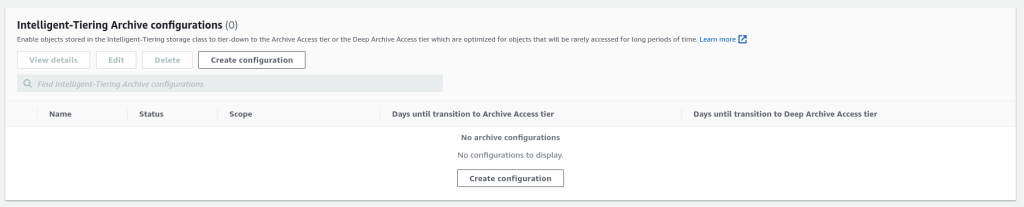
Intelligent-Tiering is another option worth knowing about. It monitors access patterns and moves objects automatically - no rules to write. The Archive Access tier within Intelligent-Tiering handles objects that haven’t been accessed in 90 days. For files you’re unsure about, this removes the guesswork.
intelligent-tiering-archive
The API
S3’s API handles all of this programmatically. You can write scripts to move data between storage classes, restore objects, set policies, and monitor usage. AWS CLI covers most operations, or you can use the SDK in your language of choice.
The API documentation is thorough. You can automate lifecycle transitions, trigger Lambda functions on specific events, set up cross-region replication for disaster recovery - all the enterprise features you’d expect.
Changing Storage Classes
To move an existing object to Glacier Deep Archive:
aws s3 cp s3://mybucket/existing_object.txt s3://mybucket/existing_object.txt --storage-class DEEP_ARCHIVE
To move to Glacier Instant Retrieval:
aws s3 cp s3://mybucket/existing_object.txt s3://mybucket/existing_object.txt --storage-class GLACIER
Wait - that last one needs clarification. The actual storage class name for Instant Retrieval is GLACIER. The older ONEZONE_IA in some examples is for a different tier (One Zone-Infrequent Access, which is S3, not Glacier). Use GLACIER for Instant Retrieval.
To restore an object from Glacier:
aws s3api restore-object \
    --bucket my-glacier-bucket \
    --key doc1.rtf \
    --restore-request Days=10
Objects restored from Glacier stay accessible for the number of days you specify. After that, they go back to archived storage automatically.
Watch out for retrieval fees. Downloading data from Glacier tiers costs extra, especially for Expedited retrievals. Factor this into your backup budget.
Glacier Vault Operations
Vaults are the container level in Glacier. You create them with a name and region, then store archives inside. Unlike regular S3, you can’t manage vault contents through the web console - use the AWS CLI or write code against the REST API.
aws glacier create-vault --vault-name my-vault --account-id -
From there, you upload archives, initiate retrieval jobs, and download results. The CLI handles the job polling and wait times for Expedited and Standard retrievals.
The Short Version
Glacier Instant Retrieval gives you millisecond access at significantly lower cost than S3 Standard. Flexible Retrieval offers the cheapest archival storage with retrieval times ranging from minutes to 48 hours. Lifecycle policies automate moving data between tiers as it ages.
For most teams, the practical approach is: keep working data in Standard, use Intelligent-Tiering to handle the transition automatically, and only write explicit rules when you have specific requirements. Set it and forget it, check the bills quarterly to make sure nothing unexpected happened.
Explore more like this

Golden AMI Pipelines with EC2 Image Builder and AWS CDK L2 Constructs
An EC2 Image Builder component is immutable. Change one line and you need a new version. The recipe referencing that component is immutable too, and the pipeline references the recipe....

CloudFormation Pre-Deployment Validation: Safer CDK and Stack Operations
CloudFormation now runs pre-deployment validation automatically on every CreateStack and UpdateStack operation, not only while creating change sets. A malformed property or resource-name collision can fail before AWS provisions or...

SageMaker Inference Meta-Monitoring with Amazon Quick: Fleet Governance
A SageMaker endpoint can be healthy while its predictions are getting worse. CPU, latency, and 5xx alarms prove that inference runs. They do not prove that fraud recall, credit decisions,...

Comments