
Amazon MSK Express to S3 and Iceberg: Native Kafka Data Delivery

Amazon MSK Express brokers can now deliver Kafka topics directly to two S3 destinations: objects in a general-purpose bucket, or managed Apache Iceberg tables in Amazon S3 Tables. Both paths are native broker capabilities. There is no Kafka Connect fleet to size, patch, scale, or nurse through backpressure.
AWS launched both options on July 30, 2026 with a stated delivery ceiling of 10 GB/s per capability. The service handles scaling, retries, and backpressure without consuming the broker egress throughput used by ordinary clients. AWS estimates up to 60% lower ingestion and delivery cost than self-managed alternatives, while the Iceberg option can reduce downstream query cost by up to 30% compared with a self-managed Kafka pipeline. Those are service claims, not a substitute for your bill and workload test.
The architecture looks simple because AWS removed infrastructure. The data contract is still yours. Schema compatibility, dead-letter handling, partition layout, retention, replay, encryption, access, and reconciliation decide whether the channel is production-ready. This guide implements those controls and explains when raw S3 is better than a streaming table.
For cluster fundamentals, read the Amazon MSK operations guide. The new capability requires a provisioned cluster with Express brokers; Standard brokers and MSK Serverless are not supported.
A Channel is the delivery unit
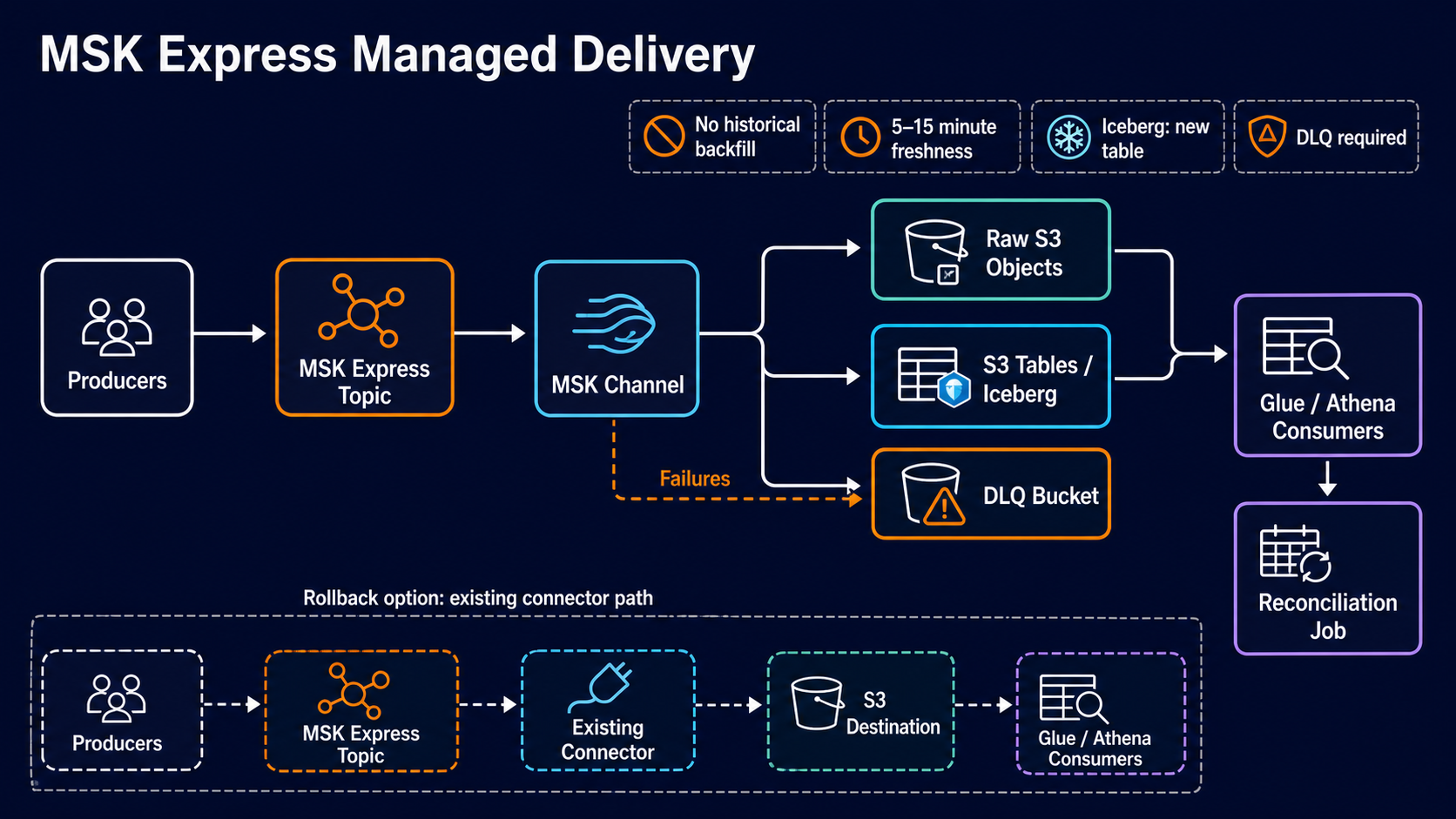
Amazon MSK calls the new resource a Channel. A Channel reads records from one Kafka topic and writes them to one configured destination. Unprocessable records go to a required S3 dead-letter queue (DLQ).
producer -> MSK Express topic -> Data Delivery Channel
                                      |          |
                                      |          +-> required S3 DLQ
                                      +-> S3 objects or S3 Tables Iceberg table
The channel only delivers records produced after it is enabled. It does not backfill older offsets. For S3 Tables, each channel configuration creates a new Iceberg table; it cannot append into an existing table. Those two limits shape every migration plan.
The MSK Data Delivery guide defines the service behavior and links the CreateChannel, DescribeChannel, UpdateChannel, DeleteChannel, and ListChannels APIs.
Choose the destination from the consumer contract
| Capability | S3 general-purpose bucket | S3 Tables with Iceberg |
|---|---|---|
| Output | Objects in source-oriented format | Managed Iceberg table and Parquet files |
| Accepted input | JSON, ByteArray, String | JSON or Glue Schema Registry JSON |
| Schema registry | Not required | Required |
| Compression | Optional GZIP or ZSTD | Parquet with ZSTD or Snappy |
| Partitioning | Configurable object-key time placeholders | Time-based table partitioning |
| Schema evolution | Consumer-owned | Not supported by Channel at launch |
| Maintenance | Your lifecycle and compaction processes | S3 Tables handles compaction, snapshot expiry, and unreferenced files |
| Best use | Archive, replay, raw landing zone, ML corpus | Near-real-time analytics and governed tables |
Pick general-purpose S3 when the durable Kafka record is the product. It preserves ByteArray and String records, supports a raw replay layer, and lets downstream jobs interpret data on their own schedule.
Pick the Iceberg destination when consumers want SQL or Spark access within minutes and can honor a stable JSON schema. AWS performs JSON-to-Parquet conversion, table registration, inline compaction, and concurrent-writer coordination.
If the organization is deciding between streaming technologies rather than just sinks, the Kafka versus Apache Pulsar analysis covers the broader operational tradeoff. Native S3 delivery makes MSK materially easier but does not change Kafka’s producer, partition, or ordering semantics.
Check the hard requirements
Both destination types require:
- an Amazon MSK provisioned cluster using Express brokers;
- an existing Kafka topic;
- an S3 bucket for the required DLQ;
- an IAM service role the Channel can assume;
- a configured freshness interval from 5 to 15 minutes.
The S3 Tables destination additionally requires a same-Region S3 Table bucket and a matching schema in AWS Glue Schema Registry. For the minimum five-minute freshness setting, AWS recommends that the topic produce at least 2.4 MB/s of uncompressed data. Lower-throughput topics should use a larger interval, up to 15 minutes, so the writer can create efficient files.
That last limit is counterintuitive. Asking a low-volume topic for the lowest latency can make its file behavior worse. Near-real-time here means a managed five-to-fifteen-minute window, not per-record transactional visibility.
Define the record contract before creating the Channel
An Iceberg-bound topic needs stable, machine-readable JSON. Avoid producer-dependent timestamps and ambiguous numbers.
{
  "event_id": "evt_01J...",
  "event_type": "order_paid",
  "event_version": 3,
  "occurred_at": "2026-07-30T18:42:17.418Z",
  "tenant_id": "t-1832",
  "order_id": "o-98104",
  "amount_minor": 1599,
  "currency": "USD",
  "source_region": "us-east-1"
}
Use an integer minor unit for money. Use UTC timestamps with an explicit zone. Include event_version, a globally unique event_id, and the business key consumers use for reconciliation. Do not depend on Kafka offset as a permanent cross-system identifier; partitions and topics are transport details.
For Iceberg, register the schema in Glue Schema Registry and configure producers to enforce compatibility before channel creation. Schema evolution is not supported by the Channel at launch. A breaking schema requires a new topic or a coordinated new Channel/table. Plan that version switch now.
Build the S3 landing layout
For general-purpose S3, the output key template should support the dominant read and retention patterns. A reasonable starting layout is:
s3://analytics-raw-prod/msk/
  topic=orders/
  year=2026/month=07/day=30/hour=18/
  <channel-generated-object>
Use the documented time placeholders rather than inventing consumer-side renames. Keep cardinality bounded: tenant ID in the object path can create millions of small prefixes and complicate lifecycle policy. Put high-cardinality fields inside records unless isolation requires separate buckets or access points.
Apply S3 versioning when overwrite recovery matters, a lifecycle policy for retention, and Object Lock when compliance requires write-once retention. The S3 Object Lock guide explains governance and compliance modes. Do not apply Object Lock to the DLQ without deciding how reprocessing marks or removes handled errors.
Create least-privilege roles and buckets
Use separate destination and DLQ buckets so operational error records do not inherit analytics-reader access. The Channel’s service role needs permission to read the MSK topic through the service integration and write only the approved S3 locations. An Iceberg channel also needs Glue Schema Registry and S3 Tables permissions described in the Channel IAM guide.
An illustrative S3 portion looks like this; add the exact MSK, S3 Tables, Glue, and KMS actions from the current destination-specific documentation:
{
  "Version": "2012-10-17",
  "Statement": [
    {
      "Sid": "WriteDeliveryObjects",
      "Effect": "Allow",
      "Action": ["s3:PutObject", "s3:AbortMultipartUpload"],
      "Resource": "arn:aws:s3:::analytics-raw-prod/msk/*"
    },
    {
      "Sid": "WriteDeadLetters",
      "Effect": "Allow",
      "Action": ["s3:PutObject", "s3:AbortMultipartUpload"],
      "Resource": "arn:aws:s3:::analytics-msk-dlq-prod/*"
    }
  ]
}
Do not grant s3:* on every bucket. For customer-managed KMS keys, include the Channel role in the key policy and restrict encryption context where the integration supports it. Enable CloudTrail data events for high-value destinations if the audit requirement justifies the volume.
The S3 monitoring and protection guide provides guardrails that apply to both data and DLQ buckets.
Configure the Channel as a reviewed specification
Use the console for the first sandbox channel if the API schema is new to your automation tooling. Record every choice in a versioned specification so the console is not the source of truth:
name: orders-raw-v1
cluster: orders-stream-prod
broker_type: EXPRESS
topic: orders.v3
destination:
  type: S3_GENERAL_PURPOSE
  bucket: analytics-raw-prod
  key_template: msk/topic=orders/year=!{timestamp:yyyy}/month=!{timestamp:MM}/day=!{timestamp:dd}/hour=!{timestamp:HH}/
  compression: ZSTD
freshness_minutes: 10
dead_letter_bucket: analytics-msk-dlq-prod
service_role: arn:aws:iam::111122223333:role/msk-orders-delivery
This is a design representation, not a copy-paste CreateChannel request. Generate the actual API input from the current service model and validate it in a non-production account. Pin the AWS CLI or SDK version; same-day features often require a client update.
For Iceberg, the spec should also name the Glue registry, schema ARN and version policy, S3 Table bucket, table name, compression, and expected partition interval.
Plan cutover around the no-backfill rule
There is no channel backfill. A safe connector-to-Channel migration uses a timestamp boundary and parallel validation:
- Record current topic offsets and a UTC cutover marker.
- Create the Channel while the existing connector continues.
- Send a known canary record after the Channel becomes active.
- Compare destination counts, event IDs, bytes, and DLQ records for a defined window.
- Stop the old connector only after the Channel’s post-enable range reconciles.
- Preserve the old connector offsets for rollback and historical replay.
If the target needs old data, run a separate bounded backfill from Kafka retention or the existing raw archive. Do not reset or recreate the Channel expecting it to read earlier offsets.
| Data range | Migration owner | Mechanism |
|---|---|---|
| Before Channel enablement | Existing pipeline/backfill job | Connector, replay consumer, or archive copy |
| After Channel enablement | MSK Channel | Native data delivery |
| Failed records | Operations workflow | DLQ triage and explicit replay |
Treat the DLQ as production data
The required DLQ lets delivery continue when a record cannot be processed. That prevents one malformed event from stopping the topic, but it can also hide a broken producer while the main table looks healthy.
Every DLQ workflow needs:
- an alarm on object count and bytes;
- error reason, topic, partition, offset, schema ID, and channel context;
- retention long enough for investigation;
- restricted access because payloads may be sensitive;
- a deterministic repair and replay tool;
- idempotency based on
event_id.
Set an error budget, such as fewer than one failed record per million. The correct threshold depends on use case; payment or security events may tolerate zero. Page on sustained failures and on a complete delivery stall, not every isolated malformed test record.
Monitor the consumer outcome
Broker health remains important, but native delivery removes connector CPU and task metrics. Replace them with Channel signals from the MSK Channel monitoring documentation: delivery lag, processed and failed records, bytes written, throttling, destination errors, and DLQ activity.
Build end-to-end checks too:
producer event_id -> Kafka acknowledgement -> Channel metric
-> S3 object/table query -> reconciliation result
For S3 Tables, monitor snapshot creation, table freshness, query latency, and schema errors. For raw S3, monitor object arrival, average object size, lifecycle transitions, and downstream job delay. A green Channel does not prove that Athena or Spark can query the data contract correctly.
The AWS Glue data-quality anomaly pattern is a strong downstream complement. It checks business data after transport succeeds.
Understand cost before deleting Connect
AWS claims the managed path can reduce ingestion and delivery cost by up to 60% compared with self-managed alternatives. The Iceberg option can reduce query cost by up to 30% through managed layout and compaction. Validate using the current Amazon MSK pricing page.
Compare the complete systems:
| Cost component | Self-managed connector path | Native Channel path |
|---|---|---|
| Worker compute | MSK Connect or EC2/EKS workers | Managed in Channel pricing |
| Broker egress | Connector reads consume path capacity | No added broker egress throughput |
| Operations | Scaling, patching, upgrades, failures | Managed by AWS |
| Storage | S3 objects and possibly temp state | S3 or S3 Tables storage |
| Compaction | Spark/Flink/maintenance jobs | Managed for S3 Tables |
| Query | Depends on file layout | Potentially lower with compacted Parquet |
| DLQ and observability | Customer-built | Still customer-owned around managed signals |
Do not count connector workers but forget S3 Tables request, maintenance, KMS, CloudWatch, data transfer, and query-engine charges. Model average and peak throughput plus the freshness interval.
When native delivery is the wrong fit
Keep MSK Connect or a custom Flink consumer when you need arbitrary transforms, joins, enrichment, per-record delivery below five minutes, a destination other than S3, an existing Iceberg table, non-JSON Iceberg records, or complex schema evolution.
Use native raw S3 for archive, replay, compliance retention, and ML training corpora. Use native S3 Tables when a stable JSON topic should become a queryable table with minimal operations. Use both channels from the same topic when you need an immutable raw layer and an analytics table; AWS says channel reads do not add broker egress throughput, but you should still validate service quotas and cost.
Design for duplicates and reconciliation
Managed retries provide reliable delivery, but downstream consumers should not assume that every business event appears exactly once merely because the Channel is managed. S3 objects and Iceberg rows need an application-level identity for reconciliation and idempotent transforms.
Use event_id as the durable key and retain Kafka topic, partition, offset, and production timestamp as transport metadata when the destination format exposes or allows them. A daily reconciliation job can compare producer counts, Channel metrics, destination counts, and unique IDs:
SELECT
  date_trunc('hour', occurred_at) AS event_hour,
  count(*) AS rows_received,
  count(DISTINCT event_id) AS unique_events,
  count(*) - count(DISTINCT event_id) AS duplicate_rows
FROM orders_streaming_table
WHERE occurred_at >= current_timestamp - INTERVAL '24' HOUR
GROUP BY 1
ORDER BY 1;
Do not delete duplicate raw records. Preserve the landing layer and deduplicate in a curated table so investigations can reconstruct delivery. For Iceberg, use a downstream MERGE into a business table if uniqueness is required; the Channel-created streaming table remains the append-oriented source.
Reconciliation also needs a producer-side count. Publish compact control records or metrics by topic and time window. If the producer reports 10 million accepted events while the destination and DLQ account for 9.7 million, investigate before Kafka retention removes the replay source.
Manage schema changes without wishful thinking
The Iceberg Channel does not support schema evolution at launch. Treat the Glue schema and table shape as immutable for a channel version.
Use a compatibility sequence:
- Add a new topic such as
orders.v4and register its schema. - Dual-publish from the producer or use a reviewed translation process.
- Create a new Channel, which creates a new Iceberg table.
- Validate counts, null behavior, and consumer queries.
- Move consumers to a versioned view that unions or selects the correct table.
- Stop the old topic only after its retention and replay obligations close.
A view can provide continuity:
CREATE OR REPLACE VIEW analytics.orders_current AS
SELECT event_id, occurred_at, amount_minor, currency, NULL AS promotion_code
FROM analytics.orders_v3
UNION ALL
SELECT event_id, occurred_at, amount_minor, currency, promotion_code
FROM analytics.orders_v4;
Avoid changing the meaning of an existing field without changing the event version. Schema compatibility checks catch type changes; they cannot catch a producer that redefines amount from dollars to cents.
For raw S3 delivery, schema evolution is technically freer because the Channel writes the source format. The complexity moves to every reader. Keep a registry and event version anyway.
Test failure and recovery before cutover
Run controlled exercises in a non-production cluster:
- revoke destination write permission and confirm errors and DLQ behavior;
- deny KMS use and verify the alarm identifies the key-policy failure;
- publish malformed JSON and an unknown Glue schema ID;
- throttle or temporarily block the destination path where supported;
- generate traffic above ordinary peak and observe backpressure;
- update the Channel and confirm which settings are mutable;
- delete a test Channel and confirm topic production continues;
- restore service and reconcile all accepted events.
Do not intentionally break shared production buckets. Use dedicated canary channels and buckets with the same policy structure. Capture recovery time and whether operator action was required.
Channel deletion does not mean destination data is deleted. Put data retention and resource cleanup in separate runbooks. An infrastructure stack should not remove a compliance archive merely because the delivery configuration is retired.
Apply a production readiness contract
| Area | Acceptance condition |
|---|---|
| Source | Express cluster, topic health, retention, and producer contract verified |
| Destination | Bucket/table Region, encryption, access, lifecycle, and ownership approved |
| Schema | Registry compatibility and version migration tested for Iceberg |
| Reliability | DLQ, alarms, reconciliation, canary, and replay tool exercised |
| Performance | Peak throughput and chosen 5–15 minute freshness measured |
| Security | Service role, KMS, bucket policies, CloudTrail, and data classification reviewed |
| Cost | Channel, S3/S3 Tables, KMS, monitoring, and query estimate compared with connector baseline |
| Recovery | Previous connector or alternate consumer retained through rollback window |
Prove the economics with one representative topic
Do not estimate the migration using broker throughput alone. Measure a topic with realistic record sizes, compression, partition count, schema variation, and traffic cycles. Record the current connector’s workers, compute, storage, network transfer, support burden, and failure-recovery labor. Then measure the managed Channel, destination requests, KMS calls, S3 or S3 Tables storage, catalog operations, and query cost over the same logical volume.
The cheaper path can change with the destination. Raw S3 objects may lower ingestion complexity but make downstream compaction and schema handling somebody else’s job. Iceberg streaming tables provide a queryable structure sooner, yet they impose a stricter record contract. Price the complete path through the first useful query, not merely Kafka-to-bucket delivery.
Keep the pilot long enough to include a peak, a quiet period, a schema release, and one recovery exercise. A 30-minute throughput test proves capacity; it does not prove the operational or financial case.
The key design decision is not “connector or no connector.” It is whether your record contract fits the managed Channel. If it does, native delivery removes an entire operational tier. If it does not, forcing the topic into that shape only moves complexity into producers and consumers.
Sources
Explore more like this

Cloud IoT Security: Zero Trust, Identity, and Signed Updates
On September 11, 2026, the Cyber Resilience Act’s incident-reporting rules start applying in the European Union. That is 22 days after this article’s publication date. A manufacturer that learns of...

Kill the Docker Hub Token: OIDC Trust for GitHub Actions
On July 31, 2026, Docker shipped OIDC connections for GitHub Actions to any organization on a Docker Team, Docker Business, or Docker Hardened Images subscription, plus organizations in the Docker-Sponsored...

Bedrock Web Search: Grounding an Agent Without Building a Scraper
On August 4, 2026, AWS made Web Search on Amazon Bedrock generally available, and the entire integration surface is one JSON object: {"type": "web_search"}. That is the whole change from...

Comments