
GitLab 19.2 Agentic Automation: Duo CLI, Custom Flows, and Security Review in Practice

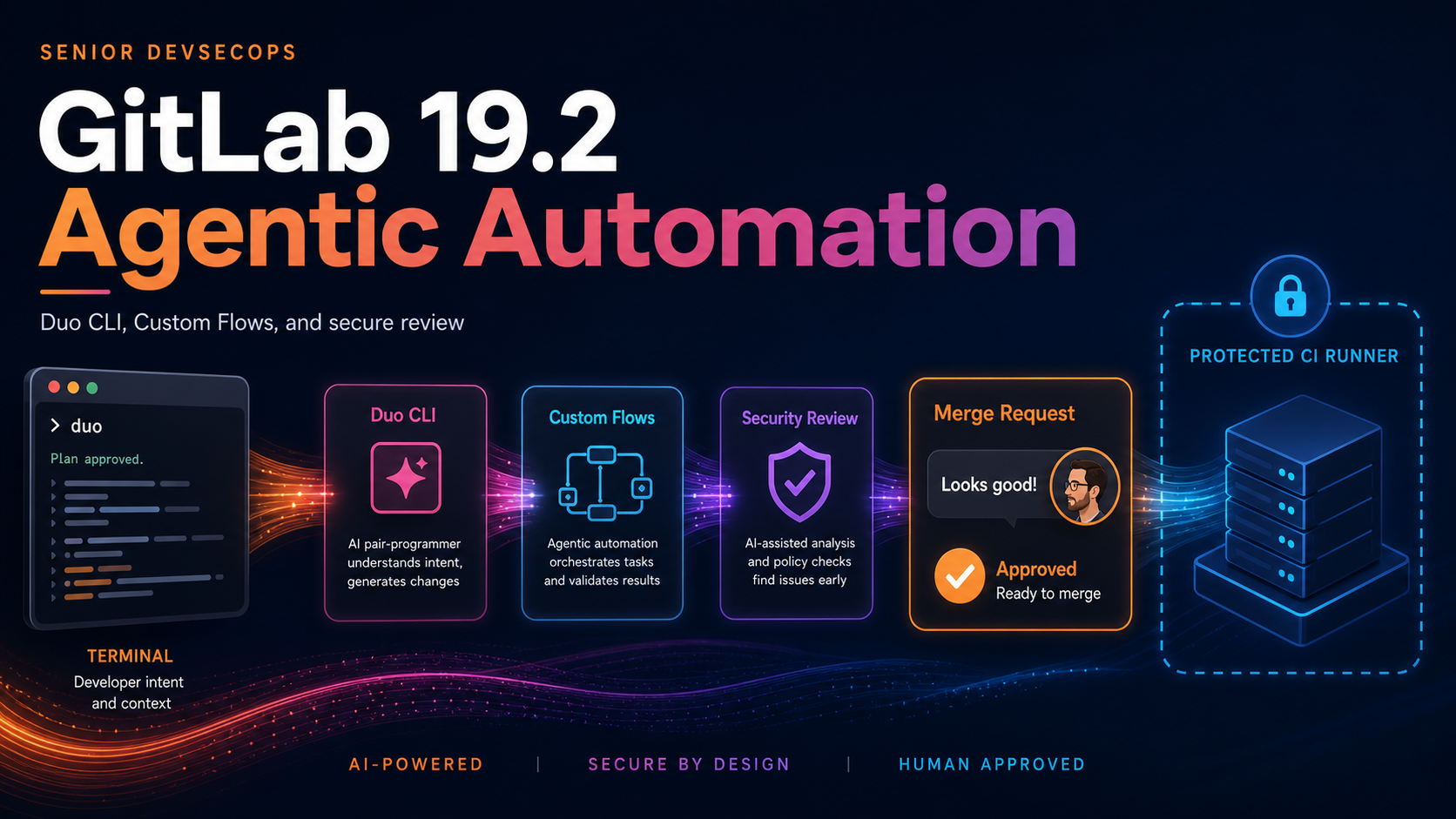
GitLab 19.2, released July 16, 2026, makes two agentic surfaces generally available: Duo CLI and Custom Flows. It also moves dependency-scanning auto-remediation and Security Review Flow into beta. The release matters because agent work is no longer confined to a chat response. It can run commands on a developer workstation, execute inside a CI runner, create commits, open merge requests, review business logic, and attempt repairs after a dependency update breaks the pipeline.
That power creates a tempting but dangerous shortcut: connect the agent, let it clear the backlog, and treat the merge request as proof of safety. A generated diff is still a code change. A passing pipeline is still limited to the tests you wrote. A service account is still an identity with reachable projects. GitLab adds useful controls, but a platform team must place them deliberately.
This guide follows one change from local investigation through a Custom Flow, Security Review, and human approval. It also draws the boundaries between interactive CLI and headless mode, where tool approvals disappear.
Four capabilities landed together
| Capability | GitLab 19.2 status | Primary use | Important boundary |
|---|---|---|---|
| GitLab Duo CLI | Generally available | Local code, pipeline, and repository work | Runs with the human user’s local and GitLab access |
| Custom Flows | Generally available | Repeatable multi-agent workflows triggered by GitLab events | Execute through runners and service accounts |
| Security Review Flow | Beta | Find logic flaws in merge-request diffs | Does not replace SAST, tests, or human review |
| Dependency scanning auto-remediation | Beta | Open version-bump MRs and attempt breaking-change fixes | Requires Ultimate and supported package managers |
Custom Flows are available across Free, Premium, and Ultimate offerings, subject to Agent Platform prerequisites and credit availability. Duo CLI requires Premium or Ultimate. Security Review Flow and dependency auto-remediation require Ultimate. Check the live documentation before committing a rollout to a license assumption.
GitLab Credits add a second constraint. Agent actions can consume a shared commitment or on-demand credits, and automated service accounts do not receive a person’s included allocation. A feature can be technically enabled and then stop when a cap is reached. The GitLab Credits documentation should be part of capacity planning, not an invoice surprise.
Begin with an ordinary failure
Use a narrow problem for the first rollout: a failing test caused by a small dependency update, for example. Do not start with “modernize this monorepo” or “fix every vulnerability.” The narrow goal makes the agent’s authority and success criteria observable.
Assume a merge request upgrades an HTTP client and the integration test now fails because a timeout option changed. The desired workflow is:
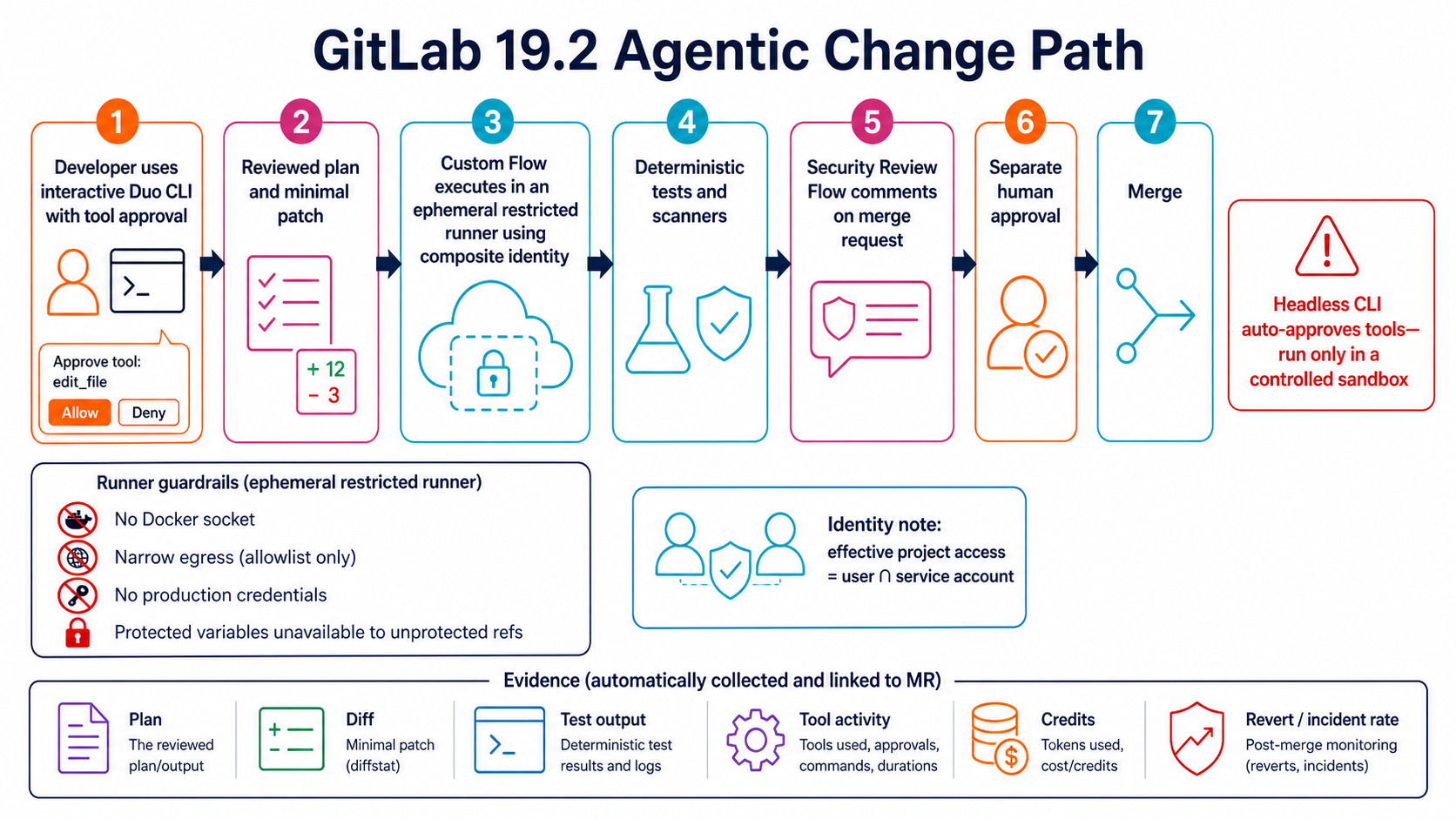
- A developer uses Duo CLI in plan mode to understand the failure.
- The developer reviews the proposed files and commands before writes occur.
- A Custom Flow reproduces the same remediation in an isolated runner when future dependency MRs fail.
- Security Review Flow examines the resulting diff for authorization and data-exposure errors.
- A different human approves the merge request under the normal branch policy.
The agent is not the approver. It is a change author and reviewer whose work feeds the same controls as human work.
Install Duo CLI with one credential path
GitLab supports Duo CLI through glab or as the standalone duo binary. Using glab avoids a second authentication setup:
glab version
glab auth status
glab duo cli --update
glab duo cli
GitLab 19.2 or later is required for the GA experience, and current documentation recommends Duo CLI 9.0.0 or later. glab version requirements also change, so use the Duo CLI setup guide rather than freezing the minimum in a corporate wiki.
The standalone route installs @gitlab/duo-cli and authenticates with a personal access token. Avoid passing a token on a command line or writing it into a project .env. For CI, use a masked, protected variable only when the workflow genuinely requires a human-style token; runner-based flows normally use GitLab’s own workflow identities.
Interactive mode supports plan and build work, shared sessions, model selection, MCP connections, skills, and AGENTS.md. Keep project instructions short and reviewable. The GitLab Functions guide offers a useful contrast: deterministic reusable CI logic belongs in a function; ambiguous analysis or repair may belong in an agent flow.
Use interactive mode for discovery
From the merge-request branch:
glab duo cli
Give the agent a constrained request:
Analyze the failing integration test for the HTTP client upgrade.
Do not modify files yet.
Identify the API behavior that changed, list the smallest candidate fix,
name every file you would edit, and specify the tests you would run.
Review repository reads and proposed commands. Then allow the smallest build step:
Implement only the timeout compatibility fix. Do not change public APIs,
dependency versions, pipeline configuration, or unrelated formatting.
Run the targeted integration test and show the diff.
Interactive approvals are valuable because the local CLI has no runner sandbox. GitLab’s security model says IDE and CLI agents can encounter the “lethal trifecta”: access to private data, exposure to untrusted content, and the ability to communicate or act. Human tool approval is a primary defense in that mode.
Review git diff, run the test independently, and inspect any new network or file access. The agent’s explanation is not evidence that the command did what it claimed.
Headless mode removes the approval pause
glab duo cli run starts a fresh non-interactive workflow:
eslint_output=$(npm run lint 2>&1 || true)

glab duo cli run \
  --goal "Fix only these lint errors. Do not alter dependencies or CI configuration: ${eslint_output}"
GitLab explicitly warns that headless mode automatically approves all tools and retains no context from previous conversations. A new run starts each time. That is appropriate only inside a controlled workspace with limited credentials, network egress, filesystem scope, and a disposable branch.
| Execution surface | Tool approval | Isolation | Recommended use |
|---|---|---|---|
| Interactive Duo CLI | Human approves write/API/terminal operations | Developer machine; no agent sandbox | Investigation and supervised changes |
| Headless Duo CLI on a workstation | Automatic | Developer machine; no agent sandbox | Avoid for untrusted repositories or broad goals |
| Custom Flow in GitLab Runner | Defined tools; no interactive approval by default | Runner job sandbox plus configured restrictions | Repeatable, reviewed automation |
| Agentic Chat in UI | Approval for write API tools | Server-side, not a runner sandbox | Repository questions and bounded GitLab actions |
The GitLab agentic threat model describes sandboxing, network restrictions, tool limits, prompt-injection detection, and secret redaction by surface. Build the rollout from that matrix.
Turn the proven repair into a Custom Flow
Custom Flows are YAML-defined workflows managed from a project or the AI Catalog. They can respond to mentions, assignments, pipeline events, and merge-request events. The exact YAML schema evolves, so create and validate the flow using the GitLab 19.2 UI or current schema rather than copying an old experimental file.
A good flow definition separates analysis, implementation, verification, and approval:
version: "v1"
environment: ambient
components:
  - name: analyze_failure
    type: AgentComponent
    prompt_id: analyze_dependency_failure
  - name: propose_patch
    type: AgentComponent
    prompt_id: implement_minimal_dependency_fix
  - name: verify_patch
    type: DeterministicComponent
    inputs:
      script: ./ci/verify-dependency-fix.sh
  - name: approval
    type: HumanInputComponent
    inputs:
      message: Review the patch and verification evidence before MR creation
routers:
  - from: analyze_failure
    to: propose_patch
  - from: propose_patch
    to: verify_patch
  - from: verify_patch
    to: approval
Treat this as an architectural sketch, not a promise that every field matches your installed schema. The current Custom Flows documentation and editor validation are authoritative.
The deterministic verification component should run a repository script that engineers can execute without an AI system. Put assertions, test selection, and artifact creation there. Agent reasoning proposes; ordinary code proves.
Custom Flows can include human-in-the-loop checkpoints. Place them before privileged effects such as opening a merge request, changing infrastructure, or updating a protected environment. A checkpoint after production deployment is merely an acknowledgment.
Composite identity limits authority by intersection
When a flow is enabled, GitLab creates a service account in the top-level group and adds it to the project, normally with Developer access. At execution, a one-time composite identity combines the initiating human and service account. Effective access is the intersection: the flow cannot exceed either identity.
If the human is a Maintainer and the service account is a Developer, the flow acts as a Developer. If the service account has access to five projects but the human can see only two, the flow should reach only their intersection.
This model helps, but shared service-account membership still deserves review. GitLab warns that sharing flow service accounts across top-level groups can produce unintended access. Keep flows private by default, grant the service account only required projects, and audit group sharing.
Commits can show the service account while merge-request authorship is attributed to the human who directed the work. That supports segregation of duties: the initiating user should not approve their agent-authored MR merely because the service account wrote the commit. The composite identity documentation explains the attribution and token scopes.
Harden the runner execution
Flows executed from the GitLab UI run in CI/CD. The runner downloads Duo CLI, connects to the workflow service over WebSocket, and executes tools directed by the model. Your runner is therefore a security boundary.
Use a dedicated runner class for agent flows:
- Ephemeral executor with a clean workspace per job
- No Docker socket, host PID, or privileged mode unless a reviewed flow requires it
- Narrow outbound allowlist for GitLab, package mirrors, and approved APIs
- No production cloud credential in the default environment
- Protected variables unavailable to unprotected refs
- Job-token allowlist restricted to required projects
- Resource and time limits
- Artifacts containing the plan, diff, test output, and tool activity
The same isolation principles in the GitLab Runner handbook become more important when commands are selected dynamically. A runner designed for trusted release scripts should not automatically become an agent sandbox.
GitLab 19.2 adds ID-token variables for flow execution. Prefer short-lived workload identity over static cloud keys when calling AWS or another provider. Scope the role to a read-only test account unless the flow’s purpose explicitly requires a write.
Add Security Review without dropping existing scanners
Security Review Flow examines merge-request intent and can identify authorization bypasses, data exposure, race conditions, and logic errors that pattern scanners often miss. To request it, assign the Duo Security Review service account as a reviewer. Findings appear as threaded comments with severity, CWE classification, and, where possible, an inline fix.
That is a different signal from SAST. Keep both.
| Control | Strong at | Weak at |
|---|---|---|
| SAST | Known code patterns, taint paths, repeatable coverage | Business intent and cross-file logic |
| Dependency scanning | Known vulnerable package versions | Application-specific exploitability and logic |
| Secret detection | Recognizable credentials and tokens | Authorization design |
| Security Review Flow | Diff intent, logic flaws, contextual reasoning | Guaranteed completeness and deterministic reproduction |
| Human security review | Architecture, threat model, organizational context | Scale and consistency |
The GitLab advanced SAST/DAST guide shows how to preserve conventional scanning. Configure merge approvals so an agent comment cannot satisfy a required human security approval.
Security Review Flow is beta and consumes credits based on MR complexity. Start with repositories where false positives and missed findings can be measured against an existing review process. Do not switch off a scanner because the agent found one clever bug.
Use dependency auto-remediation behind normal review
Dependency scanning auto-remediation opens a merge request that upgrades a vulnerable dependency. In 19.2, agentic breaking-change resolution can attempt to repair a pipeline failure caused by the bump. The MR still goes through ordinary review and approval.
Prerequisites include Dependency Scanning results, a supported package manager, an attached auto-remediation profile, and at least one active project Maintainer. Owners do not satisfy that Maintainer check. The breaking-change repair feature has its own feature flag and is not a reason to enable every preview globally.
For a safe first rollout:
- Limit to low-risk libraries and patch/minor updates.
- Require lockfile integrity and software-bill-of-materials regeneration.
- Run unit, integration, contract, and license checks.
- Block changes to CI, deployment, authentication, or database migrations without specialist approval.
- Keep the auto-generated MR separate from unrelated code.
The SBOM and supply-chain security pipeline provides the artifact and policy controls that an automated version bump still needs.
Measure more than merged changes
An agent program can merge more code while making delivery worse. Track operational outcomes:
| Metric | Useful interpretation |
|---|---|
| Flow completion rate | Reliability of automation, not code correctness |
| Human edits after agent output | Quality and prompt/instruction drift |
| Reverted agent MRs | Escaped defects or weak verification |
| Lead time from finding to fix | Whether automation clears security backlog |
| Review finding acceptance rate | Signal quality of Security Review |
| Credits per accepted change | Cost efficiency |
| Incidents tied to agent-authored changes | Real risk outcome |
| Privileged tool denials | Whether flow asks for authority it should not need |
Use DORA measures for the full delivery system. The DORA metrics implementation guide prevents a local “tickets closed” metric from hiding a higher change-failure rate.
Set credit caps and alerts before broad triggers. GitLab notes that caps use recent rather than real-time data, so some additional consumption can occur before enforcement. A subscription cap can suspend Agent Platform features for everyone after on-demand usage reaches the limit. That failure mode belongs in the operating plan.
A rollout sequence that preserves trust
Week one should be interactive Duo CLI for a small, experienced group. Require plan-first prompts, inspect tool approvals, and record which tasks actually save time.
Next, encode one successful task as a private Custom Flow on a dedicated runner. Keep its repository scope narrow, network restricted, and writes confined to a branch. Add a human checkpoint before MR creation.
Then enable Security Review Flow as an extra reviewer on selected repositories. Compare findings with SAST and human review. Only after the team understands false positives and credit use should it become automatic.
Finally, pilot dependency auto-remediation for low-risk packages. Measure time-to-fix and rollback rate. Do not expand by executive deadline; expand when evidence shows the review system can absorb the volume.
GitLab 19.2 makes agentic work governable enough to use, not safe enough to ignore. The winning pattern is deterministic tests around probabilistic changes, composite identity around delegated action, isolated runners around tool execution, and human approval before consequences. Keep those four, and the new features can clear genuine backlog without manufacturing a larger one downstream.
Measure the rollout and keep a kill switch
Agent adoption should be judged by verified engineering outcomes, not generated lines or the number of merge requests. Start with a small repository set and record a baseline before enabling flows.
Useful measures include time from failing pipeline to reviewed fix, first-pass test success, human review time, revert rate, escaped defects, security findings confirmed as valid, credits per accepted change, and the percentage of agent MRs substantially rewritten by a human. Segment by flow and repository risk; a global average hides a dangerous workflow behind many trivial successes.
Review denied or failed operations too. Repeated attempts to edit CI configuration, access unrelated projects, reach blocked networks, or consume protected variables may reveal a prompt problem, malicious repository content, or excessive tool scope.
Define automatic pause conditions before launch:
| Trigger | Response |
|---|---|
| Agent-authored change causes a production incident | Disable the affected flow and preserve its session evidence |
| Runner attempts prohibited network or host access | Stop the runner class and rotate exposed credentials if necessary |
| Credit burn exceeds the planned envelope | Pause automatic triggers; retain supervised use |
| Security Review produces unmanageable false positives | Narrow repository scope and measure precision before expansion |
| Composite identity reaches an unexpected project | Disable the shared flow/service account and audit group membership |
The kill switch must be executable without the agent platform. Document how to disable a flow, revoke its service account or token, stop its dedicated runners, block outbound access, and prevent automated merge. Test the procedure in non-production.
Revisit permissions after the first month. Remove unused tools, projects, variables, trigger events, and network destinations. Promote a workflow only when accepted-change quality, cost, and security evidence improve over the baseline. More autonomy is an earned operating state, not the default consequence of a generally available feature.
Sources
Explore more like this

Kill the Docker Hub Token: OIDC Trust for GitHub Actions
On July 31, 2026, Docker shipped OIDC connections for GitHub Actions to any organization on a Docker Team, Docker Business, or Docker Hardened Images subscription, plus organizations in the Docker-Sponsored...

Bedrock Web Search: Grounding an Agent Without Building a Scraper
On August 4, 2026, AWS made Web Search on Amazon Bedrock generally available, and the entire integration surface is one JSON object: {"type": "web_search"}. That is the whole change from...

ECR Now Allows 200 GB Image Layers. Your Model Weights Still Do Not Belong There
On August 3, 2026, AWS raised the maximum Amazon ECR image layer size to 200 GB for images pushed with docker push. The announcement names the driver in the second...

Comments