
Amazon DocumentDB: A Powerful and Flexible Database Solution

If you’ve worked with MongoDB and want something that just works without babysitting servers, Amazon DocumentDB deserves a look. It’s a fully managed document database that plays nice with MongoDB workloads, which means you can often lift your existing code and drop it right in.
What DocumentDB Brings to the Table
Fully Managed: AWS handles the boring stuff—hardware setup, patching, backups, the whole rigamarole. You focus on building your app instead of wrestling with infrastructure.
MongoDB Compatibility: DocumentDB supports MongoDB 3.6, 4.0, 5.0, 6.0, and 7.0. Most of your existing drivers and tools will connect without changes. It’s not a perfect clone, but the compatibility is solid for most workloads.
Scalability: You can scale compute and memory up or down as needed. If traffic spikes, you can respond without rearchitecting everything.
Security: Data gets encrypted at rest and in transit. It runs inside your VPC for network isolation, and IAM lets you control access with fine-grained permissions.
Built-in AWS Integration: Lambda, CloudWatch, IAM—all the usual AWS suspects connect without friction.
How It Actually Works
Amazon DocumentDB
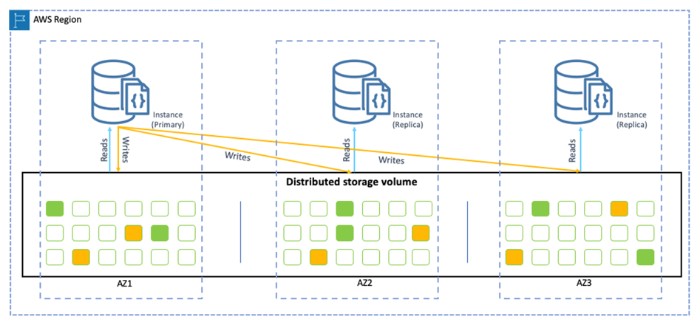
Under the hood, DocumentDB spreads your data across multiple physical servers. Each cluster stores everything in a volume that gets replicated across three Availability Zones automatically. If one AZ goes down, you’re still covered.
For heavier workloads, it shards data across instances. This lets you scale out horizontally rather than being stuck with vertical limits.
Read replicas take some of the load when you have read-heavy operations. And if you need data in another region, global clusters use asynchronous replication to keep copies in sync across geographic boundaries. You can query from the nearest region without waiting for cross-continental round trips.
The Good
- Scales horizontally: Add capacity without redesigning your stack
- Handles failure: Automatic failover and multi-AZ redundancy mean your data survives AZ outages
- Security built in: Encryption and IAM access control come standard
- MongoDB compatibility: Most existing code works without major rewrites
- ACID transactions: Data stays consistent even for complex operations
- Flexible schema: Store JSON your way, not AWS’s way
Where It Falls Short
Regional availability: DocumentDB doesn’t live in every AWS region yet. If you need global coverage, check whether your region is supported first.
Not every MongoDB feature: Some specific MongoDB capabilities don’t translate. You may need to adjust queries or workflows that rely on advanced features.
JSON only: If you need to store relational data or other formats, look elsewhere. DocumentDB is built for document-oriented work.
What It Costs
DocumentDB uses pay-as-you-go pricing. You pay for instance hours, storage, and data transfer—no upfront commitments. The AWS Simple Monthly Calculator helps you estimate costs before you commit.
The free tier is generous: 750 hours per month of instance usage plus 20 GB of storage. It’s enough to run a small project or test things out before spending money.
Getting Started
- Create an AWS Account if you don’t have one already at https://aws.amazon.com.
- Spin up a cluster: Head to the DocumentDB section in the AWS Console and create a new cluster. Pick your instance size and configure options.
- Connect: Use the MongoDB shell or any MongoDB client to connect to your new cluster endpoint.
- Create your database: Once connected, set up your database and collections.
Wrapping Up
DocumentDB works well if you want MongoDB compatibility without managing infrastructure. The security is solid, scaling is straightforward, and the AWS integration makes it a natural fit if you’re already in that ecosystem.
Just do your homework on regional availability and the specific MongoDB features you need before committing. For many use cases—content management, IoT data pipelines, real-time apps—it handles the job without headaches.
Explore more like this

Cloud IoT Security: Zero Trust, Identity, and Signed Updates
On September 11, 2026, the Cyber Resilience Act’s incident-reporting rules start applying in the European Union. That is 22 days after this article’s publication date. A manufacturer that learns of...

Bedrock Web Search: Grounding an Agent Without Building a Scraper
On August 4, 2026, AWS made Web Search on Amazon Bedrock generally available, and the entire integration surface is one JSON object: {"type": "web_search"}. That is the whole change from...

ECR Now Allows 200 GB Image Layers. Your Model Weights Still Do Not Belong There
On August 3, 2026, AWS raised the maximum Amazon ECR image layer size to 200 GB for images pushed with docker push. The announcement names the driver in the second...

Comments