
AWS Network Firewall for EKS and ECS: Policy by Namespace, Label, and Cluster

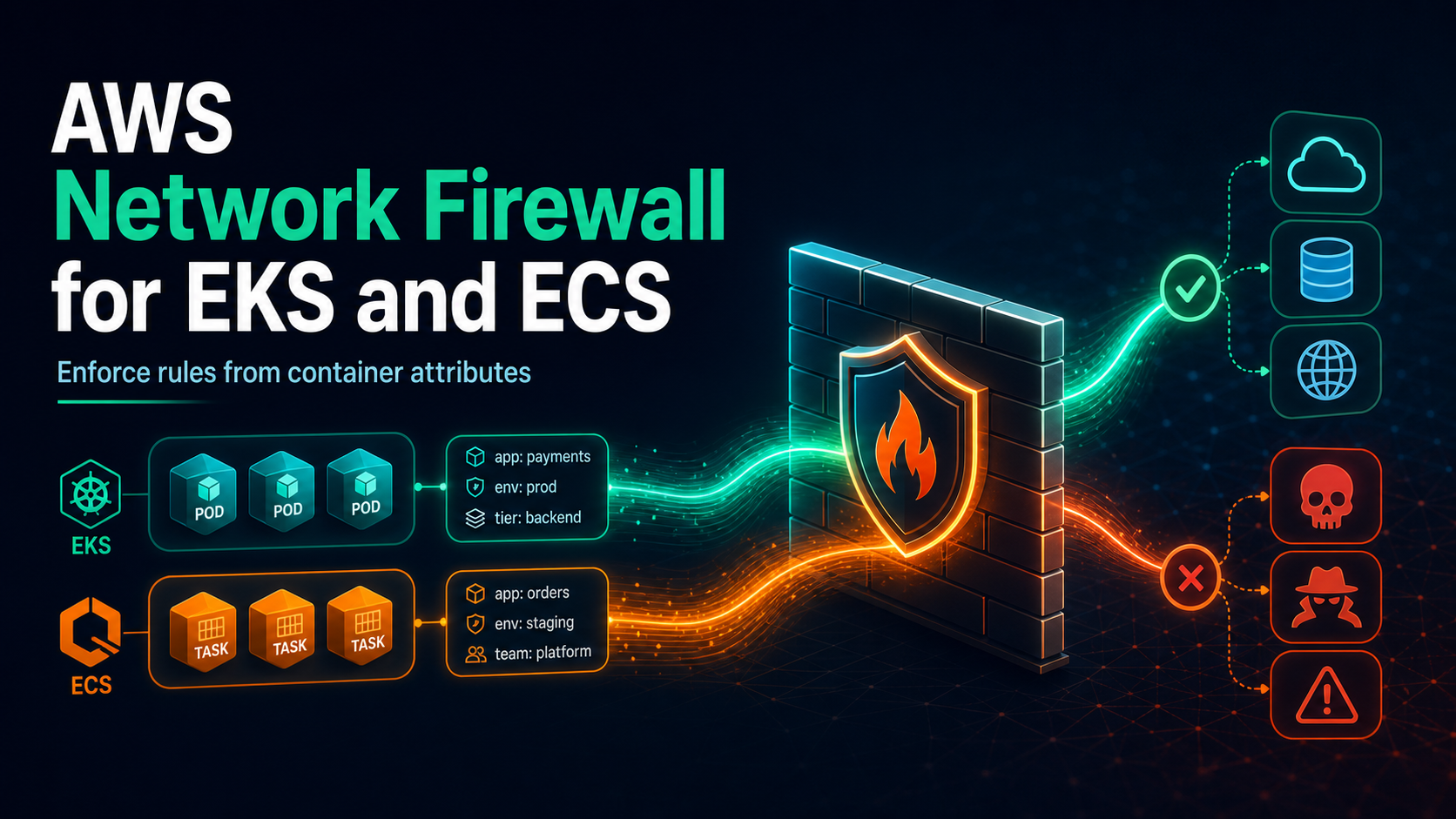
A Kubernetes label could describe a payment workload for years, while the Pod IP behind that label may survive for three minutes. Traditional firewall policy sees the three-minute identifier. AWS Network Firewall container associations, launched June 30, 2026, let the firewall continuously resolve selected EKS and ECS attributes into the current set of workload IP addresses.
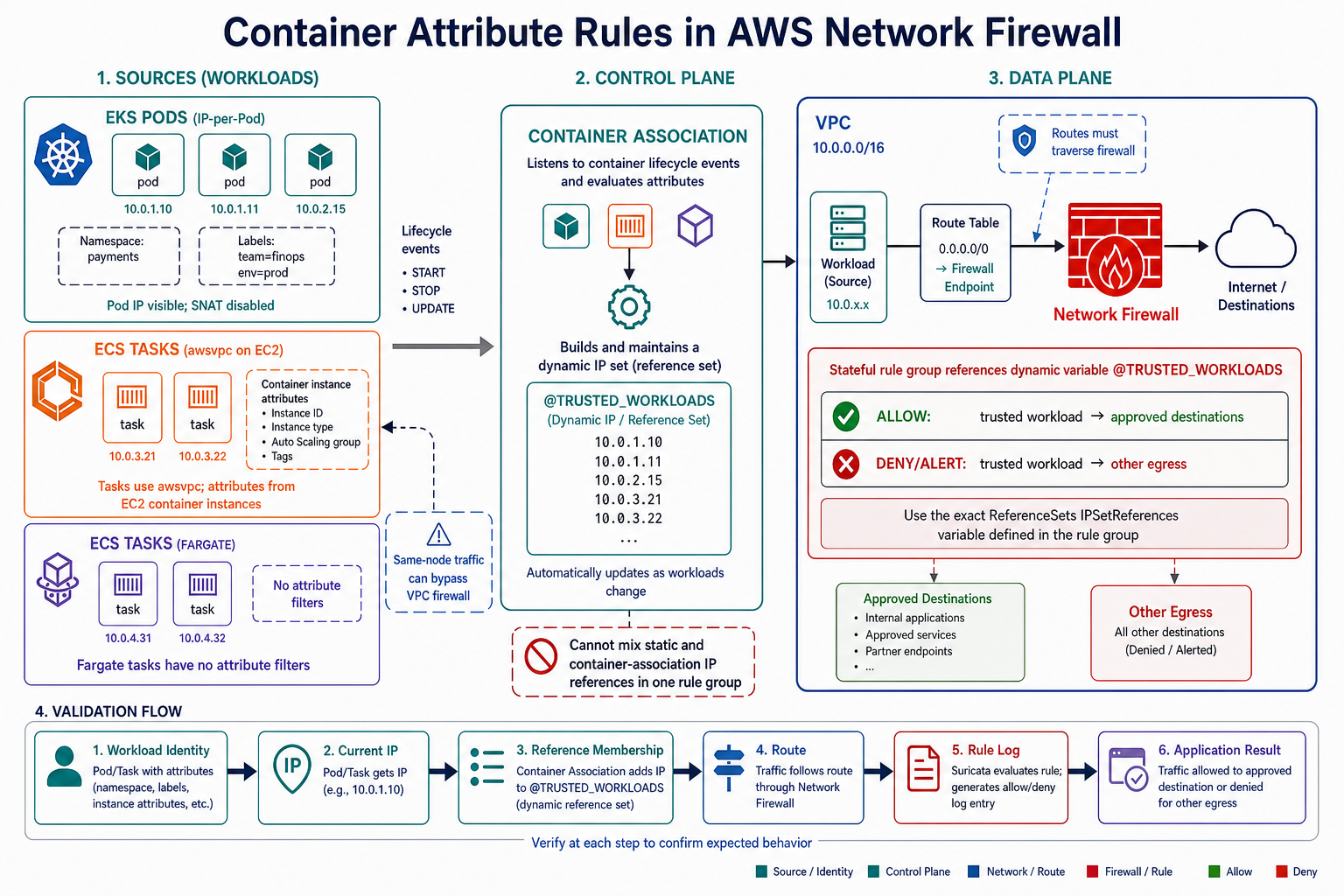
The feature does not place an agent in the packet path. Network Firewall subscribes to container lifecycle events, builds a dynamic IP set, and makes that set available to stateful rule groups. Your existing Network Firewall endpoints still inspect the packets. If traffic never traverses those endpoints, the new association cannot enforce anything.
That distinction is the center of a safe design. Attribute-aware rules solve identity-to-IP drift; they do not solve routing, same-node Pod traffic, Kubernetes admission control, label integrity, or TLS key management. This guide covers the complete chain and extends the centralized AWS Network Firewall inspection architecture with container identity.
The new control has two planes
The control plane watches workload events. For EKS, Network Firewall uses the EKS Pulse Event Service to learn Pod start and stop information. For ECS, it creates AWS-managed event rules for task lifecycle events. A service-linked role gives Network Firewall the required monitoring permissions.
The data plane remains the firewall endpoint. At packet evaluation time, a Suricata variable such as @PAYMENTS_PODS expands to the IPs currently associated with the selected namespace or labels.
| Plane | Responsibility | Failure symptom |
|---|---|---|
| Container association | Track clusters, filter attributes, maintain dynamic IP set | Association not ACTIVE, empty or stale membership |
| VPC routing | Send workload traffic through a Network Firewall endpoint | Packets bypass policy entirely |
| Stateful rule group | Match the association variable and inspect traffic | Traffic reaches firewall but takes wrong action |
| Kubernetes/ECS governance | Protect attributes that define membership | Workload joins a privileged group through label or placement change |
| Logging/SIEM | Preserve action plus association context | Enforcement works but incident ownership is unclear |
The association interacts with lifecycle metadata, not live traffic. Network Firewall adds container-association context to alert logs, which makes it easier to connect a blocked flow to a workload group.
EKS and ECS do not expose the same attributes
For EKS, filters can select namespace and Kubernetes labels. AWS also discusses cluster and Pod context in enriched logs. Labels are the most flexible selector, but flexibility creates a governance problem: anyone who can change the label may be able to change the firewall group.
For ECS, attribute filters match EC2 container-instance attributes. Fargate tasks do not have container-instance attributes. To collect their IPs, create the ECS association without attribute filters. ECS tasks must use awsvpc; bridge and host networking are unsupported.
| Platform | Supported association approach | Critical limitation |
|---|---|---|
| EKS on EC2 | Namespace and label filters | Pod IP must remain visible at firewall; disable SNAT on the inspected path |
| EKS on Fargate | EKS Pod lifecycle association | Same original-Pod-IP routing requirement |
ECS on EC2 with awsvpc |
Cluster plus container-instance attribute filters | Instance attribute describes placement, not an ECS task label |
| ECS on Fargate | Unfiltered ECS association | Attribute filters do not match Fargate tasks |
| ECS bridge or host mode | Unsupported | Firewall cannot build the required task-IP identity |
Each container association can contain up to five monitoring configurations. The target clusters must be in the same account and Region as the association. The current default quota is 100 associations per account per Region and is adjustable; references per rule group and configurations per association have fixed quotas. Confirm current values in the container-association documentation.
Routing is a prerequisite, not a side effect
Creating the association does not modify route tables. For centralized egress inspection, workload-subnet default routes often lead to a Network Firewall endpoint, then to NAT Gateway or another egress. Return traffic must be symmetric. A route that sends the request through the firewall and the response around it can break stateful inspection.
For EKS, source NAT must be disabled on the inspected path so Network Firewall sees the Pod IP. If the VPC CNI replaces the source with a node IP before the packet arrives, an association containing Pod IPs will never match.
That requirement can conflict with established egress patterns. Review AWS_VPC_K8S_CNI_EXTERNALSNAT, node routing, NAT, Transit Gateway, and centralized inspection paths in a test cluster before changing production. The EKS VPC CNI networking guide explains Pod addressing and SNAT behavior in more depth.
Same-node Pod-to-Pod traffic does not leave the node and cannot traverse a VPC Network Firewall endpoint. Use Kubernetes NetworkPolicy, Cilium, a service mesh, or host-level controls for east-west traffic at that boundary. The Cilium and eBPF networking guide covers the in-cluster layer.
Design label ownership before the rule
Consider a rule allowing security-tier=payments workloads to reach a payment gateway. If a developer can add that label to any Deployment, the developer can join the allowed IP set without touching Network Firewall.
Use a label contract:
network.bitslovers.com/egress-profile = payments
network.bitslovers.com/data-class     = regulated
network.bitslovers.com/owner          = checkout-platform
Reserve the prefix for platform automation. Enforce allowed values and mutation rules with Kyverno or another admission controller. Keep application selectors separate from security membership where practical; reusing a broad app=payments label ties firewall authority to ordinary deployment edits.
An admission policy should deny security-label changes unless an approved service account or workflow makes them. The Kyverno policy-as-code implementation provides the GitOps and validation pattern. Audit both the Deployment template and live Pod labels because controllers create Pods from templates.
For ECS on EC2, instance attributes describe the container instance, so protect the process that registers and updates those attributes. Do not schedule trusted and untrusted workloads onto the same attribute group and pretend task identity remains distinct.
Create an EKS association
The exact filter-key names are service-defined; retrieve and validate them against the current API documentation rather than inventing a convention. A production command has this shape:
aws network-firewall create-container-association \
  --container-association-name payments-prod-pods \
  --type EKS \
  --description 'Production payment workloads approved for gateway egress' \
  --container-monitoring-configurations '[
    {
      "ClusterArn":"arn:aws:eks:us-east-1:111122223333:cluster/prod-a",
      "AttributeFilters":[
        {"Key":"namespace","Value":"payments"},
        {"Key":"network.bitslovers.com/egress-profile","Value":"payments"}
      ]
    }
  ]'
After creation, wait for ACTIVE and inspect the resolved status before attaching policy. The lifecycle is CREATING, ACTIVE, UPDATING, and DELETING. During UPDATING, the previous configuration continues to operate. Updates require the latest optimistic-concurrency token from a describe call.
The first association may create AWSServiceRoleForNetworkFirewall; the caller needs iam:CreateServiceLinkedRole. Subsequent associations share that role. Apply least privilege to who can create and update associations because changing a filter changes which IPs a firewall rule controls.
Reference the dynamic set in a stateful rule group
Add the association ARN under ReferenceSets.IPSetReferences, give it a variable name, and use the variable in Suricata-compatible rules:
aws network-firewall create-rule-group \
  --rule-group-name payments-container-egress \
  --type STATEFUL \
  --capacity 100 \
  --rule-group '{
    "RulesSource": {
      "RulesString": "pass tls @PAYMENTS_PODS any -> any 443 (msg:\"allow approved payment endpoint\"; flow:to_server,established; tls.sni; dotprefix; content:\".payments.example\"; endswith; nocase; sid:101; rev:1;)\nreject tls @PAYMENTS_PODS any -> $EXTERNAL_NET 443 (msg:\"reject other payment pod TLS egress\"; flow:to_server,established; sid:102; rev:1;)"
    },
    "ReferenceSets": {
      "IPSetReferences": {
        "PAYMENTS_PODS": {
          "ReferenceArn": "arn:aws:network-firewall:us-east-1:111122223333:container-association/payments-prod-pods"
        }
      }
    }
  }'
Replace the demonstration domain with the approved destination and test the Suricata syntax in your rule-order model. Strict order, default actions, pass, drop, reject, and alert interact. A broad earlier pass can make a later deny irrelevant.
A rule group’s IP set references must be all regular IP sets or all container associations. You cannot mix static prefix-list references and container associations in the same group. Split the policy into separate rule groups when both are required.
Up to 30 container-association references can appear in one rule group under the current fixed quota. Deletion protection prevents removing an association while a rule group references it. Remove references, wait for propagation, then delete.
Build policy in alert-first stages
Do not start with a broad reject in production. Container identity, routes, DNS, TLS SNI, and application dependencies can all be incomplete.
| Stage | Rule action | Exit condition |
|---|---|---|
| Discovery | alert on selected workload egress |
Known destinations and owners cover representative traffic |
| Allow validation | pass approved FQDN/TLS patterns plus alerts for remainder |
Synthetic and real requests succeed through firewall |
| Enforcement canary | reject or drop for one low-risk namespace/workload |
Error budget and support signals remain normal |
| Wider enforcement | Expand selected attributes | No unexplained bypass or business dependency |
| Continuous assurance | Test membership, route, and rule behavior after change | Automated negative and positive tests pass |
reject returns a failure to the caller, which often shortens diagnosis. drop silently discards traffic and may exercise retry storms or long timeouts. Choose deliberately based on the threat model and application behavior.
The AWS walkthrough demonstrates an allowed curl returning HTTP 200 and a rejected TLS request failing with curl exit code 35. Copy the testing method, not the sample domains. Your test should use a purpose-built allowed endpoint and a harmless denied endpoint.
Test the identity lifecycle, not just one Pod
A successful request from one existing Pod proves very little. Test changes that drive the dynamic set:
- Start a matching Pod and verify allowed traffic.
- Start a nonmatching Pod in the same namespace and verify denial.
- Restart the matching Pod so its IP changes; verify the new IP gains policy and the old IP disappears.
- Scale from one to several replicas across nodes and AZs.
- Attempt to add the protected label through an unauthorized identity; admission must deny it.
- Remove the label through the approved workflow and verify membership disappears.
- Break the route in a disposable environment and confirm the monitoring control detects bypass.
Lifecycle propagation is described as near real time, not as a hard zero-second guarantee. Applications should not rely on the firewall association as the only authorization check during Pod startup. Measure the interval between a Pod receiving an IP and the expected rule behavior in your Region and workload.
For resilience testing, the AWS Fault Injection Service guide provides stop conditions and experiment safety. Do not inject routing failure into a centralized production firewall without a proven recovery path.
Logging and incident context
Enable Network Firewall alert and flow logs to CloudWatch Logs or S3. Enriched alerts include the container association name for a matched rule. That name should encode environment and policy purpose, not a vague value such as association-1.
Send these fields to the SIEM:
- Timestamp, action, signature ID, and rule group
- Source and destination IP/port and protocol
- TLS SNI or HTTP host where inspection makes it available
- Container association name
- Cluster, namespace, labels, and owning team from your inventory enrichment
- Deployment or task revision active at that time
Network Firewall has an association name, not the full deployment story. Join it with EKS audit logs, ECS task state changes, GitOps commits, and deployment events. The Security Lake centralized analytics guide can provide a broader security-data architecture.
Avoid putting secrets or personal data in labels. Labels propagate into several control and logging systems and are not a secret store.
Performance, TLS, and cost boundaries
AWS includes container associations in the Network Firewall base tier with no separate feature charge. You still pay ordinary Network Firewall endpoint and data-processing charges, logging storage, NAT where present, and any centralized network transit. Check the current Network Firewall pricing for the deployed Region.
Rule complexity and traffic volume affect performance. Capacity units, stateful inspection, domain lists, managed IDS/IPS signatures, and TLS decryption have different costs and operational risks. TLS inspection requires certificate authority and trust distribution work; an SNI rule can filter visible server names without decrypting application payloads, but encrypted client hello and non-TLS protocols change what is visible.
Don’t add decryption merely because the feature supports layer 7. Decide from a documented threat and privacy model. Store private keys in the approved AWS service, limit administrative roles, and test certificate rotation.
What this feature cannot replace
Container associations complement, rather than replace, several controls:
| Control | Best boundary | Why it remains necessary |
|---|---|---|
| Kubernetes NetworkPolicy or Cilium | Pod-to-Pod L3/L4 inside cluster | Same-node traffic may never hit Network Firewall |
| Security groups for Pods/tasks | VPC reachability | Coarse preventive boundary near workload ENI |
| Admission policy | Label, namespace, and workload integrity | Prevents unauthorized membership in firewall groups |
| IAM/workload identity | AWS API authorization | An allowed network path is not API permission |
| Application authentication | User and service operation | Firewall does not understand business authorization |
| Network Firewall | Routed north-south or centralized east-west inspection | FQDN, Suricata, managed threat signatures, enriched logs |
The EKS container security guide with Trivy and runtime protection covers image and runtime layers that a network rule cannot see.
Production recommendation
Start with one EKS namespace whose egress destinations are already known. Reserve a security-label prefix, protect it with admission policy, confirm original Pod IP visibility, create one association, and attach an alert-only stateful rule group. Measure membership propagation through a restart and scale event. Then enforce one safe denial.
For ECS, use awsvpc, separate EC2 instance attributes by genuine trust boundary, and leave Fargate associations unfiltered. Do not pretend an EC2 placement attribute identifies an individual task.
The feature’s value is durable intent. A rule can say “payment workloads may reach the payment gateway” while AWS maintains the changing IP set. But that sentence is true only if the label is protected and the packet crosses the firewall. Govern both, and container-aware Network Firewall turns ephemeral addresses into an auditable policy instead of another dynamic allowlist script.
Test the route, identity, and rule together
A correct association and a correct Suricata rule still do nothing when packets bypass the firewall. Build a test matrix that proves the source identity resolved to the expected IP and that the network path crosses the intended endpoint.
For each selected Kubernetes namespace/label or ECS container-instance attribute, capture:
- The pod or task identity and its current IP address.
- The container association lifecycle state and the generated reference-set membership.
- The VPC route tables on both directions of the flow.
- The Network Firewall endpoint selected for the source Availability Zone.
- The matching Suricata rule identifier and alert or flow log.
- The application result from an allowed and denied destination.
Test churn, not only a stable workload. Replace pods, roll an ECS service, scale from zero, change a label, and terminate an instance. Measure how long the dynamic set takes to reflect the new address. During that convergence window, policy behavior must fail in the direction your threat model accepts.
Same-node traffic is a known boundary because it can remain inside the node and never traverse the VPC route to Network Firewall. If the protected source and destination can co-locate, enforce complementary Kubernetes NetworkPolicy, security groups for pods where applicable, service-mesh policy, or scheduler placement. Do not claim firewall inspection for packets that never reach it.
Use this failure table during rollout:
| Symptom | First checks |
|---|---|
| Association remains pending or failed | Service-linked role, account/Region/VPC match, filter syntax, quota |
| Reference set is empty | Labels, namespace, ECS attributes, Fargate filter limitation, workload IP mode |
| Correct IP is present but rule never matches | Forward and return routes, firewall endpoint, Suricata variable/reference name |
| EKS traffic appears from node IP | CNI SNAT setting and path; firewall cannot match hidden pod identity |
| Intermittent denial during scaling | Association convergence, IP reuse, default policy during churn |
| Cross-node tests work but same-node tests bypass | Local datapath; add an in-cluster control |
Operate association changes as policy changes
Container labels and ECS instance attributes now influence a security boundary. Restrict who can set them. A developer who can relabel a pod into egress-trusted=true may gain network access without editing the firewall rule.
Protect selected namespaces and labels with admission policy. Keep reserved security labels under platform ownership, validate allowed values, and deny mutation by ordinary workload service accounts. For ECS, control container-instance registration and attributes through IAM and a reviewed bootstrap process.
Alert on association state changes, empty reference sets, sudden membership growth, rejected Suricata updates, and traffic that should have matched but did not. Retain firewall alerts alongside Kubernetes audit or ECS control-plane events so an investigator can connect a label change to a network decision.
Capacity planning still matters. Dynamic references do not remove rule-group capacity, endpoint throughput, flow-log volume, or the fixed limit on references per rule group. Estimate worst-case pods and tasks during deployments and failure recovery, then test against quotas before standardizing the pattern.
Finally, maintain a manual isolation control that does not depend on a healthy association controller. A broad emergency deny at the firewall, security-group containment, or route change can stop traffic while dynamic membership is repaired. Rehearse it with named owners and a rollback command.
Sources
- AWS Security Blog: Container attribute-based Network Firewall rules
- AWS announcement: Network Firewall container attribute inspection
- AWS Network Firewall: Container associations
- AWS Network Firewall: Suricata-compatible rule groups
- Amazon EKS: External source network address translation
- Kubernetes: Labels and selectors
- AWS Network Firewall pricing
Explore more like this

Cloud IoT Security: Zero Trust, Identity, and Signed Updates
On September 11, 2026, the Cyber Resilience Act’s incident-reporting rules start applying in the European Union. That is 22 days after this article’s publication date. A manufacturer that learns of...

Kill the Docker Hub Token: OIDC Trust for GitHub Actions
On July 31, 2026, Docker shipped OIDC connections for GitHub Actions to any organization on a Docker Team, Docker Business, or Docker Hardened Images subscription, plus organizations in the Docker-Sponsored...

Bedrock Web Search: Grounding an Agent Without Building a Scraper
On August 4, 2026, AWS made Web Search on Amazon Bedrock generally available, and the entire integration surface is one JSON object: {"type": "web_search"}. That is the whole change from...

Comments